
Thinking out loud
Where we share the insights, questions, and observations that shape our approach.
How to monetize vehicle data thanks to in-car technologies - what’s inside a Software-Defined Vehicle - Part 2
The collection of data and its subsequent monetization wouldn’t be possible without the ‘’attachment points" in the form of technologies already used in vehicles and controlled parts and systems. It's also common knowledge that car data monetization is based on three main sets of factors, covering quite different areas. These are automotive technologies, infrastructure technologies, and back-end processes. In this article, we are going to reverse-engineer in-car technologies.
There is no harvest without seeds. In relation to vehicles, these "seeds" are all the elements and systems that make data collection possible at all.

The proper design is the key when we talk about the effective use of information from the vehicle and from the users directly. Let's have a closer look at these crucial technologies.
8 technologies necessary to retrieve data from a vehicle
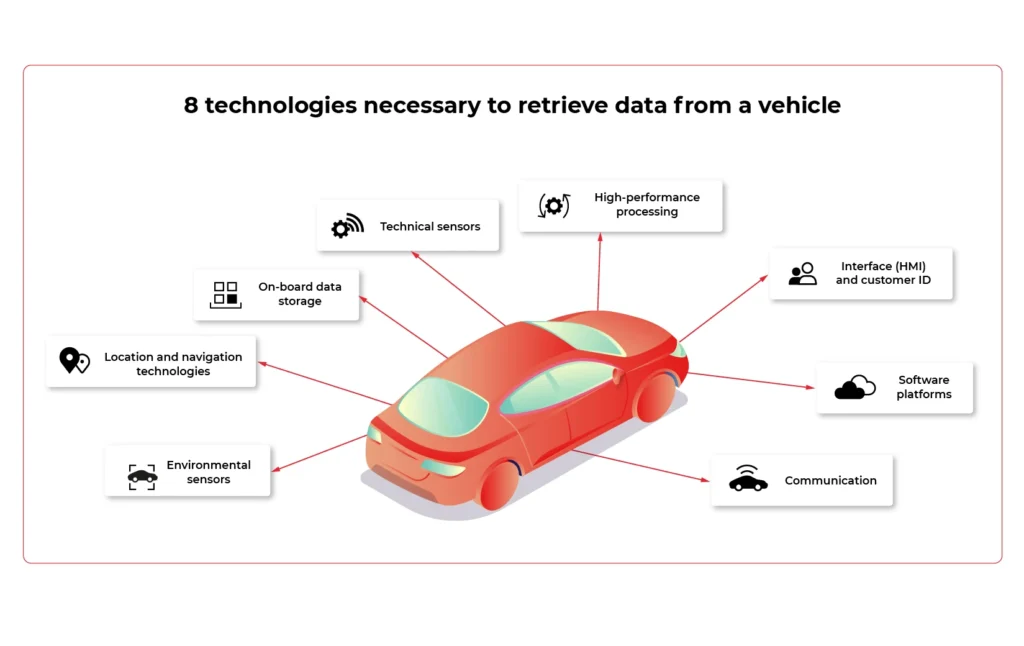
1. Technical sensors
For OEMs and suppliers , sensors are the foundation on which they can build knowledge about the vehicle's performance and possible breakdowns. Due to that, they are able to see how their products endure the operation.
With these resources, it is much easier to determine the cause of a particular fault. The biggest challenge? The type of setting and frequency of data collection and integration of results into R&D processes. These issues are yet to be discussed.
2. High-performance processing
Real-time processing and communication are pivotal in unlocking the data potential in the vehicle.
However, it is necessary to define, from the very outset, which specific processing elements are to take place in the vehicle and which in the cloud. Whether the hardware is upgradeable is also an important variable.
3. Interface (HMI) and customer ID
HMI is a bridge between a human and a machine. Any technology, tools, and devices allowing human beings to "communicate" with vehicles - request the operation, change the setting or read for example the current status of the engine.
User experience is the key. Making sure the vehicle operations are as intuitive as possible is the end goal of every interior and UI designer. Adding augmented reality, advanced HUD, gesture operations, or fancy ambient lights makes the driver feel at home, capable of quickly changing the vehicle settings, and always aware of the current situation and hazards.
4. Software platforms
They support various vehicle applications and high-speed data transmission protocols. In the context of monetization, two aspects are of paramount importance: the reliability of the over-the-air software updates and for which of what consumers will be able to pay.
5. Communication
The connection between the vehicle, sensors, internet, and onboard devices is essential. Network gateways include Wi-Fi, Bluetooth, RFID, as well as a high-speed 4G / 5G modem gateway. The latter is the greatest challenge.
The problem that needs to be dealt with is mainly the stability and cost of the aforementioned connection. As the vehicle moves, it can reach locations with low- or even no- mobile internet coverage. This results in interrupted connections, operation retries, or unavailability of services.
6. On-board data storage
It is a local hardware repository for data generated by the vehicle. It must be clear what data is stored on the cloud and who has access to it (e.g. insurers). It is equally important to reassure customers that their information is protected from unauthorized access from outside.
7. Location and navigation technologies
Monetization also depends on location data. The biggest players of software-defined vehicles must decide how to locate a vehicle (GPS) and decide which specific navigation information should be collected and which map's "technical archetype" to adopt.
8. Environmental sensors
It is not only what happens under the vehicle bonnet that matters, but also what influences it. Therefore, environmental factors provide valuable data. They detect parameters related to e.g. road conditions, weather, etc. They also focus on nearby vehicles and people as well as on the cockpit interior: passengers, transported goods, and the driver.
As for the latter, environmental sensors monitor its physiological condition. Based on fingerprint readers, cameras, and microphones, the technology determines, for example, the driver’s sobriety or the degree of fatigue. It is also possible to control vital signs such as heart rate and blood pressure.
To what extent is such data monetized? It all depends on how willing the customer is to share bio information about themselves and their passengers.
Categories of data collected in the vehicle
Which elements, systems, and subsystems are responsible for collecting valuable data that can be monetized in the automotive industry ? It's time to look at the specific spots in the vehicle that show the greatest potential for data aggregation.
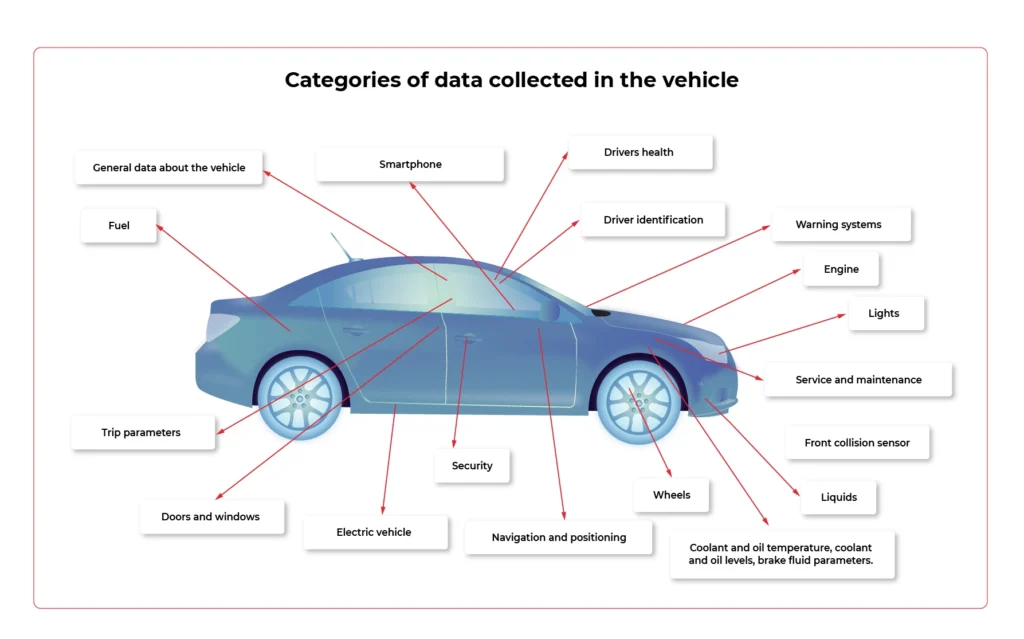
- Front collision sensor
Information about the seriousness of the accident / collision and where it occurred.
- Doors and windows
The condition of the convertible roof, sunroof, doors, windows, bonnet and boot, spoilers and service lap.
- Driver identification
Identifying the person in charge and setting preferential settings for them.
- Drivers health
Pulse, data for diabetics, measuring stress levels.
- Trip parameters
Parameters such as mileage, acceleration / deceleration, remaining range, ECO or SPORT mode activation time, average distance, driving style rating, average fuel consumption, braking intensity and gear behaviour are taken into account.
- Electric vehicle
Battery status and voltage, charging profile and status, power consumption, recovered energy measurement.
- Engine
Ignition status, oil and engine temperature data when we are talking about gasoline/ diesel engine.
- Fuel
Tank capacity and remaining range.
- General data about the vehicle
Information from the display, outside temperature value, VIN number, environment temperature, air conditioning temperature, network connectivity, teleservices availability, vehicle orientation and position.
- Lights
The condition of the headlights and indicators.
- Liquids
Coolant and oil temperature, coolant and oil levels, brake fluid parameters.
- Navigation and positioning
GPS speed, navigation destination, vehicle location (latitude and longitude), time and distance remaining to reach the destination, vehicle alignment, vehicle movement status, most visited places to suggest destinations of travel.
- Security
Technical condition of the seat belts and their fastening, information about airbags.
- Service and maintenance
Date of the next brake fluid inspection and change, time threshold for the main test and exhaust fumes test, ‘check engine’ information.
- Smartphone
Pairing with smartphones, driver behavioural patterns.
- Warning systems
ESP (Electronic Stability Program), ADAS (Advanced Driver Assistance Systems). Data on automatic eCall, battery protection. Messages from sensors (parking, distance, speed).
- Wheels
Tire pressure status, brake pads.
Challenges related to technical possibilities
People responsible for the development and implementation of modern solutions face various challenges. How well they handle them determines the success of monetization.
When analyzing individual systems, you need to take into account such aspects as:
- the frequency of data collection,
- the possibility of updating,
- the improvement of sensors that allow collecting personal data
- maintaining the stability of connections,
- identifying entities that have access to collected data.


How to monetize vehicle data thanks to in-car technologies - the biggest challenges and control points of the process - Part 1
Brook. Not a stream yet, though. But in the foreseeable future, it is going to be a proper river. What are we talking about? Data obtained from vehicles. Experts estimate that data inflow is likely to rise from approximately 33 zettabytes (this is how much we obtained in 2018) to 175 zettabytes in 2052. For OEMs and companies from the broadly-defined automotive industry, this means one thing. Endless monetization possibilities. Providing that they face the challenges connected with data capture, filtering and storage, and become familiar with the in-vehicle technologies enabling that.
The potential is enormous. However, the Capgemini report shows that there is still a long way ahead before reaching its full potential. Today, as many as 44% of OEM customers do not yet avail of any online service in their cars, and still, connecting to the network is just the starting point because without the Internet there is no option of monetizing data. And even if the vehicle is already connected to the network, only every second driver declares frequent use of this type of service.
Anyway, the condition of the Internet is a challenge in itself. Today, in modern vehicles, there are around 100 points from which information can be downloaded (in the future it is estimated that there will be up to 10,000 of them!)
Before we get to know the technologies that enable it (about which we will write in the second part of the article), let's have a look at the challenges and checkpoints that must be considered when creating a data monetization strategy for a software-defined vehicle.
5 things to bear in mind if you want to monetize vehicle data
1. Developing the customer value proposition
This is where it all begins- from creating a sales offer and an environment in which drivers will believe you have something unique and valuable for them. Without trade, no technology will guarantee your success. Customers will simply not want to share data.
Think about the unique offer you want to present to them and develop a clear data management policy. As a result, it should be followed by the selection of appropriate technologies, and then their implementation in vehicles.
Obtaining data to offer the driver safety or a good sense of direction differs from getting information related to entertainment or directing the customer to a sale in a nearby shopping mall.
It would be perfect if the developed customer value proposition was consistent with your brand's DNA and features that have always been associated with it. This would make it easier to convince users, remain in line with your business assumptions, and stand out from the competition. Focus on technology application, not on technology just to be used.
2. Consider matching technology with the data for which users are most likely to "pay"
Speaking of users’ preferences, even today, at the stage when the technologies of obtaining data from vehicles are not fully-fledged yet, it can be seen that for some services customers are willing to give up some of their privacy, while they are largely opposed or reluctant towards others.
Capgemini's research shows that the group with the greatest potential includes services related to safety and facilitating driving:
- hazard warning;
- collision warning;
- theft detection system;
- e-call;
- interactive language assistance.
On the other hand, the greatest objection among users is aroused by services related to broadly -defined shopping:
- In-car delivery;
- in car e-commerce.
Keep this in mind when choosing technology to help you monetize your data.
3. Data collector strategy
The data in the vehicle is acquired by means of special sensors and then sent to collectors, which are supposed to gather this data and enable it to be transferred to the cloud. To effectively filter this data and derive maximum benefit from it, you need reliable technology to facilitate it. Due to the huge amount of data and the interaction between various sensors, the universal data collector is the best solution, as it collects all information obtained from sensors in the car.
In order to fully use its potential, during the implementation phase of this technology, it is crucial to ensure close work of the engineering team with people responsible for digital data management (see the next section). Close cooperation of both teams will help to obtain more interesting data and implement new services more efficiently.
4. Provider of IoT data platform
Collecting data from vehicles is impossible without an IoT platform connected to cloud solutions dedicated to the automotive industry - this is where data is sent and analyzed to be later collected by the vehicle sensors.
Regardless of which platform you choose (the most popular solutions on the market today are: Microsoft Azure, Amazon AWS, and Otonomo, operating in the SaaS system), 5 features that such a platform should have are of paramount importance to enable the efficient flow of information.
You can read more about it in our article on this issue .
5. Data enrichment
While this article focuses on technologies directly related to obtaining data from the vehicle, it should not be overlooked that the software-defined vehicle operates in a wider ecosystem. Monetization of data from vehicles will not be possible without technologies related to infrastructure (e.g. smart-road infrastructure, V2X communication , or high-speed data towers), as well as coordination of back-end processes for which entities such as policymaker, cybersecurity specialist, technical regulator, road infrastructure operator or billing/tolling player are accountable.
To create more valuable and attractive services, a coherent policy is necessary, as it will enrich the data stream from third parties and the user themselves, and will improve cooperation between elements of the ecosystem.
Checkpoints inside the car
In-car technologies are not the only gateway for data that companies can obtain from drivers (another entry point may be, for instance, the driver's smartphone or road infrastructure). However, they are the ones over which OEMs and manufacturers have the greatest control, technically at least.
Before we directly describe the technologies in the vehicle allowing that data to be obtained, let's focus on the checkpoints that are crucial for the capture of information, its quality, and value for building services.
In the software-defined vehicle ecosystem, we can identify three such areas, a kind of bottleneck on which the flow of data depends. These are:
- Vehicle interior and infrastructure.
- Connection to cloud.
- Data cloud.
Let's have a look at the first area, which is practically entirely the responsibility of the automotive company and is directly related to the equipment in the vehicle.
We can list the following groups of such checkpoints which require closer attention when building a data monetization strategy.
1. Gateway to the customer
Key points due to the start of data gathering and the user's experience - their willingness to share data, and thus increasing the value of the gathered data for the manufacturer.
- HMI (i.e. a set of technologies enabling the driver to activate the vehicle and begin collecting data, e.g. touch screens, visual sensors, voice commands, etc. - certainly a topic for a separate article)
- Data gateway (port, mobile data connection, USB port, radio connection)
- Customer ID
2. Points that build loyalty and the need to buy
That is, the contact points with the offer that allow you to easily download new applications, pay bills and influence the user's willingness to renew the service. The more transparent, engaging, and easy-to-use, the more likely the user is to continue their subscription.
- App store / ecosystem
- Billing platform
- In-vehicle infotainment (IVI)
- Apps/ content
3. Key points for data security, data analysis and usability
- CPU/ control unit
- Car sensors / actuators
Software-defined vehicles do not run in a vacuum
When creating a data monetization strategy for a software-defined vehicle, one should always bear in mind the wide ecosystem in which such a vehicle operates. It is not enough to equip it with the technology itself and wait for the flow of data that will turn into specific value for the enterprise . In such a complex and extensive ecosystem, nothing happens by itself. There is no room for improvisation, omitting checkpoints, and presenting half-baked offers. Yes, the technology that downloads data from the vehicle is crucial, but it won't work unless we bear in mind the broader data management context that reaches beyond collecting and analyzing it.
Monitoring your microservices on AWS with Terraform and Grafana - monitoring
Welcome back to the series. We hope you’ve enjoyed the previous part and you’re back to learn the key points. Today we’re going to show you how to monitor the application.
Monitoring
We would like to have logs and metrics in a single place. Let’s imagine you see something strange on your diagrams, mark it with your mouse, and immediately have proper log entries from this particular timeframe and this particular machine displayed below. Now, let’s make it real.
Some basics first. There is a huge difference between the way Prometheus and Loki get the data. Both of them are being called by Grafana to poll data, but Prometheus also actively calls the application to poll metrics. Loki, instead, just listens, so it needs some extra mechanism to receive logs from applications.
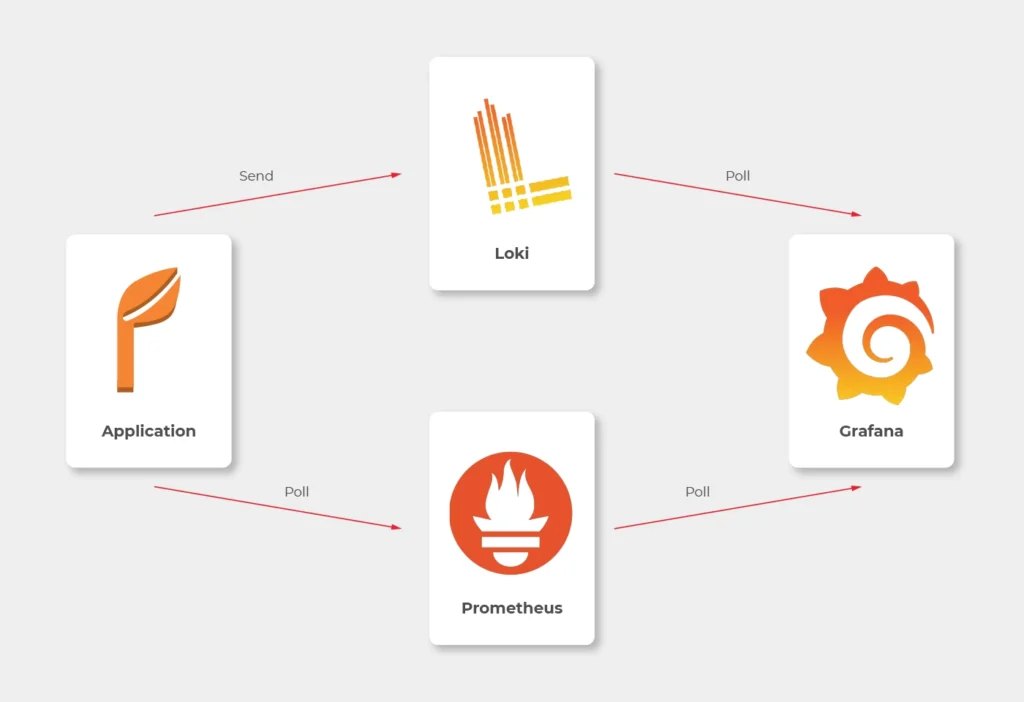
In most sources over the Internet, you’ll find that the best way to send logs to Loki is to use Promtail. This is a small tool, developed by Loki’s authors, which reads log files and sends them entry by entry to remote Loki’s endpoint. But it’s not perfect. Sending multiline logs is still in a bad shape (state for February 2021), some config is really designed to work with Kubernetes only and at the end of the day, this is one more additional application you would need to run inside your Docker image, which can get a little bit dirty. Instead, we propose to use a loki4j logback appender (https://github.com/loki4j). This is a zero-dependency Java library designed to send logs directly from your application.
There is one more Java library needed - Micrometer . We’re going to use it to collect metrics of the application.
So, the proper diagram should look like this.
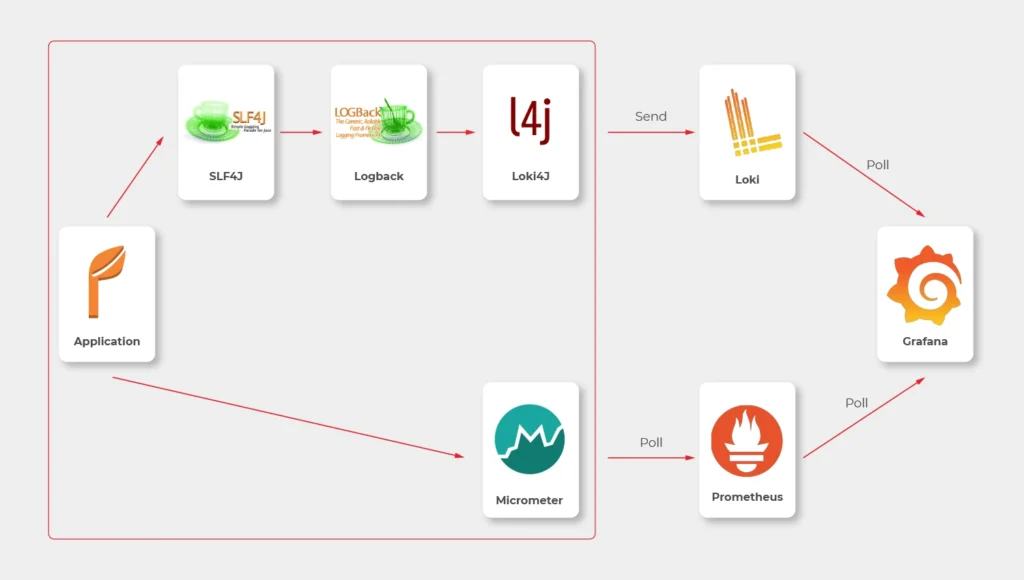
Which means, we need to build or configure the following pieces:
- slf4j (default configuration is enough)
- Logback
- Loki4j
- Loki
- Micrometer
- Prometheus
- Grafana
Micrometer
Let’s start with metrics first.
There are just three things to do on the application side.
The first one is to add a dependency to the Micrometer with Prometheus integration (registry).
<dependency>
<groupId>io.micrometer</groupId>
<artifactId>micrometer-registry-prometheus</artifactId>
</dependency>
Now, we have a new endpoint exposable from Spring Boot Actuator, so we need to enable it.
management:
endpoints:
web:
exposure:
include: prometheus,health
This is a piece of configuration to add. Make sure you include prometheus in both config server and config clients’ configuration. If you have some Web Security configured, make sure to enable full access to /actuator/health and /actuator/prometheus endpoint.
Now we would like to distinguish applications in our metrics, so we have to add a custom tag in all applications. We propose to add this piece of code as a Java library and import it with Maven.
@Configuration
public class MetricsConfig {
@Bean
MeterRegistryCustomizer<MeterRegistry> configurer(@Value("${spring.application.name}") String applicationName) {
return (registry) -> registry.config().commonTags("application", applicationName);
}
}
Make sure you have spring.application.name configured in all bootstrap.yml files in config clients and application.yml in the config server.
Prometheus
The next step is to use a brand new /actuator/prometheus endpoint to read metrics in Prometheus.
The ECS configuration is similar to backend services. The image you need to push to your ECR should look like that.
FROM prom/prometheus
COPY prometheus.yml .
ENTRYPOINT prometheus --config.file=prometheus.yml
EXPOSE 9090
As Prometheus doesn’t support HTTPS endpoints, it’s just a temporary solution, and we’ll change it later.
The prometheus.yml file contains such a configuration.
scrape_configs:
- job_name: 'cloud-config-server'
metrics_path: '/actuator/prometheus'
scrape_interval: 5s
dns_sd_configs:
- names:
- '$cloud_config_server_url'
type: 'A'
port: 8888
- job_name: 'foo'
metrics_path: '/actuator/prometheus'
scrape_interval: 5s
dns_sd_configs:
- names:
- '$foo_url
type: 'A'
port: 8080
- job_name: bar
metrics_path: '/actuator/prometheus'
scrape_interval: 5s
dns_sd_configs:
- names:
- '$bar_url
type: 'A'
port: 8080
- job_name: 'backend_1'
metrics_path: '/actuator/prometheus'
scrape_interval: 5s
dns_sd_configs:
- names:
- '$backend_1_url
type: 'A'
port: 8080
- job_name: 'backend_2'
metrics_path: '/actuator/prometheus'
scrape_interval: 5s
dns_sd_configs:
- names:
- '$backend_2_url
type: 'A'
port: 8080
Let’s analyse the first job as an example.
We would like to call '$cloud_config_server_url' url with '/actuator/prometheus' relative path on a port 8080 . As we’ve used dns_sd_configs and type: 'A', the Prometheus can handle multivalue DNS answers from the Service Discovery, to analyze all tasks in each service. Please make sure you replace all ' $x' variables in the file with proper URLs from the Service Discovery.
The Prometheus isn’t exposed to the public load balancer, so you cannot verify your success so far. You can expose it temporarily or wait for Grafana.
Logback and Loki4j
If you use the Spring Boot, you probably already have spring-boot-starter-logging
library included. Therefore, you use logback as the default slf4j integration. Our job now is to configure it to send logs to Loki. Let’s start with the dependency:
<dependency>
<groupId>com.github.loki4j</groupId>
<artifactId>loki-logback-appender</artifactId>
<version>1.1.0</version>
</dependency>
Now let’s configure it. The first file is called logback-spring.xml and located in the config server next to the application.yml (1) file.
<?xml version="1.0" encoding="UTF-8"?>
<configuration>
<property name="LOG_PATTERN" value="%d{yyyy-MM-dd HH:mm:ss.SSS} %-5level [%thread] %logger - %msg%n"/>
<appender name="Console" class="ch.qos.logback.core.ConsoleAppender">
<encoder>
<pattern>${LOG_PATTERN}</pattern>
</encoder>
</appender>
<springProfile name="aws">
<appender name="Loki" class="com.github.loki4j.logback.Loki4jAppender">
<http>
<url>${LOKI_URL}/loki/api/v1/push</url>
</http>
<format class="com.github.loki4j.logback.ProtobufEncoder">
<label>
<pattern>application=spring-cloud-config-server,instance=${INSTANCE},level=%level</pattern>
</label>
<message>
<pattern>${LOG_PATTERN}</pattern>
</message>
<sortByTime>true</sortByTime>
</format>
</appender>
</springProfile>
<root level="INFO">
<appender-ref ref="Console"/>
<springProfile name="aws">
<appender-ref ref="Loki"/>
</springProfile>
</root>
</configuration>
What do we have here? There are two appenders with the common pattern, and one root logger. So we start with pattern configuration <property name="LOG_PATTERN" value="%d{yyyy-MM-dd HH:mm:ss.SSS} %-5level [%thread] %logger - %msg%n"/> . Of course you can configure it, as you want.
Then, the standard console appender. As you can see, it uses the LOG_PATTERN .
Then you can see the com.github.loki4j.logback.Loki4jAppender appender. This way the library is being used. We’ve used < springProfile name="aws" > profile filter to enable it only in the AWS infrastructure and disable locally. We use the same when using the appender with appender-ref ref="Loki" . Please note the label pattern, used here to label each log with custom tags (application, instance, level). Another important part here is Loki’s URL. We need to provide it as an environment variable for the ECS task. To do that, you need to add one more line to your aws_ecs_task_definition configuration in terraform.
"environment" : [
...
{ "name" : "LOKI_URL", "value" : "loki.internal" }
],
As you can see, we defined “loki.internal” URL and we’re going to create it in a minute.
There are few issues with logback configuration for the config clients.
First of all, you need to provide the same LOKI_URL environment variable to each client, because you need Loki before reading config from the config server.
Now, let’s put another logback-spring.xml file in the config server next to the applic ation.yml (2) file.
<?xml version="1.0" encoding="UTF-8"?>
<configuration>
<property name="LOG_PATTERN" value="%d{yyyy-MM-dd HH:mm:ss.SSS} %-5level [%thread] %logger - %msg%n"/>
<springProperty scope="context" name="APPLICATION_NAME" source="spring.application.name"/>
<appender name="Console" class="ch.qos.logback.core.ConsoleAppender">
<encoder>
<pattern>\${LOG_PATTERN}</pattern>
</encoder>
</appender>
<springProfile name="aws">
<appender name="Loki" class="com.github.loki4j.logback.Loki4jAppender">
<http>
<requestTimeoutMs>15000</requestTimeoutMs>
<url>\${LOKI_URL}/loki/api/v1/push</url>
</http>
<format class="com.github.loki4j.logback.ProtobufEncoder">
<label>
<pattern>application=\${APPLICATION_NAME},instance=\${INSTANCE},level=%level</pattern>
</label>
<message>
<pattern>\${LOG_PATTERN}</pattern>
</message>
<sortByTime>true</sortByTime>
</format>
</appender>
</springProfile>
<root level="INFO">
<appender-ref ref="Console"/>
<springProfile name="aws"><appender-ref ref="Loki"/></springProfile>
</root>
</configuration>
The first change to notice are slashes before environment variables (eg. \${LOG_PATTERN } ). We need it to tell the config server not to resolve variables on it’s side (because it’s impossible). The next difference is a new variable <springProperty scope="context" name="APPLICATION_NAME" source="spring.application.name"/> . with this line and spring.application.name in all your applications each log will be tagged with a different name. There is also a trick with the ${INSTANCE} variable. As Prometheus uses IP address + port as an instance identifier and we want to use the same here, we need to provide this data to each instance separately.
So your Dockerfile files for your applications should have something like that.
FROM openjdk:15.0.1-slim
COPY /target/foo-0.0.1-SNAPSHOT.jar .
ENTRYPOINT INSTANCE=$(hostname -i):8080 java -jar foo-0.0.1-SNAPSHOT.jar
EXPOSE 8080
Also, to make it working, you are supposed to tell your clients to use this configuration. Just add this to bootstrap.yml files in all you config clients.
logging:
config: ${SPRING_CLOUD_CONFIG_SERVER:http://localhost:8888}/application/default/main/logback-spring.xml
spring:
application:
name: foo
That’s it, let’s move to the next part.
Loki
Creating Loki is very similar to Prometheus. Your dockerfile is as follows.
FROM grafana/loki
COPY loki.yml .
ENTRYPOINT loki --config.file=loki.yml
EXPOSE 3100
The good news is, you don’t need to set any URLs here - Loki doesn’t send any data. It just listens.
As a configuration, you can use a file from https://grafana.com/docs/loki/latest/configuration/examples/ . We’re going to adjust it later, but it’s enough for now.
Grafana
Now, we’re ready to put things together.
In the ECS configuration, you can remove service discovery stuff and add a load balancer, because Grafana will be visible over the internet. Please remember, it’s exposed at port 3000 by default.
Your Grafana Dockerfile should be like that.
FROM grafana/grafana
COPY loki_datasource.yml /etc/grafana/provisioning/datasources/
COPY prometheus_datasource.yml /etc/grafana/provisioning/datasources/
COPY dashboad.yml /etc/grafana/provisioning/dashboards/
COPY *.json /etc/grafana/provisioning/dashboards/
ENTRYPOINT [ "/run.sh" ]
EXPOSE 3000
Let’s check configuration files now.
loki_datasource.yml:
apiVersion: 1
datasources:
- name: Loki
type: loki
access: proxy
url: http://$loki_url:3100
jsonData:
maxLines: 1000
I believe the file content is quite obvious (we'll return here later).
prometheus_datasource.yml:
apiVersion: 1
datasources:
- name: prometheus
type: prometheus
access: proxy
orgId: 1
url: https://$prometheus_url:9090
isDefault: true
version: 1
editable: false
dashboard.yml:
apiVersion: 1
providers:
- name: 'Default'
folder: 'Services'
options:
path: /etc/grafana/provisioning/dashboards
With this file, you tell Grafana to install all json files from /etc/grafana/provisioning/dashboards directory as dashboards.
The last leg is to create some dashboards. You can, for example, download a dashboard from https://grafana.com/grafana/dashboards/10280 and replace ${DS_PROMETHEUS} datasource with your name “prometheus”.
Our aim was to create a dashboard with metrics and logs at the same screen. You can play with dashboards as you want, but take this as an example.
{
"annotations": {
"list": [
{
"builtIn": 1,
"datasource": "-- Grafana --",
"enable": true,
"hide": true,
"iconColor": "rgba(0, 211, 255, 1)",
"name": "Annotations & Alerts",
"type": "dashboard"
}
]
},
"editable": true,
"gnetId": null,
"graphTooltip": 0,
"id": 2,
"iteration": 1613558886505,
"links": [],
"panels": [
{
"aliasColors": {},
"bars": false,
"dashLength": 10,
"dashes": false,
"datasource": null,
"fieldConfig": {
"defaults": {
"custom": {}
},
"overrides": []
},
"fill": 1,
"fillGradient": 0,
"gridPos": {
"h": 8,
"w": 24,
"x": 0,
"y": 0
},
"hiddenSeries": false,
"id": 4,
"legend": {
"avg": false,
"current": false,
"max": false,
"min": false,
"show": true,
"total": false,
"values": false
},
"lines": true,
"linewidth": 1,
"nullPointMode": "null",
"options": {
"alertThreshold": true
},
"percentage": false,
"pluginVersion": "7.4.1",
"pointradius": 2,
"points": false,
"renderer": "flot",
"seriesOverrides": [],
"spaceLength": 10,
"stack": false,
"steppedLine": false,
"targets": [
{
"expr": "system_load_average_1m{instance=~\"$instance\", application=\"$application\"}",
"interval": "",
"legendFormat": "",
"refId": "A"
}
],
"thresholds": [],
"timeRegions": [],
"title": "Panel Title",
"tooltip": {
"shared": true,
"sort": 0,
"value_type": "individual"
},
"type": "graph",
"xaxis": {
"buckets": null,
"mode": "time",
"name": null,
"show": true,
"values": []
},
"yaxes": [
{
"format": "short",
"label": null,
"logBase": 1,
"max": null,
"min": null,
"show": true
},
{
"format": "short",
"label": null,
"logBase": 1,
"max": null,
"min": null,
"show": true
}
],
"yaxis": {
"align": false,
"alignLevel": null
}
},
{
"datasource": "Loki",
"fieldConfig": {
"defaults": {
"custom": {}
},
"overrides": []
},
"gridPos": {
"h": 33,
"w": 24,
"x": 0,
"y": 8
},
"id": 2,
"options": {
"showLabels": false,
"showTime": false,
"sortOrder": "Ascending",
"wrapLogMessage": true
},
"pluginVersion": "7.3.7",
"targets": [
{
"expr": "{application=\"$application\", instance=~\"$instance\", level=~\"$level\"}",
"hide": false,
"legendFormat": "",
"refId": "A"
}
],
"timeFrom": null,
"timeShift": null,
"title": "Logs",
"type": "logs"
}
],
"schemaVersion": 27,
"style": "dark",
"tags": [],
"templating": {
"list": [
{
"allValue": null,
"current": {
"selected": false,
"text": "foo",
"value": "foo"
},
"datasource": "prometheus",
"definition": "label_values(application)",
"description": null,
"error": null,
"hide": 0,
"includeAll": false,
"label": "Application",
"multi": false,
"name": "application",
"options": [],
"query": {
"query": "label_values(application)",
"refId": "prometheus-application-Variable-Query"
},
"refresh": 2,
"regex": "",
"skipUrlSync": false,
"sort": 0,
"tagValuesQuery": "",
"tags": [],
"tagsQuery": "",
"type": "query",
"useTags": false
},
{
"allValue": null,
"current": {
"selected": false,
"text": "All",
"value": "$__all"
},
"datasource": "prometheus",
"definition": "label_values(jvm_classes_loaded_classes{application=\"$application\"}, instance)",
"description": null,
"error": null,
"hide": 0,
"includeAll": true,
"label": "Instance",
"multi": false,
"name": "instance",
"options": [],
"query": {
"query": "label_values(jvm_classes_loaded_classes{application=\"$application\"}, instance)",
"refId": "prometheus-instance-Variable-Query"
},
"refresh": 2,
"regex": "",
"skipUrlSync": false,
"sort": 0,
"tagValuesQuery": "",
"tags": [],
"tagsQuery": "",
"type": "query",
"useTags": false
},
{
"allValue": null,
"current": {
"selected": false,
"text": [
"All"
],
"value": [
"$__all"
]
},
"datasource": "Loki",
"definition": "label_values(level)",
"description": null,
"error": null,
"hide": 0,
"includeAll": true,
"label": "Level",
"multi": true,
"name": "level",
"options": [
{
"selected": true,
"text": "All",
"value": "$__all"
},
{
"selected": false,
"text": "ERROR",
"value": "ERROR"
},
{
"selected": false,
"text": "INFO",
"value": "INFO"
},
{
"selected": false,
"text": "WARN",
"value": "WARN"
}
],
"query": "label_values(level)",
"refresh": 0,
"regex": "",
"skipUrlSync": false,
"sort": 0,
"tagValuesQuery": "",
"tags": [],
"tagsQuery": "",
"type": "query",
"useTags": false
}
]
},
"time": {
"from": "now-24h",
"to": "now"
},
"timepicker": {},
"timezone": "",
"title": "Logs",
"uid": "66Yn-8YMz",
"version": 1
}
We don’t recommend playing with such files manually when you can use a very convenient UI and export a json file later on. Anyway, the listing above is a good place to start. Please note the following elements:
In variable’s definitions, we use Prometheus only, because Loki doesn’t expose any metric so you cannot filter one variable (instance) when another one (application) is selected.
Because we would like to sometimes see all instances or log levels together, we need to query data like here: {application=\"$application\", instance=~\"$instance\", level=~\"$level \"}" . The important element is a tilde in instance=~\"$instance\" and level=~\"$level\" , which allows us to use multiple values.
Conclusion
Congratulation! You have your application monitored. We hope you like it! But please remember - it’s not production-ready yet! In the last part, we’re going to cover a security issue - add encryption at transit to all components.

Kubernetes supports Windows workloads - the time to get rid of skeletons in your closet has come
Enterprises know that the future of their software is in the cloud. Despite keeping that in mind, many tech leaders delay the process of transforming their core legacy systems. How will the situation change with Kubernetes supporting Windows workloads? Can we assume that companies will leverage the Kubernetes upgrade to accelerate their journey towards the cloud?
How can this article help you?
- You can see what Kubernetes supporting Windows workloads provides for enterprises.
- We remind you why going to the cloud is crucial for your business excellence.
- You can get to know the main reason stopping enterprises from transforming their legacy systems.
- We describe the main risks that come with delaying the transition towards the cloud.
- You learn how to leverage Kubernetes supporting Windows workloads.
Technical debt is an unpleasant legacy you often come into money while taking charges of critical systems or enterprise software older than you. Laying under the cache layer and various interfaces, legacy systems encourage you to forget them. And you are good with it - you have enough tasks to perform and things to manage on a daily basis. Sprint after sprint, your team deals with developing applications and particular features to meet increasing customer demand and sophisticated needs. Initiating a tremendous venture, which may transform into opening Pandora's box, it's not exactly what you want to add to your checklist.
The bad news is that if you're willing to be successful at your job, the clock is ticking. The problem with legacy systems is that you don't know when they break down, causing disaster. You will justify yourself, but the impact on your work will be nightmarish. What you know for sure, legacy systems under applications built by your talented teams hinder further development and make your job harder than it already is.
Whatever you are going to go for it all or don't want to throw yourself in at the deep end - Kubernetes supporting Windows workloads is the news you needed. See how it can accelerate your transition towards the cloud.
What's the deal with Kubernetes supporting Windows workloads
Kubernetes was designed to run Linux containers. Such an approach complicated the transition towards the cloud for enterprises with Windows Server legacy systems. And while over 70% of the global server market is Windows-based (according to Statista), we can see why so many legacy apps are in the closets. If you work at a large enterprise, the chances that you have a few of them hidden carefully are very high.
How supporting Windows workloads by Kubernetes is changing the game? In the - not so much - olden days, Windows-based applications were immovable - they needed to be run on Windows, required Windows server, and access to numerous related databases and libraries. Such a demanding environment encouraged enterprises to wait for better days. And now they have come. Kubernetes, with production support for scheduling Windows containers on Windows nodes in the platform cluster, allows for running these Windows applications, enabling enterprises to modernize and move their apps to the cloud.
It’s believed that with this release, Kubernetes provides enterprises with the opportunity to accelerate their DevOps and cloud transformation . In case you missed 1 mln publications about cloud advantages, we will write up the main points.
Why do enterprises move their legacy applications to the cloud
As promised above, let’s keep it short:
- Scalability - the cloud allows you to easily manage your IT resources, data storage capacity, computing power, and networking (in both ways) without downtimes or other disruptions. Such flexibility supports business growth, product/service development, and better cost management.
- Security - the right set of strategies and policies allow enterprises to build and manage secure cloud environments. Decentralization and support for your cloud stack provide solutions to common challenges in maintaining on-premise infrastructure.
- Maintenance - using cloud services delivered by trusted providers, you don't have to maintain many things on your own, just leveraging available services.
- Accessibility - the pandemic showed us how crucial is remote access to our IT resources, and the cloud provides your remote or distributed teams with easy access regardless of your team members' localization - that is priceless.
- Reliability - cloud providers ensure easier and cheaper data backups, disaster recovery, and business continuity as they use the economy at scale.
- Performance - as the cloud service market is blooming and service providers are competing about increasing revenues, the quality and performance of cloud infrastructure are top-notch.
- Cost-effectiveness - with cloud computing, your enterprise can cut off numerous spendings from your books - including infrastructure, electricity, and IT experts responsible for managing resources.
- Agility - forget about capacity planning while your computing provisioning can be done within a few clicks leveraging self-service.
Sounds convincing? If everything is obvious, why are there still so many legacy apps?
Why do enterprises delay with moving apps to the cloud
Legacy systems are long-time friends with procrastination. If you are long enough in this business, you have definitely heard a few of these excuses:
- We cannot do it now. We have too many things on the list. A better day will come.
- It’s risky. It’s critically risky. Why do you even ask? Do you want to see the world burning?
- Ok, let’s do it! But wait….who knows how to do it?
- We can cover it with our UI or cache layer, and nobody will ever notice.
- It’s our core system. You touch it, everything will go bad.
- Why change it if it works well?
- It’s a too huge project for me to decide and take responsibility for the never-ending process.
These are some examples from the top of the iceberg. Diving into the process of moving legacy apps to the cloud , you can stumble upon numerous points convincing you to stay out of them. But can it last forever? What if the “zero hour” strikes?
Playing a risky game: what can happen if you don’t migrate to the cloud
Many of our business challenges wouldn’t have existed if we, at some point, tackled the underestimated issues. The excuses highlighted above can convince you to leave things as they are. But what if your real problems are just ahead of you? Let’s name some threats that may occur at enterprises that delay transition towards the cloud.
- Maintaining legacy systems becomes more expensive with time as your company has to pay for computing power supporting these solutions.
- Your enterprise may face a huge challenge to find experts understanding your legacy systems. The longer you postpone the process, the harder it will be to look for people working with frameworks and tools that are outdated.
- By allowing for increasing your technical debt, your enterprise acts against your willingness for innovation. Your legacy systems suppress the development of new products and services, undermining your competitive advantage.
- You can face a challenge to provide services to your customers because of downtimes and distractions caused by inefficient systems.
- Technology develops fast. Legacy systems stop you from participating in the movement and may generate new issues in the future, especially in the time you will need to be flexible.
- Most established enterprises work on highly regulated markets and have to meet challenging conditions. One of our business partners had to rebuild one of its core systems because of new regulations regarding data management. Such a situation can lead to enormous costs.
- There appears a serious security threat as legacy systems are prone to attacks, and without upgrades, your system may become insecure.
The list above can be expanded to many additional issues. But instead of describing challenges, let’s discuss how they can be addressed using Kubernetes .
How to leverage Kubernetes supporting Windows workloads
There is a ton of code written on Windows. With the Kubernetes update, you don’t have to think about rebuilding your applications from scratch, so myriads of working hours spent by your team are secured. Most of the code can be moved to the Kubernetes container and there developed. It’s safer and cheaper.
Kubernetes supporting Windows workloads gives you time to navigate your journey to the cloud properly. First of all, it ends the discussion for all those excuses mentioned above. The moment is now. Secondly, you can now utilize an evolutionary approach by developing and upgrading your systems instead of building them from ground zero. Furthermore, with your key legacy systems moved to the cloud, you can accelerate the overall transformation at your enterprise towards an agile, DevOps-oriented organization open to innovation and developing highly competitive software.
What should be your next move?
By supporting Windows workloads, Kubernetes makes the life of many tech teams easier. But it would be too easy if everything worked by itself. Configuration of the Kubernetes cluster to utilize Windows workloads is demanding and time-consuming. Instead of doing it on your own, you can leverage the ready-to-use solution provided by Grape Up. Cloudboostr , our Kubernetes stack, enables you to move your Windows-based apps to the cloud. Consult our expert on how to do it properly!

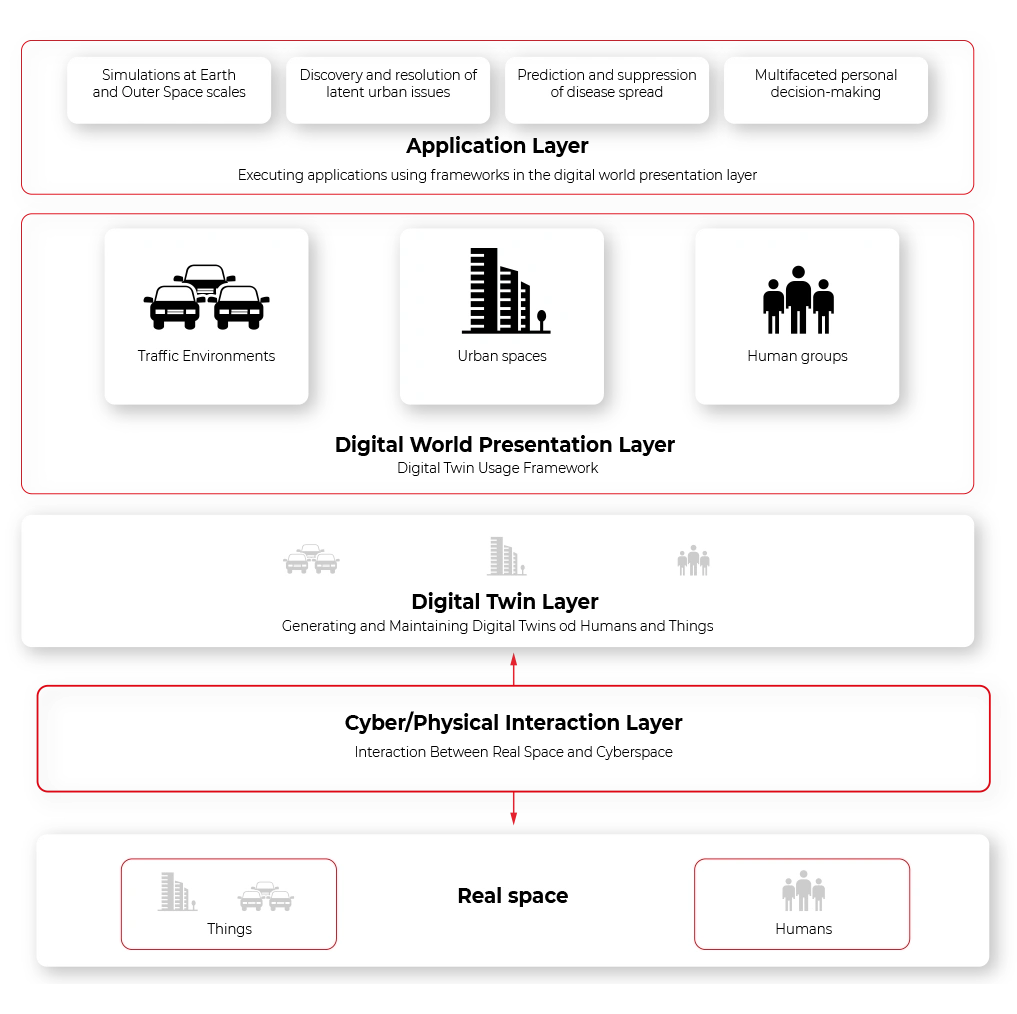
The next step for digital twin – virtual world
Digital Twin is a widely spread concept of creating a virtual representation of object state. The object may be small, like a raindrop, or huge as a factory. The goal is to simplify the operations on the object by creating a set of plain interfaces and limiting the amount of stored information. With a simple interface, the object can be easily manipulated and observed, while the state of its physical reflection is adjusted accordingly.
In the automotive and aerospace industries , this is a common approach to use virtual objects representation to design, develop, test, manufacture, and operate both parts of a vehicle, like an engine, drivetrain, chassis/fuselage, or a full vehicle – a whole car, motorcycle, truck or aircraft. Virtual representations are easier to experiment with, especially on a bigger scale, and to operate - especially in situations when connectivity between a vehicle and the cloud is not stable ability to query the state anyway is vital to provide a smooth user experience.
It’s not always critical to replicate the object with all details. For some use cases, like airflow modeling for calculating drag force, mainly exterior parts are important. For computer vision AI simulation, on the other hand, user checking if the doors and windows are locked only requires a boolean true/false state. And to simulate the combustion process in the engine, even the vehicle type is not important.
Today, artificial intelligence takes a significant role in a lot of car systems, to name a few: driver assistance, fatigue check, predictive maintenance, emergency braking, and collision avoidance, speed limit recognition, and prediction. Most of those systems do not live in a void - to operate correctly they require information about the surrounding world gathered through V2X connections, cameras, radars, lidars, GPS position, thermometers, or ABS/ESP sensors.
Let’s take Adaptive Cruise Control (ACC). The vehicle is kept in lane using computer vision and a front-facing camera. The distance to surrounding vehicles and obstacles is calculated using both a camera and a radar/lidar. Position on the map is gathered using GPS, and the speed limit is jointly calculated using the navigation system, road sign recognition, and distance to the vehicle ahead. This is an example of a complex system, which is hard to test - all parts of it have to be simulated separately, for example, by injecting a fake GPS path. Visualizing this kind of test system is complicated, and it’s hard to use data gathered from the car to reproduce the failure scenarios.
Here the Virtual World comes to help. The virtual world is an extension of the vehicle shadow concept where the multiple types of digital twins coexist in the same environment knowing their presence and interfaces. The system is composed of digital representation of physical assets whenever possible – including elements recognized via computer vision. Vehicles, road infrastructure, positioning systems, or even pedestrians are part of the virtual world. All vehicles are part of the same environment meaning they can share the data regarding the position of other traffic participants.
- Such a system provides multiple benefits: Improved accuracy of assistance systems, as the recognized infrastructure and traffic participants can come from other vehicles, and their position can be estimated even when they are still outside the range of sensors.
- Easier, more robust communication between infrastructure, vehicles, pedestrians, and cloud APIs as everything remains in the same digital system.
- Possibility to fully reproduce conditions of system failure as the state history of not just vehicle, but all of its surrounding remains in cloud and can be used to recreate and visualize the area.
- Ability to enhance existing systems leveraging data from the greater area - for example, immediately notifying about an obstacle on the road in 500 meters and suggestion to reduce speed.
- The extensive information set can be used to build new AI/ML applications, like real-time weather information (rain sensor) can be built to close sunroofs of vehicles parked in the area.
- The same system can be used to better simulate its behavior, even using data from real vehicles.
- Common interfaces allow for quicker implementation.
Obviously, there are also challenges - the amount of data to be stored is huge, so it should be heavily optimized, and storage has to be highly scalable. There is also an impact of the connection between the car and the cloud . Overall, the advantages overweight the disadvantages, and the Virtual World will be a common pattern in the next years with the growing implementation of software-defined vehicles and machine learning applications requiring more and more data to improve its operations.
IoT SaaS - why automotive industry should care, and which AWS IoT or Azure IoT is better to use as a base platform for connected vehicle development
We're connected. There’s no doubt about it. At work, at home, in town, on holidays. Our life is no longer divided into offline and online, digital and analog. Our life is somewhere in between, and it happens in both worlds at once. Also in our car, where we expect access to data, instant updates, entertainment, and understanding of our needs. The proven IoT SaaS platform makes this much easier. Today choosing this option is crucial for every company in the automotive industry. Without it, the connected vehicle wouldn’t exist.
What you will learn from this article:
- Why an automotive company needs cloud services and how to build new business value on them
- What features an IoT platform for the automotive industry should have
- What cloud solutions are chosen by the largest producers
Before our very eyes, the car is becoming part of the Internet of Things ecosystem. We want safer driving and 'being led by the hand', ease of integration with external digital services like music streaming, automatic parking payments, or real-time traffic alerts, and the transfer of virtual experiences from one tool to another (including the car).
The vehicles we drive have become more service-oriented, which not only creates new options and business opportunities for companies from the automotive sector but also poses potential threats.
A hacking attack on a phone may result in money loss or compromising the user, whereas an attack on a car can have much more serious consequences. This is why choosing the platform for a connected vehicle is crucial.
Let's have a look at the basic assumptions that such a platform should meet. Let's get to know the main service providers and market use cases influencing the choice of the largest brands in the automotive industry.
5 must-haves for every IoT SaaS platform
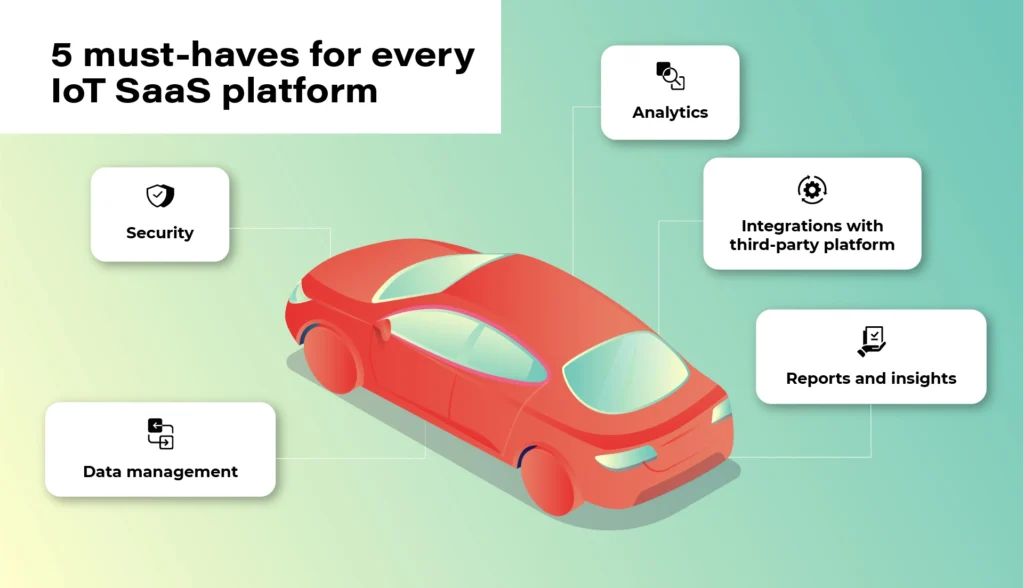
1. Security
At the heart of the Internet of Things is data. However, no one will share it unless the system guarantees an appropriate level of security and privacy. Access authorization is meant for selected users and platforms only. Authentication is geared to prevent unwanted third-party devices from connecting to the vehicle. Finally, there is also an option of blocking devices reaching their limits of usage or ones that have become unsafe. These types of elements that make up the security of the platform are a necessary condition to consider the implementation of the platform in your own vehicle fleet.
2. Data
The connected vehicle continuously receives and sends data. The vehicle communicates not only with other moving vehicles but also with the city and road infrastructure and third-party platforms. Data management, storage, and analysis are the gist of the entire IoT ecosystem. For everything to run smoothly and in line with security protocols, devices need to get data directly from your IoT platform, not from devices. Only in this way will you get a bigger picture of the whole, plus the option of comprehensive analysis- hence the possibility of monetization and obtaining additional business value .
3. Analytics
Once we have the guarantee that the data is safe and obtained from the right sources, we can start analyzing it. A good IoT platform allows it to be analyzed in real-time, but also in relation to past events. It also allows you to predict events before they happen - for example, it will warn the user about replacing a specific component before it breaks down. It is important that the platform collects and analyses data from the entire spectrum of events. Only in this way can it create a comprehensive picture of the real situation.
4. Integrations
The number of third-party platforms that the driver can connect to their car will continue to increase. You have to be prepared for this and choose a solution that will be able to evolve along with market changes. The openness of the system (combined with its security) will keep you going and expand your potential monetization possibilities.
When the system is shut down, you may have to replace some devices or make constant programming changes to communication protocols in the near future.
5. Reports
With this amount of data, since thousands or even hundreds of thousands of vehicles can be pinned to the platform - transparent data reporting becomes necessary. Some of the information may be irrelevant, some will gain significance only in combination with others, some will be more or less important for your business (different aspects will be pointed out by a company operating in the area of shared mobility , as opposed to a company managing a lorry fleet).
Your IoT platform must enable you to easily access, select and present key information in a way that will be clear to each employee, not business intelligence experts only.
We need data to draw constructive business conclusions, not to be bombarded with useless information.
Top market solutions - use cases of the biggest automotive brands
All right. So what solution should you opt for? There is no one, obvious answer to this question. It all depends on your individual needs, the scale of the business, and the cooperation model that is key for you.
You can focus on larger market players and scalable solutions - e.g. the Microsoft Azure platform or AWS by Amazon or on services in the SaaS model provided e.g. by players such as Otonomo, Octo, Bosch, or Ericsson.
Microsoft Azure x Volkswagen

The Azure platform, created by the technological giant from Redmond, has been known to developers and cloud architects for a long time. No wonder that it is often used by the most famous brands in the automotive industry. Microsoft is supported by the scale of its projects, excellent understanding of cloud technologies, and experience in creating solutions dedicated to the world's largest brands.
In 2020, based on these solutions, Volkswagen implemented its own Automotive Cloud platform (by its subsidiary - CARIAD, previously called CarSoftware.org.)
Powered by Microsoft Azure cloud and IoT Edge solutions, the platform will support the operation of over 5 million new Volkswagens every year. The company also plans to transfer technology to other vehicles from the group in all regions of the world, and by doing this, laying the foundations for customer-centric services.
As the brand writes in its press release, the platform is focused on „providing new services and solutions, such as in-car consumer experiences, telematics, and the ability to securely connect data between the car and the cloud.”
For this purpose, Volkswagen has also created a dedicated consumer platform - Volkswagen We, where car users will find smart mobility services and connectivity apps for their vehicles.
AWS x Ford and Lyft

Over 13 years on the market and „165 fully featured services for computing, storage, databases, networking, analytics, robotics, machine learning and artificial intelligence (AI), Internet of Things (IoT), mobile, security, hybrid, virtual and augmented reality (VR and AR), media….” support AWS, or the Amazon cloud solutions.
For people from the automotive industry, a great advantage is a huge brand community and an extensive ecosystem of other services such as movie streaming (Prime Video), voice control (Alexa), or shopping in Amazon Go stores, which can create new business opportunities for companies providing automotive solutions.
The Amazon platform was selected, among others, by the Ford Motor Company (in cooperation with Transportation Mobility Cloud), and by Lyft in the shared mobility sector.
Ford and creators of the Transportation Mobility Cloud (TMC) Autonomic justified the choice of that solution as follows: [we choose] „AWS for its global availability, and the breadth and depth of AWS’ portfolio of services, including Internet of Things (IoT), machine learning, analytics, and compute services”. The collaboration with Amazon is intended to help the brands expand the availability of cloud connectivity services and connected car application development services for the transportation industry”.
Based on the Amazon DynamoDB (NoSQL database) service, Lyft chose Amazon services to be able to easily track users’ journeys, precisely calculate routes and manage the scale of the process during the communication peak, holidays, and days off.
Chris Lambert, CTO at Lyft, commented on the brand's choice: „By operating on AWS, we are able to scale and innovate quickly to provide new features and improvements to our services and deliver exceptional transportation experiences to our growing community of Lyft riders. […] we don’t have to focus on the undifferentiated heavy lifting of managing our infrastructure, and can concentrate instead on developing and improving services with the goal of providing the best transportation experiences for riders and drivers, and take advantage of the opportunity for Lyft to develop best-in-class self-driving technology.”
BMW & MINI x Otonomo

Transforming data to revolutionize driving and transportation. Otonomo, the IoT platform operating in the SaaS model, using this slogan is trying to convince the automotive industry to avail of its services.
Among its customers, BMW and belonging to the same MINI group are particularly noteworthy. The vehicles have been connected to the platform in 44 countries and are intended to provide additional information for road traffic, smart cities, and improve the overall driving experience.
Among the data to be collected by the vehicles, the manufacturer mentions information on the availability of parking lots, traffic congestion, and traffic itself in terms of city planning, real-time traffic intelligence, local hazard warning services, mapping services, and municipal maintenance and road optimization.
Volvo x Ericsson Connected Vehicle Cloud

Partnerships with telecommunications companies are also a common business model in creating cloud services for vehicles. This kind of cooperation was chosen by Volvo, e.g. whilst working with Ericsson. Anyway, this cooperation dates back to 2012 and is constantly being expanded.
Connected Vehicle Cloud (CVC) platform, as its producer named it, allows Volvo to „deliver scalably, secured, high-quality digital capabilities, including a full suite of automation, telematics, infotainment, navigation, and fleet management services to its vehicles. All software is able to be supported and seamlessly updated over-the-air (OTA) through the Ericsson CVC”.
Mazda x KDDI & Orange IoT

In 2020, connected car services also made their debut in Mazda, specifically the MX-30 model. Like the Swedish vehicle manufacturer, a local technology partner was also selected here. It was KDDI, the Japanese telecommunications tycoon. (Orange became a partner for the European market).
With Mazda's connection to the IoT cloud, the MyMazda App has also been developed. The manufacturer boasts that in this way they introduced a package of integrated services, "which will remove barriers between the car and the driver and provide a unique experience in using the vehicle". The IoT platform itself is geared to offer drivers a higher level of safety and comfort.
What counts is the specifics of your industry and flexibility of the platform
Regardless of which solution you choose, remember that security and data management are an absolute priority of any IoT platform. There is no one proven model because the automotive industry also has completely different vehicles, goals, and fleet scales.
Identify your key needs and make your final choice based on them. The IoT platform should be adjusted to your business, not the other way round. Otherwise, you will be in for constant software updates and potential problems with data management and its smooth monetization.
Building telematics-based insurance products of the future
Thanks to advancements in connected car technologies and the accessibility of personal mobile devices, insurers can roll out telematics-based services at scale. Utilizing telematics data opens the door to improving customer experience, unlocking new revenue streams, and increasing market competitiveness.
After reading this article, you will know:
- What is telematics
- How insurers build PAYD & PHYD products
- Why real-time crash detection is important
- How to identify stolen vehicles
- If it’s possible to streamline roadside assistance
- What role telematics plays in predictive maintenance
Telemetry- the early days
Obtaining vehicle data isn’t a new concept that has materialized with the evolution of the cloud and connectivity technologies. It is called telemetry and was possible for a long time but accessible only to the manufacturers or specialized parties because establishing the connection with the car was not an easy feat. As an example, it first started to be used by Formula 1 racing teams in the late 1980s, and all they could manage was very short bursts of data when the car was passing close to the pits. Also, the diversity and complexity of data were significantly different compared to what is available today because cars were less complex and had fewer sensors onboard that could gather and communicate data.
What is telematics?
At the very basic level, it’s a way of connecting to the vehicle data remotely. More specifically, telematics is a connection mechanism between machines (M2M) enabled by telecommunication advances. Telematics understood in the insurance context is even more specific and means connecting to the data generated by both the vehicle itself and the driver .
At first, when telematics-based products started gaining popularity, they required drivers to use additional devices like black boxes that needed to be installed in the car, sometimes by a qualified technician. These devices were either installed on the dashboard, under the bonnet, or plugged in the OBD-II connector. The black boxes were fairly simple devices that comprised of GPS, motion sensor, and a SIM card plus some basic software. They gathered rudimentary information about:
- the time-of-day customers drive
- the speed on different sorts of roads
- sharp braking and acceleration
- total mileage
- the total number of journeys
Meantime mobile apps mostly replaced black boxes as it didn’t take long for smartphones to get sophisticated enough to render them rather useless. Of course, they are still offered by the insurers as an alternative for customers that refuse to install apps that access their location or require one due to not having a sufficiently advanced mobile device. However, these days most of the cars that roll off the assembly line have built-in connectivity capabilities, so the telematics function is already embedded in the vehicle from the very beginning. As an example, 90% of Ford passenger cars starting from 2020 are connected. This means that there is no more need for additional devices. The car can now share all the data black boxes or apps gathered plus a lot of detailed data about the vehicle state from the massive amount of sensors they’ve got on board. More technologically advanced cars like Tesla can send up to 5 gigabytes of data every day.
Telematics-based insurance products and services
By employing new technologies, insurers can be closer to their customers, understand them better and take a more proactive approach to maintain the relationship. Telematics is the key technology that allows for this type of stance in the auto insurance area. Insurers can leverage telematics to build numerous products and services , but it is important to remember that the regulations can differ from state to state and from country to country.
So, the solutions depicted in this article should serve only as an example of how the technology can be used.
Usage-based products
Usage-based products are probably the most widespread in this category as they have been around for some time and offer the most tangible benefit to customers - cost savings.
The market value for these products is currently estimated at 20 billion dollars, and it is projected to reach 67 billion USD in the next 5 years. This is a good indicator that there is a growing demand in the market, especially from millennials and gen Zs who expect the services & products they buy to be tailored to them and not based on a generic quote.
Currently, the two main categories of usage-based insurance are Pay-how-you-drive (PHYD) and Pay-as-you-drive (PAYD) products. The first one is based on the assumption that the drivers should be rewarded for how they drive. So, when building PHYD offering, insurers need data on when & where their customers drive, the speed on different roads, how they accelerate, and brake, and how they enter corners. Feeding that data to Machine Learning algorithms allows assessing whether the customers are safe drivers who obey the law and to reward them with a discount on their premium. The customer benefits are clear, but the insurer benefits as well. By enabling their customers to use PHYD products, the insurers can:
- correct risk miscalculations,
- enhance price accuracy,
- attract favorable risks,
- retain profitable accounts,
- reduce claim costs
- enable lower premiums
The second category is the PAYD model in which the customers pay only for what they actually drive plus a low monthly rate. In this scenario, the insurers only need to monitor the miles driven and then multiply the amount by a fixed mile fee (a few cents usually). This type of solution is perfect for irregular drivers, and it was also a choice for many during COVID. It can increase insurance affordability, reduce uninsured driving, and provide consumer savings. It makes premiums more accurately reflect the claim costs of each individual motorist and rewards motorists who reduce their accident risk. Additionally, it can be a great alternative to PHYD products for customers who are not comfortable with gathering multiple data points about their driving behavior.
Real-time crash detection
This solution allows insurers to be closer to their customer and to react to events in real-time. It is a part of a larger trend in which the evolution of technology enables the shift from a mode of operations where the insurer is largely invisible to their customers (unless something happens) to a new model where the company is there to support and help the customers. And if possible, even go as far as to predict and prevent losses occur.
By analyzing the vehicle data and driver behavior, it is possible to detect accidents as they happen. Through monitoring the vehicle location, speed, and sensor data (in this case, motion sensor) and setting up alerts, insurers can be the first to know that there has been an accident. However, detecting the actual accident requires filtering out random shock and vibrations like speed bumps, rough roads, and potholes, parking on the kerb, doors, or boot lid being slammed.
This allows them to take a proactive approach and contact the driver, coordinate the emergency services, and roadside assistance. Using the data from the crash, they can also start the first notice of loss process and reconstruct the accident’s timeline. If it happens that there are more parties involved in the incident, the crash data can be used to determine who is responsible in ambiguous situations.
Stolen Vehicle Alerts
The big advantage of telematics-based products and services is that they are beneficial to both sides, and it’s easy to present. One of the examples can be enabling stolen vehicle alerts. By gathering data about customer behavior, insurers can build driver profiles that allow them to set up alerts that are triggered by unusual or suspicious behavior.
For instance, let’s assume a customer typically drives their car between 7am and 5pm on weekdays and then goes on various medium distance trips during the weekend. So an unexpected, high-speed journey at 3am on Wednesday can seem suspicious and trigger an alert. Of course, there can be unforeseen events that force customer behavior like that, but then the policyholder can be contacted to verify whether that’s them using the car and if there’s been an emergency. However, if the verification fails, then authorities can be notified and informed of the vehicle’s position in real-time to help recover the vehicle once it’s been confirmed as stolen.
For fleet owners, geo-fencing rules can be established to enhance fleet security. Many of the businesses with fleets operate during specific working hours. At night the company vehicles are parked in designated lots. So, if there is a situation when a vehicle leaves the specific area during the hours it shouldn’t, an automated alert can be triggered. The fleet manager can be then contacted to verify whether the car is being used by the company or if it’s leaving the property unauthorized. If necessary, authorities can be notified about the theft, and the vehicle location can be tracked to enable swift recovery.
Roadside assistance
Vehicle roadside assistance is a service that assists the driver of a vehicle in case of a breakdown. Vehicle roadside assistance is an effort by auto service professionals to sort minor mechanical and electrical repairs and adjustments in an attempt to make a vehicle drivable again. According to just a single roadside assistance company in the US, they receive 1.76 million calls for help a year, which translates to 5,000 calls every day. Clearly, any automation and expediting of the processes can have a significant impact on the effectiveness of operations and the customer experience.

By employing modern technologies like telematics, insurers can streamline the process from the moment the driver notifies the insurer of a breakdown. The company can start a full process aimed at resolving the issue as fast as possible in the least stressful way. Using vehicle location, a tow truck can be dispatched without the need for the customer to try and pinpoint their location. And the insurer can then proceed to locate and book the nearest available replacement vehicle. Furthermore, using the telematics data, an initial assessment of damage can be performed in order to expedite the repair. As an example, the data may indicate that the vehicle has been overheating for several miles before it stopped and that can be useful information for the garage that will try to fix the car.
Predictive maintenance
There are two types of servicing: reactive and proactive. While reactive requires managing a failure after it occurs, the various proactive maintenance approaches allow for some level of planning to address that failure ahead of time. Proactive maintenance enables better vehicle uptime and higher utilization, especially for fleet owners. Telematics is helping to further improve maintenance practices and optimize uptime on the path to predictive maintenance models.
This type of service is best suited for more modern vehicles where the telematics feature is embedded and there is a multitude of different sensors monitoring the vehicle’s health. However, a more basic level of predictive maintenance is achievable with plug-in telematics dongles and devices able to read fault codes.
Using that data, insurers can remind policyholders about things like oil and brake pad changes, which will have an impact on both road safety and vehicle longevity. They can also send alerts about issues like low tire pressure to encourage drivers to refill the tires with air on their own rather than wait for a puncture and require roadside assistance.
The simple preventive maintenance can ultimately save a lot of stress for the driver as it will prevent more severe issues with the car as well as money and time spent on the repairs. For fleet owners, it means increased uptime and better utilization of the vehicles that in turn lead to an increase in profit and lower costs.
Building Telematics-based Insurance Products - Summing Up
Aside from offering policyholders benefits like fairer, lower rates, streamlined claims resolution, and better roadside assistance, telematics technology is a goldmine of data for the insurers . They get a better understanding of driver behavior and associated risk and can adjust the premiums accordingly. In the event of an accident, an adjuster can find out which part of the car was damaged, how severe the impact was, and what is the probability of passengers suffering injuries. Finally, insurance companies can benefit from reduced administration costs by being able to resolve the claim faster and more efficiently.
Cybersecurity meets automotive business
The automotive industry is well known for its security standards regarding the road safety of vehicles. All processes regarding vehicle development - from drawing board to sales - were standardized and refined over the years. Both internal tests, as well as globally renowned companies like NHTSA or EuroNCAP, are working hard on making the vehicle safe in all road conditions - for both passengers and other participants of road traffic.
ISO/SAE 21434 - new automotive cybersecurity standard
Safety engineering is currently an important part of automotive engineering and safety standards, for example, ISO 26262 and IEC 61508. Techniques regarding safety assessment, like FTA (Fault Tree Analysis), or FMEA (Failure Mode and Effects Analysis) are also standardized and integrated into the vehicle development lifecycle.
With the advanced driver assistance systems starting to be a commodity, the set of tests started to quickly expand adapting to the market situation. Currently, EuroNCAP takes into account automatic emergency braking systems, lane assist, speed assistance, or adaptive cruise control. The overall security rating of the car highly depends on modern systems.
But the security is not limited to crash tests and driver safety. In parallel to the new ADAS systems, the connected car concept, remote access, and in general, vehicle connectivity moved forward. Secure access to the car does not only mean car keys but also network access and defense against cybersecurity threats.
And the threat is real. 6 years ago, in 2015, two security researchers hacked Jeep Cherokee driving 70mph on a highway by effectively disabling its breaks , changing the climate control and the infotainment screen display. The zero-day exploit allowing that is now fixed, but the situation immediately caught the public eye and changed the OEMs mindset from “minor, unrealistic possibility” to “very important topic”.
There was no common standard though. OEMs, Tier1s, and automotive software development companies worked hard to make sure this kind of situation never happens again.
A few years later other hackers proved that the first generation of Tesla Autopilot could be tricked to accelerate over the speed limit by only slightly changing the speed limit road sign. As a result, discussion about software-defined vehicles cybersecurity sparked again.
All of these resulted in the definition of the new standard called ISO 21434 “Road vehicles — cybersecurity engineering . The work started last year, but currently, it’s at the “Approval” phase, so we can quickly go through the most important topics it tackles.
In general, the new norm provides guidelines for including cybersecurity activities into processes through the whole vehicle lifecycle. The entire document structure is visualized below:
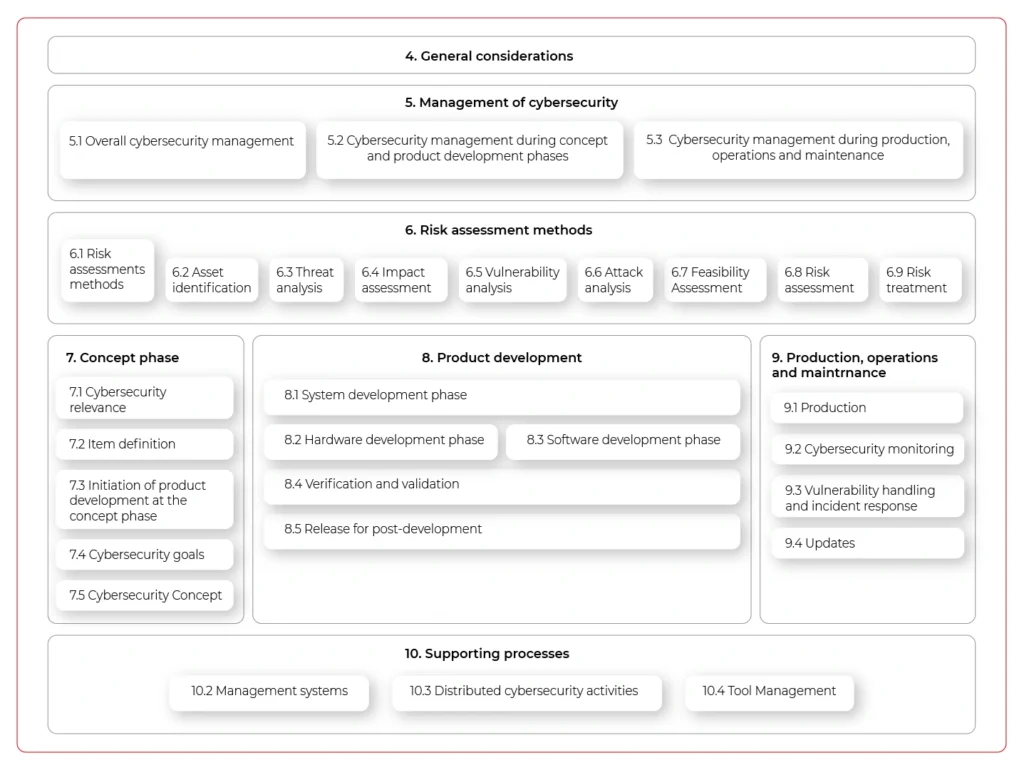
The important aspect of the new standard is that it does not only handle vehicle production but all activities until the vehicle is decommissioned - including incident response or software updates. It does not just focus on singular activities but highly encourages the continuous improvement of internal processes and standards.
The document also lists the best practices regarding cybersecurity design:
- Principle of least privilege
- Authentication and authorization
- Audit
- E2E security
- Architectural Trust Levels
- Segregation of interfaces
- Protection of Maintainability during service
- Testability during development (test interface) and operations10.
- Security by default
The requirements do not end on the architectural and design level. They can go as low as the hardware (identification of security-related elements, documentation, and verification for being safe, as they are potential entry points for hackers), and source code, where specific principles are also listed:
- The correct order of execution for subprograms and functions
- Interfaces consistency
- Data flow and control flow corrections
- Simplicity, readability, comprehensibility
- Robustness, verifiability, and suitability for modifications
The standard documentation is comprehensive, although clearly visible in the provided examples rather abstract and not specific to any programming languages, frameworks, and tools. There are recommendations, but it’s not intended to answer all questions, rather give a basis for further development. While not a panacea to all cybersecurity problems of the industry, we are now at the point when we need standardization and common ground for handling security threats in-vehicle software and connectivity, and the new ISO 21434 is a great start.
How to automate operationalization of Machine Learning apps - running first project using Metaflow
In the second article of the series, we guide you on how to run a simple project in an AWS environment using Metaflow. So, let’s get started.
Need an introduction to Metaflow? Here is our article covering basic facts and features .
Prerequisites
- Python 3
- Miniconda
- Active AWS subscription
Installation
To install Metaflow, just run in the terminal:
conda config --add channels conda-forge conda install -c conda-forge metaflow
and that's basically it. Alternatively, if you want to only use Python without conda type:
pip install metaflow
Set the following environmental variables related to your AWS account:
- AWS_ACCESS_KEY_ID
- AWS_SECRET_ACCESS_KEY
- AWS_DEFAULT_REGION
AWS Server-Side configuration
The separate documentation called “ Administrator's Guide to Metaflow “ explains in detail how to configure all the AWS resources needed to enable cloud scaling in Metaflow. The easier way is to use the CloudFormation template that deploys all the necessary infrastructure. The template can be found here . If for some reason, you can’t or don’t want to use the CloudFormation template, the documentation also provides detailed instructions on how to deploy necessary resources manually. It can be a difficult task for anyone who’s not familiar with AWS services so ask your administrator for help if you can. If not, then using the CloudFormation template is a much better option and in practice is not so scary.
AWS Client-Side configuration
The framework needs to be informed about the surrounding AWS services. Doing it is quite simple just run:
metaflow configure aws
in terminal. You will be prompted for various resource parameters like S3, Batch Job Queue, etc. This command explains in short what’s going on, which is really nice. All parameters will be stored under the ~/.metaflowconfig directory as a json file so you can modify it manually also. If you don’t know what should be the correct input for prompted variables, in the AWS console, go to CloudFormation -> Stacks -> YourStackName -> Output and check all required values there. The output of the stack formation will be available after the creation of your stack from the template as explained above. After that, we are ready to use Metaflow in the cloud!
Hello Metaflow
Let's write very simple Python code to see what boilerplate we need to create a minimal working example.
hello_metaflow.py
from metaflow import FlowSpec, step
class SimpleFlow(FlowSpec):
@step
def start(self):
print('Lets start the flow!')
self.message = 'start message'
print(self.message)
self.next(self.modify_message)
@step
def modify_message(self):
self.message = 'modified message'
print(self.message)
self.next(self.end)
@step
def end(self):
print('The class members are shared between all steps.')
print(self.message)
if __name__ == '__main__':
SimpleFlow()
The designers of Metaflow decided to apply an object-oriented approach. To create a flow, we must create a custom class that inherits from FlowSpec class. Each step in our pipeline is marked by @step decorator and basically is represented by a member function. Use self.next member function to specify the flow direction in the graph. As we mentioned before, this is a directed acyclic graph – no cycles are allowed, and the flow must go in one way, with no backward movement. Steps named start and end are required to define the endpoints of the graph. This code results in a graph with three nodes and two-edged.

It’s worth to note that when you assign anything to self in your flow, the object gets automatically persisted in S3 as a Metaflow artifact.
To run our hello world example, just type in the terminal:
python3 hello_metaflow.py run
Execution of the command above results in the following output:
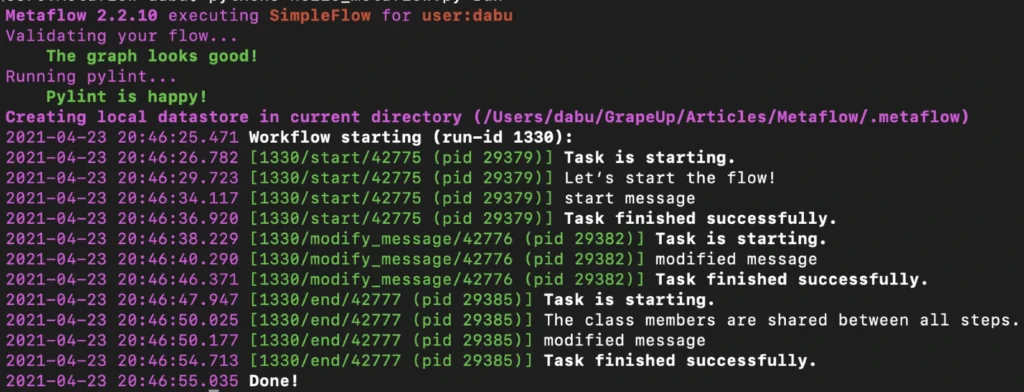
By default, Metaflow uses local mode . You may notice that in this mode, each step spawns a separate process with its own PID. Without much effort, we have obtained code that can be very easily paralleled on your personal computer.
To print the graph in the terminal, type the command below.
python3 hello_metaflow.py show
Let’s modify hello_metaflow.py script so that it imitates the training of the model.
hello_metaflow.py
from metaflow import FlowSpec, step, batch, catch, timeout, retry, namespace
from random import random
class SimpleFlow(FlowSpec):
@step
def start(self):
print('Let’s start the parallel training!')
self.parameters = [
'first set of parameters',
'second set of parameters',
'third set of parameters'
]
self.next(self.train, foreach='parameters')
@catch(var = 'error')
@timeout(seconds = 120)
@batch(cpu = 3, memory = 500)
@retry(times = 1)
@step
def train(self):
print(f'trained with {self.input}')
self.accuracy = random()
self.set_name = self.input
self.next(self.join)
@step
def join(self, inputs):
top_accuracy = 0
for input in inputs:
print(f'{input.set_name} accuracy: {input.accuracy}')
if input.accuracy > top_accuracy:
top_accuracy = input.accuracy
self.winner = input.set_name
self.winner_accuracy = input.accuracy
self.next(self.end)
@step
def end(self):
print(f'The winner is: {self.winner}, acc: {self.winner_accuracy}')
if __name__ == '__main__':
namespace('grapeup')
SimpleFlow()
The start step prepares three sets of parameters for our dummy training. The optional argument for each passed to the next function call splits our graph into three parallel nodes. Foreach executes parallel copies of the train step.
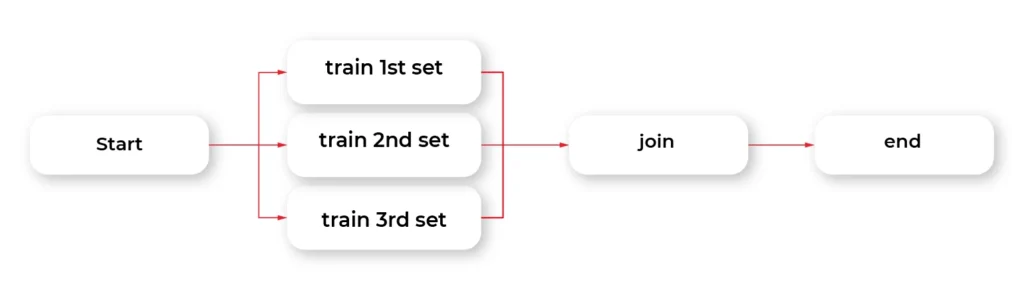
The train step is the essential part of this example. The @batch decorator sends out parallel computations to the AWS nodes in the cloud using the AWS Batch service. We can specify how many virtual CPU cores we need, or the amount of RAM required. This one line of Python code allows us to run heavy computations in parallel nodes in the cloud at a very large scale without much effort. Simple, isn't it?
The @catch decorator catches the exception and stores it in an error variable, and lets the execution continue. Errors can be handled in the next step. You can also enable retries for a step simply by adding @retry decorator. By default, there is no timeout for steps, so it potentially can cause an infinite loop. Metaflow provides a @timeout decorator to break computations if the time limit is exceeded.
When all parallel pieces of training in the cloud are complete, we merge the results in the join function. The best solution is selected and printed as the winner in the last step.
Namespaces is a really useful feature that helps keeping isolated different runs environments, for instance, production and development environments.
Below is the simplified output of our hybrid training.
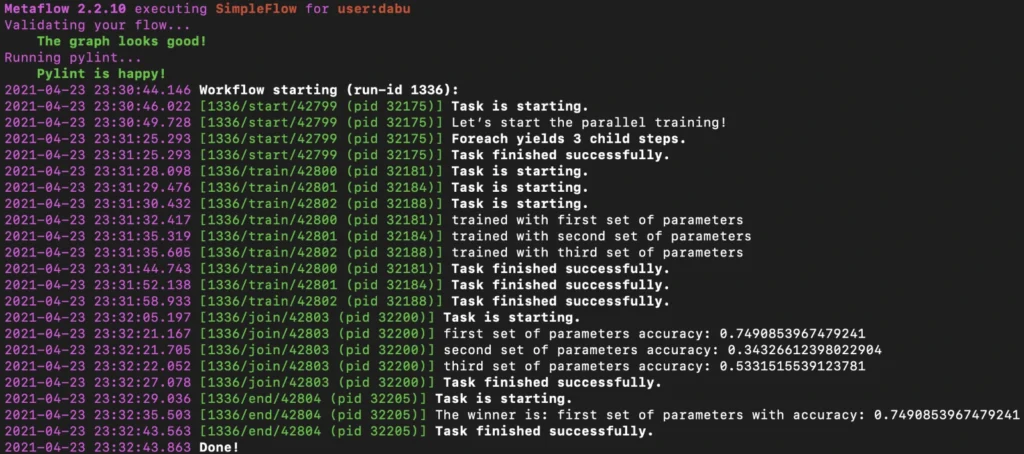
Obviously, there is an associated cost of sending computations to the cloud, but usually, it is not significant, and the benefits of such a solution are unquestionable.
Metaflow - Conclusions
In the second part of the article about Metaflow, we presented only a small part of the library's capabilities. We encourage you to read the documentation and other studies. We will only mention here some interesting and useful functionalities like passing parameters, conda virtual environments for a given step, client API, S3 data management, inspecting flow results with client API, debugging, workers and runs management, scheduling, notebooks, and many more. We hope this article has sparked your interest in Metaflow and will encourage you to explore this area further.

How to monetize car data - 3 strategies for companies and 28 practical use cases
Data is the currency of the 21st century. Those who have access to it can manage it wisely and draw constructive conclusions to get ahead and outperform the competition. The business model based on their monetization is no longer the domain strictly reserved for the Silicon Valley giants. Also, companies whose products and services are not directly related to data trading are trying their hand in this field. The automotive industry is one of the market sectors where data monetization will soon bring the greatest benefits. It is estimated that by 2030 it will be as much as $ 450-750 billion on a global scale.
In this article, you will learn:
What are the 4 megatrends to increase the amount of data from cars.
* Which technologies will enable better data downloading.
* Who can earn money from vehicle data monetization.
* What are the three main data monetization strategies.
* 28 practical use cases of how you can generate revenue.
The increase in revenues on this account is not only due to the electronics and sensors that are installed inside the vehicles. Social and cultural changes will also contribute to the increase in the amount of generated data - for example, the need to reduce city traffic and the search for ways of traveling alternative to vehicles with combustion engines.
Among the megatrends that will contribute to a greater inflow of data for monetization, the following are usually mentioned:
- electrification;
- connectivity;
- diverse mobility / shared mobility;
- and autonomous driving.
The trends that will transform the way we travel and use vehicles today are opportunities not only for OEMs (original equipment manufacturers), but also for insurance companies, fleet managers, toll providers, fuel retailers, and companies dealing with parking or traffic.

All these industries are increasingly joined by technologies that not only help to collect data but also to process it. The flow of information between these market sectors will enable the development of effective methods of obtaining data and creating new services that can be monetized.
In particular, it will be enabled due to the 8 developing technologies:
1. Big data analytics
2. High-speed data towers (5G)
3. Software platforms
4. Data cloud
5. High definition maps
6. High-resolution positioning (GPS)
7. Smart road infrastructure
8. V2X communication
Due to the extensive technological infrastructure, the amount of data that can be obtained from the vehicle will increase immeasurably with today's possibilities. It is estimated that in the near future, up to 10,000+ points from which data can be collected will be accessible in the car.
Understand the drivers and their needs
/„The challenge for industry players is that data will not be car-centric, but customer-centric.” – European premium OEM”/
While technology plays a key role in converting data into real currency, we should bear in mind one thing. In fact, the data is generated not by the vehicle, but by its user. It is the user’s attitude towards technology, privacy, and convenience that determines the success of obtaining information. Without their consent and willingness, there is no effective data monetization strategy.
As the examples of Google or Facebook show, the use of data without users' knowledge sooner or later ends in lawsuits, reluctance, and consumers turning their backs on the brand.
So how can you get users' consent to share data?
The answer is simple - although putting it into practice may be a real challenge - offer something in return. If you give something to the driver, they will share the data you care about the most.
Among the universal benefits on which you can build a strategy for obtaining data from drivers, the following are especially noteworthy:
- time savings,
- greater overall comfort and driving comfort,
- increased level of safety,
- reduction of vehicle operating costs,
- entertainment or increasing driving experience.
Research shows that drivers are much more willing to share data about the external environment of the vehicle - e.g., driving conditions, the technical condition of the vehicle, or even its location. However, they are not so eager to share data from their vehicle interior, e.g., the possibility of recording conversations. However, the percentage of such approvals increases dramatically, up to 60%, when drivers are offered more safety in return.
Younger customers and frequent travelers (who spend over 20 hours in their cars weekly) are also more open to this type of service - which results from their attitude to life, as well as personal needs. Differences in attitudes to privacy can also be shown in different markets (e.g., in Asia, Germany, or the USA). This is due to cultural differences, data regulations, and the technological advancement of a given region.
Regardless of where the company operates, in order to consider effective data monetization, you need to answer three key questions:
- WHO drives a given car?
- HOW do they behave behind the wheel?
- WHERE do they drive?
Understanding the consumer's needs and the way they travel is the starting point for developing an effective data monetization strategy. Only then can we choose the right tools and technologies enabling us to turn data into profits.
Monetizing car data - 28 practical use cases
Each case of data collection in a vehicle can potentially be turned into a benefit. It may concern one of the three areas:
- Generating revenue
- Reducing costs
- Increasing safety and security
Data monetization strategies can be based on only one of these assumptions or be a mix of activities from different areas. Let's have a look at the specific methods that are currently developing in the automotive market.
1. Generating revenue
Generating revenue from data in the automotive industry is frequently done by selling new functionalities and services. Usually (but not always), they are directly linked to the vehicle and are aimed at the driver ( direct monetization ).
Due to a large number of sensors and the fact that the car of the future will perfectly know and read the driver's needs, this type of vehicle is also perfect for being fitted with tailored advertising .
The third way of generating income can also be selling data to advertising companies that will use it to promote third-party brands. Obviously, this model causes the most distrust and reservations among the majority of consumers.
Direct monetization
1. Over-the-air-software add-ons / OTA
Do you want your car's operating system to be faster and more efficient? Or maybe you need to have it repaired, but you are too busy to visit your car dealer? Updating your software in the cloud will let you avoid stress and save you time. Analysts estimate that by 2022 automotive companies will have made about 100 million such vehicle updates annually.
2. Networked parking service
Being able to enter the car park without paying the traditional fee, and a suggestion where you can find a free space. Who wouldn't take advantage of such a convenience in congested cities, for a small surcharge or by providing the registration number of their own vehicle? The system of smart car parks connected to the network offers such possibilities.
3. Tracking/theft protection service
A car is often a valuable and indispensable resource for company activities (but also for private individuals). Vehicle theft does not only involve a financial loss but often logistics-related issues, too. Users increasingly often agree to share their location and modern tracking systems that will easily locate the vehicle in the event of theft.
4. Vehicle usage monitoring and scoring
Who wouldn't want to pay less for vehicle insurance or its rental? Systems monitoring drivers’ behavior while driving and evaluating them in line with the regulations may soon become the standard of services offered by insurers and rental companies.
5. Connected navigation service
Real-time road traffic updates, current fuel prices at nearby filling stations, possible parking options, access to repair stations or car wash - all that by means of voice commands and questions we ask our GPS while driving. For such convenience, most drivers will be delighted to share their data.
6. Onboard delivery of mobility-related content /services
7. Onboard platform to purchase non-driving related goods
Just as the phone is no longer used merely for telephone calls, the car increasingly often plays additional roles. Listening to music from the Internet or streaming videos by passengers (or by the driver, when the car is parked) is completely normal today. Soon we can expect that shopping from the driver's seat will also become the order of the day. And not necessarily only shopping for goods related to mobility and the car.
8. Usage-based tolling and taxation
Each road user and road infrastructure is subject to the same tax obligations and fees. Meanwhile, modern technology allows us to monitor how we use the infrastructure and how often we do it. There is an extensive group of drivers who could save a lot by sharing this type of data with road management.
9. „Gamified” / social like driving experience
“Tell me and I will forget, show me and I may remember; involve me and I will understand.” - Confucius said over 2,500 years ago, and nothing has changed since. Having fun, competing with friends, and having personal experience are still the strongest incentives for us to take new action. It also relates to our purchases.
10. Fleet management solution
Managing a fleet of vehicles, each in different locations, driven by a different driver, and carrying a different load is a real challenge. Unless the entire fleet is managed using one central platform that collects data from individual vehicles. Then everything is close at hand.
11. In-car hot-spot
Mobile internet onboard? Not only the driver who can update necessary data and stay in touch with the base (in the case of a fleet vehicle) will benefit, but also the passengers. In-car hot-spot is an ideal product for companies from the telecom industry, travel companies, insurers, and fleets.
Tailored advertising
12. Predictive maintenance
Advertising is not scared of any medium and, like a chameleon, it adjusts to the environment in which it appears. A car that, just like a smartphone, gets new functions every now and then, becomes an ideal place for such activities. Especially those messages that help drivers predict possible breakdowns and remind them about the upcoming service or oil change are highly appreciated.
13. Targeted advertisements and promotions
Apart from targeting advertisements in terms of the needs related to the vehicle operation, advertisers can also select ads based on who and where is driving the car, the driver's age, gender, or interests. Of course, the accuracy of targeting depends on the amount of data that can be obtained from the vehicle user. Drivers can therefore see displayed ads based on their current and past behavior and linked to the businesses and places featured on their route.
Selling data
Gathering vehicle data and selling it to third parties ? We only mention this point because, being experts, we feel it is our duty. As the previous and subsequent use cases show, there are many more creative ways, approved by drivers, that will allow them to benefit from car data.
2. Reducing costs
Data is a mine of information. Companies from the automotive industry can earn money not only by selling new products but also by enhancing existing solutions, reducing R&D costs, or offering cheaper services to users. Potentially, not only producers but also end users can benefit from data acquisition.
R&D and material costs reduction
14. Warranty costs reduction
Every year, companies from the automotive industry spend huge amounts of money on user warranty services. Data on how the vehicle is used, or what breaks down the most often can not only improve the service process itself and increase consumer satisfaction but also help make real savings in companies. Based on the analyzed information, it is possible to more precisely select the scope of warranty and its duration and even adjust it to specific users.
15. Traffic data based retail footprint and stock level optimization
By using advanced geospatial analysis, traditional stores and malls are capable of locating heavy-traffic areas. Wherever the number of vehicles and the frequency of trips increases, there is a potential for greater sales. It is also easier to plan and adjust the stock, expecting potential consumer interest. Companies from the automotive industry, which have data from vehicles, are a natural business partner for this submarket.
16. Data feedback based R&D optimization
Regardless of the sector in which we operate, the R&D department cannot exist without market feedback, looking for new trends and insights. In the automotive industry, continuous product optimization is the key to success. Data provided by managers is a constant source of inspiration and optimization that can contribute to a company's market position. Of course, provided that they are properly analyzed and used for new products.
Customers cost reduction
17. Usage-based insurance PAYD / PHYD
Switching from an insurance based on accident history to insurance based on date, time, and actual driving style? The advantages for the insurer do not need any explanation. For drivers who travel safely on the road and have nothing to be ashamed of, pay as you drive (PAYD) or pay how you drive (PHYD) insurance certainly has unquestionable benefits and is worth sacrificing a bit of privacy.
18. Driving style suggestions
Do you want to know how to drive more economically? How to adjust the speed to the road conditions or shorten the travel time? Systems installed in connected cars will be happy to help you with this. All you have to do is share information about how you are getting on behind the wheel.
19. E-hailing
24/7 availability, the possibility to order a ride from a location where there are no traditional taxis, the ease of paying via a mobile application. There are many advantages to using the services of brands such as Uber or Lyft. Although no one heard about these companies a few years ago, today they set trends related to our mobility . All due to the skillful use of data and the creation of a business model based on the driver and passenger benefit.
20. Carpooling
Fuel economy and pro-ecological trends increasingly contribute to our conscious use of vehicles. Instead of driving alone, we share travel costs increasingly often and invite other people to travel with us. The creation of applications and infrastructure based on consumer data, which will facilitate driver and passengers recognition, is an ideal model for companies from the automotive industry.
21. P2P car sharing
Your car is parked in the garage because you cycle daily or use public transport? Rent it to other drivers via the peer-to-peer platform and earn money. Of course, the company behind the mentioned application that connects both parties will also earn a few bobs on it, as that's what its business model is all about.
22. Trucks platooning
Connecting vehicles into convoys has existed as long as traffic. However, today's technology and data flow offer additional benefits. Trucks platooning is the creation of a convoy using communication technology and automated driving assistance systems. In such a convoy, one of the cars is the "leader", and the rest adapt to its actions, requiring no or little action from the drivers. Advantages for companies organizing a convoy? Lower Co2 emissions (up to 16% from the trailing vehicles and by up to 8% from the lead vehicle), better road safety, saving drivers time, and getting tasks done faster.
Improved customer satisfaction
23. Early recall detection and software updates
The data received from the vehicle enables early detection of faults and prevents unnecessary problems on the road, and even more - it allows to repair them remotely in the OTA (over-the-air) model. Thanks to such amenities, the driver does not have to download the required software or visit their authorized dealer in person to repair the vehicle.
3. Increasing safety and security
24. Driver’s condition monitoring service
Drowsiness and fatigue are some of the most common factors contributing to road accidents. Thanks to driver monitoring systems in the form of infrared sensors and a camera integrated into the steering wheel, the vehicle can warn the driver in advance and recognize symptoms that could lead to an accident or falling asleep at the wheel. This is one of the amenities that drivers most often agree on when it comes to sharing vehicle data.
25. Improved road/infrastructure maintenance and design
Analyzing data from vehicles can help both the drivers themselves and the road service. For instance, when cars regularly skid at some point - which is detected by ESP / ABS systems, road workers can introduce certain speed limits or improve the road profile. This type of data is also useful in planning road repairs when the renovation needs to be planned during less traffic volume.
26. Breakdown call service
Tyre pressure monitoring, battery and engine condition, fuel level, and electricity drops in the vehicle. Monitoring such data can prevent more than one accident, and should it happen, it helps the driver overcome the obstacles much faster. When roadside assistance knows where the driver is and what exactly happened to the car, it can react much faster or instruct the driver how to fix the problem.
27. Emergency call service
Data from connected cars can save not only our holidays but also our lives. When every second counts and the driver or other road users cannot call an ambulance or fire brigade, the connected car will do it for them. Thanks to the emergency call service option, the vehicle sends information about the location of the vehicle and its status to the appropriate services.
28. Road laws monitoring on enforcement
Data collected from vehicles - especially on a large scale - can tell a lot about the way a given group drives or about the compliance with the rules of the road. Providing data from your own vehicle to the traffic law monitoring services can improve our habits, reduce the number of road hogs and drunk drivers, and help adjust the law to new conditions.
Crucial factors in data monetization
The data stream generated by vehicles will increase year by year. In order to be well prepared for the monetization of this information and not to miss the opportunities for the automotive industry for additional sources of income, it is crucial to take care of several key issues.
- First of all : find a steadfast IT partner with experience in the field, who will supplement the competencies of the OEM with cloud solutions, AI, and building platforms based on data monitoring and analysis.
- Secondly : constantly create and test car products and services based on real needs and amenities for customers - which is inherently related to the next point.
- Thirdly : create an open policy for the management of customers’ data that rules out trading in confidential information or unclear or misleading regulations of data use.
Only the development of a business strategy based on all these assumptions can bring real benefits and help stand out from the competitors.
As you can see, this is not a simple and quick process to implement, as many entities are involved in it, and various interest groups may clash. So, is the game worth the candle? The answer is in the stories of telephone companies that used to believe that the telephone should only be used for making calls, and it did not have to be smart.
Whether we like it or not, vehicles are changing right before our very eyes and are increasingly often used not only for getting from A to B. People who do not understand it and do not see the opportunities facing the automotive industry may soon share the fate of the mobile giants from over a dozen years ago.
Machine Learning at the edge – federated learning in the automotive industry
Machine Learning combined with edge computing gains a lot of interest in industries leveraging AI at scale - healthcare, automotive, or insurance. The proliferation of use cases such as autonomous driving or augmented reality, requiring low latency, real-time response to operating correctly, made distributed data processing a tempting solution. Computation offloading to edge IoT devices makes the distributed cloud systems smaller - and in this case, smaller is cheaper. That’s the first most obvious benefit of moving machine learning from the cloud to edge devices.
Why is this article worth reading? See what we provide here:
- Explaining why regular ML training flow might not be enough.
- Presenting the idea behind federated learning.
- Describing the advantages and risks associated with this technology.
- Introducing technical architecture of a similar solution.
How can federated learning be used in the automotive industry?
Using the automotive industry as an example, modern cars already contain the edge device with processors capable of making complex computations. All ADAS (Advanced Driver Assistance Systems) and autonomous driving calculations happen on-board and require rather significant compute power. Detecting obstacles, road lanes, other vehicles, or road signs happens right now using onboard vehicle systems. That’s why collaboration with companies like Nvidia becomes crucial for OEMs, as the need for better onboard SoCs does not stop.
Even though the prediction happens in the vehicle, the model is trained and prepared using regular, complex, and costly training systems built on-premises or in the cloud. The training data grows bigger and bigger making the training process computationally expensive, slower, and requiring significant storage, especially if incremental learning is not used. The updated model may take time to be passed to the vehicle, and storing the user driving patterns, or even images from the onboard camera, requires both user consent and adherence to local law regulations.
The possible solution for that problem is using a local dataset from each vehicle as small, distributed training sets and training the model in the form of “federated learning”, where the local model is trained using smaller data batches and then aggregated into a singular global model. This is both more computational and memory efficient.
What are the benefits of federated learning?
One of the important concepts highly associated with machine learning at edge is building Federated Learning on top of edge ML. The combination of federated learning and edge computing gives important, measurable advantages:
- Reduced training time - edge devices calculate simultaneously which improves velocity compared to a monolithic system.
- Reduced inference time - compared to the cloud, at the edge inference results are calculated immediately.
- Collaborative learning - instead of single, huge training dataset learning happens simultaneously using smaller datasets - which makes it both easier and more accurate enabling bigger training sets.
- Always up-to-date model in vehicle - the new model is propagated to the vehicle after validation which makes the learning process of the network automatic.
- Exceptional privacy - the omnipresent problem of secure channels for passing sensitive user data, anonymization, and storing personal user data for training purposes is now gone. The learning happens on local data in the edge device, and the data never leaves the vehicle. The weights which are being shared cannot be used to identify the user or even his driving patterns.
- Lack of single point of failure - the data loss of the training set is not a threat.
Benefits from these concepts contain both cost savings and accuracy improved, visible as an overall better user experience when using the vehicle systems. As autonomous driving and ADAS systems are critical, better model accuracy is also directly associated with better security. For example, if the system can identify pedestrians on the road in front of vehicles with accuracy higher by 10%, it can mean that an additional 10% of collisions with pedestrians can be avoided. That is a measurable and important difference.
Of course, the solution does not come only with benefits. There are certain risks that have to be taken into account when deciding to transition to federated learning. The main one is that compared to the regular training mechanisms, federated learning is based on heterogeneous training data - disconnected datasets stored on edge devices. This means the global model accuracy is hard to control, as the global model is derived based on local models and changes dynamically.
This can be solved by building a hybrid solution, where part of the model is built using safe, predefined data, and it is gradually enhanced by federated learning. This brings both worlds closer together - amounts of data impossible to handle by a singular training system and stable model based on a verified training set.
Architectural overview
To build this kind of system, we need to start with the overall architecture. Key assumptions are that the infrastructure is capable of running distributed, microservices-based systems and has queueing and load balancing capabilities. Edge devices have some kind of storage, sensors, and SoC with CPU, and GPU capable of training the ML model .
Let’s split it into multiple subsystems and consider them one by one:
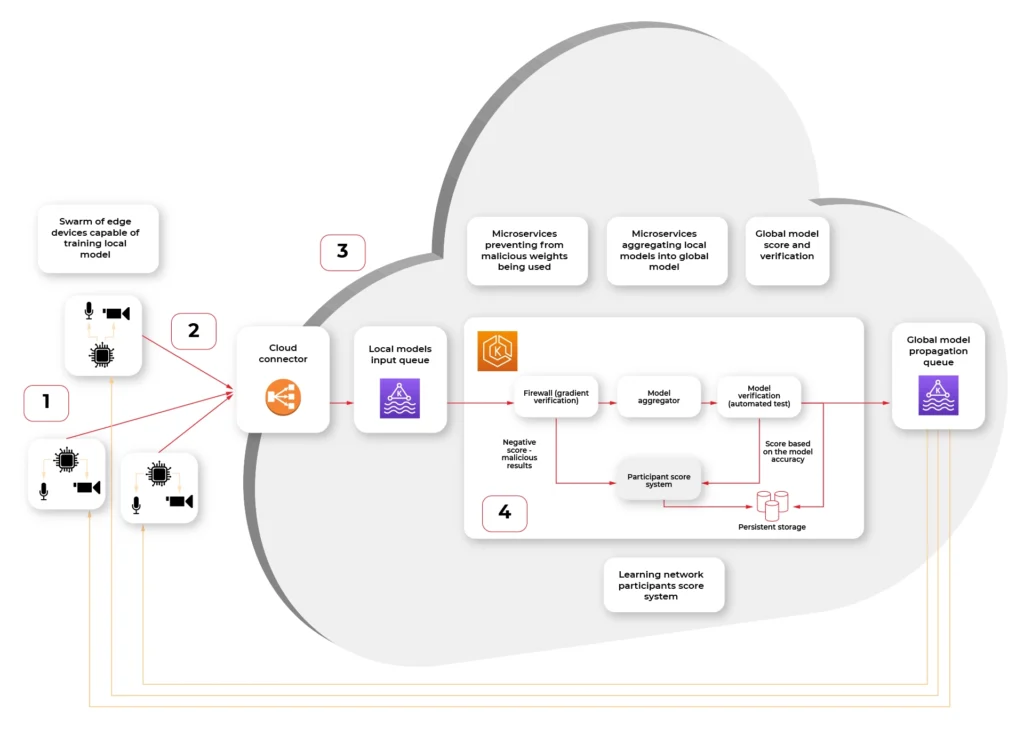
- Swarm of connected vehicle edge devices, each one with connected sensors and ability to recalculate model gradient (weights.)
- Connection medium, in this case fast, 5G network available in the car
- Cloud connector, being a secure, globally available public API where each of the vehicle IoT edge devices connect to.
- Kubernetes cluster with federated learning system split into multiple scalable microservices:
a) Gradient verification / Firewall - system rejecting the gradient that looks counterfeit - either manipulated by 3rd party or being based on fictional data.
b) Model aggregator - system merging the new weights into the existing model and creating an updated model.
c) Result verification automated test system - system verifying the new model on a predefined dataset with known predictions to score the model compared to the original.
d) Propagating queue connected to (S)OTA - automatic or triggered by user propagation of updated model in the form of an over-the-air update to the vehicle.
A firewall?
The firewall here, inside the system, is not a mistake. It is not guarding the network against attacks. It is guarding the model against being altered by cyber attacks.
Security is a very important aspect of AI, especially when the model can be altered by unverified data from the outside. There are multiple known attack vectors:
- Byzantine attack - regarding the situation, when some of the edge devices are compromised and uploading wrong weights. In our case, it is unlikely for the attacker to be omniscient (to know the data of all participants), so the uploaded weights are either randomized but plausible, like generated Gaussian noise, or flip-bit of result calculation. The goal is to make the model unpredictable.
- Model Poisoning - this attack is similar to the byzantine attack, but the goal is to inject the malicious model, which as a result alters the global model to misclassify objects. The dangerous example of such an attack is by injecting multiple fake vehicles into a model, which incorrectly identifies the trees as “stop” road signs. As a result, an autonomous car would not be able to operate correctly and stop near all trees as it would be a cross-section.
- Data Poisoning - this attack is the hardest to avoid and easiest to execute, as it does not require a vehicle to be compromised. The sensor, for example, camera, is fed with a fake picture, which contains minor, but present changes - for example, a set of bright green pixels, like on the picture:

This can be a printed picture or even a sticker on a regular road sign. If the network learns to treat those four pixels as a “stop” sign. This can be painted, for example, on another vehicle and cause havoc on the road when an autonomous car encounters this pattern.
As we can see, those attacks are specific to distributed learning systems or machine learning in general. Taking this into account is critical, as the malicious model may be impossible to identify by looking at the weights or even prediction results if the way of attack was not determined.
There are multiple countermeasures that can be used to mitigate those attacks. Median or distance to the global model can be calculated and quickly identify rogue data. The other defense is to check the score of the global model after merging and revert the change if the score is significantly worse.
In both cases, the notification about the situation should be notified, both to operators as a metric and to a service that gives scores to the vehicle edge devices. If the device gets repeatedly flagged as wrong-doing, it should be kicked out of the network, and investigation is required to figure out if this is a cyberattack and who is the attacker.
Model aggregation and test
As we know, taking care of the cybersecurity threats specific to our use case, now the important step is merging the new weights with the global model.
There is no one best function or algorithm that can be used to aggregate the local models into global models by merging the individual results (weights). In general, very often average, or weighted average gives sufficient results to start with.
The Aggregation step is not final. The versioned model is then tested in the next step using the predefined data with automated verification. This is a crucial part of the system, preventing the most obvious faults - like the lane assist system stopping to recognize roadside lines.
If the model passes the test with a score at least as good as the current model (or predefined value), it’s being saved.
Over-the-air propagation
The last step of the pipeline is enqueueing the updated model to be propagated back to vehicles. This can be either an automatic process as in continuous deployment directly to the car or may require a manual trigger if the system requires additional manual tests on the road.
A safe way of distributing the update is using the container image. The same image may be used for tests and then run in vehicles greatly reducing the chance of deploying failing updates. With this process, rollback is also simple as long as the device is able to store the previous version of the model.
The results
Moving from legacy, monolithic training method to federated learning gives promising results in both reduced overall system cost and improved accuracy. With quick expansion of 5G low-latency network and IoT edge devices into vehicles, this kind of system can move from theoretical discussions, scientific labs, and proofs of concepts to fully capable and robust production systems. The key part of building such a system is to consider the cybersecurity threats and crucial metrics like global model accuracy from the start.
8 examples of how AI drives the automotive industry
Just a few years ago, artificial intelligence stirred our imagination via the voice of Arnold Schwarzenegger from "Terminator" or agent Smith from "The Matrix". It wasn't long before the rebellious robots' film dialogue replaced the actual chats we have with Siri or Alexa over our morning cup of coffee. Nowadays, artificial intelligence is more and more boldly entering new areas of our lives. The automotive industry is one of those that are predicted to speed up in the coming years. By 2030, 95-98% of new vehicles are likely to use this technology.
What will you learn from this article?
- How to use AI in the production process
- How AI helps drivers to drive safely and comfortably
- How to use AI in vehicle servicing
- What companies from the AI industry should pay attention to if they want to introduce such innovations
- You will learn about interesting use cases of the major brands
Looking at the application of AI in various industries, we can name five stages of implementation of such solutions. Today, companies from the Communication Technology (ICT) and Financial Services ("Matured Industries") sectors are taking the lead. Healthcare, Retail, Life Science ("Aspirational Industries") are following closely behind. Food & Beverages and Agriculture ("Strugglers") and companies from the Chemicals and Oil and Gas sectors ("Beginners") are bringing up the rear. The middle of the bunch is the domain of Automotive and, partly related to it, Industrial Machinery.
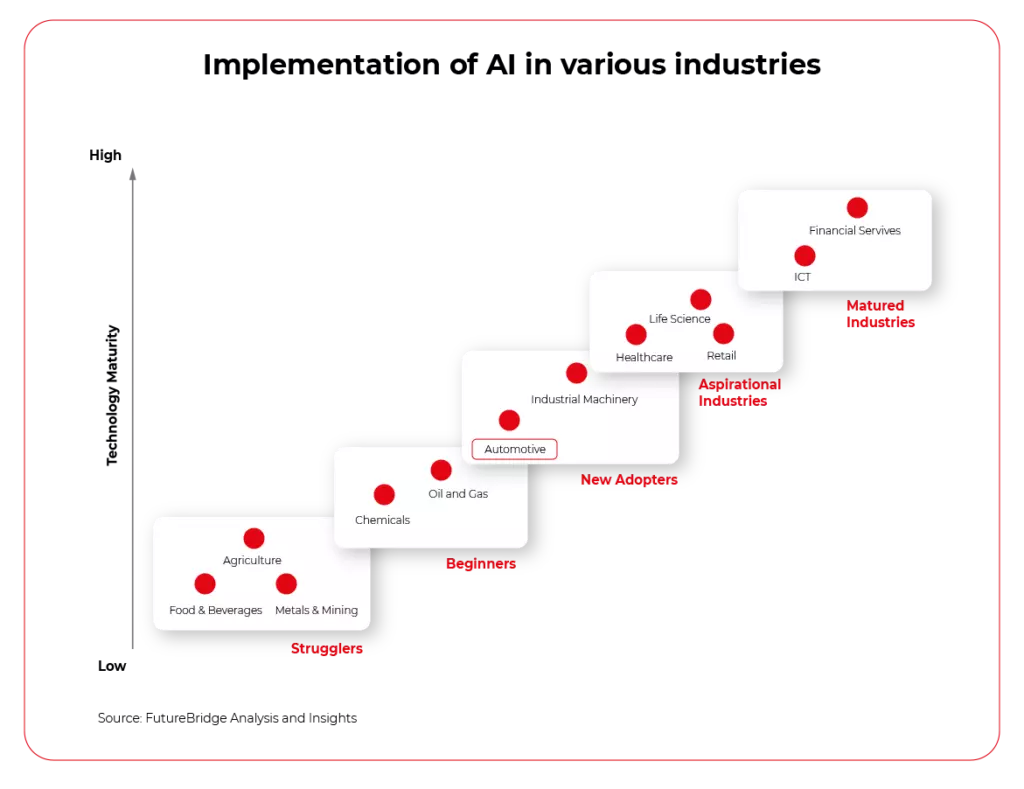
Although these days we choose a car mainly for its engine or design, it is estimated that over the next ten years, its software will be an equally significant factor that will impact our purchasing decision.
AI will not only change the way we use our vehicles, but also how we select, design, and manufacture them. Even now, leading brands avail of this type of technology at every stage of the product life cycle - from production through use, to maintenance and aftermarket.
Let's have a closer look at the benefits a vehicle manufacturing company can get when implementing AI in its operations.
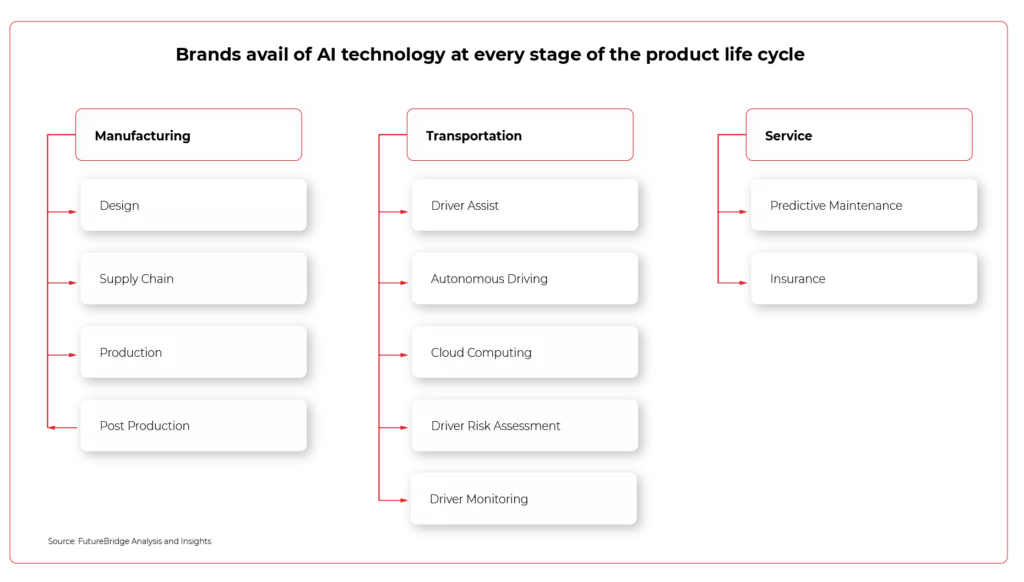
Manufacturing - how AI improves production
1. You will be able to work out complex operations and streamline supply chains
An average passenger car consists of around 30,000 separate parts, which interestingly enough, are usually ordered from various manufacturers in different regions of the world. If, on top of that, we add a complicated manufacturing process, increasingly difficult access to skilled workers and market dependencies, it becomes clear that potential delays or problems in the supply chain result in companies losing millions. Artificial intelligence can predict these complex interactions, automate processes, and prevent possible failures and mishaps
- Artificial intelligence complements Audi's supply chain monitoring. When awarding contracts, it is verified that the partners meet the requirements set out in the company's internal quality code. In 2020, over 13,000 suppliers provided the Volkswagen Group with a self-assessment of their own sustainability performance. Audi only works with companies that successfully pass this audit.
2. More efficient production due to intelligent co-robots working with people
For years, companies from the automotive industry have been trying to find ways to enhance work on the production line and increase efficiency in areas where people would get tired easily or be exposed to danger. Industrial robots have been present in car factories for a long time, but only artificial intelligence has allowed us to introduce a new generation of devices and their work in direct contact with people. AI-controlled co-bots move materials, perform tests, and package products making production much more effective.
- Hyundai Vest Exoskeleton (H-VEX) became a part of Kia Motors’ manufacturing process in 2018. It provides wearable robots for assembly lines. AI in this example helps in the overall production while sensing the work of human employees and adjusting their motions to help them avoid injuries.
- AVGs (Automated Guided Vehicles) can move materials around plants by themselves. They can identify objects in their path and adjust their route. In 2018, an OTTO Motors device carried a load of 750 kilograms in this way!
3. Quality control acquires a completely new quality
The power of artificial intelligence lies not only in analyzing huge amounts of data but also in the ability to learn and draw conclusions. This fact can be used by finding weak points in production, controlling the quality of car bodies, metal or painted surfaces, and also by monitoring machine overload and predicting possible failures. In this way, companies can prevent defective products from leaving the factories and avoid possible production downtime.
- Audi uses computer vision to find small cracks in the sheet metal in the vehicles. Thus, even at the production stage, it reduces the risk of damaged parts leaving the factory.
- Porsche has developed "Sounce", a digital assistant, using deep learning methods. AI is capable of reliably and accurately detecting noise, for example during endurance tests. This solution, in particular, takes the burden off development engineers who so far had to be present during such tests. Acoustic testing based on Artificial Intelligence (AI) increases quality and reduces production costs.
4. AI will configure your dream vehicle
In a competitive and excessively abundant market, selling vehicles is very difficult. Brands are constantly competing in services and technologies that are to provide buyers with new experiences and facilitate the purchasing process. Manufacturers use artificial intelligence services not only at the stage of prototyping and modeling vehicles, but also at the end of the manufacturing process, when the vehicle is eventually sold. A well-designed configurator based on AI algorithms is often the final argument, by which the customer is convinced to buy their dream vehicle. Especially when we are talking about luxury cars.
- The Porsche Car Configurator is nothing more than a recommendation engine powered by artificial intelligence. The luxury car manufacturer created it to allow customers to choose a vehicle from billions of possible options. The configurator works using several million data and over 270 machine learning modules. Effect? The customer chooses the vehicle of their dreams based on customised recommendations.
Transportation - how AI facilitates driving vehicles
5. Artificial intelligence will provide assistance in an emergency
A dangerous situation on the road, vehicle in the blind spot, power steering on a slippery surface. All those situations can be supported by artificial intelligence, which will calculate the appropriate driving parameters or correct the way the driver behaves on the road. Instead of making automatic decisions - which are often emotion-imbued or lack experience - brands increasingly hand them over to machines, thus reducing the number of accidents and protecting people's lives.
- Verizon Connect solutions for fleet management allow you to send speed prompts to your drivers as soon as your vehicle's wipers are turned on. This lets the driver know that they have to slow down due to adverse road conditions such as rain or snow. And the intelligent video recorder will help you understand the context of the accident - for instance, by informing you that the driver accelerated rapidly before the collision.
6. Driver monitoring and risk assessment increase driving safety and comfort
Car journeys may be exhausting. But not for artificial intelligence. The biggest brands are increasingly equipping vehicles with solutions aimed at monitoring fatigue and driver reaction time. By combining intelligent software with appropriate sensors, the manufacturer can fit the car with features that will significantly reduce the number of accidents on the road and discomfort from driving in difficult conditions.
- Tesla monitors the driver's eyes, thus checking the driver's level of fatigue and preventing them from falling asleep behind the wheel. It’s mainly used for the Autopilot system to prevent driver from taking short nap during travel.
- The BMW 3 Series is equipped with a personal assistant, the purpose of which is to improve driving safety and comfort. Are you tired of the journey? Ask for the "the vitalization program" that will brighten the interior, lower the temperature or select the right music. Are you cold? All you have to do is say the phrase "I'm cold" and the seats will be heated to the optimal temperature.
Maintenance - how AI helps you take care of your car
7. Predictive Maintenance prevents malfunctions before they even appear
Cars that we are driving today are already pretty smart. They can alert you whenever something needs your attention and they can pretty precisely say what they actually need – oil, checking the engine, lights etc. The Connected Car era however equipped with the possibilities given by AI brings a whole lot more – predictive maintenance. In this case AI monitors all the sensors within the car and is set to detect any potential problems even before they occur.
AI can easily spot any changes, which may indicate failure, long before it could affect the vehicle’s performance. To go even further with this idea, thanks to the Over-The-Air Update feature, after finding a bug that can be easily fixed by a system patch, such solution can be sent to the car Over-The-Air directly by the manufacturer without the need for the customer to visit the dealership.
- Predi (an AI software company from California) has created an intelligent platform that uses the service order history and data from the Internet of Things to prevent breakdowns and deal with new possible ones faster.
8. Insure your car directly from the cockpit
Driving a car is not only about operating costs and repairs, but also insurance that each of us is required to purchase. In this respect, AI can be useful not only for insurance companies ( see how AI can improve the claims handling process ), but also for drivers themselves. Thanks to the appropriate software, we will remember about expiring insurance or even buy it directly from the comfort of our car, without having to visit the insurer's website or a stationary point.
- The German company ACTINEO, specialising in personal injury insurance, processes and digitises 120,000. claims annually. Their ACTINEO Cockpit service is a digital manager that allows for the comprehensive management of this type of cases, control of billing costs, etc.
- In collaboration with Ford, Arity provides insurers - with the driver's consent, of course - data on the driving style of the vehicle owner. In return for sharing this information, the driver is offered personalised insurance that matches his driving style. The platform’s calculations are based on "more than 440 billion miles of historical driving data from more than 23 million active telematics connections and more than eight years of data directly from cars (source: Green Car Congress).
When will AI take over the automotive industry?
In 2015, it is estimated that only 5-10% of cars had some form of AI installed. The last five years have brought the dissemination of solutions such as parking assistance, driver assistance and cruise control. However, the real boom is likely to occur within the next 8-10 years.
From now on, artificial intelligence in the automotive industry will no longer be a novelty or wealthy buyers’ whims. The spread of the Internet of Things, consumer preferences and finding ways of saving money in the manufacturing process will simply force manufacturers to do this - not only in the vehicle cockpits, but also on the production and service lines.
To this end, they will be made to cooperate with manufacturers of sensors and ultrasonic solutions (cooperation between BMW and Mobileye, Daimler from Bosch or VW and Ford with Aurora) and IT companies providing software for AI. A dependable partner who understands the potential of AI and knows how to use its power to create the car of the future is the key to success for companies in this industry.
The future of autonomous driving connectivity – Quantum entanglement or 6G?
The title of the article is quite deceiving - both mentioned technologies are currently just distant concepts based on widely divergent connectivity mediums. It’s still a distant future, but let’s think for a while about where we are now, what awaits us in the very near future and where we are heading in the long term.
Autonomous driving and the whole Connected Car concept benefits greatly from internet connectivity. Traffic information, being able to request information about nearby cars, navigation, infrastructures like traffic lights, parking, or charging stations - all of that affects the decision about the actual path to be taken by the vehicle or driver.
Some of the systems are rather insensitive to the network bandwidth, for example, the layout of the roads does not require updates every second. On the other hand information about red light or vehicles losing traction nearby are critical and lowering latency directly affects the safety.
What technologies provide connectivity for autonomous driving?
These days cars mainly use the common mobile technology for connectivity: GPRS/EDGE, 3G/HSDPA, LTE, and 4G switching dynamically depending on network coverage. As the availability of 5G increases, the obvious next step is implementing it in the vehicle modems.
Can connected cars rely on 5G?
Obviously, 5G will never be available everywhere. The technology itself is a limitation here - it is millimeter-wave connectivity resulting in 2% of range compared to 4G (300-600m compared to 10-15km). Additionally, the latest Ericsson report predicts that by the end of 2026, 5G coverage is expected to reach 60 percent of the global population, while this still means mainly densely populated areas like cities and suburbs.
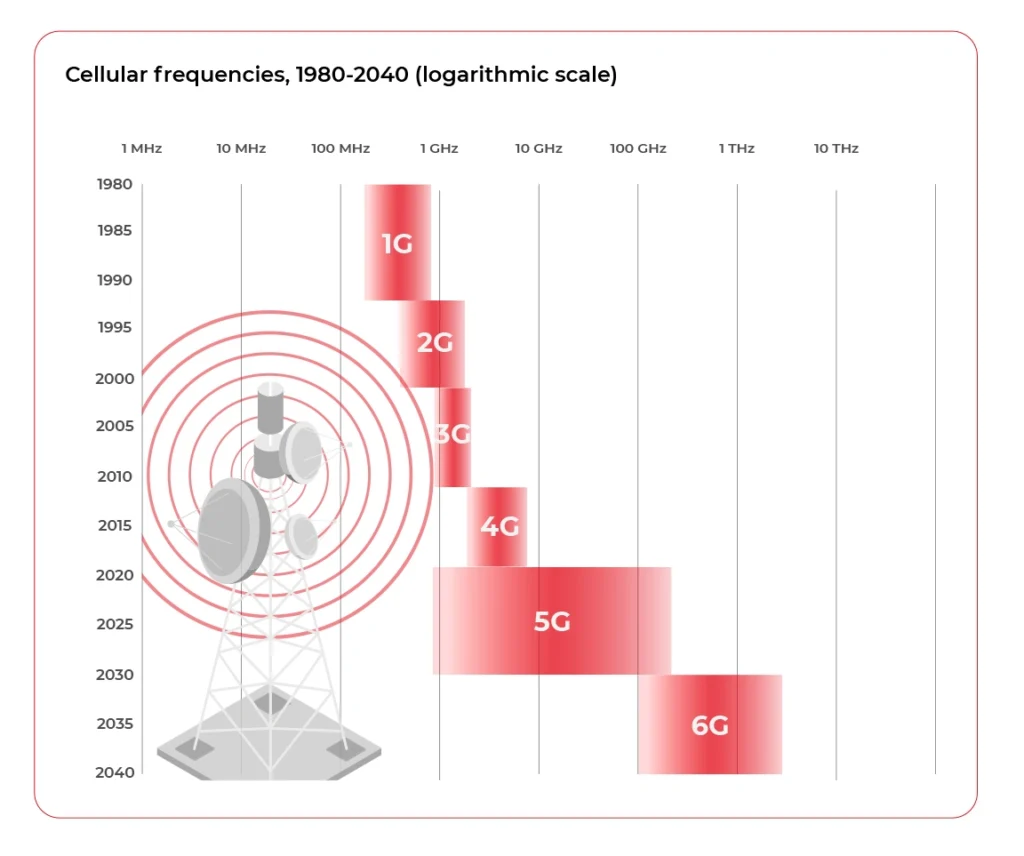
5G solves the latency and bandwidth problem but does not give full coverage, especially for rural areas and highways. Is there nothing more we can use to improve the situation? Not at all, multiple alternatives are being developed right now in parallel.
What are the alternatives to 5G?
There is IEE80211.p (WAVE - Wireless Access for the Vehicular Environment) based on the Wi-Fi WLAN standard focusing on improving the stability of the connection between high-speed vehicles. This is short-range, Vehicle2Vehicle and Vehicle2Infrarstructure communication.
While the 5G is not yet fully there, the 6G is starting to form. The successor of the 5th generation of the wireless cellular network is planned to increase the bandwidth, greatly allowing for extremely data consuming, real-time services to be built - like dynamic Virtual Reality streaming. The groups, like the Next G Alliance, are working on defining technical aspects and testing multiple possibilities, like THz wave frequencies as a physical medium for communication.
The other promising development is the LEO (Low Earth Orbit) satellite network, with a Starlink created by Elon Musk being the most popular currently available. This is no match in terms of latency to both 5G and 6G, but the unprecedented coverage and worldwide availability make it a great solution for situations, where the bandwidth is critical, while moderate latency is still sufficient.
The most futuristic medium, the quantum entanglement from the title of this article, seemed like the Holy Grail of communication - faster than light, meaning no latency at all. When the scientists announced that quantum entanglement works and was observed by comparing distant, entangled particles, the world held its breath. But in the end, there is currently no way to transmit anything this way - quantum entanglement breaks if one of the particles in the pair is forced to a particular quantum state. It’s disappointing but shows us that there may be a totally new way for communication still to be discovered.
Sum up: what connection type will be fueling Connected and Autonomous Cars
So what is the future of communication for Connected Cars and Autonomous Driving? 5G, 6G, satellite or wifi? The answer is all of them. As cars right now can dynamically switch between different kinds of mobile networks, in the future, they should also be able to pick the lowest latency connection available from a mobile network, satellite, wifi or whatever will be the future, or even use multiple simultaneously depending on the system requirements. Because there is no one best solution for all geographical regions, in-car systems, and conflicting requirements. Hybrid connectivity is the future of automotive connectivity.
How to automate operationalization of Machine Learning apps - an introduction to Metaflow
In this article, we briefly highlight the features of Metaflow, a tool designed to help data scientists operationalize machine learning applications.
Introduction to machine learning operationalization
Data-driven projects become the main area of focus for a fast-growing number of companies. The magic has started to happen a couple of years ago thanks to sophisticated machine learning algorithms, especially those based on deep learning. Nowadays, most companies want to use that magic to create software with a breeze of intelligence. In short, there are two kinds of skills required to become a data wizard:
Research skills - understood as the ability to find typical and non-obvious solutions for data-related tasks, specifically extraction of knowledge from data in the context of a business domain. This job is typically done by data scientists but is strongly related to machine learning, data mining, and big data.
Software engineering skills - because the matter in which these wonderful things can exist is software. No matter what we do, there are some rules of the modern software development process that help a lot to be successful in business. By analogy with intelligent mind and body, software also requires hardware infrastructure to function.
People tend to specialize, so over time, a natural division has emerged between those responsible for data analysis and those responsible for transforming prototypes into functional and scalable products. That shouldn't be surprising, as creating rules for a set of machines in the cloud is a far different job from the work of a data detective.
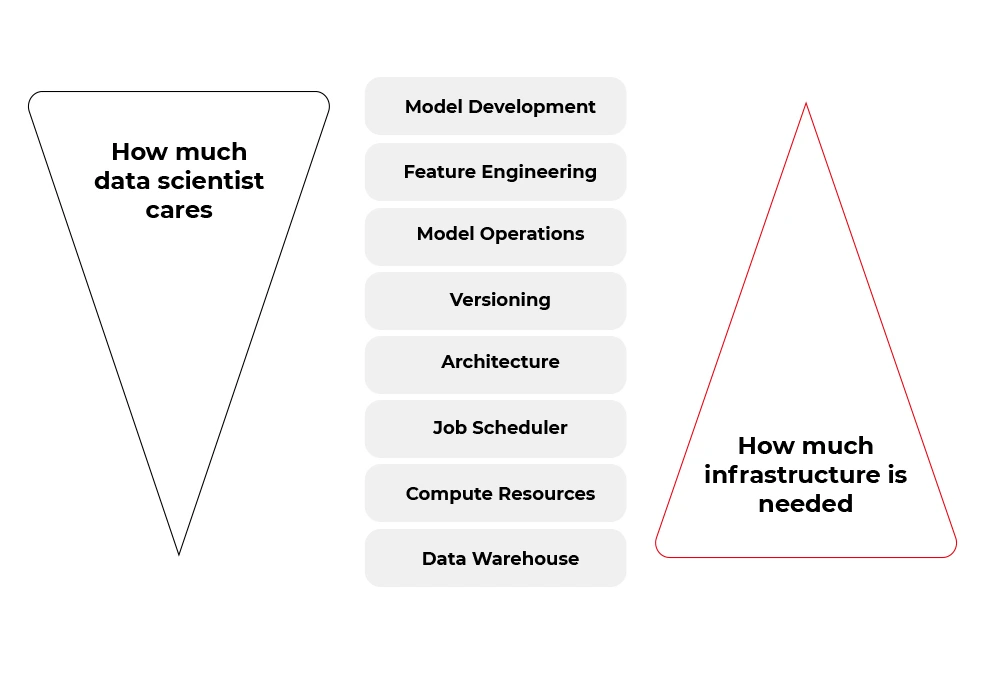
Fortunately, many of the tasks from the second bucket (infrastructure and software) can be automated. Some tools aim to boost the productivity of data scientists by allowing them to focus on the work of a data detective rather than on the productionization of solutions. And one of these tools is called Metaflow.
If you want to focus more on data science , less on engineering, but be able to scale every aspect of your work with no pain, you should take a look at how is Metaflow designed.
A Review of Metaflow
Metaflow is a framework for building and managing data science projects developed by Netflix. Before it was released as an open-source project in December 2019, they used it to boost the productivity of their data science teams working on a wide variety of projects from classical statistics to state-of-the-art deep learning.
The Metaflow library has Python and R API, however, almost 85% of the source code from the official repository (https://github.com/Netflix/metaflow) is written in Python. Also, separate documentation for R and Python is available.
At the time this article is written (July 2021), the official repository of the Metaflow has 4,5 k stars, above 380 forks, and 36 contributors, so it can be assumed as a mature framework.
“Metaflow is built for data scientists, not just for machines”
That sentence got attention when you visit the official website of the project ( https://metaflow.org/ ). Indeed, these are not empty words. Metaflow takes care of versioning, dependency management, computing resources, hyperparameters, parallelization, communication with AWS stack, and much more. You can truly focus on the core part of your data-related work and let Metaflow do all these things using just very expressive decorators.
Metaflow - core features
The list below explains the key features that make Metaflow such a wonderful tool for data scientists, especially for those who wish to remain ignorant in other areas.
- Abstraction over infrastructure. Metaflow provides a layer of abstraction over the hardware infrastructure available, cloud stack in particular. That’s why this tool is sometimes called a unified API to the infrastructure stack.
- Data pipeline organization. The framework represents the data flow as a directed acyclic graph. Each node in the graph, also called step, contains some code to run wrapped in a function with @step decorator.
@step
def get_lat_long_features(self):
self.features = coord_features(self.data, self.features)
self.next(self.add_categorical_features)
The nodes on each level of the graph can be computed in parallel, but the state of the graph between levels must be synchronized and stored somewhere (cached) – so we have very good asynchronous data pipeline architecture.

This approach facilitates debugging, enhances the performance of the pipeline, and allows us completely separate the steps so that we can run one step locally and the next one in the cloud if, for instance, the step requires solving large matrices. The disadvantage of that approach is that salient failures may happen without proper programming discipline.
- Versioning. Tracking versions of our machine learning models can be a challenging task. Metaflow can help here. The execution of each step of the graph (data, code, and parameters) is hashed and stored, and you can access logged data later, using client API.
- Containerization. Each step is run in a separate environment. We can specify conda libraries in each container using
@condadecorator as shown below. It can be a very useful feature under some circumstances.
@conda(libraries={"scikit-learn": "0.19.2"})
@step
def fit(self):
...
- Scalability. With the help of
@batchand@resourcesdecorators, we can simply command AWS Batch to spawn a container on ECS for the selected Metaflow step. If individual steps take long enough, the overhead of spawning the containers should become irrelevant.
@batch(cpu=1, memory=500)
@step
def hello(self):
...
- Hybrid runs. We can run one step locally and another compute-intensive step on the cloud and swap between these two modes very easily.
- Error handling. Metaflow’s
@retrydecorator can be used to set the number of retries if the step fails. Any error raised during execution can be handled by@catchdecorator. The@timeoutdecorator can be used to limit long-running jobs especially in expensive environments (for example with GPGPUs).
@catch(var="compute_failed")
@retry
@step
def statistics(self):
...
- Namespaces. An isolated production namespace helps to keep production results separate from experimental runs of the same project running concurrently. This feature is very useful in bigger projects where more people is involved in development and deployment processes.
from metaflow import Flow, namespace
namespace("user:will")
run = Flow("PredictionFlow").latest_run
- Cloud Computing . Metaflow, by default, works in the local mode . However, the shared mode releases the true power of Metaflow. At the moment of writing, Metaflow is tightly and well coupled to AWS services like CloudFormation, EC2, S3, Batch, DynamoDB, Sagemaker, VPC Networking, Lamba, CloudWatch, Step Functions and more. There are plans to add more cloud providers in the future. The diagram below shows an overview of services used by Metaflow.
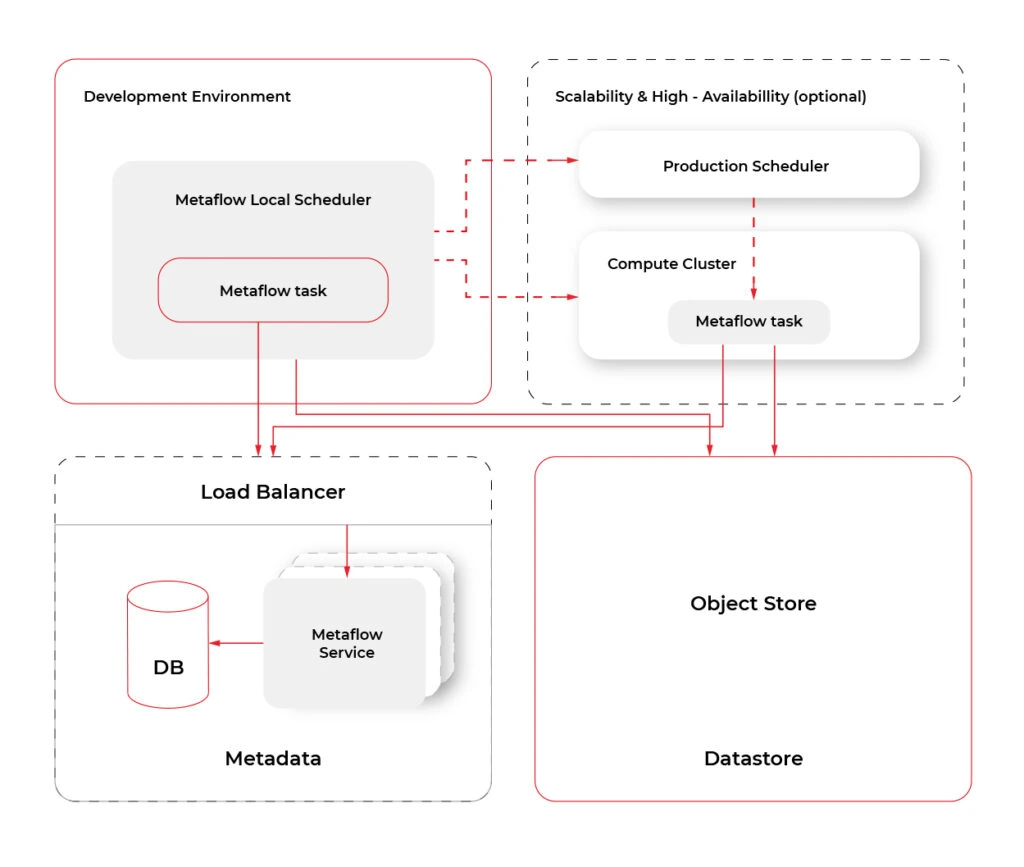
Metaflow - missing features
Metaflow does not solve all problems of data science projects. It’s a pity that there is only one cloud provider available, but maybe it will change in the future. Model serving in production could be also a really useful feature. Competitive tools like MLFlow or Apache AirFlow are more popular and better documented. Metaflow lacks a UI that would make metadata, logging, and tracking more accessible to developers. All this does not change the fact that Metaflow offers a unique and right approach, so just cannot be overlooked.
Conclusions
If you think Metaflow is just another tool for MLOps , you may be surprised. Metaflow offers data scientists a very comfortable workflow abstracting them from all low levels of that stuff. However, don't expect the current version of Metaflow to be perfect because Metaflow is young and still actively developed. However, the foundations are solid, and it has proven to be very successful at Netflix and outside of it many times.
Monitoring your microservices on AWS with Terraform and Grafana - basic microservices architecture
Do you have an application in the AWS cloud? Do you have several microservices you would like to monitor? Or maybe you’re starting your new project and looking for some good-looking, well-designed infrastructure? Look no further - you are in the right place!
We’ve spent some time building and managing microservices and cloud-native infrastructure so we provide you with a guide covering the main challenges and proven solutions.
In this series, we describe the following topics:
- How to create a well-designed architecture with microservices and a cloud-config server?
- How to collect metrics and logs in a common dashboard?
- How to secure the entire stack?
Monitoring your microservices - assumptions
Choosing Grafana for such a project seems obvious, as the tool is powerful, fast, user-friendly, customizable, and easy to maintain. Grafana works perfectly with Prometheus and Loki. Prometheus is a metric sink that collects metrics from multiple sources and sends them to the target monitoring system. Loki does the very same operation for logs. Both collectors are designed to be integrated with Grafana.
See the diagram below to better understand our architecture:
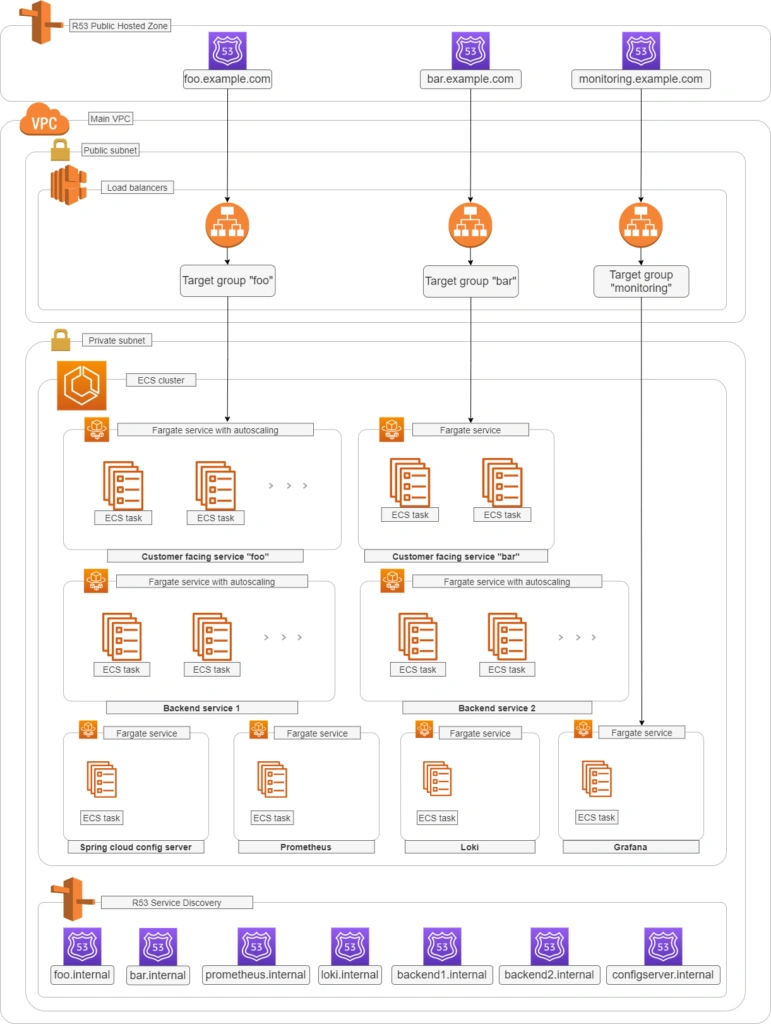
Let’s analyze the diagram for a moment. On the top, there is a publicly visible hosted zone in Route 53, the DNS “entry” to our system, with 3 records: two application services available over the internet and an additional monitoring service for our internal purposes.
Below, there is a main VPC with two subnets: public and private. In the public one, we have load balancers only, and in the private one, there is an ECS cluster. In the cluster, we have few services running using Fargate: two with internet-available APIs, two for internal purposes, one Spring Cloud Config Server, and our monitoring stack: Loki, Prometheus, and Grafana. At the bottom of the diagram, you can also find a Service Discovery service (AWS CloudMap) that creates entries in Route 53, to enable communication inside our private subnet.
Of course, for readability reasons, we omit VPC configuration, services dependencies (RDS, Dynamo, etc.), CI/CD, and all other services around the core. You can follow this guide covering building AWS infrastructure.
To sum up our assumptions:
- We use an infra-as-a-code approach with Terraform
- There are few Internet-facing services and few for internal purposes in our private subnet
- Internet-facing services are exposed via load balancers in the public subnet
- We use the Fargate launch type for ECS tasks
- Some services can be scaled with ECS auto-scaling groups
- We use Service Discovery to redeploy and scale without manual change of IP’s, URL’s or target groups
- We don’t want to repeat ourselves so we use a Spring Cloud Config Server as a main source of configuration
- We use Grafana to see synchronized metrics and logs
- (what you cannot see on the diagram) We use encrypted communication everywhere - including communication between services in a private subnet
Basic AWS resources
In this article, we assume you have all basic resources already created and correctly configured: VPC, subnets, general security groups, network ACLs, network interfaces, etc. Therefore we’re going to focus on resources visible on the diagram above, crucial from a monitoring point of view.
Let’s create the first common resource:
resource "aws_service_discovery_private_dns_namespace" "namespace_for_environment" {
name = "internal"
vpc = var.vpc_id
}
This is the Service Discovery visible in the lower part of the diagram. We’re going to fill it in a moment.
By the way, above, you can see an example, how we’re going to present listings. You will need to adjust some variables for your needs (like var .vpc_id ). We strongly recommend using Terragrunt to manage dependencies between your Terraform modules, but it’s out of the scope of this paper.
Your services without monitoring
Internet-facing services
Now let’s start with the first application. We need something to monitor.
resource "aws_route53_record" "foo_entrypoint" {
zone_id = var.zone_environment_id
name = "foo"
type = "A"
set_identifier = "foo.example.com"
alias {
name = aws_lb.foo_ecs_alb.dns_name
zone_id = aws_lb.foo_ecs_alb.zone_id
evaluate_target_health = true
}
latency_routing_policy {
region = var.default_region
}
}
This is an entry for Route53 to access the internet-facing “foo” service. We’ll use it to validate a TLS certificate later.
resource "aws_lb" "foo_ecs_alb" {
name = "foo"
internal = false
load_balancer_type = "application"
security_groups = [
aws_security_group.alb_sg.id
]
subnets = var.vpc_public_subnet_ids
}
resource "aws_lb_target_group" "foo_target_group" {
name = "foo"
port = 8080
protocol = "HTTP"
target_type = "ip"
vpc_id = var.vpc_id
health_check {
port = 8080
protocol = "HTTP"
path = "/actuator/health"
matcher = "200"
}
depends_on = [
aws_lb.foo_ecs_alb
]
}
resource "aws_lb_listener" "foo_http_listener" {
load_balancer_arn = aws_lb.foo_ecs_alb.arn
port = "8080"
protocol = "HTTP"
default_action {
type = "forward"
target_group_arn = aws_lb_target_group.foo_target_group.arn
}
}
resource "aws_security_group" "alb_sg" {
name = "alb-sg"
description = "Inet to ALB"
vpc_id = var.vpc_id
ingress {
protocol = "tcp"
from_port = 8080
to_port = 8080
cidr_blocks = [
"0.0.0.0/0"
]
}
egress {
protocol = "-1"
from_port = 0
to_port = 0
cidr_blocks = [
"0.0.0.0/0"
]
}
}
OK, what do we have so far?
Besides the R53 entry, we’ve just created a load balancer, accepting traffic on 8080 port and transferring it to the target group called foo_target_group . We use a default Spring Boot " /actuator/health " health check endpoint (you need to have spring-boot-starter-actuator dependency in your pom) and a security group allowing ingress traffic to reach the load balancer and all egress traffic from the load balancer.
Now, let’s create the service.
resource "aws_ecr_repository" "foo_repository" {
name = "foo"
}
resource "aws_ecs_task_definition" "foo_ecs_task_definition" {
family = "foo"
network_mode = "awsvpc"
requires_compatibilities = ["FARGATE"]
cpu = "512"
memory = "1024"
execution_role_arn = var.ecs_execution_role_arn
container_definitions = <<TASK_DEFINITION
[
{
"cpu": 512,
"image": "${aws_ecr_repository.foo_repository.repository_url}:latest",
"memory": 1024,
"memoryReservation" : 512,
"name": "foo",
"networkMode": "awsvpc",
"essential": true,
"environment" : [
{ "name" : "SPRING_CLOUD_CONFIG_SERVER_URL", "value" : "configserver.internal" },
{ "name" : "APPLICATION_NAME", "value" : "foo" }
],
"portMappings": [
{
"containerPort": 8080,
"hostPort": 8080
}
]
}
]
TASK_DEFINITION
}
resource "aws_ecs_service" "foo_service" {
name = "foo"
cluster = var.ecs_cluster_id
task_definition = aws_ecs_task_definition.foo_ecs_task_definition.arn
desired_count = 2
launch_type = "FARGATE"
network_configuration {
subnets = var.vpc_private_subnet_ids
security_groups = [
aws_security_group.foo_lb_to_ecs.id,
aws_security_group.ecs_ecr_security_group.id,
aws_security_group.private_security_group.id
]
}
service_registries {
registry_arn = aws_service_discovery_service.foo_discovery_service.arn
}
load_balancer {
target_group_arn = aws_lb_target_group.foo_target_group.arn
container_name = "foo"
container_port = 8080
}
depends_on = [aws_lb.foo_ecs_alb]
}
You can find just three resources above, but a lot of configuration. The first one is easy - just an ECR for the image of your application. Then we have a task definition. Please pay attention to environment variables SPRING_CLOUD_CONFIG_SERVER_URL - this is an address of our config server inside our internal Service Discovery domain. The third one is an ECS service.
As you can see, it uses some magic of ECS Fargate - automatically registering new tasks in a Service Discovery ( service_registries section) and a load balancer ( load_balancer section). We just need to wait until the load balancer is created ( depends_on = [aws_lb.foo_ecs_alb] ). If you want to add some autoscaling, this is the right place to put it in. You’re also ready to push your application to the ECR if you already have one. We’re going to cover the application's important content later in this article. The ecs_execution_role_arn is just a standard role with AmazonECSTaskExecutionRolePolicy , allowed to be assumed by ECS and ecs-tasks.
Let’s discuss security groups now.
resource "aws_security_group" "foo_lb_to_ecs" {
name = "allow_lb_inbound_foo"
description = "Allow inbound Load Balancer calls"
vpc_id = var.vpc_id
ingress {
from_port = 8080
protocol = "tcp"
to_port = 8080
security_groups = [aws_security_group.foo_alb_sg.id]
}
}
resource "aws_security_group" "ecs_to_ecr" {
name = "allow_ecr_outbound"
description = "Allow outbound traffic for ECS task, to ECR/docker hub"
vpc_id = aws_vpc.main.id
egress {
from_port = 443
to_port = 443
protocol = "tcp"
cidr_blocks = ["0.0.0.0/0"]
}
egress {
from_port = 53
to_port = 53
protocol = "udp"
cidr_blocks = ["0.0.0.0/0"]
}
egress {
from_port = 53
to_port = 53
protocol = "tcp"
cidr_blocks = ["0.0.0.0/0"]
}
}
resource "aws_security_group" "private_inbound" {
name = "allow_inbound_within_sg"
description = "Allow inbound traffic inside this SG"
vpc_id = var.vpc_id
ingress {
from_port = 0
to_port = 0
protocol = "-1"
self = true
}
egress {
from_port = 0
to_port = 0
protocol = "-1"
self = true
}
}
As you can see, we use three groups - all needed. The first one allows the load balancer located in the public subnet to call the task inside the private subnet. The second one allows our ECS task to poll its image from the ECR. The last one allows our services inside the private subnet to talk to each other - such communication is allowed by default, only if you don’t attach any specific group (like the load balancer’s one), therefore we need to explicitly permit this communication.
There is just one piece needed to finish the “foo” service infrastructure - the service discovery service entry.
resource "aws_service_discovery_service" "foo_discovery_service" {
name = "foo"
description = "Discovery service name for foo"
dns_config {
namespace_id = aws_service_discovery_private_dns_namespace.namespace_for_environment.id
dns_records {
ttl = 100
type = "A"
}
}
}
It creates a “foo” record in an “internal” zone. So little and yet so much. The important thing here is - this is a multivalue record, which means it can cover 1+ entries - it provides basic, equal-weight autoscaling during normal operation but Prometheus can dig out from such a record each IP address separately to monitor all instances.
Now some good news - you can simply copy-paste the code of all resources with names prefixed with “foo_” and create “bar_” clones for the second, internet-facing service in the project. This is what we love Terraform for.
Backend services (private subnet)
This part is almost the same as the previous one, but we can simplify some elements.
resource "aws_ecr_repository" "backend_1_repository" {
name = "backend_1"
}
resource "aws_ecs_task_definition" "backend_1_ecs_task_definition" {
family = "backend_1"
network_mode = "awsvpc"
requires_compatibilities = ["FARGATE"]
cpu = "512"
memory = "1024"
execution_role_arn = var.ecs_execution_role_arn
container_definitions = <<TASK_DEFINITION
[
{
"cpu": 512,
"image": "${aws_ecr_repository.backend_1_repository.repository_url}:latest",
"memory": 1024,
"memoryReservation" : 512,
"name": "backend_1",
"networkMode": "awsvpc",
"essential": true,
"environment" : [
{ "name" : "_JAVA_OPTIONS", "value" : "-Xmx1024m -Xms512m" },
{ "name" : "SPRING_CLOUD_CONFIG_SERVER_URL", "value" : "configserver.internal" },
{ "name" : "APPLICATION_NAME", "value" : "backend_1" }
],
"portMappings": [
{
"containerPort": 8080,
"hostPort": 8080
}
]
}
]
TASK_DEFINITION
}
resource "aws_ecs_service" "backend_1_service" {
name = "backend_1"
cluster = var.ecs_cluster_id
task_definition = aws_ecs_task_definition.backend_1_ecs_task_definition.arn
desired_count = 1
launch_type = "FARGATE"
network_configuration {
subnets = var.vpc_private_subnet_ids
security_groups = [
aws_security_group.ecs_ecr_security_group.id,
aws_security_group.private_security_group.id
]
}
service_registries {
registry_arn = aws_service_discovery_service.backend_1_discovery_service.arn
}
}
resource "aws_service_discovery_service" "backend_1_discovery_service" {
name = "backend1"
description = "Discovery service name for backend 1"
dns_config {
namespace_id = aws_service_discovery_private_dns_namespace.namespace_for_environment.id
dns_records {
ttl = 100
type = "A"
}
}
}
As you can see, all resources related to the load balancer are gone. Now, you can copy the code about creating the backend_2 service.
So far, so good. We have created 4 services, but none will start without the config server yet.
Config server
The infrastructure for the config server is similar to the backed services described above. It simply needs to know all other services’ URLs. In the real-world scenario, the configuration may be stored in a git repository or in the DB, but it’s not needed for this article, so we’ve used a native config provider, with all config files stored locally.
We would like to dive into some code here, but there is not much in this module yet. To make it just working, we only need this piece of code:
@SpringBootApplication
@EnableConfigServer
public class CloudConfigServer {
public static void main(String[] arguments) {
run(CloudConfigServer.class, arguments);
}
}
and few dependencies.
<dependency>
<groupId>org.springframework.cloud</groupId>
<artifactId>spring-cloud-config-server</artifactId>
</dependency>
<dependency>
<groupId>org.springframework.boot</groupId>
<artifactId>spring-boot-starter-security</artifactId>
</dependency>
<dependency>
<groupId>org.springframework.boot</groupId>
<artifactId>spring-boot-starter-web</artifactId>
</dependency>
We also need some extra config in the pom.xml file.
<parent>
<groupId>org.springframework.boot</groupId>
<artifactId>spring-boot-starter-parent</artifactId>
<version>2.4.2</version>
</parent>
<dependencyManagement>
<dependencies>
<dependency>
<groupId>org.springframework.cloud</groupId>
<artifactId>spring-cloud-dependencies</artifactId>
<version>2020.0.1</version>
<type>pom</type>
<scope>import</scope>
</dependency>
</dependencies>
</dependencyManagement>
<build>
<plugins>
<plugin>
<groupId>org.springframework.boot</groupId>
<artifactId>spring-boot-maven-plugin</artifactId>
</plugin>
</plugins>
</build>
That’s basically it - you have your own config server. Now, let’s put some config inside. The Structure of the server is as follows.
config_server/
├─ src/
│ ├─ main/
│ ├─ java/
│ ├─ com/
│ ├─ example/
│ ├─ CloudConfigServer.java
│ ├─ resources/
│ ├─ application.yml (1)
│ ├─ configforclients/
│ ├─ application.yml (2)
As there are two files called application.yml we’ve added numbers (1), (2) at the end of lines to distinguish them. So the application.yml (1) file is there to configure the config server itself. Its content is as follows:
server:
port: 8888
spring:
application:
name: spring-cloud-config-server
profiles:
include: native
cloud:
config:
server:
native:
searchLocations: classpath:/configforclients
management:
endpoints:
web:
exposure:
include: health
With the “native” configuration, the entire classpath:/ and classpath:/config are taken as a configuration for remote clients. Therefore, we need this line:
spring.cloud.config.server.native.searchLocations: classpath:/configforclients to distinguish the configuration for the config server itself and for the clients. The client’s configuration is as follows:
address:
foo: ${FOO_URL:http://localhost:8080}
bar: ${BAR_URL:http://localhost:8081}
backend:
one: ${BACKEND_1_URL:http://localhost:8082}
two: ${BACKEND_2_URL:http://localhost:8083}
management:
endpoints:
web:
exposure:
include:health
spring:
jackson:
default-property-inclusion: non_empty
time-zone: Europe/Berlin
As you can see, all service discovery addresses are here, so they can be used by all clients. We also have some common configurations, like Jackson-related, and one important for the infra - to expose health checks for load balancers.
If you use Spring Boot Security (I hope you do), you can disable it here - it will make accessing the config server simpler, and, as it’s located in the private network and we’re going to encrypt all endpoints in a moment - you don’t need it. Here is an additional file to disable it.
@Configuration
@EnableWebSecurity
public class WebSecurityConfig extends WebSecurityConfigurerAdapter {
@Override
public void configure(WebSecurity web) throws Exception {
web.ignoring().antMatchers("/**");
getHttp().csrf().disable();
}
}
Yes, we know, it's strange to use @EnableWebSecurity to disable web security, but it’s how it works. Now, let’s configure clients to read those configurations.
Config clients
First of all, we need two dependencies.
<dependency>
<groupId>org.springframework.cloud</groupId>
<artifactId>spring-cloud-starter-bootstrap</artifactId>
</dependency>
<dependency>
<groupId>org.springframework.cloud</groupId>
<artifactId>spring-cloud-starter-config</artifactId>
</dependency>
We assume you have all Spring-Boot related dependencies already in place.
As you can see, we need to use bootstrap, so instead of the application.yml file, we’re going to use bootstrap.yml(which is responsible for loading configuration from external sources):
main:
banner-mode: 'off'
cloud:
config:
uri: ${SPRING_CLOUD_CONFIG_SERVER:http://localhost:8888}
There are only two elements here. We use the first one just to show you that some parameters simply cannot be set using the config server. In this example, main.banner-mode is being read before accessing the config server, so if you want to disable the banner (or change it) - you need to do it in each application separately. The second property - cloud.config.uri - is obviously a pointer to the config server. As you can see, we use a fallback value to be able to run everything both in AWS and local machines.
Now, with this configuration, you can really start every service and make sure that everything works as expected.
Monitoring your microservices - conclusion
That was the easy part. Now you have a working application, exposed and configurable. We hope you can tweak and adjust it for your own needs. In the next part we’ll dive into a monitoring topic.