
Thinking out loud
Where we share the insights, questions, and observations that shape our approach.
5 concourse CI tips: How to speed up your builds and pipeline development
With ever-growing IT projects, automation is nowadays a must-have. From building source code and testing to versioning and deploying, CI/CD tools were always the anonymous team member, who did the job no developer was eager to do. Today, we will take a look at some tips regarding one of the newest tools - Concourse CI. First, we will speed up our Concourse jobs, then we’ll ease the development of the new pipelines for our projects.
Aggregate your steps
By default, Concourse tasks in a job are executed separately. This is perfectly fine for small Concourse jobs that last a minute or two. It also works well at the beginning of the project, as we just want to get the process running. But at some point, it would be nice to optimize our builds.
The simplest way to save time is to start using the aggregate keyword. It runs all the steps declared inside of it in parallel. This leads to time-savings in both - script logic execution and in the overhead that occurs when starting the next task.
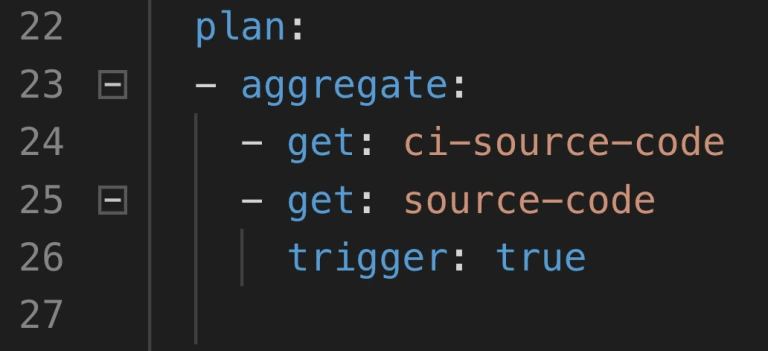
Neat, so where can we use it? There are 2 main parts of a job where the aggregation is useful:
1. Resource download and upload.
2. Tests execution.
Get and put statements are ideal targets because download and upload of resources are usually completely independent. Integration tests, contract tests, dependency vulnerabilities tests, and alike are also likely candidates if they don’t interfere with one another. Project build tasks? Probably not, because those are usually sequential and we require their output to proceed.
How much time can aggregating save? Of course, it depends. Assuming we can’t aggregate steps that build and test our code, we do get the advantage of simultaneous upload and download of our resources as well as we get less visible step-to-step overhead. We usually save up to two, maybe even three minutes. The largest saving we got was from over half an hour to below ten minutes. Most of the saved time came from running test-related tasks in parallel.
Use docker images with built-in tools
This improvement is trickier to implement but yields a noticeable build time gains. Each task runs in a container, and the image for that container has a certain set of tools available. At some point in the project comes a time where no available image has the tool required. First thing developers do is they download that tool manually or install it using a package manager as a part of the task execution. This means that the tool is fetched every time the task runs. On top of that, the console output is flooded with tool installation logs.
The solution is to prepare a custom container image that already has everything needed for a task to complete. This requires some knowledge not directly related to Concourse, but for example to Docker. With a short dockerfile and a couple of terminal commands, we get an image with the tools we need.
1. Create dockerfile.
2. Inside of the file, install or copy your tools using RUN or COPY commands.
3. Build the image using docker build.
4. Tag and push the image to the registry.
5. Change image_resource part in your Concourse task to use the new image.
That’s it, no more waiting for tools to install each time! We could even create a pipeline to build and push the image for us.
Create pipelines from a template
Moving from time-saving measures to developer convenience tips, here’s one for bigger projects. Those usually have a certain set of similar build pipelines with the only differences being credentials, service names, etc. - parameters that are not hardcoded in the pipeline script and are injected at execution time from a source like CredHub. This is typical for Cloud Foundry and Kubernetes web projects with microservices. With a little bit of creativity, we could get a bash or python script to generate those pipelines from a single template file.
First, we need to have a template file. Take one of your existing pipeline specifications and substitute parameter names with their pipeline agnostic version. Our script needs to loop over a pipeline names list, substitute generic parameter names with proper pipeline related ones that are available in Credhub and then set the pipeline in Concourse with the fly CLI.
The second part of the equation here is a Concourse job that watches for changes in the template file in a Git repository and starts the pipeline generation script. With this solution, we have to change only one file to get all pipelines updated, and on top of that, a commit to pipeline repository is sufficient to trigger the update.
Log into a task container to debug issues
When debugging Concourse task failures, the main source of information on failure is the console. A quick glance at the output is enough to solve most of the problems. Other issues may require a quick peek into the environment of an unsuccessful task. We can do that with fly intercept command.
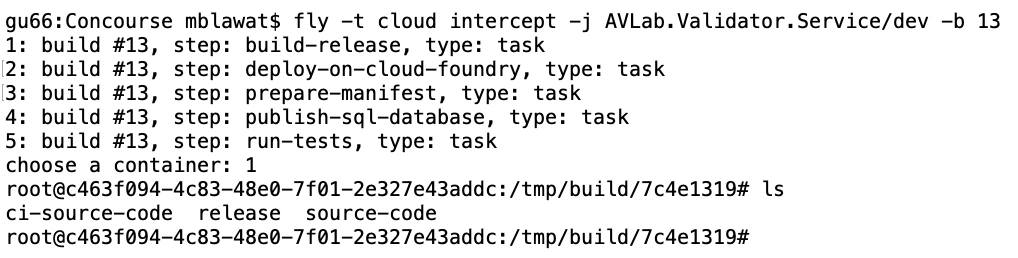
Fly intercept allows us to log into a container that executed a specific task in a specific job run. Inside we can see the state of the container when task finished and can try to find the root of failure. There may be an empty environment variable - we forgot to set the proper param in a yml file. The resource has a different structure inside of it - we need to change the task script or the resource structure. When the work is done, don’t forget to log out of the container. Oh, and don’t wait too long! Those containers can be disposed of by Concourse at any time.
Use Visual Studio Code Concourse add-on
The last thing I want to talk about is the Concourse CI Pipeline Editor for Visual Studio Code. It’s a plugin that offers suggestions, documentation popups, and error checking for Concourse yml files. If you use the pipeline template and generation task from the previous tip, then any syntax error in your template will be discovered as late as the update task updating the pipelines from the template. That’s because you won’t run fly set-pipeline yourself. Fixing such issue requires a new commit in the pipeline repository.
With the plugin, any unused resource or a typo in property name will be detected immediately. Add-on will also help you write new pieces of automation code by suggesting keywords and showing available values for Concourse commands. The only action required is to update the files.associations section in the settings. We use separate directories for pipelines and tasks, so we have set it up as follows:

Conclusion
And that’s it! We hope you have found at least one tip useful and will use it in your project. Aggregate is an easy one to implement, and it’s good to have a habit of aggregating steps from the start. Custom images and pipeline templates are beneficial in bigger projects where they help keep CI less clunky. Finally, fly intercept and the VSC add-on are just extra tools to save time during the pipeline development.

How to run a successful sprint review meeting
A Sprint Review is a meeting that closes and approves a Sprint in Scrum. The value of this meeting comes to inspect the increment and adapt the Product Backlog accordingly to current business conditions. This is a session where the Scrum Team and all interested stakeholders can attend to exchange information regarding progress made during the Sprint. They discuss problems and update the work plan to meet current market needs and approach a once determined product vision in a new way.
This meeting is supposed to enable feedback loop and foster collaboration, especially between the Scrum Team and all Stakeholders. A Sprint Review will be valuable for product development if there is an overall understanding of its purpose and plan. To maximize its value, it’s good to be aware of the impediments Scrum Team could meet. We would like to share our experience with a Sprint Review, the most important problems and facts discovered during numerous projects run by our team from Grape Up . As one of our company values is Drive Change, we are continuously working on enhancing our Scrum Process by investigating problems, resolving them, and implementing proper solutions to our daily work.
“Meetings – coding work balance.“
It’s a hard reality for managers leading projects. A lot of teams have a problem with too many meetings which disorganize daily work and may be an obstacle to deliver increment. Every group consists of both; people who hate meetings and prefer focusing on coding and meetings-lovers who always have thousands of questions and value teamwork over working independently. Internal team meetings or chats with stakeholders are an important part of daily work only when they bring any benefit to the team or product. Scrum prescribes four meetings during a Sprint: Sprint planning, the Daily Scrum, a Sprint Review and a Sprint Retrospective. It all makes collaboration critical to run a successful Scrum Team.
A stereotype developer who sits in his basement and doesn’t go on the daylight, who is introvert doesn’t fit this vision. Communication skills are very important for every scrum developer. Beyond technical skills and the ability to create good quality code, they need to develop their soft skills. Meetings are time-consuming and here comes a real threat that makes many people angry – after a few quarters of discussions, you may see no progress in coding. You need to confront with opinions of your colleagues and many times it’s not easy. Moreover, you need to describe to the managers what are you doing in a different language than JavaScript or Python.
For many professionals, the ideal world would be to sit comfortably in front of a screen and just write good quality code. But wait… Do people really want to do the work that no one wants? Create functionalities no one needs? Feedback exchange may not help to speed up the production process but for sure can boost the quality and usability of an application. The main idea of Scrum is to inspect and adapt continuously, and there is no way to do it without discussion and collaboration. In agile, the team’s information flow and early transformation is the main thing. It saves money and “lives”!
A Sprint Review gives a unique chance to stop for a moment and look at all the work done. It’s an important meeting that helps to keep roadmap and backlog in good health together with the market expectations. This is not only a one-side demo but a discussion of all participating guests. Each presented story should be talked through. Each attendee can ask questions, and the Product Owner or a team member should be able to answer it. It’s good to be as neutral as it’s possible neither praise nor criticize. Focus on evaluating features, not people.
Our team works for external clients from the USA, and our contact with them is constricted by time zones. A Sprint Review helps us to understand better client needs and step into their shoes. The development team can share their ideas and obstacles, and what is most important, enrich the understanding of the business value of their input. Each team member presents own part of a project, describes how it works, and asks the client for feedback. Sometimes we even share a work that's not 100% completed to be sure we are heading into the right direction to adapt on the early phase of implementation.
"Keep calm and work": No timeboxing
A Sprint Review should be open to everyone interested in joining the discussion. Main guests are the Product Owner, the Development Team, and business representation, but other stakeholders are also welcome. Is there a Scrum Master on board? For sure it should be! This may lead to a quite big meeting when many points of view occur and clash with each other. Uncontrolled discussion lasting hours is a real threat.
The Scrum Master’s role is to keep all meetings on track and allow everyone to talk. Parkinson’s Law is an old adage that says "work expands so as to fill the time available for its completion." Every Scrum Master’s golden rule of conducting meetings should be to schedule session blocks for the minimum amount of time needed. Remember that too long gathering may be a waste of time. Even if you are able to finish a meeting in 30 min, but had planned it for 1 hour, it will finally take the entire hour. Don’t forget that long and worthless meetings are boring.
An efficient Sprint Review needs to keep all guests focused and engaged. For a 1-week sprint, it should last about one hour; for a 2-week sprint, two hours. The Scrum Master’s role is to ensure theses time boxes but also to facilitate a meeting and inform when discussion leaves a trace. There should be time to present the summary of the last sprint: what was done and what wasn’t, to demonstrate progress and to answer all questions. Finally, additional time for gathering new ideas that will for sure appear. The second part of the meeting should be focused on discussing and prioritizing current backlog elements to adjust to customer and market needs. It’s a good moment for all team members to listen to the customer and get to know the management perspective and plan the next release content and date. A Sprint Review is an ideal moment for stakeholders to bring new ideas and priorities to the dev team and reorder backlog with Product Owner. During this session, all three Scrum pillars meet: transparency, inspection, and adaptation.
YOLO! : Preparation is for weak
A good plan is an attribute of a well-conducted meeting! No one likes mysterious meetings. An invitation should inform not only about time, place, and date of the meeting but also about the high-level program. Agenda is the first step of a good Sprint Review but not the only one. To be sure that Sprint Review will be satisfying for all participants, everyone needs to be well prepared. Firstly, the Product Owner should decide what work can be presented and create a clear plan of the demo and the entire meeting. The second step is to determine people responsible for each presented feature. Their job is to prepare the environment, interesting scenarios, and all needed materials. But before asking the team for it, make sure they know how to do it. Not all of the people are born presenters, but they can become one with your help.
In our team, we help each other with preparations to the Sprint Review. We work in Poland, but our customers are mostly from the USA. Not only the distance and time difference is a challenge but also language barriers. If there is a need everyone can ask for a rehearsal demo where we can present our work, discuss potential problems, and ask each other for more details. We’re constantly improving our English to make sure everything is clear to our clients. This boosts everyone’s self-confidence and final receipt. Team members know what to do, they’re ready for potential questions and focus on input from stakeholders. This is how we improve not only Sprint Reviews to be better and better but also communication skills.
"Work on your own terms": No DoD
“How ready is your work?”. Imagine a world where each developer decides when s/he finished work on her/his own terms. For one, it’s when the code is just compiled, for others it includes unit tests and it's compatible with coding standards, or even integration and usability tests. Everything works on a private branch but when it comes to integrating… boom! The team is trying to prepare a version to demonstrate but the final product crashes. The Product Owner and stakeholders are confused. A sprint without potentially releasable work is a wasted sprint. This dark scenario shouldn’t have happened to any Scrum Team.
To save time and to avoid misunderstandings, it’s good to speak the same language. All team members should be aware of the meaning of the word “done”. In our team, this keeps us on track with a transparent view of what work really can be found as delivered in a sprint. Definition of Done is like an examination of consistency for a team. Clear, generally achievable, and easy to understand steps to decide how much work is done to create a potentially releasable feature. This provides all stakeholders with clear information and allows the planning of the next business steps.
It is a guide that dictates when teams can legitimately claim that a given user’s story/task is "done" and can be moved to the next level - approval by the Product Owner and release. Basic elements of our DoD are; the code reviewed by other developers, merged to develop branch, and deployed on DEV/QA environment, and finally properly tested by QA and developers with the manual, and automation tests. The last step comes to fixing all defects, verifying if all the Acceptance Criteria are met, and reviewing by the Product Owner. Only when all DoD elements are done, we surely say that this is something we can potentially release when it will be needed.
"Curiosity killed a cat": don't report progress
Functionalities which meet requirements of Definition of Done are the first candidates to be shared on the Sprint Review. In the ideal Agile World, it’s not recommended to demonstrate not finished work. Everything we want to present should be potentially releasable… but wait! Could you agree that an ideal Agile World doesn’t exist? How many times external clients really don’t know how they want to implement something until they see the prototype.
Our company provides not only product development services but also consulting support. We don’t limit this collaboration to performing tasks, in most cases we co-create applications with our clients, advise the best solutions, and tackle their problems. Many times, there’s is no help from a Graphic Designer or a UX team. That happened to us. That’s why we have improved our Sprint Review. Since then we present not only finished work but also this in progress. Advanced features should be divided into smaller stories which can be delivered during one sprint. Final feature will be ready after a few sprints but completed parts of it should be demonstrated. It helps us discuss the vision and potential obstacles. Each meeting starts with work “done” and goes to work "in progress". What is the value? Clients trust us, believe in our ideas but at the same time still, have final word and control. Very quickly we can find out if we’re moving in the right direction or not. It’s better to hear “I imagined it in a different way, let’s change something” after one sprint than live with the falsified view of reality till the feature release.
"As you make your bed, so you must lie in it": don't inform about obstacle
Finally, even the best and ideal team can turn into the worst bunch of co-workers if they are not honest. We all know that customer satisfaction is a priority but not at all costs. It is not a shame to talk about problems the team met during the Sprint or obstacles we face with advanced features. Stakeholders need to know clearly the state of product development to confront it with the business teams involved in a project; marketing, sales or colleagues responsible for the project budget. When tasks take much more time than predicted, it’s better to show a delay in production and explain their reasons. Putting lipstick on a pig does not work. Transparency, which is so important is Scrum, allows all the people involved in the project to make good decisions for further product development. A Product Owner, as someone who defines the product vision, evaluates product progress and anticipates client needs, is obligated to look at the entire project from a general perspective, and monitor its health.
One more time, a stay-cool rule is up to date. Don’t panic and share a clear message based on facts.
We all want to implement the best practices and visions that make our life and work more productive and fruitful. Scrum helps with its values, pillars, and rules . But there is a long way from unconscious incompetence to conscious competence. It’s good to be aware of the problems we can meet and how to manage with them. “Rome wasn't built in a day”. If your team doesn’t use a Sprint Review but only a demo at the end of the sprint, just try to change it. As a team member, Scrum Master or Product Owner, observe, analyze and adapt continuously not only with your product but also with your team and processes.
Pro Tips:
- Adjust the time of a Sprint Review to accurate needs. For a 1-week Sprint, it’s one hour, for a 2-week Sprint give it two hours. It is a recommendation based on our experience.
- Have a plan. Create stable agenda and a brief summary of a Sprint and share it before meeting with everyone invited to a Sprint Review.
- Prepare yourself and a team. Coach your team members and discuss potential questions that can be asked by stakeholders.
- Facilitate meeting to keep all stakeholders interested and give everyone possibility to share feedback.
- Create a clear Definition of Done that is understandable by all team members and stakeholders.
- Be honest. Talk about problems and obstacles, show work in progress if you see there is value in it. Engage and co-create the product with your client.
- Try to be as neutral as it’s possible nor to praise or criticize. Focus on facts and substantive information.

Main challenges while working in multicultural half-remote teams
We know that adjusting to the new working environment may be tough. It’s even more challenging when you have to collaborate with people located in different offices around the world. We both experienced such a demanding situation and want to describe a few problems and suggest some ways to tackle them. We hope to help fellow professionals who are at the beginning of this ambitious career path. In this article, we want to elaborate on working in multicultural, half-remote teams and main challenges related to this. To dispel doubts, by “half remote team” we mean a situation in which part of the group works together on-site when other part/parts of the crew work in other places, single or in a larger group/groups. We've gathered our experiences during our works in this kind of teams in Europe and the USA.
It’s nothing new that some seemingly harmless things can nearly destroy whole relations in a team and can start an internal tension. One of us worked in a team where six people worked together in one office and the rest of the team (three people) in the second office. We didn’t know why, but something wrong started to happen, these two groups of people started calling themselves “we” and “them”. One team, divided into two mutually opposing groups of people.
Those groups started to defy each other, gossip about yourself, and disturb yourself at work. What's more, there was not a person who tried to fix it, conflicts were growing, and teamwork was impossible. The project was closed. One year later, we started to observe this in our another project. In that project situation was different. There were 3 groups of people, a larger group with 4 people, and 2 smaller with 2 people each. We had delved into the state of things, and we discovered the reasons for this situation.
Information exchange
One of the reasons was the information exchange. The biggest team was located together, and they often discuss things related to work. Often the discussion turned into planning and decision-making, as you can guess, the rest of the team did not have the opportunity to take part in them. The large team made the decision without consulting it, and it really annoyed the rest…
What was done wrong, how can you avoid it in your project? The team should be team, even if its members don’t work in the same location. Everyone should take an active part in making decisions. Despite the fact that it is difficult to achieve, all team members must be aware of this, they must treat the rest of the team in the same way, as if they were sitting next to them.
Firstly, if an idea is developed during the discussion, a group of people must grab it and present it to the rest of the team for further analysis. You should avoid situations where the idea is known only to a local group of people. It reduces the knowledge about the project and increases the anger of other developers. They do not feel part of the team, they do not feel that they have an impact on its development. What's more, if the idea does not please the rest, they begin to treat authors hostile which create conflicts and leads to a situation where people start to say “we” and “them”. Part of the team should not make important decisions, it should be taken by the whole team, if a smaller group has something to talk about everyone should know about it and have a chance to join them (even remotely!).
Secondly, if a group notices they are discussing things which other people may be interested in, they should postpone local discussion and create remote room when discussion can be continued. Anyone can join it as if sitting next to them.
Thirdly, if it was not possible to include others in the conversation the conversation summary should be saved and made available to all team members.
Team integration
The second reason We found was an integration of the parts of the team. The natural thing was that people sitting together knew each other better, thus, a natural division into groups within the team was formed. Sadly, this can not be avoided… but we can reduce the impact of this factor.
Firstly, if possible, we should ensure the integration of the parts of the team. They have to meet at least once, and preferably in regular meetings not related to work, so-called integration trips.
Secondly, mutual trust among the team should be built. The team should talk about difficult situations in full composition, not in local groups over coffee. And if a local conversation took place, the problem should be presented to the whole team. Everyone should be able to speak honestly and feel comfortable in the team, it is very important!
Language and insufficient communication
Another obstacle is a different culture or language. If there are people who speak different languages in the team, they will usually use English which will not be a native language for a part of the team… Different team members may have different levels of English speaking skills, less skilled team members may not understand intricate phrases.
It is very important to make sure everyone understands the given statement. If you know that you have some people in your team whose English is not so fluent, you can ask and make sure they understood everything. Confidence should be built inside the team, everyone should feel that they can ask for an explanation of the statement in the simplest words without taunting and consistency. We have seen such a problem many times in teams especially multicultural. A lack of understanding leads to misunderstandings and the collapse of the project. Each of the team members should learn and improve their skills, the team should support colleagues with lower language skills, politely correcting them and communicating that they use some language form incorrectly. We recommend doing it in private unless the confidence in the team is so large that it can be done in a group.
Communication can also lead to misunderstandings, at the beginning of our careers our language skills were not the best. Our statements were very simple and crude. As a result, sometimes our messages were perceived as aggressive… We did not realize it until We started to notice the tension between us and some of the team members. It is very difficult to remedy this, after all, we do not know what others think. Therefore, small advice from us - talk to each other, seriously and try to build a culture of open feedback in the team, address even uncomfortable topics. Even if you have a language problem it is sometimes better to try to describe something in 100 simple sentences than not to speak at all...
Time difference
Let’s focus on one more challenging difficulty that may cause a lot of troubles while working in half-remote teams. While working in teams distributed over a larger area of the world, the time difference between team member’s locations might cause an issue that is very hard to overcome. We have been working in a team where team members were located in the USA (around both eastern and western coasts), Australia and Poland. As per our experience, it is nearly impossible to gather all team members together because of working hours in those locations. We have observed some common issues that such a situation may cause.
Team members working in different time zones have limited capabilities of teamwork. There is often not enough time for team activities like technical or non-work-related discussions over a cup of coffee that build team spirit and good relations between members. It is impossible to integrate distributed teams without cyclic meetings in one place. We have seen how such odds and ends lead to team divisions on “we” and “they” mentioned before. It is also a blocker when it comes to applying good programming practices in the project like pair programming and knowledge sharing.
Distributed teams are more difficult to manage, and some of the Agile work methodologies are not applicable at all, as it often requires the participation of all team members. In the case of our team, Scrum methodology did not work at all, because we could not organize successful planning sessions, sprint reviews, retrospectives and demos on which everyone’s input matters. It was a common situation where after planning team members did not know what they are supposed to do next, and at first, they needed to discuss something with absent teammates.
If we take a look at distributed team performance, it will usually seem to be lower than in the case of local teams. That is mainly because of inevitable delays when some team member needs assistance from another. Imagine that you start working and after an hour you encounter a problem that requires your teammate’s help, but s/he will wake up no sooner than in 7 hours. You have to postpone task you were working on, and focus on some other - what usually slows your job down. Of course, it is a sunny day scenario, because there might be more serious issues where you cannot do anything else in the meantime (i.e. you have broken all environments including production, backup was “nice to have” on planning - and your mate from Australia is the only one who can restore it). It also takes more time to exchange information, process code reviews and share knowledge about a project if we cannot reach other team members immediately when they are needed.
On the other hand, distributed teams have some advantages. There are many projects or professions that require client support for 24/7 - and in this case, it is much easier for such time coverage. It can save a team from on-calls and other inconveniences.
We have learned that there is no cure for all the problems that distributed teams struggle with, but the impact of some of them can be reduced. Companies that are aware of how time difference impacts team performance often offer possibilities to work remotely from home in fully flexible hours. In some cases, it works and it is faster to get things done, but it does not solve all problems on a daily basis, because everyone wants to live their private life as well, meet friends on the evening or grab a beer and watch TV series rather than work late at night. Moreover, team integration and cooperation issue could be solved by frequent travels but it is expensive and the majority of people do not have the possibility to leave home for a longer period of time.
Summary
To sum it up, multicultural half-remote teams are really challenging to manage. Distributed teams struggle with a lot of troubles such as information exchange, teamwork, communication, and integration - which may be caused by cultural differences, remote communication and the time difference between team members. Without all this, there is just a bunch of individuals that cannot act as a team. Despite the above tips to solve some of the problems, it is hard to avoid the lack of partnership among team members, that may lead to divisions, misunderstandings and team collapse.
And while the struggles described above are real, we can't forget why we do it. Building a distributed team allows a company to acquire talent often not available on the local market. By creating an international environment, the same company can gain a wider perspective and better understand different markets. Diversification of the workforce can be a lifesaver when it comes to some emergency issue that may be a danger for a company that the entire team works in one location. We at Grape Up share different experiences, and thanks to knowledge exchange, our team members are prepared to work is such a demanding environment.
Bringing visibility to cloud-native applications
Working with cloud-native applications entails continuously tackling and implementing solutions to cross-cutting concerns. One of these concerns that every project is bound to run into comes to deploying highly scalable, available logging, and monitoring solutions.
You might ask, “how do we do that? Is it possible to find "one size fits all" solution for such a complex and volatile problem?” You need to look no further!
Taking into account our experience based on working with production-grade environments , we propose a generic architecture, built totally from open source components, that certainly provide you with the highly performant and maintainable workload. To put this into concrete terms, this platform is characterized by its:
- High availability - every component is available 24/7 providing users with constant service even in the case of a system failure.
- Resiliency - crucial data are safe thanks to redundancy and/or backups.
- Scalability - every component is able to be replicated on demand accordingly to the current load.
- Performance - ability to be used in any and all environments.
- Compatibility - easily integrated into any workflows.
- Open source - every component is accessible to anyone with no restrictions.
To build an environment that enables users to achieve outcomes described above, we decided to look at Elastic Stack, fully open source logging solution, structured in a modular way.
Elastic stack
Each component has a specific function, allowing it to be scaled in and out as needed. Elastic stack is composed of:
- Elasticsearch - RESTful, distributed search and analytics engine built on Apache Lucene able to index copious amount of data.
- Logstash - server-side data processing pipeline, able to transform, filter and enrich events on the fly.
- Kibana – a feature-rich visualization tool, able to perform advanced analysis on your data.
While all this looks perfect, you still need to be cautious while deploying your Elastic Stack cluster. Any downtime or data loss caused by incorrect capacity planning can be detrimental to your business value. This is extremely important, especially when it comes to production environments. Everything has to be carefully planned, including worst-case scenarios. Concerns that may weigh on the successful Elastic stack configuration and deployment are described below.
High availability
When planning any reliable, fault-tolerant systems, we have to distribute its critical parts across multiple, physically separated network infrastructures. It will provide redundancy and eliminate single points of failure.
Scalability
ELK architecture allows you to scale out quickly. Having good monitoring tools setup makes it easy to predict and react to any changes in the system's performance. This makes it resilient and helps you optimize the cost of maintaining the solution.
Monitoring and alerts
A monitoring tool along with a detailed set of alerting rules will save you a lot of time. It lets you easily maintain the cluster, plan many different activities in advance, and react immediately if anything bad happens to your software.
Resource optimization
In order to maximize the stack performance, you need to plan the hardware (or virtualized hardware) allocation carefully. While data nodes need efficient storage, ingesting nodes will need more computing power and memory. While planning this take into consideration the number of events you want to process and amount of data that has to be stored to avoid many problems in the future.
Proper component distribution
Make sure the components are properly distributed across the VMs. Improper setup may cause high CPU and memory usage, can introduce bottlenecks in the system and will definitely result in lower performance. Let's take Kibana and ingesting node as an example. Placing them on one VM will cause poor user experience since UI performance will be affected when more ingesting power is needed and vice-versa.
Data replication
Storing crucial data requires easy access to your data nodes. Ideally, your data should be replicated across multiple availability zones which will guarantee redundancy in case of any issues.
Architecture
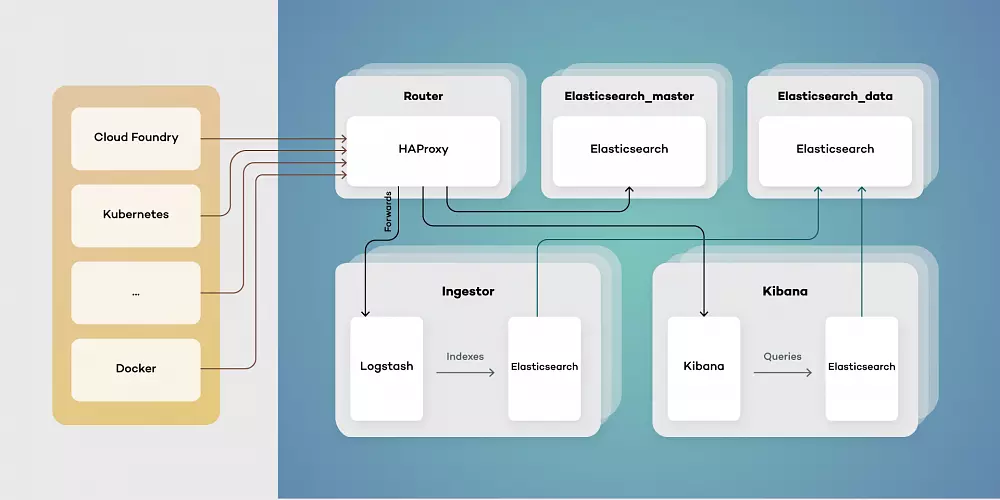
Our proposed architecture consists of five types of virtual machines - Routers, elastic masters, elastic data, ingestors, and Kibana instances. This toolset simplifies scaling of components while separating their responsibilities. Each of them has a different function:
- Elasticsearch_master - controls indexes and Elasticsearch master. Responsible for creating new indexes, rolling updates and monitoring clusters health.
- Elasticsearch_data - stores data and retrieves it as needed. Can be run both as hot and warm storage, as well as provides redundancy on data.
- Ingestor - exposes input endpoints for events both while transforming and enriching data stored in Elasticsearch.
- Kibana - provides users with visualizations by querying Elasticsearch data.
- Router - serves as a single point of entry, both for users and services producing data events.
Architecting your Elastic Stack deployment in this way allows for the simple upgrade procedure. Thanks to using a single point of entry, switching to a new version of Elastic Stack is as simple as pointing HAProxy to an upgraded cluster.
Using a clustered structure also allows for freely adding data nodes as needed when your traffic inevitably grows.


Highlights from KubeCon + CloudNativeCon Europe 2019 – Kubernetes, Service Mesh Interface, and Cloudboostr
This year’s KubeCon was a great occasion to sum up 5 years of Kubernetes and outline its future. It was also a great place to make some important announcements, and we got it. Our team spent those days not only on learning about new features and networking with this amazing community but also talking about how Cloudboostr can impact the adoption of cloud-native technology .
Grape Up team joined 7,700 attendees, top enterprises, media and analysts in Barcelona, Spain at KubeCon + CloudNativeCon Europe 2019 to discuss what’s new in Kubernetes, open source and cloud-native, learn from the most inspiring people in the industry, network with peers from different projects and together work on developing the community gathered around the Cloud Native Computing Foundation.

KubeCon + CloudNativeCon Europe 2019: Kubernetes is thriving
This year’s KubeCon provided us with many promising news and announcements. From the very first keynote to the last workshop, a strong focus was on leading technologies, mainly Kubernetes, and its improvements. Dan Kohn, Executive Director at CNCF, in his opening keynote, presented the Kubernetes place in the cloud-native environment and explained why Kubernetes, like many technologies and applications before, is winning the race called simultaneous invention.
Dan Kohn used engaging storytelling, to present that from ages people have been working on similar ideas at the same time, taking advantage of works done before them. He stressed the fact that there wouldn’t be Kubernetes without technologies, that had built the foundations. He gave us a glimpse of what, in his opinion, makes Kubernetes standing from the crowd:
- It works really well!
- Vendor-Neutral Open Source and Certified Partners.
- The People that develop and promote it.
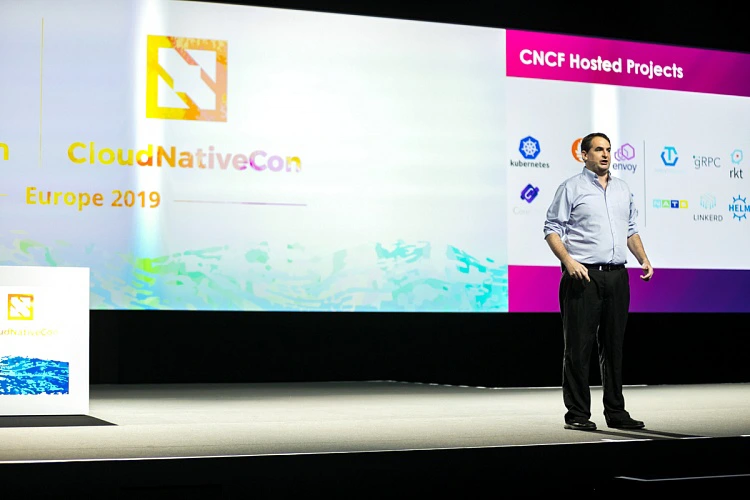
The end of the opening keynote was strong – all the members of the community gathered around Kubernetes and CNCF have an impact on the technology improvements, as Kubernetes is a foundation on which many new technologies arise.
Hot news: Service Mesh Interface
Microsoft stole the show announcing the launch of Service Mesh Interface, an open project that defines a set of common APIs that provide developers with interoperability across different service mesh technologies.
The Service Mesh Interface includes:
- A standard interface for meshes on Kubernetes.
- A basic feature set for the most common mesh use cases.
- Flexibility to support new mesh capabilities over time.
- Space for the ecosystem to innovate with mesh technology.

This announcement from Microsoft led to many discussions during the conference. As the service mesh is a technology at the early stage of its development, an environment designed for growth should impact its further evolution. SMI is supposed to provide interoperability that will help the emerging ecosystem of tools integrate with existing mesh providers, and instead of doing it individually, gain cross-mesh capabilities through SMI. We’re looking forward to seeing how it will affect the developers' job and help to solve customer problems in the nearest future.
Cloudboostr – an enterprise-grade Kubernetes
What makes KubeCon + CloudNativeCon a special event is an incredible capability of CNCF to engage so many people representing multiple tech and business areas to collaborate together on developing a brighter future for the cloud-native ecosystem. As Dan Kohn said at the beginning of the conference, Kubernetes and parts of the cloud-native landscape build the foundation for the technologies of the future. We at Grape Up also want to participate in this process of developing cloud-native technology and helping various companies implementing Kubernetes.
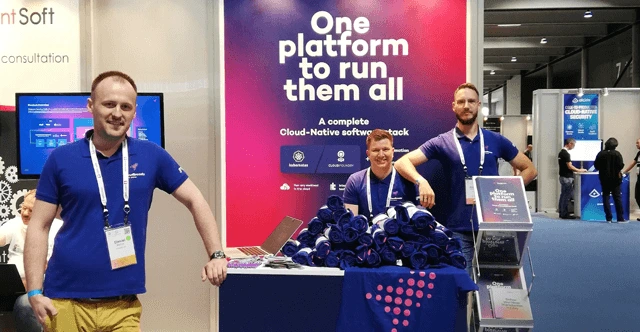
This is why KubeCon + CloudNativeCon was a great occasion to talk with the end users and developers about their adoption of cloud-native tools. They had a chance to learn more about Cloudboostr, our cloud-native software stack, built with Kubernetes at its core , and allowing companies to stand up a complete cloud-native environment in a couple of hours. Our experts spent those days in Barcelona on discussing the evolution of Kubernetes, its business use cases, and ways to get the most of its capabilities. Our team value this kind of events the most – it's crucial for our product development and a better understanding of people’s challenges and business needs.
Seeing companies highly interested in Cloudboostr capabilities, we are encouraged to work even harder on new improvements. And this the clue to the Kubernetes success – by building a community that inspires other members to grow and connecting them to accelerate the development of associated services, CNCF has created a self-engaging mechanism that helps Kubernetes thrive and acquire new users. This strategy makes Kubernetes an important part of the technology development as a whole, which with every year becomes even more impressive.

Why nearshoring may be the best choice for your software development
Adapting the latest technologies obligates executives to decide if they should build an in-house team or outsource demanding processes and hire an external team. And while outsourced projects become more sophisticated, leaders responsible for making decisions are taking into account more factors than just cost savings. Here comes nearshoring.
Disruptive economy, the fast-changing landscape of cutting-edge technologies, and extremely demanding customers – regardless of the established position on the market, today’s most powerful enterprises need help to retain once gained a competitive advantage . Most of the world’s largest companies are undergoing radical changes that focus on adapting the latest technology and game-changing approaches to company culture.
To embrace digital transformation and get the most out of it, leaders in their fields – automotive, telco, insurance, banking, etc. – utilize knowledge and experience of external teams. As this collaboration is getting more recognition it also takes more sophisticated forms. For decades, the biggest enterprises have been opening their branches in different countries or delegating parts of their processes to specialized teams outside the organization – this is the way outsourcing and offshoring were born.
And while it works perfectly for many business fields, companies that implement the most comprehensive technologies, rebuilding their core businesses, and trying to adopt promising approaches to software delivery, need a solution that is more sophisticated.
What is nearshoring?
Delegating tasks to external teams is full of benefits, but also has some real treats – like cultural differences in communication between teams, challenges to manage processes remotely, disruption in transforming knowledge, and many more. After years of testing good and bad experiences, some enterprises have mastered the most effective way to delegate job – nearshoring.
Nearshoring is often described as the outsourcing of services, especially regarding the newest technologies, to companies in nearby countries. In practice, it means that an enterprise from Germany hires a company from Poland to develop a particular project like building an app or implementing software. Nearshoring is often used by brands expanding their services to the new yet advanced business fields, where building and an in-house team responsible for a given area would be too expensive and challenging.
Why do enterprises prefer nearshoring over offshoring?
While using nearshoring and offshoring comes to some common profits – cost savings, tax benefits, finding skilled professionals in given niches, the first one supposed to be an answer to the challenges addressed in a previous part. Companies that complain about their experiences with offshoring too often make the same mistakes. They decide on moving their processes to the far-distant countries regardless of cultural differences and working style. They focus on thing easier to measure, like financial results and don’t take into consideration less obvious factors.
Backed with that experiences, enterprises from various industries have started to collaborate with teams of professionals that have more in common with their employees; geographically, by living in the same part of the world, often sharing a border, and culturally – by belonging to similar cultural circle, sharing common working culture, and being at a comparable level of language used in project (English, first!).
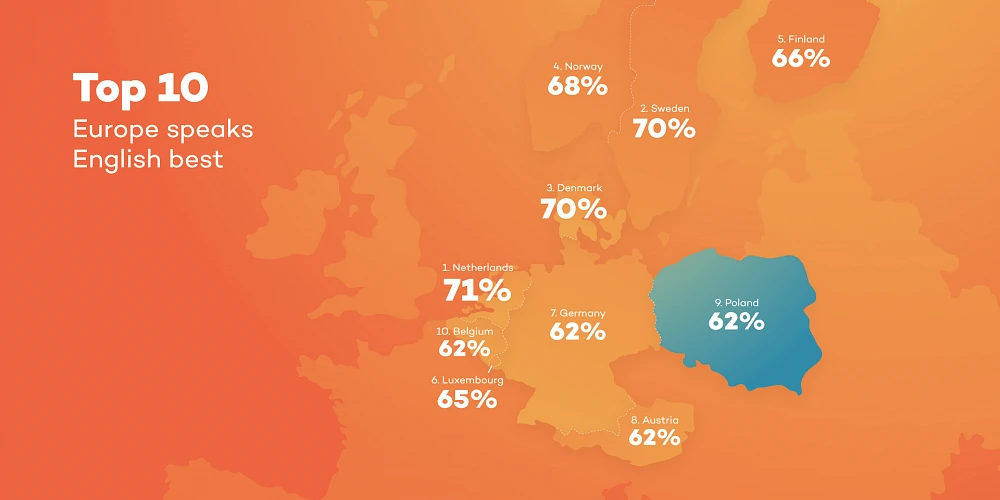
According to many leaders responsible for workforce management, when deciding on hiring a company that have to help you with improving your business, especially if you're trying to implement complex technology, you should pay at least as much attention to the communication and soft skills as to the know-how and experiences in working on similar projects.
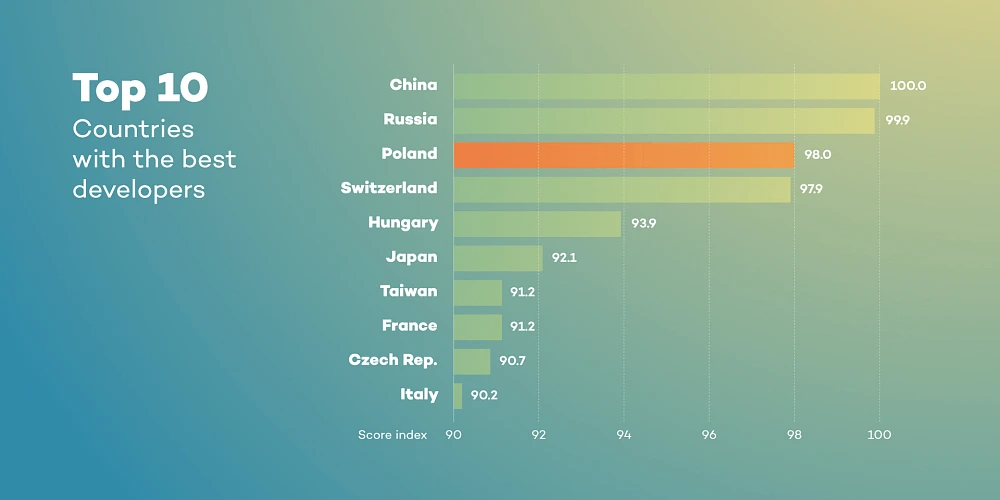
Where do enterprises from Western and Northern Europe look for partners?
Agile teams from Central Europe that consist of experts in transforming businesses, implementing DevOps culture, and enabling cloud-native technologies are getting a strong recognition among established companies from Germany, France, UK. Norway and Italy. Professionals in Poland, Czechia or Hungary are known for their skills, language proficiency, and working culture. And it has never been more difficult to find some real differences in the ways people from these parts of Europe live.
All these things make collaboration more fluent and easier to manage. Partnering with companies from the same time zones can also save the cost of communication and transport, and makes them available during similar working hours.
Taking into account flexibility, language skills, technical knowledge, experience in various international projects, lower operational costs and cultural similarities to the leading European countries, companies from countries like Poland have become natural nearshoring hubs.
Collaboration with top enterprises from a nearshoring partner’s perspective
For the last couple of years, Grape Up has been working as a nearshoring partner with the most recognized brands in various industries like leading automakers from Germany and large telcos from Italy and Switzerland. These experiences have helped our team develop soft skills needed to get the most out of the cooperation, both for hiring enterprises and our employees who can now master their expertise working on demanding projects for the most competitive businesses.
We have to admit that our competitive advantage may seem unfair. We’ve gathered a huge team of experienced engineers familiar with the latest cloud-native technologies, Open Source tools, DevOps and Agile approaches. They feel well in the international environment, speak fluent English, and are good in adapting to a new working style. We have two R&D centers in Poland and a few offices in Europe. We use experience amassed through the years of working with companies that are willing to be early adopters of cutting-edge technologies and innovative methodologies. We’re active contributors to cloud-native and open source communities, we attend top conferences and industry events – that give us direct access to knowledge and innovative ideas. Being ahead of the competitive crowd allows us to focus on the most promising projects.
If your enterprise is working on digital transformation, trying to implement DevOps or adapt cloud-native technologies and you need some support or consultancy reach us without a doubt . We are responsible for numerous successful migration to the cloud, enabling cloud platforms, transforming legacy software into cutting-edge applications, and tackling business challenges that at first sight might seem unsolvable.
What to know before introducing pair programming at your company?
Pair programming has become a popular way of developing the newest products and encouraging team members to share knowledge and grow together. Many of the world’s top enterprises adopt this innovative technique. Some of them with success and some of them with less expected results.
Before a company embraces pair programming its leaders and developers should get to know some basic knowledge about this approach. As a company that not only uses this practice on a daily basis but also implements pair programming in the customer’s engineering teams, we’ve answered to the commonly asked questions about this technique, its pros, and cons, how to prepare a workstation for developers working in pairs, and if pair programming is good for everyone.
What is pair programming and how should it look like?
You can find various definitions, but most of them agree that pair programming is an agile software development technique that requires two developers working together on the same block of code, using one workstation. In these pairs, one programmer is becoming a “Driver” and the second one is known as a “Navigator”. Where they work together “Driver” manages a computer and writes code, whereas “Navigator” is supposed to check the written code, follow colleague’s job, and work on problems faced during implementation. When using the pair programming technique, programmers should discuss ongoing works, search for effective solutions, and support each other. What’s important, roles in a pair coding team should be changed during a workday as they are not assigned permanently.
How to prepare a workstation?
The most important thing when designing a workstation comes to making it comfortable for both programmers. A desk for a pair should be properly larger than a desk for an employee working alone. And when two people work together for eight hours a day both need their own, dedicated space to build a comfort zone. A workstation for coding duo requires at least two monitors that displaying the same things, and a keyboard and mouse for each developer.
Teams that work remotely proved that pair programming can be done effectively even when collaborating developers do it at a distance. It’s important to equip these developers with a working gear that enables productive communication, and high-quality headphones are a must-have.
Here is a list of useful tools and resources for pair programming:
- Cloud IDEs: AWS Cloud9, Codenvy,
- Communication and screen sharing tools: Skype, Slack, Zoom, TeamViewer, Stride,
- Live Code Share Extensions: Atom Teletype/VSCode Live Share,
- GIT Scripts: pivotal-legacy/git_scripts.

Advantages and disadvantages of pair programming
And when pair programming delivers real value for companies that implemented this technique, the leaders responsible for adopting these practices in their teams have to be aware of its threats. Here are some of the most valuable pros of pair programming:
- Higher quality of designed solutions - more compound and more meaningful development for given tasks.
- Different views and perspectives regarding the same problem.
- Reduced risk of failure or making a mistake.
- Time and cost savings - software is delivered faster which decreases the costs of development.
- Agile and productive knowledge transfer in projects.
- Breaking down silos in projects - avoiding situations when only one person in a project owns key knowledge.
- Building stronger relationships among team members.
And here come some cons every company has to take into account:
- Dealing with distractions to individual comfort zones and independent working style.
- Personalized working environment - getting used to a non-standard way of doing a job.
- Common lack of convenience to not that obvious and innovative way of programming among developers used to works on their own.
- More demanding and exhausting way of work.
All of the disadvantages may result in rising discomfort and drops in productivity which sabotage the whole idea of pair programming and potential wins it could provide.
Was every developer born for pair programming?
Pair programming may not be that easy as it is often presented. This technique obligates developers to be communicative, conscientious and focused on the subject matter. For many coding professionals, the hardest part of programming in pairs comes to the necessity to adjust to the other person - her/his way of work, time, and individual habits.
People who value working on their own manner and their own comfort, need focus and quiet environment, or just avoiding too much engagement in communication, may find pair programming too demanding for them.

My experiences with PP
My experience with pair programming has started two years ago. The theory seemed reasonable, but I was a little bit skeptical, and to be honest, I didn't believe in promised advantages. For me, it was rather a waste of time and resources when two developers work on the same problem at the same time.
At first, it was hard. I had to change my entire working routine and adjust to a colleague I was paired with. Actually, we both had to modify our working style, and we all know how difficult it is to change habits.
Adjusting to the new technique of doing my job influenced my time after work. I was more tired but at the same time, I felt that we had done a lot of good quality jobs. And step by step, it became easier as we got familiar with those practices. What was really encouraging - the result of our work and the amount of new knowledge was insane .
Working at that level of focus is demanding and costs a lot of energy. So, having a break for 2 or 3 minutes, do some small talk about topics unrelated to problems you’re currently trying to solve, may result in a more productive attitude during the day. It’s also worth noting, that direct collaboration with one of my colleague gave me the opportunity to better get to know that person and having a good friend at work also improved my comfort.
After a few weeks, I’ve noticed all these advantages of pair programming that previously wasn’t that obvious to me. We’ve improved the quality of our work, and our solutions were well thought out. As a result, we’ve minimized the number of mistakes which significantly enriched our outcome. And then it has become clear for me that pair programming is not just a cool theory but an effective way of developing new solutions and useful tool for learning new things. And when it’s a challenging technique, maybe not for everyone, but for sure it’s worth giving it a try. Anyone can try it on his/her own and in case of any troubles get back to the previous way of doing the job.
To sum up all my experiences with pair programming, I have to admit that this technique definitely works and expect the simple tasks, it’s worth to use it every day.

Be lazy – do not reinvent the cloud wheel from scratch
Keeping up with the newest technologies is demanding. A lot of companies tend to do that once in a while, and it is totally understandable. It is hard to follow and discover the perfect momentum to choose the cloud technology that will be valuable and cost-effective for years to come.
Cloud is not only a technology, but it also determines how to design, build and maintain applications and systems. For someone who is currently engaged in the process of digital transformation that is a huge deal – it's like upgrading your rickshaw to the newest Mustang car. All of the development tasks seems to be so easy after adopting to all cloud and DevOps conditions.
The common mistake in the situation where your process and software tools are outdated is to reinvent the new environment by yourself. Especially, when sophisticated platforms or infrastructures come into the picture. Becoming an expert in cloud technologies is a perfect example. It requires a lot of time and resources to master the best tools and to make them work together in the way we want them to. That time should be spent instead on what drives the company’s business and what the customer cares about the most: developing the product that will be running in the cloud.
At Grape Up, we follow a technology agnostic approach. We choose tools and technologies that are tailored to every specific customer and project. While working with the various companies on digital transformation, we helped several teams leverage cloud-native technologies and adapt a DevOps approach to deliver software faster, better, and safer. And despite the fact that every case was different, we have identified a visible pattern. Our team discovered a strong market demand on a cloud-native platform based on open source solutions. We also noticed that in most cases platform maintenance operations were outsourced. Again, building know-how is a hard process, so why not let someone with the right experience lead the way?
This is how Cloudboostr was born. A complete solution to run any workload in any cloud . All based on available open source tools that are well-known by the community and most importantly widely used and maintained. In the beginning, we’ve created a type of reference architecture to accelerate the digital transformation process. It was used as our internal boilerplate, not to reinvent to the whole thing with every customer, but rather use something based on the experiences from previous projects. Along the way, what used to be our template, got mature, and the time has come to make it an external platform, available for other companies.
How does the Cloudboostr platform work?
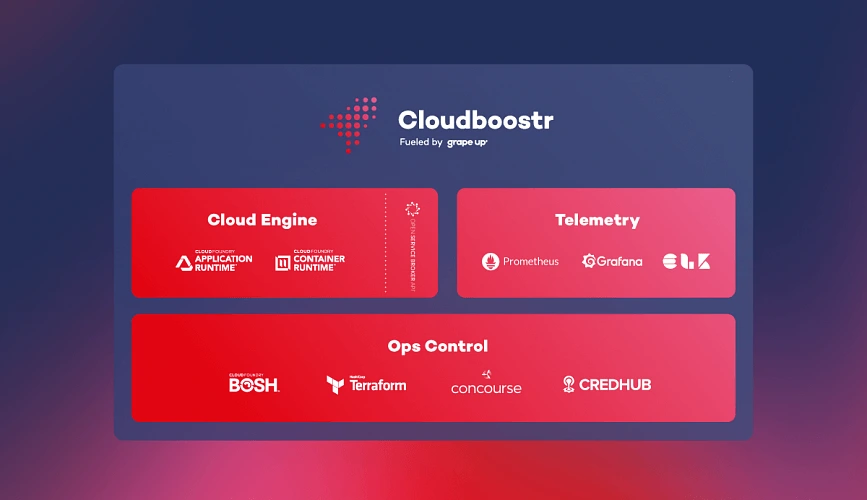
The Cloudboostr’s technology stack incorporates a number of leading open source technologies proven to work well together. Cloudboostr’s Cloud Engine is built with Kubernetes and Cloud Foundry, making applications deployment easy and both solutions cover a wide spectrum of application use cases. Terraform, BOSH & Concourse are used to automate the platform’s management and operations, and also track who, when & why applied a particular change. Built-in Telemetry toolkit consisting of Prometheus, Grafana and ELK stack allows to monitor the whole platform, investigate any issues and also recognize areas which should be improved.
The main abstraction layer of the platform is called Ops Control. It is a control panel for the whole platform. Here, all of the environments and also all shared resources like managing, monitoring or alerting services, are created and configured. Every environment can be created with either Cloud Foundry or Kubernetes or both of them. Shared resources help to monitor and maintain all of the environments and ensure proper workflows. From the operator’s perspective, the main point of interaction is Concourse with all of the pipelines and CLI for more advanced commands. Plus all of the Telemetry dashboards, with all sorts of graphical charts and metrics, where all concerns are clearly visible.
Cloudboostr as a platform includes all of the third party components under its wings. This means that any new platform releases will incorporate not only internal features or improvements but also upgrades of its elements if available. From a perspective of platform user, this is convenient - there is no need to worry about any upgrades, but one - the platform.
From a production perspective, it is crucial to have your platform always up and running. Cloudboostr uses HA-mode by default and leverages the cloud’s multi-AZ capabilities. It also automatically backs up and restores individual components of the platform and their state and data, allowing you to easily recreate and restore a corrupted or failed environment.
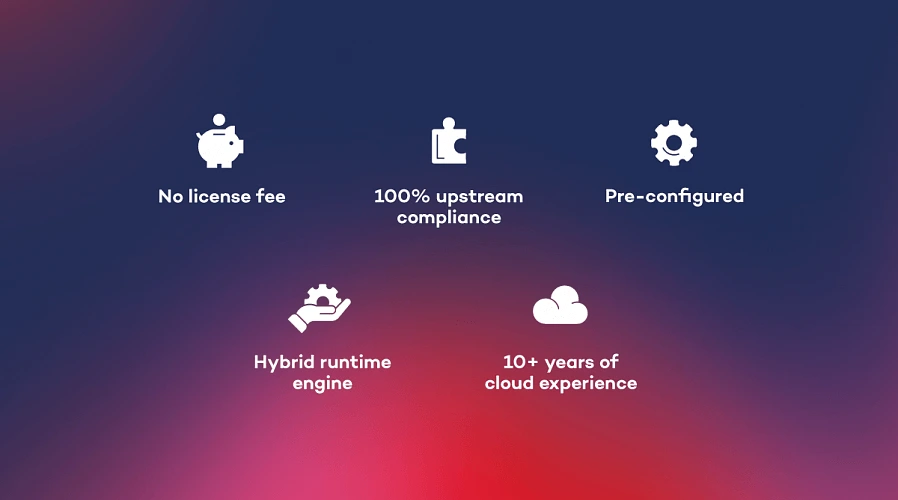
It is also important that Cloudboostr comes pre-configured, so if you're starting a journey with the cloud, you can install the platform very fast and be ready to deploy your applications very quickly. The initial cost of getting platform working is fairly low when it comes to getting the know-how, and that's a huge benefit.
How can Cloudboostr be tested?
It is obvious that platform is a big deal and no one would like to buy a pig in a poke. Especially when long term services are in the picture. Grape Up enables customers to try out the platform for a while before making a final decision. It is also understandable that most of the companies need more time to get to know the technology behind the platform. That's why the trial time is done in the dojo style. For a few weeks, the Grape Up crew settles in a customer location, installs the out of the box product, teaches how to use it and also navigates migration of the first application to the platform. Support provided by experienced platform engineers helps to understand the full capabilities of the product and how to use it in particular scenarios.
After the first period, there is another time frame for unassisted tests, where the client’s operations team can play with the platform, apply various tests or migrate other applications to see how they will run on the new environment. During that time, Grape Up platform engineers are still available to help and guide.
What about costs?
All the mentioned technologies are open source and if one would like to build this platform on their own they can do that. So why should anyone pay for that? The answer is, no one needs to pay for Cloudboostr license – it's totally free.
In order to use Cloudboostr platform though, you need to have a support service subscription plan. It's obvious that complex solutions, such as cloud platforms, need to be maintained by someone. Majority of the market outsource the services, which is especially convenient if you use software organized as a product. Again, it's not worth it to gain experience by yourself and spend weeks or months on that, while your competitors are moving forward. Also knowing that there is already a fair share of the market, who knows the technical details that you're looking for. However if one feels that they already have all of the knowledge needed to maintain the platform themselves, that's fine too - they can simply choose a minimal support plan.
Conclusion
The wisdom coming out from this article is – if you want to go cloud, do not reinvent the cloud wheel from scratch. Do the things that you were meant to – focus on building your applications and delivering true value to your customers and let the experts help you run your applications in the cloud and maintain the cloud environment. Boost your cloud journey with Cloudboostr !
Cloud Foundry Summit 2019 – continuously building the future
Cloud Foundry Summit 2019 in Philadelphia was the first event on our list of conferences we're heading to this year. It was an excellent season opening and another example that Cloud Foundry community is developing well. "Building the future" - this year’s motto is a good metaphor for the current situation. Cloud Foundry is evolving, and it's perfectly fine.
A quote from Abby Kearns, Executive Director of the Cloud Foundry Foundation, can summarize what's happening these days:
“We’re all kayakers now, navigating the rapids of change. The quickest learners will be the biggest winners.”
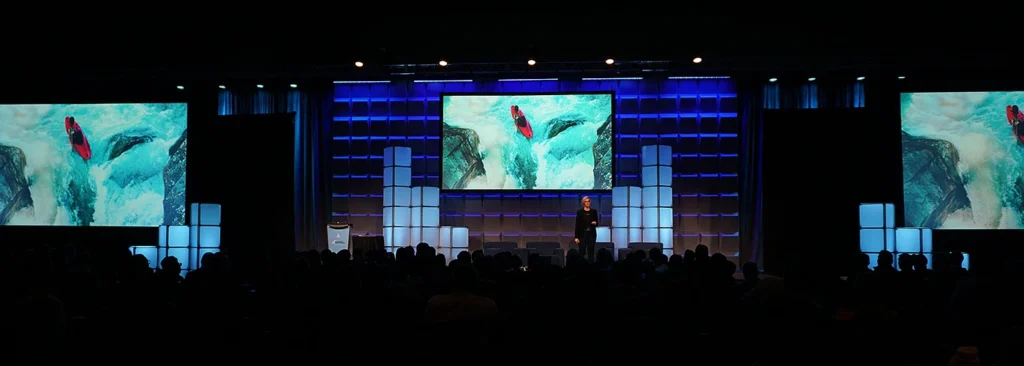
Abby Kearns started the summit with this powerful statement, and she addressed the fact that influence the way we develop our companies – technology is evolving at a rapid pace. The cloud-native landscape is continuously growing as new solutions and ideas are introduced on a regular basis. Often easy to use, but not developed enough to use them on production without taking some risk. How to choose the right technologies? When to adopt them? Should the whole application or component be rewritten? As Abby said, the quickest learners will be the biggest winners.
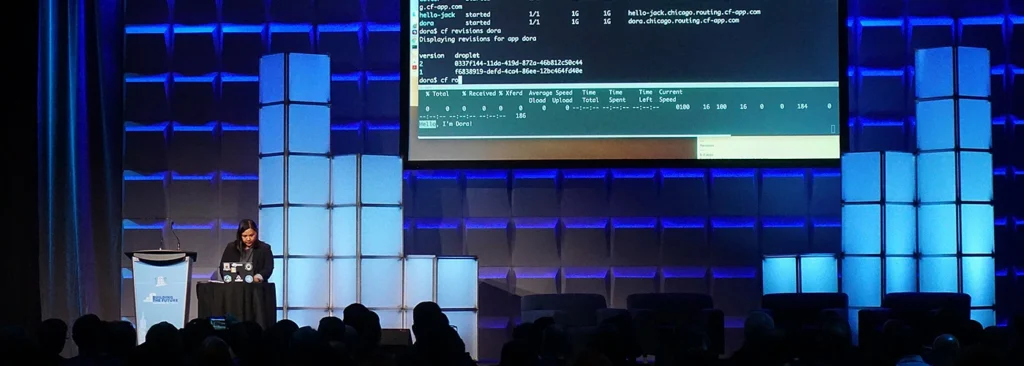
During the event, we had a chance to see how many of those tools have evolved into more mature and more customer-friendly apps. From the end-user perspective, it was promising to see them working together, as it gives a glimpse of how it may look in the future.
Cloud Foundry loves Kubernetes
One of the hottest topics in the corridors was for sure the Eirini project. This is a perfect example of how software should evolve – and yes, Cloud Foundry Foundation isn’t too proud to admit that Kubernetes is better than Diego/Garden in particular cases. This is how one open source should work with another.
A year ago one could ask if Kubernetes will push Cloud Foundry into the shadow. The question was wrong – how could we compare apples and oranges? To simplify things, we can call Cloud Foundry an Application PaaS, while Kubernetes can be described as a Container PaaS. This year we’re discussing how they can work together. As this seems to be the right question the Eirini project may be the right answer.
We can't wait to hear more about Cloud Foundry and Kubernetes collaboration. Especially given the fact that the project was proclaimed to pass core functional tests and it is ready early adopters. Learn more about Project Eirini
Interoperability
One of the keywords announcing the conference was interoperability. Eirini is a good example of that. TheCloud Foundry project continues to integrate with other open source projects to provide more capabilities for users. Platform maturity allows to incorporate new tools easily and makes the whole process user-friendly.
Worth noting is the fact that all of these tools are somehow used (or will be used soon) in ongoing projects, so it's not just state of the art. This is for sure a hard work of the community experts that help Cloud Foundry stay ahead of the curve.
The Comcast story
Philadelphia is home to a large Cloud Foundry member – Comcast. The company story of successful digital transformation is a practical guideline on how it should look like. In this year's agenda there was no case study about it, but anyway it is worth mentioning and congratulating the Comcast crew. This technology voyage and company restructuring – to be explicit, breaking siloses – should be an inspiration to all of us.
Cloudboostr
It wouldn't be an honest review without writing some personal summary of how do we feel about our participation in the summit. As an IT consulting company, we were more than excited to be a Silver Sponsor of a conference which gathers hundreds, if not thousands of cloud experts in one place.

Besides an engaging business case study of helping an established company to go through a digital transformation, we've also seen a huge interest in our cloud platform - Cloudboostr . A lot of companies want to automate their deployment & delivery tools. Becoming a cloud expert is a long and demanding process for firms that need to be focused on running their business operations. Majority of the world's top enterprises collaborate with external teams. Some of them use proven solutions that help them adjust to the fast-changing environment. A complete cloud platform (not only PaaS) meets market needs perfectly, and we were happy to tell our new friends about it.
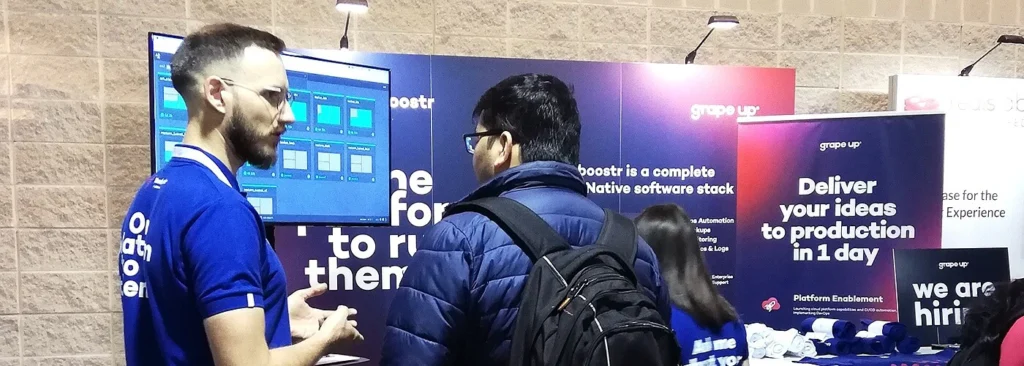
As the "kayakers" we know that it's a long way to go and we'll be happy to share our knowledge and experience in order to help our customers move forward.
5 Tips on how to deal with common problems when running large production environments
Working as a platform operator with cloud-native technologies, L2 technical support , and participating in CF installations give a unique opportunity to observe how different companies implement new technologies in their works and how they deal with running large production environments. Among various bad experiences, imperfect ideas, and the most reprehensible habits related to running and maintaining cloud infrastructures those listed below can generate the most complicated problems.
Bad practices often occur when it comes to productive CF infrastructures. However, these guidelines should help everyone who runs or uses any of the production-ready workloads.
Neglected capacity planning
Let’s start with this: you have to be aware that you will run out of resources eventually. Then you should plan how to scale up. If you run on-premises software, you should consider hardware and virtualization layer’s requirements. Proper sizing of the availability zones will always save you many problems.
On top of IaaS there is always a PaaS or some container orchestrator. The key to success here is to optimize all the limits, quotas and other configurations (like application scaling rules, etc.) so the microservices never consume available resources, even under high load.
It’s obvious that both hardware and virtualized capacity planning requires a buffer. You need to be prepared for issues, maintenance and infrastructure changes. There is no best configuration. It always depends on many factors but nevertheless, it is always worth taking into consideration.
Capacity and resources have to be monitored. A good monitoring tool with decent alerting rules will help you predict possible problems and react quickly if anything bad happens to your infrastructure.
Poor or no CI/CD
If you want to maintain any piece of software, don’t forget how valuable is automation. Many times people quit on CI/CD implementation because of the deadline or tasks formally more important. In most cases, it doesn't end up well.
It's hard to build, test and deploy software without automation. The manual process is highly exposed to the risk of human error. Apart from that, it is almost impossible to keep track of deployed software (version, updates, hotfixes, security patches, etc.) in large production environments. Sometimes you have to maintain CF platforms hosting 1K+ applications. Consider how problematic would be the migration process if there is a business decision to switch to a different solution.
For operators maintaining the infrastructures, platforms, and services used by developers it’s critical to keep everything up to date, take care of security patches and configuration changes. It is impossible to handle this manually with minimal or zero downtime of the services. That is why automated pipelines are so important, and you should never give up on implementing them in the first place.
Poor or no backup/restore procedures
Backup/restore is another important process that people often put in the background. You may think that your applications are safe if your IaaS offers you a highly available environment or containers you run have an auto-healing function. This is not true. Any disaster can happen, and in order to recover quickly, you have to create a well-defined backup and restore procedures that work. That’s not all, as the procedures have to be tested periodically. You need to be sure that backup/restore works fine since the process may depend on some external services that might have changed or just brake.
No periodic updates
Every software has to be updated regularly in order to keep it secure. It is also much safer to perform minor updates with a little chance of failure or downtime than doing ‘big jumps’. Major updates introduce higher risk, and it is hard to catch up with versions especially if there is no automation implemented.
You may see cloud infrastructures that were just installed and never upgraded and that generates a lot of issues for platform operators (users can’t see any difference). It is not a problem until everything works correctly. But after some time people may start escalating issues related to the versioning of the services. Unfortunately, it is too late to upgrade smoothly. It becomes a big spider’s web of dependencies. It may take weeks to plan the upgrade process and months to execute it.
Flawed architecture
Defective architecture generates serious problems. Many times developers are not aware of the issue until it shows up in production. After that, it’s really hard to admit the architecture needs to be changed and people often try to get rid of the effect instead of fixing the cause of the problem.
Let’s take a real-life example often faced. You may be receiving Prometheus alerts saying that ELK stack is overloaded. After investigating the issue, it may turn out that microservices are so verbose that they generate thousands of log messages per second. What if you raise the possible architecture problem, but nobody cares? As a result, you’ll have to scale ELK. In those cases, it may waste hundreds of CPUs and terabytes of memory and storage. That makes somebody spend money just to store 90% of useless data and maybe 10% of valuable information. This is really a simple way to put yourself in a situation without a way out.
Conclusion
Following these guidelines will definitely not be easy. Sometimes people responsible for making decisions are just not aware of the consequences of taking some actions. The role of every technically skilled person in the project is to spread the knowledge and make people aware of what may happen if they ignore those basic rules that matter. You can’t step back if you encounter such practices in the future. Be an example for others and drive change - it’s always worth trying.
How to overcome main challenges when collaborating with teams from different countries?
In one of his latest articles, Filip Ryba describes the specificity of working on on-site projects in the USA . Let's compare his experiences with similar projects run in other parts of the world.
Let's take the US first.
What can we learn from U.S work culture?
Teams in the USA are very customer-oriented and everyone knows their users. Ask your teammate about some functionality in the product. In Poland you will usually get a technical answer, something along the lines "Oh, it is because we need to get additional data from..." and you have to ask some follow-up questions, to get to actual functionality needed by customers and in many cases, you won't get that answer at all. In the USA you will most likely get "Oh, it is because our customers need to know if...", which puts you in the right business context from the start. I find it really positive since instead of just focusing on technical parts you are focusing more on the actual usability of the feature for the customers.
The teams that I worked with always had a flat structure. Sure, there was a PM and a PO, but they were sitting with their team at the same desks. It's another factor that makes communication super easy and effective.
We are actually closer culturally to the United States than you might think. We have Hollywood movies in our cinemas and on TV, we listen to news involving the US, and Netflix becomes popular worldwide. It gives us something to talk about to break the ice.
Obviously, everyone there speaks English, although its level differs from person to person. It is pretty common especially in IT that teams are multi-cultured and you will have teammates from India, China, Mexico to name a few. This might be challenging at first, but you will catch up pretty quick. Being constantly exposed to a foreign language is the best way to learn.
Another aspect of American culture that is especially contrasting with our culture is that when you share something you will always get positive feedback. You will hear "Oh, that's great!" or "Oh, that's so cool!" and it does not matter if they really think that. What matters is that it encourages to share more and it works.
Differences between American and German working culture
How do they compare to our neighbors from Germany? While the teams here also have a flat structure there is also a more rigorous division of responsibilities between teams. There are parts that belong to the architecture team, testing team, CI/CD teams, etc. This inevitably leads to more internal dependencies and generates more meetings. The Germans are very polite and open to discuss everything. Even if they do not have to agree with you, they will at least hear you out. Even when a decision comes from the top, they will still seek consensus within a team.
While collaborating with German companies your PO/PM will be more technical than their US counterpart. Firstly, it helps to translate business goals to engineering tasks. Secondly, the goals that do not bring immediate business value like code refactoring or improvements to the development environment are better understood, and easier accepted. All of that makes projects more technical with teams having less influence on the business side of the product.
Collaborating with Italian teams
The US might be 7000 km from Poland, but we are culturally closer to them than let’s say Italy. If you add to it that not many Italians speak English, the communication may be a bit challenging. The project I worked on was managed in a more freestyle manner. When seeking some information about a project all you have to do is to walk around the office and ask around until you find someone who has that knowledge. Of course, sometimes you also have to find someone who can help you as a translator.
Due to the same reasons communication with an end user is next to impossible. Trying to change the way things are done is even more challenging. Let’s say you finally encouraged your PM to agree to change things a bit. You go back home happy that things are finally moving into the right direction only to discover next day that there was another meeting with some other PM’s and everything is going back to how it was. Sometimes it requires time to work out a way of running projects that suits both sides - when you deal with the early struggles the job becomes more effective.
Collaborating with people from other countries sometimes may be demanding but when you invest some time in better understanding their work culture, a way of communicating, and daily routines it becomes easier. Despite all the differences and challenges at the beginning, on-site projects can be a valuable lesson and helpful experience. There is one more aspect of working abroad that I really like. You can of course visit the same countries by yourself during vacation. However as a tourist you don’t have to figure out what is the best way to commute, where to go shopping, where to eat, what to do on Friday evening etc. This allows you to experience how it is to live there without actually moving there.
What Is an exit strategy and why do you need one?
Cloud is everywhere these days. There is no doubt about that. Everyone already did or is about to make an important decision - which cloud provider to choose?
For enterprise solutions, the first thought goes to the big players: Amazon, Microsoft, Google. They provide both private and public cloud solutions using their own set of APIs, command-line tools and of course pricing.
It is very easy to get in, but is it the same with getting out? All your services may already benefit from great tools and services shared by your provider. Awesome tools, but specific to the company. Does Amazon CLI work with Azure? Not really.
The important part is that the scale of your infrastructure you can manage. The software can be optimized, to some point, but still, it may be a viable choice. Resources can be hosted using CDN to better manage bandwidth and storage cost. But what can be done if the provider increased the prices? How this can be mitigated?
The exit strategy
This is why you need an exit strategy. The plan to move all your resources safely and possibly without any interruptions from one warehouse to another. Or even the plan to migrate from one provider to the another. The reasons for the change may be very different. Pricing change, network problems, low latency or even a law change. All this may push your company against the wall. It is fine when you are prepared, but how to do this?
It may seem more on the paranoic side or catastrophic thinking, but in reality, it is not so uncommon. Even worse case, which is a provider shut down, happened a lot lately. It is especially visible with an example of cloud storage startups. $15 million dollars CloudMine startup filed for bankruptcy last year. A few years ago the same thing happened to Nirvanix and Megacloud. Nobody expected that and a lot of companies has been facing that problem - how can we safely move all the data if everything can disappear in 2 weeks?
Does it mean AWS will go down tomorrow? Probably not, but would you like to bet if it will be there in 10 years? A few years ago nobody even heard about Alibaba Cloud, and now they have 19 datacenters worldwide. The world is moving so fast that nobody can say what tomorrow brings.
How to mitigate the problem?
So we have established what the problem is. Now let’s move to the solutions. In the following paragraphs, I will briefly paint a picture of what consists of an exit strategy and may help you move towards it.
One of them is to use a platform like Cloud Foundry or Kubernets which can enable you to run your services on any cloud. All big names offer some kind of hosted Kubernetes solutions: Amazon ECS, Microsoft AKS and Google GKE. Moving workloads from one Kubernetes deployment to another, even private hosted, is easy.
This may not be enough though. Sometimes you have more than containers deployed. The crucial part then will be to have infrastructure as a config. Consider if the way you deploy your platform to IaaS is really transferable? Do you use provider-specific databases, storage or services? Maybe you should change some solutions to more universal ones?
Next part will be to make sure services your write, deploy and configure are truly cloud-native. Are they really portable in a way you can get the same source code or docker image and run on the different infrastructure? Are all external services loosely coupled and bounded to your application so you can easily exchange them? Or if all your microservices platforms are independent?
Last, but not least is to backup everything. Really, EVERYTHING. Not just all your data, but also the configuration of services, infrastructure, and platforms. If you can restore everything from the ground up to the working platform in 24 hours you are better than most of your competitors.
So why do I need one?
Avoiding provider lock-in may not be easy, especially when your company just started to use AWS or Azure. You may not feel very comfortable creating an exit strategy for different providers or just don’t know where to start. There are solutions, like Grape Up’s Cloudboostr, that manage backups and multi-cloud interoperability out of the box. Using this kind of platform may save you a lot of pain.
An exit strategy gives you a lot of freedom. New, small cloud provider comes to the market and gives you a very competitive price? You can move all your services to their infrastructure. Especially when we consider that small cloud providers can be more flexible and more keen to adapt to their client needs.
An exit plan gives safety, freedom, and security. Do not think of it as optional. The whole world goes toward the multi-cloud and the hybrid cloud . According to Forbes, this is what 2019 will matter most in the cloud ecosystem. Do you want to stay behind? Or are you already prepared for the worse?

Server Side Swift with Vapor - end to end application with Heroku cloud
In this tutorial, I want to show you the whole production process of back-end and front-end swift applications and push the backend side to the heroku cloud.
First, please make sure that you have installed at least Xcode 10. Let’s start from the backend side:
Open a terminal and check your Swift version and make sure that your swift version is 4.2.
swift –-version

Time to install Vapor CLI, for this one we should use homebrew.
brew install vapor/tap/vapor
Vapor CLI is already installed.
Let’s create a new project. Vapor CLI have simple commands for lots of things. Most of them you will learn in this tutorial later.
Vapor new {your-project-name}
Go into the project directory and build it using "vapor build" command:
vapor build

Let’s create xcode project using vapor xcode which will be needed later.
And verify if your backend works fine locally:
vapor run
As we can see the server is starting on our machine to be sure if that works fine, go to the web browser and check the localhost:8080.
Yupi! Here is your first application running with Perfect Swift. Let's try to deploy it to the cloud, but first, we need to install heroku cli.
brew install heroku/brew/ heroku
Now, deploy your first application to the cloud, but first you need to create free Heroku account. I will skip this process in tutorial. When the account was created go to the terminal install Heroku CLI and try to deploy.
vapor heroku init
Before we push to Heroku we have to change Heroku stack from 18 to 16 as 18 is in the beta stage and doesn’t support vapor yet.

Let’s deploy: git push Heroku master.
The app is already deployed. You can log in via a web browser to your Heroku account and see if it is running and if it works!
Now we need to configure the project. Go to Xcode or other source editor and install PostgreSQL framework. In Package.swift we need to add the FluentPostreSQL. In Package.swift we need to add the FluentPostreSQL.
Run vapor clean, vapor build and then vapor Xcode.
It's time to configure the database and clean up the project. First of all, go to configure.swift file and remove FluentSQL and remove related functions related to it. Then we need to configure the PostgreSQL database in our project. We need to remember that few things need to be done like at the beginning import the FluentPostgreSQL and register provider into services.
try services.register(FluentPostgreSQLProvider())
Then we need to create a database config and register the database.
// Configure a database
var databases = DatabasesConfig()
let databaseConfig: PostgreSQLDatabaseConfig
if let url = Environment.get("DATABASE_URL") {
guard let urlConfig = PostgreSQLDatabaseConfig(url: url) else {
fatalError("Failed to create PostgresConfig")
}
print(urlConfig)
databaseConfig = urlConfig
} else {
let databaseName: String
let databasePort: Int
if (env == .testing) {
databaseName = "vapor-test"
if let testPort = Environment.get("DATABASE_PORT") {
databasePort = Int(testPort) ?? 5433
} else {
databasePort = 5433
}
}
else {
databaseName = Environment.get("DATABASE_DB") ?? "vapor"
databasePort = 5432
}
let hostname = Environment.get("DATABASE_HOSTNAME") ?? "localhost"
let username = Environment.get("DATABASE_USER") ?? "robertbaran"
databaseConfig = PostgreSQLDatabaseConfig(hostname: hostname, port: databasePort, username: username, database: databaseName, password: nil)
}
let database = PostgreSQLDatabase(config: databaseConfig)
databases.add(database: database, as: .psql)
services.register(databases)
Once the database is registered we need to create our model and controller. In the example project, we have todo model and controller you could remove that as we will create a new model and controller. The idea for the app is creating a shopping list, so we need to think about what we need for that. So we have already database registered so we have to create a model which will contain our productName and id. Create ShoppingList.swift file which will be our PostgreSQL model.
import FluentPostgreSQL
import Vapor
final class ShoppingList: PostgreSQLModel {
var id: Int?
var productName: String
init(id: Int? = nil, productName: String) {
print("Shopping List Model was sucesfully created")
self.id = id
self.productName = productName
}
}
extension ShoppingList: Migration { }
extension ShoppingList: Content { }
extension ShoppingList: Parameter { }
Go back to the configuration file and register database migration for that model.
var migrations = MigrationConfig()
migrations.add(model: ShoppingList.self, database: .psql)
services.register(migrations)>
The model is already done, the database is registered so it’s time to create a controller which we gonna use for getting, creating and deleting data from our database. We have provided functions for that:
import Vapor
final class ShoppingListController {
func index(_ req: Request) throws -> Future<[ShoppingList]> {
return ShoppingList.query(on: req).all()
}
func create(_ req: Request) throws -> Future {
return try req.content.decode(ShoppingList.self).flatMap { item in
return item.create(on: req)
}
}
func delete(_ req: Request) throws -> Future {
return try req.parameters.next(ShoppingList.self).flatMap { item in
return item.delete(on: req)
}.transform(to: .ok)
}
}
Also, we need to configure the routes. Go to routes.swift and initialize ShoppingListController and create routes for the functions which we already created in the controller:
let shoppingListController = ShoppingListController()
router.get("shoppingList", use: shoppingListController.index)
router.post("shoppingList", use: shoppingListController.create)
router.delete("shoppingList", ShoppingList.parameter, use: shoppingListController.delete)
Try to build the project. Once the project is built successfully you can test that locally but first, you need to setup PostgreSQL locally. I would recommend you to configure Postgres on Heroku and push it directly. First, add Heroku add-ons. I’m using the free hobby-dev database for this project:
heroku addons:create heroku-postgresql:hobby-dev
Then:
heroku config
Edit procfile web: Run serve --env production --port $PORT --hostname 0.0.0.0
Commit the changes and push to Heroku .
gu98:VaporSwiftTutorial robertbaran$ cd HerokuVaporSwiftTutorial/
gu98:HerokuVaporSwiftTutorial robertbaran$ clear
gu98:HerokuVaporSwiftTutorial robertbaran$ heroku addons:create heroku-postgresql:shoppingList-dev
Creating heroku-postgresql:shoppingList-dev on ⬢ heroku-vapor-swift-tutorial... !
▸ Couldn't find either the add-on service or the add-on plan of "heroku-postgresql:shoppingList-dev".
gu98:HerokuVaporSwiftTutorial robertbaran$ clear
gu98:HerokuVaporSwiftTutorial robertbaran$ heroku addons:create heroku-postgresql:hobby-dev
Creating heroku-postgresql:hobby-dev on ⬢ heroku-vapor-swift-tutorial... free
Database has been created and is available
! This database is empty. If upgrading, you can transfer
! data from another database with pg:copy
Created postgresql-tetrahedral-24833 as DATABASE_URL
Use heroku addons:docs heroku-postgresql to view documentation
gu98:HerokuVaporSwiftTutorial robertbaran$ heroku config
=== heroku-vapor-swift-tutorial Config Vars
DATABASE_URL: postgres://hpeyjgreawzvrs:f42deaf2a16932b18b3a693fff7a577711e2c10c19efe731a0d0165e12d5a6c4@ec2-23-21-188-236.compute-1.amazonaws.com:5432/dab0tadl6uco6a
gu98:HerokuVaporSwiftTutorial robertbaran$
Verify the Heroku build, you can use it for that Postman or any other tool for API Development. Make post/get/delete and verify if that works. If you followed this tutorial everything should work fine.
Now let's begin work on the iOS app for creating a shopping list. Usually, I create a workspace and new project for iOS, but you can do it whatever you like. There are a few options. You can have 2 separate projects for frontend and backend, you can group everything in one project and use different targets for it or you can have a workspace with 2 projects. In this tutorial, I will be working with the workspace and 2 separates projects.
Save your backend project as a workspace from Xcode -> File menu now close the current project and open the workspace. Create SingleViewApplication for frontend application select shared scheme for it and drag n drop your project file to the workspace. Now you have to close Xcode and open again your workspace. All projects should appear properly.
Make sure that you have all schemes here and also your projects appear properly.
Let’s start working on the iOS app. This will be just quick as we need just add a button text field and table view with the list. I’m not gonna create MVVM but it’s recommended also will use just NSURLSession for it as this tutorial it’s not about it. I just want to show you how quick and easy the whole application can be created.
Go to Main.storyboard and create UI for this app first. Add tableView, button, and textField into you view Controller and setup constraints.
Create outlets for button, textField and connect delegate and dataSource for the tableView. Create an action for the button, create an extension for tableView delegate and data source. Create CellView. In your storyboard, you could create a prototype cell and use it in the data source. You could also create some labels and loading indicator to make that application a nice look. This tutorial is not about swift – iOS so I just give you an example of usage APIs here. You can find the whole project here. This for both frontend and backend with the workspace created. To be able to run it first you need to follow all the changes related to backend specific and Heroku as URL needs to be changed here for Heroku deployed an app or if you want to run it locally you need to configure PostgreSQL database on your machine and change database configuration in the configure.swift file.
Conclusion
Vapor is the best choice until you don’t need to use a non-SQL database like Kassandra as there is no easy way to configure that and make it work. As for me, this is no issue at all. This tutorial is easy but this is just to show you how that simple is writing backend in Swift. It’s the most important thing for the ios developers and also for every other delveloper as in my opinion this language is becoming to be the most popular language in a few years. I’m not a backend developer just enthusiast of server-side swift but thinking about change my frontend role to become a full stack.
Painless view controller configuration in Swift
Back in the pre-storyboard era of iOS development, developers had to write hundreds of lines of boilerplate code that served to manage UIViewController object hierarchies. Back then, some were inventing generic approaches to the configuring of controllers and transitions between them. Others were just satisfied with the ad-hoc view controller creation and presented them directly from other code controllers. But things changed when Apple introduced storyboards in iOS 5. It was a huge step forward in the UI design for iOS. Storyboards introduced an ability to visually define app screens and - what is the most important - transitions between them (called segues) in a single file. Storyboard segues allow to discard all the boilerplate code related to transitions between view controllers.
Of course, every solution has its advantages and disadvantages. When it comes to storyboards, some may note issues such as hard to resolve merge conflicts, coupling of view controllers, poor reusability etc. Some developers don’t even use storyboards because of such disadvantages. For others the advantages play a more important role. However, the real bottleneck of the storyboards is the initialization of view controllers. In fact, there is no true initialization for the view controllers presented by storyboard segues.
Problems with the view controller configuration
Let’s start from some basics. In Objective-C/Swift, in order to give an object an initial state, the initializer ( init() ) is called. This call assigns values to properties of the class. It always happens at the point where the object is created. When subclassing any class, we may provide the initializer and this is the only proper way. We may also provide such initializer for the UIViewController subclass. However, in case such controller is created/presented using the storyboard, the segue creation takes place through a particular initializer – init(coder:) . Overriding it in subclass may give us the ability to initialize properties added by the subclass. However, we don’t have the ability to pass additional arguments to the overridden method. Moreover, even if we had such an ability, it would make no sense. This is because for storyboard-driven view controllers there is no particular point in code which allows them to pass data to the initializer. That is, we cannot catch the moment of creation of such controller. The creation of view controllers managed by storyboard segues is hidden from the programmer. It happens when segue to the controller is triggered – either entirely handled by the system (when triggering action is set up in the storyboard file) or using performSegue() method.
Apple, however, provides a place where we can pass some data to an already created view controller after the segue is triggered. It’s a prepare(for : sender:) method. From its first parameter (of UIStoryboardSegue type), we can get the segue’s destination view controller. Because the controller has already been created (initialization is already performed when triggering segue) the only option for passing the required data is to configure it. This means that after the initialization, but before the prepare(for : sender:) is called, the properties of the controller that hold such data should not have initial value or should have fake ones. While the second option is meaningless in most cases, the first one is widely used. Such absence of data means that the corresponding controller’s properties should be of an optional type(s). Let’s take a look on the following sample:
override func prepare(for segue: UIStoryboardSegue, sender: Any?) {
if segue.identifier == "ToSomeViewControllerSegueID",
let controller = segue.destination as? SomeViewController {
controller.someValue = 12345
}
}
}
This is how the view controller configuring is implemented in most cases when dealing with segues:
- check segue id;
- get the destination view controller from the segue object;
- try to cast it to the type of the expected view controller subclass.
In case all conditions are satisfied we can set values to the properties of the controller that need to be configured. The problem with the approach is that it has too much service code related to verification and data extraction. It may not be visible in simple cases like the one shown above. However, taking into account the fact that each view controller in application often has transitions to several other view controllers such service code becomes a real boilerplate code we’d like to avoid. Take a look at the following example that generalizes the problem with prepare(for : sender:) implementation.
override func prepare(for segue: UIStoryboardSegue, sender: Any?) {
if segue.identifier == "ToViewControllerA",
let controller = segue.destination as? ViewControllerA {
// configure View Controller A
}
} else if segue.identifier == "ToViewControllerB",
let controller = segue.destination as? ViewControllerB {
// configure View Controller B
}
} else if segue.identifier == "ToViewControllerC",
let controller = segue.destination as? ViewControllerC {
// configure View Controller C
}
} else ...
...
} else if segue.identifier == "ToViewControllerZ",
let controller = segue.destination as? ViewControllerZ {
// configure View Controller Z
}
}
}
All those if… else if… blocks are making code hard to read. Moreover, each block is for the a different view controller that has to be configured. That is, the more view controllers are going to be present by this one, the more if… else if… will be added. This, in turn, reveals another problem with such configuration. There is a single method for a particular controller that does all configurations for every controller we’re going to present.
Solution
Let’s try to find the approach to the view controller configuration that may eliminate the outlined problems. We’re limited to the usage of prepare(for : sender:) since it’s the only point where the configuration can be done. So we cannot do anything with the type of the destination view controller and with the check of segue identifier. Instead we’d like to generalize the process of configuration in a way that allows us to have a single type check and single verification for identifier. That is, check with some generalized type of destination view controller and variable segue identifier rather than enumerating all the possible concrete types/identifiers. For this, we need to pass somehow the information about the type and the segue identifier to the prepare(for : sender:) method. We would like to have something like the following:
override func prepare(for segue: UIStoryboardSegue, sender: Any?) {
if segue.identifier == ,
let viewerController = segue.destination as? {
// configure viewerController
}
}
In order to have a single configuration code for all the controllers we need two things: unified interface to configure the controller, and a way to get the configuration data for the particular destination controller and segue identifier. Let’s define each part of the solution.
1. Unified interface for view configuration
As defined previously, configuration means setting values to one or more properties of destination view controller. So it’s natural to associate the configuration interface with the destination controller rather than with the one that triggers the segue. Obviously, each destination view controller has a different number of properties of different types to configure.
In order to provide a unified configuration interface we may implement a method for configuring each controller. We should pass there the values that will be assigned to the corresponding controller properties. To unify such method, every configured controller should have the same signature. To achieve this, we should wrap a set of passed configuring values into a single object. Then such method will always have one argument – no matter how many properties should be set. The type of the argument is a type of the wrapping object and is different for each view controller. This means that the view controller should implement a method for configuring and somehow define a type of the argument of the method. This is a perfect task for protocols with associated types. Let’s define the following protocol:
protocol Configurable {
associatedtype ConfigurationType
func configure(with configuration: ConfigurationType)
}
Each view controller that is going to be configured (is configurable) should conform to this protocol by implementing the configure(with:) method and defining a concrete type for ConfigurationType . In the easiest case where we only have one property that needs to be configured, the ConfigurationType is the type of that property. Otherwise, the ConfigurationType may be defined as a structure or tuple to represent several values. Consider the following examples:
class SomeViewController: UIViewController, Configurable {
var someValue: Int?
var someObject: MyModelType?
…
func configure(with configuration: (value: Int, object: MyModelType)) {
value = configuration.value
someObject = configuration.object
}
}
class OtherViewController: UIViewController, Configurable {
var underlyingObject: MyObjectType?
…
func configure(with object: MyObjectType) {
underlyingObject = object
}
}
2. Defining the configuration data for view controller
Now, let’s go back to the controller that is triggering a segue. We’re going to use the configuration protocol we’ve defined. For this, we need to have data for passing it to the configure(with:) method. This should be something as follows:
override func prepare(for segue: UIStoryboardSegue, sender: Any?) {
if let segueIdentifier = segue.identifier {
// 1. Get configuration object
// for segue.destination and segueIdentifier
// 2. Pass configuration object to the destination controller
}
}
Let's focus on how should we obtain the configuration object. Each segue is unique within a controller that triggers those segues. For each segue we have a single destination controller that has its own type of configuration. This means that segue id unambiguously defines a configuration type that should be used for configuring the destination view controller.
On the other hand, just returning the configuration of a concrete type per each segue id is not enough. If we did so, we would need to pass it somehow to a destination controller that has a type UIViewCotroller. It has nothing to do with the configuration. On the other hand, we cannot use the Configurable protocol as a type of an object directly because it has an associated type constraint. That is, we cannot cast the destination view controller to the Configurable type like as follows:
(segue.destination as? Configurable)?.configure(with: data) . Instead, we need to use some proxy generic type that is constrained to being a Configurable.
Also, creating all the configuration objects for the controllers in a single method has no sense since it brings the same issue as the one with prepare(for ) . That is, in this case we have a concentration of code intended to configuring different objects in a single method. Instead, the better solution is to group the code for creating the particular configuration and the type of the controller which is configured into a separate object. Consider the following example:
class Configurator {
let configurationProvider: () -> ConfigurableType.ConfigurationType
init(configuringCode: @escaping () -> ConfigurableType.ConfigurationType) {
self.configurationProvider = configuringCode
}
func performConfiguration(of object: ConfigurableType) {
let configuration = configurationProvider()
object.configure(with: configuration)
}
}
In the code above, a single Configurator<T> instance is responsible for configuring the controller of a particular type. The code that creates the configuration is injected to the configurator in the init() method during creation.
According with the reasoning given above, we should associate a segue ID with the particular configuration and type. Considering the approach with the Configurator<T> , the easiest way to do it is to create a mapping object where the key is a segue ID and a value is the corresponding Configurator<T> instance. We may also create those Configurator<T> objects in place of the map definition. This will make the code more clear and readable. The following example demonstrates such map:
var segueIDToConfigurator: [String : Any] {
return [
"ToSomeViewControllerSegueID": Configurator {
return (value: 123, object: MyModelType())
},
"ToOtherViewControllerSegueID": Configurator {
return MyObjectType()
}
]
}
Let’s now try to use the configuration from the dictionary above in prepare(for ) method. Let’s take a look at the following example
override func prepare(for segue: UIStoryboardSegue, sender: Any?) {
if let segueIdentifier = segue.identifier,
let configuring = segueIDToConfigurator[segueIdentifier] as? Configurator {
configuring.performConfiguration(of: segue.destination)
}
}
The problem is that the value type of the dictionary segueIDToConfigurator is Any . We cannot call on it any method directly. Instead, we need to cast it to the type that contains the performConfiguration(of:) method. On the other hand, the only type in our implementation that contains the performConfiguration(of:) method is the generic type Configurator<T> . And to use it we should pass a certain type of the destination view controller in place of the generic type placeholder. At this point, the problem is in prepare(for ) method. In this method we don’t have the information about that view controller type. Let’s try to resolve the problem. We need Configurator<T> only to call the performConfiguration(of:) method. Instead of having the whole interface of Configurator<T> type inside the prepare(for ) method we may use some intermediate interface that does not depend on a generic type and allows us to call performConfiguration(of:) .
var segueIDToConfigurator: [String : Configuring] {
return [
"ToSomeViewControllerSegueID": Configurator {
return (value: 123, object: MyModelType())
},
"ToOtherViewControllerSegueID": Configurator {
return MyObjectType()
}
]
}
For this, let’s create a protocol Configuring and modify the Configurator<T> type to make it conform to it. The example below demonstrates the refined approach.
protocol Configuring {
func performConfiguration(of object: SomeType) throws
}
class Configurator: Configuring {
let configurationProvider: () -> ConfigurableType.ConfigurationType
init(configuringCode: @escaping () -> ConfigurableType.ConfigurationType) {
self.configurationProvider = configuringCode
}
func performConfiguration(of object: SomeType) throws {
if let configurableObject = object as? ConfigurableType {
let configuration = configurationProvider()
configurableObject.configure(with: configuration)
} else {
throw ConfigurationError()
}
}
}
Now, the performConfiguration(of:) is a generic method. This allows us to call it without knowing the exact type of the object which is configured. The method however became throwable. This is because the type of its argument is widened so that the arbitrary type can be passed. But the method can still handle only the objects that conform to the Configurable protocol. And if the passed object is not Configurable we don’t have anything to do with it. In this case we throw an error.
We may now use the newly defined Configuring protocol to define the dictionary for segue-to-configurator mapping:
This allows us to use the Configuring objects inside the prepare(for ) method as shown below:
override func prepare(for segue: UIStoryboardSegue, sender: Any?) {
if let segueIdentifier = segue.identifier,
let configuring = segueIDToConfigurator[segueIdentifier] {
do {
try configuring.performConfiguration(of: segue.destination)
} catch let configurationError {
fatalError("Cannot configure (segue.destination). " +
"Error: (configurationError)")
}
}
}
Refining the solution
The above prepare(for ) implementation is the same for any controller that is going to use the described approach. There are several ways to avoid such code duplication. But you must keep in mind that each has its downsides.
The first and the most obvious way is to use some base view controller across the project that will implement the method prepare(for ) and the segueIDToConfigurator property for holding configurations:
class BaseViewController {
var segueIDToConfigurator: [String: Configuring] {
return [String: Configuring]()
}
override func prepare(for segue: UIStoryboardSegue, sender: Any?) {
if let segueIdentifier = segue.identifier,
let configuring = segueIDToConfigurator[segueIdentifier] {
do {
try configuring.performConfiguration(of: segue.destination)
} catch let configurationError {
// throw an error or just write to log
// if you just want to silently it ignore
fatalError("Cannot configure (segue.destination). " +
"Error: (configurationError)")
}
}
}
}
class MyViewController: BaseViewController {
// Define needed configurators
override var segueIDToConfigurator: [String: Configuring]{
...
}
}
The advantage of the first way is that any controller that subclasses BaseViewController needs to define strictly the data that is needed for the configuration. That is, override the segueIDToConfigurator property. However, it forces all the view controllers to subclass BaseViewController . This makes it impossible to use the system UIViewController subclasses like UITableViewViewController , etc.
The second way is to use a special protocol that defines the interface of the controller that can configure other controllers. Consider the following example:
protocol ViewControllerConfiguring {
var segueIDToConfigurator: [String: Configuring] { get }
}
extension ViewControllerConfiguring {
func configure(segue: UIStoryboardSegue) {
if let segueIdentifier = segue.identifier,
let configuring = segueIDToConfigurator[segueIdentifier] {
do {
try configuring.performConfiguration(of: segue.destination)
} catch let configurationError {
fatalError("Cannot configure (segue.destination). " +
"Error: (configurationError)")
}
}
}
}
class MyViewController: UIViewController, ViewControllerConfiguring {
// Define needed configurators
var segueIDToConfigurator = ...
// Each view controller still have to implement this method
override func prepare(for segue: UIStoryboardSegue, sender: Any?) {
configure(segue: segue)
}
}
This way is more flexible in comparison to the first one. The protocol can be implemented by any object that is going to configure the segue destination controller. It means that not only UIViewController subclass can use it. Moreover, it doesn’t limit us to use only the BaseViewController as a superclass. On the other hand, each view controller still needs to override prepare(for ) and call configure(segue:) method in its implementation.
Summary
In this article, I described the approach to configuring destination view controllers with clean and straightforward code when using storyboard segues. The approach is possible thanks to useful Swift concepts, such as Generics and Protocols with associated types. The code is also safe as it uses static typing wherever possible and handles errors. Meanwhile the dynamic types are concentrated in single place and the possible errors are handled only there. This approach allows us to avoid unnecessary boilerplate code in the prepare(for ) methods. On the other hand, it makes configuring particular view controllers clearer and more robust by using a specific Configurable protocol.

Grape Up consultants’ 101 – what does on-site work look like?
When I first came to Grape Up, almost two years ago, I could hardly say I did not know what to expect. The kind of work I was to be doing was known to me, as was the location. Still, I felt anxious about going over the pond and spending almost three months in a peaceful Chicago suburb. Another challenge – working with people with whom I seemingly had little in common, apart from the knowledge of the tech and language. I was kind of obsessed with those tiny details that set the American and European cultures apart – so similar, yet so different. But let me get back to where the story started.
In the first half of 2017, I happened to be looking for a different job, just when Grape Up tried to reach me. An inconspicuous e-mail, detailing a work opportunity in the United States, for a period of time, possibly in an Illinois or Texas location, appeared somehow in my inbox. I decided to bite the bullet, well knowing myself as a not-so-adventurous person – apparently, the more I thought about the implications of going abroad for a fairly long time, the more I hesitated. So, the decision was a quick one – still, I wish I knew things back then that I now do.
Because of that, to clarify matters for anybody pondering about working with Grape Up as a contractor programmer here is a little guide, which I modeled after a typical FAQ. This should be a good start – if any questions arise, do not hesitate to contact us!
Can you tell me more about the job you got?
I have been working for a big insurance company, perhaps the second largest of its kind in the US by revenue. By all means, this could be likened to working in a Polish branch of a corporation, but the work culture is quite different from what you could get in the country of my residence.
Was your job interview anyhow different from the usual?
I would say it was as good as any interview I have been to, save for one thing. Since I would be working in pairs (a very common practice in teams adhering to extreme programming), I had a short call with a technical person from the US company. I was presented with a problem, and we then tried to alternatively write tests and implementations together – the purpose was to have a quick outlook on how I would find myself in the new environment, and also for me to get a gist of how pair coding looks like. This might seem unusual at the beginning – try not to let it intimidate you!
Was getting to the USA hard?
I found the process of obtaining the necessary visa daunting. First, the ancient form on the US Embassy’s website (watch out for mistakes), then waiting for the appointment and finally getting into the queue at the Consulate. I cannot say that I did not enjoy getting that sticker in my passport – it made me proud! Apart from that, the flight itself and resulting jet lag can be physically challenging for some (myself included). Still, once that initial fatigue subsided, America was all mine to enjoy.
What did your usual day look like?
For the morning routine, we would usually drive or walk to work (had we been fortunate enough to live downtown), attend a group standup at 8AM, have a team stand-up shortly afterward and then have a complimentary breakfast, provided by our company. After working for a bit, we would head for lunch at 12 (lots of options, regardless of the location). Informal breaks also happen, more or less frequently – ping-pong and Mario Kart are among popular leisure activities in the US workplace. Workday would end at 5PM with some exceptions, such as “summer hours” on Fridays, in which case we could go home a little earlier. Still, all of this varies from company to company, and even from location to location.
What about the projects?
I happened to work on-and-off with various product teams. The projects spanned internal enterprises, such as data buses, as well as front-facing customer applications, like video chatrooms and remote consulting services. Worth noting is the fact that I have always felt like an important part of a team – little difference was being made between people working as contractors and full-time employees.
How did you find the people there?
Whether you are headed for America or otherwise, you may be in a culture shock. In America, they may seem unusually nice, in other places, to the contrary, somewhat uptight. Either way, unhelpful and rude people are a surprisingly rare occurrence. Some of them were externals, like me and we had little problem finding common ground – regardless, cultural discrepancies are a fun topic to chit-chat about.
What’s there to do in the time after?
Speaking of Chicago, depending on the closeness to the city center, there’s a lot to do or even more. Museums are abounding, as are clubs. Try eating something different every day! In the suburbs, some local Asian restaurants are well worth paying a visit. Apart from that, you may want to save some of your planned leave for visiting the other cities or sights after your assignment is completed.
Is food in the US really as unhealthy as it gets?
Depends on what you are having, of course. There are plenty of decently healthy options to choose from but finding them requires a little effort. It’s easy to end up eating junk food every day, because of the convenience, so watch your carbs while you are there.
Was there anything you felt uncomfortable with?
The 9-hour working day with an hourly lunch break takes some time to get used to. American cities are vast and half an hour drives to the nearest Wal-Mart are not uncommon while living in the suburbs. Downtown, on the other hand, while offering a lot of services within walking distance is very loud and lively – I certainly did not expect being woken up to car sirens at 2:00 in the morning on the weekends!
To sum it up, how was your experience?
Overall, quite good – I really appreciate the opportunities that on-site work was able to provide me with, like working with people from different backgrounds and getting a taste of what’s it like to live in a different country.
Would you go back?
Absolutely – as a matter of fact, I already did and came back. It has only been getting better with every new place I traveled to. I sure hope that impression lasts long enough.