
Top five tips for DevOps in the cloud

At Grape Up, we define DevOps as an engineering culture which unifies software development and operations, from first designs through development to production. If followed correctly, DevOps bridges the gap between these two IT groups. DevOps engineers often work at the crossroads of coding, process re-engineering and communicating with others.
Cloud, without a doubt, is inseparable from the DevOps approach. As a philosophy built on mutual collaboration and streamlined development, DevOps can still pose many challenges to IT experts attempting to apply these practices to the cloud. We’ve put together this ultimate guide to help you avoid the top barriers.
Invest in proper cloud and DevOps training
There are a number of technological obstacles that people new to DevOps must overcome – from fragmented toolsets to neglected test automation while focusing on CI/CD deployment. In addition to these, there are cultural differences specific to every company and challenges all IT teams must face and to which they must adapt. Companies should build a culture that is collaborative and focuses on shared goals. This also means finding team members who are DevOps champions within the organization.
Go cloud-native
If you’ve already decided to go for the cloud, you should be all in! The world’s digital-first companies like Facebook or Amazon already design their applications completely removed from physical resources and moved them to cloud application platforms such as Cloud Foundry. In this way, they are able to abstract away the infrastructure and spend more time innovating. Doesn’t this prove cloud-native is the way to go?
Make containers an option
Containers help make your applications easily transportable and manageable. If applications are split into modules, changes to each of them can be made without the need to touch the entire application. Since a limited number of components require sophisticated adjustments, using Cloud Foundry for a typical application and Cloud Foundry Container Runtime for running customized containers is the most productive way for handling any type of workload.
Make security your priority
Since cloud security constantly changes, you have to make sure that your security doesn’t end where your DevOps tools begin. It should be an essential part of automated testing. Including it in the CI/CD processes is a good idea. Some companies even decide to hire a Chief Security Officer in charge of monitoring DevOps security in the cloud.
Earn support from the Board
Sometimes, all it takes to gain resource and budget support is the encouragement and assistance of the senior executives. Take the time to educate your Board about the benefits of DevOps so you can start putting the DevOps practices into place as soon as possible.

Grape Up guides enterprises on their data-driven transformation journey
Ready to ship? Let's talk.
Check related articles
Read our blog and stay informed about the industry's latest trends and solutions.
Using Azure DevOps Platform for configurable builds of a multicomponent iOS application
In this article, we share our experience with building CI/CD for a multicomponent multi-language project. The article describes the structure of the pipeline set up and focuses on two important features needed in our project’s automation workflow: pipeline chaining and build variants.
The CI/CD usage is a standard in any application development process . Mobile apps are no exception here.
In our project, we have several iOS applications and libraries. Each application uses several components (frameworks) written in different languages. The components structure is as in the picture below:
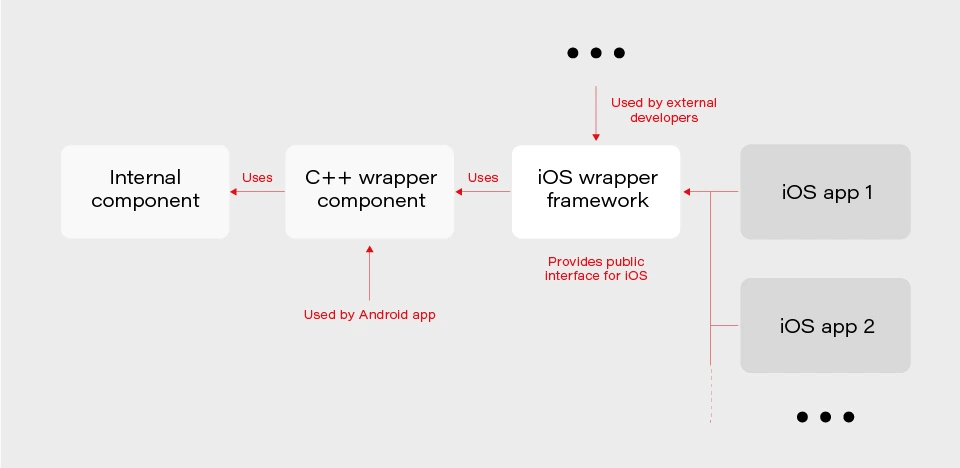
The internal component contains all the core (domain) logic that apps use. The first two components are C/C++ based and are compiled as frameworks. The wrapper framework provides an Objective-C/Swift layer that is necessary for using it in an iOS application. There are several iOS applications that are using the wrapper framework. Additionally, this framework is also used by external developers in their own applications.
The wrapper framework should be built for both x86_64 and arm64 architecture to be used on both a simulator and a real iOS device. Also, we need a debug and release version for each architecture. When it comes to applications each of them may be built for AppStore, internal testing (Ad-Hoc) or TestFlight beta testing.
Without an automated CI/CD system, it would be extremely inefficient to build the whole chain of components manually. As well as to track the status of merges/pull requests for each component. That is to control if the component is still building after the merge. Let’s see how our pipelines are organized.
Using Azure DevOps pipelines
For building CI/CD, we’ve chosen Azure DevOps. We use Azure Pipelines for building our components and Azure Artifacts to host the built components, as well as several external 3rd party libraries.
To check the integrity and track the build status of each component, we have special integration pipelines that are integrated with GitHub. That is, each pull request that is going to be merged to the development branch of a particular component triggers this special integration pipeline.
For regular builds, we have pipelines based on the purpose of each branch type: experimental, feature, bugfix, development, and master.
Since each component depends on another component built on Azure, we should somehow organize the dependency management. That is versioning of the dependent components and their download. Let’s take a look at our approach to dependency management.
Dependency management
Azure provides basic CLI tools to manipulate pipelines. We may use it to download dependencies (inform of Azure artifacts) required to build a particular component. At a minimum, we need to know the version, configuration (debug or release) and architecture (x86_64 or arm64) of a particular dependency. Let’s take a look at the options that Azure CLI gives us:
az artifacts universal download \
--organization "${Organization}" \
--feed "${Feed}" \
--name "${Name}" \
--version "${Version}" \
--path "${DownloadPath}"
The highlighted parameters are the most important for us. The CLI does not provide explicit support of build configuration or architecture. For this purpose, we simply use the name (specified as --name parameter) that has a predefined format:
<component name>-<configuration>-<architecture>
This makes it possible to have components of the same version with different architecture and build configurations.
The other aspect is how to store info about version, configuration, etc., for each dependency. We’ve decided to use the git config format to store this info. It’s pretty easy to parse using git config and does not require any additional parsing tool. So, each component has its own dependencies.config file. Below is the example file for component dependent on two frameworks:
[framework1]
architecture = "arm64"
configuration = "release"
version = "1.2.3.123"[framework2]
architecture = "arm64"
configuration = "release"
version = "3.2.1.654"
To make it possible to download dependencies as part of the build process, we have a special script that manages dependencies. The script is run as a build phase of the Xcode project of each component. Below are the basic steps the script does.
1. Parse dependencies.config file to get version, architecture, and configuration. The important thing here is that if some info is omitted (e.g. we may not specify build configuration in dependencies.config file) script will use the one the dependent component is being built with. That is, when we build the current component for the simulator script will download dependencies of simulator architecture.
2. Form artifact’s name and version and forward them to az artifacts universal download command .
There are two key features of our build infrastructure: pipeline chaining and build variants support. They cover two important cases in our project. Let’s describe how we implemented them.
Chaining pipelines
When a low-level core component is updated, we want to test these changes in the application. For this purpose, we should build the framework dependent on the core component and build the app using this framework. Automation here is extremely useful. Here’s how it looks like with our pipelines.
1. When a low-level component (let’s call it component1 ) is changed on a specific branch (e.g., integration), a special integration pipeline is triggered. When a component is built and an artifact is published, the pipeline starts another pipeline that will build the next dependent component. For this purpose, az pipelines build queue command is used as follows:
az pipelines build queue \
--project "component2" \
--branch "integration" \
--organization "${Organization}" \
--definition-name "${BuildDefinition}" \
--variables \
"config.pipeline.component1Version=${BUILD_BUILDNUMBER}" \
“config.pipeline.component1Architecture=${CurrentArchitecture}" \
"config.pipeline.component1Configuration=${CurrentConfiguration}"
This command starts the pipeline for building component2 (the one dependent on component1 ).
The key part is passing the variables config.pipeline.component1 Version, config.pipeline.component1Architecture and config.pipeline.component1Configuration to the pipeline. These variables define the version, build configuration, and architecture of component1 (the one being built by the current pipeline) that should be used to build component2 . The command overrides the corresponding values from dependencies.config file of component2 . This means that the resulting component2 will use newly built component1 dependency instead of the one defined by dependencies.config file.
2. When component2 is built, it uses the same approach to launch the next pipeline for building a subsequent component.
3. When all the components in the chain required by the app are ready, the integration pipeline building the app is launched. As a part of its build process, the app is sent to TestFlight.
So, simply pushing changes of the lowest level component to the integration branch gives you a ready-to-test app on TestFlight.
Build variants
Some external developers that use the wrapper iOS framework may need additional features that should not be available in regular public API intended for other developers. This brings us to the need of having different variants of the same component. Such variants may be distinct in different features, or in behavior of the same features.
Additional methods or classes may be provided as a specific or experimental API in a wrapper framework for iOS. The other use case is to have behavior different than the default one for regular (official) public API in the wrapper framework. For instance, a method that writes an image file to a specified directory in some cases may be required to also write additional files along with the image (e.g., file with image processing settings or metadata).
Going further, an implementation may be changed not only in the iOS framework itself but also in its dependencies. As described previously, core logic is implemented in a separate component and iOS framework is dependent on. So, when some code behavior change is required by a particular build variant, most likely it will also be done in the internal component.
Let’s see how to better implement build variants. The proper understanding of use cases and potential extension capabilities are crucial for choosing the correct solution.
The first important thing is that in our project different build variants have few changes in API compared to each other. Usually, a build variant contains a couple of additional methods or classes. Most part of the code is the same for all variants. Inside implementation, there also may be some distinctions based on the concrete variant we’re building. So, it would be enough to have some preprocessor definition (active compilation conditions for Swift) indicating which build variant is being built.
The second thing is that the number of build variants is often changed. Some may be removed, (e.g., when an experimental API becomes generally accessible.) On the other hand, when an external developer requests another specific functionality, we need to create a new variant by slightly modifying the standard implementation or exposing some experimental/internal API. This means that we should be able to add or remove build variants fast.
Let’s now describe our implementation based on the specifics given above. There are two parts of the implementation. The first one is at the pipeline level.
Since we may often add/remove our build variants, creating a pipeline for each build variant is obviously not a good idea. Instead, we add a special variable config.pipeline.buildVariant in the pipeline’s Variables to each pipeline that is supposed to be used for building different variants. The variable should be added to pipelines of all the components the resulting iOS framework depends on because a specific feature often requires code changes, not only in the iOS framework itself but also in its dependencies. Pipeline implementation then will use this variable e.g., for downloading specific dependencies required by a particular variant, tagging build to indicate the variant, and, of course, providing the corresponding build setting to Xcode build command.
The second part is a usage of the build variant setting provided by the pipeline inside the Xcode project. Using Xcode build settings we’re adding a compile-time constant (preprocessor definition for Objective C/C++ code and compilation conditions for Swift) that reflect the selected build variant. It is used to control which functionality to compile. This build settings may also be used to choose to build variant-specific resources to be embedded into the framework.
When chaining pipelines we just pass the variable to next pipeline:
az pipelines build queue \
--project "component2" \
--branch "integration" \
--organization "${Organization}" \
--definition-name "${BuildDefinition}" \
--variables \
"config.pipeline.component1Version=${BUILD_BUILDNUMBER}" \
"config.pipeline.component1Architecture=${CurrentArchitecture}" \
"config.pipeline.component1Configuration=${CurrentConfiguration}" \
“config.pipeline.buildVariant=${CONFIG_PIPELINE_BUILDVARIANT}"
Summary
In this article, we’ve described our approach to multi-component app CI/CD infrastructure based on Azure . We’ve focused on two important features of our build infrastructure: chaining component builds and building different variants of the same component. It’s worth mentioning that the described solution is not the only correct one. It's rather the most optimal that fits our needs. You may experiment and try different approaches utilizing a flexible developed pipeline system that Azure provides.
Interested in our services?
Reach out for tailored solutions and expert guidance.