
Integrating generative AI with knowledge graphs for enhanced data analytics

The integration of generative AI into data analytics is transforming business data management and interpretation, opening vast possibilities across industries.
Recent statistics from a Gartner survey indicate significant strides in the adoption of generative AI: 45% of organizations are now piloting generative AI projects, with 10% having fully integrated these systems into their operations. This marks a considerable increase from earlier figures, demonstrating a rapid adoption curve. Additionally, by 2026, it's predicted that more than 80% of organizations will use generative AI applications, up from less than 5% just three years prior.
Combining generative AI and knowledge graphs for data analytics
The potential impact of combining generative AI with knowledge graphs is particularly promising. This synergy enhances data analytics by improving accuracy, speeding up data processing, and enabling deeper insights into complex datasets. As adoption continues to expand, the mentioned technologies will transform how organizations leverage data for strategic advantage.
This article details the specific benefits of generative AI and knowledge graphs and how their integration can boost data-based decision-making processes.
Maximizing generative AI potential in data analytics
Generative AI has revolutionized data analytics by automating tasks that traditionally required significant human effort and by providing new methods to manage and interpret large datasets. Here is a more detailed explanation of how GenAI operates in various aspects of data analytics.
Rapid Summarization of Information
GenAI's ability to swiftly process and summarize large volumes of data is a boon in situations that demand quick insights from extensive datasets. This is especially critical in areas like financial analysis or market trend monitoring, where rapid information condensation can significantly expedite decision-making processes.
Enhanced Data Enrichment
In the initial stages of data analytics , raw data is often unstructured and may contain errors or gaps. GenAI plays a crucial role in enriching this raw data before it can be effectively visualized or analyzed. This includes cleaning the data, filling in missing values, generating new features, and integrating external data sources to add depth and context. Such capabilities are particularly beneficial in scenarios like predictive modeling for customer behavior, where historical data may not fully capture current trends.
Automation of Repetitive Data Preparation Tasks
Data preparation is often the most time-consuming part of data analytics. GenAI helps automate these processes with unmatched precision and speed. This not only enhances the efficiency and accuracy of data preparation but also improves data quality by quickly identifying and correcting inconsistencies.
Complex Data Simplification
GenAI expertly simplifies complex data patterns, making them easy to understand and accessible. This allows users with varying levels of expertise to derive actionable insights and make informed decisions effortlessly.
Interactive Data Exploration via Conversational Interfaces
GenAI uses Natural Language Processing (NLP) to facilitate interactions, allowing users to query data in everyday language. This significantly lowers the barrier to data exploration, making analytics tools more user-friendly and extending their use across different organizational departments.
The use of knowledge graphs in data analytics
Knowledge graphs prove increasingly useful in data analytics, providing a solid framework to improve decision-making in various industries. These graphs represent data as interconnected networks of entities linked by relationships, enabling intuitive and sophisticated analysis of complex datasets.
What are associative knowledge graphs?
Associative knowledge graphs are a specialized subset of knowledge graphs that excel in identifying and leveraging intricate and often subtle associations among data elements. These associations include not only direct links but also indirect and inferred relationships that are crucial for deep data analysis, AI modeling, and complex decision-making processes where understanding subtle connections can be crucial.
Associative knowledge graphs functionalities
Associative knowledge graphs are useful in dynamic environments where data constantly evolves. They can incorporate incremental updates without major structural changes , allowing them to quickly adapt and maintain accuracy without extensive modifications. This is particularly beneficial in scenarios where knowledge graphs need to be updated frequently with new information without retraining or restructuring the entire graph.
Designed to handle complex queries involving multiple entities and relationships, these graphs offer advanced capabilities beyond traditional relational databases. This is due to their ability to represent data in a graph structure that reflects the real-world interconnections between different pieces of information. Whether the data comes from structured databases, semi-structured documents, or unstructured sources like texts and multimedia, associative knowledge graphs can amalgamate these different data types into a unified model.
Additionally, associative knowledge graphs generate deeper insights in data analytics through cognitive and associative linking . They connect disparate data points by mimicking human cognitive processes, revealing patterns important for strategic decision-making.
Generative AI and associative knowledge graphs: Synergy for analytics
The integration of Generative AI with associative knowledge graphs enhances data processing and analysis in three key ways: speed, quality of insights, and deeper understanding of complex relationships.
Speed: GenAI automates conventional data management tasks , significantly reducing the time required for data cleansing, validation, and enrichment. This helps decrease manual efforts and speed up data handling. Combining it with associative knowledge graphs simplifies data integration and enables faster querying and manipulation of complex datasets, enhancing operational efficiency.
Quality of Insights: GenAI and associative knowledge graphs work together to generate high-quality insights. GenAI quickly processes large datasets to deliver timely and relevant information. Knowledge graphs enhance these outputs by providing semantic and contextual depth, where precise insights are vital.
Deeper Understanding of Complex Relationships: By illustrating intricate data relationships, knowledge graphs reveal hidden patterns and correlations which leads to more comprehensive and actionable insights that can improve data utilization in complex scenarios.
Example applications
Healthcare:
- Patient Risk Prediction : GenAI and associative knowledge graphs can be used to predict patient risks and health outcomes by analyzing and interpreting comprehensive data, including historical records, real-time health monitoring from IoT devices, and social determinants of health. This integration enables creation of personalized treatment plans and preventive care strategies.
- Operational Efficiency Optimization : These technologies optimize resource allocation, staff scheduling, and patient flow by integrating data from various hospital systems (electronic health records, staffing schedules, patient admissions). This results in more efficient resource utilization, reduced waiting times and improved overall care delivery.
Insurance, Banking & Finance:
- Risk Assessment / Credit Scoring : Using a broad array of data points such as historical financial data, social media activity, and IoT device data, GenAI and knowledge graphs can help generate accurate risk assessments and credit scores. This comprehensive analysis uncovers complex relationships and patterns, enhancing the understanding of risk profiles.
- Customer Lifetime Value Prediction : These technologies are utilized to analyze transaction and interaction data to predict future banking behaviors and assess customer profitability. By tracking customer behaviors, preferences, and historical interactions, they allow for the development of personalized marketing campaigns and loyalty programs, boosting customer retention and profitability.
Retail:
- Inventory Management : Customers can also use GenAI and associative knowledge graphs to optimize inventory management and prevent overstock and stockouts. Integrating supply chain data, sales trends, and consumer demand signals ensures balanced inventory aligned with market needs, improving operational efficiency and customer satisfaction.
- Sales & Price Forecasting : Otherwise, you can forecast future sales and price trends by analyzing historical sales data, economic indicators, and consumer behavior patterns. By combining various data sources, you get a comprehensive understanding of sales dynamics and price fluctuations, aiding in strategic planning and decision-making.
gIQ – data analytics platform powered by generative AI and associative knowledge graphs
The gIQ data analytics platform demonstrates one example of integrating generative AI with knowledge graphs. Developed by Grape Up founders, this solution represents a cutting-edge approach, allowing for transformation of raw data into applicable knowledge. This integration allows gIQ to swiftly detect patterns and establish connections, delivering critical insights while bypassing the intensive computational requirements of conventional machine learning techniques. Consequently, users can navigate complex data environments easily, paving the way for informed decision-making and strategic planning.
Conclusion
The combination of generative AI and knowledge graphs is transforming data analytics by allowing organizations to analyze data more quickly, accurately, and insightfully. The increasing use of these technologies indicates that they are widely recognized for their ability to improve decision-making and operational efficiency in a variety of industries.
Looking forward, it's highly likely that the ongoing development and improvement of these technologies will unlock more advanced and sophisticated applications. This will drive innovation and give organizations a strategic advantage. Embracing these advancements isn't just beneficial, it's essential for companies that want to remain competitive in an increasingly data-driven world.

Check related articles
Read our blog and stay informed about the industry's latest trends and solutions.
Choosing the right approach: How generative AI powers legacy system modernization
In today's rapidly evolving digital landscape, the need to modernize legacy systems and applications is becoming increasingly critical for organizations aiming to stay competitive. Once the backbone of business operations, legacy systems are now potential barriers to efficiency, innovation, and security.
As technology progresses, the gap between outdated systems and modern requirements widens, making modernization not just beneficial but essential.
This article provides an overview of different legacy system modernization approaches, including the emerging role of generative AI (GenAI). We will explore how GenAI can enhance this process, making it not only faster and more cost-effective but also better aligned with current and future business needs.
Understanding legacy systems
Legacy systems are typically maintained due to their critical role in existing business operations. They often feature:
- Outdated technology stacks and programming languages.
- Inefficient and unstable performance.
- High susceptibility to security vulnerabilities due to outdated security measures.
- Significant maintenance costs and challenges in sourcing skilled personnel.
- Difficulty integrating with newer technologies and systems.
Currently, almost 66% of enterprises continue to rely on outdated applications to run their key operations, and 60% use them for customer-facing tasks.
Why is this the case?
Primarily because of a lack of understanding of the older technology infrastructure and the technological difficulties associated with modernizing legacy systems. However, legacy application modernization is often essential. In fact, 70% of global CXOs consider mainframe and legacy modernization a top business priority.
The necessity of legacy software modernization
As technology rapidly evolves, businesses find it increasingly vital to update their aging infrastructure to keep pace with industry standards and consumer expectations. Legacy systems modernization is crucial for several reasons:
- Security Improvements : Outdated software dependencies in older systems often lack updates, leaving critical bugs and security vulnerabilities unaddressed.
- Operational Efficiency : Legacy systems can slow down operations with their inefficiencies and frequent maintenance needs.
- Cost Reduction : Although initially costly, the long-term maintenance of outdated systems is often more expensive than modernizing them.
- Scalability and Flexibility : Modern systems are better equipped to handle increasing loads and adapt to changing business needs.
- Innovation Enablement : Modernized systems can support new technologies and innovations, allowing businesses to stay ahead in competitive markets.
Modernizing legacy code presents an opportunity to address multiple challenges from both a business and an IT standpoint, improving overall organizational performance and agility.
Different approaches to legacy modernization
When it comes to modernizing legacy systems, there are various approaches available to meet different organizational needs and objectives. These strategies can vary greatly depending on factors such as the current state of the legacy systems, business goals, budget constraints, and desired outcomes.
Some modernization efforts might focus on minimal disruption and cost, opting to integrate existing systems with new functionalities through APIs or lightly tweaking the system to fit a new operating environment. Other approaches might involve more extensive changes, such as completely redesigning the system architecture to incorporate advanced technologies like microservices or even rebuilding the system from scratch to meet modern standards and capabilities.
Each approach has its own set of advantages, challenges, and implications for the business processes and IT landscape. The choice of strategy depends on balancing these factors with the long-term vision and immediate needs of the organization.
Rewriting legacy systems with generative AI
One of the approaches to legacy system modernization involves rewriting the system's codebase from scratch while aiming to maintain or enhance its existing functionalities. This method is especially useful when the current system no longer meets the evolving standards of technology, efficiency, or security required by modern business environments.
By starting anew, organizations can leverage the latest technologies and architectures, making the system more adaptable and scalable to future needs.
Generative AI is particularly valuable in this context for several reasons:
- Uncovering hidden relations and understanding embedded business rules : GenAI supports the analysis of legacy code to identify complex relationships and dependencies crucial for maintaining system interactions during modernization. It also deciphers embedded business rules, ensuring that vital functionalities are preserved and enhanced in the updated system.
- Improved accuracy : GenAI enhances the accuracy of the modernization process by automating tasks such as code analysis and documentation, which reduces human errors and ensures a more precise translation of legacy functionalities to the new system.
- Optimization and performance : With GenAI, the new code can be optimized for performance from the outset. It can integrate advanced algorithms that improve efficiency and adaptability, which are often lacking in older systems.
- Reducing development time and cost : The automation capabilities of GenAI significantly reduce the time and resources needed for rewriting systems. Faster development cycles and fewer human hours needed for coding and testing lower the overall cost of the modernization project.
- Increasing security measures: GenAI can help implement advanced security protocols in the new system, reducing the risk of data breaches and associated costs. This is crucial in today's digital environment, where security threats are increasingly sophisticated.
By integrating GenAI in this modernization approach, organizations can achieve a more streamlined transition to a modern system architecture, which is well-aligned with current and future business requirements. This ensures that the investment in modernization delivers substantial returns in terms of system performance, scalability, and maintenance costs.

How generative AI fits in legacy system modernization process
Generative AI enables faster speeds and provides a deeper understanding of the business context, which significantly boosts development across all phases, from design and business analysis to code generation , testing, and verification.
Here's how GenAI transforms the modernization process:
1. Analysis Phase
Automated documentation and in-depth code analysis : GenAI's ability to assist in automatic documenting, reverse engineering, and extracting business logic from legacy codebases is a powerful capability for modernization projects. It overcomes the limitations of human memory and outdated documentation to help ensure a comprehensive understanding of existing systems before attempting to upgrade or replace them.
Business-context awareness : By analyzing the production source code directly, GenAI helps comprehend the embedded business logic, which speeds up the migration process and improves the safety and accuracy of the transition.
2 . Preparatory Phase
Tool compatibility and integration: GenAI tools can identify and integrate with many compatible development tools, recommend necessary plugins or extensions within supported environments, and enhance the existing development environment by automating routine tasks and providing intelligent code suggestions to support effective modernization efforts.
LLM-assisted knowledge discovery : Large Language Models (LLMs) can be used to delve deep into a legacy system’s data and codebase to uncover critical insights and hidden patterns. This knowledge discovery process aids in understanding complex dependencies, business logic, and operational workflows embedded within the legacy system. This step is crucial for ensuring that all relevant data and functionalities are considered before beginning the migration, thereby reducing the risk of overlooking critical components.
3. Migration/Implementation Phase
Code generation and conversion : Using LLMs, GenAI aids in the design process by transforming outdated code into contemporary languages and frameworks, thereby improving the functionality and maintainability of applications.
Automated testing and validation : GenAI supports the generation of comprehensive test cases to ensure that all new functionalities are verified against specified requirements and that the migrated system operates as intended. It helps identify and resolve potential issues early, ensuring a high level of accuracy and functionality before full deployment.
Modularization and refactoring : GenAI can also help break down complex, monolithic applications into manageable modules, enhancing system maintainability and scalability. It identifies and suggests strategic refactoring for areas with excessive dependencies and scattered functionalities.
4. Operations and Optimization Phase
AI-driven monitoring and optimization : Once the system is live, GenAI continues to monitor its performance, optimizing operations and predicting potential failures before they occur. This proactive maintenance helps minimize downtime and improve system reliability.
Continuous improvement and DevOps automation : GenAI facilitates continuous integration and deployment practices, automatically updating and refining the system to meet evolving business needs. It ensures that the modernized system is not only stable but also continually evolving with minimal manual intervention.
Across All Phases
- Sprint execution support : GenAI enhances agile sprint executions by providing tools for rapid feature development, bug fixes, and performance optimizations, ensuring that each sprint delivers maximum value.
- Security enhancements and compliance testing : It identifies security vulnerabilities and compliance issues early in the development cycle, allowing for immediate remediation that aligns with industry standards.
- Predictive analytics for maintenance and monitoring : It also helps anticipate potential system failures and performance bottlenecks using predictive analytics, suggesting proactive maintenance and optimizations to minimize downtime and improve system reliability.
Should enterprises use genAI in legacy system modernization?
To determine if GenAI is necessary for a specific modernization project, organizations should consider the complexity and scale of their legacy systems, the need for improved accuracy in the modernization process, and the strategic value of faster project execution.
If the existing systems are cumbersome and deeply intertwined with critical business operations, or if security, speed, and accuracy are priorities, then GenAI is likely an indispensable tool for ensuring successful modernization with optimal outcomes.
Conclusion
Generative AI significantly boosts the legacy system modernization process by introducing advanced capabilities that address a broad range of challenges. From automating documentation and code analysis in the analysis phase to supporting modularization and system integration during implementation, this technology provides critical support that speeds up modernization, ensures high system performance, and aligns with modern technological standards.
GenAI integration not only streamlines processes but also equips organizations to meet future challenges effectively, driving innovation and competitive advantage in a rapidly evolving digital landscape.
Generative AI for developers - our comparison
So, it begins… Artificial intelligence comes into play for all of us. It can propose a menu for a party, plan a trip around Italy, draw a poster for a (non-existing) movie, generate a meme, compose a song, or even "record" a movie. Can Generative AI help developers? Certainly, but….
In this article, we will compare several tools to show their possibilities. We'll show you the pros, cons, risks, and strengths. Is it usable in your case? Well, that question you'll need to answer on your own.
The research methodology
It's rather impossible to compare available tools with the same criteria. Some are web-based, some are restricted to a specific IDE, some offer a "chat" feature, and others only propose a code. We aimed to benchmark tools in a task of code completion, code generation, code improvements, and code explanation. Beyond that, we're looking for a tool that can "help developers," whatever it means.
During the research, we tried to write a simple CRUD application, and a simple application with puzzling logic, to generate functions based on name or comment, to explain a piece of legacy code, and to generate tests. Then we've turned to Internet-accessing tools, self-hosted models and their possibilities, and other general-purpose tools.
We've tried multiple programming languages – Python, Java, Node.js, Julia, and Rust. There are a few use cases we've challenged with the tools.
CRUD
The test aimed to evaluate whether a tool can help in repetitive, easy tasks. The plan is to build a 3-layer Java application with 3 types (REST model, domain, persistence), interfaces, facades, and mappers. A perfect tool may build the entire application by prompt, but a good one would complete a code when writing.
Business logic
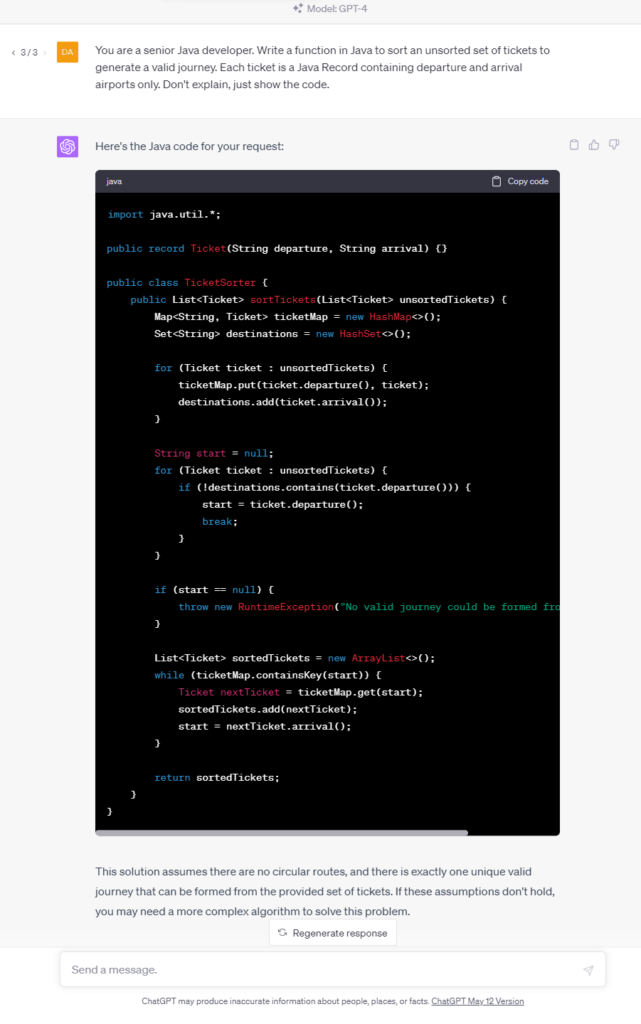
In this test, we write a function to sort a given collection of unsorted tickets to create a route by arrival and departure points, e.g., the given set is Warsaw-Frankfurt, Frankfurt-London, Krakow-Warsaw, and the expected output is Krakow-Warsaw, Warsaw-Frankfurt, Frankfurt-London. The function needs to find the first ticket and then go through all the tickets to find the correct one to continue the journey.
Specific-knowledge logic
This time we require some specific knowledge – the task is to write a function that takes a matrix of 8-bit integers representing an RGB-encoded 10x10 image and returns a matrix of 32-bit floating point numbers standardized with a min-max scaler corresponding to the image converted to grayscale. The tool should handle the standardization and the scaler with all constants on its own.
Complete application
We ask a tool (if possible) to write an entire "Hello world!" web server or a bookstore CRUD application. It seems to be an easy task due to the number of examples over the Internet; however, the output size exceeds most tools' capabilities.
Simple function
This time we expect the tool to write a simple function – to open a file and lowercase the content, to get the top element from the collection sorted, to add an edge between two nodes in a graph, etc. As developers, we write such functions time and time again, so we wanted our tools to save our time.
Explain and improve
We had asked the tool to explain a piece of code:
- A method to run two tasks in parallel, merge results to a collection if successful, or fail fast if any task has failed,
- Typical arrow anti-pattern (example 5 from 9 Bad Java Snippets To Make You Laugh | by Milos Zivkovic | Dev Genius ),
- AWS R53 record validation terraform resource.
If possible, we also asked it to improve the code.
Each time, we have also tried to simply spend some time with a tool, write some usual code, generate tests, etc.
The generative AI tools evaluation
Ok, let's begin with the main dish. Which tools are useful and worth further consideration?
Tabnine
Tabnine is an "AI assistant for software developers" – a code completion tool working with many IDEs and languages. It looks like a state-of-the-art solution for 2023 – you can install a plugin for your favorite IDE, and an AI trained on open-source code with permissive licenses will propose the best code for your purposes. However, there are a few unique features of Tabnine.
You can allow it to process your project or your GitHub account for fine-tuning to learn the style and patterns used in your company. Besides that, you don't need to worry about privacy. The authors claim that the tuned model is private, and the code won't be used to improve the global version. If you're not convinced, you can install and run Tabnine on your private network or even on your computer.
The tool costs $12 per user per month, and a free trial is available; however, you're probably more interested in the enterprise version with individual pricing.
The good, the bad, and the ugly
Tabnine is easy to install and works well with IntelliJ IDEA (which is not so obvious for some other tools). It improves standard, built-in code proposals; you can scroll through a few versions and pick the best one. It proposes entire functions or pieces of code quite well, and the proposed-code quality is satisfactory.
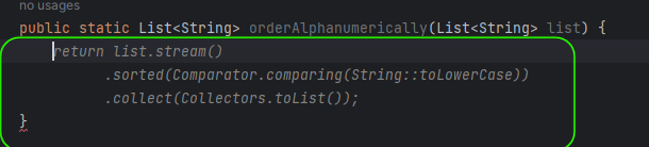
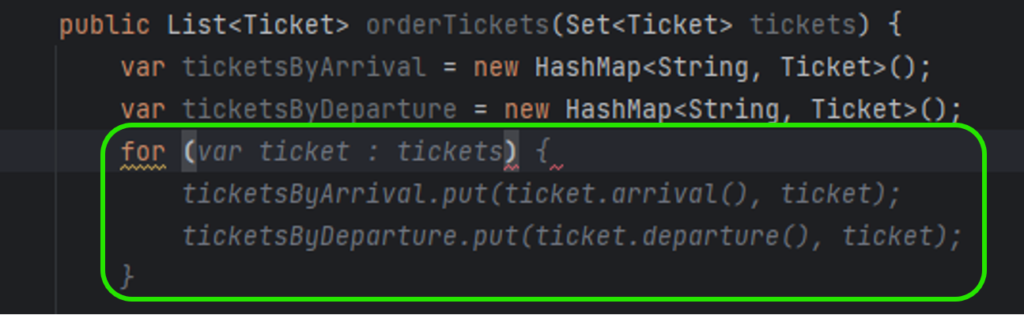
So far, Tabnine seems to be perfect, but there is also another side of the coin. The problem is the error rate of the code generated. In Figure 2, you can see ticket.arrival() and ticket.departure() invocations. It was my fourth or fifth try until Tabnine realized that Ticket is a Java record and no typical getters are implemented. In all other cases, it generated ticket.getArrival() and ticket.getDeparture() , even if there were no such methods and the compiler reported errors just after the propositions acceptance.
Another time, Tabnine omitted a part of the prompt, and the code generated was compilable but wrong. Here you can find a simple function that looks OK, but it doesn't do what was desired to.

There is one more example – Tabnine used a commented-out function from the same file (the test was already implemented below), but it changed the line order. As a result, the test was not working, and it took a while to determine what was happening.
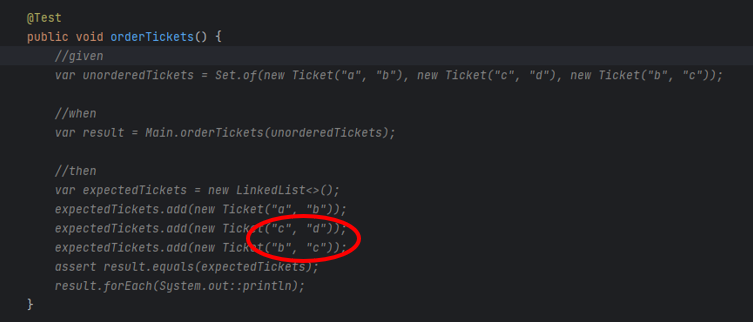
It leads us to the main issue related to Tabnine. It generates simple code, which saves a few seconds each time, but it's unreliable, produces hard-to-find bugs, and requires more time to validate the generated code than saves by the generation. Moreover, it generates proposals constantly, so the developer spends more time reading propositions than actually creating good code.
Our rating
Conclusion: A mature tool with average possibilities, sometimes too aggressive and obtrusive (annoying), but with a little bit of practice, may also make work easier
‒ Possibilities 3/5
‒ Correctness 2/5
‒ Easiness 2,5/5
‒ Privacy 5/5
‒ Maturity 4/5
Overall score: 3/5
GitHub Copilot
This tool is state-of-the-art. There are tools "similar to GitHub Copilot," "alternative to GitHub Copilot," and "comparable to GitHub Copilot," and there is the GitHub Copilot itself. It is precisely what you think it is – a code-completion tool based on the OpenAI Codex model, which is based on GPT-3 but trained with publicly available sources, including GitHub repositories. You can install it as a plugin for popular IDEs, but you need to enable it on your GitHub account first. A free trial is available, and the standard license costs from $8,33 to $19 per user per month.
The good, the bad, and the ugly
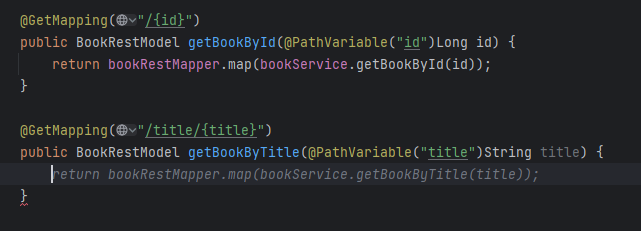
It works just fine. It generates good one-liners and imitates the style of the code around.
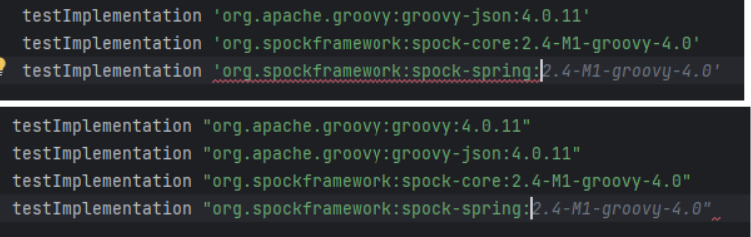
Please note the Figure 6 - it not only uses closing quotas as needed but also proposes a library in the "guessed" version, as spock-spring.spockgramework.org:2.4-M1-groovy-4.0 is newer than the learning set of the model.
However, the code is not perfect.
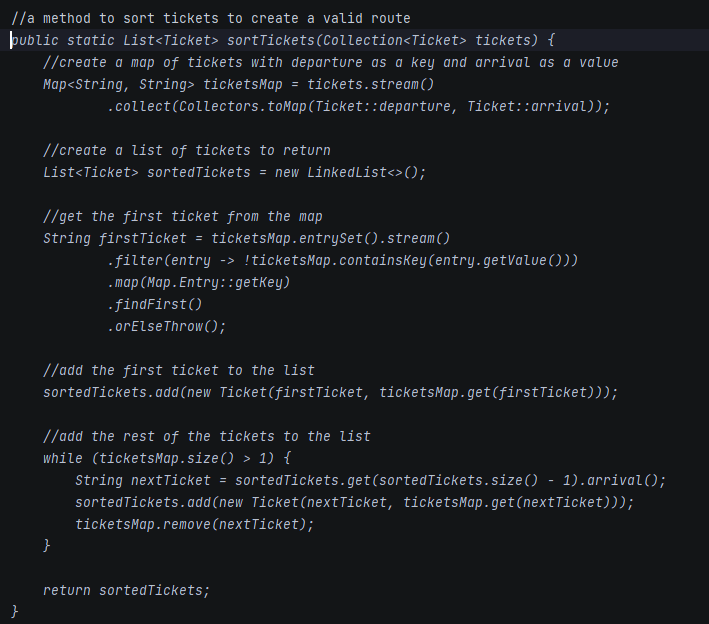
In this test, the tool generated the entire method based on the comment from the first line of the listing. It decided to create a map of departures and arrivals as Strings, to re-create tickets when adding to sortedTickets, and to remove elements from ticketMaps. Simply speaking - I wouldn't like to maintain such a code in my project. GPT-4 and Claude do the same job much better.
The general rule of using this tool is – don't ask it to produce a code that is too long. As mentioned above – it is what you think it is, so it's just a copilot which can give you a hand in simple tasks, but you still take responsibility for the most important parts of your project. Compared to Tabnine, GitHub Copilot doesn't propose a bunch of code every few keys pressed, and it produces less readable code but with fewer errors, making it a better companion in everyday life.
Our rating
Conclusion: Generates worse code than GPT-4 and doesn't offer extra functionalities ("explain," "fix bugs," etc.); however, it's unobtrusive, convenient, correct when short code is generated and makes everyday work easier
‒ Possibilities 3/5
‒ Correctness 4/5
‒ Easiness 5/5
‒ Privacy 5/5
‒ Maturity 4/5
Overall score: 4/5
GitHub Copilot Labs
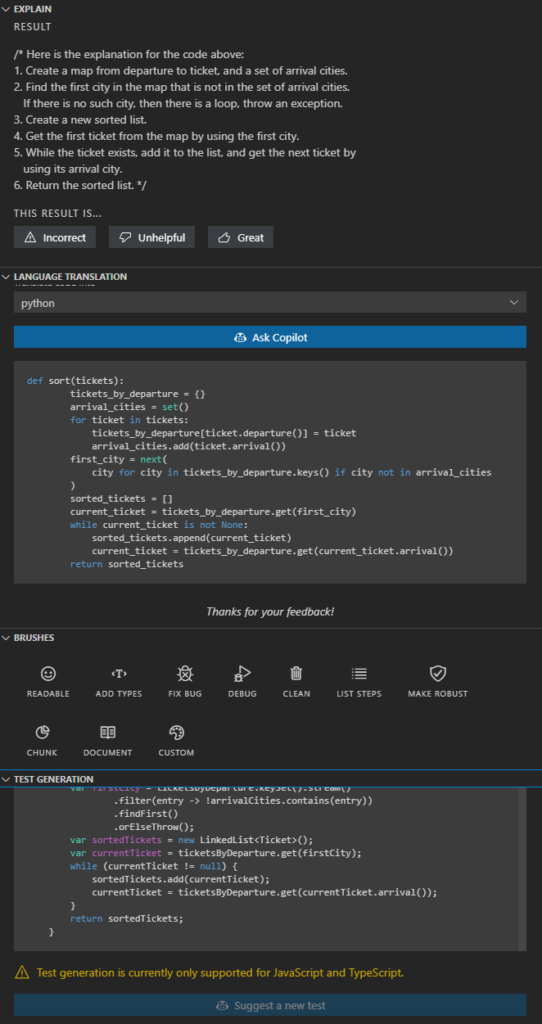
The base GitHub copilot, as described above, is a simple code-completion tool. However, there is a beta tool called GitHub Copilot Labs. It is a Visual Studio Code plugin providing a set of useful AI-powered functions: explain, language translation, Test Generation, and Brushes (improve readability, add types, fix bugs, clean, list steps, make robust, chunk, and document). It requires a Copilot subscription and offers extra functionalities – only as much, and so much.
The good, the bad, and the ugly
If you are a Visual Studio Code user and you already use the GitHub Copilot, there is no reason not to use the "Labs" extras. However, you should not trust it. Code explanation works well, code translation is rarely used and sometimes buggy (the Python version of my Java code tries to call non-existing functions, as the context was not considered during translation), brushes work randomly (sometimes well, sometimes badly, sometimes not at all), and test generation works for JS and TS languages only.
Our rating
Conclusion: It's a nice preview of something between Copilot and Copilot X, but it's in the preview stage and works like a beta. If you don't expect too much (and you use Visual Studio Code and GitHub Copilot), it is a tool for you.
‒ Possibilities 4/5
‒ Correctness 2/5
‒ Easiness 5/5
‒ Privacy 5/5
‒ Maturity 1/5
Overall score: 3/5
Cursor
Cursor is a complete IDE forked from Visual Studio Code open-source project. It uses OpenAI API in the backend and provides a very straightforward user interface. You can press CTRL+K to generate/edit a code from the prompt or CTRL+L to open a chat within an integrated window with the context of the open file or the selected code fragment. It is as good and as private as the OpenAI models behind it but remember to disable prompt collection in the settings if you don't want to share it with the entire World.
The good, the bad, and the ugly
Cursor seems to be a very nice tool – it can generate a lot of code from prompts. Be aware that it still requires developer knowledge – "a function to read an mp3 file by name and use OpenAI SDK to call OpenAI API to use 'whisper-1' model to recognize the speech and store the text in a file of same name and txt extension" is not a prompt that your accountant can make. The tool is so good that a developer used to one language can write an entire application in another one. Of course, they (the developer and the tool) can use bad habits together, not adequate to the target language, but it's not the fault of the tool but the temptation of the approach.
There are two main disadvantages of Cursor.
Firstly, it uses OpenAI API, which means it can use up to GPT-3.5 or Codex (for mid-May 2023, there is no GPT-4 API available yet), which is much worse than even general-purpose GPT-4. For example, Cursor asked to explain some very bad code has responded with a very bad answer.
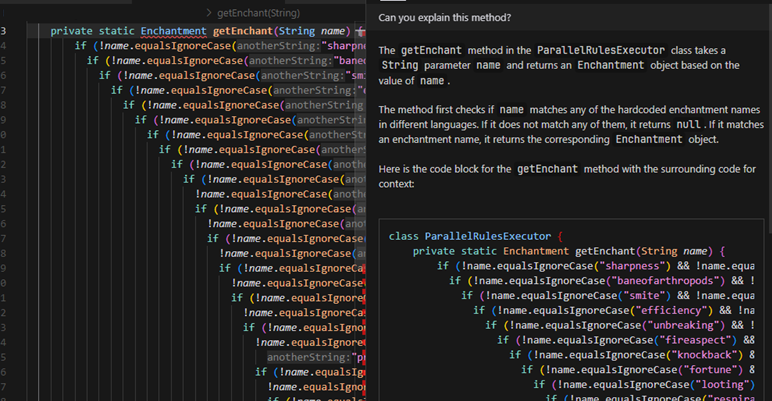
For the same code, GPT-4 and Claude were able to find the purpose of the code and proposed at least two better solutions (with a multi-condition switch case or a collection as a dataset). I would expect a better answer from a developer-tailored tool than a general-purpose web-based chat.
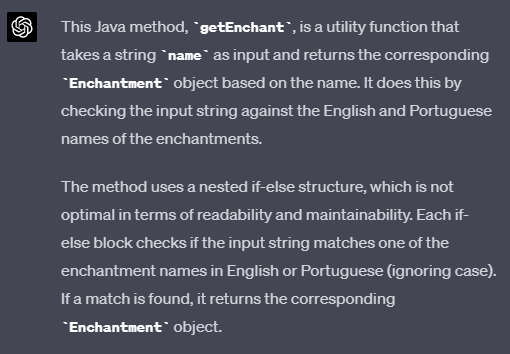
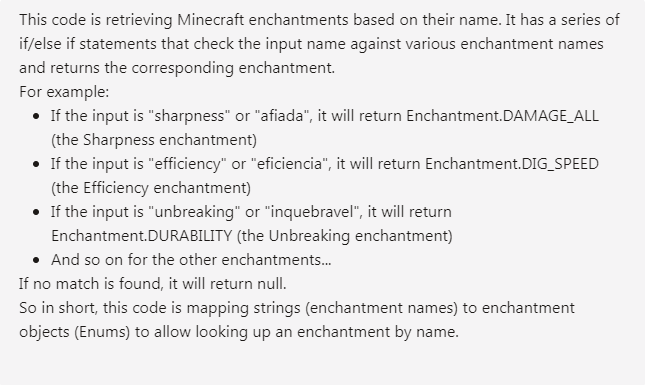
Secondly, Cursor uses Visual Studio Code, but it's not just a branch of it – it's an entire fork, so it can be potentially hard to maintain, as VSC is heavily changed by a community. Besides that, VSC is as good as its plugins, and it works much better with C, Python, Rust, and even Bash than Java or browser-interpreted languages. It's common to use specialized, commercial tools for specialized use cases, so I would appreciate Cursor as a plugin for other tools rather than a separate IDE.
There is even a feature available in Cursor to generate an entire project by prompt, but it doesn't work well so far. The tool has been asked to generate a CRUD bookstore in Java 18 with a specific architecture. Still, it has used Java 8, ignored the architecture, and produced an application that doesn't even build due to Gradle issues. To sum up – it's catchy but immature.
The prompt used in the following video is as follows:
"A CRUD Java 18, Spring application with hexagonal architecture, using Gradle, to manage Books. Each book must contain author, title, publisher, release date and release version. Books must be stored in localhost PostgreSQL. CRUD operations available: post, put, patch, delete, get by id, get all, get by title."
https://www.youtube.com/watch?v=Q2czylS2i-E
The main problem is – the feature has worked only once, and we were not able to repeat it.
Our rating
Conclusion: A complete IDE for VS-Code fans. Worth to be observed, but the current version is too immature.
‒ Possibilities 5/5
‒ Correctness 2/5
‒ Easiness 4/5
‒ Privacy 5/5
‒ Maturity 1/5
Overall score: 2/5
Amazon CodeWhisperer
CodeWhisperer is an AWS response to Codex. It works in Cloud9 and AWS Lambdas, but also as a plugin for Visual Studio Code and some JetBrains products. It somehow supports 14 languages with full support for 5 of them. By the way, most tool tests work better with Python than Java – it seems AI tool creators are Python developers🤔. CodeWhisperer is free so far and can be run on a free tier AWS account (but it requires SSO login) or with AWS Builder ID.
The good, the bad, and the ugly
There are a few positive aspects of CodeWhisperer. It provides an extra code analysis for vulnerabilities and references, and you can control it with usual AWS methods (IAM policies), so you can decide about the tool usage and the code privacy with your standard AWS-related tools.
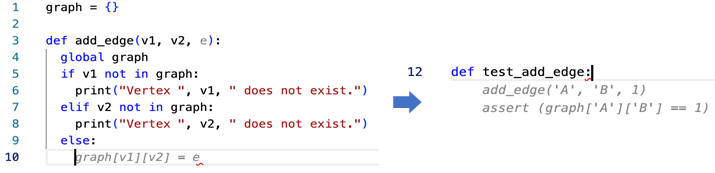
However, the quality of the model is insufficient. It doesn't understand more complex instructions, and the code generated can be much better.
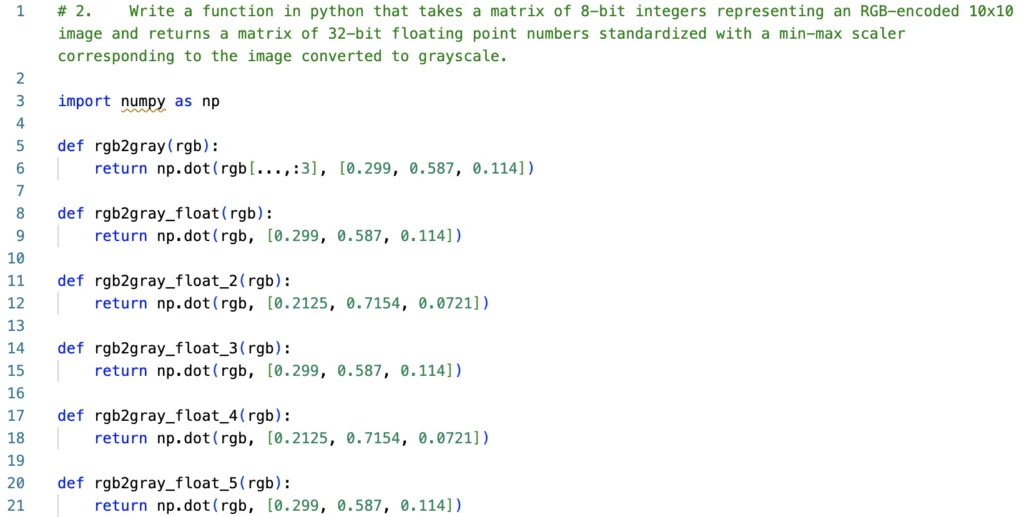
For example, it has simply failed for the case above, and for the case below, it proposed just a single assertion.
Our rating
Conclusion: Generates worse code than GPT-4/Claude or even Codex (GitHub Copilot), but it's highly integrated with AWS, including permissions/privacy management
‒ Possibilities 2.5/5
‒ Correctness 2.5/5
‒ Easiness 4/5
‒ Privacy 4/5
‒ Maturity 3/5
Overall score: 2.5/5
Plugins
As the race for our hearts and wallets has begun, many startups, companies, and freelancers want to participate in it. There are hundreds (or maybe thousands) of plugins for IDEs that send your code to OpenAI API.
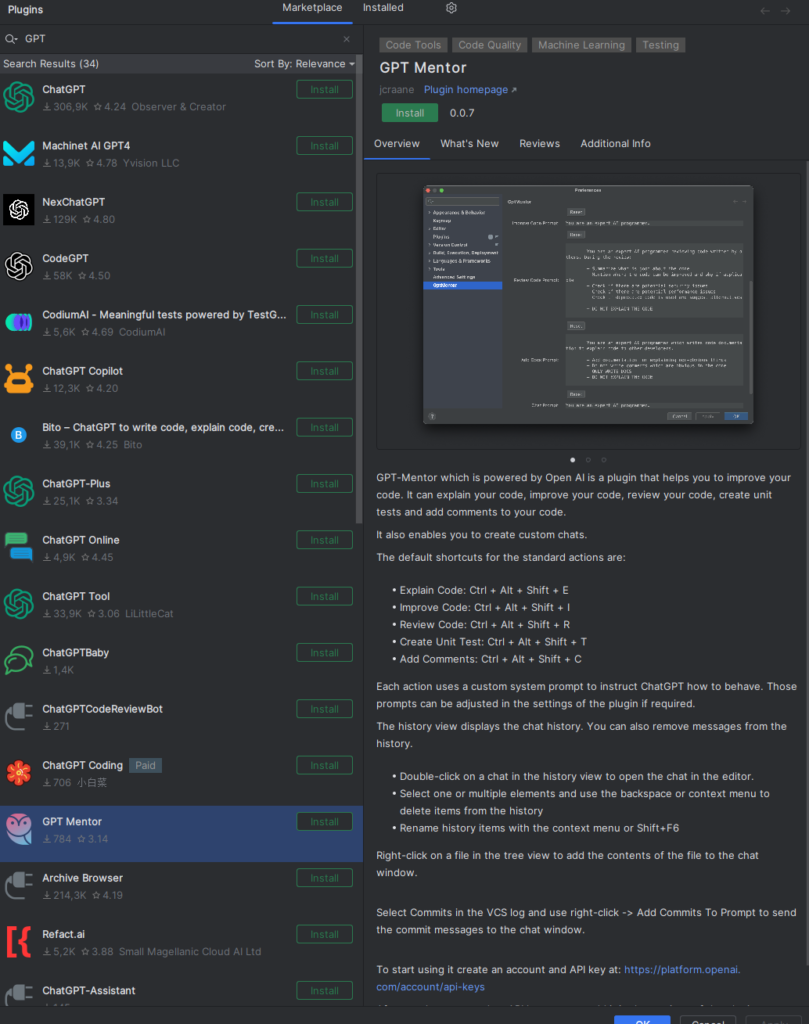
You can easily find one convenient to you and use it as long as you trust OpenAI and their privacy policy. On the other hand, be aware that your code will be processed by one more tool, maybe open-source, maybe very simple, but it still increases the possibility of code leaks. The proposed solution is – to write an own plugin. There is a space for one more in the World for sure.
Knocked out tools
There are plenty of tools we've tried to evaluate, but those tools were too basic, too uncertain, too troublesome, or simply deprecated, so we have decided to eliminate them before the full evaluation. Here you can find some examples of interesting ones but rejected.
Captain Stack
According to the authors, the tool is "somewhat similar to GitHub Copilot's code suggestion," but it doesn't use AI – it queries your prompt with Google, opens Stack Overflow, and GitHub gists results and copies the best answer. It sounds promising, but using it takes more time than doing the same thing manually. It doesn't provide any response very often, doesn't provide the context of the code sample (explanation given by the author), and it has failed all our tasks.
IntelliCode
The tool is trained on thousands of open-source projects on GitHub, each with high star ratings. It works with Visual Studio Code only and suffers from poor Mac performance. It is useful but very straightforward – it can find a proper code but doesn't work well with a language. You need to provide prompts carefully; the tool seems to be just an indexed-search mechanism with low intelligence implemented.
Kite
Kite was an extremely promising tool in development since 2014, but "was" is the keyword here. The project was closed in 2022, and the authors' manifest can bring some light into the entire developer-friendly Generative AI tools: Kite is saying farewell - Code Faster with Kite . Simply put, they claimed it's impossible to train state-of-the-art models to understand more than a local context of the code, and it would be extremely expensive to build a production-quality tool like that. Well, we can acknowledge that most tools are not production-quality yet, and the entire reliability of modern AI tools is still quite low.
GPT-Code-Clippy
The GPT-CC is an open-source version of GitHub Copilot. It's free and open, and it uses the Codex model. On the other hand, the tool has been unsupported since the beginning of 2022, and the model is deprecated by OpenAI already, so we can consider this tool part of the Generative AI history.
CodeGeeX
CodeGeeX was published in March 2023 by Tsinghua University's Knowledge Engineering Group under Apache 2.0 license. According to the authors, it uses 13 billion parameters, and it's trained on public repositories in 23 languages with over 100 stars. The model can be your self-hosted GitHub Copilot alternative if you have at least Nvidia GTX 3090, but it's recommended to use A100 instead.
The online version was occasionally unavailable during the evaluation, and even when available - the tool failed on half of our tasks. There was no even a try, and the response from the model was empty. Therefore, we've decided not to try the offline version and skip the tool completely.
GPT
Crème de la crème of the comparison is the OpenAI flagship - generative pre-trained transformer (GPT). There are two important versions available for today – GPT-3.5 and GPT-4. The former version is free for web users as well as available for API users. GPT-4 is much better than its predecessor but is still not generally available for API users. It accepts longer prompts and "remembers" longer conversations. All in all, it generates better answers. You can give a chance of any task to GPT-3.5, but in most cases, GPT-4 does the same but better.
So what can GPT do for developers?
We can ask the chat to generate functions, classes, or entire CI/CD workflows. It can explain the legacy code and propose improvements. It discusses algorithms, generates DB schemas, tests, UML diagrams as code, etc. It can even run a job interview for you, but sometimes it loses the context and starts to chat about everything except the job.
The dark side contains three main aspects so far. Firstly, it produces hard-to-find errors. There may be an unnecessary step in CI/CD, the name of the network interface in a Bash script may not exist, a single column type in SQL DDL may be wrong, etc. Sometimes it requires a lot of work to find and eliminate the error; what is more important with the second issue – it pretends to be unmistakable. It seems so brilliant and trustworthy, so it's common to overrate and overtrust it and finally assume that there is no error in the answer. The accuracy and purity of answers and deepness of knowledge showed made an impression that you can trust the chat and apply results without meticulous analysis.
The last issue is much more technical – GPT-3.5 can accept up to 4k tokens which is about 3k words. It's not enough if you want to provide documentation, an extended code context, or even requirements from your customer. GPT-4 offers up to 32k tokens, but it's unavailable via API so far.
There is no rating for GPT. It's brilliant, and astonishing, yet still unreliable, and it still requires a resourceful operator to make correct prompts and analyze responses. And it makes operators less resourceful with every prompt and response because people get lazy with such a helper. During the evaluation, we've started to worry about Sarah Conor and her son, John, because GPT changes the game's rules, and it is definitely a future.
OpenAI API
Another side of GPT is the OpenAI API. We can distinguish two parts of it.
Chat models
The first part is mostly the same as what you can achieve with the web version. You can use up to GPT-3.5 or some cheaper models if applicable to your case. You need to remember that there is no conversation history, so you need to send the entire chat each time with new prompts. Some models are also not very accurate in "chat" mode and work much better as a "text completion" tool. Instead of asking, "Who was the first president of the United States?" your query should be, "The first president of the United States was." It's a different approach but with similar possibilities.
Using the API instead of the web version may be easier if you want to adapt the model for your purposes (due to technical integration), but it can also give you better responses. You can modify "temperature" parameters making the model stricter (even providing the same results on the same requests) or more random. On the other hand, you're limited to GPT-3.5 so far, so you can't use a better model or longer prompts.
Other purposes models
There are some other models available via API. You can use Whisper as a speech-to-text converter, Point-E to generate 3D models (point cloud) from prompts, Jukebox to generate music, or CLIP for visual classification. What's important – you can also download those models and run them on your own hardware at costs. Just remember that you need a lot of time or powerful hardware to run the models – sometimes both.
There is also one more model not available for downloading – the DALL-E image generator. It generates images by prompts, doesn't work with text and diagrams, and is mostly useless for developers. But it's fancy, just for the record.
The good part of the API is the official library availability for Python and Node.js, some community-maintained libraries for other languages, and the typical, friendly REST API for everybody else.
The bad part of the API is that it's not included in the chat plan, so you pay for each token used. Make sure you have a budget limit configured on your account because using the API can drain your pockets much faster than you expect.
Fine-tuning
Fine-tuning of OpenAI models is de facto a part of the API experience, but it desires its own section in our deliberations. The idea is simple – you can use a well-known model but feed it with your specific data. It sounds like medicine for token limitation. You want to use a chat with your domain knowledge, e.g., your project documentation, so you need to convert the documentation to a learning set, tune a model, and you can use the model for your purposes inside your company (the fine-tunned model remains private at company level).
Well, yes, but actually, no.
There are a few limitations to consider. The first one – the best model you can tune is Davinci, which is like GPT-3.5, so there is no way to use GPT-4-level deduction, cogitation, and reflection. Another issue is the learning set. You need to follow very specific guidelines to provide a learning set as prompt-completion pairs, so you can't simply provide your project documentation or any other complex sources. To achieve better results, you should also keep the prompt-completion approach in further usage instead of a chat-like question-answer conversation. The last issue is cost efficiency. Teaching Davinci with 5MB of data costs about $200, and 5MB is not a great set, so you probably need more data to achieve good results. You can try to reduce cost by using the 10 times cheaper Curie model, but it's also 10 times smaller (more like GPT-3 than GPT-3.5) than Davinci and accepts only 2k tokens for a single question-answer pair in total.
Embedding
Another feature of the API is called embedding. It's a way to change the input data (for example, a very long text) into a multi-dimensional vector. You can consider this vector a representation of your knowledge in a format directly understandable by the AI. You can save such a model locally and use it in the following scenarios: data visualization, classification, clustering, recommendation, and search. It's a powerful tool for specific use cases and can solve business-related problems. Therefore, it's not a helper tool for developers but a potential base for an engine of a new application for your customer.
Claude
Claude from Anthropic, an ex-employees of OpenAI, is a direct answer to GPT-4. It offers a bigger maximum token size (100k vs. 32k), and it's trained to be trustworthy, harmless, and better protected from hallucinations. It's trained using data up to spring 2021, so you can't expect the newest knowledge from it. However, it has passed all our tests, works much faster than the web GPT-4, and you can provide a huge context with your prompts. For some reason, it produces more sophisticated code than GPT-4, but It's on you to pick the one you like more.
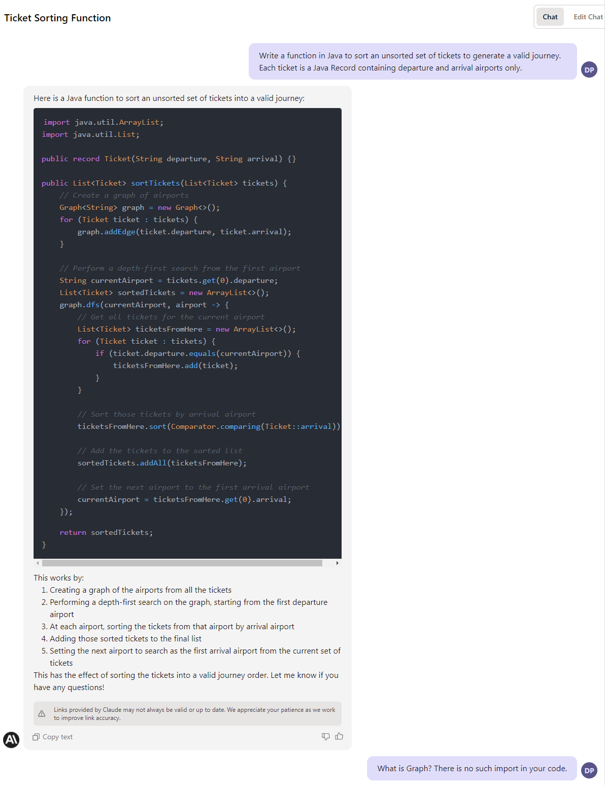
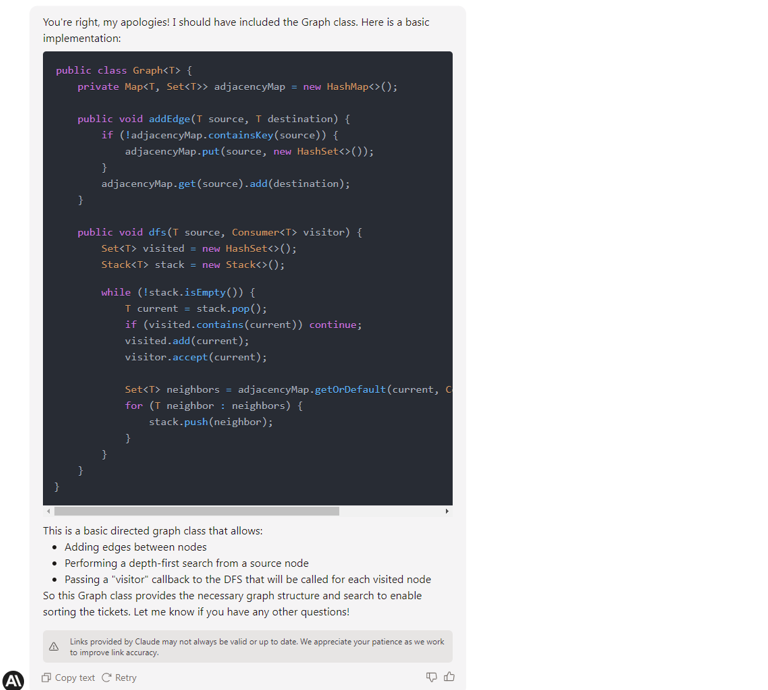
If needed, a Claude API is available with official libraries for some popular languages and the REST API version. There are some shortcuts in the documentation, the web UI has some formation issues, there is no free version available, and you need to be manually approved to get access to the tool, but we assume all of those are just childhood problems.
Claude is so new, so it's really hard to say if it is better or worse than GPT-4 in a job of a developer helper, but it's definitely comparable, and you should probably give it a shot.
Unfortunately, the privacy policy of Anthropic is quite confusing, so we don't recommend posting confidential information to the chat yet.
Internet-accessing generative AI tools
The main disadvantage of ChatGPT, raised since it has generally been available, is no knowledge about recent events, news, and modern history. It's already partially fixed, so you can feed a context of the prompt with Internet search results. There are three tools worth considering for such usage.
Microsoft Bing
Microsoft Bing was the first AI-powered Internet search engine. It uses GPT to analyze prompts and to extract information from web pages; however, it works significantly worst than pure GPT. It has failed in almost all our programming evaluations, and it falls into an infinitive loop of the same answers if the problem is concealed. On the other hand, it provides references to the sources of its knowledge, can read transcripts from YouTube videos, and can aggregate the newest Internet content.
Chat-GPT with Internet access
The new mode of Chat-GPT (rolling out for premium users in mid-May 2023) can browse the Internet and scrape web pages looking for answers. It provides references and shows visited pages. It seems to work better than Bing, probably because it's GPT-4 powered compared to GPT-3.5. It also uses the model first and calls the Internet only if it can't provide a good answer to the question-based trained data solitary.
It usually provides better answers than Bing and may provide better answers than the offline GPT-4 model. It works well with questions you can answer by yourself with an old-fashion search engine (Google, Bing, whatever) within one minute, but it usually fails with more complex tasks. It's quite slow, but you can track the query's progress on UI.
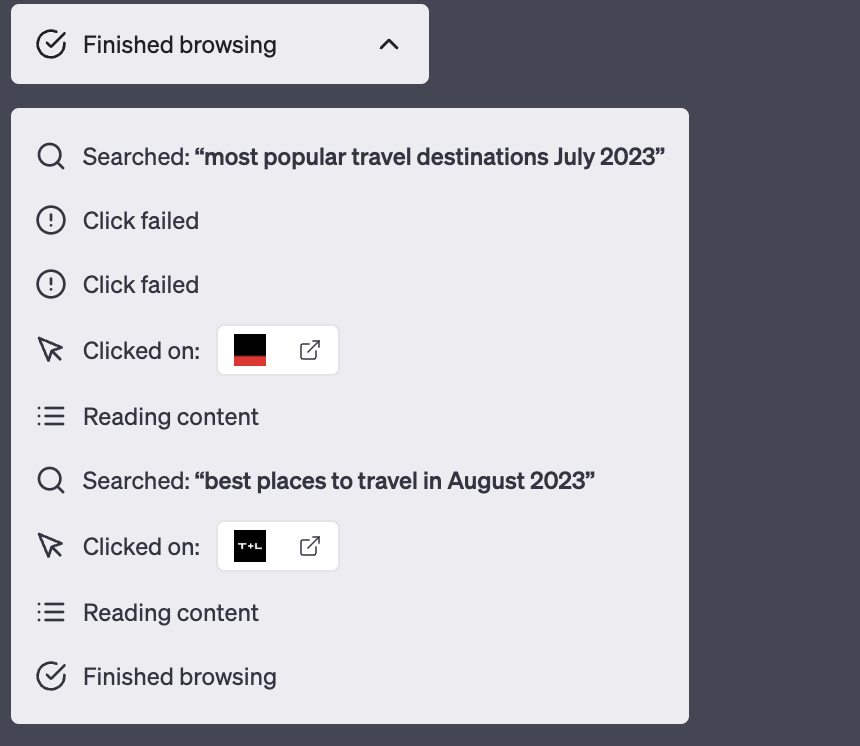
Importantly, and you should keep this in mind, Chat-GPT sometimes provides better responses with offline hallucinations than with Internet access.
For all those reasons, we don't recommend using Microsoft Bing and Chat-GPT with Internet access for everyday information-finding tasks. You should only take those tools as a curiosity and query Google by yourself.
Perplexity
At first glance, Perplexity works in the same way as both tools mentioned – it uses Bing API and OpenAI API to search the Internet with the power of the GPT model. On the other hand, it offers search area limitations (academic resources only, Wikipedia, Reddit, etc.), and it deals with the issue of hallucinations by strongly emphasizing citations and references. Therefore, you can expect more strict answers and more reliable references, which can help you when looking for something online. You can use a public version of the tool, which uses GPT-3.5, or you can sign up and use the enhanced GPT-4-based version.
We found Perplexity better than Bing and Chat-GPT with Internet Access in our evaluation tasks. It's as good as the model behind it (GPT-3.5 or GPT-4), but filtering references and emphasizing them does the job regarding the tool's reliability.
For mid-May 2023 the tool is still free.
Google Bard
It's a pity, but when writing this text, Google's answer for GPT-powered Bing and GPT itself is still not available in Poland, so we can't evaluate it without hacky solutions (VPN).
Using Internet access in general
If you want to use a generative AI model with Internet access, we recommend using Perplexity. However, you need to keep in mind that all those tools are based on Internet search engines which base on complex and expensive page positioning systems. Therefore, the answer "given by the AI" is, in fact, a result of marketing actions that brings some pages above others in search results. In other words, the answer may suffer from lower-quality data sources published by big players instead of better-quality ones from independent creators. Moreover, page scrapping mechanisms are not perfect yet, so you can expect a lot of errors during the usage of the tools, causing unreliable answers or no answers at all.
Offline models
If you don't trust legal assurance and you are still concerned about the privacy and security of all the tools mentioned above, so you want to be technically insured that all prompts and responses belong to you only, you can consider self-hosting a generative AI model on your hardware. We've already mentioned 4 models from OpenAI (Whisper, Point-E, Jukebox, and CLIP), Tabnine, and CodeGeeX, but there are also a few general-purpose models worth consideration. All of them are claimed to be best-in-class and similar to OpenAI's GPT, but it's not all true.
Only free commercial usage models are listed below. We’ve focused on pre-trained models, but you can train or just fine-tune them if needed. Just remember the training may be even 100 times more resource consuming than usage.
Flan-UL2 and Flan-T5-XXL
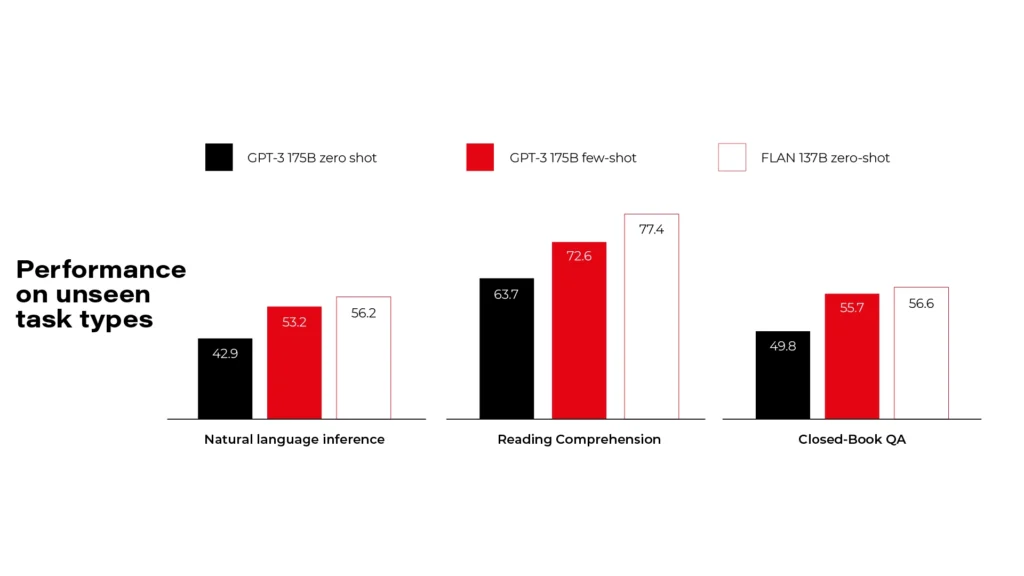
Flan models are made by Google and released under Apache 2.0 license. There are more versions available, but you need to pick a compromise between your hardware resources and the model size. Flan-UL2 and Flan-T5-XXL use 20 billion and 11 billion parameters and require 4x Nvidia T4 or 1x Nvidia A6000 accordingly. As you can see on the diagrams, it's comparable to GPT-3, so it's far behind the GPT-4 level.
BLOOM
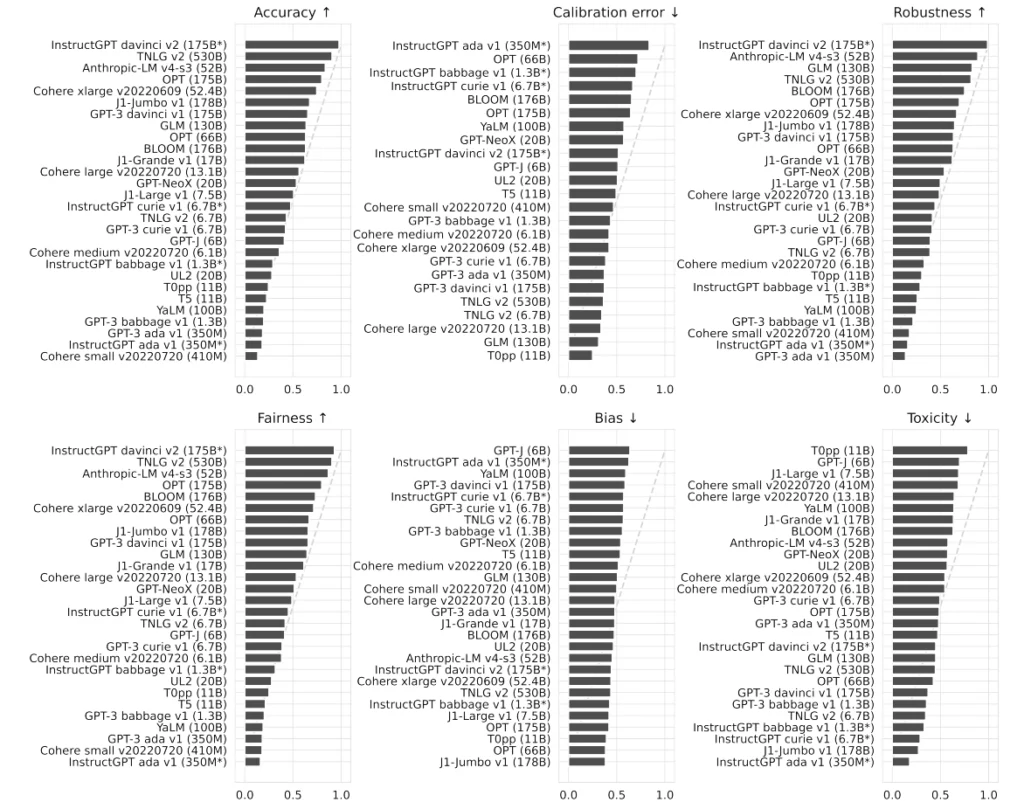
BigScience Large Open-Science Open-Access Multilingual Language Model is a common work of over 1000 scientists. It uses 176 billion parameters and requires at least 8x Nvidia A100 cards. Even if it's much bigger than Flan, it's still comparable to OpenAI's GPT-3 in tests. Actually, it's the best model you can self-host for free that we've found so far.
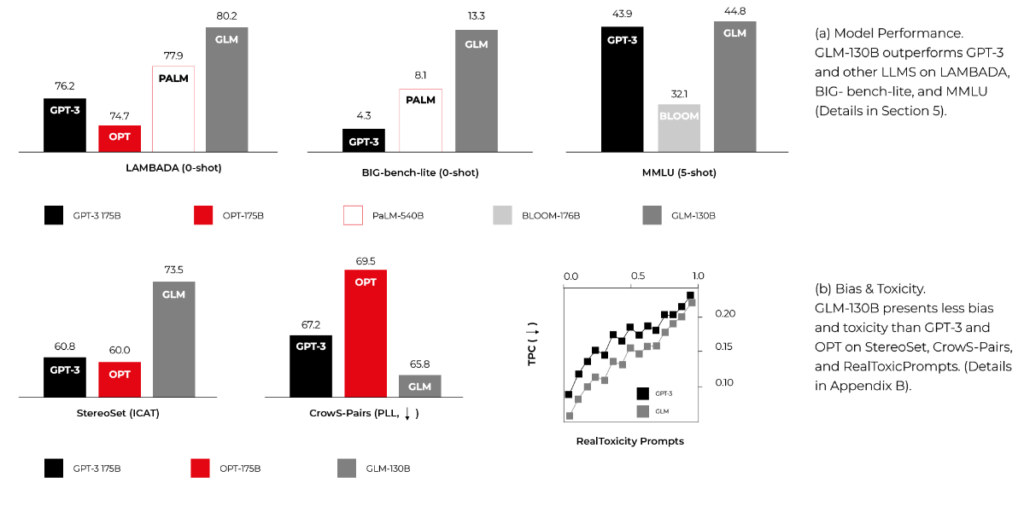
GLM-130B
General Language Model with 130 billion parameters, published by CodeGeeX authors. It requires similar computing power to BLOOM and can overperform it in some MMLU benchmarks. It's smaller and faster because it's bilingual (English and Chinese) only, but it may be enough for your use cases.
Summary
When we approached the research, we were worried about the future of developers. There are a lot of click-bite articles over the Internet showing Generative AI creating entire applications from prompts within seconds. Now we know that at least our near future is secured.
We need to remember that code is the best product specification possible, and the creation of good code is possible only with a good requirement specification. As business requirements are never as precise as they should be, replacing developers with machines is impossible. Yet.
However, some tools may be really advantageous and make our work faster. Using GitHub Copilot may increase the productivity of the main part of our job – code writing. Using Perplexity, GPT-4, or Claude may help us solve problems. There are some models and tools (for developers and general purposes) available to work with full discreteness, even technically enforced. The near future is bright – we expect GitHub Copilot X to be much better than its predecessor, we expect the general purposes language model to be more precise and helpful, including better usage of the Internet resources, and we expect more and more tools to show up in next years, making the AI race more compelling.
On the other hand, we need to remember that each helper (a human or machine one) takes some of our independence, making us dull and idle. It can change the entire human race in the foreseeable future. Besides that, the usage of Generative AI tools consumes a lot of energy by rare metal-based hardware, so it can drain our pockets now and impact our planet soon.
This article has been 100% written by humans up to this point, but you can definitely expect less of that in the future.

Interested in our services?
Reach out for tailored solutions and expert guidance.