
Cloud-native applications: 5 things you should know before you start

Introduction
Building cloud-native applications has become a direction in IT that has already been followed by companies like Facebook, Netflix or Amazon for years. The trend allows enterprises to develop and deploy apps more efficiently by means of cloud services and provides all sorts of run-time platform capabilities like scalability, performance and security. Thanks to this, developers can actually spend more time delivering functionality and speed up Innovation. What else is there that leaves the competition further behind than introducing new features at a global scale according to customer needs? You either keep up with the pace of the changing world or you don’t. The aim of this article is to present and explain the top 5 elements of cloud-native applications.
Why do you need cloud-native applications in the first place?
It is safe to say that the world we live in has gone digital. We communicate on Facebook, watch movies on Netflix, store our documents on Google Drive and at least a certain percentage of us shop on Amazon. It shouldn’t be a surprise that business demands are on a constant rise when it comes to customer expectations. Enterprises need a high-performance IT organization to be on top of this crowded marketplace.
Throughout the last 20 years the world has witnessed an array of developments in technology as well as people & culture. All these improvements took place in order to start delivering software faster. Automation, continuous integration & delivery to DevOps and microservice architecture patterns also serve that purpose. But still, quite frequently teams have to wait for infrastructure to become available, which significantly slows down the delivery line.
Some try to automate infrastructure provisioning or make an attempt towards DevOps. However, if the delivery of the infrastructure relies on a team that works remotely and can’t keep up with your speed, automated infrastructure provisioning will not be of much help. The recent rise of cloud computing has shown that infrastructure can be made available at a nearly infinite scale. IT departments are able to deliver their own infrastructure just as fast as if they were doing their regular online shopping on Amazon. On top of that, cloud infrastructure is simply cost efficient, as it doesn’t need tons of capital investment in advance. It represents a transparent pay-as-you-go model. Which is exactly why this kind of infrastructure has won its popularity among startups or innovation departments where a solution that tries out new products quickly is a golden ticket. So, what IS there to know before you dive in?
The ingredients of cloud-native apps, and what makes them native?
Now that we have explained the need for cloud-native apps, we can still shed a light on the definition, especially because it doesn’t always go hand in hand with its popularity. Cloud native apps are those applications that have been built to live and run in the cloud. If you want to get a better understanding of that it means - I recommend reading on. There are 5 elements divided into 2 categories (excluding the application itself) that are essential for creating cloud native environments.
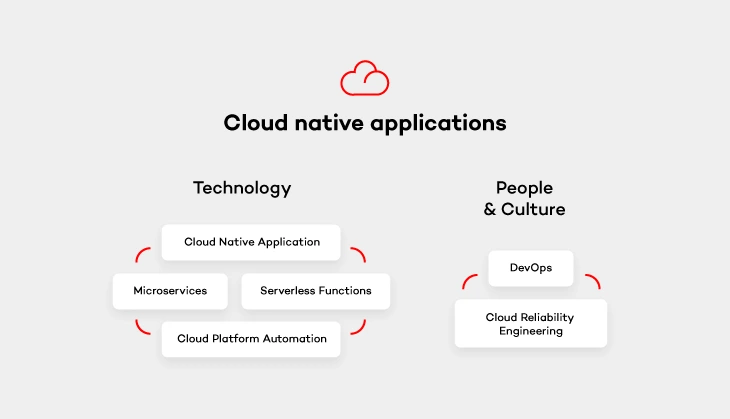
Cloud platform automation
In other words, the natural habitat in which cloud-native applications live. It provides services that keep the application running, manage security and network. As stated above, the flexibility of such cloud platform and its cost-efficiency thanks to the pay-as-you-go model is perfect for enterprises who don’t want to pay through the nose for infrastructure from the very beginning.
Serverless functions
These small, one-purpose functions that allow you to build asynchronous event-driven architectures by means of microservices. Don’t let the „serverless” part of their name misleads you, though. Your code WILL run on servers. The only difference is that it’s on the cloud provider’s side to handle accelerating instances to run your code and scale out under load. There are plenty of serverless functions out there offered by cloud providers that can be used by cloud-native apps. Services like IoT, Big Data or data storage are built from open-source solutions. It means that you simply don’t have to take care of some complex platform, but rather focus on functionality itself and not have to deal with the pains of installation and configuration.
Microservices architecture pattern
Architecture pattern aims to provide self-contained software products which implement one type of a single-purpose function that can be developed, tested and deployed separately to speed up the product’s time to market. Which is equal to what cloud-native apps offer.
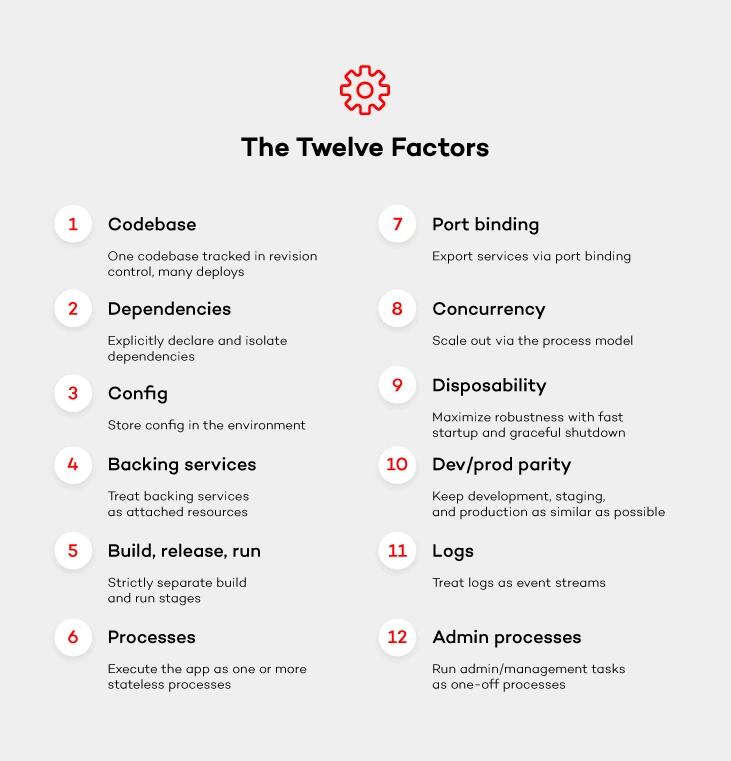
Once you get down to designing microservices, remember to do it in a way so that they can run cloud native. Most likely, you will come across one of the biggest challenges when it comes to the ability to run your app in a distributed environment across application instances. Luckily, there are these 12-factor app design principles which you can follow with a peaceful mind. These principles will help design such microservices that can run cloud native.
DevOps culture
The journey with cloud-native applications comes not only with a change in technology, but also with a culture change. Following DevOps principles is essential for cloud-native apps . Therefore, getting the whole software delivery pipeline to work automatically will only be possible if development and operation teams cooperate closely together. Development engineers are those who are in charge of getting the application to run on the cloud platform. While operations engineers handle development, operations and automation of that platform.
Cloud reliability engineering
And last but not least – cloud reliability engineering that comes from Google’s Site Reliability Engineering (SRE) concept. It is based on approaching the platform administration in the same way as software engineering. As stated by Ben Treynor , VP of Engineering at Google „Fundamentally, it’s what happens when you ask a software engineer to design an operations function (…). So SRE is fundamentally doing work that has historically been done by an operations team, but using engineers with software expertise, and banking on the fact that these engineers are inherently both predisposed to, and have the ability to, substitute automation for human labor.”
Treynor also claims that the roles of many operations teams nowadays are similar. But the way SRE teams work is significantly different because of several reasons. SRE people are software engineers with software development abilities and are characterized by proclivity. They have enough knowledge about programming languages, data structures, algorithms and performance. The result? They can create software that is more effective.
Summary
Cloud- native applications are one of the reasons why big players such as Facebook or Amazon stay ahead of the competition. The article sums up the most important factors that comprise them. Of course, the process of building cloud native apps goes far beyond choosing the tools. The importance of your team (People & Culture) can never be stressed enough. So what are the final thoughts? Advocate DevOps and follow Google’s Cloud Engineering principles to make your company efficient and your platform more reliable. You will be surprised at how fast cloud-native will help your organization become successful.

Grape Up guides enterprises on their data-driven transformation journey
Ready to ship? Let's talk.
Check related articles
Read our blog and stay informed about the industry's latest trends and solutions.
Bringing visibility to cloud-native applications
Working with cloud-native applications entails continuously tackling and implementing solutions to cross-cutting concerns. One of these concerns that every project is bound to run into comes to deploying highly scalable, available logging, and monitoring solutions.
You might ask, “how do we do that? Is it possible to find "one size fits all" solution for such a complex and volatile problem?” You need to look no further!
Taking into account our experience based on working with production-grade environments , we propose a generic architecture, built totally from open source components, that certainly provide you with the highly performant and maintainable workload. To put this into concrete terms, this platform is characterized by its:
- High availability - every component is available 24/7 providing users with constant service even in the case of a system failure.
- Resiliency - crucial data are safe thanks to redundancy and/or backups.
- Scalability - every component is able to be replicated on demand accordingly to the current load.
- Performance - ability to be used in any and all environments.
- Compatibility - easily integrated into any workflows.
- Open source - every component is accessible to anyone with no restrictions.
To build an environment that enables users to achieve outcomes described above, we decided to look at Elastic Stack, fully open source logging solution, structured in a modular way.
Elastic stack
Each component has a specific function, allowing it to be scaled in and out as needed. Elastic stack is composed of:
- Elasticsearch - RESTful, distributed search and analytics engine built on Apache Lucene able to index copious amount of data.
- Logstash - server-side data processing pipeline, able to transform, filter and enrich events on the fly.
- Kibana – a feature-rich visualization tool, able to perform advanced analysis on your data.
While all this looks perfect, you still need to be cautious while deploying your Elastic Stack cluster. Any downtime or data loss caused by incorrect capacity planning can be detrimental to your business value. This is extremely important, especially when it comes to production environments. Everything has to be carefully planned, including worst-case scenarios. Concerns that may weigh on the successful Elastic stack configuration and deployment are described below.
High availability
When planning any reliable, fault-tolerant systems, we have to distribute its critical parts across multiple, physically separated network infrastructures. It will provide redundancy and eliminate single points of failure.
Scalability
ELK architecture allows you to scale out quickly. Having good monitoring tools setup makes it easy to predict and react to any changes in the system's performance. This makes it resilient and helps you optimize the cost of maintaining the solution.
Monitoring and alerts
A monitoring tool along with a detailed set of alerting rules will save you a lot of time. It lets you easily maintain the cluster, plan many different activities in advance, and react immediately if anything bad happens to your software.
Resource optimization
In order to maximize the stack performance, you need to plan the hardware (or virtualized hardware) allocation carefully. While data nodes need efficient storage, ingesting nodes will need more computing power and memory. While planning this take into consideration the number of events you want to process and amount of data that has to be stored to avoid many problems in the future.
Proper component distribution
Make sure the components are properly distributed across the VMs. Improper setup may cause high CPU and memory usage, can introduce bottlenecks in the system and will definitely result in lower performance. Let's take Kibana and ingesting node as an example. Placing them on one VM will cause poor user experience since UI performance will be affected when more ingesting power is needed and vice-versa.
Data replication
Storing crucial data requires easy access to your data nodes. Ideally, your data should be replicated across multiple availability zones which will guarantee redundancy in case of any issues.
Architecture
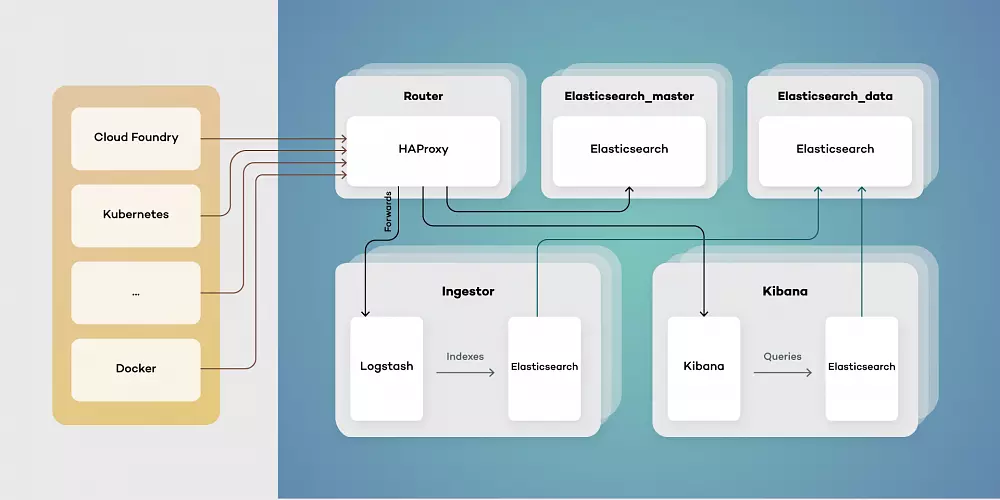
Our proposed architecture consists of five types of virtual machines - Routers, elastic masters, elastic data, ingestors, and Kibana instances. This toolset simplifies scaling of components while separating their responsibilities. Each of them has a different function:
- Elasticsearch_master - controls indexes and Elasticsearch master. Responsible for creating new indexes, rolling updates and monitoring clusters health.
- Elasticsearch_data - stores data and retrieves it as needed. Can be run both as hot and warm storage, as well as provides redundancy on data.
- Ingestor - exposes input endpoints for events both while transforming and enriching data stored in Elasticsearch.
- Kibana - provides users with visualizations by querying Elasticsearch data.
- Router - serves as a single point of entry, both for users and services producing data events.
Architecting your Elastic Stack deployment in this way allows for the simple upgrade procedure. Thanks to using a single point of entry, switching to a new version of Elastic Stack is as simple as pointing HAProxy to an upgraded cluster.
Using a clustered structure also allows for freely adding data nodes as needed when your traffic inevitably grows.
Cloud development overview for non-cloud developers
Introduction
This article covers basic concepts of web applications that are designed to be run in Cloud environment and are intended for software engineers who are not familiar with Cloud Native development but work with other programming concepts/technologies. The article gives an overview of the basics from the perspective of concepts that are already known to non-cloud developers including mobile and desktop software engineers.
Basic concepts
Let’s start with something simple. Let’s imagine that we want to write a web application that allows users to create an account, order the products and write reviews on them. The simplest way is to have our backend app as a single app combining UI and code. Alternatively, we may split it frontend and into the backend, which just provides API.
Let’s focus on the backend part. The whole communication between its components happens inside of a single app, on a code level. From the executable file perspective, our app is a monolithic piece of code: it’s a single file or package. Everything looks simple and clean: the code is split into several logical components, each component has its own layers. The possible overall architecture may look as follows:
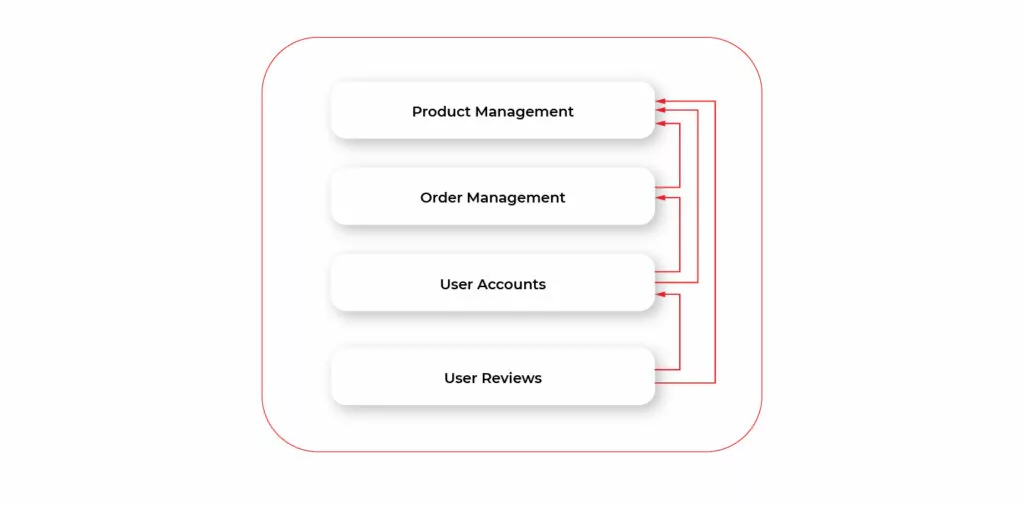
But as we try to develop our app we'll quickly figure out that the above approach is not enough in the modern world and modern web environment. To understand what's wrong with the app architecture we need to figure out the key specificity of web apps compared to desktop or mobile apps. Let’s describe quite simple yet very important points. While being obvious to some (even non-web) developers the points are crucial for understanding essential flaws of our app while running in the modern server environment.
Desktop or mobile app runs on the user's device. This means that each user has their own app copy running independently. For web apps, we have the opposite situation. In a simplified way, in order to use our app user connects to a server and utilizes an app instance that runs on that server. So, for web apps, all users are using a single instance of the app. Well, in real-world examples it's not strictly a single instance in most cases because of scaling. But the key point here is that the number of users, in a particular moment of time is way greater than the number of app instances. In consequence, app error or crash has incomparably bigger user impact for web apps. I.e., when a desktop app crashes, only a single user is impacted. Moreover, since the app runs on their device they may just restart the app and continue using it. In case of a web app crash, thousands of users may be impacted. This brings us to two important requirements to consider.
- Reliability and testability
Since all the code is placed in a single (physical) app our changes to one component during development of the new features may impact any other existing app component. Hence, after implementing a single feature we have to retest the whole app. If we have some bug in our new code that leads to a crash, once the app crashes it becomes unavailable to all the users. Before we figure out the crash we have some downtime when users cannot use the app. Moreover to prevent further crashes we have to roll back to a previous app version. And if we delivered some fixes/updates along with the new feature we’ll lose those improvements. - Scalability
Consider the number of users is increased during a short period. In case of our example app, this may happen due to, e.g., discounts or new attractive products coming in. It quickly turns out that one app instance running is not enough. We have too many requests and app “times out” requests it cannot handle. We may just increase the number of running instances of the app. Hence, each instance will independently handle user orders. But after a closer look, it turns out that we actually don’t need to scale the whole app. The only part of the app that needs to handle more requests is creating and storing orders for a particular product. The rest of the app doesn’t need to be scaled. Scaling other components will result in unneeded memory growth. But since all the components are contained in a monolith (single binary) we can only scale all of them at once by launching new instances.
The other thing to consider is network latency which adds important limitations compared to mobile or desktop apps. Even though the UI layer itself runs directly in the browser (javascript), any heavy computation or CRUD operation requires http call. Since such network calls are relatively slow (compared to interactions between components in code) we should optimize the way we work with data and some server-side computations.
Let’s try to address the issues we described above.
Microservices
Let’s make a simple step and split our app into a set of smaller apps called microservices. The diagram below illustrates the general architecture of our app rethinks using microservices.
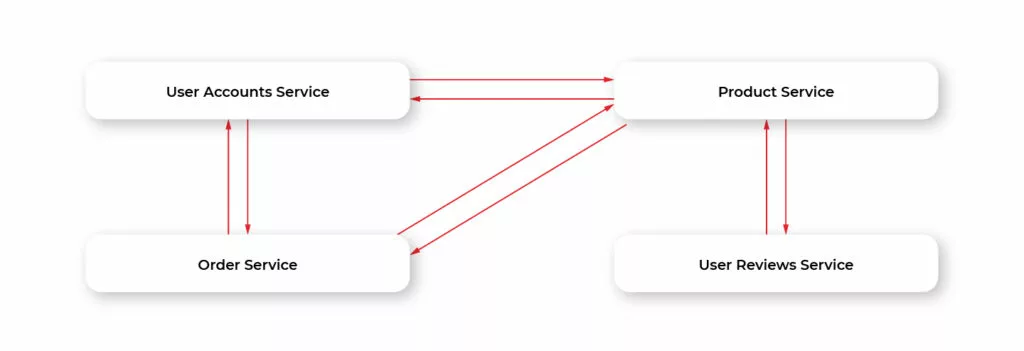
This helps us solve the problems of monolithic apps and has some additional advantages.
• Implementing a new feature (component) results in adding a new service or modifying the existing one. This reduces the complexity of the development and increases testability. If we have a critical bug we will simply disable that service while the other app parts will still work (excluding the parts that require interaction with the disabled service) and contain any other changes/fixes not related to the new feature.
• When we need to scale the app we may do it only for a particular component. E.g., if a number of purchases increase we may increment the number of running instances of Order Service without touching other ones.
• Developers in a team can work fully independently while developing separate microservices. We’re also not limited by a single language. Each microservice may be written in a different language.
• Deployment becomes easier. We may update and deploy each microservice independently. Moreover, we can use different server/cloud environments for different microservices. Each service can use its own third-party dependency services like a database or message broker.
Besides its advantages, microservice architecture brings additional complexity that is driven by the nature of microservice per se: instead of a single big app, we now have multiple small applications that have to communicate with each other through a network environment.
In terms of desktop apps, we may bring up here the example of inter-process communication, or IPC. Imagine that a desktop app is split into several smaller apps, running independently on our machine. Instead of calling methods of different app modules within a single binary we now have multiple binaries. We have to design a protocol of communication between them (e.g., based on OS native IPC API), we have to consider the performance of such communication, and so on. There may be several instances of a single app running at the same time on our machine. So, we should find out a way to determine the location of each app within the host OS.
The described specificity is very similar to what we have with microservices. But instead of running on a single machine microservice apps run in a network which adds even more complexity. On the other hand, we may use already existing solutions, like http for communicating between services (which is how microservices communicate in most cases) and RESTful API on top of it.
The key thing to understand here is that all the basic approaches described below are introduced mainly to solve the complexity resulting from splitting a single app into multiple microservices.
Locating microservices
Each microservice that calls API of another microservice (often called client service) should know its location. In terms of calling REST API using http the location consists of address and port. We can hardcode the location of the callee in the caller configuration files or code. But the problem is that can be instantiated, restarted, or moved independently of each other. So, hardcoding is not a solution as if the callee service location is changed the caller will have to be restarted or even recompiled. Instead, we may use Service Registry pattern.
To put it simply, Service Registry is a separate application that holds a table that maps a service id to its location. Each service is registered in Service Registry on startup and deregistered on shutdown. When client service needs to discover another service it gets the location of that service from the registry. So, in this model, each microservice doesn’t know the concrete location of its callee services but just their ids. Hence, if a certain service changes its location after restart the registry is updated and its client services will be able to get this new location.
Service discovery using a Service registry may be done in two ways.
1. Client-side service discovery. Service gets the location of other services by directly querying the registry. Then calls discovered the service’s API by sending a request to that location. In this case, each service should know the location of the Service Registry. Thus, its address and port should be fixed.
2. Server-side service discovery. Service may send API call requests along with service id to a special service called Router. Router retrieves the actual location of the target service and forwards the request to it. In this case, each service should know the location of the Router.
Communicating with microservices
So, our application consists of microservices that communicate. Each has its own API. The client of our microservices (e.g., frontend or mobile app) should use that API. But such usage becomes complicated even for several microservices. Another example, in terms of desktop interprocess communication, imagines a set of service apps/daemons that manage the file system. Some may run constantly in the background, some may be launched when needed. Instead of knowing details related to each service, e.g., functionality/interface, the purpose of each service, whether or not it runs, we may use a single facade daemon, that will have a consistent interface for file system management and will internally know which service to call.
Referring back to our example with the e-shop app consider a mobile app that wants to use its API. We have 5 microservices, each has its own location. Remember also, that the location can be changed dynamically. So, our app will have to figure out to which services particular
requests should be sent. Moreover, the dynamically changing location makes it almost impossible to have a reliable way for our client mobile app to determine the address and port of each service.
The solution is similar to our previous example with IPC on the desktop. We may deploy one service at a fixed known location, that will accept all the requests from clients and forward each request to the appropriate microservice. Such a pattern is called API Gateway.
Below is the diagram demonstrating how our example microservices may look like using Gateway:
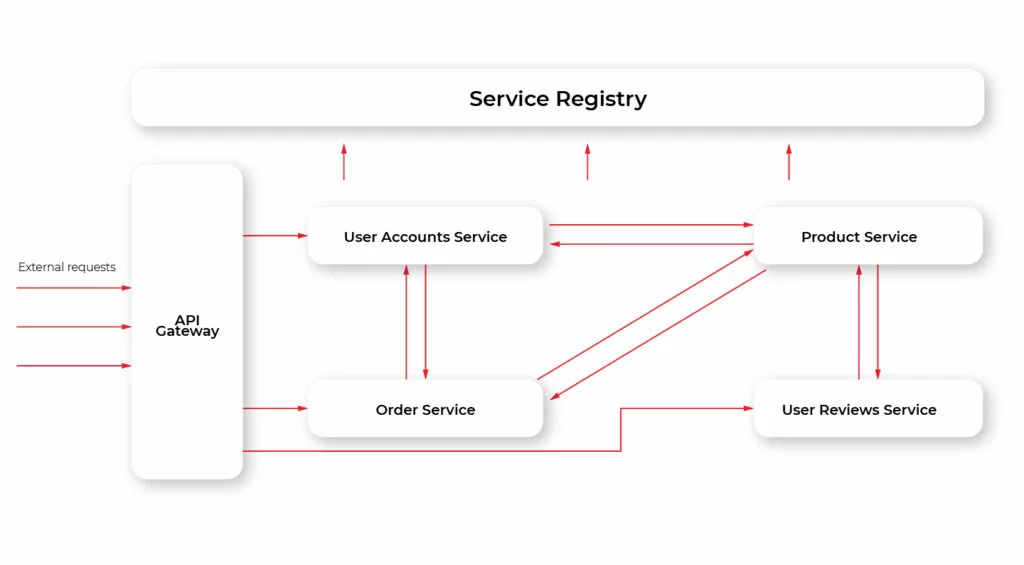
Additionally, this approach allows unifying communication protocol. That is, different services may use different protocols. E.g., some may use REST, some AMQP, and so on. With API Gateway these details are hidden from the client: the client just queries the Gateway using a single protocol (usually, but not necessarily REST) and then the Gateway translates those requests into the appropriate protocol a particular microservice uses.
Configuring microservices
When developing a desktop or mobile app we have several devices the app should run on during its lifecycle. First, it runs on the local device (either computer or mobile device/simulator in case of mobile app) of the developers who work on the app. Then it’s usually run on some dev device to perform unit tests as part of CI/CD. After that, it’s installed on a test device/machine for either manual or automated testing. Finally, after the app is released it is installed on users’ machines/devices. Each type of device
(local, dev, test, user) implies its own environment. For instance, a local app usually uses dev backend API that is connected to dev database. In the case of mobile apps, you may even develop using a simulator, that has its own specifics, like lack or limitation of certain system API. The backend for the app’s test environment has DB with a configuration that is very close to the one used for the release app. So, each environment requires a separate configuration for the app, e.g., server address, simulator specific settings, etc. With a microservices-based web app, we have a similar situation. Our microservices usually run in different environments. Typically they are dev, test, staging, and production. Hardcoding configuration is no option for our microservices, as we typically move the same app package from one environment to another without rebuilding it. So, it’s natural to have the configuration external to the app. At a minimum, we may specify a configuration set per each environment inside the app. While such an approach is good for desktop/mobile apps it has provides a limitation for a web app. We typically move the same app package/file from one environment to another without recompiling it. A better approach is to externalize our configuration. We may store configuration data in database or external files that are available to our microservices. Each microservice reads its configuration on startup. The additional benefit of such an approach is that when the configuration is updated the app may read it on the fly, without the need for rebuilding and/or redeploying it.
Choosing cloud environment
We have our app developed with a microservices approach. The important thing to consider is where would we run our microservices. We should choose the environment that allows us to take advantage of microservice architecture. For cloud solutions, there are two basic types of environment: Infrastructure as a Service, or IaaS, and Platform as a Service, or PaaS. Both have ready-to-use solutions and features that allow scalability, maintainability, reliability which require much effort to achieve on on-premises. and Each of them has advantages compared to traditional on-premises servers.
Summary
In this article, we’ve described key features of microservices architecture for the cloud-native environment. The advantages of microservices are:
- app scalability;
- reliability;
- faster and easier development
- better testability.
To fully take advantage of microservice architecture we should use IaaS or PasS cloud environment type.
Interested in our services?
Reach out for tailored solutions and expert guidance.