
About us
Our services

Capabilities

Legacy Modernization
Data Platforms
AI & Advanced Analytics

Industries

Automotive
Finance
Manufacturing

Solutions

Databoostr

Data Sharing & Monetization Platform

Cloudboostr

Multicloud Enterprise Kubernetes

Looking for something else?

Contact us for tailored solutions and expert guidance.

Contact
Case studies
Resources

Resources

Blog

Read our blog and stay informed about the industry’s latest trends and technology.

Ready to find your breaking point?

Stay updated with our newsletter.

Subscribe

Insights

Ebooks

Explore our resources and learn about building modern software solutions from experts and practitioners.

Read more
Contact
Blog
Software development

Oracle shakes the world of Java releases

Grape up Expert
November 24, 2025
•
5 min read

Table of contents

Heading 2
Heading 3
Heading 4
Heading 5
Heading 6

Schedule a consultation with software experts

Contact us

While Java 10 is said to be the new kid on the block, rumors about 11 are already spreading fast. Now, let’s be honest: how many of you have made the upgrade to J10? I can bet that the majority of us are still sticking with the good old 8. And do you remember the story with Java 9? It became obsolete in just 6 weeks! With the release of Java 10 on March 20, 2018 and Java 11 being already right around the corner, it is safe to say that Oracle is making the move towards faster release cycles which will give us more features and abilities faster than ever. The question is “is it really a change for better?”

Why so often, Oracle?

One may wonder about the reason behind such frequent releases. It is actually because of serious changes about Java as a platform from Oracle. First of all, the new versions are released more frequently, every 6 months, and this is called time-based release model. Before 9 we had a feature-based model and, as a result, a new version every 2-3 years. However, Oracle was facing constant criticism about the slow java evolution. On the other hand, developers had more than enough time to adapt to changes. Right now, we are left with the question „Is six months enough to assume a release is mature and stable?” Maybe instead of resolving the issue, Oracle jumped from one extreme to another?

By all means, in the light of these changes, not all developers are super enthusiastic about that as it requires  a persistent migration effort . It raises many questions:

  •  Will my dependencies work on the next version?
  •  If my IDE be ready?
  •  Will my build tool (Maven, Gradle, etc.) be ready?
  •  If my other tools (spotbugs, checkstyle, PMD etc.) be compatible?

Right now, most of the software mentioned above is available for free. What if their authors decide to charge them? Certainly, they will bear some costs because of faster Java release train. Java, as a platform, had been considered as free and open up till now. And in my opinion that determined the success of Java.

What does the future of Java hold?

Additionally, Oracle itself announces that updates and patches will be published for free only for the latest version of Java (it doesn’t apply to an LTS release, what I described later). If the last version is X, you have X-1 and would like Oracle to provide a security patch to you - you will have to pay. Ok, and what about OpenJDK? Well, theoretically, the OpenJDK community could release security updates, but there is no sign of this yet.

Simon Ritter, Deputy CTO at Azul Systems and Java & JVM technologies enthusiast, has recently made a statement on his blog that right now we can have all three java qualities: stable, secure and free. But things are changing, and there will come a day when we will have to choose only two.

For the purpose of this article let’s assume that Java 9 is stable now. But the last version is 10, and free security updates are available only for Java 10. So if you need to have a stable and secure Java, it’s not going to be free of charges. If you don’t want to spend money at that point, you have to choose between the following two aspects: stability (9) or security (10 with critical security updates provided).

However, every cloud has a silver lining and things do have a way of working out smoothly. For enterprises and organizations that don't necessarily want or need to upgrade at a rapid pace, Oracle says that it will provide a long-term support (LTS) release every three years. Specific JDK versions will be identified as LTS releases, for them publicly available updates will be provided at least for three years. All other, intermediate releases (9, 10) will have updates only for six months. JDK 8 has been classified as an LTS release. The next one will be the JDK 11 to be released in September 2018. So the last free update of Java 8 for business users will be published in January 2019.

Summary

I think this is the main reason, why most of us, as I wrote at the beginning, stayed at Java 8. In a few months a part of enterprises probably will migrate to Java 11, skipping 9 and 10. However Java 11 is going to be significantly expanded comparing to Java 8. It creates a possibility that the migration will be expensive and risky. In summary: do you prefer one big step, from Java 8 to 11, or take it one day at a time with smaller steps without skipping a single version?

Grape Up guides enterprises on their data-driven transformation journey

Ready to ship? Let's talk.

Check our offer
Blog

Check related articles

Read our blog and stay informed about the industry's latest trends and solutions.

Software development

Native bindings for JavaScript - why should I care?

At the very beginning, let’s make one important statement: I am not a JavaScript Developer. I am a C++ Developer, and with my skill set I feel more like a guest in the world of JavaScript. If you’re also a Developer, you probably already know why companies today are on the constant lookout for web developers - the JavaScript language is flexible and has a quite easy learning curve. Also, it is present everywhere from computers, to mobile devices, embedded devices, cars, ATMs or washing machines - you name it. Writing portable code that may be run everywhere is tempting and that's why it gets more and more attention.

Desktop applications in JavaScript

In general, JavaScript is not the first or best fit for desktop applications. It was not created for that purpose and it lacks GUI libraries like C++, C#, Java or even Python. Even though it has found its niche.

Just take a look at the Atom text editor. It is based on Electron [1], a framework to run JS code in a desktop application. The tool internally uses chromium engine so it is more or less a browser in a window, but still quite an impressive achievement to have the same codebase for both Windows, macOS and Linux. It is quite meaningful for those that want to use agile processes. Especially because it is really easy to start with an MVP and have incremental updates with new features often, as it is the same code.

Native code and JavaScript? Are you kidding?

Since JavaScript works for desktop applications, one may think: why bother with native bindings then? But before you also think so, consider the fact that there are a few reasons for that, usually performance issues:

  • Javascript is a script, virtualized language. In some scenarios, it may be of magnitude slower than its native code equivalent [2].
  • Javascript is characterized by garbage collection and has a hard time with memory consuming algorithms and tasks.
  • Access to hardware or native frameworks is sometimes only possible from a native, compiled code.

Of course, this is not always necessary. In fact, you may happily live your developer life writing JS code on a daily basis and never find yourself in a situation when creating or using native code in your application is unavoidable. Hardware performance is still on the uphill and often there is no need to even profile an application. On the other hand, once it happens, every developer should know what options are available for them.

The strange and scary world of static typing

If a JavaScript Developer who uses Electron finds out that his great video encoding algorithm does not keep up with the framerate, is that the end of his application? Should he rewrite everything in assembler?

Obviously not. He might try to use the native library to do the hard work and leverage the environment without a garbage collector and with fast access to the hardware - or maybe even SIMD SSE extensions. The question that many may ask is: but isn’t it difficult and pointless?

Surprisingly not. Let’s dig deeper into the world of native bindings when as an opposite to JavaScript, you often have to specify the type of variable or return value for functions in your code.

First of all, if you want to use Electron or any framework based on NodeJS, you are not alone - you have a small friend called “nan” (if you have seen “wat”[3] you are probably already smiling). Nan is a “native abstraction for NodeJS” [4] and thanks to its very descriptive name, it is enough to say that it allows to create add-ons to NodeJS easily. As literally everything today you can install it using the npm below:

$ npm install --save nan

Without getting into boring, technical details, here is an example of wrapping C++ class to a JavaScript object:
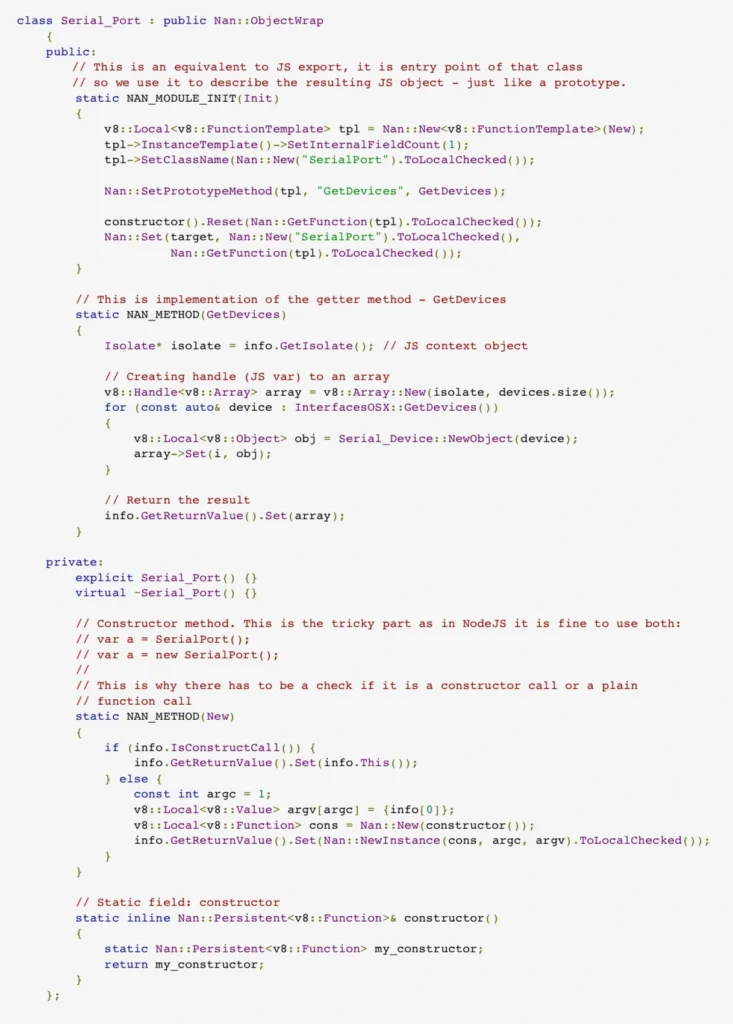
Nothing really fancy and the code isn’t too complex either. Just a thin wrapping layer over the C++ class. Obviously, for bigger frameworks there will be much code and more problems to solve, but in general we have a native framework bound with the JavaScript application.

Summary

The bad part is that we, unfortunately, need to compile the code for each platform to use it and by each platform we usually mean windows, linux, macOS, android and iOS depending on our targets. Also, it is not rocket science, but for JavaScript developers that never had a chance to compile the code it may be too difficult.

On the other hand, we have a not so perfect, but working solution for writing applications that run on multiple platforms and handle even complex business logic . Programming has never been a perfect world, it has always been a world of trade-offs, beautiful solutions that never work and refactoring that never happens. In the end, when you are going to look for yet another compromise between your team’s skills and the client’s requirements for the next desktop or mobile application framework, you might consider using JavaScript.

  • Electron
  • Wat
  • Nan
Read more
AI
Software development

Spring AI framework overview – introduction to AI world for Java developers

In this article, we explain the fundamentals of integrating various AI models and employing different AI-related techniques within the Spring framework. We provide an overview of the capabilities of Spring AI and discuss how to utilize the various supported AI models and tools effectively.

Understanding Spring AI - Basic concepts

Traditionally, libraries for AI integration have primarily been written in Python, making knowledge of this language essential for their use. Additionally, their integration in applications written in other languages implies the writing of a boilerplate code to communicate with the libraries. Today, Spring AI makes it easier for Java developers to enable AI in Java-based applications.

Spring AI aims to provide a unified abstraction layer for integrating various AI LLM types and techniques (e.g., ETL, embeddings, vector databases) into Spring applications. It supports multiple AI model providers, such as OpenAI, Google Vertex AI, and Azure Vector Store, through standardized interfaces that simplify their integration by abstracting away low-level details. This is achieved by offering concrete implementations tailored to each specific AI provider.

Generating data: Integration with AI models

Spring AI API supports all main types of AI models, such as chat, image, audio, and embeddings. The API for the model is consistent across all model types. It consists of the following main components:

1) Model interfaces that provide similar methods for all AI model providers. Each model type has its own specific interface, such as ChatModel for chat AI models and ImageModel for image AI models. Spring AI provides its own implementation of each interface for every supported AI model provider.

2) Input prompt/request class that is used by the AI model (via model interface) providing user input (usually text) instructions, along with options for tuning the model’s behavior.

3) Response for output data produced by the model. Depending on the model type, it contains generated text, image, or audio (for Chat Image and Audio models correspondingly) or more specific data like floating-point arrays in the case of Embedding models.

All AI model interfaces are standard Spring beans that can be injected using auto-configuration or defined in Spring Boot configuration classes.

Chat models

The chat LLMs gnerate text in response to the user’s prompts. Spring AI has the following main API for interaction with this type of model.

  • The ChatModel interface allows sending a String prompt to a specific chat AI model service. For each supported AI chat model provider in Spring AI, there is a dedicated implementation of this interface.
  • The prompt class contains a list of text messages (queries, typically a user input) and a ChatOptions object. The ChatOptions interface is common for all the supported AI models. Additionally, every model implementation has its own specific options for class implementation.
  • The ChatResponse class encapsulates the output of the AI chat model, including a list of generated data and relevant metadata.
  • Furthermore, the chat model API has a ChatClient class , which is responsible for the entire interaction with the AI model. It encapsulates the ChatModel, enabling users to build and send prompts to the model and retrieve responses from it. ChatClient has multiple options for transforming the output of the AI model, which includes converting raw text response into a custom Java object or fetching it as a Flux-based stream.

Putting all these components together, let’s give an example code of Spring service class interacting with OpenAI chat API:

// OpenAI model implementation is available via auto configuration
// when ‘org.springframework.ai:spring-ai-openai-spring-boot-starter'
// is added as a dependency

@Configuration
public class ChatConfig {
// Defining chat client bean with OpenAI model
@Bean
ChatClient chatClient(ChatModel chatModel) {
return ChatClient.builder(chatModel)
.defaultSystem("Default system text")
.defaultOptions(
OpenAiChatOptions.builder()
.withMaxTokens(123)
.withModel("gpt-4-o")
.build()
).build();
}
}@Service
public class ChatService {
private final ChatClient chatClient;
...
public List<String> getResponses(String userInput) {
var prompt = new Prompt(
userInput,
// Specifying options of concrete AI model options
OpenAiChatOptions.builder()
.withTemperature(0.4)
.build()
);

var results = chatClient.prompt(prompt)
.call()
.chatResponse()
.getResults();

return results.stream()
.map(chatResult -> chatResult.getOutput().getContent())
.toList();
}
}

Image and Audio models

Image and Audio AI model APIs are similar to the chat model API; however, the framework does not provide a ChatClient equivalent for them.

For image models the main classes are represented by:

  • ImagePrompt that contains text query and ImageOptions
  • ImageModel for abstraction of the concrete AI model
  • ImageResponse containing a list of the ImageGeneration objects as a result of ImageModel invocation.

Below is the example Spring service class for generating images:

@Service
public class ImageGenerationService {
// OpenAI model implementation is used for ImageModel via autoconfiguration
// when ‘org.springframework.ai:spring-ai-openai-spring-boot-starter’ is
// added as a dependency

private final ImageModel imageModel;
...
public List<Image> generateImages(String request) {
var imagePrompt = new ImagePrompt(
// Image description and prompt weight
new ImageMessage(request, 0.8f),
// Specifying options of a concrete AI model
OpenAiImageOptions.builder()
.withQuality("hd")
.withStyle("natural")
.withHeight(2048)
.withWidth(2048)
.withN(4)
.build()
);

var results = imageModel
.call(imagePrompt)
.getResults();

return results.stream()
.map(ImageGeneration::getOutput)
.toList();
}
}

When it comes to audio models there are two types of them supported by Spring AI: Transcription and Text-to-Speech.

The text-to-speech model is represented by the SpeechModel interface. It uses text query input to generate audio byte data with attached metadata.

In transcription models , there isn't a specific general abstract interface. Instead, each model is represented by a set of concrete implementations (as per different AI model providers). This set of implementations adheres to a generic "Model" interface, which serves as the root interface for all types of AI models.

Embedding models

1. The concept of embeddings

Let’s outline the theoretical concept of embeddings for a better understanding of how the embeddings API in Spring AI functions and what its purpose is.

Embeddings are numeric vectors created through deep learning by AI models. Each component of the vector corresponds to a certain property or feature of the data. This allows to define the similarities between data (like text, image or video) using mathematical operations on those vectors.

Just like 2D or 3D vectors represent a point on a plane or in a 3D space, the embedding vector represents a point in an N-dimensional space. The closer points (vectors) are to each other or, in other words, the shorter the distance between them is, the more similar the data they represent is. Mathematically the distance between vectors v1 and v2 may be defined as: sqrt(abs(v1 - v2)).

Consider the following simple example with living beings (e.g., their text description) as data and their features:

Is Animal (boolean) Size (range of 0…1) Is Domestic (boolean) Cat 1 0,1 1 Horse 1 0,7 1 Tree 0 1,0 0

In terms of the features above, the objects might be represented as the following vectors: “cat” -> [1, 0.1, 1] , “horse” -> [1, 0.7, 1] , “tree” -> [0, 1.0, 0]

For the most similar animals from our example, e.g. cat and horse, the distance between the corresponding vectors is sqrt(abs([1, 0.1, 1] - [1, 0.7, 1])) = 0,6 While comparing the most distinct objects, that is cat and tree gives us: sqrt(abs([1, 0.1, 1] - [0, 1.0, 0])) = 1,68

2. Embedding model API

The Embeddings API is similar to the previously described AI models such as ChatModel or ImageModel.

  • The Document class is used for input data. The class represents an abstraction that contains document identifier, content (e.g., image, sound, text, etc), metadata, and the embedding vector associated with the content.
  • The EmbeddingModel interface is used for communication with the AI model to generate embeddings. For each AI embedding model provider, there is a concrete implementation of that interface. This ensures smooth switching between various models or embedding techniques.
  • The EmbeddingResponse class contains a list of generated embedding vectors.

Storing data: Vector databases

Vector databases are specifically designed to efficiently handle data in vector format. Vectors are commonly used for AI processing. Examples include vector representations of words or text segments used in chat models, as well as image pixel information or embeddings.

Spring AI has a set of interfaces and classes that allow it to interact with vector databases of various database vendors. The primary interface of this API is the VectorStore , which is designed to search for similar documents using a specific similarity query known as SearchRequest.

It also has methods for adding and removing the Document objects. When adding to the VectorStore, the embeddings for documents are typically created by the VectorStore implementation using an EmbeddingMode l. The resulting embedding vector is assigned to the documents before they are stored in the underlying vector database.

Below is an example of how we can retrieve and store the embeddings using the input documents using the Azure AI Vector Store.

@Configuration
public class VectorStoreConfig {
...
@Bean
public VectorStore vectorStore(EmbeddingModel embeddingModel) {
var searchIndexClient = ... //get azure search index client
return new AzureVectorStore(
searchIndexClient,
embeddingModel,
true,
// Metadata fields to be used for the similarity search
// Considering documents that are going to be stored in vector store
// represent books/book descriptions

List.of(MetadataField.date("yearPublished"),
MetadataField.text("genre"),
MetadataField.text("author"),
MetadataField.int32("readerRating"),
MetadataField.int32("numberOfMainCharacters")));
}
}
@Service
public class EmbeddingService {
private final VectorStore vectorStore;
...
public void save(List<Document> documents) {
// The implementation of VectorStore uses EmbeddingModel to get embedding vector
// for each document, sets it to the document object and then stores it

vectorStore.add(documents);
}

public List<Document> findSimilar(String query,
double similarityLimit,
Filter.Expression filter) {
return vectorStore.similaritySearch(
SearchRequest.query(query)
// used for embedding similarity search
// only having equal or higher similarity
.withSimilarityThreshold(similarityLimit)
// search only documents matching filter criteria
.withFilterExpression(filter)
.withTopK(10)
// max number of results
);
}

public List<Document> findSimilarGoodFantasyBook(String query) {
var goodFantasyFilterBuilder = new FilterExpressionBuilder();
var goodFantasyCriteria = goodFantasyFilterBuilder.and(
goodFantasyFilterBuilder.eq("genre", "fantasy"),
goodFantasyFilterBuilder.gte("readerRating", 9)
).build();

return findSimilar(query, 0.9, goodFantasyCriteria);
}
}

Preparing data: ETL pipelines

The ETL, which stands for “Extract, Transform, Load” is a process of transforming raw input data (or documents) to make it applicable or more efficient for the further processing by AI models. As the name suggests, the ETL consists of three main stages: extracting the raw data from various data sources, transforming data into a structured format, and storing the structured data in the database.

In Spring AI the data used for ETL in every stage is represented by the Document class mentioned earlier. Here are the Spring AI components representing each stage in ETL pipeline:

  • DocumentReader – used for data extraction, implements Supplier<List<Document>>
  • DocumentTransformer – used for transformation, implements Function<List<Document>, List<Document>>
  • DocumentWriter – used for data storage, implements Consumer<List<Document>>

The DocumentReader interface has a separate implementation for each particular document type, e.g., JsonReader, TextReader, PagePdfDocumentReader, etc. Readers are temporary objects and are usually created in a place where we need to retrieve the input data, just like, e.g., InputStream objects. It is also worth mentioning that all the classes are designed to get their input data as a Resource object in their constructor parameter. And, while Resource is abstract and flexible enough to support various data sources, such an approach limits the reader class capabilities as it implies conversion of any other data sources like Stream to the Resource object.

The DocumentTransformer has the following implementations:

  • TokenTextSplitter – splits document into chunks using CL100K_BASE encoding, used for preparing input context data of AI model to fit the text into the model’s context window.
  • KeywordMetadataEnricher – uses a generative AI model for getting the keywords from the document and embeds them into the document’s metadata.
  • SummaryMetadataEnricher – enriches the Document object with its summary generated by a generative AI model.
  • ContentFormatTransformer – applies a specified ContentFormatter to each document to unify the format of the documents.

These transformers cover some of the most popular use cases of data transformation. However, if some specific behavior is required, we’ll have to provide a custom DocumentTransformer.

When it comes to the DocumentWriter , there are two main implementations: VectorStore, mentioned earlier, and FileDocumentWriter, which writes the documents into a single file. For real-world development scenarios the VectorStore seems the most suitable option. FileDocumentWriter is more suitable for simple or demo software where we don't want or need a vector database.

With all the information provided above, here is a clear example of what a simple ETL pipeline looks like when written using Spring AI:

public void saveTransformedData() {
// Get resource e.g. using InputStreamResource
Resource textFileResource = ...
TextReader textReader = new TextReader(textFileResource);

// Assume tokenTextSplitter instance in created as bean in configuration
// Note that the read() and split() methods return List<Document> objects

vectorStore.write(tokenTextSplitter.split(textReader.read()));
}

It is worth mentioning that the ETL API uses List<Document> only to transfer data between readers, transformers, and writers. This may limit their usage when the input document set is large, as it requires the loading of all the documents in memory at once.

Converting data: Structured output

While the output of AI models is usually raw data like text, image, or sound, in some cases, we may benefit from structuring that data. Particularly when the response includes a description of an object with features or properties that suggest an implicit structure within the output.

Spring AI offers a Structured Output API designed for chat models to transform raw text output into structured objects or collections. This API operates in two main steps: first, it provides the AI model with formatting instructions for the input data, and second, it converts the model's output (which is already formatted according to these instructions) into a specific object type. Both the formatting instructions and the output conversion are handled by implementations of the StructuredOutputConverter interface.

There are three converters available in Spring AI:

  • BeanOutputConverter<T> – instructs AI model to produce JSON output using JSON Schema of a specified class and converts it to the instances of the that class as an output.
  • MapOutputConverter – instructs AI model to produce JSON output and parses it into a Map<String, Object> object
  • ListOutputConverter – retrieves comma separated items form AI model creating a List<String> output

Below is an example code for generating a book info object using BeanOutputConverter:

public record BookInfo (String title,
String author,
int yearWritten,
int readersRating) { }

@Service
public class BookService {
private final ChatClient chatClient;
// Created in configuration of BeanOutputConverter<BookInfo> type
private final StructuredOutputConverter<BookInfo> bookInfoConverter;
...
public final BookInfo findBook() {
return chatClient.prompt()
.user(promptSpec ->
promptSpec
.text("Generate description of the best " +
"fantasy book written by {author}.")
.param("author", "John R. R. Tolkien"))
.call()
.entity(bookInfoConverter);
}
}

Production Readiness

To evaluate the production readiness of the Spring AI framework, let’s focus on the aspects that have an impact on its stability and maintainability.

Spring AI is a new framework. The project was started back in 2023. The first publicly available version, the 0.8.0 one, was released in February 2024. There were 6 versions released in total (including pre-release ones) during this period of time.

It’s an official framework of Spring Projects, so the community developing it should be comparable to other frameworks, like Spring JPA. If the framework development continues, it’s expected that the community will provide support on the same level as for other Spring-related frameworks.

The latest version, 1.0.0-M4, published in November, is still a release candidate/milestone. The development velocity, however, is quite good. Framework is being actively developed: according to the GitHub statistics, the commit rate is 5.2 commits per day, and the PR rate is 3.5 PRs per day. We may see it by comparing it to some older, well-developed frameworks, such as Spring Data JPA, which has 1 commit per day and 0.3 PR per day accordingly.

When it comes to bug fixing, there are about 80 bugs in total, with 85% of them closed on their official GitHub page. Since the project is quite new, these numbers may not be as representable as in other older Spring projects. For example, Spring Data JPA has almost 800 bugs with about 90% fixed.

Conclusion

Overall, the Spring AI framework looks very promising. It might become a game changer for AI-powered Java applications because of its integration with Spring Boot framework and the fact that it covers the vast majority of modern AI model providers and AI-related tools, wrapping them into abstract, generic, easy-to-use interfaces.

Read more
View all
Connect

Interested in our services?

Reach out for tailored solutions and expert guidance.

Stay updated with our newsletter

Subscribe for fresh insights and industry analysis.

About UsCase studiesContactCareers
Capabilities:
Legacy ModernizationData PlatformsArtificial Intelligence
Industries:
AutomotiveFinanceManufacturing
Solutions:
DataboostrCloudboostr
Resources
BlogInsights
© Grape Up 2025
Cookies PolicyPrivacy PolicyTerms of use