
Parking is plain sailing... Provided that your car is equipped with automated valet parking


Among the many vehicle functions that intelligent software increasingly performs for us, parking is certainly the one that the majority of us would be most willing to leave to algorithms. While a ride on the highway can be seamless or a long road trip can be smooth, it is also the moment when the engine slows down and the search for a parking space, for a significant number of drivers, becomes a real test of skills. How about getting it automated? This would be beneficial not only for the driver but also for OEM-s, who can use such technology in factories and when loading and unloading vehicles onto ships or trains. Automated Valet Parking developed in BMW iX shows that this process has already started.
Parking difficulties are influenced not only by the dynamically changing circumstances of each parking operation and the large number of factors that must be monitored but also by overloaded parking lots and the endless chase for a time. According to statistics, it is in parking lots that the highest number of collisions and accidents occur, and it is this element that drivers often point out as causing them the most trouble.
According to the National Safety Council statistics, over 60,000 people are injured in parking lots every year. What is more, there are more than 50,000 crashes in parking lots and garages annually. In contrast, according to insurer Moneybarn, 60 percent of drivers found parallel parking to be stressful.
Leaving security in the hands of technology
It's no wonder that car companies around the world are looking for a foothold in exactly this part of automation, which could allow them to convince users to place their confidence in fully autonomous vehicles.
Increased safety - which can definitely be influenced by the introduction of such solutions - has always been at the forefront of all ratings showing driver approval of SVD (software-defined vehicle) technology . With automatic parking, the driver additionally receives time-savings, convenience, and reduced stress, because they do not have to waste energy on searching for a free spot, nor think about where they parked their vehicle. An algorithm and a system of networked sensors make the parking decisions for the driver. All the driver has to do is leave the car in a special drop-off/pick-up zone and confirm parking in the application. After shopping at the mall or a meeting, the user again confirms the vehicle pick-up in the app and proceeds to the zone where their vehicle is already parked.
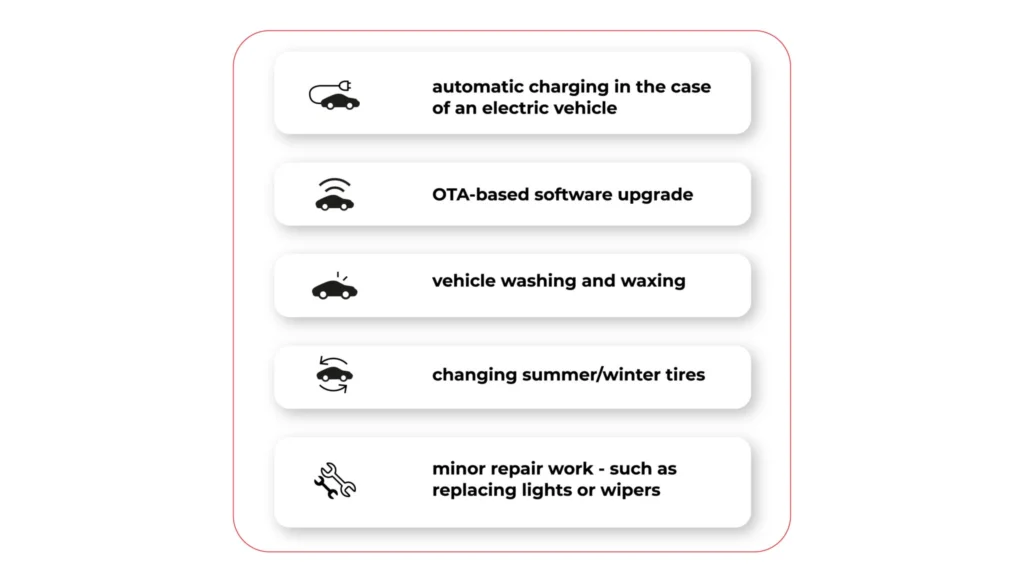
This stress-free handover of the car into the trusted hands of a "digital butler", opens up new service opportunities also for OEMs and companies cooperating with the automotive industry . While the driver can go shopping or go to the movies in peace, the vehicle can be serviced during this time. Among the potential applications are services such as:
- automatic charging in the case of an electric vehicle;
- OTA-based software upgrade;
- vehicle washing and waxing
- changing summer/winter tires;
- minor repair work - such as replacing lights or wipers.
Let's take a look at two of the most impressive use cases in this area that have appeared on the market recently. The first one is the Automated Valet Parking project, implemented in partnership with top car manufacturers and technology providers, with BMW leading the way. The second one is the offer of Nvidia, which managed to start cooperation with Mercedes-Benz in this field.
BMW Autonomous Valet Parking
Futurists of the 20th century predicted that the next century would bring us an era of robots able to perform most daily human activities on their own, in an intelligent, autonomous, and efficient way. Although this vision was a gross exaggeration, today on the market there are solutions that can clearly be described as innovative or ahead of their time.
An example? BMW and their all-electric flagship SUV, BMW iX, which communicates with external infrastructure and parks 100 percent without the driver’s input. The owner of the vehicle simply steps out of the car, handing it over to the "technological guardian".
The data exchange here takes place in three tracks: vehicle, smartphone app, and underground garage parts (cameras + sensors). The driver activates the Autonomous Valet Parking (AVP) option in the application, thanks to which the vehicle is able to maneuver independently around the garage without his participation. And all this with maximum safety, both in terms of collision-avoidance and protection of expensive items inside the vehicle.
This project would be much harder without the modern 5G network equipment provided by Deutsche Telekom. Why a fifth-generation network? Because compared to traditional WLAN solutions, it allows to dynamically enable, disable and update capabilities through API.
The flexible configuration and very low latency allow to shape the bandwidth and prioritize the vehicle connectivity traffic, making the connection stable, fast and reliable. This is one of the key requirements for any Connected Car system which is coupled with Autonomous Vehicle capabilities - if the connection is not reliable, latency is too high, or another device takes over the bandwidth, it may result in jerk, stuttering ride, as the data from external sensors is transferred late.
However, these are not all the surprises that the BWM Group has in store for their customers. In addition to parking, the driver can also benefit from other automated service functions such as washing or intelligent refueling. The solution is universal and can also be used by other OEMs.
https://youtu.be/iz_yKaa8QgM
Nvidia cooperate with Mercedes-Benz
There are many indications that Voice Assistant will be growing. For example, in 2020 in the U.S. alone, about 20 million people will make purchases via smartphone using voice-activated features [statista.com]. This trend isn't sparing the automotive industry, either, with technology providers racing to create software that would revolutionize such cumbersome tasks as parking. One of the forerunners is the semiconductor giant Nvidia, which created the Nvidia Drive Concierge service . It's an artificial intelligence-based software assistant that - literally - gives the floor to the driver, but also lets technology come to the fore.
"Hey Nvidia!" What does this voice command remind you of? Most often it is associated with another conversational voice assistance system, namely Siri. You are on the right track, because NDC works on a similar principle. The driver gives a command, and the assistant is able to recognize a specific voice, assign it to the vehicle owner and respond.
By far the most interesting functionality is the ability to integrate the software with Nvidia Drive AV autonomous technology, or on-demand parking. This works in a very intuitive way. All you have to do is get out of the vehicle, activate the function and watch as the "four wheels" steer themselves towards a parking space. And they do it in a collision-free manner, regardless of whether it's parallel, perpendicular or angled parking. It will work the same way in the reverse direction. If you want to leave a parking space, you simply hail the car, it pulls up on its own and is ready to continue its journey.
Sounds like total abstraction? It's already happening. Nvidia has teamed up with one of the world's leading OEMs, Mercedes-Benz. Starting in 2024, all next-generation Benz vehicles will be powered by Nvidia Drive AGX Orin technology, along with sensors and software. For the German company, automated parking services will therefore soon become common knowledge.
This is what Jensen Huang, founder and CEO of Nvidia, said about the collaboration: Together, we're going to revolutionize the car ownership experience, making the vehicle software programmable and continuously upgradable via over-the-air updates. Every future Mercedes-Benz with the Nvidia Drive system will come with a team of expert AI and software engineers continuously developing, refining and enhancing the car over its lifetime.
Automated Valet Parking: innovation at the cutting edge of technology
Vehicle automation and the resulting cooperation between OEMs and suppliers of new technologies is now entering new dimensions. Also in this area that many drivers associate with something very cumbersome, which often generates anxiety.
The integration of Nvidia Orin systems at Mercedes-Benz or the comprehensive AVP at BMW are prime examples of how new solutions at the intersection of AI , IoT, and 5G are becoming, to some extent, guardians of safety and guarantors of comfort from start to finish. It's also a good springboard to talk about fully automated vehicles.

Data powertrain in automotive: Complete end-to-end solution
We power your entire data journey, from signals to solutions
Check related articles
Read our blog and stay informed about the industry's latest trends and solutions.
Not only the self-driving vehicles: 9 use cases of AI in transportation
Accidents, traffic congestion, lack of parking lots and poor state of roads. These are the 4 Horsemen of the Road Apocalypse that on occasion haunt cities around the globe. Have they come to settle in the largest agglomerations for good? Can AI in transportation combat them and make mobility smoother, more comfortable, and safer? Practical solutions introduced by the biggest transport companies from all over the world show that it is possible. And we do not have to wait for fully self-driving cars to use the advantages of AI. The changes are happening right before our eyes.
In 1900, the number of vehicles in the USA - the only country that produced cars at the time - reached 4192 vehicles. Today, the number of motor cars is estimated to be around 600 million, and with the current growth in production, this number is expected to double in the next 30 years. Our cities are congested, polluted and in many places getting around in a car during rush hour borders on the miraculous. Not to mention the real endurance test that drivers' nerves are put to.
Government agencies and shipping companies must explore solutions that reduce the number of vehicles in cities and equip urban infrastructure and cars with tools that effectively offset the side effects of technological globalization. The Internet of Things and artificial intelligence are coming to the rescue to facilitate a new class of intelligent transportation systems (ITS), not only for automotive but also for rail, marine, and aircraft transportation.
By analyzing massive amounts of data from vehicles and connecting the road infrastructure into a seamless network of information exchange , many aspects of transportation can be successfully addressed. The benefits of using AI in this market area are not only for cities and drivers but also for transport companies, pedestrians, and the environment. The whole transport ecosystem benefits from it, not just one of its constituent parts. We should all care about the development of these technologies and the broadest possible use of them in transport.
Thanks to the above-mentioned technologies, new trends are developing, such as micro-mobility, shared mobility or, especially in the Netherlands and Scandinavia, the idea of mobility-as-a-service (MaaS), which encourages drivers to give up their own vehicle and exchange it for one in which transport is provided as a service.
Benefits of introducing AI in transportation
According to Market Data Forecast, the global transportation AI market will be worth around $3.87 billion by 2026 and is estimated to grow at a CAGR of 15.8% between 2021 and 2026. And it's no wonder that more and more businesses are embracing these solutions. The benefits of using AI technology in transportation are truly far-reaching and, indeed, their future is looking bright. With the development of data analytics and more modern sensors gathering information, new and innovative applications are bound to emerge.
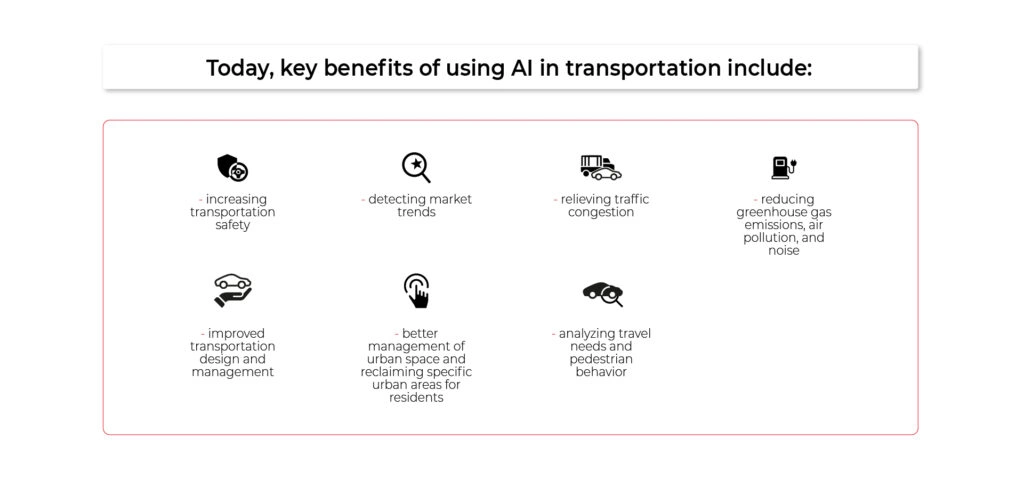
Today, key benefits of using AI in transportation include:
- increasing transportation safety;
- detecting market trends;
- relieving traffic congestion;
- reducing greenhouse gas emissions, air pollution, and noise;
- improved transportation design and management;
- better management of urban space and reclaiming specific urban areas for residents;
- analyzing travel needs and pedestrian behavior.
9 use cases of AI in transportation
When talking about using AI in transportation, self-driving cars are the most often mentioned examples that stir the imagination. Although such solutions have already been tested on the city streets (e.g. Waymo and Cruise in California) and occasionally we hear news about reaching by the manufacturer the highest (5th) level of automation, we are still a little away from the dissemination of vehicles that do not need any attention of the driver.
The main challenges faced by autonomous driving remain unchanged. First, detection of objects on the road and their categorization, and second, making the right decisions by the neural network, decision tree, or, in most cases, complicated hybrid model.
In 95% of cases, the neural network controlling the vehicles is already behaving correctly and making the best possible decisions. But there is still a marginal 5%, and this level is the most difficult to achieve at the moment. It simply takes time and more data to "train" a neural network. With the dropping price of LIDARs [light detection and ranging sensors], high resolutions camera, and the computing power of the GPUs [graphic processing units] increasing, it is only a matter of the next few years before this barrier is overcome - first in limited controlled areas (e.g. factories and harbors), the form of autonomized truck transport, and then using city vehicles.
Meanwhile, there are already more than a dozen advanced technologies on the road today that are taking advantage of the AI ‘’goodies’’ and changing the way we control vehicle flow, driver safety, and driving behavior. Let's take a closer look at them.
1.Traffic detection & traffic signs
If traffic regulations were boiled down to one simple rule that even a few-year-old child could understand, red and green lights would definitely be second to none. Meanwhile, there are hundreds of road accidents each year related to running the red light and not stopping the vehicle at the right moment. Many factors contribute to this, such as driver fatigue, inclement weather, misuse of cell phones while driving, or simply rushing and time pressure.
People make mistakes and always will, these cannot be avoided. However, we have started to teach the machine to recognize traffic lights and eradicate such mistakes (the first attempts were made by BMW and Mercedes). With this technology, the braking system will react automatically when the driver tries to run a red light, and thus we can prevent disaster.
2. Pedestrian detection
The unpredictability of pedestrians and their different behavior on the road is one of the main factors holding back the mass introduction of autonomous cars. Thanks to computer vision, AI already recognizes trees, unusual objects, and pedestrians without much of a struggle, and can warn drivers of a human approaching the roadway. The problem arises when a pedestrian is carrying groceries, holding a dog on a lead, or is in a wheelchair. Their unusual shape increases the difficulty for the machine to properly identify a human. Although it must be admitted that by using various object detection functions - based on motion, textures, shapes, or gradients - it is practically 100% successful.
However, the pedestrian's intention still remains a great challenge. Will he or she step onto the road or not? Are they only walking by the side of the road, or do they intend to cross it? These elements are always ambiguous and a neural network is needed to predict them effectively. To this end, the human pose estimation method comes in handy. It is based on the dynamics of the human skeleton and is capable of predicting human intentions in real-time.
3.Traffic Flow Analysis
Noise, smog, clogged city arteries, stressed drivers, economic losses, greenhouse gas emissions - traffic congestion and vehicle crowding in cities give rise to numerous undesirable phenomena. AI can effectively help counteract all of them and make transportation much more efficient and convenient.
By relying on in-vehicle sensors, municipal CCTV cameras, and even drones to monitor vehicle flow, the algorithms can watch and keep track of the traffic both on highways and in the city. This allows them to warn drivers of potential congestion or accidents and direct the flow of vehicles in an efficient manner. It is also invariably useful for the town and urban planners involved in constructing new roads and improving the city's infrastructure. With prior traffic analysis and the vast amount of data available, AI can identify the best planning solutions and help reduce undesirable situations right at the planning stage.
4.Inspection of dangerous turns, traffic circles and bike lanes
On a macro scale AI can help us change the entire road network, and on a micro-scale- a single intersection or traffic circle that needs repair. The analysis of the material provided by intelligent algorithms can calculate the trajectory of vehicles entering the bend, analyze the risk of potential conflicts between vehicles - pedestrians - cyclists, the speed at which vehicles enter the bend, or the waiting time at the traffic lights. The analysis of all this invaluable information can help optimize a given road section, and improve the safety and convenience of transport.
5.Computer Vision-Powered Parking Management
Entering the city center by car and finding a parking lot is often a struggle. If we connect the city's parking lots into an efficient network of sensors that monitor available spaces, the length of time vehicles are parked, and the hours when vehicles are most heavily congested, this key aspect of traffic can be greatly enhanced. With maps embedded in vehicles, AI can facilitate finding free parking spots, alert you to potential parking overcrowding, and - something actually pretty common - allow you to find your car when you forget where you parked it.
Such solutions are particularly useful in places such as airports, sports stadiums or arenas, where traffic must be smooth, and a high volume of visitors may pose a threat to safety.
6. Automated license plate recognition
A useful application of AI and computer vision is car license plate recognition. This type of technology is often used when entering highways, tunnels, ferries, or restricted areas constrained by gates or barriers. AI helps verify whether a given vehicle is on the list of registrations that, due to the fee paid or the drivers' status, are allowed to access a given area.
License plate recognition by algorithms is also a well-proven tool in the hands of the police and security services, who in this way are able to pinpoint the route of a particular vehicle or verify the driver's alibi.
7. Road condition monitoring
Each year potholes cause $3,000,000,000 worth of damage to vehicles in the U.S. alone. Intelligent algorithms can warn drivers of surprises lurking on the roads and monitor the condition of the road surface, so they can notify the authorities in advance of potential spots that will soon need fixing. This is enabled by linking the camera to ADAS, which applies machine learning to gather real-time information from the road surface where it is moving.
In this way, the driver can be warned not only of roadway damage but also of wet surfaces, ice, potholes or dangerous road debris. All of this improves safety for travelers, prevents accidents, and saves money - both in terms of drivers' finances and city funds.
8. Automatic Traffic Incident Detection
Video surveillance has been with us on the roads for ages, but it wasn't until the system was supported by AI solutions that it became possible to detect traffic incidents more efficiently, respond faster and provide information to traffic users practically in real-time.
By linking cameras within an ITS system, using computer vision technology, and equipping vehicles with intelligent sensors, we can detect different types of accidents. Intelligent algorithms save lives, prevent serious accidents and warn road users of hazardous situations by recommending safer travel options.
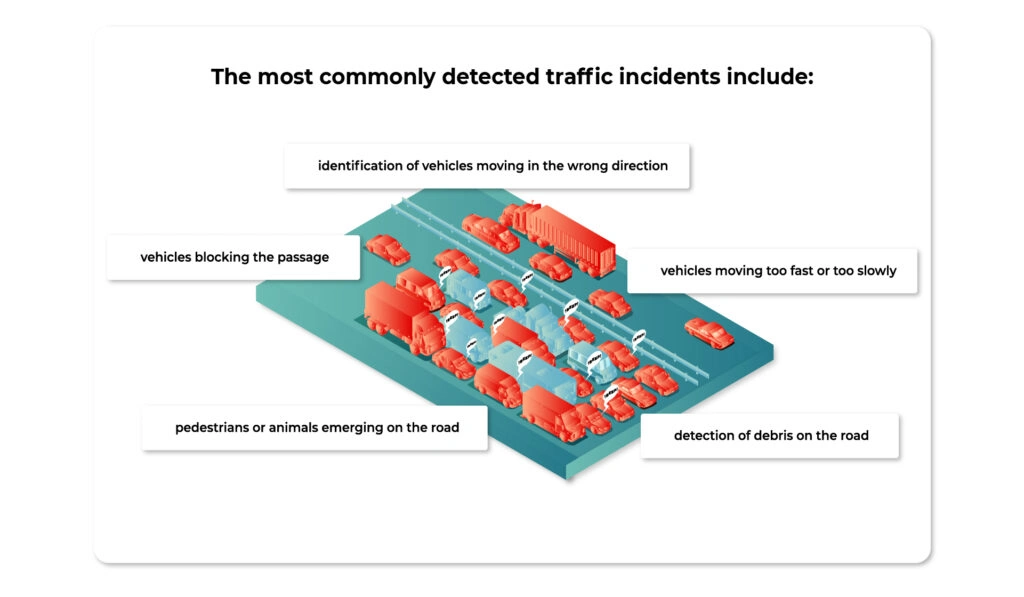
The most commonly detected traffic incidents include:
- pedestrians or animals entering on the road;
- vehicles moving too fast or too slowly;
- vehicles blocking the passage;
- detection of debris on the road;
- identification of vehicles moving in the wrong direction
9. Driver Monitoring
Finally, there is a full category of artificial intelligence solutions that apply directly in the interior of the car and affect the drivers themselves (we covered this in more depth in this article ). Among them, three are particularly noteworthy:
- driver’s fatigue monitoring - by detecting the driver's face and estimating the position of the head, the system can detect drowsiness and emotions of the driver and thus prevent an accident.
- alerts when the driver gets distracted - for instance, when they reach for their cell phone, veer out of their lane, or turn around in the back seat to talk to fellow passengers.
- emergency assist systems - when the driver is not responsive and does not operate the vehicle, the car first tries to wake the driver by braking and pulling safety belts, and if it fails pulls over and calls emergency.
AI in transportation: setting the course for change
Given the speed at which computer processing power is changing and the number of sensors from which data is being collected , fully automated cars on city roads are likely to be a question of the nearest 5-10 years. Change is happening at an exponential rate and today's applications of AI in transportation are just the first glimpse of the possibilities offered by intelligent algorithms. Change is essential and inevitable, e.g. due to the challenges facing the global community when it comes to global warming.
An increasing number of people live in cities, own not one but two vehicles, and want to travel to work or do their shopping in comfort. Transport companies and city managers must join forces with IT companies to fully tap into the potential of AI and change transport to be more efficient, environmentally friendly and suited to the way we want to use our cities. This is the only way we can make transportation sustainable and remove obstacles on the way to a zero-carbon economy and smart cities. Otherwise, we may face a vision of the future in which scientists predict traffic congestion 10 times worse than we experience today.
AAOS 14 - Surround view parking camera: How to configure and launch exterior view system
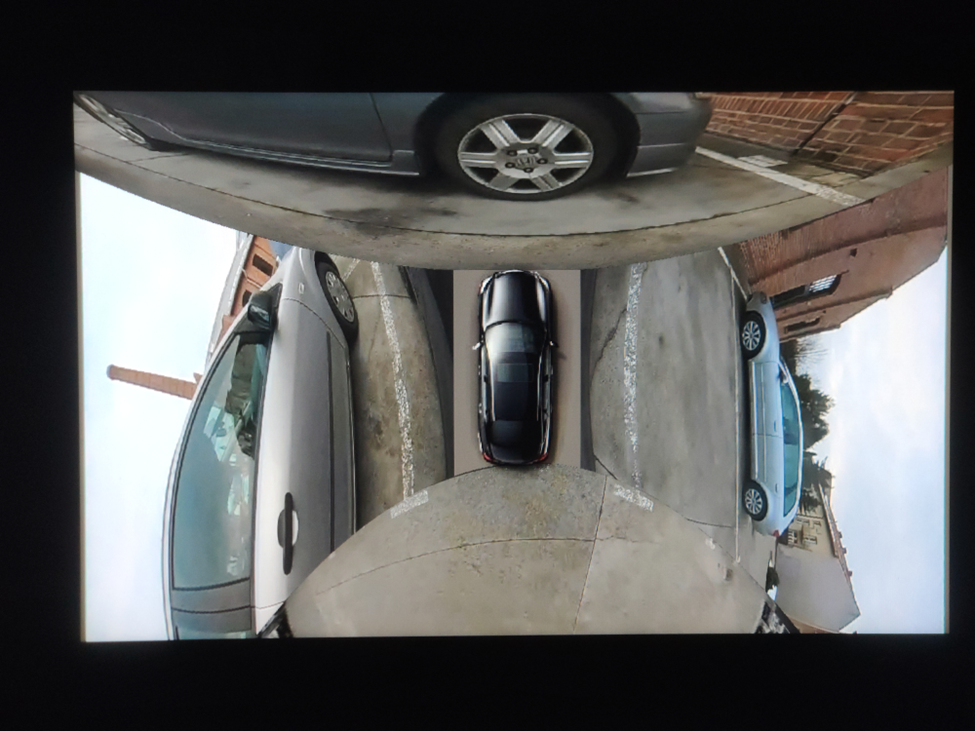
EVS - park mode
The Android Automotive Operating System (AAOS) 14 introduces significant advancements, including a Surround View Parking Camera system. This feature, part of the Exterior View System (EVS), provides a comprehensive 360-degree view around the vehicle, enhancing parking safety and ease. This article will guide you through the process of configuring and launching the EVS on AAOS 14 .
Structure of the EVS system in Android 14
The Exterior View System (EVS) in Android 14 is a sophisticated integration designed to enhance driver awareness and safety through multiple external camera feeds. This system is composed of three primary components: the EVS Driver application, the Manager application, and the EVS App. Each component plays a crucial role in capturing, managing, and displaying the images necessary for a comprehensive view of the vehicle's surroundings.
EVS driver application
The EVS Driver application serves as the cornerstone of the EVS system, responsible for capturing images from the vehicle's cameras. These images are delivered as RGBA image buffers, which are essential for further processing and display. Typically, the Driver application is provided by the vehicle manufacturer, tailored to ensure compatibility with the specific hardware and camera setup of the vehicle.
To aid developers, Android 14 includes a sample implementation of the Driver application that utilizes the Linux V4L2 (Video for Linux 2) subsystem. This example demonstrates how to capture images from USB-connected cameras, offering a practical reference for creating compatible Driver applications. The sample implementation is located in the Android source code at packages/services/Car/cpp/evs/sampleDriver .
Manager application
The Manager application acts as the intermediary between the Driver application and the EVS App. Its primary responsibilities include managing the connected cameras and displays within the system.
Key Tasks :
- Camera Management : Controls and coordinates the various cameras connected to the vehicle.
- Display Management : Manages the display units, ensuring the correct images are shown based on the input from the Driver application.
- Communication : Facilitates communication between the Driver application and the EVS App, ensuring a smooth data flow and integration.
EVS app
The EVS App is the central component of the EVS system, responsible for assembling the images from the various cameras and displaying them on the vehicle's screen. This application adapts the displayed content based on the vehicle's gear selection, providing relevant visual information to the driver.
For instance, when the vehicle is in reverse gear (VehicleGear::GEAR_REVERSE), the EVS App displays the rear camera feed to assist with reversing maneuvers. When the vehicle is in park gear (VehicleGear::GEAR_PARK), the app showcases a 360-degree view by stitching images from four cameras, offering a comprehensive overview of the vehicle’s surroundings. In other gear positions, the EVS App stops displaying images and remains in the background, ready to activate when the gear changes again.
The EVS App achieves this dynamic functionality by subscribing to signals from the Vehicle Hardware Abstraction Layer (VHAL), specifically the VehicleProperty::GEAR_SELECTION . This allows the app to adjust the displayed content in real-time based on the current gear of the vehicle.
Communication interface
Communication between the Driver application, Manager application, and EVS App is facilitated through the IEvsEnumerator HAL interface. This interface plays a crucial role in the EVS system, ensuring that image data is captured, managed, and displayed accurately. The IEvsEnumerator interface is defined in the Android source code at hardware/interfaces/automotive/evs/1.0/IEvsEnumerator.hal .
EVS subsystem update
Evs source code is located in: packages/services/Car/cpp/evs. Please make sure you use the latest sources because there were some bugs in the later version that cause Evs to not work.
cd  packages/services/Car/cpp/evs
git checkout main
git pull
mm
adb push out/target/product/rpi4/vendor/bin/hw/android.hardware.automotive.evs-default /vendor/bin/hw/
adb push out/target/product/rpi4/system/bin/evs_app /system/bin/
EVS driver configuration
To begin, we need to configure the EVS Driver. The configuration file is located at /vendor/etc/automotive/evs/evs_configuration_override.xml .
Here is an example of its content:
<configuration>
    <!-- system configuration -->
    <system>
        <!-- number of cameras available to EVS -->
        <num_cameras value='2'/>
    </system>

    <!-- camera device information -->
    <camera>

        <!-- camera device starts -->
        <device id='/dev/video0' position='rear'>
            <caps>
                <!-- list of supported controls -->
                <supported_controls>
                    <control name='BRIGHTNESS' min='0' max='255'/>
                    <control name='CONTRAST' min='0' max='255'/>
                    <control name='AUTO_WHITE_BALANCE' min='0' max='1'/>
                    <control name='WHITE_BALANCE_TEMPERATURE' min='2000' max='7500'/>
                    <control name='SHARPNESS' min='0' max='255'/>
                    <control name='AUTO_FOCUS' min='0' max='1'/>
                    <control name='ABSOLUTE_FOCUS' min='0' max='255' step='5'/>
                    <control name='ABSOLUTE_ZOOM' min='100' max='400'/>
                </supported_controls>

                <!-- list of supported stream configurations -->
                <!-- below configurations were taken from v4l2-ctrl query on
                     Logitech Webcam C930e device -->
                <stream id='0' width='1280' height='720' format='RGBA_8888' framerate='30'/>
            </caps>

            <!-- list of parameters -->
            <characteristics>

            </characteristics>
        </device>
        <device id='/dev/video2' position='front'>
            <caps>
                <!-- list of supported controls -->
                <supported_controls>
                    <control name='BRIGHTNESS' min='0' max='255'/>
                    <control name='CONTRAST' min='0' max='255'/>
                    <control name='AUTO_WHITE_BALANCE' min='0' max='1'/>
                    <control name='WHITE_BALANCE_TEMPERATURE' min='2000' max='7500'/>
                    <control name='SHARPNESS' min='0' max='255'/>
                    <control name='AUTO_FOCUS' min='0' max='1'/>
                    <control name='ABSOLUTE_FOCUS' min='0' max='255' step='5'/>
                    <control name='ABSOLUTE_ZOOM' min='100' max='400'/>
                </supported_controls>

                <!-- list of supported stream configurations -->
                <!-- below configurations were taken from v4l2-ctrl query on
                     Logitech Webcam C930e device -->
                <stream id='0' width='1280' height='720' format='RGBA_8888' framerate='30'/>
            </caps>

            <!-- list of parameters -->
            <characteristics>

            </characteristics>
        </device>
    </camera>

    <!-- display device starts -->
    <display>
        <device id='display0' position='driver'>
            <caps>
                <!-- list of supported inpu stream configurations -->
                <stream id='0' width='1280' height='800' format='RGBA_8888' framerate='30'/>
            </caps>
        </device>
    </display>
</configuration>
In this configuration, two cameras are defined: /dev/video0 (rear) and /dev/video2 (front). Both cameras have one stream defined with a resolution of 1280 x 720, a frame rate of 30, and an RGBA format.
Additionally, there is one display defined with a resolution of 1280 x 800, a frame rate of 30, and an RGBA format.
Configuration details
The configuration file starts by specifying the number of cameras available to the EVS system. This is done within the <system> tag, where the <num_cameras> tag sets the number of cameras to 2.
Each camera device is defined within the <camera> tag. For example, the rear camera ( /dev/video0 ) is defined with various capabilities such as brightness, contrast, auto white balance, and more. These capabilities are listed under the <supported_controls> tag. Similarly, the front camera ( /dev/video2 ) is defined with the same set of controls.
Both cameras also have their supported stream configurations listed under the <stream> tag. These configurations specify the resolution, format, and frame rate of the video streams.
The display device is defined under the <display> tag. The display configuration includes supported input stream configurations, specifying the resolution, format, and frame rate.
EVS driver operation
When the EVS Driver starts, it reads this configuration file to understand the available cameras and display settings. It then sends this configuration information to the Manager application. The EVS Driver will wait for requests to open and read from the cameras, operating according to the defined configurations.
EVS app configuration
Configuring the EVS App is more complex. We need to determine how the images from individual cameras will be combined to create a 360-degree view. In the repository, the file packages/services/Car/cpp/evs/apps/default/res/config.json.readme contains a description of the configuration sections:
{
  "car" : {                     // This section describes the geometry of the car
    "width"  : 76.7,            // The width of the car body
    "wheelBase" : 117.9,        // The distance between the front and rear axles
    "frontExtent" : 44.7,       // The extent of the car body ahead of the front axle
    "rearExtent" : 40           // The extent of the car body behind the rear axle
  },
  "displays" : [                // This configures the dimensions of the surround view display
    {                           // The first display will be used as the default display
      "displayPort" : 1,        // Display port number, the target display is connected to
      "frontRange" : 100,       // How far to render the view in front of the front bumper
      "rearRange" : 100         // How far the view extends behind the rear bumper
    }
  ],
  "graphic" : {                 // This maps the car texture into the projected view space
    "frontPixel" : 23,          // The pixel row in CarFromTop.png at which the front bumper appears
    "rearPixel" : 223           // The pixel row in CarFromTop.png at which the back bumper ends
  },
  "cameras" : [                 // This describes the cameras potentially available on the car
    {
      "cameraId" : "/dev/video32",  // Camera ID exposed by EVS HAL
      "function" : "reverse,park",  // Set of modes to which this camera contributes
      "x" : 0.0,                    // Optical center distance right of vehicle center
      "y" : -40.0,                  // Optical center distance forward of rear axle
      "z" : 48,                     // Optical center distance above ground
      "yaw" : 180,                  // Optical axis degrees to the left of straight ahead
      "pitch" : -30,                // Optical axis degrees above the horizon
      "roll" : 0,                   // Rotation degrees around the optical axis
      "hfov" : 125,                 // Horizontal field of view in degrees
      "vfov" : 103,                 // Vertical field of view in degrees
      "hflip" : true,               // Flip the view horizontally
      "vflip" : true                // Flip the view vertically
    }
  ]
}
The EVS app configuration file is crucial for setting up the system for a specific car. Although the inclusion of comments makes this example an invalid JSON, it serves to illustrate the expected format of the configuration file. Additionally, the system requires an image named CarFromTop.png to represent the car.
In the configuration, units of length are arbitrary but must remain consistent throughout the file. In this example, units of length are in inches.
The coordinate system is right-handed: X represents the right direction, Y is forward, and Z is up, with the origin located at the center of the rear axle at ground level. Angle units are in degrees, with yaw measured from the front of the car, positive to the left (positive Z rotation). Pitch is measured from the horizon, positive upwards (positive X rotation), and roll is always assumed to be zero. Please keep in mind that, unit of angles are in degrees, but they are converted to radians during configuration reading. So, if you want to change it in EVS App source code, use radians.
This setup allows the EVS app to accurately interpret and render the camera images for the surround view parking system.
The configuration file for the EVS App is located at /vendor/etc/automotive/evs/config_override.json . Below is an example configuration with two cameras, front and rear, corresponding to our driver setup:
{
  "car": {
    "width": 76.7,
    "wheelBase": 117.9,
    "frontExtent": 44.7,
    "rearExtent": 40
  },
  "displays": [
    {
      "_comment": "Display0",
      "displayPort": 0,
      "frontRange": 100,
      "rearRange": 100
    }
  ],
  "graphic": {
    "frontPixel": -20,
    "rearPixel": 260
  },
  "cameras": [
    {
      "cameraId": "/dev/video0",
      "function": "reverse,park",
      "x": 0.0,
      "y": 20.0,
      "z": 48,
      "yaw": 180,
      "pitch": -10,
      "roll": 0,
      "hfov": 115,
      "vfov": 80,
      "hflip": false,
      "vflip": false
    },
    {
      "cameraId": "/dev/video2",
      "function": "front,park",
      "x": 0.0,
      "y": 100.0,
      "z": 48,
      "yaw": 0,
      "pitch": -10,
      "roll": 0,
      "hfov": 115,
      "vfov": 80,
      "hflip": false,
      "vflip": false
    }
  ]
}
Running EVS
Make sure all apps are running:
ps -A | grep evs
automotive_evs 3722    1   11007600   6716 binder_thread_read  0 S evsmanagerd
graphics      3723     1   11362488  30868 binder_thread_read  0 S android.hardware.automotive.evs-default
automotive_evs 3736    1   11068388   9116 futex_wait          0 S evs_app
To simulate reverse gear you can call:
evs_app --test --gear reverse
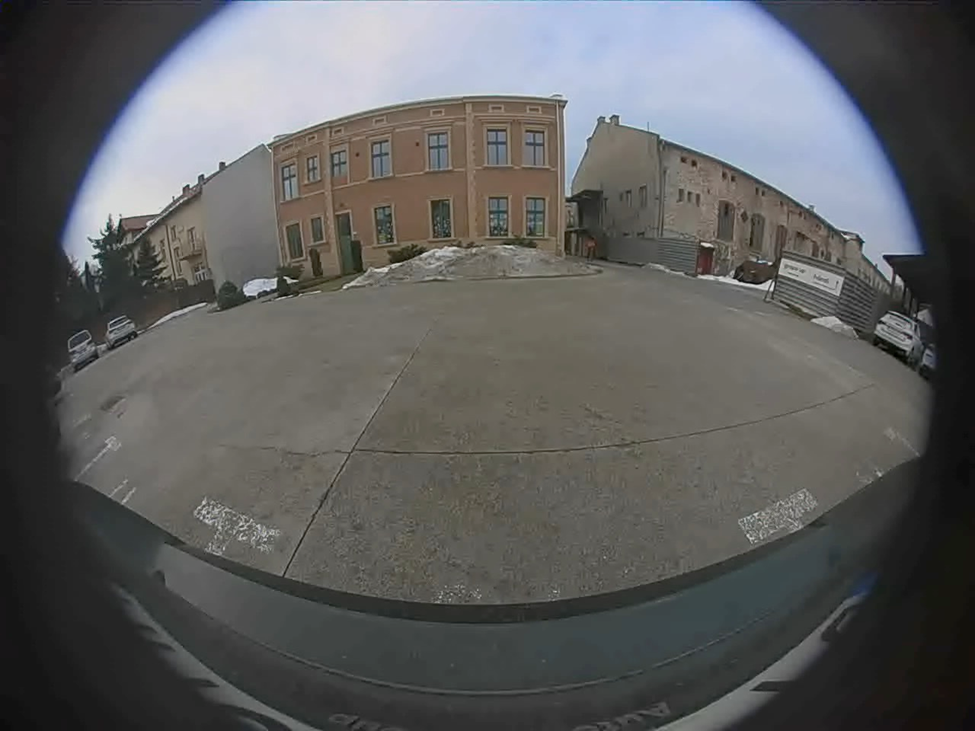
And park:
evs_app --test --gear park
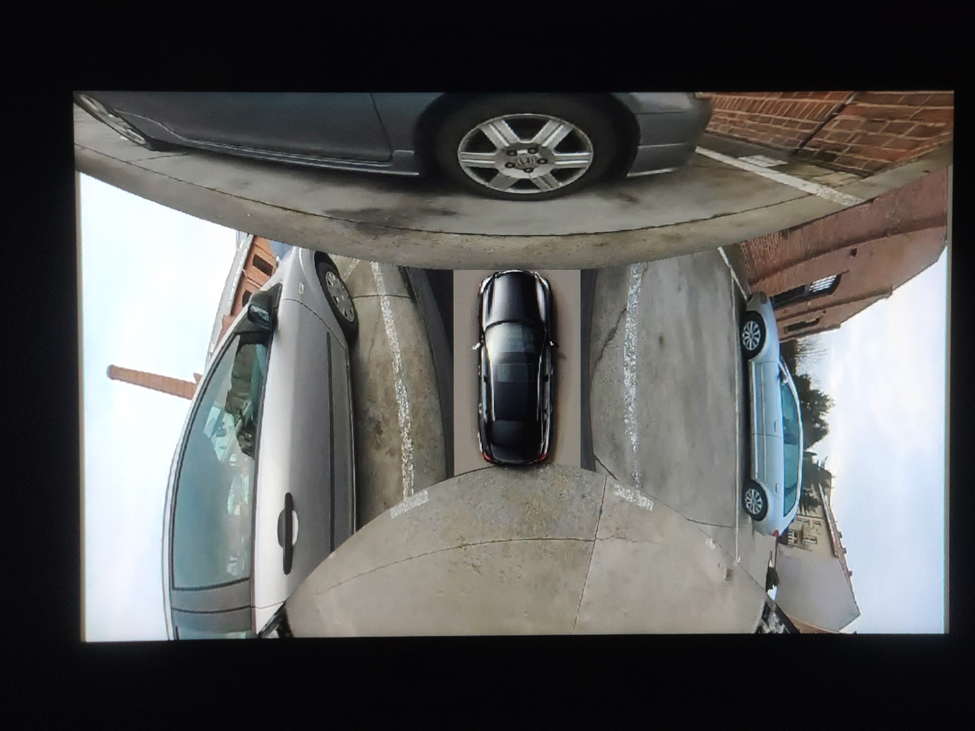
EVS app should be displayed on the screen.
Troubleshooting
When configuring and launching the EVS (Exterior View System) for the Surround View Parking Camera in Android AAOS 14, you may encounter several issues.
To debug that, you can use logs from EVS system:
logcat EvsDriver:D EvsApp:D evsmanagerd:D *:S
Multiple USB cameras - image freeze
During the initialization of the EVS system, we encountered an issue with the image feed from two USB cameras. While the feed from one camera displayed smoothly, the feed from the second camera either did not appear at all or froze after displaying a few frames.
We discovered that the problem lay in the USB communication between the camera and the V4L2 uvcvideo driver. During the connection negotiation, the camera reserved all available USB bandwidth. To prevent this, the uvcvideo driver needs to be configured with the parameter quirks=128 . This setting allows the driver to allocate the USB bandwidth based on the actual resolution and frame rate of the camera.
To implement this solution, the parameter should be set in the bootloader, within the kernel command line, for example:
console=ttyS0,115200 no_console_suspend root=/dev/ram0 rootwait androidboot.hardware=rpi4 androidboot.selinux=permissive uvcvideo.quirks=128
After applying this setting, the image feed from both cameras should display smoothly, resolving the freezing issue.
Green frame around camera image
In the current implementation of the EVS system, the camera image is surrounded by a green frame, as illustrated in the following image:
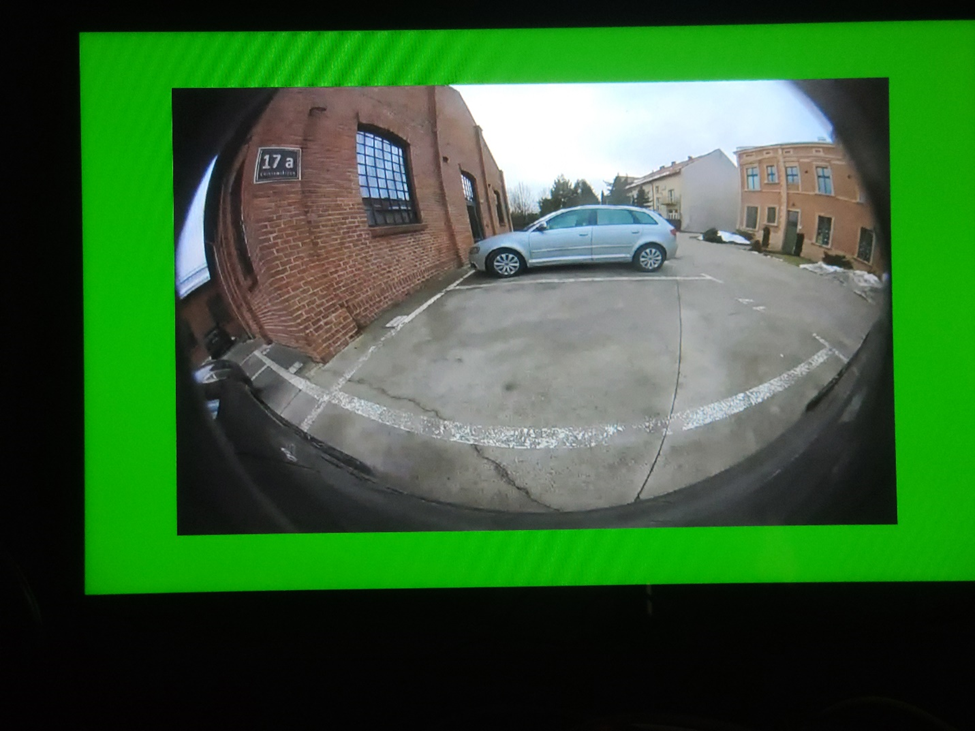
To eliminate this green frame, you need to modify the implementation of the EVS Driver. Specifically, you should edit the GlWrapper.cpp file located at cpp/evs/sampleDriver/aidl/src/ .
In the void GlWrapper::renderImageToScreen() function, change the following lines:
-0.8, 0.8, 0.0f, // left top in window space
 0.8, 0.8, 0.0f, // right top
-0.8, -0.8, 0.0f, // left bottom
 0.8, -0.8, 0.0f // right bottom
to
-1.0,  1.0, 0.0f,  // left top in window space
 1.0,  1.0, 0.0f,  // right top
-1.0, -1.0, 0.0f,  // left bottom
 1.0, -1.0, 0.0f   // right bottom
After making this change, rebuild the EVS Driver and deploy it to your device. The camera image should now be displayed full screen without the green frame.
Conclusion
In this article, we delved into the intricacies of configuring and launching the EVS (Exterior View System) for the Surround View Parking Camera in Android AAOS 14. We explored the critical components that make up the EVS system: the EVS Driver, EVS Manager, and EVS App, detailing their roles and interactions.
The EVS Driver is responsible for providing image buffers from the vehicle's cameras, leveraging a sample implementation using the Linux V4L2 subsystem to handle USB-connected cameras. The EVS Manager acts as an intermediary, managing camera and display resources and facilitating communication between the EVS Driver and the EVS App. Finally, the EVS App compiles the images from various cameras, displaying a cohesive 360-degree view around the vehicle based on the gear selection and other signals from the Vehicle HAL.
Configuring the EVS system involves setting up the EVS Driver through a comprehensive XML configuration file, defining camera and display parameters. Additionally, the EVS App configuration, outlined in a JSON file, ensures the correct mapping and stitching of camera images to provide an accurate surround view.
By understanding and implementing these configurations, developers can harness the full potential of the Android AAOS 14 platform to enhance vehicle safety and driver assistance through an effective Surround View Parking Camera system. This comprehensive setup not only improves the parking experience but also sets a foundation for future advancements in automotive technology.
Developing software for connected cars - common challenges and how to tackle them
Automotive is transforming into a hyper-connected, software-driven industry that goes far beyond the driving experience. How to build applications in such an innovative environment? What are the main challenges of providing software for connected cars and how to deal with them? Let’s dive into the process of utilizing the capabilities of the cloud to move automotive forward.
People have always aimed for the clouds. From Icarus in Greek mythology, first airplanes and spaceships to dreams about flying cars – our culture and history of technology development express a strong desire to go beyond our limits. Although the vision from Back to the Future and other Sci-Fi movies didn’t come true and our cars cannot be used as flying vehicles, our cars actually are in the cloud.
Meanwhile, the idea of the Internet of Things came true; our devices are connected to the Internet . We have smartphones, smartwatches, smart homes and, as it turns out, smart cars. We are able to communicate with them to gather data or even remotely control them. The possibilities are only limited by hardware, but even it is constantly improving to follow the pace of rapid changes triggered by software development.
Offerings on the automotive market are developing rapidly with numerous features and promised experiences to the end customer. By using cutting-edge technologies, utilizing cloud platforms, and working with innovative software developers, automakers provide solutions to even the most demanding needs . And while our user experience is improving at an accelerated pace, there is still a broad list of challenges to tackle.
In this article, we dive into the technology behind the latest trends, take into account the most demanding areas of developing software in the cloud, and explain how proper solution empowers the change that affects us all.
Challenging determinants of the cloud revolution in automotive
Connecting with your car through a smartphone or utilizing information about traffic provided to your vehicle thanks to the platforms that accumulate data registered by other drivers is extremely useful.
Those innovative changes wouldn’t be possible without cloud infrastructure . And as there is no way back from moving to the cloud, the transition creates challenges in various areas: safety, security, responsiveness, integrity , and more.
Safety in the automotive sector
How to create a solution that doesn’t affect the safety of a driver? When developing new services, you cannot forget about the basics. Infotainment provided to vehicles is more advanced for every new release of a car and can be really engaging. The amount of delivered information combined with increasingly larger displays may lead to distraction and create dangerous situations. It’s worth mentioning that some of the colors may even impair the driver’s vision!
Integration with the cloud usually enables some of the remote commands. When implementing them, there are a lot of restrictions that need to be kept in mind. Some of them are obvious, such as you don’t want to disable the engine when a car is being driven 100km/h, but others may be much more complicated and unseen at first.
Providing security for car owners
Enabling services for your vehicle in the cloud, despite being extremely helpful to improve your experience, creates another way to break into your car. Everyone would like to open a car without using keys, but using a mobile phone, voice, or a fingerprint instead. And as these solutions seem modern and fancy, there is a big responsibility on the software side to do it securely.
Responsiveness enabling the seamless user experience
Customer-facing services need to deliver a seamless experience to the end-user. The customer doesn’t want to wait a minute or even ten seconds for unlocking a car door. These services need to do it immediately or not at all, as an issue with opening the doors just because the system had a ‘lag’ is not acceptable behavior.
Data integrity is a must
Another very important concept associated with providing solutions utilizing cloud technologies is data integrity. Information collected by your vehicle should be useful and up to date. You don’t want a situation when the mobile application says that the car has a range of 100km, but in the morning, it turns out that the tank is almost empty, and you need to refuel it before going to work.
How to integrate and utilize mobile devices to connect with your vehicle?
When discussing how to use mobile phones to control cars, a very important question occurs; how to communicate with the car? There is no simple answer, as it all depends on what model and version of a car it is, as depending on a provider, the vehicles are equipped with various technologies. Some of them are equipped with BLE, Wi-Fi Hotspots, or RFID tags, while others don’t offer a direct connection to the car, and the only way is to go through the backend side. Most of the manufacturers will expose some API over the Internet without providing a direct connection from mobile to the car. In such cases, usually, it’s a good practice to create your own backend which handles all API flaws. To do so, your system will need a platform to have a reliable solution.
When the limitation of hardware is met, there is always an option to equip the car with a custom device, which will expose a proper communication channel and will be integrated with the vehicle. To do so, it may use the OBD protocol. It gives us full control over the communication part, however, it’s expensive and hard to maintain the solution.
Building a platform to solve the challenges
There is no simple answer on how to solve the mentioned challenges and implement a resilient system that will deliver all necessary functionalities with the highest quality. However, it’s very important to remember that such a solution should be scalable and utilize cloud-native patterns. When designing a system for connected cars, the natural choice is to go with the microservice architecture. The implementation of the system is one thing, and partly this topic was covered in the previous article , but on the other hand, the very important aspect is a runtime, the platform. Choosing the wrong setup of virtual machines or having to deploy everything manually can lead to downtime of the system. Having a system that isn’t available for the customer constantly can damage your business.
Kubernetes to the rescue! As probably you know, Kubernetes is a container orchestration platform, which allows running workload in pods. The platform itself helped us to deliver many features faster and with ease to our clients. Nowadays, Kubernetes is so easily accessible that you can spin up a cluster in minutes using existing service providers like AWS or Azure. It allows you to increase the speed of delivery of new features, as they may be deployed immediately! What’s very important with Kubernetes, is its abstraction from infrastructure. The development team with expertise in Kubernetes is able to work on any cloud provider. Furthermore, mission-critical systems can successfully implement Kubernetes for their use cases as well.
Automotive cloud beyond car manufacturers
Automotive cloud is not only a domain of car manufacturers. As mentioned earlier, they offer digital services to integrate with their cars, but numerous mobility service providers integrate with these APIs to implement their own use cases.
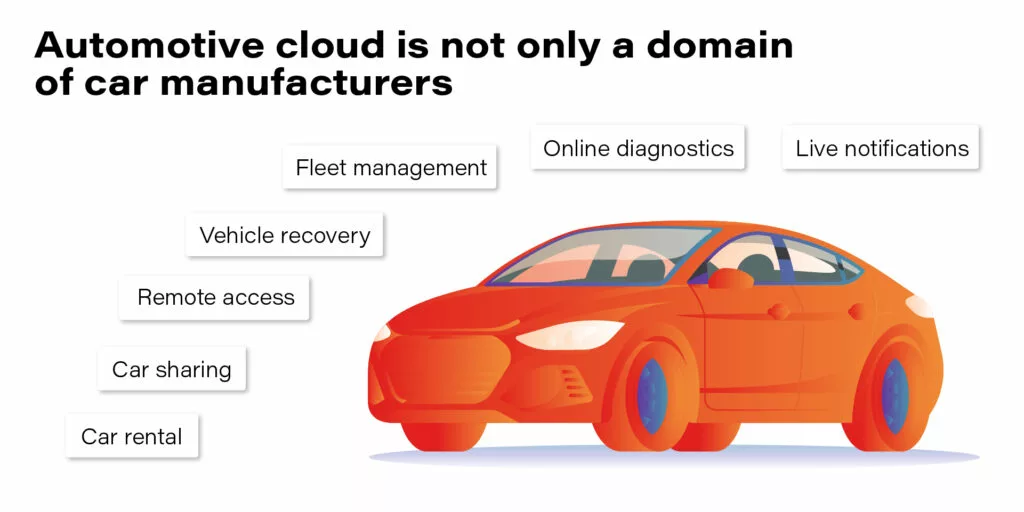
- Live notifications
- Online diagnostics
- Fleet management
- Vehicle recovery
- Remote access
- Car sharing
- Car rental
The best practices of providing cloud-native software for the automotive industry
Working with the leading auto motive brands and being engaged in numerous projects meant to deliver innovative applications. Our team have collected a group of helpful practices which make development easier and improve user experience. There are some must-have practices when it comes to delivering high-quality software, such as CI/CD, Agile, DevOps, etc., – they are crucial yet well-known for the experienced development team and we don’t focus on them in this article. Here we share tips dedicated for teams working with app delivery for automotive.
Containerize your vehicle
One of the things we’ve learned collaborating with Porsche is that vehicles are equipped with ECUs and installing software on them isn’t easy. However, Kubernetes helps to mitigate that challenge, as we can mock the target ECU by docker image with specialized operating systems and install software directly in it. That’s a good approach to create an integration environment that shortens the feedback loop and helps deliver software faster and better.
Asynchronous API
In the IoT ecosystem, you can’t rely too much on your connection with edge devices. There are a lot of connectivity challenges, for example, a weak cellular range. You can’t guarantee when your command to the car will be delivered and if the car will respond in milliseconds or even at all. One of the best patterns here is to provide the asynchronous API. It doesn’t matter on which layer you’re building your software if it’s a connector between vehicle and cloud or a system communicating with the vehicle’s API provider. Asynchronous API allows you to limit your resource consumption and avoid timeouts that leave systems in an unknown state.
Let’s take a very simple example of a mobile application for locking the car remotely.
Synchronous API scenario
- A customer presses a button on the application to lock the car.
- The request is sent and is waiting for a response.
- The request needs to be delegated to the car which may take some time.
- The backend component crashes and starts without any knowledge about the previous request.
- The application gets a timeout.
- What now? Is the car locked? What should be displayed to the end-user?
Asynchronous API scenario
- The customer presses a button on the application to lock the car.
- The request is sent and ended immediately.
- The request needs to be delegated to the car which may take some time.
- The backend component crashes and starts without any knowledge about the previous request.
- The car sends a request with the command result through the backend to the application.
- Application displays: “Car is locked.”
With asynchronous API, there’s always a way to resend the response. With synchronous API, after you lose connection, the system doesn’t know where to resend response out of the box. As you may see, the asynchronous pattern handles this case perfectly.
Digital Twin
DigDigital Twin is a virtual model of a process, a product or a service, in case of automotive – a digital cockpit of a car. This pattern helps to ensure the integrity of data and simplify the development of new systems by its abstraction over the vehicle. The concept is based on the fact that it stores the actual state of the vehicle in the cloud and constantly updates it based on data sent from a car. Every feature requiring some property of vehicle should be integrated with Digital Twin to limit direct integrations with a car and improve the execution time of operations.
Implementation of Digital Twin may be tricky though, as it all depends on the vehicle manufacturer and API it provides. Sometimes it doesn’t expose enough properties or doesn’t provide real-time updates. In such cases, it’s even impossible to implement this pattern.
Software for Connected Cars - Summary
We believe that the future will look more futuristic than we could have ever imagined. Autonomous cars, smart cars, smart homes, every device tries to make our lives easier. It’s not known when and how these solutions will fully utilize Artificial Intelligence to make this experience even better. Everything connects as numerous IoT devices are connected which provides us with unlimited possibilities.
T he automotive industry is currently transforming, and it isn’t only focusing on the driving experience anymore. There is a serious focus on connected mobility and other customer-oriented services to enhance our daily routines and habits. However, as software providers, we should keep in mind that automotive is a mature industry. The first connected car solutions were built years ago, and it’s challenging to integrate with them. These best practices should help focus on customer experience. Unreliable systems won’t encourage anyone to use it, and bad reviews can easily destroy a brilliant idea.
The automotive industry is experiencing a challenging transformation. We can notice these changes with every new model of a car and with every new service released. However, to keep up with the pace of the changing world, the industry needs modern technologies and reliable solutions, such as Kubernetes. And on top of that cloud-native application, software created with the best practices by experienced engineers who use the customer-first approach.
Interested in our services?
Reach out for tailored solutions and expert guidance.