
Apache Kafka fundamentals

Nowadays, we have plenty of unique architectural solutions. But all of them have one thing in common – every single decision should be done after a solid understanding of the business case as well as the communication structure in a company. It is strictly connected with famous Conway’s Law:
“Any organization that designs a system (defined broadly) will produce a design whose structure is a copy of the organization's communication structure.”
In this article, we go deeper into the Event-Driven style, and we discover when we should implement such solutions. This is when Kafka comes to play.
The basic definition taken from the Apache Kafka site states that this is an open-source distributed event streaming platform . But what exactly does it mean? We explain the basic concepts of Apache Kafka, how to use the platform, and when we may need it.
Apache Kafka is all about events
To understand what the event streaming platform is, we need to have a prior understanding of an event itself. There are different ways of how the services can interact with each other – they can use Commands, Events, or Queries. So, what is the difference between them?
- Command – we can call it a message in which we expect something to be done - like in the army when the commander gives an order to soldiers. In computer science, we are making requests to other services to perform some action, which causes a system state change. The crucial part is that they are synchronous, and we expect that something will happen in the future. It is the most common and natural method for communication between services. On the other hand, you do not really know if your expectation will be fulfilled by the service. Sometimes we create commands, and we do not expect any response (it is not needed for the caller.)
- Event – the best definition of an event is a fact. It is a representation of the change which happened in the service (domain). It is essential that there is no expectation of any future action. We can treat an event as a notification of state change. Events are immutable. In other words - it is everything necessary for the business. This is also a single source of truth, so events need to precisely describe what happened in the system.
- Query – in comparison to the others, the query is only returning a response without any modifications in the system state. A good example of how it works can be an SQL query.
Below there is a small summary which compares all the above-mentioned ways of interaction:
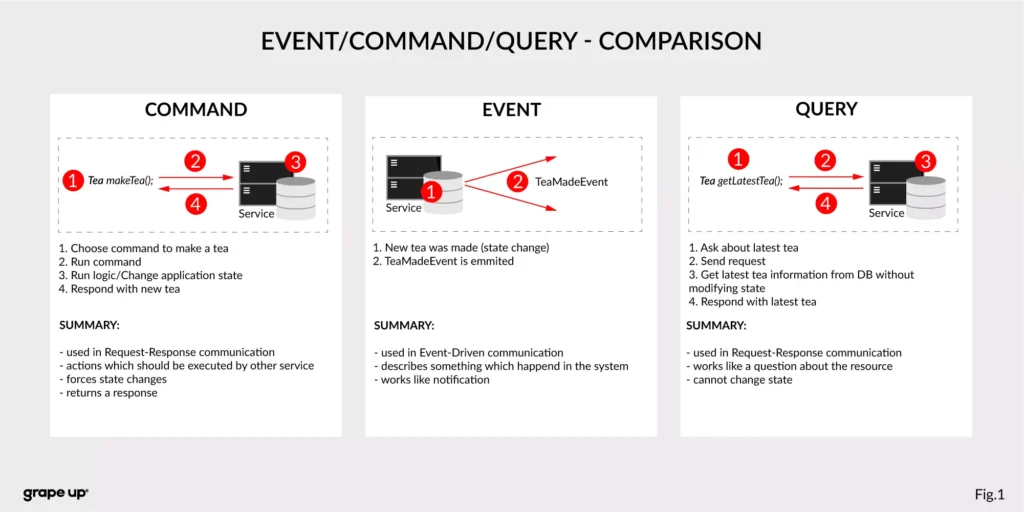
Now we know what the event is in comparison to other interaction styles. But what is the advantage of using events? To understand why event-driven solutions are better than synchronous request-response calls, we have to learn a bit about software architecture history.
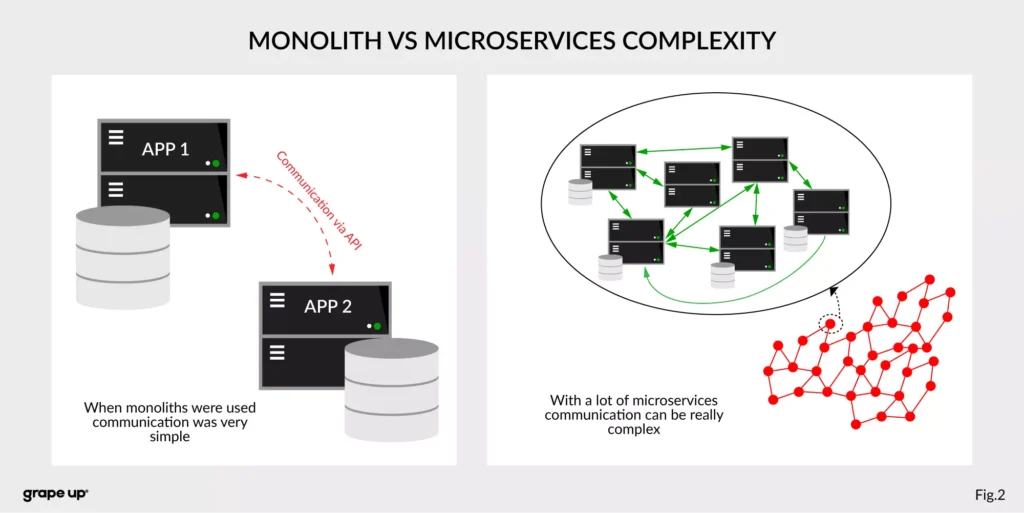
The figure describes a difference between a system that has old monolith architecture and a system with new modern microservice architecture.
The left side of the figure presents an API communication between two monoliths. In this case, communication is straightforward and easy. There is a different problem though such monolith solutions are very complex and hard to maintain.
The question is, what happens if we want to use, instead of two big services, a few thousands of small microservices . How complex will it be? The directed graph on the right side is showing how quickly the number of calls in the system can grow, and with it, the number of shared resources. We can have a situation when we need to use data from one microservice in many places. That produces new challenges regarding communication.
What about communication style?
In both cases, we are using a request-response style of communication (figure below), and we need to know how to use API provided by the server from the caller perspective. There must be some kind of protocol to exchange messages between services.
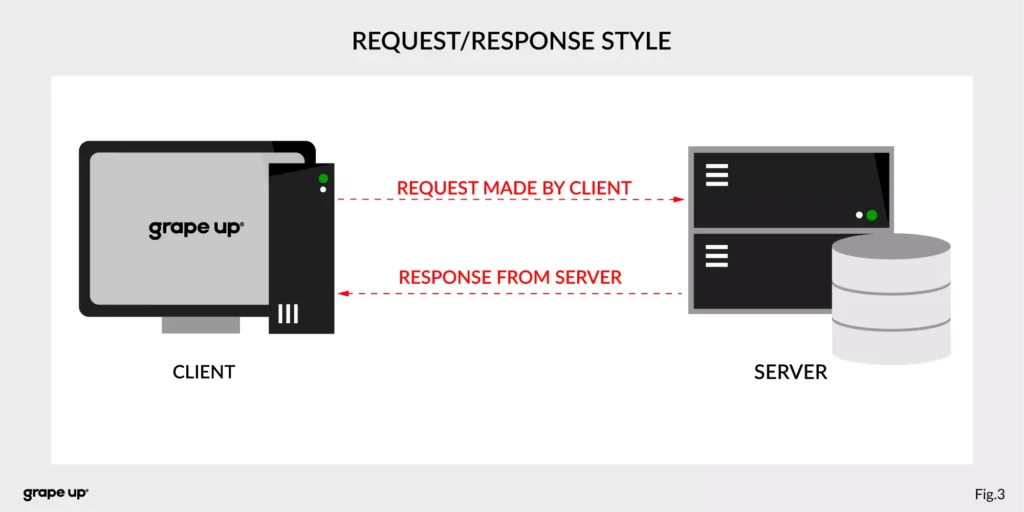
So how to reduce the complexity and make an integration between services easier? To answer this – look at the figure below.
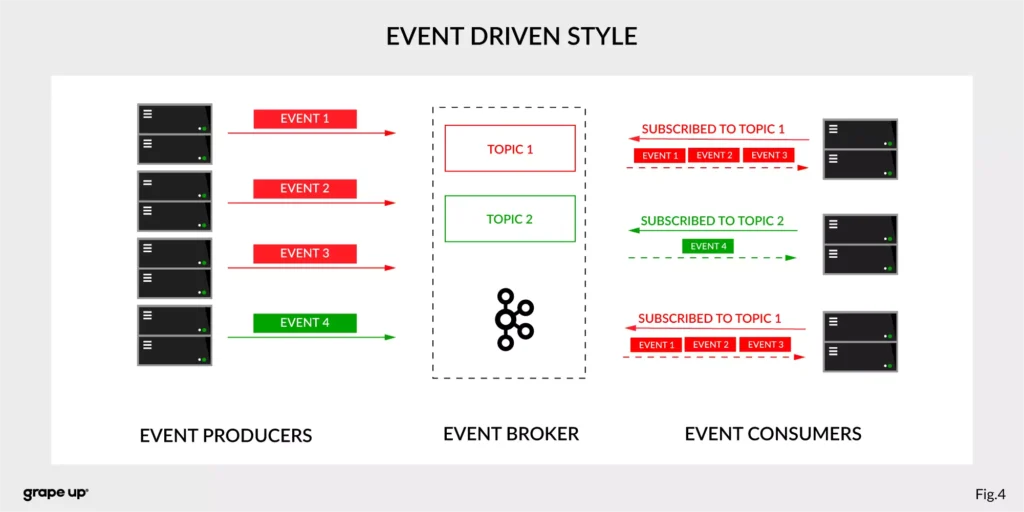
In this case, interactions between event producers and consumers are driven by events only. This pattern supports loose coupling between services, and what is more important for us, the event producer does not need to be aware of the event consumer state. It is the essence of the pattern. From the producer's perspective, we do not need to know who or how to use data from the topic.
Of course, as usual, everything is relative. It is not like the event-driven style is always the best. It depends on the use case. For instance, when operations should be done synchronously, then it is natural to use the request-response style. In situations like user authentication, reporting AB tests, or integration with third-party services, it is better to use a synchronous style. When the loose coupling is a need, then it is better to go with an event-driven approach. In larger systems, we are mixing styles to achieve a business goal.
The name of Kafka has its origins in the word Kafkaesque which means according to the Cambridge dictionary something extremely unpleasant, frightening, and confusing, and similar to situations described in the novels of Franz Kafka.
The communication mess in the modern enterprise was a factor to invent such a tool. To understand why - we need to take a closer look at modern enterprise systems.
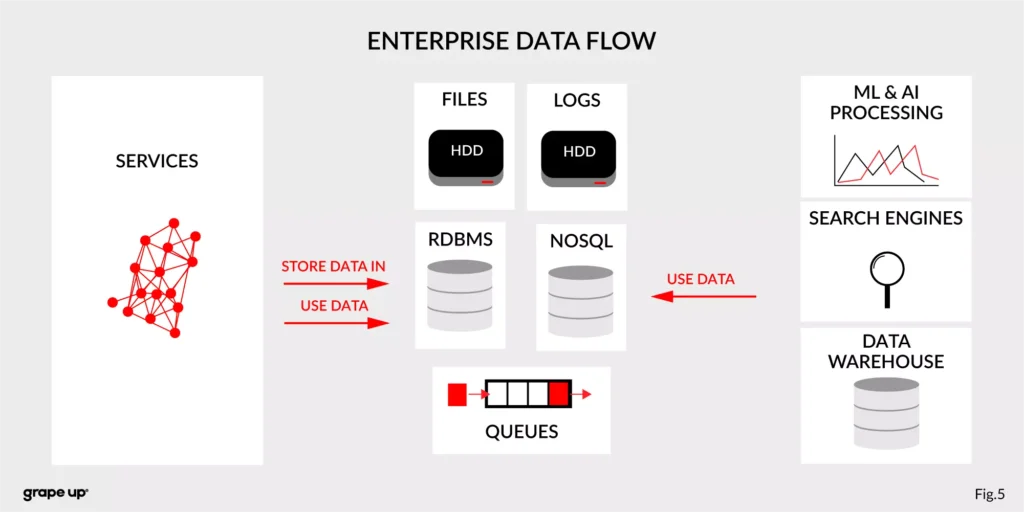
The modern enterprise systems contain more than just services. They usually have a data warehouse, AI and ML analytics, search engines, and much more. The format of data and the place where data is stored are various – sometimes a part of the data is stored in RDBMS, a part in NoSQL, and other in file bucket or transferred via a queue. They can have different formats and extensions like XML, JSON, and so on. Data management is the key to every successful enterprise. That is why we should care about it. Tim O’Reilly once said:
„We are entering a new world in which data may be more important than software.”
In this case, having a good solution for processing crucial data streams across an enterprise is a must to be successful in business. But as we all know, it is not always so easy.
How to tame the beast?
For this complex enterprise data flow scenario, people invented many tools/methods. All to make this enterprise data distribution possible. Unfortunately, as usual, to use them, we have to make some tradeoffs. Here we have a list of them:
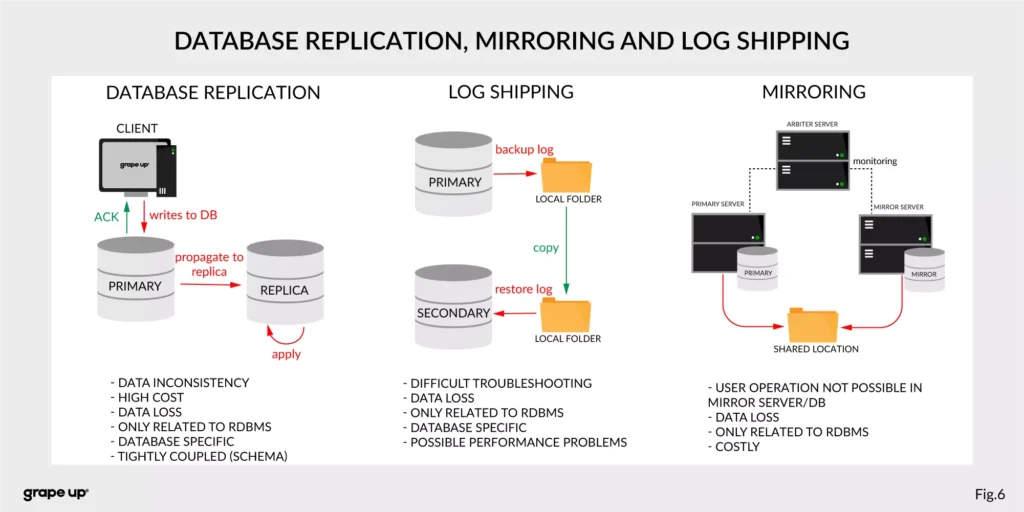
- Database replication, Mirroring, and Log Shipping - used to increase the performance of an application (scaling) and backup/recovery.
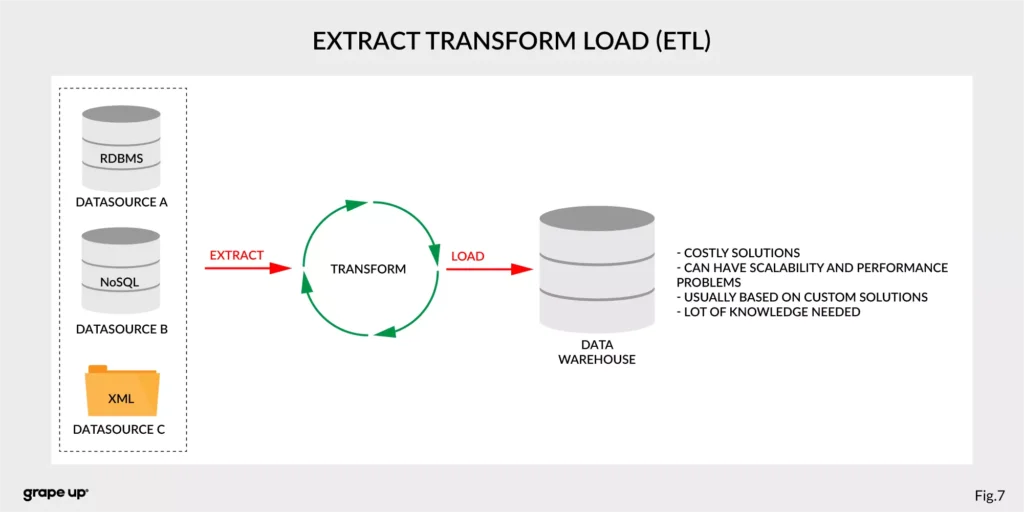
- ETL – Extract, Transform, Load - used to copy data from different sources for analytics/reports.
- Messaging systems - provide asynchronous communication between systems.
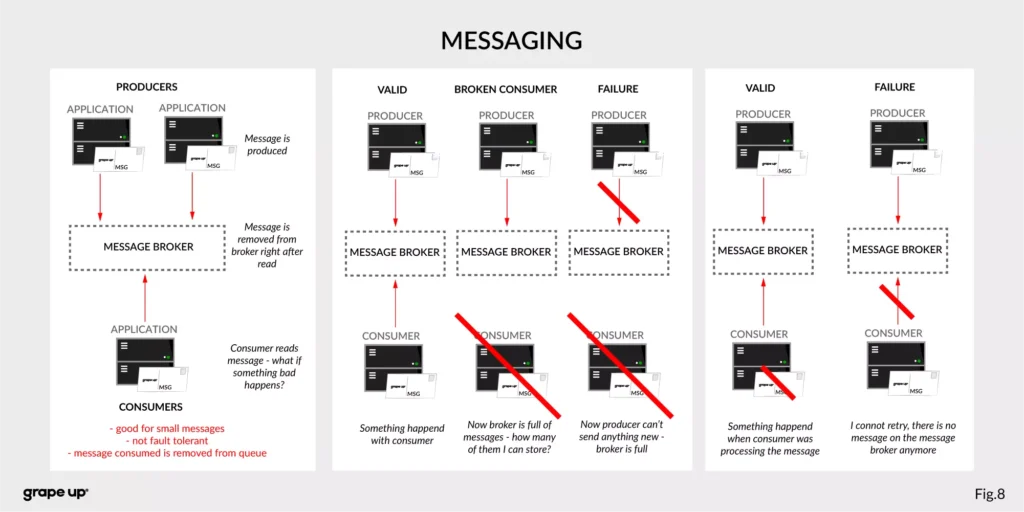
As you can see, we have a lot of problems that we need to take care of to provide correct data flow across an enterprise organization. That is why Apache Kafka was invented. One more time we have to go to the definition of Apache Kafka. It is called a distributed event streaming platform. Now we know what the event is and how event-driven style looks like. So as you probably can guess, event streaming, in our case, means capturing, storing, manipulating, processing, reacting, and routing event streams in real-time. It is based on three main capabilities – publishing/subscribing, storing, and processing. These three capabilities make this tool very successful.
- Publishing/Subscribing provides an ability to read/write to streams of events and even more – you can continuously import/export data from different sources/systems.
- Storing is also very important here. It solves the abovementioned problems in messaging. You can store streams of events for as long as you want without being afraid that something will be gone.
- Processing allows us to process streams in real-time or use history to process them.
But wait! There is one more word to explain – distributed. Kafka system internally consists of servers and clients. It uses a high-performance TCP Protocol to provide reliable communication between them. Kafka runs as a cluster on one or multiple servers which can be easily deployed in the cloud or on-prem in single or multiple regions. There are also Kafka Connect servers used for integration with other data sources and other Kafka Clusters. Clients that can be implemented in many programming languages have a special role to read/write and process event streams. The whole ecosystem of Kafka is distributed and of course like every distributed system has a lot of challenges regarding node failures, data loss, and coordination.
What are the basic elements of Apache Kafka?
To understand how Apache Kafka works let first explain the basic elements of the Kafka ecosystem.
Firstly, we should take a look at the event. It has a key, value, timestamp, and optional metadata headers. A key is used not only for identification, but it is used also for routing and aggregation operations for events with the same key.
As you can see in the figure below - if the message has no key attached, then data is sent using a round-robin algorithm. The situation is different when the event has a key attached. Then the events always go to the partition which holds this key. It makes sense from the performance perspective. We usually use ids to get information about objects, and in that case, it is faster to get it from the same broker than to look for it on many brokers.
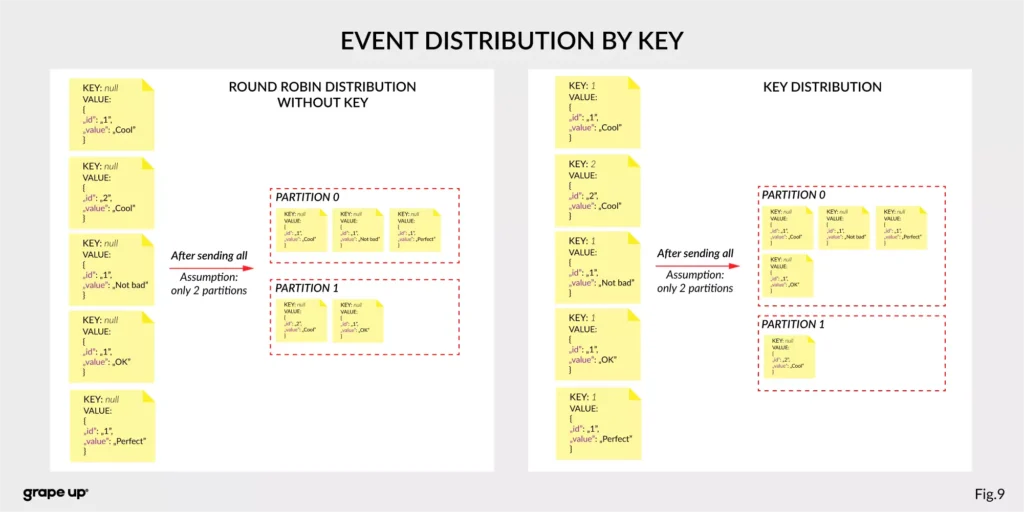
The value, as you can guess, stores the essence of the event. It contains information about the business change that happened in the system.
There are different types of events:
- Unkeyed Event – event in which there is no need to use a key. It describes a single fact of what happened in the system. It could be used for metric purposes.
- Entity Event – the most important one. It describes the state of the business object at a given point in time. It must have a unique key, which usually is related to the id of the business object. They are playing the main role in event-driven architectures.
- Keyed Event – an event with a key but not related to any business entity. The key is used for aggregation and partitioning.
Topics –storage for events. The analogy to a folder in a filesystem, where the topic is like a folder that organizes what is inside. An example name of the topic, which keeps all orders events in the e-commerce system can be “ orders” . Unlike in other messaging systems, the events stay on the topic after reading. It makes it very powerful and fault-tolerant. It also solves a problem when the consumer will process something with an error and would like to process it again. Topics can always have zero, single, and multiple producers and subscribers.
They are divided into smaller parts called partitions. A partition can be described as a “commit log”. Messages can be appended to the log and can be read only in the order from the beginning to the end. Partitions are designed to provide redundancy and scalability. The most important fact is that partitions can be hosted on different servers (brokers), and that gives a very powerful way to scale topics horizontally.
Producer – client application responsible for the creation of new events on Kafka Topic. The producer is responsible for choosing the topic partition. By default, as we mentioned earlier round-robin is used when we do not provide any key. There is also a way of creating custom business mapping rules to assign a partition to the message.
Consumer – client application responsible for reading and processing events from Kafka. All events are being read by a consumer in the order in which they were produced. Each consumer also can subscribe to more than one topic. Each message on the partition has a unique integer identifier ( offset ) generated by Apache Kafka which is increased when a new message arrives. It is used by the consumer to know from where to start reading new messages. To sum up the topic, partition and offset are used to precisely localize the message in the Apache Kafka system. Managing an offset is the main responsibility for each consumer.
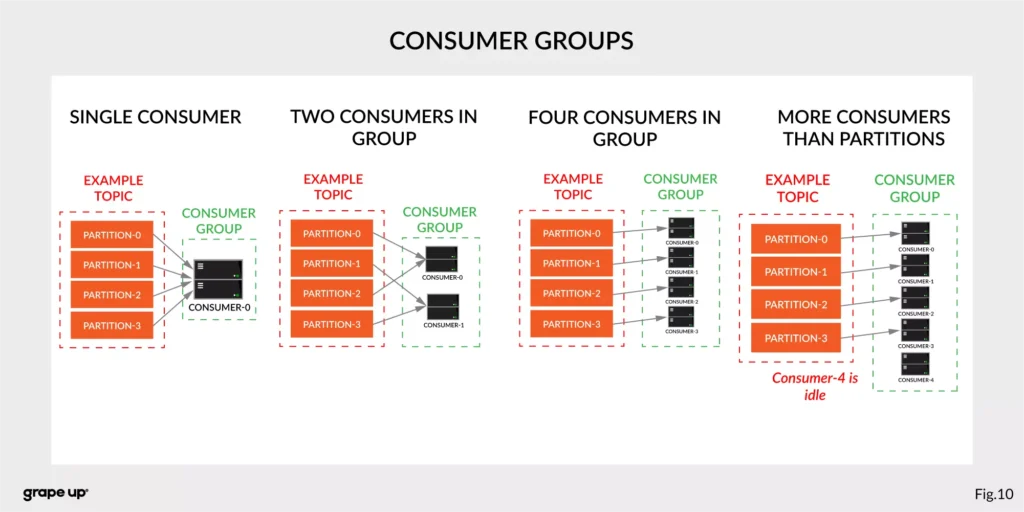
The concept of consumers is easy. But what about the scaling? What if we have many consumers, but we would like to read the message only once? That is why the concept of consumer group was designed. The idea here is when consumer belongs to the same group, it will have some subset of partitions assigned to read a message. That helps to avoid the situation of duplicated reads. In the figure below, there is an example of how we can scale data consumption from the topic. When a consumer is making time-consuming operations, we can connect other consumers to the group, which helps to process faster all new events on the consumer level. We have to be careful though when we have a too-small number of partitions, we would not be able to scale it up. It means if we have more consumers than partitions, they are idle.
But you can ask – what will happen when we add a new consumer to the existing and running group? The process of switching ownership from one consumer to another is called “rebalance.” It is a small break from receiving messages for the whole group. The idea of choosing which partition goes to which consumer is based on the coordinator election problem.
Broker – is responsible for receiving and storing produced events on disk, and it allows consumers to fetch messages by a topic, partition, and offset. Brokers are usually located in many places and joined in a cluster . See the figure below.
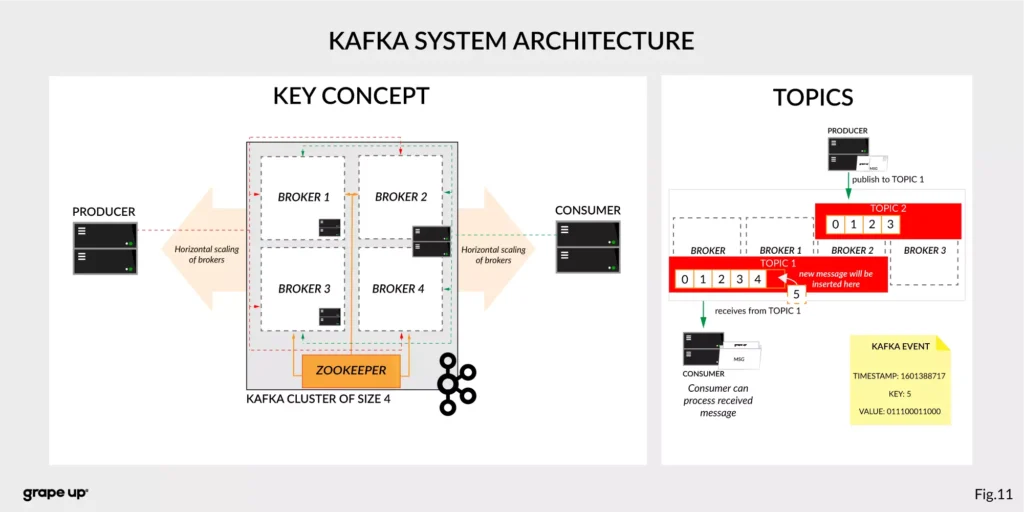
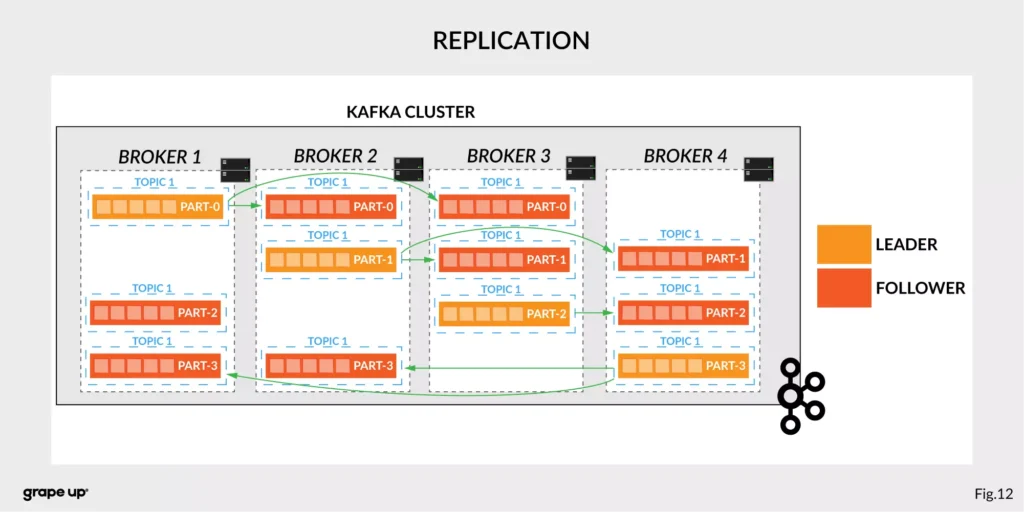
Like in every distributed system, when we use brokers we need to have some coordination. Brokers, as you can see, can be run on different servers (also it is possible to run many on a single server). It provides additional complexity. Each broker contains information about partitions that it owns. To be secure, Apache Kafka introduced a dedicated replication for partitions in case of failures or maintenance. The information about how many replicas do we need for a topic can be set for every topic separately. It gives a lot of flexibility. In the figure below, the basic configuration of replication is shown. The replication is based on the leader-follower approach.
Everything is great! We have found all advantages of using Kafka in comparison to more traditional approaches. Now it is time to say something when to use it.
When to use Apache Kafka?
Apache Kafka provides a lot of use cases. It is widely used in many companies, like Uber, Netflix, Activision, Spotify, Slack, Pinterest, Coursera, LinkedIn, etc. We can use it as a:
- Messaging system – it can be a good alternative to the existing messaging systems. It has a lot of flexibility in configuration, better throughput, and low end-to-end latency.
- Website Activity tracking – it was the original use case for Kafka. Activity tracking on the website generates a high volume of data that we have to process. Kafka provides real-time processing for event-streams, which can be sometimes crucial for the business.
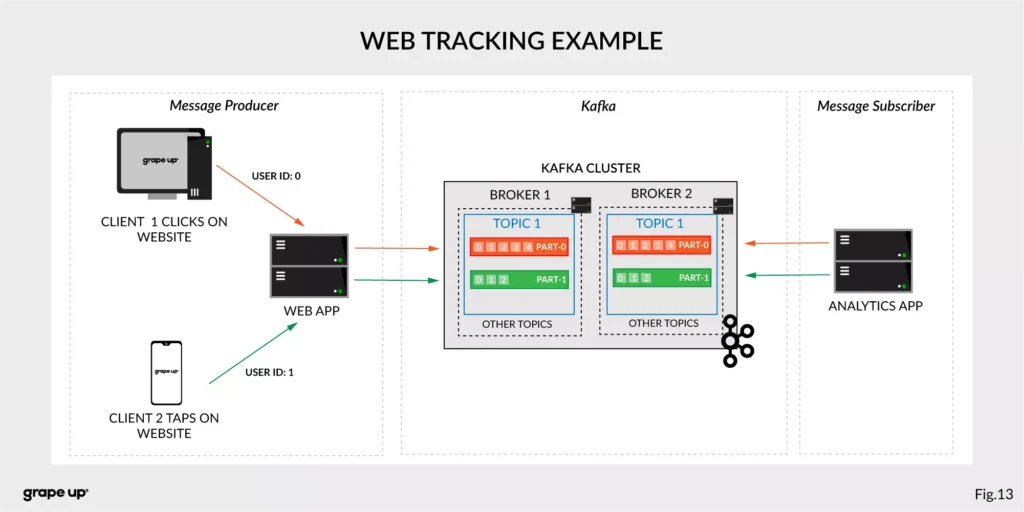
Figure 13 presents a simple use case for web tracking. The web application has a button that generates an event after each click. It is used for real-time analytics. Clients' events that are gathered on TOPIC 1. Partitioning is using user-id so client 1 events (user-id = 0) are stored in partition 0 and client 2 (user-id = 1) are stored in partition 1. The record is appended and offset is incremented on a topic. Now, a subscriber can read a message, and present new data on a dashboard or even use older offset to show some statistics.
- Log aggregation – it can be used as an alternative to existing log aggregation solutions. It gives a cleaner way of organizing logs in form of the event streams and what is more, gives a very easy and flexible way to gather logs from many different sources. Comparing to other tools is very fast, durable, and has low end-to-end latency.
- Stream processing – is a very flexible way of processing data using data pipelines. Many users are aggregating, enriching, and transforming data into new topics. It is a very quick and convenient way to process all data in real-time.
- Event sourcing – is a system design in which immutable events are stored as a single source of truth about the system. A typical use case for event sourcing can be found in bank systems when we are loading the history of transactions. The transaction is represented by an immutable event which contains all data describing what exactly happened in our account.
- Commit log – it can be used as an external commit-log for distributed systems. It has a lot of mechanisms that are useful in this use case (like log-compaction, replication, etc.)
Summary
Apache Kafka is a powerful tool used by leading tech enterprises. It offers a lot of use cases, so if we want to use a reliable and durable tool for our data, we should consider Kafka. It provides a loose coupling between producers and subscribers, making our enterprise architecture clean and open to changes. We hope you enjoyed this basic introduction to Apache Kafka and you will try to dig deeper into how it works after this article.
Looking for guidance on implementing Kafka or other event-driven solutions?
Get in touch with us to discuss how we can help.
Sources:
- kafka.apache.org/intro
- confluent.io/blog/journey-to-event-driven-part-1-why-event-first-thinking-changes-everything/
- hackernoon.com/by-2020-50-of-managed-apis-projected-to-be-event-driven-88f7041ea6d8
- ably.io/blog/the-realtime-api-family/
- confluent.io/blog/changing-face-etl/
- infoq.com/articles/democratizing-stream-processing-kafka-ksql-part2/
- cqrs.nu/Faq
- medium.com/analytics-vidhya/apache-kafka-use-cases-e2e52b892fe1
- confluent.io/blog/transactions-apache-kafka/
- martinfowler.com/articles/201701-event-driven.html
- pluralsight.com/courses/apache-kafka-getting-started#
- jaceklaskowski.gitbooks.io/apache-kafka/content/kafka-brokers.html
Bellemare, Adam. Building event-driven microservices: leveraging distributed large-scale data . O'Reilly Media, 2020.
Narkhede, Neha, et al. Kafka: the Definitive Guide: Real-Time Data and Stream Processing at Scale . O'Reilly Media, 2017.
Stopford, Ben. Designing Event-Driven Systems, Concepts and Patterns for Streaming Services with Apache Kafka , O'Reilly Media, 2018.

Grape Up guides enterprises on their data-driven transformation journey
Ready to ship? Let's talk.
Check related articles
Read our blog and stay informed about the industry's latest trends and solutions.
How to build hypermedia API with Spring HATEOAS
Have you ever considered the quality of your REST API? Do you know that there are several levels of REST API? Have you ever heard the term HATEOAS? Or maybe you wonder how to implement it in Java? In this article, we answer these questions with the main emphasis on the HATEOAS concept and the implementation of that concept with the Spring HATEOAS project.
Learn more about services provided by Grape Up
You are at Grape Up blog, where our experts share their expertise gathered in projects delivered for top enterprises. See how we work.
Enabling the automotive industry to build software-defined vehicles
Empowering insurers to create insurance telematics platforms
Providing AI & advanced analytics consulting
What is HATEOAS?
H ypermedia A s T he E ngine O f A pplication S tate - is one of the constraints of the REST architecture. Neither REST nor HATEOAS is any requirement or specification. How you implement it depends only on you. At this point, you may ask yourself - how RESTful your API is without using HATEOAS? This question is answered by the REST maturity model presented by Leonard Richardson. This model consists of four levels, as set out below:
- Level 0
The API implementation uses the HTTP protocol but does not utilize its full capabilities. Additionally, unique addresses for resources are not provided. - Level 1
We have a unique identifier for the resource, but each action on the resource has its own URL. - Level 2
We use HTTP methods instead of verbs describing actions, e.g., DELETE method instead of URL .../delete - Level 3
The term HATEOAS has been introduced. Simply speaking, it introduces hypermedia to resources. That allows you to place links in the response informing about possible actions, thereby adding the possibility to navigate through API.
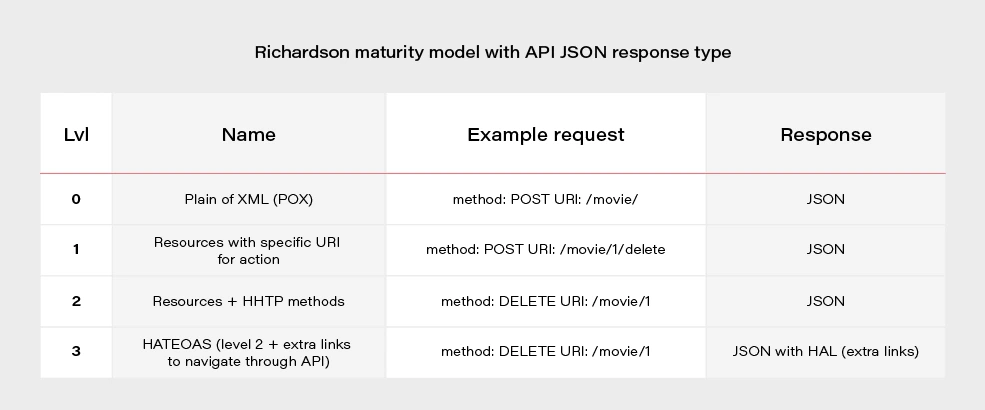
Most projects these days are written using level 2. If we would like to go for the perfect RESTful API, we should consider HATEOAS.
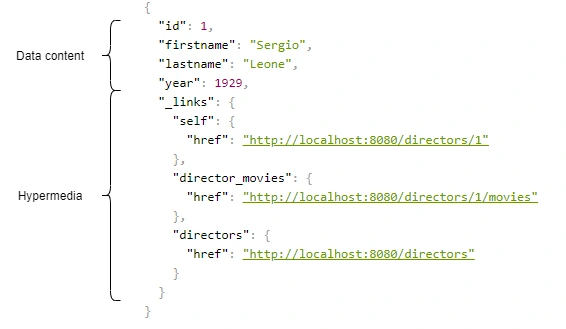
Above, we have an example of a response from the server in the form of JSON+HAL. Such a resource consists of two parts: our data and links to actions that are possible to be performed on a given resource.
Spring HATEOAS 1.x.x
You may be asking yourself how to implement HATEOAS in Java? You can write your solution, but why reinvent the wheel? The right tool for this seems to be the Spring Hateoas project. It is a long-standing solution on the market because its origins date back to 2012, but in 2019 we had a version 1.0 release. Of course, this version introduced a few changes compared to 0.x. They will be discussed at the end of the article after presenting some examples of using this library so that you better understand what the differences between the two versions are. Let’s discuss the possibilities of the library based on a simple API that returns us a list of movies and related directors. Our domain looks like this:
@Entity
public class Movie {
@Id
@GeneratedValue
private Long id;
private String title;
private int year;
private Rating rating;
@ManyToOne
private Director director;
}
@Entity
public class Director {
@Id
@GeneratedValue
@Getter
private Long id;
@Getter
private String firstname;
@Getter
private String lastname;
@Getter
private int year;
@OneToMany(mappedBy = "director")
private Set<Movie> movies;
}
We can approach the implementation of HATEOAS in several ways. Three methods represented here are ranked from least to most recommended.
But first, we need to add some dependencies to our Spring Boot project:
<dependency>
<groupId>org.springframework.boot</groupId>
<artifactId>spring-boot-starter-hateoas</artifactId>
</dependency>
Ok, now we can consider implementation options.
Entity extends RepresentationModel with links directly in Controller class
Firstly, extend our entity models with RepresentationModel.
public class Movie extends RepresentationModel<Movie>
public class Director extends RepresentationModel<Director>
Then, add links to RepresentationModel within each controller. The example below returns all directors from the system. By adding two links to each director - to himself and to the entire collection. A link is also added to the collection. The key elements of this code are two methods with static imports:
-
linkTo() -
methodOn()
@GetMapping("/directors")
public ResponseEntity<CollectionModel<Director>> getAllDirectors() {
List<Director> directors = directorService.getAllDirectors();
directors.forEach(director -> {
director.add(linkTo(methodOn(DirectorController.class).getDirectorById(director.getId())).withSelfRel());
director.add(linkTo(methodOn(DirectorController.class).getDirectorMovies(director.getId())).withRel("directorMovies"));
});
Link allDirectorsLink = linkTo(methodOn(DirectorController.class).getAllDirectors()).withSelfRel());
return ResponseEntity.ok(CollectionModel.of(directors, allDirectorsLink));
}
This is the response we get after invoking such controller:
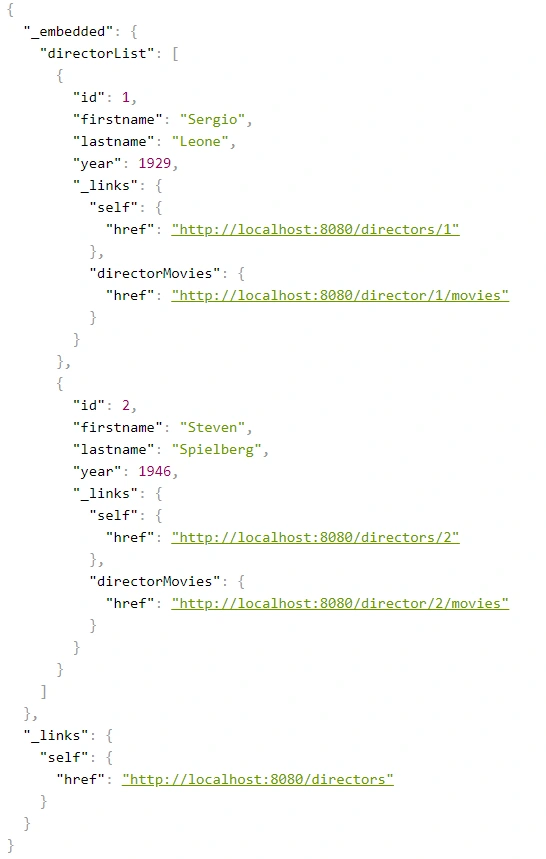
We can get a similar result when requesting a specific resource.
@GetMapping("/directors/{id}")
public ResponseEntity<Director> getDirector(@PathVariable("id") Long id) {
return directorService.getDirectorById(id)
.map(director -> {
director.add(linkTo(methodOn(DirectorController.class).getDirectorById(id)).withSelfRel());
director.add(linkTo(methodOn(DirectorController.class).getDirectorMovies(id)).withRel("directorMovies"));
director.add(linkTo(methodOn((DirectorController.class)).getAllDirectors()).withRel("directors"));
return ResponseEntity.ok(director);
})
.orElse(ResponseEntity.notFound().build());
}
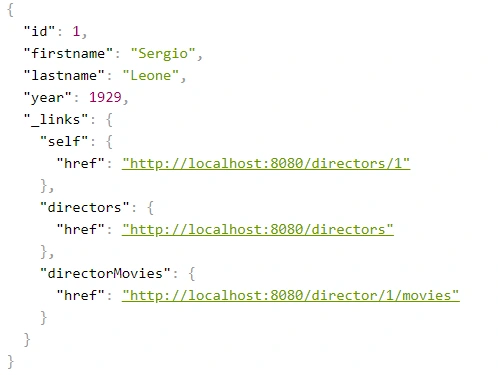
The main advantage of this implementation is simplicity. But making our entity dependent on an external library is not a very good idea. Plus, the code repetition for adding links for a specific resource is immediately noticeable. You can, of course, bring it to some private method, but there is a better way.
Use Assemblers - SimpleRepresentationModelAssembler
And it’s not about assembly language, but about a special kind of class that converts our resource to RepresentationModel.
One of such assemblers is SimpleRepresentationModelAssembler. Its implementation goes as follows:
@Component
public class DirectorAssembler implements SimpleRepresentationModelAssembler<Director> {
@Override
public void addLinks(EntityModel<Director> resource) {
Long directorId = resource.getContent().getId();
resource.add(linkTo(methodOn(DirectorController.class).getDirectorById(directorId)).withSelfRel());
resource.add(linkTo(methodOn(DirectorController.class).getDirectorMovies(directorId)).withRel("directorMovies"));
}
@Override
public void addLinks(CollectionModel<EntityModel<Director>> resources) {
resources.add(linkTo(methodOn(DirectorController.class).getAllDirectors()).withSelfRel());
}
}
In this case, our entity will be wrapped in an EnityModel (this class extends RepresentationModel ) to which the links specified by us in the addLinks() will be added. Here we overwrite two addLinks() methods - one for entire data collections and the other for single resources. Then, as part of the controller, it is enough to call the toModel() or toCollectionModel() method ( addLinks() are template methods here), depending on whether we return a collection or a single representation.
@GetMapping
public ResponseEntity<CollectionModel<EntityModel<Director>>> getAllDirectors() {
return ResponseEntity.ok(directorAssembler.toCollectionModel(directorService.getAllDirectors()));
}
@GetMapping(value = "directors/{id}")
public ResponseEntity<EntityModel<Director>> getDirectorById(@PathVariable("id") Long id) {
return directorService.getDirectorById(id)
.map(director -> {
EntityModel<Director> directorRepresentation = directorAssembler.toModel(director)
.add(linkTo(methodOn(DirectorController.class).getAllDirectors()).withRel("directors"));
return ResponseEntity.ok(directorRepresentation);
})
.orElse(ResponseEntity.notFound().build());
}
The main benefit of using the SimpleRepresentationModelAssembler is the separation of our entity from the RepresentationModel , as well as the separation of the adding link logic from the controller.
The problem arises when we want to add hypermedia to the nested elements of an object. Obtaining the effect, as in the example below, is impossible in a current way.
{
"id": "M0002",
"title": "Once Upon a Time in America",
"year": 1984,
"rating": "R",
"directors": [
{
"id": "D0001",
"firstname": "Sergio",
"lastname": "Leone",
"year": 1929,
"_links": {
"self": {
"href": "http://localhost:8080/directors/D0001"
}
}
}
],
"_links": {
"self": {
"href": "http://localhost:8080/movies/M0002"
}
}
}
Create DTO class with RepresentationModelAssembler
The solution to this problem is to combine the two previous methods, modifying them slightly. In our opinion, RepresentationModelAssembler offers the most possibilities. It removes the restrictions that arose in the case of nested elements for SimpleRepresentationModelAssembler . But it also requires more code from us because we need to prepare DTOs, which are often done anyway. This is the implementation based on RepresentationModelAssembler :
@Component
public class DirectorRepresentationAssembler implements RepresentationModelAssembler<Director, DirectorRepresentation> {
@Override
public DirectorRepresentation toModel(Director entity) {
DirectorRepresentation directorRepresentation = DirectorRepresentation.builder()
.id(entity.getId())
.firstname(entity.getFirstname())
.lastname(entity.getLastname())
.year(entity.getYear())
.build();
directorRepresentation.add(linkTo(methodOn(DirectorController.class).getDirectorById(directorRepresentation.getId())).withSelfRel());
directorRepresentation.add(linkTo(methodOn(DirectorController.class).getDirectorMovies(directorRepresentation.getId())).withRel("directorMovies"));
return directorRepresentation;
}
@Override
public CollectionModel<DirectorRepresentation> toCollectionModel(Iterable<? extends Director> entities) {
CollectionModel<DirectorRepresentation> directorRepresentations = RepresentationModelAssembler.super.toCollectionModel(entities);
directorRepresentations.add(linkTo(methodOn(DirectorController.class).getAllDirectors()).withSelfRel());
return directorRepresentations;
}
}
When it comes to controller methods, they look the same as for SimpleRepresentationModelAssembler , the only difference is that in the ResponseEntity the return type is DTO - DirectorRepresentation .
@GetMapping
public ResponseEntity<CollectionModel<DirectorRepresentation>> getAllDirectors() {
return ResponseEntity.ok(directorRepresentationAssembler.toCollectionModel(directorService.getAllDirectors()));
}
@GetMapping(value = "/{id}")
public ResponseEntity<DirectorRepresentation> getDirectorById(@PathVariable("id") String id) {
return directorService.getDirectorById(id)
.map(director -> {
DirectorRepresentation directorRepresentation = directorRepresentationAssembler.toModel(director)
.add(linkTo(methodOn(DirectorController.class).getAllDirectors()).withRel("directors"));
return ResponseEntity.ok(directorRepresentation);
})
.orElse(ResponseEntity.notFound().build());
}
Here is our DTO model:
@Builder
@Getter
@EqualsAndHashCode(callSuper = false)
@Relation(itemRelation = "director", collectionRelation = "directors")
public class DirectorRepresentation extends RepresentationModel<DirectorRepresentation> {
private final String id;
private final String firstname;
private final String lastname;
private final int year;
}
The @Relation annotation allows you to configure the relationship names to be used in the HAL representation. Without it, the relationship names match the class name and a suffix List for the collection.
By default, JSON+HAL looks like this:
{
"_embedded": {
"directorRepresentationList": [
…
]
},
"_links": {
…
}
}
However, annotation @Relation can change the name of directors :
{
"_embedded": {
"directors": [
…
]
},
"_links": {
…
}
}
Summarizing the HATEOAS concept, it consists of a few pros and cons.
Pros:
- If the client uses it, we can change the API address for our resources without breaking the client.
- Creates good self-documentation, and table of contents of API to the person who has the first contact with our API.
- Can simplify building some conditions on the frontend, e.g., whether the button should be disabled / enabled based on whether the link to corresponding the action exists.
- Less coupling between frontend and backend.
- Just like writing tests imposes on us to stick to the SRP principle in class construction, HATEOAS can keep us in check when designing API.
Cons:
- Additional work needed on implementing non-business functionality.
- Additional network overhead. The size of the transferred data is larger.
- Adding links to some resources can be sometimes complicated and can introduce mess in controllers.
Changes in Spring HATEOAS 1.0
Spring HATEOAS has been available since 2012, but the first release of version 1.0 was in 2019.
The main changes concerned the changes to the package paths and names of some classes, e.g.
Old New ResourceSupport RepresentationModel Resource EntityModel Resources CollectionModel PagedResources PagedModel ResourceAssembler RepresentationModelAssembler
It is worth paying attention to a certain naming convention - the replacement of the word Resource in class names with the word Representation . It occurred because these types do not represent resources but representations, which can be enriched with hypermedia. It is also more in the spirit of REST. We are returning the resource representations, not the resources themselves. In the new version, there is a tendency to move away from constructors in favor of static construction methods - .of() .
It is also worth mentioning that the old version has no equivalent for SimpleRepresentationModelAssembler . On the other hand, the ResourceAssembler interface has only the toResource() method (equivalent - toModel() ) and no equivalent for toCollectionModel() . Such a method is found in RepresentationModelAssembler and is the toModelCollection() method.
The creators of the library have also included a script that migrates old package paths and old class names to the new version. You can check it here .
How to build real-time notification service using Server-Sent Events (SSE)
Most of the communication on the Internet comes directly from the clients to the servers. The client usually sends a request, and the server responds to that request. It is known as a client-server model, and it works well in most cases. However, there are some scenarios in which the server needs to send messages to the clients. In such cases, we have a couple of options: we can use short and long polling, webhooks, websockets, or event streaming platforms like Kafka. However, there is another technology, not popularized enough, which in many cases, is just perfect for the job. This technology is the Server-Sent Events (SSE) standard.
Learn more about services provided by Grape Up
You are at Grape Up blog, where our experts share their expertise gathered in projects delivered for top enterprises. See how we work.
Enabling the automotive industry to build software-defined vehicles
Empowering insurers to create insurance telematics platforms
Providing AI & advanced analytics consulting
What are Server-Sent Events?
SSE definition states that it is an http standard that allows a web application to handle a unidirectional event stream and receive updates whenever the server emits data. In simple terms, it is a mechanism for unidirectional event streaming.
Browsers support
It is currently supported by all major browsers except Internet Explorer.
Message format
The events are just a stream of UTF-8 encoded text data in a format defined by the Specification. The important aspect here is that the format defines the fields that the SSE message should have, but it does not mandate a specific type for the payload, leaving the freedom of choice to the users.
{
"id": "message id <optional>",
"event": "event type <optional>",
"data": "event data –plain text, JSON, XML… <mandatory>"
}
SSE Implementation
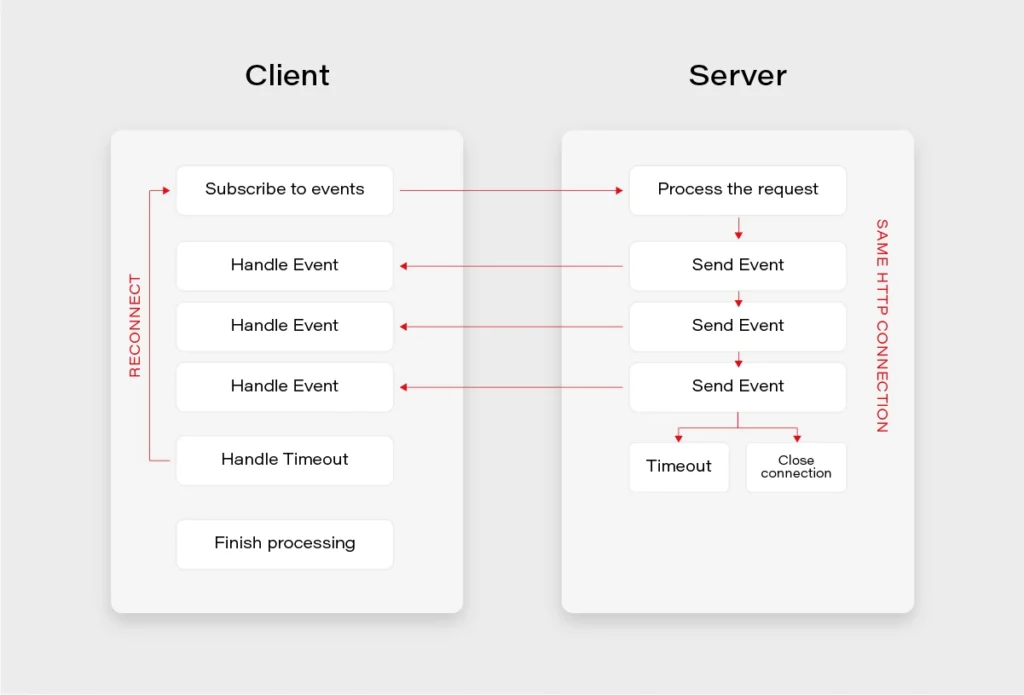
For the SSE to work, the server needs to tell the client that the response’s content-type is text/eventstream . Next, the server receives a regular HTTP request, and leaves the HTTP connection open until no more events are left or until the timeout occurs. If the timeout occurs before the client receives all the events it expects, it can use the built-in reconnection mechanism to reestablish the connection.
Simple endpoint (Flux):
The simplest implementation of the SSE endpoint in Spring can be achieved by:
- Specifying the produced media type as text/event-stream,
- Returning Flux type, which is a reactive representation of a stream of events in Java.
@GetMapping(path = "/stream-flux", produces = MediaType.TEXT_EVENT_STREAM_VALUE)
public Flux<String> streamFlux() {
return Flux.interval(Duration.ofSeconds(1))
.map(sequence -> "Flux - " + LocalTime.now().toString());
ServerSentEvent class:
Spring introduced support for SSE specification in version 4.2 together with a ServerSentEvent class. The benefit here is that we can skip the text/event-stream media type explicit specification, as well as we can add metadata such as id or event type.
@GetMapping("/sse-flux-2")
public Flux<ServerSentEvent> sseFlux2() {
return Flux.interval(Duration.ofSeconds(1))
.map(sequence -> ServerSentEvent.builder()
.id(String.valueOf(sequence))
.event("EVENT_TYPE")
.data("SSE - " + LocalTime.now().toString())
.build());
}
SseEmitter class:
However, the full power of SSE comes with the SseEmitter class. It allows for asynchronous processing and publishing of the events from other threads. What is more, it is possible to store the reference to SseEmitter and retrieve it on subsequent client calls. This provides a huge potential for building powerful notification scenarios.
@GetMapping("/sse-emitter")
public SseEmitter sseEmitter() {
SseEmitter emitter = new SseEmitter();
Executors.newSingleThreadExecutor().execute(() -> {
try {
for (int i = 0; true; i++) {
SseEmitter.SseEventBuilder event = SseEmitter.event()
.id(String.valueOf(i))
.name("SSE_EMITTER_EVENT")
.data("SSE EMITTER - " + LocalTime.now().toString());
emitter.send(event);
Thread.sleep(1000);
}
} catch (Exception ex) {
emitter.completeWithError(ex);
}
});
return emitter;
}
Client example:
Here is a basic SSE client example written in Javascript. It simply defines an EventSource and subscribes to the message event stream in two different ways.
// Declare an EventSource
const eventSource = new EventSource('http://some.url');
// Handler for events without an event type specified
eventSource.onmessage = (e) => {
// Do something - event data etc will be in e.data
};
// Handler for events of type 'eventType' only
eventSource.addEventListener('eventType', (e) => {
// Do something - event data will be in e.data,
// message will be of type 'eventType'
});
SSE vs. Websockets
When it comes to SSE, it is often compared to Websockets due to usage similarities between both of the technologies.
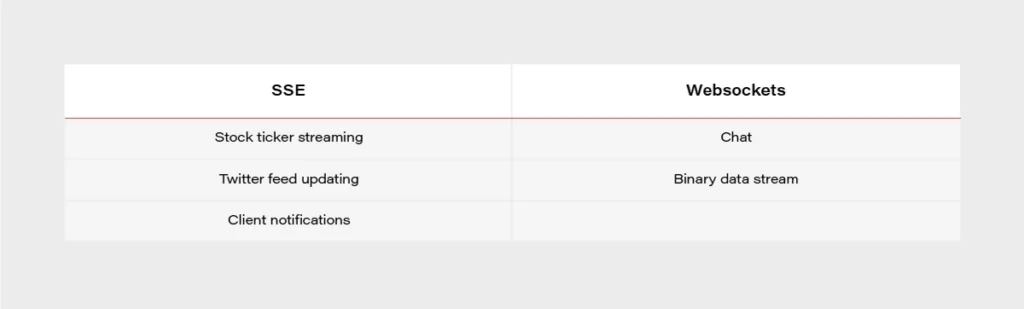
- Both are capable of pushing data to the client,
- Websockets are bidirectional – SSE unidirectional,
- In practice, everything that can be done with SSE, and can also be achieved with Websockets,
- SSE can be easier,
- SSE is transported over a simple HTTP connection,
- Websockets require full duplex-connection and servers to handle the protocol,
- Some enterprise firewalls with packet inspection have trouble dealing with Websockets – for SSE that’s not the case,
- SSE has a variety of features that Websockets lack by design, e.g., automatic reconnection, event ids,
- Only Websockets can send both binary and UTF-8 data, SSE is limited to UTF-8,
- SSE suffers from a limitation to the maximum number of open connections (6 per browser + domain). The issue was marked as Won’t fix in Chrome and Firefox.
Use Cases:
Notification Service Example:
A controller providing a subscribe to events and a publish events endpoints.
@Slf4j
@RestController
@RequestMapping("/events")
@RequiredArgsConstructor
public class EventController {
public static final String MEMBER_ID_HEADER = "MemberId";
private final EmitterService emitterService;
private final NotificationService notificationService;
@GetMapping
public SseEmitter subscribeToEvents(@RequestHeader(name = MEMBER_ID_HEADER) String memberId) {
log.debug("Subscribing member with id {}", memberId);
return emitterService.createEmitter(memberId);
}
@PostMapping
@ResponseStatus(HttpStatus.ACCEPTED)
public void publishEvent(@RequestHeader(name = MEMBER_ID_HEADER) String memberId, @RequestBody EventDto event) {
log.debug("Publishing event {} for member with id {}", event, memberId);
notificationService.sendNotification(memberId, event);
}
}
A service for sending the events:
@Service
@Primary
@AllArgsConstructor
@Slf4j
public class SseNotificationService implements NotificationService {
private final EmitterRepository emitterRepository;
private final EventMapper eventMapper;
@Override
public void sendNotification(String memberId, EventDto event) {
if (event == null) {
log.debug("No server event to send to device.");
return;
}
doSendNotification(memberId, event);
}
private void doSendNotification(String memberId, EventDto event) {
emitterRepository.get(memberId).ifPresentOrElse(sseEmitter -> {
try {
log.debug("Sending event: {} for member: {}", event, memberId);
sseEmitter.send(eventMapper.toSseEventBuilder(event));
} catch (IOException | IllegalStateException e) {
log.debug("Error while sending event: {} for member: {} - exception: {}", event, memberId, e);
emitterRepository.remove(memberId);
}
}, () -> log.debug("No emitter for member {}", memberId));
}
}
To sum up, Server-Sent Events standard is a great technology when it comes to a unidirectional stream of data and often can save us a lot of trouble compared to more complex approaches such as Websockets or distributed streaming platforms.
A full notification service example implemented with the use of Server-Sent Events can be found on my github: https://github.com/mkapiczy/server-sent-events
If you're looking to build a scalable, real-time notification system or need expert guidance on modern software solutions, Grape Up can help . Our engineering teams help enterprises design, develop, and optimize their software infrastructure.
Get in touch to discuss your project and see how we can support your business.
Sources:
- https://www.baeldung.com/spring-server-sent-events
- https://www.w3.org/TR/eventsource/
- https://stackoverflow.com/questions/5195452/websockets-vs-server-sent-events-eventsource
- https://www.telerik.com/blogs/websockets-vs-server-sent-events
- https://simonprickett.dev/a-look-at-server-sent-events/
How to run Selenium BDD tests in parallel with AWS Lambda - Lambda handlers
In our first article about Selenium BDD Tests in Parallel with AWS Lambda, we introduce parallelization in the Cloud and give you some insights into automating testing to accelerate your software development process. By getting familiar with the basics of Lambda Layers architecture and designing test sets, you are now ready to learn more about the Lambda handlers.
Lambda handlers
Now’s the time to run our tests on AWS. We need to create two Lambda handlers. The first one will find all scenarios from the test layer and run the second lambda in parallel for each scenario. In the end, it will generate one test report and upload it to the AWS S3 bucket.
Let’s start with the middle part. In order to connect to AWS, we need to use the boto3 library - AWS SDK for Python. It enables us to create, configure, and manage AWS services. We also import here behave __main__ function , which will be called to run behave tests from the code, not from the command line.
lambda/handler.py
import json
import logging
import os
from datetime import datetime
from subprocess import call
import boto3
from behave.__main__ import main as behave_main
REPORTS_BUCKET = 'aws-selenium-test-reports'
DATETIME_FORMAT = '%H:%M:%S'
logger = logging.getLogger()
logger.setLevel(logging.INFO)
def get_run_args(event, results_location):
test_location = f'/opt/{event["tc_name"]}'
run_args = [test_location]
if 'tags' in event.keys():
tags = event['tags'].split(' ')
for tag in tags:
run_args.append(f'-t {tag}')
run_args.append('-k')
run_args.append('-f allure_behave.formatter:AllureFormatter')
run_args.append('-o')
run_args.append(results_location)
run_args.append('-v')
run_args.append('--no-capture')
run_args.append('--logging-level')
run_args.append('DEBUG')
return run_args
What we also have above is setting arguments for our tests e.g., tags or feature file locations. But let's get to the point. Here is our Lambda handler code:
lambda/handler.py
def lambda_runner(event, context):
suffix = datetime.now().strftime(DATETIME_FORMAT)
results_location = f'/tmp/result_{suffix}'
run_args = get_run_args(event, results_location)
print(f'Running with args: {run_args}')
# behave -t @smoke -t ~@login -k -f allure_behave.formatter:AllureFormatter -o output --no-capture
try:
return_code = behave_main(run_args)
test_result = False if return_code == 1 else True
except Exception as e:
print(e)
test_result = False
response = {'test_result': test_result}
s3 = boto3.resource('s3')
for file in os.listdir(results_location):
if file.endswith('.json'):
s3.Bucket(REPORTS_BUCKET).upload_file(f'{results_location}/{file}', f'tmp_reports/{file}')
call(f'rm -rf {results_location}', shell=True)
return {
'statusCode': 200,
'body': json.dumps(response)
}
The lambda_runner method is executed with tags that are passed in the event. It will handle a feature file having a name from the event and at least one of those tags. At the end of a single test, we need to upload our results to the S3 bucket. The last thing is to return a Lambda result with a status code and a response from tests.
There’s a serverless file with a definition of max memory size, lambda timeout, used layers, and also some policies that allow us to upload the files into S3 or save the logs in CloudWatch.
lambda/serverless.yml
service: lambda-test-runner
app: lambda-test-runner
provider:
name: aws
runtime: python3.6
region: eu-central-1
memorySize: 512
timeout: 900
iamManagedPolicies:
- "arn:aws:iam::aws:policy/CloudWatchLogsFullAccess"
- "arn:aws:iam::aws:policy/AmazonS3FullAccess"
functions:
lambda_runner:
handler: handler.lambda_runner
events:
- http:
path: lambda_runner
method: get
layers:
- ${cf:lambda-selenium-layer-dev.SeleniumLayerExport}
- ${cf:lambda-selenium-layer-dev.ChromedriverLayerExport}
- ${cf:lambda-selenium-layer-dev.ChromeLayerExport}
- ${cf:lambda-tests-layer-dev.FeaturesLayerExport}
Now let’s go back to the first lambda function. There will be a little more here, so we'll go through it in batches. Firstly, imports and global variables. REPORTS_BUCKET should have the same value as it’s in the environment.py file (tests layer).
test_list/handler.py
import json
import logging
import os
import shutil
import subprocess
from concurrent.futures import ThreadPoolExecutor as PoolExecutor
from datetime import date, datetime
import boto3
from botocore.client import ClientError, Config
REPORTS_BUCKET = 'aws-selenium-test-reports'
SCREENSHOTS_FOLDER = 'failed_scenarios_screenshots/'
CURRENT_DATE = str(date.today())
REPORTS_FOLDER = 'tmp_reports/'
HISTORY_FOLDER = 'history/'
TMP_REPORTS_FOLDER = f'/tmp/{REPORTS_FOLDER}'
TMP_REPORTS_ALLURE_FOLDER = f'{TMP_REPORTS_FOLDER}Allure/'
TMP_REPORTS_ALLURE_HISTORY_FOLDER = f'{TMP_REPORTS_ALLURE_FOLDER}{HISTORY_FOLDER}'
REGION = 'eu-central-1'
logger = logging.getLogger()
logger.setLevel(logging.INFO)
There are some useful functions to avoid duplication and make the code more readable. The first one will find and return all .feature files which exist on the tests layer. Then we have a few functions that let us create a new AWS bucket or folder, remove it, upload reports, or download some files.
test_list/handler.py
def get_test_cases_list() -> list:
return [file for file in os.listdir('/opt') if file.endswith('.feature')]
def get_s3_resource():
return boto3.resource('s3')
def get_s3_client():
return boto3.client('s3', config=Config(read_timeout=900, connect_timeout=900, max_pool_connections=500))
def remove_s3_folder(folder_name: str):
s3 = get_s3_resource()
bucket = s3.Bucket(REPORTS_BUCKET)
bucket.objects.filter(Prefix=folder_name).delete()
def create_bucket(bucket_name: str):
client = get_s3_client()
try:
client.head_bucket(Bucket=bucket_name)
except ClientError:
location = {'LocationConstraint': REGION}
client.create_bucket(Bucket=bucket_name, CreateBucketConfiguration=location)
def create_folder(bucket_name: str, folder_name: str):
client = get_s3_client()
client.put_object(
Bucket=bucket_name,
Body='',
Key=folder_name
)
def create_sub_folder(bucket_name: str, folder_name: str, sub_folder_name: str):
client = get_s3_client()
client.put_object(
Bucket=bucket_name,
Body='',
Key=f'{folder_name}{sub_folder_name}'
)
def upload_html_report_to_s3(report_path: str):
s3 = get_s3_resource()
current_path = os.getcwd()
os.chdir('/tmp')
shutil.make_archive('report', 'zip', report_path)
s3.Bucket(REPORTS_BUCKET).upload_file('report.zip', f'report_{str(datetime.now())}.zip')
os.chdir(current_path)
def upload_report_history_to_s3():
s3 = get_s3_resource()
current_path = os.getcwd()
os.chdir(TMP_REPORTS_ALLURE_HISTORY_FOLDER)
for file in os.listdir(TMP_REPORTS_ALLURE_HISTORY_FOLDER):
if file.endswith('.json'):
s3.Bucket(REPORTS_BUCKET).upload_file(file, f'{HISTORY_FOLDER}{file}')
os.chdir(current_path)
def download_folder_from_bucket(bucket, dist, local='/tmp'):
s3 = get_s3_resource()
paginator = s3.meta.client.get_paginator('list_objects')
for result in paginator.paginate(Bucket=bucket, Delimiter='/', Prefix=dist):
if result.get('CommonPrefixes') is not None:
for subdir in result.get('CommonPrefixes'):
download_folder_from_bucket(subdir.get('Prefix'), bucket, local)
for file in result.get('Contents', []):
destination_pathname = os.path.join(local, file.get('Key'))
if not os.path.exists(os.path.dirname(destination_pathname)):
os.makedirs(os.path.dirname(destination_pathname))
if not file.get('Key').endswith('/'):
s3.meta.client.download_file(bucket, file.get('Key'), destination_pathname)
For that handler, we also need a serverless file. There’s one additional policy AWSLambdaExecute and some actions that are required to invoke another lambda.
test_list/serverless.yml
service: lambda-test-list
app: lambda-test-list
provider:
name: aws
runtime: python3.6
region: eu-central-1
memorySize: 512
timeout: 900
iamManagedPolicies:
- "arn:aws:iam::aws:policy/CloudWatchLogsFullAccess"
- "arn:aws:iam::aws:policy/AmazonS3FullAccess"
- "arn:aws:iam::aws:policy/AWSLambdaExecute"
iamRoleStatements:
- Effect: Allow
Action:
- lambda:InvokeAsync
- lambda:InvokeFunction
Resource:
- arn:aws:lambda:eu-central-1:*:*
functions:
lambda_test_list:
handler: handler.lambda_test_list
events:
- http:
path: lambda_test_list
method: get
layers:
- ${cf:lambda-tests-layer-dev.FeaturesLayerExport}
- ${cf:lambda-selenium-layer-dev.AllureLayerExport}
And the last part of this lambda - the handler. In the beginning, we need to get a list of all test cases. Then if the action is run_tests , we get the tags from the event. In order to save reports or screenshots, we must have a bucket and folders created. The invoke_test function will be executed concurrently by the PoolExecutor. This function invokes a lambda, which runs a test with a given feature name. Then it checks the result and adds it to the statistics so that we know how many tests failed and which ones.
In the end, we want to generate one Allure report. In order to do that, we need to download all .json reports, which were uploaded to the S3 bucket after each test. If we care about trends, we can also download data from the history folder. With the allure generate command and proper parameters, we are able to create a really good looking HTML report. But we can’t see it at this point. We’ll upload that report into the S3 bucket with a newly created history folder so that in the next test execution, we can compare the results. If there are no errors, our lambda will return some statistics and links after the process will end.
test_list/handler.py
def lambda_test_list(event, context):
test_cases = get_test_cases_list()
if event['action'] == 'run_tests':
tags = event['tags']
create_bucket(bucket_name=REPORTS_BUCKET)
create_folder(bucket_name=REPORTS_BUCKET, folder_name=SCREENSHOTS_FOLDER)
create_sub_folder(
bucket_name=REPORTS_BUCKET, folder_name=SCREENSHOTS_FOLDER, sub_folder_name=f'{CURRENT_DATE}/'
)
remove_s3_folder(folder_name=REPORTS_FOLDER)
create_folder(bucket_name=REPORTS_BUCKET, folder_name=REPORTS_FOLDER)
client = boto3.client(
'lambda',
region_name=REGION,
config=Config(read_timeout=900, connect_timeout=900, max_pool_connections=500)
)
stats = {'passed': 0, 'failed': 0, 'passed_tc': [], 'failed_tc': []}
def invoke_test(tc_name):
response = client.invoke(
FunctionName='lambda-test-runner-dev-lambda_runner',
InvocationType='RequestResponse',
LogType='Tail',
Payload=f'{{"tc_name": "{tc_name}", "tags": "{tags}"}}'
)
result_payload = json.loads(response['Payload'].read())
result_body = json.loads(result_payload['body'])
test_passed = bool(result_body['test_result'])
if test_passed:
stats['passed'] += 1
stats['passed_tc'].append(tc_name)
else:
stats['failed'] += 1
stats['failed_tc'].append(tc_name)
with PoolExecutor(max_workers=500) as executor:
for _ in executor.map(invoke_test, test_cases):
pass
try:
download_folder_from_bucket(bucket=REPORTS_BUCKET, dist=REPORTS_FOLDER)
download_folder_from_bucket(bucket=REPORTS_BUCKET, dist=HISTORY_FOLDER, local=TMP_REPORTS_FOLDER)
command_generate_allure_report = [
f'/opt/allure-2.10.0/bin/allure generate --clean {TMP_REPORTS_FOLDER} -o {TMP_REPORTS_ALLURE_FOLDER}'
]
subprocess.call(command_generate_allure_report, shell=True)
upload_html_report_to_s3(report_path=TMP_REPORTS_ALLURE_FOLDER)
upload_report_history_to_s3()
remove_s3_folder(REPORTS_FOLDER)
subprocess.call('rm -rf /tmp/*', shell=True)
except Exception as e:
print(f'Error when generating report: {e}')
return {
'Passed': stats['passed'],
'Failed': stats['failed'],
'Passed TC': stats['passed_tc'],
'Failed TC': stats['failed_tc'],
'Screenshots': f'https://s3.console.aws.amazon.com/s3/buckets/{REPORTS_BUCKET}/'
f'{SCREENSHOTS_FOLDER}{CURRENT_DATE}/',
'Reports': f'https://s3.console.aws.amazon.com/s3/buckets/{REPORTS_BUCKET}/'
}
else:
return test_cases
Once we have it all set, we need to deploy our code. This shouldn’t be difficult. Let’s open a command prompt in the selenium_layer directory and execute the serverless deploy command. When it’s finished, do the same thing in the ‘tests’ directory, lambda directory, and finally in the test_list directory. The order of deployment is important because they are dependent on each other.
When everything is set, let’s navigate to our test-list-lambda in the AWS console.
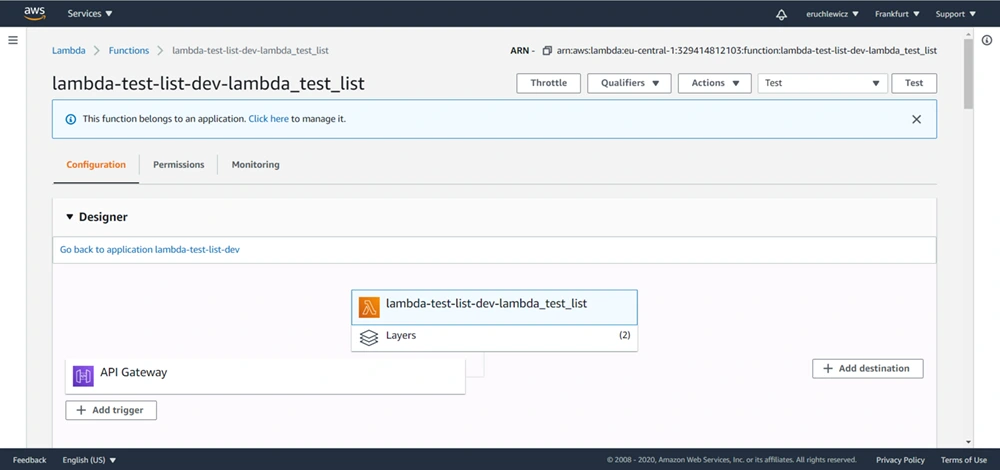
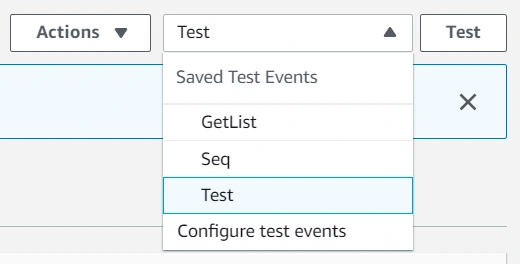
We need to create a new event. I already have three, the Test one is what we’re looking for. Click on the Configure test events option.
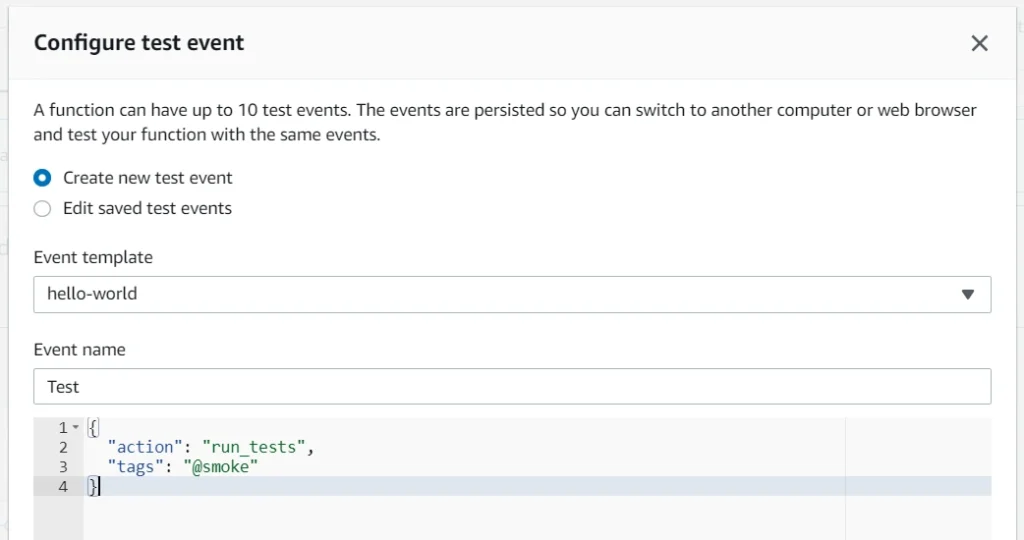
Then select an event template, an event name, and fill JSON. In the future, you can add more tags separated with a single space. Click Create to save that event.
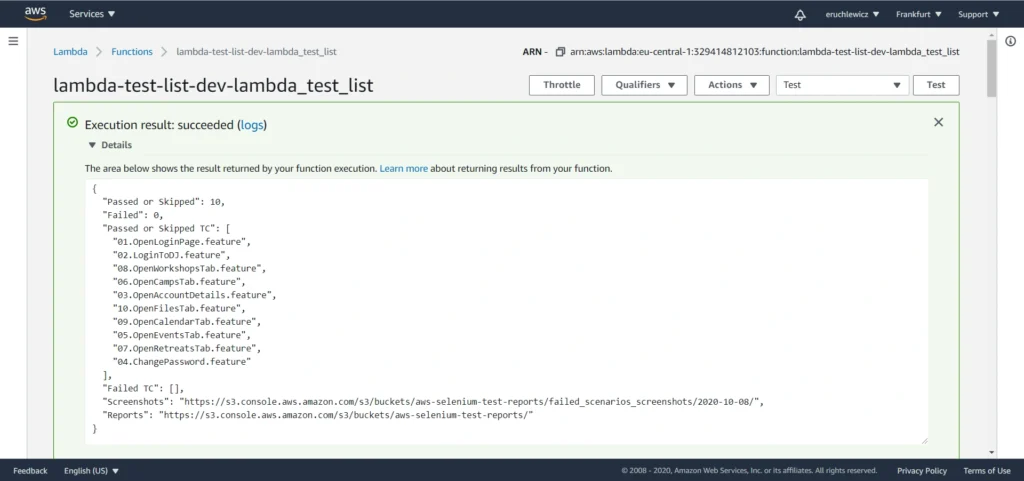
The last step is to click the Test button and wait for the results. In our case, it took almost one minute. The longest part of our solution is generating the Allure report when all tests are finished.
When you navigate to the reports bucket and download the latest one, you need to unpack the .zip file locally and open the index.html file in the browser. Unfortunately, most of the browsers won’t handle it that easily. If you have Allure installed, you can use the allure serve <path> command. It creates a local Jetty server instance, serves the generated report, and opens it in the default browser. But there’s also a workaround - Microsoft Edge. Just right-click on the index.html file and open it with that browser. It works!
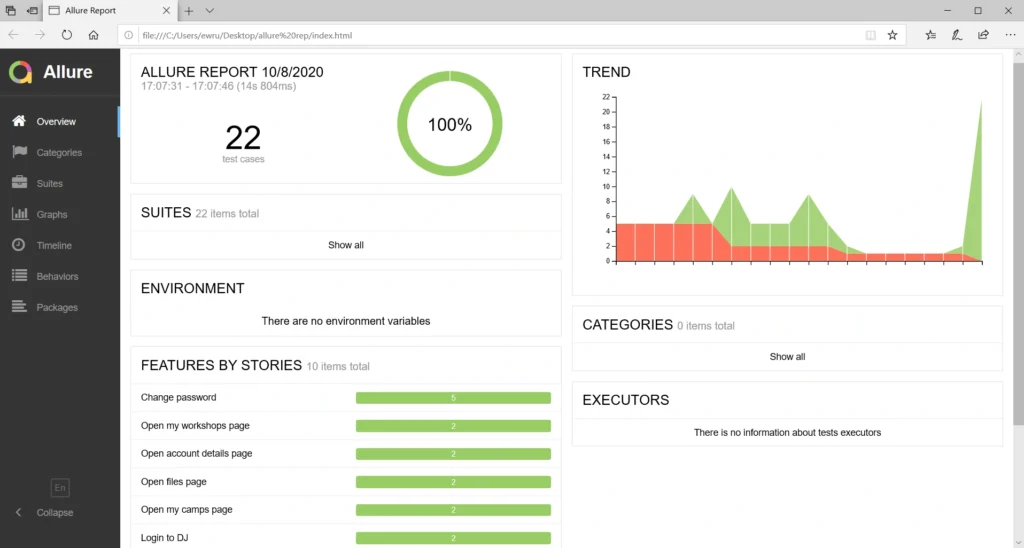
Statistics
Everybody knows that time is money. Let’s check how much we can save. Here we have a division into the duration of the tests themselves and the entire process.
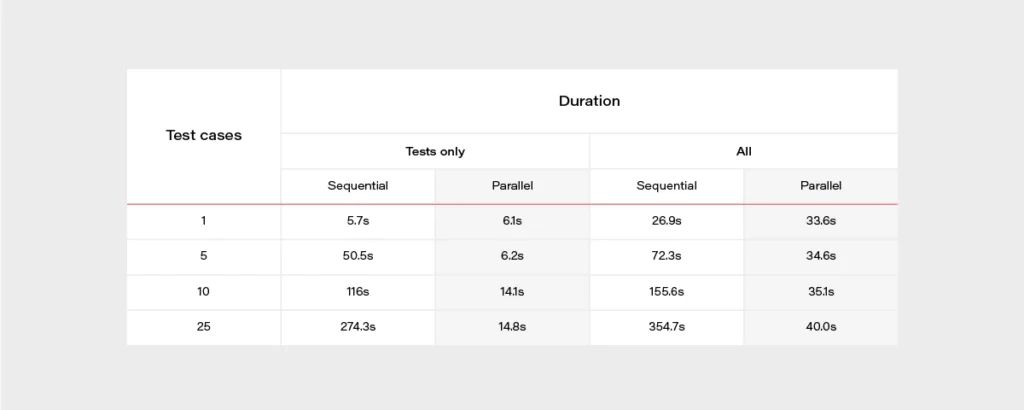
It’s really easy to find out that parallel tests are much faster. When having a set of 500 test cases, the difference is huge. It can take about 2 hours when running in a sequential approach or 2 minutes in parallel. The chart below may give a better overview.
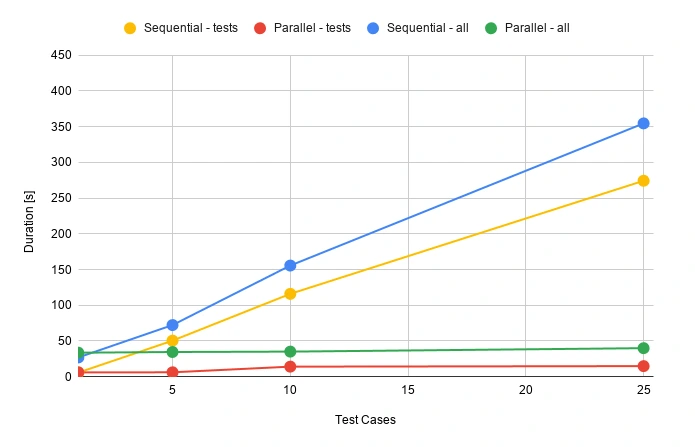
During the release, there’s usually not that much time for doing regression tests. Same with running tests that take several hours to complete. Parallel testing may speed up the whole release process.
Well, but what is the price for that convenience? Actually not that high.

Let’s assume that we have 100 feature files, and it takes 30 seconds for each one to execute. We can set a 512MB memory size for our lambda function. Tests will be executed daily in the development environment and occasionally before releases. We can assume 50 executions of each test monthly.
Total compute (seconds) = 100 * 50 * (30s) = 150,000 seconds
Total compute (GB-s) = 150,000 * 512MB/1024 = 75,000 GB-s
Monthly compute charges = 75,000 * $0.00001667 = $1.25
Monthly request charges = 100 * 50 * $0.2/M = $0.01
Total = $1.26
It looks very promising. If you have more tests or they last longer, you can double this price. It’s still extremely low!
AWS Lambda handlers - summary
We went through quite an extended Selenium test configuration with Behave and Allure and made it work in the parallel process using AWS Lambda to achieve the shortest time waiting for results. Everything is ready to be used with your own app, just add some tests! Of course, there is still room for improvement - reports are now available in the AWS S3 bucket but could be attached to emails or served so that anybody can display them in a browser with a URL. You can also think of CI/CD practices. It's good to have continuous testing in the continuous integration process, e.g., when pushing some new changes to the main or release branch in your GIT repository in order to find all bugs as soon as possible. Hopefully, this article will help you with creating your custom testing process and speed up your work.
Sources
Interested in our services?
Reach out for tailored solutions and expert guidance.