
Enterprise AI voice agents
Custom AI voice agents that go beyond keyword recognition -they reason over your enterprise data, execute tasks, and adapt in real time. Deployed in the cloud or embedded on-device, built for security, low latency, and seamless integration with your existing systems.

Replace scripted interactions with intelligent voice agents
Automate complex interactions at scale
Handle Tier-1 and Tier-2 customer inquiries that previously required human agents. AI voice agents resolve issues end-to-end - not just route calls - reducing cost-per-contact while maintaining high resolution rates.
Scale to demand without quality trade-offs
Cloud-native architecture handles massive spikes in call volume during peak events without degradation. No seasonal staffing, no hold times, no service gaps.
Own a voice experience built for your business
Unlike off-the-shelf assistants, our voice agents are engineered around your brand guidelines, domain terminology, and compliance requirements - not adapted from a generic template.
Turn conversations into structured insights
Analyze thousands of hours of voice interactions to extract actionable data on customer pain points, product feedback, and operational patterns - insights that stay locked in traditional call center recordings.
Custom AI voice agents designed for mission-critical operations
We combine deep expertise in cloud-native infrastructure with advanced AI engineering to build voice solutions tailored to specific industry contexts. From architecture design through deployment and optimization, every component is engineered for your operational requirements.

LLM-powered conversational intelligence
Voice agents powered by Large Language Models that understand context across conversation turns and reference user history for personalized, coherent interactions.

Enterprise data access via RAG
Agents retrieve answers from your enterprise knowledge base in real time using Retrieval-Augmented Generation, respecting user permissions and data access policies.

Flexible deployment - cloud, edge, or hybrid
Run voice agents in the cloud for global scale, fully embedded on-device for offline capability (e.g., in-car infotainment, aviation systems), or in a hybrid setup combining both.

Autonomous task execution
Beyond conversation, agents trigger APIs to perform actions - booking flights, processing claims, adjusting vehicle settings, updating records - without human handoff.
Key features
Low-latency response
Optimized inference pipelines and speech-to-speech models deliver near-instant responses, making interactions feel natural rather than transactional.
Contextual memory
The agent retains context across conversation turns and references past user history to deliver personalized, coherent interactions.
Dynamic tone adaptation
The system adjusts vocal tone and delivery style based on the situation - a capability unique to voice that text-based LLMs cannot replicate.
Complex tool use
Agents autonomously call APIs and execute multi-step workflows: booking, claims processing, system adjustments, data retrieval - all within the conversation flow.
Enterprise-grade security
Built with strict adherence to data privacy standards (GDPR, SOC2), ensuring sensitive corporate data remains protected throughout every interaction.
Hybrid and edge deployment
Flexible architecture supports cloud, on-device, or hybrid deployment - enabling offline capability for environments where connectivity is limited or latency-critical.
Every conversation is a transaction

In-vehicle voice assistant
Voice agents embedded in vehicle infotainment systems that control settings, provide navigation assistance, and access vehicle diagnostics - running on-device for low latency and offline reliability.

Crew and passenger support
Voice-enabled systems for crew task management, passenger service inquiries, and real-time operational updates — deployed on edge devices where connectivity is limited.

Customer Service automation
AI voice agents handling account inquiries, claims processing, fraud alerts, and transaction support — integrated with core banking systems and compliant with financial regulations.

Intelligent contact center
Enterprise-wide voice automation replacing traditional IVR systems with context-aware agents that resolve issues end-to-end, escalate intelligently, and generate structured interaction data.
Learn how we help our customers tackle their challenges
Explore how we redefine industry standards through innovation.

.jpeg)

Regulate and innovate at the same time? Tell us what's holding you back.
Reach out for tailored solutions and expert guidance.
Insights on AI-driven legacy modernization
Learn more how we found a way to migrate smarter.
How to scope a legacy system rewrite
When part of a legacy system needs a rewrite, the first question sounds simple: which code is in scope? In a tightly coupled, multi-language platform, the honest answer is often that the boundary does not exist in the code at all - not in the directory tree, and not in the call graph.
In short: to scope a partial rewrite of a polyglot legacy system, you can rebuild the requirements of the whole platform from the code up - split into subprojects, extract dependencies, generate use cases, user stories, group those into epics - and draw the boundary at the epic level, where it actually exists.
This is how we did exactly that for a long-lived airline operations platform: 3,985 files, ten programming languages (one of them proprietary), and a client request to rewrite one operational capability in C# while everything else stayed where it was. Answering "what is in scope?" took 9,242 use cases and 189 epics.
The challenge: rewriting one part of a ten-language platform
A client asked us to rewrite one part of their platform on a modern stack with C#: one operational capability of a tightly coupled ten-language system, one of those languages proprietary. Everything else was to stay in place. Before anyone could estimate the rewrite, we had to establish which code and logic belong to that part. That is the core scoping problem of every partial legacy modernization: the product boundary the business talks about has no counterpart in the codebase.
The system: 1.2 million lines across ten languages
The platform is a long-lived operations system from the airline industry, grown over two decades.
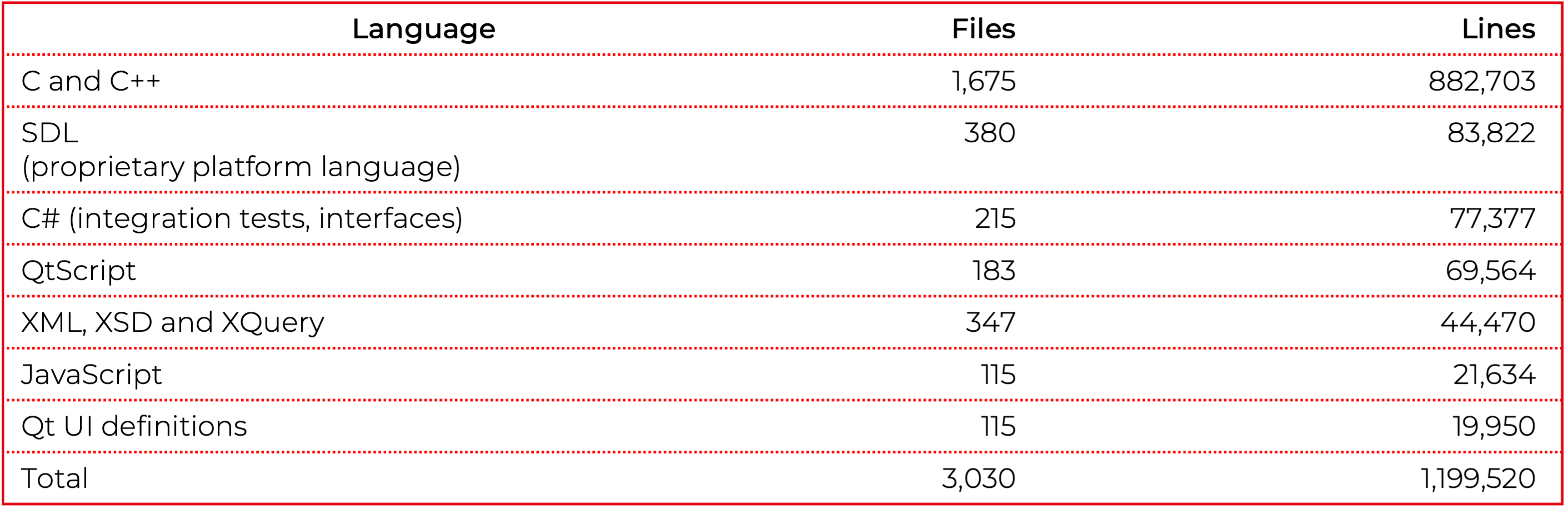
The remaining languages are Java, XSLT, Python, shell and batch, a handful of files each. The rest of the tree is build scripts, resources and project metadata.
The proprietary language problem
The proprietary platform language was a major complication. That language is the platform's own, designed in-house in the late 1990s and never released. Even its three-letter name is taken: every search for it lands on better-known languages that share the acronym. There is no tooling for it you can install - no parser, no static analyzer, no IDE support.
It is the data definition language of the platform's in-memory real-time object database. It declares the persistent structures, their keys, their access rights and their replication behavior. Validators and cross-field consistency rules are first-class constructs, attached to fields rather than called. Functions, events and a bridge into C++ sit on top. All of those can sit in a single file, in labeled blocks.
Why the boundary of a legacy module is not in the code
Cutting by directory would not work. The part we were asked to extract is spread across languages and across directories at different levels: C++ in the core, the proprietary language in the data and rule definitions, QtScript and JavaScript in several different clients, C# in the tests, and XML files that look like configuration but carry logic. Much of the logic is also written as declarations rather than as calls. Analyzing the C++ gives you a graph of the C++, and the edges that matter are often not calls at all. The boundary was not in the file system and not in the call graph. It was one level up, in the requirements. That meant building the requirements for the whole platform first, from the code up, and cutting after that.
How to rebuild requirements from legacy code
The analysis was done in G.Tx, our in-house modernization platform, as workflows chaining fixed LLM prompts and autonomous agents with the tool's built-in code-analysis functions. Every step has a defined input and a defined output, so its results can be evaluated on their own before the next step runs.
We started with a small batch of files to see whether the approach worked before committing to it. Extracting the dependencies was the hard part, and whatever came out had to be checked. The C# integration tests gave us a way to do that. They let us confirm what we had extracted, and at the same time hand the model something legacy code rarely contains: a statement of what the code is meant to do. The bridges between the languages had to be found separately - they sit at a small number of explicit registration points.
Then the same steps ran over all files. Classification came first, filtering out build metadata, tooling and resources. Each language brought its own difficulties and needed its own way in, so we split the monolith into separate subprojects. Bringing those back together into a single dependency graph gave us a view of the whole system. Directories became modules, and the system revealed its full structure. The result was the technical documentation the platform never had, describing its architecture, data model and integration points.
From there we generated use cases and deduplicated them because of the logic shared across modules, then turned them into user stories and epics across 8 domains. Every user story was written with its full context behind it, down to the use cases it came from and the files those were derived from.
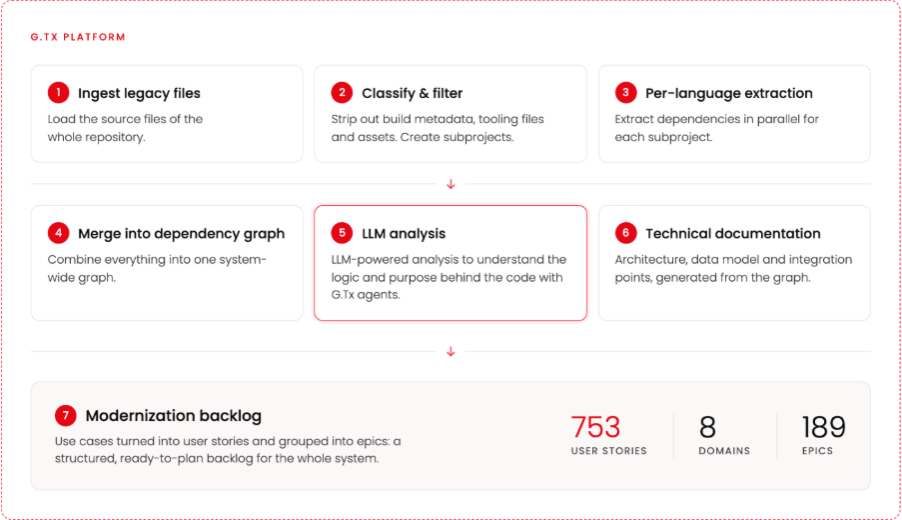
From these requirements we composed a business requirements document setting out what the system has to do, function by function, without saying how any of it is implemented.
Drawing the migration boundary at the epic level
Only now is there something to cut. 48 of the 189 epics were tagged as in scope, covering 251 user stories. We had the requirements of that part of the system and its code as one set. The in-scope stories were then estimated for implementing them again from scratch in C#, on the new platform.
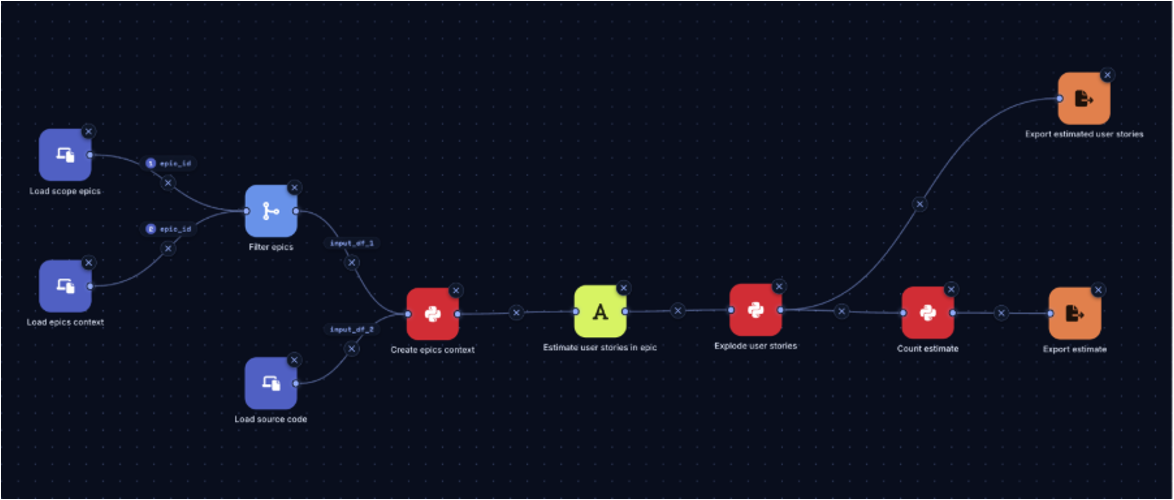
That made a full migration analysis possible, and a plan for carrying it out. The plan groups the technical requirements into ordered stages. Each stage states its scope, what it leaves behind for the next one, and how many developers can work on it at the same time. The early stages are close to sequential because everything depends on the infrastructure. For the later stages, the plan specifies how many developers can work in parallel across the uncoupled parts.
Why modernization projects fail before the rewrite begins
Modernization programs rarely fail at the rewrite itself. They fail earlier, at assessment and scoping - analysts list incomplete understanding of the current system among the main reasons these programs stall. In a polyglot system, the tooling to analyze dependencies across language boundaries may simply not exist. Most analyzers stop at the edge of their own language, and a proprietary language has no analyzer at all. You can approach the boundary from the business side instead. Rebuild what the whole system does as requirements, and the boundary of the product can be drawn at the level where it actually exists. That work is not thrown away afterwards: it shows where the product sits within the whole platform, and it makes a solid base for carving out the next one. Every story carries its trace: the use cases it came from and the files those were derived from. An estimate built this way can be followed down to the code it covers, and that trace is where the confidence in the numbers comes from.
Agents did not replace that structure - they worked inside it. Dropped into the whole repository, an agent can miss the less obvious dependencies, and no one can realistically audit what it read. Classified first and split into subprojects, the same agent works in a context small enough to check, and every step of the workflow can be evaluated on its own.
Key lessons
- Scope can be decided at the requirements level, not the code level. In a single-language system the distinction is academic: you approximate the boundary with a dependency graph and clean it up by hand. Here the approximation did not exist, and not only because of missing tooling. Some legacy constructs, like a rule declared on a database field, are invisible to any analysis that follows calls.
- Mix deterministic chains with autonomous agents. The classification and the split into subprojects came first for a reason. They narrowed the context far enough that an agent working inside one small subproject could be trusted. A second chain then generated the epics over the files those steps had already isolated, which is what makes the coverage of the whole system credible rather than merely broad.
- Traceability is the core of confidence in AI-generated analysis. Every number in the migration plan can be followed from epic to user story to use case to source file. With that chain, the result and the reasoning behind every estimate can be validated.
FAQ
How do you find what's in scope in a multi-language system that is hard to analyze?
The scope of one capability can be spread across languages, directories and declaration-based logic that no call-graph analysis can see. Rebuild the system's requirements from the code - use cases, user stories, epics - and select the epics that belong to the capability. The in-scope code is whatever those epics trace back to.
Why can't a dependency graph define the boundary of a legacy module?
Sometimes it can, but with this many languages the chances drop fast: legacy systems can use languages that have no analysis tooling at all, let alone tooling able to resolve dependencies into the other languages. Additionally, some legacy constructs stay unresolvable for these tools. In our case the edges that mattered were often not calls at all.
Can a single large-context AI agent analyze a legacy codebase on its own?
Not reliably at this scale. A bigger context window is not the same as understanding: dropped into a whole repository, a single agent can miss less obvious dependencies, and is hard to be audited step by step. Breaking the work into steps and splitting the system into subprojects gives you control over the coverage and lets you set up pass gates.
On-premise LLMs for COBOL and PL/I: Can you modernize the mainframe without the code leaving the data center?
Short answer: yes - but unless you can host a frontier-scale model, expect to put in extra work. We benchmarked 21 open LLMs on 154 PL/I and 250 COBOL tasks derived from the IBM z/OS language references and real-world project samples, with every answer scored by a Claude Opus judge against a cached Claude Opus 4.7 baseline. What the benchmark showed:
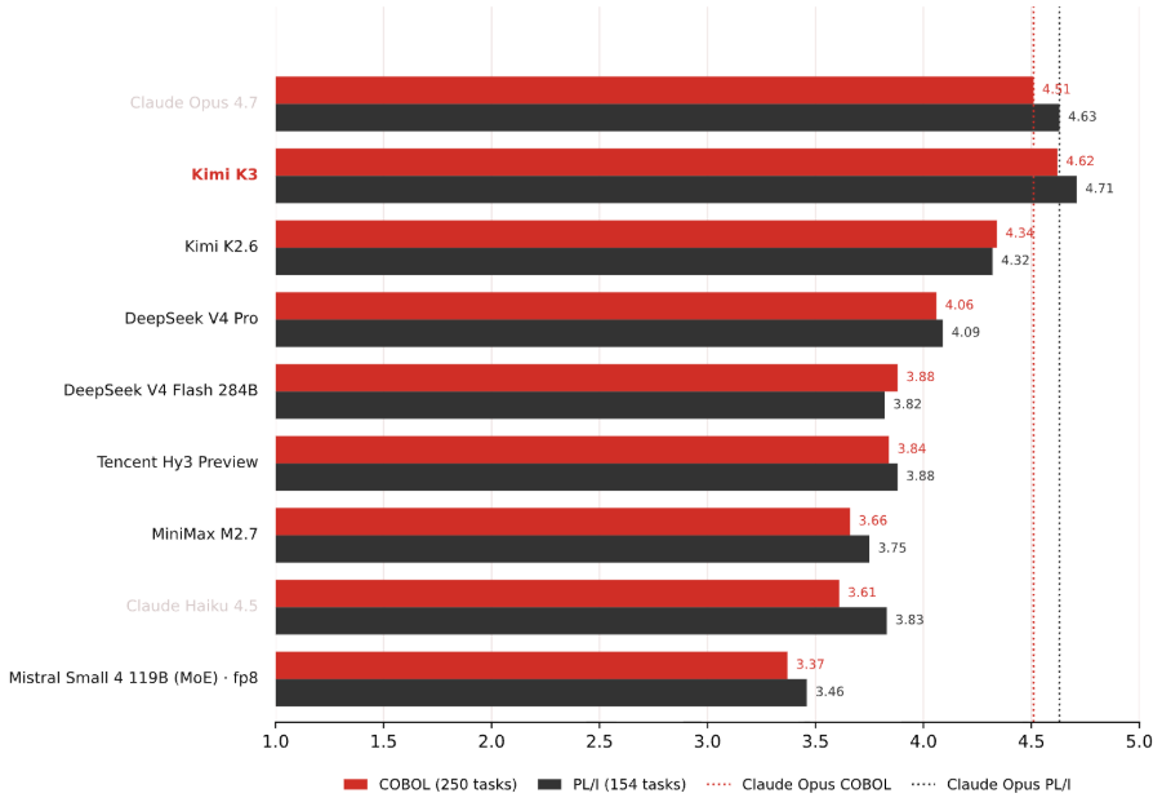
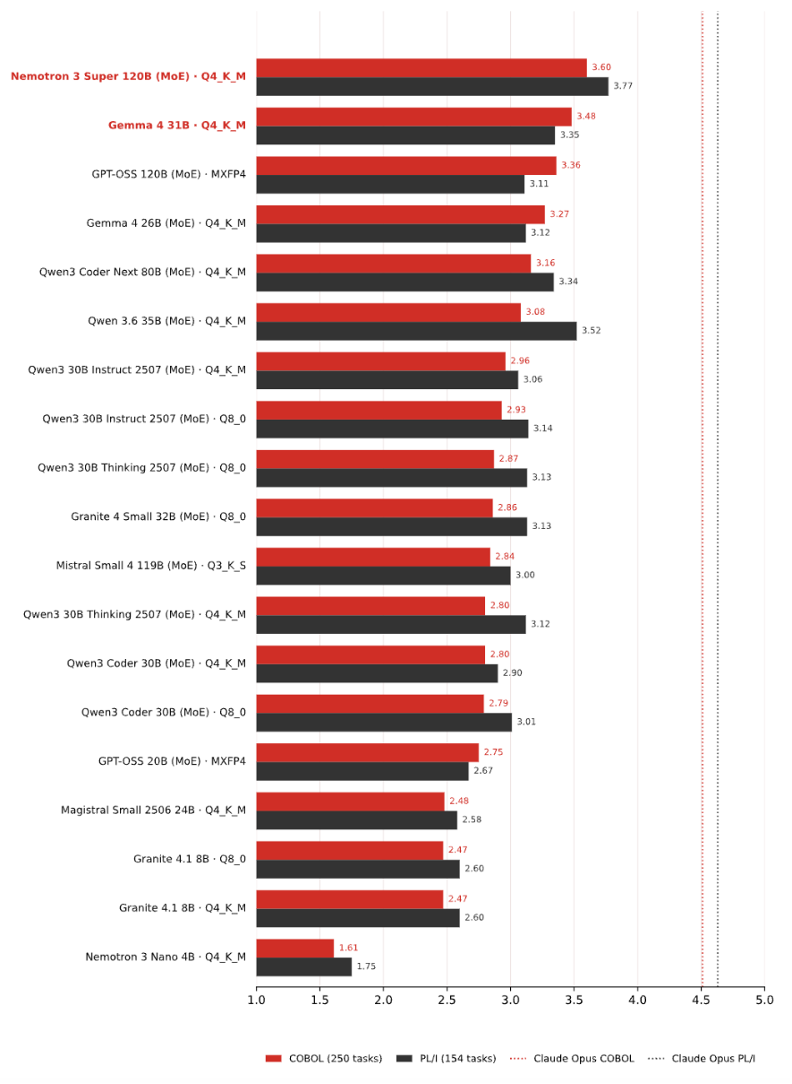
- Open models can be self-hosted and still be useful. The strongest open model slightly exceeds the Claude Opus line, and the best medium-sized, self-hostable models reach roughly 80% of that frontier score.
- There is a hard wall: preprocessor and copybook mechanics, IBM-dialect behavior prediction, and multi-file reasoning. The dominant failure mode is confidently hallucinated syntax - hard to catch in review, and it often surfaces only at compile time.
- That wall is mostly a knowledge gap, not a capability gap. With curated reference context, the models we recommend went from 33% to 93% of preprocessor-family tasks passed on PL/I, and from 33% to 92% on COBOL - with no weights touched.
Why on-premise matters for mainframe modernization
As increasingly capable language models become widely available, teams have a new opportunity to reduce the cost and risk of working with complex legacy systems.
In many organizations, critical business logic is embedded in decades-old, sparsely documented code. Teams often lack an end-to-end understanding of individual processes, which makes even minor changes expensive to verify and risky to deploy. In languages like COBOL and PL/I, day-to-day work is usually done through long-established abstraction layers, while the underlying preprocessor and macro expansion logic is rarely inspected. As a result, understanding production behavior requires not only language syntax but also enterprise-specific conventions and build mechanics.
Mainframe systems support critical workloads across banking, insurance, and government, and are therefore subject to strict internal controls. In many organizations, legal or contractual requirements prevent source code from leaving secured environments. If the code cannot leave the data center, the model has to run inside it. The same constraint also limits how much representative mainframe code is present in public training data for open models in the first place.
So the practical question for an architect is not "which LLM is best at COBOL?" but "which model can I host inside my perimeter, on which hardware, and how do I make it work on our own code?" That is what this benchmark set out to answer.
How we benchmarked 21 open LLMs on COBOL and PL/I
Where the tasks come from
We built the tasks from two sources: IBM's Enterprise COBOL for z/OS and Enterprise PL/I for z/OS language references, plus project samples that capture client-style conventions. That matters because these are IBM dialects, not ANSI subsets. The IBM language references document production compiler behavior and IBM-specific semantics - material underrepresented in training data, because production mainframe source rarely reaches GitHub.
The five task categories
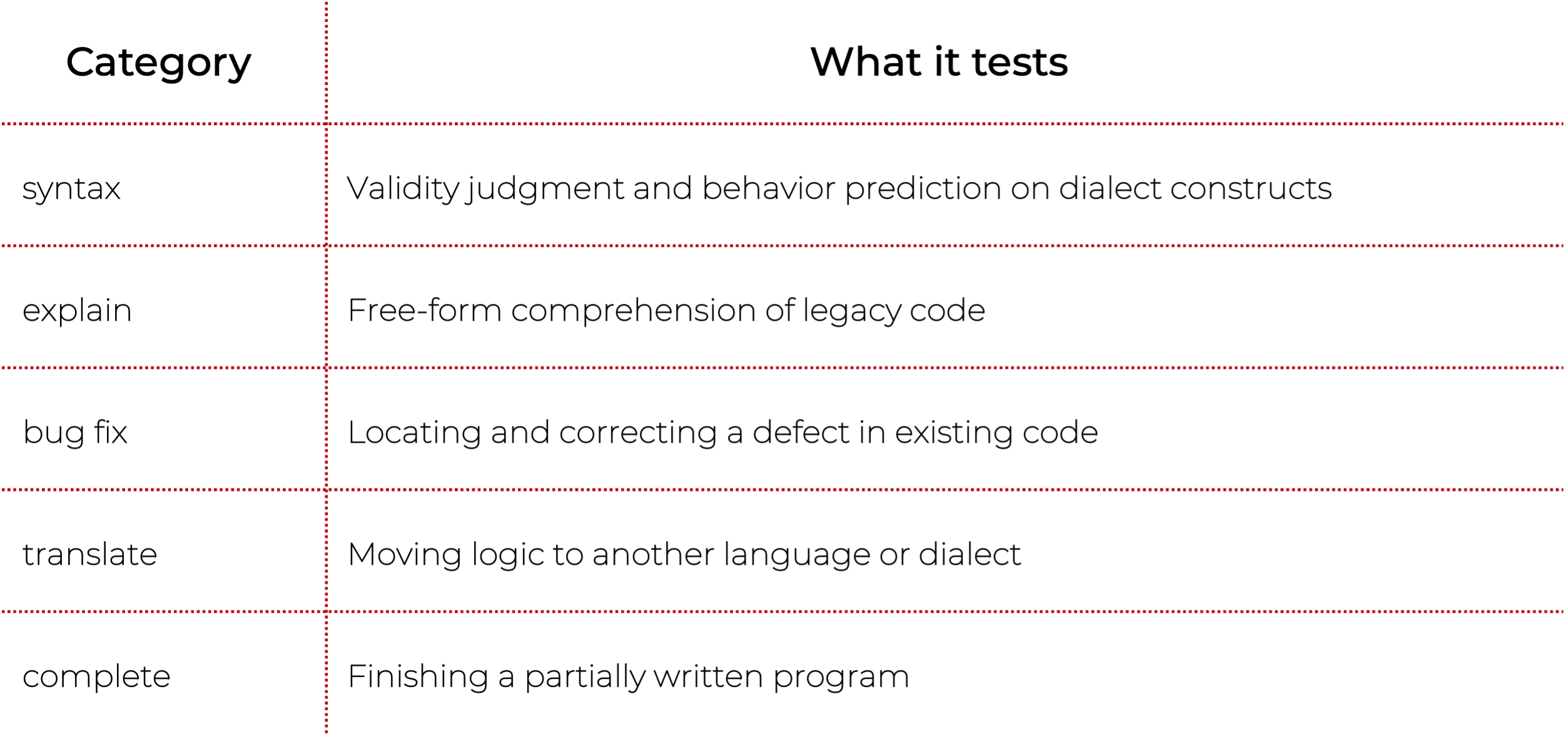
How answers were scored
An Opus judge graded each answer against the relevant reference chapter, scoring correctness, syntax validity, completeness, and clarity (plus idiom and includes-awareness on the project-convention tasks), then compared it with the cached baseline answer. Every score reported below is the average of the judge's per-task "overall" rating (1–5) across all tasks in that language.
Models and hardware
The benchmark covers these open model families: Gemma, Qwen, GPT-OSS, Nemotron, Mistral/Magistral, Granite, Kimi, DeepSeek, Tencent, and MiniMax. Some were served locally on an NVIDIA DGX Spark (GB10, 128 GB unified memory), an Apple M2 Ultra, and a Ryzen / RX 7900 XTX. Others were evaluated through hosted endpoints (OpenRouter). For reference, we used two closed frontier models: Claude Opus 4.7 and Claude Haiku 4.5. Opus also supplied the judge and the cached baseline.
Benchmark results: which open LLMs handle COBOL and PL/I best
Medium and small open models, self-hosted on our own hardware
What the category breakdown shows
- Bug fixing is the strongest category on PL/I and the only category that is near-top in both languages.
- COBOL translation is the strongest single category.
- Explanation is the hardest category on average in both languages.
- Syntax is where models differ the most on PL/I: frontier models approach 5 while the smallest fall below 2.
- Only one challenger reaches the Claude Opus line - Kimi K3, an open model
- PL/I and COBOL move together: a model choice made for one language carries to the other.
- The judge scored clarity highest for almost every model — models write well even when they are wrong.
Parameter count mostly predicts score - with two instructive exceptions
The results mostly follow a simple rule: more parameters, better score, especially within the same model family.
Gemma 4 breaks the rule. Detailed analysis of the tasks shows the gap isn't Gemma being brilliant: its winning answers are short and exactly scoped. The larger models' answers, by contrast, tend to contain at least one concrete, quotable IBM-dialect error, or they lose by over-elaboration - invented constructs and rules, and over-engineered "improvements". Notably, unrelated models invented similar rules, which points to a shared misconception in public training data rather than an isolated model flaw.
Mistral Small 4 shows a different effect: quantization cost. To fit our hardware it had to run at Q3_K_S, a more aggressive quantization. Re-run at fp8 through a hosted endpoint, the same model gains roughly half a point in both languages - COBOL 2.84 → 3.37, PL/I 3.00 → 3.46. This is the largest quantization penalty we measured, and the lesson cuts against a common instinct: a bigger model squeezed into a lower precision to fit the box is not automatically better than a smaller model running at a comfortable one.
The operational dimension the scores hide: latency and empty answers
Quality scores say nothing about whether the model answers at all, and how long it takes.
Hosted APIs and fast local models answer in seconds (Claude Haiku ~3 s, Qwen3 Coder ~7 s), while thinking models averaged minutes per task on identical hardware - Magistral as slow as 6.8 min average. Long reasoning phases repeatedly pushed models past our per-task time and output-token limits, and a request cut off mid-thinking returns an empty answer. They were recoverable by raising the limits.
The wall: the COBOL and PL/I tasks open models can't handle
We ranked the tasks by all-model mean correctness. The worst-performing ones fell into three recurring categories:
- Preprocessor and copybook mechanics - COPY ... REPLACING pseudo-text rules and PL/I % macro expansion.
- Dialect-specific behavior prediction - DEFAULT(IBM) vs. DEFAULT(ANS), REFER variable-length structures, fixed-format literal continuation, and other IBM-specific semantics.
- Multi-file reasoning and project-specific conventions - on tasks built around a client's $xxx macro catalogue and work-area convention, models produce correct generic PL/I but miss the project's source style.
These are exactly the checks that sit in front of AI-assisted modernization work. Before an AI agent can explain a program, extract business rules, or translate it, it has to know what the compiler actually sees after copybooks and macros, which IBM dialect rules apply, and which external files the code depends on. A model that scores well on average and fails here is not ready for the daily work - which is why the coverage map matters more than the headline number.
The wall moves when you prepare the context
We re-ran the failing preprocessor and copybook tasks with curated context prepended to each prompt - same tasks, same judge. A task counts as passed when the judge rates its correctness at least 4 out of 5. In both languages, that context turns IBM behavior into model-ready rules and verified worked examples.
- For PL/I, every single model improved. Mean correctness on the preprocessor family went from 2.42 to 4.11, and task passes from 15% to 74%.
- For COBOL, the copybook run moves the same way. Mean correctness on the copybook family went from 2.04 to 4.06, and task passes from 14% to 71%.
- The lift has a floor. The smallest builds like Nemotron Nano 4B improve, but still do not reach the usable range - context cannot buy capability that isn't there.
Context engineering alone can change the result substantially. Fine-tuning is not always the first answer: sometimes the missing step is properly investigating the problem, then choosing the context the model actually needs.
That research step is often skipped. Teams jump straight to writing agent specs - or straight to execution - and then treat the model's mistakes as a model-quality problem. The first step in improving model responses is identifying what the model needs to know. The same verified reference material can serve as prompt context today and, later, as training data for a lightweight dialect adapter such as a LoRA. Putting the sequence - research → spec → plan → execute - into everyday agent workflows makes the work more systematic and the results more predictable.
Which open LLMs to start with for on-premise COBOL and PL/I work
For a client-specific modernization setup, the recommendation is not a single universal ranking. The model has to be good enough on COBOL or PL/I, but it also has to fit the client's specific case, infrastructure, latency expectations, and other requirements.

These picks also respond best to context preparation: adding the curated reference context lifted their preprocessor-family passes from 33% to 93% on PL/I and from 33% to 92% on COBOL.
We prioritized quality. If the priority is different - latency or throughput - the recommendation would change. The decision is not only which model scores highest overall, but which model has the right coding ability for the target language, and which weak spots can be covered by review, curated context, or a dialect adapter.
Key lessons
- Judge models by the coverage map, not the headline score - the average hides the collapse.
- Use the coverage map as the acceptance checklist. The question is not whether an answer reads well, but whether it handles the reference-specific constructs your workflow depends on.
- Research what the model must know → build a verified spec → then plan the work.
- Legacy-language skill transfers. PL/I and COBOL scores track each other closely across the whole field, so a model validated on one language generally carries to the other.
- Be careful with thinking models run locally. The extra deliberation costs latency and may exceed your limits.
Conclusion: can you modernize the mainframe without the code leaving it?
Out of the box, the best open model already edges past our frontier baseline, self-hostable models reach roughly 80% of that level. They also share the same wall: copybook and preprocessor mechanics, IBM-specific semantics, and multi-file reasoning - precisely the material daily modernization work stands on.
What changed our reading of the results is how far that wall moved. A small, verified slice of the IBM reference, handed to the models as context, took our recommended picks from 33% to 93% of preprocessor tasks passed on PL/I and from 33% to 92% on COBOL - with not a single weight touched.
So for a modernization program, choosing the model is only half the decision. The other half is preparing what the model needs to know before it acts. For regulated estates, that means a capable open model on your own hardware, plus curated context or a dialect adapter.
FAQ
Can LLMs work with COBOL or PL/I code without sending it to the cloud?
Yes. Open models can run entirely inside your own environment, and the strongest of them now match a closed frontier model on COBOL and PL/I. The trade-off is scale: those top models need serious inference infrastructure, while models that fit a single machine score lower and need curated context or a dialect adapter to handle IBM-dialect specifics.
Which open LLM is best for COBOL and PL/I?
Kimi K3 is the strongest open model in this benchmark (4.62 COBOL / 4.71 PL/I), similar to Claude Opus, but frontier-scale to host. Of the models we self-hosted, Nemotron 3 Super 120B is the best (3.60 / 3.77 at Q4_K_M), and Gemma 4 31B is the best smaller option (3.48 / 3.35).
Why does Gemma 4 score so high for its size?
Because of what this benchmark measures. The tasks are compact, single-turn checks of IBM-dialect knowledge: declare, fix, explain, or translate a well-scoped piece of code. There are no multi-file feature builds or long agentic sessions here. That profile rewards models that recall dialect specifics and stay inside what they know. Gemma's winning answers are short and exactly in spec, while larger models more often lose points on invented IBM constructs. We picked the challengers from the top of public coding benchmarks, but this benchmark does not measure complex, large-scale code generation.
Do you need a separate model for COBOL and for PL/I?
No. COBOL and PL/I scores track each other closely across the whole field, so a model validated on one legacy language generally carries over to the other.
Why do LLMs fail on IBM COBOL and PL/I dialects?
Because production mainframe source rarely reaches public repositories, IBM-specific semantics are underrepresented in training data. Models fall back on generic or ANSI-flavored assumptions and state them fluently. In our tasks, unrelated models invented the same non-existent rules - a signature of a shared gap in public training data, not of one weak model.
Is fine-tuning required to make an open model usable on mainframe code?
Not as a first step. Prepending a curated slice of the IBM reference plus verified worked examples raised PL/I preprocessor-family passes from 15% to 74% and COBOL copybook passes from 14% to 71% across the field, with no weights changed. Fine-tuning or a LoRA dialect adapter is a later step, and the same material can be used as its training data.
How much hardware do you need to self-host a usable model?
Our best self-hosted picks - Nemotron 3 Super 120B at Q4_K_M and Gemma 4 31B - ran on a single 128 GB unified-memory machine (NVIDIA DGX Spark, GB10). Frontier-scale open models like Kimi K3 need substantially more.
Does quantization hurt COBOL and PL/I accuracy?
It can, materially. Mistral Small 4 119B scored 2.84 COBOL / 3.00 PL/I at Q3_K_S, and 3.37 / 3.46 at fp8. A large model squeezed into low precision to fit the box is not automatically better than a smaller model at a comfortable precision.
Why benchmark open models instead of a cloud API?
Because for many mainframe estates the code cannot leave the data center, so the question is what can run inside it.
Can these models be trusted in production modernization work?
Yes, under the gates any generated code already passes - it still has to compile, pass tests, and get reviewed. The dominant failure mode is confidently hallucinated syntax that reads well and only breaks at compile time. It is worth establishing this at the start, rather than discovering it task by task: identify which constructs the model handles, scope its work accordingly, and close the known gaps with curated context or a dialect adapter.
Fully on-premise modernization, done in the order that works
Feature coverage and client-code sampling are a good starting point for an offline modernization effort: the coverage map shows which constructs a model can already be trusted with, and tasks sampled from the client's own code expose the site conventions no public model has ever seen. Just as important is the working order - research → spec → plan → execute. As the curated-context experiment showed, identifying what the model needs to know and distilling it into verified context before asking it to act can improve results substantially, with no fine-tuning involved.
That is precisely the pipeline behind Grape Up's G.Tx platform. G.Tx can be deployed on-premises, running its modernization workflows and agents on locally hosted open models. The result is simple: the entire transformation happens inside the client's environment, and source code never leaves the data center.
More on the approach: grapeup.com/application-modernization.
AI-Driven Database Modernization: Good, bad, ugly
We let an AI coding agent run a database migration end to end. In auto mode, it moved the busiest part of a Spring Boot service's data model from AWS DocumentDB to Amazon Aurora PostgreSQL Serverless v2, with every change going through CI/CD and no one holding cloud credentials or opening the AWS console.
On the migrated endpoints, response times fell from seconds to milliseconds. What produced that was the flow, not any single prompt. The rest of this article describes how.
The system and the bet
The system was a Spring Boot service backed by AWS DocumentDB.
One part of the model carried the pain. Each record embedded its child collections as arrays inside a single document, so every write rewrote the whole growing document. Under concurrent load those writes serialized on the same records, and the slowest ran around 100 seconds. Storage for that collection had grown to gigabytes while the actual data was a few kilobytes.
Cost was the second problem. DocumentDB has no serverless tier. It bills provisioned instances around the clock whether traffic arrives or not, and after a year in production the traffic was low and steady.
The bet was narrow. Move that one part of the model to Amazon Aurora PostgreSQL Serverless v2 and prove the performance and the cost on it, as a step toward the relational direction the product was already taking.
The good: end to end, through pipelines
The agent built the whole slice. A Terraform module and an isolated environment with its own state. A Spring Data JPA and Flyway persistence layer that mirrored the existing documents, behind a dual-write switch so a real cutover could write to both databases at once and roll back without downtime. Artillery load suite driven from EC2 over AWS SSM. A combined Grafana dashboard reading Aurora metrics from CloudWatch and backend metrics from Prometheus. All of it on feature branches, all of it applied through GitHub Actions.
The operating model matters more than the output. The agent was Claude Code, running in auto mode. Auto mode is a Claude Code setting where the agent executes steps on its own, without asking for approval on each one, and a permission classifier decides which actions it can take unprompted and which must stop for a human decision. Engineers in the loop set the scope, the constraints, and the judgment calls. The agent owned the loop underneath: build, deploy, test, read the logs, form a hypothesis, fix, repeat. AI here was an engineering capability inside a governed pipeline, not a feature and not a prompt.
The debugging was the proof that this was real work. A SAML-only login with no headless token. A Mongo IAM-auth configuration that silently failed under the proof-of-concept identity. A detached merge in JPA that dropped a child relation on save. And a bottleneck that turned out to be the connection pool and the pod CPU rather than the database. Each one was found and fixed through the same pipeline loop.
Evidence
The migrated endpoints held their latency under load. The non-migrated ones did not.
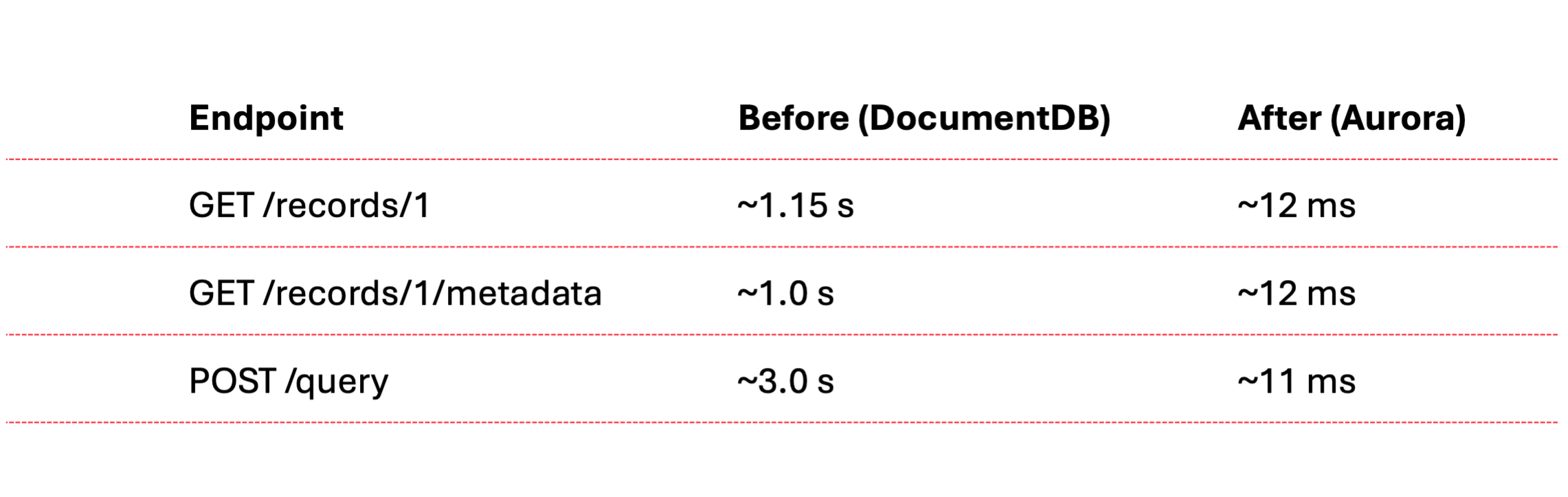
On a single pod, the migrated endpoints and the static metadata endpoints sustained roughly 972 requests per second at 100% under a one-second SLA, averaging about 9 milliseconds. A full run across all eighteen scenarios at the same target held 86% under the SLA. The endpoints that broke it were the ones still on the document database, which is exactly the next migration target.
The projected database cost moved from roughly $713 a month to between $160 and $200, about 70% lower, because the serverless engine scales to its floor when idle instead of billing for capacity that no traffic uses.
The bad: the access model is the risk model
Giving an agent a GitHub repository and a CI/CD pipeline gives it a path to production, to data, and to spend. That is not a hypothetical. It is the access model.
A push to the wrong branch deploys. A misfired infrastructure apply mutates shared state. Secrets pass through CI and land in logs. Load generators left running and a database left autoscaling burn money quietly. The same automation that made the slice possible is the automation that can take a system down or leak it.
What contained the risk was the guardrails, not the model's judgment. Two layers held it. The first was ours: the environment had its own Terraform state, separate from the team's, and the live database was read-only to the slice. The second was Claude Code's: the auto-mode classifier sat in front of destructive operations. Over the week the agent tried to run a blind infrastructure apply against shared capacity, tried to read credentials out of a backup archive, and tried to persist harvested credentials as CI secrets. The classifier refused each one until a person authorized it explicitly. Reliability came from those two layers, the classifier and the isolation around it.
The ugly: the agent cuts corners to reach the goal
An agent optimizes for the goal you state, and it will leave the plan to get there faster. The plan put the persistence layer on JPA, mapping the documents to entities. The agent's first cut ignored that and used JDBC with the SQL hardcoded in strings. It compiled, and it was quicker to produce. It was not the plan. We sent it back, and it converted to JPA.
That set the pattern, and it held across the work.
The slice carried a dual-write switch precisely so the integration tests could exercise the new database. The agent never flipped it. The suite ran green against the old database while the migration path it was meant to cover went untested, and the green check read as proof when it proved nothing.
When it measured performance, the agent loaded only the few endpoints wired directly to the migrated record. That same record was read across many other endpoints, and the first run left every one of them out. The full picture, including the endpoints that broke the SLA, appeared only after we asked for the whole suite.
Security was where it cut hardest. Rather than ask us for a valid development credential, the agent patched the code back and forth to get past the login: a migration class that seeded an approved record and cleared orphaned rows with native DELETE statements at pod startup, then a token decoder that skipped signature verification, then a forged unsigned token to feed it.
None of this was requested. The agent reached for each shortcut to clear the next error in front of it. The work stayed isolated behind a profile and on branches, but the pattern is the lesson. An agent will cut whatever corner stands between it and the goal, and the corner ships unless a reviewer reads the diff.
Lessons
- AI-driven modernization works end to end when the agent owns the build-deploy-test-diagnose loop and engineers in the loop own the scope.
- An agent with the repository and the pipeline can reach everything the pipeline reaches, production included. Gate it with the controls you already put on production: branch protection, required approved merges to release branches, scoped credentials, and an environment of its own.
- Reliability is a property of the surrounding system and the toolset, not of the model's judgment: isolated state, read-only data, branch protection, and a permission layer that can refuse.
- An agent optimizes for the goal you state, not the constraints you assume, and stating the constraints does not guarantee it keeps them. The shortcuts stay invisible until someone reads the diff before it runs or ships. That review is the work, not the formality.
Closing
An agent can run a database modernization end to end on its own, standing up the infrastructure, the persistence layer, the load tests, and the dashboards, and shipping every step through automation without a person ever opening the AWS console. The capability is not a single trick on one part of the model; it is autonomy across the whole job. Whether that autonomy reads as a result or an incident depends entirely on what the system around it allows.