
Whose cluster is it anyway?

While researching how enterprises adopt Kubernetes, we can outline a common scenario; implementing a Kubernetes cluster in a company often starts as a proof of concept. Either developers decide they want to try something new, or the CTO does his research and decides to give it a try as it sounds promising. Typically, there is no roadmap, no real plan for the future steps, no decision to go for production.
First steps with a Kubernetes cluster in an enterprise
And then it is a huge success - a Kubernetes cluster makes managing deployments easier, it’s simple to use for developers, cheaper than the previously used platform and it just works for everyone. The security team creates the firewall rules, approves the configuration of the network overlay and load balancers. Operators create their CI/CD pipelines for the cluster deployments, backups and daily tasks. Developers rewrite configuration parsing and communication to fully utilize the ConfigMaps, Secrets and cluster internal routing and DNS. In no time you are one click from scrapping the existing infrastructure and moving everything to the Kubernetes.
This might be the point when you start thinking about providing support for your cluster and the applications in it. It may be an internal development team using your Kubernetes cluster, or PaaS for external teams. In all cases, you need a way to triage all support cases and decide which team or a person is responsible for which part of the cluster management . Let’s first split this into two scenarios.
A Kubernetes Cluster per team
If the decision is to give a full cluster or clusters for a team, there is no resource sharing, so there is less to worry about. Still, someone has to draw the line and say where a cluster operators’ responsibility ends, and the developers have to take it.
The easiest way would be to give the full admin access to the cluster, some volumes for persistent data and a set of LBs (or even one LB for ingress), and delegate the management to the development team. Such a solution would not be possible in most cases, as it requires a lot of experience from the development team to properly manage the cluster and make sure it is stable. Also, this is not always optimal from the resources perspective to create a cluster for even a small team.
The other problem is that when a team has to manage the whole cluster, the actual way it works can greatly diverge. Some teams decide to use nginx ingress and some traefik. End of the day, it is much easier to monitor and manage the uniform clusters.
Shared cluster
The alternative is to utilize the same cluster for multiple teams. There is quite a lot of configuration required to make sure the team doesn't interfere and can’t affect other teams operations, but adds a lot of flexibility when it comes to resource management and limits greatly the number of clusters which have to be managed, for example in terms of backing them up. It might be also useful if teams work on the same project or the set of projects which use the same resources or closely communicate - at the current point it is possible to communicate between the cluster using service mesh or just load balancers, but it may be the most performant solution.
Responsibility levels
If the dev team does not possess the skills required to manage a Kubernetes cluster, then the responsibility has to split between them and operators. Let’s create four examples of this kind of distribution:
Not a developer responsibility
This is probably the hardest version for the operators’ team, where the development team is only responsible for building the docker image and pushing to the correct container registry. Kubernetes on it’s own helps a lot with making sure that new version rollout does not result in a broken application via deployment strategy and health checks. If something silently breaks, it may be hard to figure out if it is a cluster failure or a result of the application update , or even database model change.
Developer can manage deployments, pods, and configuration resources
This is a better scenario. When developers are responsible for the whole application deployment by creating manifests, all configuration resources, and doing rollouts, they can and should do a smoke test afterwards to make sure everything remains operational. Additionally, they can check the logs to see what went wrong and debug in the cluster.
This is also the point where the security or operations team need to start to think about securing a cluster. There are settings on the pod level which can elevate the workload privileges, change the group it runs as or mount the system directories. This can be done for example via Open Policy Agent. Obviously, there should be no access to the other namespaces, especially the kube-system, but this can be easily done with just built-in RBAC.
Developers can manage all namespace level resources
If the previous version worked maybe we can give developers more power? We can, especially when we create quotas on everything we can. Let’s first go through additional resources that are now available and see if something seems risky (we have stripped the uncommon ones for clarity). Below you can see them gathered in two groups:
Safe ones:
- Job
- PersistentVolumeClaim
- Ingress
- PodDisruptionBudget
- DaemonSet
- HorizontalPodAutoscaler
- CronJob
- ServiceAccount
The ones we recommend to block:
- NetworkPolicy
- ResourceQuota
- LimitRange
- RoleBinding
- Role
This is not really a definitive guide, just a hint. NetworkPolicy depends really on the network overlay configuration and security rules we want to enforce. ServiceAccount is also arguable depending on the use case. Other ones are commonly used to manage the resources in the shared cluster and the access to it, so should be available mainly for the cluster administrators.
DevOps multifunctional teams
Last, but not least, the famous and probably the hardest to come by approach: multifunctional teams and a DevOps role. Let’s start with the first one - moving part of the operators to work in the same team, same room, with the developers solves a lot of problems. There is no going back and forth and trying to keep in sync backlogs, sprints, and tasks for multiple teams - the work is prioritized for the team and treated as a team effort. No more waiting 3 weeks for a small change, because the whole ops team is busy with the mission-critical project . No more fighting for the change that is top-priority for the project, but gets pushed down in the queue.
Unfortunately, this means each team needs its own operators, which may be expensive and rarely possible. As a solution for that problem comes the mythical DevOps position: developer with operator skills who can part-time create and manage the cluster resources, deployments and CI/CD pipelines, and part-time work on the code. The required skill set is very broad, so it is not easy to find someone for that position, but it gets popular and may revolutionize the way teams work. Sad to say, this position is often described as an alias of the SRE position, which is not really the same thing.
Triage, delegate, and fix
The responsibility split is done, so now we should only decide on the incident response scenarios, how do we triage issues, and figure out which team is responsible for fixing it (for example by monitoring cluster health and associating it with the failure), alerting and, of course, on-call schedules. There are a lot of tools available just for that.
Eventually, there is always a question “whose cluster is it?” and if everyone knows which field or part of the cluster they manage, then there are no misunderstandings and no blaming each other for the failure. And it’s getting resolved much faster.

Transform how you build, own, and scale data infrastructure
Your data foundation determines everything that follows
Check related articles
Read our blog and stay informed about the industry's latest trends and solutions.
Kubernetes cluster management: Size and resources
While managing Kubernetes clusters, we can face some demanding challenges. This article helps you manage your cluster resources properly, especially in an autoscaling environment.
If you try to run a resource-hungry application, especially on a cluster which has autoscaling enabled, at some point this happens:
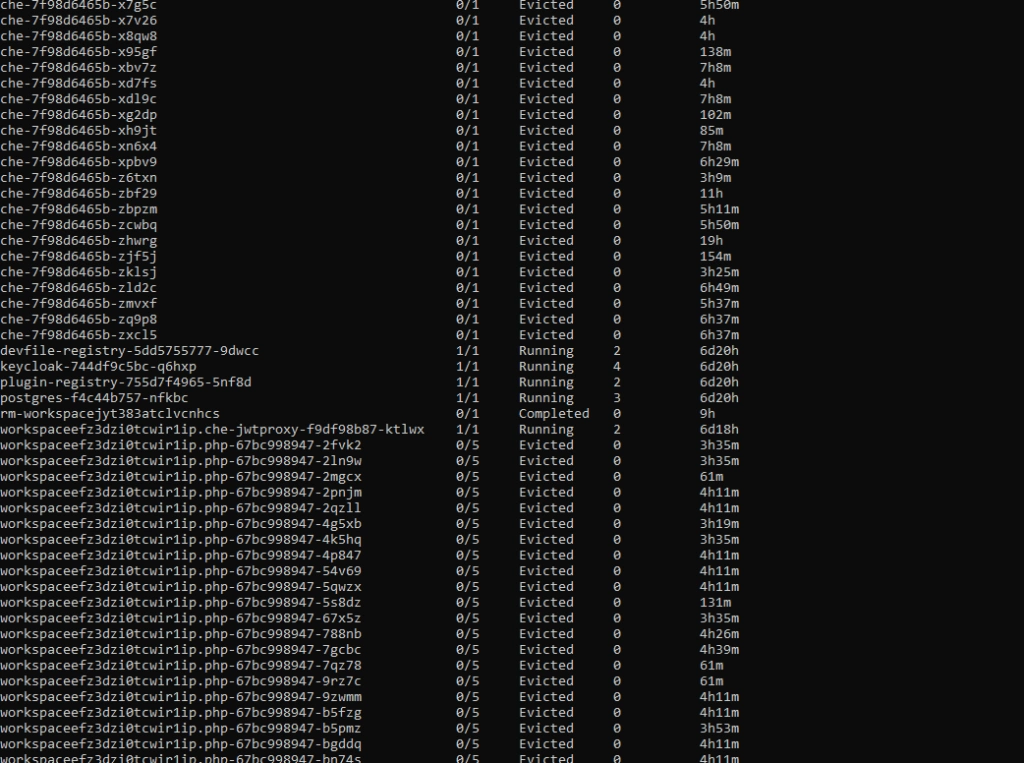
For the first time, it may look bad, especially if you see dozens of evicted pods in kubectl get, and you only wanted to run 5 pods. With all that claims, that you can run containers without worries about the orchestration, as Kubernetes does all of that for you, you may find it overwhelming.
Well, this is true to some extent, but the answer is - it depends, and it all boils down to a crucial topic associated with Kubernetes cluster management. Let's dive into the problem.
Learn more about services provided by Grape Up
You are at Grape Up blog, where our experts share their expertise gathered in projects delivered for top enterprises. See how we work.
Enabling the automotive industry to build software-defined vehicles
Empowering insurers to create insurance telematics platforms
Providing AI & advanced analytics consulting
Kubernetes Cluster resources management
While there is a general awareness that resources are never limitless - even in a huge cluster as a service solution, we do not often consider the exact layout of the cluster resources. And the general idea of virtualization and containerization makes it seem like resources are treated as a single, huge pool - which may not always be true. Let’s see how it looks.
Let’s assume we have a Kubernetes cluster with 16 vCPU and 64GB of RAM.
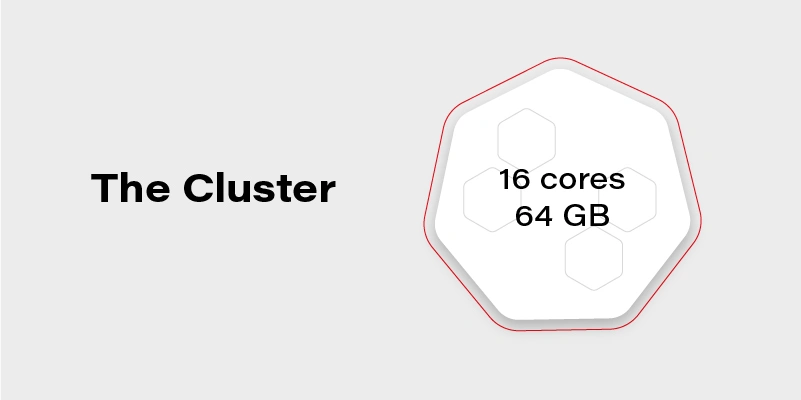
Can we run on it our beautiful AI container, which requires 20GB of memory to run? Obviously, not. Why not? We have 64GB of memory available on the cluster!
Well, not really. Let’s see how our cluster looks inside:
The Cluster again
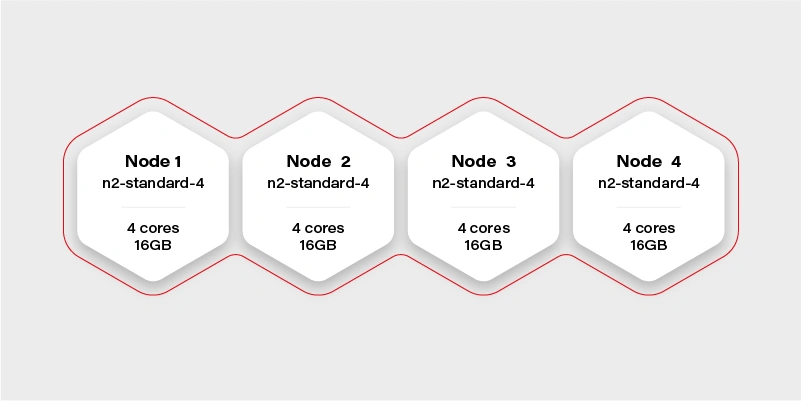
There are 4 workers in the cluster, and each has 16GB of memory available (in practice, it will be a little bit less, because of DaemonSets and system services, which run a node and take their small share). Container hard memory limit is, in this case, 16GB, and we can’t run our container.
Moreover, it means we have to always take this limitation into account. Not just if we deploy one big container, but also in complex deployments, or even things which in general can run out-of-the-box like helm charts .
Let’s try another example.
Our next task will be a Ceph deployment to the same cluster. The target we want to achieve is a storage size of 1TB split into 10 OSDs (object storage daemons) and 3 ceph MONs (monitors). We want to put it on 2 of the nodes, and leave the other 2 for deployments which are going to use the storage. Basic and highly extensible architecture.
The first, naive approach is to just set OSDs count to 10, MONs count to 3 and add tolerations to the Ceph pods, plus of course matching taint on Node 1 and Node 2 . All ceph deployments and pods are going to have the nodeSelector set to target only nodes 1 and 2 .
Kubernetes does its thing and runs mon-1 and mon-2 on the first worker along with 5 osds, and mon-3 along with 5 osds on the second worker.
mon-1
mon-2
osd-1
osd-2
osd-3
osd-4
osd-5 mon-3
osd-6
osd-7
osd-8
osd-9
osd-10 Stateless App
It worked out! And our application can now save quite a lot of large files to Ceph very quickly, so our job becomes easier. If we also deploy the dashboard and create a replicated pool, we can even see 1TB of storage available and 10 OSDs up, that's a huge achievement!
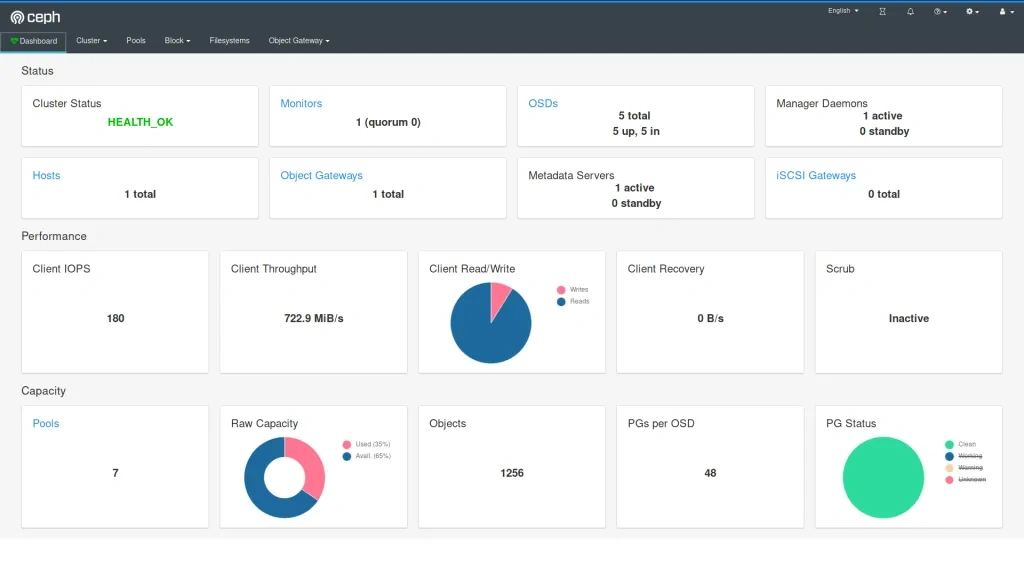
The very next morning, we check the status again and see that the available storage is around 400GB and 4 OSDs in flight. What is going on? Is this a crash? Ceph is resilient, it should be immune to crashes, restart quickly, and yet it does not seem like it worked very well here.
If we now check the cluster, we can see a lot of evicted OSD pods. Even more, than we are supposed to have at all. So what really has happened? To figure this out, we need to go back to our initial deployment configuration and think it through.
Limits and ranges
We ran 13 pods, 3 of them (monitors) don’t really need a lot of resources, but OSDs do. More we use it more resources it needs because ceph caches a lot of data in memory. Plus replication and balancing data over storage containers do not come free.
So initially after the deployment, the memory situation looks more or less like this:
Node 1
mon-1 - 50MB
mon-2 - 50MB
osd-1 - 200MB
osd-2 - 200MB
osd-3 - 200MB
osd-4 - 200MB
osd-5 - 200MB
1100MB memory used Node 2
mon-3 - 50M
Bosd-6 - 200MB
osd-7 - 200MB
osd-8 - 200MB
osd-9 - 200MB
osd-10 - 200MB
1050MB memory used
After a few hours of extensive usage, something goes wrong.
Node 1
mon-1 - 250MB
mon-2 - 250MB
osd-1 - 6500MB
osd-2 - 5300MB
osd-3 - Evicted
osd-4 - Evicted
osd-5 - Evicted
12300MB memory used Node 2
mon-3 - 300MB
osd-6 - 9100MB
osd-7 - 5700MB
osd-8 - Evicted
osd-9 - Evicted
osd-10 - Evicted
15100MB memory used
We have lost almost 50% of our pods. Does it mean it’s over? No, we can lose more of them quickly, especially if the high throughput will now target the remaining pods. Does it mean we need more than 32GB of memory to run this Ceph cluster? No, we just need to correctly set limits so a single OSD can’t just use all available memory and starve other pods.
In this case, the easiest way would be to take the 30GB of memory (leave 2GB for mons - 650MB each, and set them limits properly too!) and divide it by 10 OSDs. So we have:
resources :
limits :
memory : "3000Mi"
cpu : "600m"
Is it going to work? It depends, but probably not. We have configured 15GB of memory for OSDs and 650MB for each pod. It means that first node requires: 15 + 2*0.65 = 16.3GB. A little bit too much and also not taking into account things like DaemonSets for logs running on the same node. The new version should do the trick:
resources :
limits :
memory : "2900Mi"
cpu : "600m"
Quality of Service
There is one more warning. If we also set a request for the pod to exactly match the limit, then Kubernetes treats this kind of pod differently:
resources :
requests :
memory : "2900Mi"
cpu : "600m"
limits :
memory : "2900Mi"
cpu : "600m"
This pod configuration is going to have QoS in Kubernetes set to Guaranteed . Otherwise, it is Burstable . Guaranteed pods are never evicted - by setting the same request and limit size, we confirm that we are certain what is the resource usage of this pod, so it should not be moved or managed by Kubernetes. It reduces flexibility for the scheduler but makes the whole deployment way more resilient.
Obviously, for mission-critical systems , “best-effort” is never enough.
Resources in an autoscaling environment
If we can calculate or guess the required resources correctly to match the cluster size, the limits and quality of service may be just enough. Sometimes though the configuration is more sophisticated and the cluster size is fluid - it can scale up and down horizontally and change the number of available workers.
In this case, the planning goes in two parallel paths - you need to plan for the minimal cluster size and the maximum cluster size - assuming linear scaling of resources.
It cannot be assumed that applications will act properly and leave space for the other cluster cohabitants. If the pods are allowed to scale up horizontally or vertically while the cluster is expanding, it may result in evicting other pods when it’s scaling down. To mitigate this issue, there are two main concepts available in Kubernetes: Pod Priority and Pod Disruption Budget .
Let’s start again by creating our test scenario. This time we don’t need tons of nodes, so let’s just create a cluster with two node groups: one consisting of regular instances (let’s call it persistent) and one consisting of preemptible/spot instance (let’s just call them preemptible for the sake of an experiment).
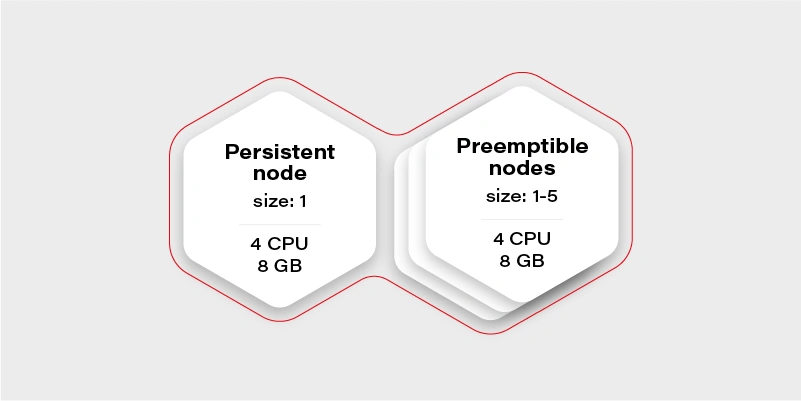
The preemptible nodes group will scale up when the CPU usage of the VM (existing node) will be over 0.7 (70%).
The advantage of the preemptible/spot instances is their price. They are much cheaper than regular VMs of the same performance. The only drawback is that there is no guarantee for their lifetime - the instance can be killed when the cloud providers decide it is required somewhere else, for maintenance purposes, or just after 24 hours. This means we can only run fault-tolerant, stateless workloads there.
Which should be most of the things which run in your cluster if you follow the 12 factors, right?
Why there is one persistent node in our cluster then? To prepare for the rare case, when none of the preemptible nodes are running, it is going to maintain the minimal set of containers to manage the operability of the application.
Our application will consist of:
Application Replicas CPUs Memory Redis cluster with one redis master - has to run on a persistent node 1 0.5 300MB Frontend application (immutable) 2 0.5 500MB Backend application (immutable) 2 0.7 500MB Video converter application (immutable) 1 1 2GB Sum 3.9 4.3GB
We can configure the redis master to work on the persistent node using a node selector. Then just deploy everything else and Bob is your uncle .
Horizontal Pod Autoscaler
Well, but we have an autoscaling nodes group and no autoscaling configured in the cluster. This means we have never really triggered cluster autoscaling and it stays all the time on two workers, because application itself does not increase replicas count. Let’s start with the Horizontal Pod Autoscaler:
Frontend:
apiVersion : autoscaling/v2beta2
kind : HorizontalPodAutoscaler
metadata :
name : frontend-hpa
spec : scaleTargetRef :
apiVersion : apps/v1
kind : Deployment
name : frontend
minReplicas : 2
maxReplicas : 10
metrics :
- type : Resource
resource :
name : cpu
target :
type : Utilization
averageUtilization : 75
Backend:
apiVersion : autoscaling/v2beta2
kind : HorizontalPodAutoscaler
metadata :
name : backend-hpa
spec :
scaleTargetRef :
apiVersion : apps/v1
kind : Deployment
name : backend
minReplicas : 2
maxReplicas : 10
metrics :
- type : Resource
resource :
name : cpu
target :
type : Utilization
averageUtilization : 75
Video converter:
apiVersion : autoscaling/v2beta2
kind : HorizontalPodAutoscaler
metadata :
name : video-converter-hpa
spec :
scaleTargetRef :
apiVersion : apps/v1
kind : Deployment
name : video-converter
minReplicas : 1
maxReplicas : 25
metrics :
- type : Resource
resource :
name : cpu
target :
type : Utilization
averageUtilization : 25
So now we have the same configuration as we described in the deployment - the sum of minReplicas is equal. Why does the video converter have such a low target average utilization? When there are multiple conversions enqueued, it will make autoscaling quicker - if it quickly reaches 25% of average CPU usage, then the new one is spawned. This is a very trivial configuration - if you need something more sophisticated check scaling policies .
What might happen if we now test our environment and enqueue 50 video conversions each taking around 10 minutes?
It depends, but the likely scenario is that the video converter will scale up to the 25 instances. What happens with other containers in the cluster? Some of them will be evicted, maybe backend ones, maybe frontend ones, or maybe even redis. There is quite a high risk of the setup to break down and be inaccessible for the end-users.
Can we mitigate the issue? Yes, for example, we can create the priority classes and assign them lower for the video converter. The higher priority pod has, the more worth it has for the scheduler. If two pods are due to be evicted - the one with lower priority gets the pole position. If two pods of different priorities are scheduled, the higher priority one gets the precedence.
apiVersion : scheduling.k8s.io/v1
kind : PriorityClass
metadata :
name : high-priority
value : 100000
globalDefault : false
description : "This is high priority class for important workloads"
So if we give the converter lower priority, we confirm that the frontend and backend pods are more important, and in the worst case, the video converter can be expelled from the cluster.
Moreover, this is not going to guarantee that the backend can’t evict the frontend.
There is also an alternative that allows us to have better control over the scheduling of the pods. It is called…
Pod Disruption Budget
This resource allows us to configure a minimal amount of the deployment pods running at once. It is more strict than just priority because it can even block the node drain, if there is not enough space on other workers to reschedule the pod, and in result make the replicas count lower than the assigned budget.
The configuration is straightforward:
apiVersion : policy/v1beta1
kind : PodDisruptionBudget
metadata :
name : frontend-pdb
spec :
minAvailable : 2
selector :
matchLabels :
app : frontend
From now on, the frontend replica count cannot get lower than 2. We can assign this way minimums for all the pods and make sure there are always at least 1 or 2 pods which can handle the request.
This is the easiest and safest way to make sure that pod autoscaling and cluster scaling down is not going to affect the overall solution stability - as long as the minimal set of containers configured with the disruption budget can fit the minimal cluster size and it is enough to handle the bare minimum of requests.
Connecting the dots
Now we have all the required pieces to create a stable solution. We can configure HPAs to have the same min number of replicas as PDB to make the scheduler's life easier. We know our max cluster size and made sure limits are the same as requests, so pods are not evicted. Let’s see what we get with the current configuration:
Application Min. replicas Max. replicas PDB CPUs Memory A redis cluster with one redis master - has to run on a persistent node 1 1 1 0.5 300MB Frontend application (immutable) 2 10 2 0.5 500MB Backend application (immutable) 2 10 2 0.7 500MB Video converter application (immutable) 1 25 1 1 2GB Sum (min) 3.9 4.3GB Sum (max) 37.5 ~60.3GB
Not bad. It can even stay as it is, but the current max cluster size is 24 cores with 48GB of memory. With all the configurations we went through, it should be fine when we exceed that size, so there is a little bit of flexibility for the scheduler - for example if there is a very low load on frontend and backend, but a huge pile of data to be converted, then the converter can scale up to approx. 19-21 instances, which is nice to have.
There is no one design that fits all
Is there anything wrong with the current configuration? Well, there can be, but we are going into unknown depths of “it depends.”
It all starts with the simple question - what is the purpose of my solution/architecture and what are the KPIs. Let’s look again at the example - it is a video converted with a web application. A pretty basic solution that scales up if required to accommodate a higher load. But what is more important - faster conversion or more responsible UI?
It all boils down to the product requirements, and in general, it is easy to solve. There are three paths we can follow from now on:
The I don’t care path
If it does not matter from the user and product perspective just leave it and see how it performs. Maybe even two frontend pods can handle a lot of load? Or maybe nobody cares about the latency as long as nothing crashes unexpectedly? Don’t overengineer and don’t try the premature optimization - let it be and see if it’s fine. If it’s not there are still two other paths available.
The I know what matters most path
This path requires a bit of knowledge about priorities. If the priority is the smooth and scalable UI and it’s fine to have quite some conversions waiting - put the higher priority on the frontend and backend deployments as described in previous paragraphs. If the video conversion is the key - put the higher priority on it. Whatever you choose, it will be the deployment that can scale up at the expense of the other one. This is especially important if loads don’t really run in parallel most of the time, so can scale up and down independently, and the next path does not fit that scenario.
The I want to be safe path
The last path is straightforward, just put the maximums so to be close to the cluster limits, but not higher:
Application Min. replicas Max. replicas PDB CPUs Memory A redis cluster with one redis master - has to run on a persistent node 1 1 1 0.5 300MB Frontend application (immutable) 2 8 2 0.5 500MB Backend application (immutable) 2 8 2 0.7 500MB Video converter application (immutable) 1 13 1 1 2GB Sum (min) 3.9 4.3GB Sum (max) 23,1 34,3GB
Now there is some space in the memory department, so we can, for example, give the pods more memory. We are also always safe because most of the time, there will be no fighting for resources. It might happen only when the cluster will be scaling up.
Is this a perfect solution? Not really, because it is possible to fit 20 video converters at once in the cluster when there is no traffic on the UI (frontend and backend) and we artificially limit the deployment ability to scale.
Autoscaling considerations
When it comes to autoscaling, there are some things to keep in mind. First, it is not reliable - it’s impossible to say how long it will take for the cloud provider to spin up the VM. It may take seconds, and it may take minutes (in general it rarely takes less than a minute), so starting very small with the hope of autoscaling solving the peak loads may not be the greatest idea.
The other often forgotten thing is that when we scale up, then there is a point when the cluster scales down. If the deployment scales down and pods are truly stateless and can handle it gracefully - then it is not a big deal. When it comes to the cluster scaling down, we need to remember that it effectively shuts down the VMs. Sometimes something is running on them, and the scheduler has to quickly move the workload to the other workers. This is something that has to be thoughtfully tested to make sure it does not break the application operations.
Kubernetes cluster management - summary
This is the end of our quite long journey through Kubernetes cluster size and resources management. There is much more there, especially for the bigger clusters or complex problems, which may come in handy later on, like configuring the eviction policies , namespace requests and limits , or topology management useful when we have specific nodes for specific purposes. Although what we have gone through in this article should be perfectly fine and serve well even quite complex solutions . Good luck and we wish you no evicted pods in the future!
Kubernetes as a solution to container orchestration
Containerization
Kubernetes has become a synonym for containerization. Containerization, also known as operating-system-level virtualization provides the ability to run multiple isolated containers on the same Kernel. That is, on the same operating system that controls everything inside the system. It brings a lot of flexibility in terms of managing application deployment.
Deploying a few containers is not a difficult task. It can be done by means of a simple tool for defining and running multi-container Docker applications like Docker Compose. Doing it manually via command line interface is also a solution.
Challenges in the container environment
Since the container ecosystem moves fast it is challenging for developers to stay up-to-date with what is possible in the container environment. It’s usually in the production system where things get more complicated as mature architecture can consist of hundreds or thousands of containers. But then again, it’s not the deployment of such swarm that’s the biggest challenge.
What’s even more confusing is the quality of our system called High Availability. In other words, it is when multiple instances of the same container must be distributed across nodes available in the cluster. The type of the application that lives in a particular container that dictates the distribution algorithm that should be applied. Once the containers are deployed and distributed across the cluster, we encounter another problem: the system behavior in the presence of node failure.
Luckily enough, modern solutions provide a self-healing mechanism. Therefore, if a node hits the capacity limits or its down issues, the container will be redeployed on a different node to ensure stability. With that said, managing multiple containers without a sophisticated tool is almost impossible. This sophisticated tool is known as a container orchestrator. Companies have many options when it comes to platforms for running containers. Deciding which one is the best for a particular organization can be a challenging task itself. There are plenty of solutions on the market among which the most popular one is Kubernetes [1].
Kubernetes
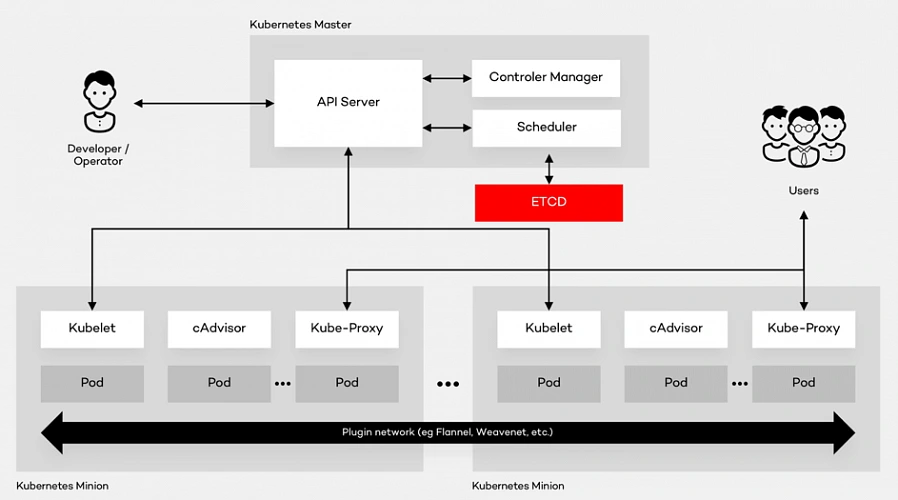
Kubernetes is the open source container platform first released by Google in 2014. The name Kubernetes, translated from Ancient Greek and means “Helmsman”. The whole idea behind this open-source project was based on Google’s experience of running containers at an enormous scale. The company uses Kubernetes for the Google Container Engine (GKE), their own Container as a Service (CaaS). And it shouldn’t be a surprise to anyone that numerous other platforms out there such as IBM Cloud, AWS or Microsoft Azure support Kubernetes. The tool can manage the two most popular types of containers – Docker & Rocket. Moreover, it helps organize networking, computing and storage – three nightmares of the microservice world. Its architecture is based on two types of nodes – Master and Minion as shown below:
Architecture glossary
- PI Server – entry point for REST commands. It processes and validates the requests and executes the logic.
- Scheduler – it supports the deployment of configured pods and services onto the nodes.
- Controller Manager – uses an apiserver to control the shared state of the cluster and makes changes if necessary.
- ETCD Storage – key-value store used mainly for shared configuration and service discovery.
- Kubelet – receives the configuration of a pod from the apiserver and makes sure that the right containers are running. It also communicates with the master node.
- cAdvisor – (Container Advisor) it collects and processes information about each running container. Most importantly, it helps container users understand the resource usage and performance characteristics of their containers.
- Kube - Proxy – runs on each node. It manages the networking routing for TCP (Transmission Control Protocol) and UDP (User Datagram Protocol) packets which are used for sending bits of data.
- Pod – the fundamental element of the architecture, a group of containers that, in a non-containerized setup, would all run on a single server.
Architecture description
A Pod provides abstraction of the container and makes it possible to group them and deploy on the same host. The containers that are in the same Pod share a network, storage and a run specification. Every single Minion Node runs a kubelet agent process which connects it to the Master Node as well as a kube-proxy which can do simple TCP and UDP stream forwarding. The Kubernetes architecture model assumes that Pods can communicate with other Pods, regardless of which host they land on. Besides, they also have a short lifetime: they’re created, destroyed and then created again depending on the server. Connectivity can be implemented in various methods (kube-router, L2 network etc.). In many cases, a simple overlay network based on a Flannel is a sufficient solution.
Summary
As a company with years of experience in the cloud evolution, we advise enterprises to think even up to ten years into the future when choosing the right platform . It all depends on where they see technology heading. Hopefully, this summary will help you understand the fundamentals of component containerization, the Kubernetes architecture and, in the end, make the right decision.
Interested in our services?
Reach out for tailored solutions and expert guidance.