
Ragas and Langfuse integration - quick guide and overview

With large language models (LLMs) being used in a variety of applications today, it has become essential to monitor and evaluate their responses to ensure accuracy and quality. Effective evaluation helps improve the model's performance and provides deeper insights into its strengths and weaknesses. This article demonstrates how embeddings and LLM services can be used to perform end-to-end evaluations of an LLM's performance and send the resulting metrics as traces to Langfuse for monitoring.
This integrated workflow allows you to evaluate models against predefined metrics such as response relevance and correctness and visualize these metrics in Langfuse, making your models more transparent and traceable. This approach improves performance monitoring while simplifying troubleshooting and optimization by turning complex evaluations into actionable insights.
I will walk you through the setup, show you code examples, and discuss how you can scale and improve your AI applications with this combination of tools.
To summarize, we will explore the role of Ragas in evaluating the LLM model and how Langfuse provides an efficient way to monitor and track AI metrics.
Important : For this article, Ragas in version 0.1.21 and Python 3.12 were used.
If you would like to migrate to version 0.2.+ follow, then up the latest release documentation.
1. What is Ragas, and what is Langfuse?
1.1 What is Ragas?
So, what’s this all about? You might be wondering: "Do we really need to evaluate what a super-smart language model spits out? Isn’t it already supposed to be smart?" Well, yes, but here’s the deal: while LLMs are impressive, they aren’t perfect. Sometimes, they give great responses, and other times… not so much. We all know that with great power comes great responsibility. That’s where Ragas steps in.
Think of Ragas as your model’s personal coach . It keeps track of how well the model is performing, making sure it’s not just throwing out fancy-sounding answers but giving responses that are helpful, relevant, and accurate. The main goal? To measure and track your model's performance, just like giving it a score - without the hassle of traditional tests.
1.2 Why bother evaluating?
Imagine your model as a kid in a school. It might answer every question, but sometimes it just rambles, says something random, or gives you that “I don’t know” look in response to a tricky question. Ragas makes sure that your LLM isn’t just trying to answer everything for the sake of it. It evaluates the quality of each response, helping you figure out where the model is nailing it and where it might need a little more practice.
In other words, Ragas provides a comprehensive evaluation by allowing developers to use various metrics to measure LLM performance across different criteria , from relevance to factual accuracy. Moreover, it offers customizable metrics, enabling developers to tailor the evaluation to suit specific real-world applications.
1.3 What is Langfuse, and how can I benefit from it?
Langfuse is a powerful tool that allows you to monitor and trace the performance of your language models in real-time. It focuses on capturing metrics and traces, offering insights into your models' performance. With Langfuse, you can track metrics such as relevance, correctness, or any custom evaluation metric generated by tools like Ragas and visualize them to better understand your model's behavior.
In addition to tracing and metrics, Langfuse also offers options for prompt management and fine-tuning (non-self-hosted versions), enabling you to track how different prompts impact performance and adjust accordingly. However, in this article, I will focus on how tracing and metrics can help you gain better insights into your model’s real-world performance.
2. Combining Ragas and Langfuse
2.1 Real-life setup
Before diving into the technical analysis, let me provide a real-life example of how Ragas and Langfuse work together in an integrated system. This practical scenario will help clarify the value of this combination and how it applies in real-world applications, offering a clearer perspective before we jump into the code.
Imagine using this setup in a customer service chatbot , where every user interaction is processed by an LLM. Ragas evaluates the answers generated based on various metrics, such as correctness and relevance, while Langfuse tracks these metrics in real-time. This kind of integration helps improve chatbot performance, ensuring high-quality responses while also providing real-time feedback to developers.
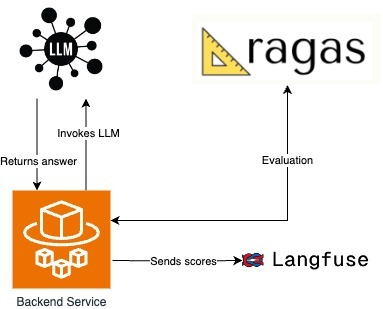
In my current setup, the backend service handles all the interactions with the chatbot. Whenever a user sends a message, the backend processes the input and forwards it to the LLM to generate a response. Depending on the complexity of the question, the LLM may invoke external tools or services to gather additional context before formulating its answer. Once the LLM returns the answer, the Ragas framework evaluates the quality of the response.
After the evaluation, the backend service takes the scores generated by Ragas and sends them to Langfuse. Langfuse tracks and visualizes these metrics, enabling real-time monitoring of the model's performance, which helps identify improvement areas and ensures that the LLM maintains an elevated level of accuracy and quality during conversations.
This architecture ensures a continuous feedback loop between the chatbot, the LLM, and Ragas while providing insight into performance metrics via Langfuse for further optimization.
2.2 Ragas setup
Here’s where the magic happens. No great journey is complete without a smooth, well-designed API. In this setup, the API expects to receive the essential elements: question, context, expected contexts, answer, and expected answer. But why is it structured this way? Let me explain.
- The question in our API is the input query you want the LLM to respond to, such as “What is the capital of France?” It's the primary element that triggers the model's reasoning process. The model uses this question to generate a relevant response based on its training data or any additional context provided.
- The answer is the output generated by the LLM, which should directly respond to the question. For example, if the question is “What is the capital of France?” the answer would be “The capital of France is Paris.” This is the model's attempt to provide useful information based on the input question.
- The expected answer represents the ideal response. It serves as a reference point to evaluate whether the model’s generated answer was correct. So, if the model outputs "Paris," and the expected answer was also "Paris," the evaluation would score this as a correct response. It's like the answer key for a test.
- Context is where things get more interesting. It's the additional information the model can use to craft its answer. Imagine asking the question, “What were Albert Einstein’s contributions to science?” Here, the model might pull context from an external document or reference text about Einstein’s life and work. Context gives the model a broader foundation to answer questions that need more background knowledge.
- Finally, the expected context is the reference material we expect the model to use. In our Einstein example, this could be a biographical document outlining his theory of relativity. We use the expected context to compare and see if the model is basing its answers on the correct information.
After outlining the core elements of the API, it’s important to understand how Retrieval-Augmented Generation (RAG) enhances the language model’s ability to handle complex queries. RAG combines the strength of pre-trained language models with external knowledge retrieval systems. When the LLM encounters specialized or niche queries, it fetches relevant data or documents from external sources, adding depth and context to its responses. The more complex the query, the more critical it is to provide detailed context that can guide the LLM to retrieve relevant information. In my example, I used a simplified context, which the LLM managed without needing external tools for additional support.
In this Ragas setup, the evaluation is divided into two categories of metrics: those that require ground truth and those where ground truth is optional . These distinctions shape how the LLM’s performance is evaluated.
Metrics that require ground truth depend on having a predefined correct answer or expected context to compare against. For example, metrics like answer correctness and context recall evaluate whether the model’s output closely matches the known, correct information. This type of metric is essential when accuracy is paramount, such as in customer support or fact-based queries. If the model is asked, "What is the capital of France?" and it responds with "Paris," the evaluation compares this to the expected answer, ensuring correctness.
On the other hand, metrics where ground truth is optional - like answer relevancy or faithfulness - don’t rely on direct comparison to a correct answer. These metrics assess the quality and coherence of the model's response based on the context provided, which is valuable in open-ended conversations where there might not be a single correct answer. Instead, the evaluation focuses on whether the model’s response is relevant and coherent within the context it was given.
This distinction between ground truth and non-ground truth metrics impacts evaluation by offering flexibility depending on the use case. In scenarios where precision is critical, ground truth metrics ensure the model is tested against known facts. Meanwhile, non-ground truth metrics allow for assessing the model’s ability to generate meaningful and coherent responses in situations where a definitive answer may not be expected. This flexibility is vital in real-world applications, where not all interactions require perfect accuracy but still demand high-quality, relevant outputs.
And now, the implementation part:
from typing import Optional

from fastapi import FastAPI
from pydantic import BaseModel

from src.service.ragas_service import RagasEvaluator


class QueryData(BaseModel):
   question: Optional[str] = None
   contexts: Optional[list[str]] = None
   expected_contexts: Optional[list[str]] = None
   answer: Optional[str] = None
   expected_answer: Optional[str] = None


class EvaluationAPI:
   def __init__(self, app: FastAPI):
       self.app = app
       self.add_routes()

   def add_routes(self):
       @self.app.post("/api/ragas/evaluate_content/")
       async def evaluate_answer(data: QueryData):
           evaluator = RagasEvaluator()
           result = evaluator.process_data(
               question=data.question,
               contexts=data.contexts,
               expected_contexts=data.expected_contexts,
               answer=data.answer,
               expected_answer=data.expected_answer,
           )
           return result
Now, let’s talk about configuration. In this setup, embeddings are used to calculate certain metrics in Ragas that require a vector representation of text, such as measuring similarity and relevancy between the model’s response and the expected answer or context. These embeddings provide a way to quantify the relationship between text inputs for evaluation purposes.
The LLM endpoint is where the model generates its responses. It’s accessed to retrieve the actual output from the model, which Ragas then evaluates. Some metrics in Ragas depend on the output generated by the model, while others rely on vectorized representations from embeddings to perform accurate comparisons.
import json
import logging
from typing import Any, Optional

import requests

from datasets import Dataset
from langchain_openai.chat_models import AzureChatOpenAI
from langchain_openai.embeddings import AzureOpenAIEmbeddings
from ragas import evaluate
from ragas.metrics import (
   answer_correctness,
   answer_relevancy,
   answer_similarity,
   context_entity_recall,
   context_precision,
   context_recall,
   faithfulness,
)
from ragas.metrics.critique import coherence, conciseness, correctness, harmfulness, maliciousness

from src.config.config import Config

logging.basicConfig(level=logging.INFO)
logger = logging.getLogger(__name__)


class RagasEvaluator:
   azure_model: AzureChatOpenAI
   azure_embeddings: AzureOpenAIEmbeddings


   def __init__(self) -> None:
       config = Config()
       self.azure_model = AzureChatOpenAI(
           openai_api_key=config.api_key,
           openai_api_version=config.api_version,
           azure_endpoint=config.api_endpoint,
           azure_deployment=config.deployment_name,
           model=config.embedding_model_name,
           validate_base_url=False,
       )
       self.azure_embeddings = AzureOpenAIEmbeddings(
           openai_api_key=config.api_key,
           openai_api_version=config.api_version,
           azure_endpoint=config.api_endpoint,
           azure_deployment=config.embedding_model_name,
       )
The logic in the code is structured to separate the evaluation process into different metrics, which allows flexibility in measuring specific aspects of the LLM’s responses based on the needs of the scenario. Ground truth metrics come into play when the LLM’s output needs to be compared against a known, correct answer or context. For instance, metrics like answer correctness or context recall check if the model’s response aligns with what was expected. The run_individual_evaluations function manages these evaluations by verifying if both the expected answer and context are available for comparison.
On the other hand, non-ground truth metrics are used when there isn’t a specific correct answer to compare against. These metrics, such as faithfulness and answer relevancy, assess the overall quality and relevance of the LLM’s output. The collect_non_ground_metrics and run_non_ground_evaluation functions manage this type of evaluation by examining characteristics like coherence, conciseness, or harmfulness without needing a predefined answer. This split ensures that the model’s performance can be evaluated comprehensively in various situations.
def process_data(
       self,
       question: Optional[str] = None,
       contexts: Optional[list[str]] = None,
       expected_contexts: Optional[list[str]] = None,
       answer: Optional[str] = None,
       expected_answer: Optional[str] = None,
) -> Optional[dict[str, Any]]:
   results: dict[str, Any] = {}
   non_ground_metrics: list[Any] = []

   # Run individual evaluations that require specific ground_truth
   results.update(self.run_individual_evaluations(question, contexts, answer, expected_answer, expected_contexts))

   # Collect and run non_ground evaluations
   non_ground_metrics.extend(self.collect_non_ground_metrics(contexts, question, answer))
   results.update(self.run_non_ground_evaluation(question, contexts, answer, non_ground_metrics))


   return {"metrics": results} if results else None
def run_individual_evaluations(
       self,
       question: Optional[str],
       contexts: Optional[list[str]],
       answer: Optional[str],
       expected_answer: Optional[str],
       expected_contexts: Optional[list[str]],
) -> dict[str, Any]:
   logger.info("Running individual evaluations with question: %s, expected_answer: %s", question, expected_answer)
   results: dict[str, Any] = {}

   # answer_correctness, answer_similarity
   if expected_answer and answer:
       logger.info("Evaluating answer correctness and similarity")
       results.update(
           self.evaluate_with_metrics(
               metrics=[answer_correctness, answer_similarity],
               question=question,
               contexts=contexts,
               answer=answer,
               ground_truth=expected_answer,
           )
       )

   # expected_context
   if question and expected_contexts and contexts:
       logger.info("Evaluating context precision")
       results.update(
           self.evaluate_with_metrics(
               metrics=[context_precision],
               question=question,
               contexts=contexts,
               answer=answer,
               ground_truth=self.merge_ground_truth(expected_contexts),
           )
       )

   # context_recall
   if expected_answer and contexts:
       logger.info("Evaluating context recall")
       results.update(
           self.evaluate_with_metrics(
               metrics=[context_recall],
               question=question,
               contexts=contexts,
               answer=answer,
               ground_truth=expected_answer,
           )
       )

   # context_entity_recall
   if expected_contexts and contexts:
       logger.info("Evaluating context entity recall")
       results.update(
           self.evaluate_with_metrics(
               metrics=[context_entity_recall],
               question=question,
               contexts=contexts,
               answer=answer,
               ground_truth=self.merge_ground_truth(expected_contexts),
           )
       )

   return results
def collect_non_ground_metrics(
       self, context: Optional[list[str]], question: Optional[str], answer: Optional[str]
) -> list[Any]:
   logger.info("Collecting non-ground metrics")
   non_ground_metrics: list[Any] = []

   if context and answer:
       non_ground_metrics.append(faithfulness)
   else:
       logger.info("faithfulness metric could not be used due to missing context or answer.")

   if question and answer:
       non_ground_metrics.append(answer_relevancy)
   else:
       logger.info("answer_relevancy metric could not be used due to missing question or answer.")

   if answer:
       non_ground_metrics.extend([harmfulness, maliciousness, conciseness, correctness, coherence])
   else:
       logger.info("aspect_critique metric could not be used due to missing answer.")

   return non_ground_metrics
def run_non_ground_evaluation(
       self,
       question: Optional[str],
       contexts: Optional[list[str]],
       answer: Optional[str],
       non_ground_metrics: list[Any],
) -> dict[str, Any]:
   logger.info("Running non-ground evaluations with metrics: %s", non_ground_metrics)
   if non_ground_metrics:
       return self.evaluate_with_metrics(
           metrics=non_ground_metrics,
           question=question,
           contexts=contexts,
           answer=answer,
           ground_truth="",  # Empty as non_ground metrics do not require specific ground_truth
       )
   return {}
@staticmethod
def merge_ground_truth(ground_truth: Optional[list[str]]) -> str:
   if isinstance(ground_truth, list):
       return " ".join(ground_truth)
   return ground_truth or ""

class RagasEvaluator:
   azure_model: AzureChatOpenAI
   azure_embeddings: AzureOpenAIEmbeddings

   langfuse_url: str
   langfuse_public_key: str
   langfuse_secret_key: str

   def __init__(self) -> None:
       config = Config()
       self.azure_model = AzureChatOpenAI(
           openai_api_key=config.api_key,
           openai_api_version=config.api_version,
           azure_endpoint=config.api_endpoint,
           azure_deployment=config.deployment_name,
           model=config.embedding_model_name,
           validate_base_url=False,
       )
       self.azure_embeddings = AzureOpenAIEmbeddings(
           openai_api_key=config.api_key,
           openai_api_version=config.api_version,
           azure_endpoint=config.api_endpoint,
           azure_deployment=config.embedding_model_name,
       )
2.3 Langfuse setup
To use Langfuse locally, you'll need to create both an organization and a project in your self-hosted instance after launching via Docker Compose. These steps are necessary to generate the public and secret keys required for integrating with your service. The keys will be used for authentication in your API requests to Langfuse's endpoints, allowing you to trace and monitor evaluation scores in real-time. The official documentation provides detailed instructions on how to get started with a local deployment using Docker Compose, which can be found here .
The integration is straightforward: you simply use the keys in the API requests to Langfuse’s endpoints, enabling real-time performance tracking of your LLM evaluations.
Let me present integration with Langfuse:
class RagasEvaluator:

   # previous code from above
   langfuse_url: str
   langfuse_public_key: str
   langfuse_secret_key: str

   def __init__(self) -> None:

       # previous code from above
       self.langfuse_url = "http://localhost:3000"
       self.langfuse_public_key = "xxx"
       self.langfuse_secret_key = "yyy"def send_scores_to_langfuse(self, trace_id: str, scores: dict[str, Any]) -> None:
   """
   Sends evaluation scores to Langfuse via the /api/public/scores endpoint.
   """
   url = f"{self.langfuse_url}/api/public/scores"
   auth_string = f"{self.langfuse_public_key}:{self.langfuse_secret_key}"
   auth_bytes = base64.b64encode(auth_string.encode('utf-8')).decode('utf-8')

   headers = {
       "Content-Type": "application/json",
       "Authorization": f"Basic {auth_bytes}"
   }
   # Iterate over scores and send each one
   for score_name, score_value in scores.items():
       payload = {
           "traceId": trace_id,
           "name": score_name,
           "value": score_value,
       }

       logger.info("Sending score to Langfuse: %s", payload)
       response = requests.post(url, headers=headers, data=json.dumps(payload))
And the last part is to invoke that function in process_data. Simply just add:
if results:
   trace_id = "generated-trace-id"
   self.send_scores_to_langfuse(trace_id, results)
3. Test and results
Let's use the URL endpoint below to start the evaluation process:
http://0.0.0.0:3001/api/ragas/evaluate_content/
Here is a sample of the input data:
{
"question": "Did Gomez know about the slaughter of the Fire Mages?",
"answer": "Gomez, the leader of the Old Camp, feigned ignorance about the slaughter of the Fire Mages. Despite being responsible for ordering their deaths to tighten his grip on the Old Camp, Gomez pretended to be unaware to avoid unrest among his followers and to protect his leadership position.",
"expected_answer": "Gomez knew about the slaughter of the Fire Mages, as he ordered it to consolidate his power within the colony. However, he chose to pretend that he had no knowledge of it to avoid blame and maintain control over the Old Camp.",
"contexts": [
"{\"Gomez feared the growing influence of the Fire Mages, believing they posed a threat to his control over the Old Camp. To secure his leadership, he ordered the slaughter of the Fire Mages, though he later denied any involvement.\"}",
"{\"The Fire Mages were instrumental in maintaining the barrier that kept the colony isolated. Gomez, in his pursuit of power, saw them as an obstacle and thus decided to eliminate them, despite knowing their critical role.\"}",
"{\"Gomez's decision to kill the Fire Mages was driven by a desire to centralize his authority. He manipulated the events to make it appear as though he was unaware of the massacre, thus distancing himself from the consequences.\"}"
],
"expected_context": "Gomez ordered the slaughter of the Fire Mages to solidify his control over the Old Camp. However, he later denied any involvement to distance himself from the brutal event and avoid blame from his followers."
}
And here is the result presented in Langfuse
Results: {'answer_correctness': 0.8177382234142327, 'answer_similarity': 0.9632605859646228, 'context_recall': 1.0, 'faithfulness': 0.8333333333333334, 'answer_relevancy': 0.9483433866761223, 'harmfulness': 0.0, 'maliciousness': 0.0, 'conciseness': 1.0, 'correctness': 1.0, 'coherence': 1.0}
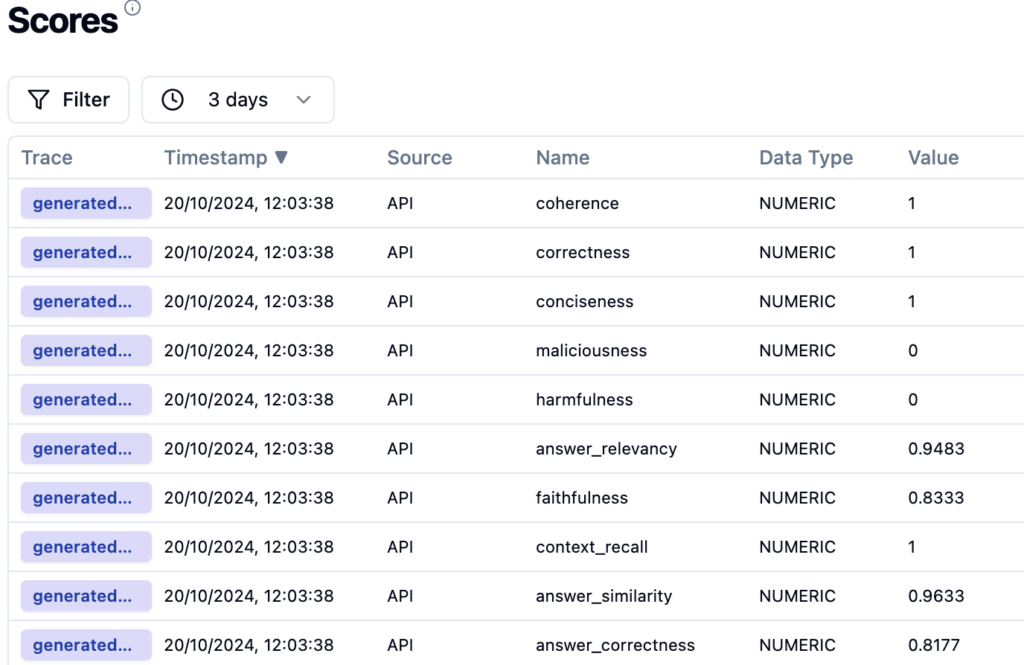
As you can see, it is as simple as that.
4. Summary
In summary, I have built an evaluation system that leverages Ragas to assess LLM performance through various metrics. At the same time, Langfuse tracks and monitors these evaluations in real-time, providing actionable insights. This setup can be seamlessly integrated into CI/CD pipelines for continuous testing and evaluation of the LLM during development, ensuring consistent performance.
Additionally, the code can be adapted for more complex LLM workflows where external context retrieval systems are integrated. By combining this with real-time tracking in Langfuse, developers gain a robust toolset for optimizing LLM outputs in dynamic applications. This setup not only supports live evaluations but also facilitates iterative improvement of the model through immediate feedback on its performance.
However, every rose has its thorn. The main drawbacks of using Ragas include the costs and time associated with the separate API calls required for each evaluation. This can lead to inefficiencies, especially in larger applications with many requests. Ragas can be implemented asynchronously to improve performance, allowing evaluations to occur concurrently without blocking other processes. This reduces latency and makes more efficient use of resources.
Another challenge lies in the rapid pace of development in the Ragas framework. As new versions and updates are frequently released, staying up to date with the latest changes can require significant effort. Developers need to continuously adapt their implementation to ensure compatibility with the newest releases, which can introduce additional maintenance overhead.

Grape Up guides enterprises on their data-driven transformation journey
Ready to ship? Let's talk.
Check related articles
Read our blog and stay informed about the industry's latest trends and solutions.
Getting started with the Julia language
Are you looking for a programming language that is fast, easy to start with, and trending? The Julia language meets the requirements. In this article, we show you how to take your first steps.
What is the Julia language?
Julia is an open-source programming language for general purposes. However, it is mainly used for data science, machine learning , or numerical and statistical computing. It is gaining more and more popularity. According to the TIOBE index, the Julia language jumped from position 47 to position 23 in 2020 and is highly expected to head towards the top 20 next year.
Despite the fact Julia is a flexible dynamic language, it is extremely fast. Well-written code is usually as fast as C, even though it is not a low-level language. It means it is much faster than languages like Python or R, which are used for similar purposes. High performance is achieved by using type interference and JIT (just-in-time) compilation with some AOT (ahead-of-time) optimizations. You can directly call functions from other languages such as C, C++, MATLAB, Python, R, FORTRAN… On the other hand, it provides poor support for static compilation, since it is compiled at runtime.
Julia makes it easy to express many object-oriented and functional programming patterns. It uses multiple dispatches, which is helpful, especially when writing a mathematical code. It feels like a scripting language and has good support for interactive use. All those attributes make Julia very easy to get started with and experiment with.
First steps with the Julina language
- Download and install Julia from Download Julia .
- (Optional - not required to follow the article) Choose your IDE for the Julia language. VS Code is probably the most advanced option available at the moment of writing this paragraph. We encourage you to do your research and choose one according to your preferences. To install VSCode, please follow Installing VS Code and VS Code Julia extension .
Playground
Let’s start with some experimenting in an interactive session. Just run the Julia command in a terminal. You might need to add Julia's binary path to your PATH variable first. This is the fastest way to learn and play around with Julia.
C:\Users\prso\Desktop>julia
_
_ _ _(_)_ | Documentation: https://docs.julialang.org
(_) | (_) (_) |
_ _ _| |_ __ _ | Type "?" for help, "]?" for Pkg help.
| | | | | | |/ _` | |
| | |_| | | | (_| | | Version 1.5.3 (2020-11-09)
_/ |\__'_|_|_|\__'_| | Official https://julialang.org/ release
|__/ |
julia> println("hello world")
hello world
julia> 2^10
1024
julia> ans*2
2048
julia> exit()
C:\Users\prso\Desktop>
To get a recently returned value, we can use the ans variable. To close REPL, use exit() function or Ctrl+D shortcut.
Running the scripts
You can create and run your scripts within an IDE. But, of course, there are more ways to do so. Let’s create our first script in any text editor and name it: example.jl.
x = 2
println(10x)
You can run it from REPL:
julia> include("example.jl")
20
Or, directly from your system terminal:
C:\Users\prso\Desktop>julia example.jl
20
Please be aware that REPL preserves the current state and includes statement works like a copy-paste. It means that running included is the equivalent of typing this code directly in REPL. It may affect your subsequent commands.
Basic types
Julia provides a broad range of primitive types along with standard mathematical functions and operators. Here’s the list of all primitive numeric types:
- Int8, UInt8
- Int16, UInt16
- Int32, UInt32
- Int64, UInt64
- Int128, UInt128
- Float16
- Float32
- Float64
A digit suffix implies several bits and a U prefix that is unsigned. It means that UInt64 is unsigned and has 64 bits. Besides, it provides full support for complex and rational numbers.
It comes with Bool , Char , and String types along with non-standard string literals such as Regex as well. There is support for non-ASCII characters. Both variable names and values can contain such characters. It can make mathematical expressions very intuitive.
julia> x = 'a'
'a': ASCII/Unicode U+0061 (category Ll: Letter, lowercase)
julia> typeof(ans)
Char
julia> x = 'β'
'β': Unicode U+03B2 (category Ll: Letter, lowercase)
julia> typeof(ans)
Char
julia> x = "tgα * ctgα = 1"
"tgα * ctgα = 1"
julia> typeof(ans)
String
julia> x = r"^[a-zA-z]{8}$"
r"^[a-zA-z]{8}$"
julia> typeof(ans)
Regex
Storage: Arrays, Tuples, and Dictionaries
The most commonly used storage types in the Julia language are: arrays, tuples, dictionaries, or sets. Let’s take a look at each of them.
Arrays
An array is an ordered collection of related elements. A one-dimensional array is used as a vector or list. A two-dimensional array acts as a matrix or table. More dimensional arrays express multi-dimensional matrices.
Let’s create a simple non-empty array:
julia> a = [1, 2, 3]
3-element Array{Int64,1}:
1
2
3
julia> a = ["1", 2, 3.0]
3-element Array{Any,1}:
"1"
2
3.0
Above, we can see that arrays in Julia might store Any objects. However, this is considered an anti-pattern. We should store specific types in arrays for reasons of performance.
Another way to make an array is to use a Range object or comprehensions (a simple way of generating and collecting items by evaluating an expression).
julia> typeof(1:10)
UnitRange{Int64}
julia> collect(1:3)
3-element Array{Int64,1}:
1
2
3
julia> [x for x in 1:10 if x % 2 == 0]
5-element Array{Int64,1}:
2
4
6
8
10
We’ll stop here. However, there are many more ways of creating both one and multi-dimensional arrays in Julia.
There are a lot of built-in functions that operate on arrays. Julia uses a functional style unlike dot-notation in Python. Let’s see how to add or remove elements.
julia> a = [1,2]
2-element Array{Int64,1}:
1
2
julia> push!(a, 3)
3-element Array{Int64,1}:
1
2
3
julia> pushfirst!(a, 0)
4-element Array{Int64,1}:
0
1
2
3
julia> pop!(a)
3
julia> a
3-element Array{Int64,1}:
0
1
2
Tuples
Tuples work the same way as arrays. A tuple is an ordered sequence of elements. However, there is one important difference. Tuples are immutable. Trying to call methods like push!() will result in an error.
julia> t = (1,2,3)
(1, 2, 3)
julia> t[1]
1
Dictionaries
The next commonly used collections in Julia are dictionaries. A dictionary is called Dict for short. It is, as you probably expect, a key-value pair collection.
Here is how to create a simple dictionary:
julia> d = Dict(1 => "a", 2 => "b")
Dict{Int64,String} with 2 entries:
2 => "b"
1 => "a"
julia> d = Dict(x => 2^x for x = 0:5)
Dict{Int64,Int64} with 6 entries:
0 => 1
4 => 16
2 => 4
3 => 8
5 => 32
1 => 2
julia> sort(d)
OrderedCollections.OrderedDict{Int64,Int64} with 6 entries:
0 => 1
1 => 2
2 => 4
3 => 8
4 => 16
5 => 32
We can see, that dictionaries are not sorted. They don’t preserve any particular order. If you need that feature, you can use SortedDict .
julia> import DataStructures
julia> d = DataStructures.SortedDict(x => 2^x for x = 0:5)
DataStructures.SortedDict{Any,Any,Base.Order.ForwardOrdering} with 6 entries:
0 => 1
1 => 2
2 => 4
3 => 8
4 => 16
5 => 32
DataStructures is not an out-of-the-box package. To use it for the first time, we need to download it. We can do it with a Pkg package manager.
julia> import Pkg; Pkg.add("DataStructures")
Sets
Sets are another type of collection in Julia. Just like in many other languages, Set doesn’t preserve the order of elements and doesn’t store duplicated items. The following example creates a Set with a specified type and checks if it contains a given element.
julia> s = Set{String}(["one", "two", "three"])
Set{String} with 3 elements:
"two"
"one"
"three"
julia> in("two", s)
true
This time we specified a type of collection explicitly. You can do the same for all the other collections as well.
Functions
Let’s recall what we learned about quadratic equations at school. Below is an example script that calculates the roots of a given equation: ax2+bx+c .
discriminant(a, b, c) = b^2 - 4a*c
function rootsOfQuadraticEquation(a, b, c)
Δ = discriminant(a, b, c)
if Δ > 0
x1 = (-b - √Δ)/2a
x2 = (-b + √Δ)/2a
return x1, x2
elseif Δ == 0
return -b/2a
else
x1 = (-b - √complex(Δ))/2a
x2 = (-b + √complex(Δ))/2a
return x1, x2
end
end
println("Two roots: ", rootsOfQuadraticEquation(1, -2, -8))
println("One root: ", rootsOfQuadraticEquation(2, -4, 2))
println("No real roots: ", rootsOfQuadraticEquation(1, -4, 5))
There are two functions. The first one is just a one-liner and calculates a discriminant of the equation. The second one computes the roots of the function. It returns either one value or multiple values using tuples.
We don’t need to specify argument types. The compiler checks those types dynamically. Please take note that the same happens when we call sqrt() function using a √ symbol. In that case, when the discriminant is negative, we need to wrap it with a complex()function to be sure that the sqrt() function was called with a complex argument.
Here is the console output of the above script:
C:\Users\prso\Documents\Julia>julia quadraticEquations.jl
Two roots: (-2.0, 4.0)
One root: 1.0
No real roots: (2.0 - 1.0im, 2.0 + 1.0im)
Plotting
Plotting with the Julia language is straightforward. There are several packages for plotting. We use one of them, Plots.jl.
To use it for the first, we need to install it:
julia> using Pkg; Pkg.add("Plots")
After the package was downloaded, let’s jump straight to the example:
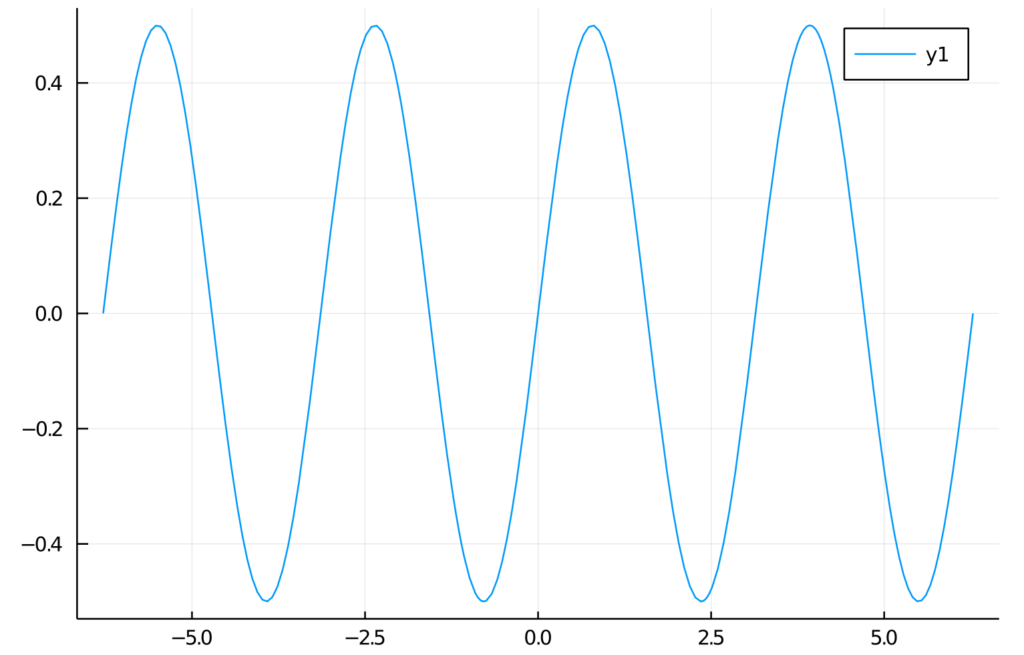
julia> f(x) = sin(x)cos(x)
f (generic function with 1 method)
julia> plot(f, -2pi, 2pi)
We’re expecting a graph of a function in a range from -2π to 2π. Here is the output:
Summary and further reading
In this article, we learned how to get started with Julia. We installed all the required components. Then we wrote our first “hello world” and got acquainted with basic Julia elements.
Of course, there is no way to learn a new language from reading one article. Therefore, we encourage you to play around with the Julia language on your own.
To dive deeper, we recommend reading the following sources:
Generative AI for developers - our comparison
So, it begins… Artificial intelligence comes into play for all of us. It can propose a menu for a party, plan a trip around Italy, draw a poster for a (non-existing) movie, generate a meme, compose a song, or even "record" a movie. Can Generative AI help developers? Certainly, but….
In this article, we will compare several tools to show their possibilities. We'll show you the pros, cons, risks, and strengths. Is it usable in your case? Well, that question you'll need to answer on your own.
The research methodology
It's rather impossible to compare available tools with the same criteria. Some are web-based, some are restricted to a specific IDE, some offer a "chat" feature, and others only propose a code. We aimed to benchmark tools in a task of code completion, code generation, code improvements, and code explanation. Beyond that, we're looking for a tool that can "help developers," whatever it means.
During the research, we tried to write a simple CRUD application, and a simple application with puzzling logic, to generate functions based on name or comment, to explain a piece of legacy code, and to generate tests. Then we've turned to Internet-accessing tools, self-hosted models and their possibilities, and other general-purpose tools.
We've tried multiple programming languages – Python, Java, Node.js, Julia, and Rust. There are a few use cases we've challenged with the tools.
CRUD
The test aimed to evaluate whether a tool can help in repetitive, easy tasks. The plan is to build a 3-layer Java application with 3 types (REST model, domain, persistence), interfaces, facades, and mappers. A perfect tool may build the entire application by prompt, but a good one would complete a code when writing.
Business logic
In this test, we write a function to sort a given collection of unsorted tickets to create a route by arrival and departure points, e.g., the given set is Warsaw-Frankfurt, Frankfurt-London, Krakow-Warsaw, and the expected output is Krakow-Warsaw, Warsaw-Frankfurt, Frankfurt-London. The function needs to find the first ticket and then go through all the tickets to find the correct one to continue the journey.
Specific-knowledge logic
This time we require some specific knowledge – the task is to write a function that takes a matrix of 8-bit integers representing an RGB-encoded 10x10 image and returns a matrix of 32-bit floating point numbers standardized with a min-max scaler corresponding to the image converted to grayscale. The tool should handle the standardization and the scaler with all constants on its own.
Complete application
We ask a tool (if possible) to write an entire "Hello world!" web server or a bookstore CRUD application. It seems to be an easy task due to the number of examples over the Internet; however, the output size exceeds most tools' capabilities.
Simple function
This time we expect the tool to write a simple function – to open a file and lowercase the content, to get the top element from the collection sorted, to add an edge between two nodes in a graph, etc. As developers, we write such functions time and time again, so we wanted our tools to save our time.
Explain and improve
We had asked the tool to explain a piece of code:
- A method to run two tasks in parallel, merge results to a collection if successful, or fail fast if any task has failed,
- Typical arrow anti-pattern (example 5 from 9 Bad Java Snippets To Make You Laugh | by Milos Zivkovic | Dev Genius ),
- AWS R53 record validation terraform resource.
If possible, we also asked it to improve the code.
Each time, we have also tried to simply spend some time with a tool, write some usual code, generate tests, etc.
The generative AI tools evaluation
Ok, let's begin with the main dish. Which tools are useful and worth further consideration?
Tabnine
Tabnine is an "AI assistant for software developers" – a code completion tool working with many IDEs and languages. It looks like a state-of-the-art solution for 2023 – you can install a plugin for your favorite IDE, and an AI trained on open-source code with permissive licenses will propose the best code for your purposes. However, there are a few unique features of Tabnine.
You can allow it to process your project or your GitHub account for fine-tuning to learn the style and patterns used in your company. Besides that, you don't need to worry about privacy. The authors claim that the tuned model is private, and the code won't be used to improve the global version. If you're not convinced, you can install and run Tabnine on your private network or even on your computer.
The tool costs $12 per user per month, and a free trial is available; however, you're probably more interested in the enterprise version with individual pricing.
The good, the bad, and the ugly
Tabnine is easy to install and works well with IntelliJ IDEA (which is not so obvious for some other tools). It improves standard, built-in code proposals; you can scroll through a few versions and pick the best one. It proposes entire functions or pieces of code quite well, and the proposed-code quality is satisfactory.
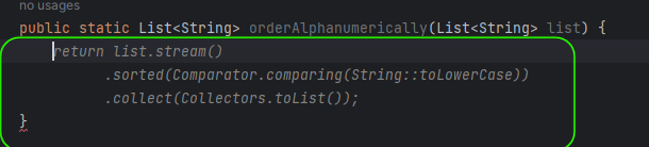
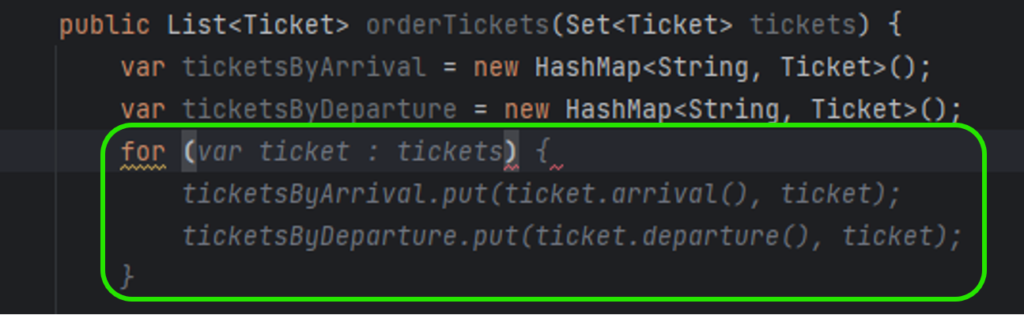
So far, Tabnine seems to be perfect, but there is also another side of the coin. The problem is the error rate of the code generated. In Figure 2, you can see ticket.arrival() and ticket.departure() invocations. It was my fourth or fifth try until Tabnine realized that Ticket is a Java record and no typical getters are implemented. In all other cases, it generated ticket.getArrival() and ticket.getDeparture() , even if there were no such methods and the compiler reported errors just after the propositions acceptance.
Another time, Tabnine omitted a part of the prompt, and the code generated was compilable but wrong. Here you can find a simple function that looks OK, but it doesn't do what was desired to.

There is one more example – Tabnine used a commented-out function from the same file (the test was already implemented below), but it changed the line order. As a result, the test was not working, and it took a while to determine what was happening.
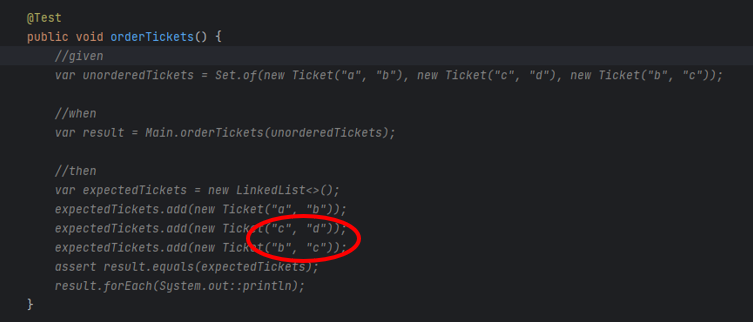
It leads us to the main issue related to Tabnine. It generates simple code, which saves a few seconds each time, but it's unreliable, produces hard-to-find bugs, and requires more time to validate the generated code than saves by the generation. Moreover, it generates proposals constantly, so the developer spends more time reading propositions than actually creating good code.
Our rating
Conclusion: A mature tool with average possibilities, sometimes too aggressive and obtrusive (annoying), but with a little bit of practice, may also make work easier
‒ Possibilities 3/5
‒ Correctness 2/5
‒ Easiness 2,5/5
‒ Privacy 5/5
‒ Maturity 4/5
Overall score: 3/5
GitHub Copilot
This tool is state-of-the-art. There are tools "similar to GitHub Copilot," "alternative to GitHub Copilot," and "comparable to GitHub Copilot," and there is the GitHub Copilot itself. It is precisely what you think it is – a code-completion tool based on the OpenAI Codex model, which is based on GPT-3 but trained with publicly available sources, including GitHub repositories. You can install it as a plugin for popular IDEs, but you need to enable it on your GitHub account first. A free trial is available, and the standard license costs from $8,33 to $19 per user per month.
The good, the bad, and the ugly
It works just fine. It generates good one-liners and imitates the style of the code around.
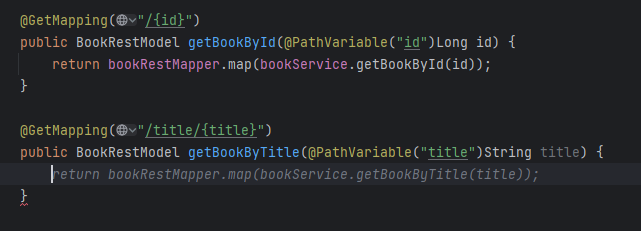
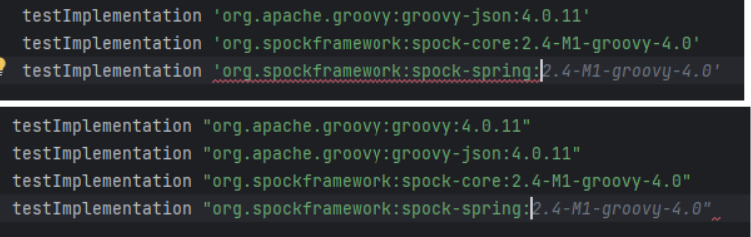
Please note the Figure 6 - it not only uses closing quotas as needed but also proposes a library in the "guessed" version, as spock-spring.spockgramework.org:2.4-M1-groovy-4.0 is newer than the learning set of the model.
However, the code is not perfect.
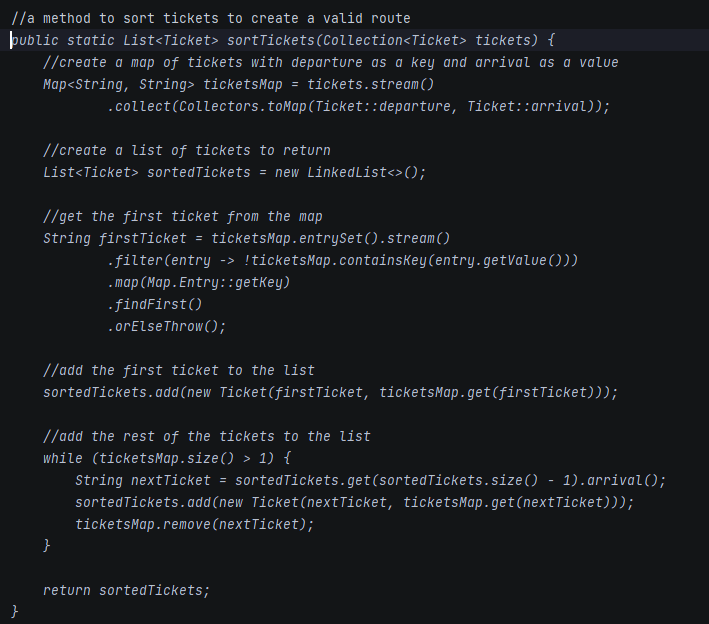
In this test, the tool generated the entire method based on the comment from the first line of the listing. It decided to create a map of departures and arrivals as Strings, to re-create tickets when adding to sortedTickets, and to remove elements from ticketMaps. Simply speaking - I wouldn't like to maintain such a code in my project. GPT-4 and Claude do the same job much better.
The general rule of using this tool is – don't ask it to produce a code that is too long. As mentioned above – it is what you think it is, so it's just a copilot which can give you a hand in simple tasks, but you still take responsibility for the most important parts of your project. Compared to Tabnine, GitHub Copilot doesn't propose a bunch of code every few keys pressed, and it produces less readable code but with fewer errors, making it a better companion in everyday life.
Our rating
Conclusion: Generates worse code than GPT-4 and doesn't offer extra functionalities ("explain," "fix bugs," etc.); however, it's unobtrusive, convenient, correct when short code is generated and makes everyday work easier
‒ Possibilities 3/5
‒ Correctness 4/5
‒ Easiness 5/5
‒ Privacy 5/5
‒ Maturity 4/5
Overall score: 4/5
GitHub Copilot Labs
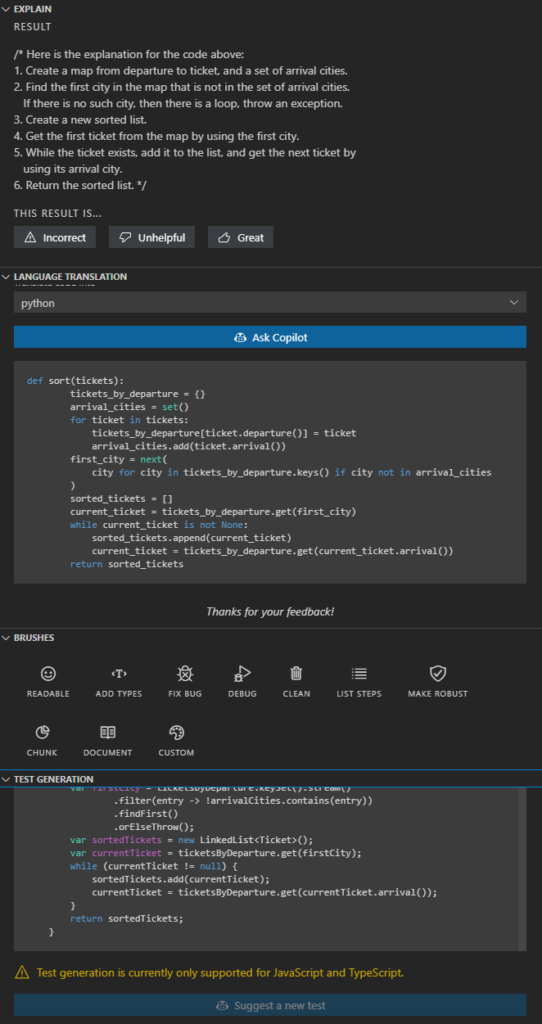
The base GitHub copilot, as described above, is a simple code-completion tool. However, there is a beta tool called GitHub Copilot Labs. It is a Visual Studio Code plugin providing a set of useful AI-powered functions: explain, language translation, Test Generation, and Brushes (improve readability, add types, fix bugs, clean, list steps, make robust, chunk, and document). It requires a Copilot subscription and offers extra functionalities – only as much, and so much.
The good, the bad, and the ugly
If you are a Visual Studio Code user and you already use the GitHub Copilot, there is no reason not to use the "Labs" extras. However, you should not trust it. Code explanation works well, code translation is rarely used and sometimes buggy (the Python version of my Java code tries to call non-existing functions, as the context was not considered during translation), brushes work randomly (sometimes well, sometimes badly, sometimes not at all), and test generation works for JS and TS languages only.
Our rating
Conclusion: It's a nice preview of something between Copilot and Copilot X, but it's in the preview stage and works like a beta. If you don't expect too much (and you use Visual Studio Code and GitHub Copilot), it is a tool for you.
‒ Possibilities 4/5
‒ Correctness 2/5
‒ Easiness 5/5
‒ Privacy 5/5
‒ Maturity 1/5
Overall score: 3/5
Cursor
Cursor is a complete IDE forked from Visual Studio Code open-source project. It uses OpenAI API in the backend and provides a very straightforward user interface. You can press CTRL+K to generate/edit a code from the prompt or CTRL+L to open a chat within an integrated window with the context of the open file or the selected code fragment. It is as good and as private as the OpenAI models behind it but remember to disable prompt collection in the settings if you don't want to share it with the entire World.
The good, the bad, and the ugly
Cursor seems to be a very nice tool – it can generate a lot of code from prompts. Be aware that it still requires developer knowledge – "a function to read an mp3 file by name and use OpenAI SDK to call OpenAI API to use 'whisper-1' model to recognize the speech and store the text in a file of same name and txt extension" is not a prompt that your accountant can make. The tool is so good that a developer used to one language can write an entire application in another one. Of course, they (the developer and the tool) can use bad habits together, not adequate to the target language, but it's not the fault of the tool but the temptation of the approach.
There are two main disadvantages of Cursor.
Firstly, it uses OpenAI API, which means it can use up to GPT-3.5 or Codex (for mid-May 2023, there is no GPT-4 API available yet), which is much worse than even general-purpose GPT-4. For example, Cursor asked to explain some very bad code has responded with a very bad answer.
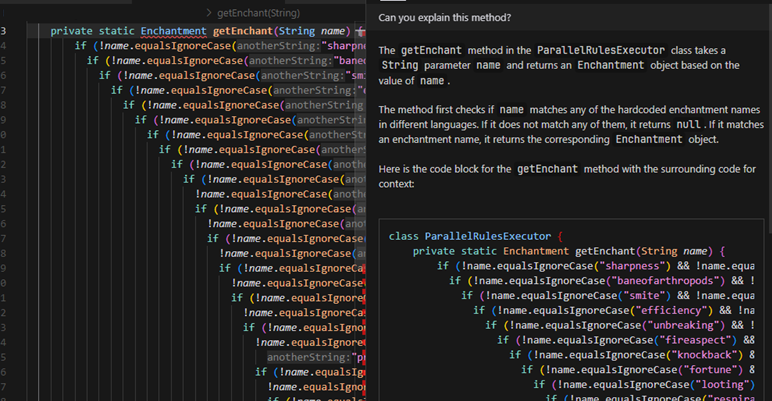
For the same code, GPT-4 and Claude were able to find the purpose of the code and proposed at least two better solutions (with a multi-condition switch case or a collection as a dataset). I would expect a better answer from a developer-tailored tool than a general-purpose web-based chat.
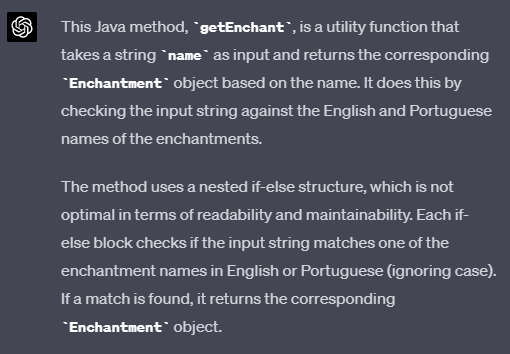
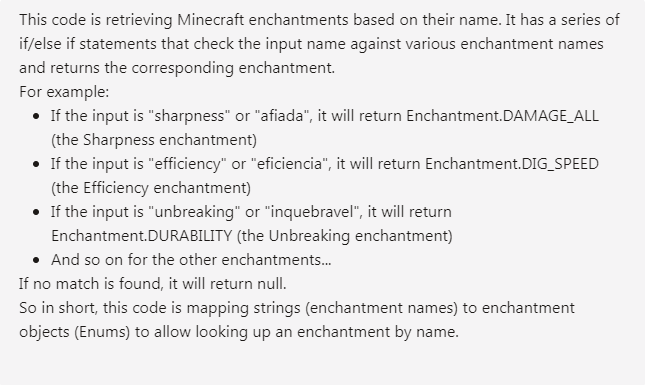
Secondly, Cursor uses Visual Studio Code, but it's not just a branch of it – it's an entire fork, so it can be potentially hard to maintain, as VSC is heavily changed by a community. Besides that, VSC is as good as its plugins, and it works much better with C, Python, Rust, and even Bash than Java or browser-interpreted languages. It's common to use specialized, commercial tools for specialized use cases, so I would appreciate Cursor as a plugin for other tools rather than a separate IDE.
There is even a feature available in Cursor to generate an entire project by prompt, but it doesn't work well so far. The tool has been asked to generate a CRUD bookstore in Java 18 with a specific architecture. Still, it has used Java 8, ignored the architecture, and produced an application that doesn't even build due to Gradle issues. To sum up – it's catchy but immature.
The prompt used in the following video is as follows:
"A CRUD Java 18, Spring application with hexagonal architecture, using Gradle, to manage Books. Each book must contain author, title, publisher, release date and release version. Books must be stored in localhost PostgreSQL. CRUD operations available: post, put, patch, delete, get by id, get all, get by title."
https://www.youtube.com/watch?v=Q2czylS2i-E
The main problem is – the feature has worked only once, and we were not able to repeat it.
Our rating
Conclusion: A complete IDE for VS-Code fans. Worth to be observed, but the current version is too immature.
‒ Possibilities 5/5
‒ Correctness 2/5
‒ Easiness 4/5
‒ Privacy 5/5
‒ Maturity 1/5
Overall score: 2/5
Amazon CodeWhisperer
CodeWhisperer is an AWS response to Codex. It works in Cloud9 and AWS Lambdas, but also as a plugin for Visual Studio Code and some JetBrains products. It somehow supports 14 languages with full support for 5 of them. By the way, most tool tests work better with Python than Java – it seems AI tool creators are Python developers🤔. CodeWhisperer is free so far and can be run on a free tier AWS account (but it requires SSO login) or with AWS Builder ID.
The good, the bad, and the ugly
There are a few positive aspects of CodeWhisperer. It provides an extra code analysis for vulnerabilities and references, and you can control it with usual AWS methods (IAM policies), so you can decide about the tool usage and the code privacy with your standard AWS-related tools.
However, the quality of the model is insufficient. It doesn't understand more complex instructions, and the code generated can be much better.
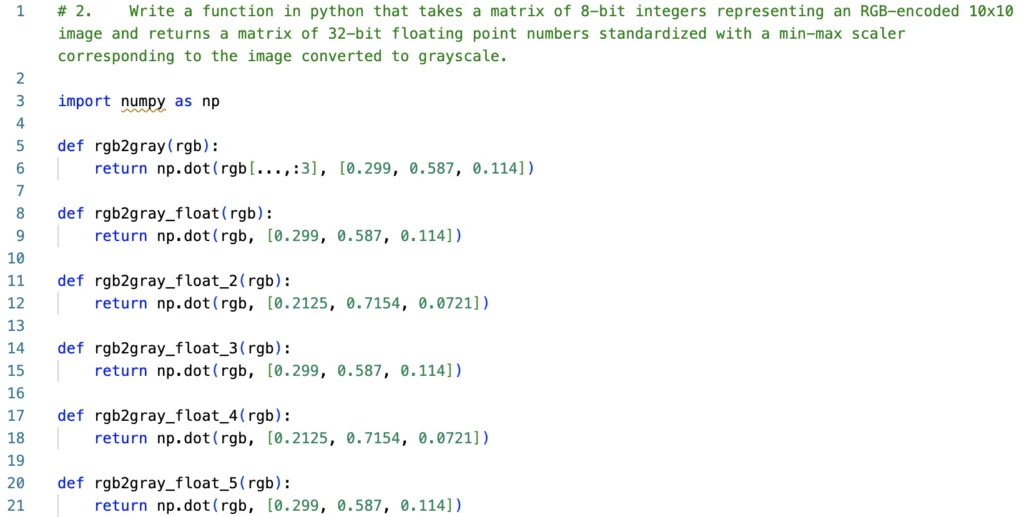
For example, it has simply failed for the case above, and for the case below, it proposed just a single assertion.
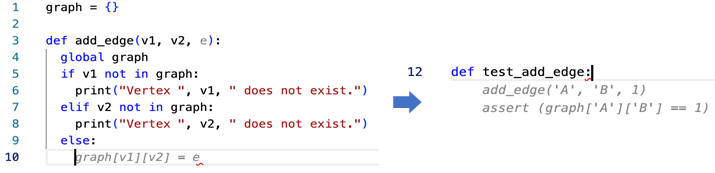
Our rating
Conclusion: Generates worse code than GPT-4/Claude or even Codex (GitHub Copilot), but it's highly integrated with AWS, including permissions/privacy management
‒ Possibilities 2.5/5
‒ Correctness 2.5/5
‒ Easiness 4/5
‒ Privacy 4/5
‒ Maturity 3/5
Overall score: 2.5/5
Plugins
As the race for our hearts and wallets has begun, many startups, companies, and freelancers want to participate in it. There are hundreds (or maybe thousands) of plugins for IDEs that send your code to OpenAI API.
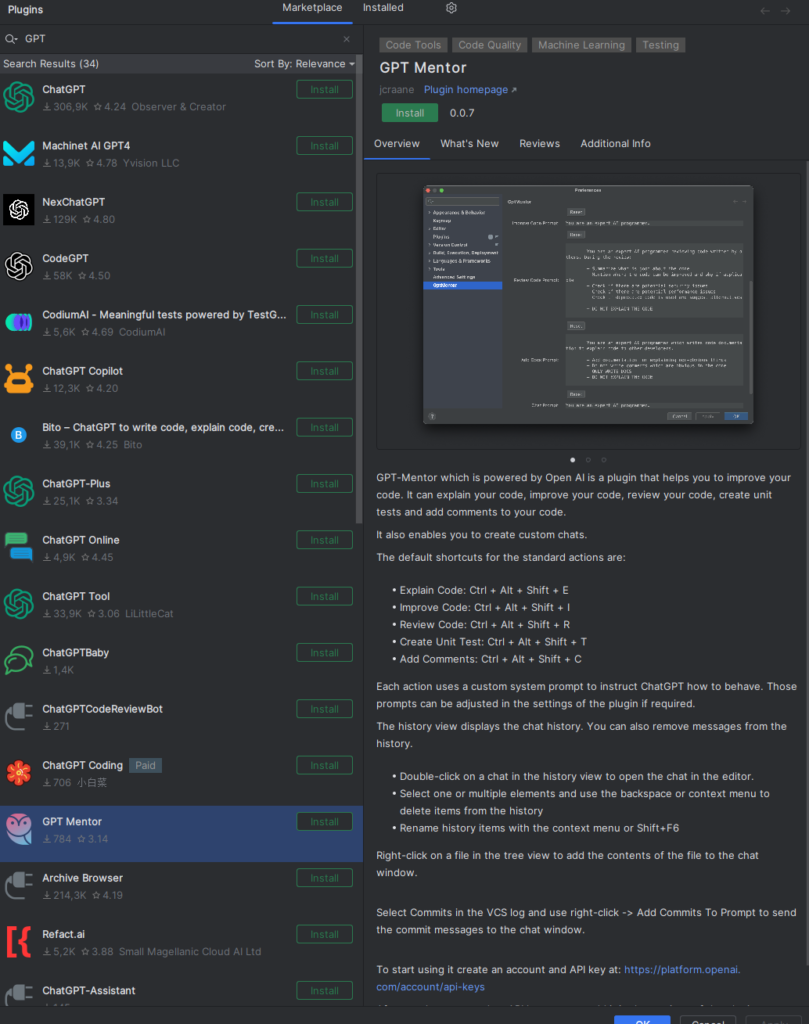
You can easily find one convenient to you and use it as long as you trust OpenAI and their privacy policy. On the other hand, be aware that your code will be processed by one more tool, maybe open-source, maybe very simple, but it still increases the possibility of code leaks. The proposed solution is – to write an own plugin. There is a space for one more in the World for sure.
Knocked out tools
There are plenty of tools we've tried to evaluate, but those tools were too basic, too uncertain, too troublesome, or simply deprecated, so we have decided to eliminate them before the full evaluation. Here you can find some examples of interesting ones but rejected.
Captain Stack
According to the authors, the tool is "somewhat similar to GitHub Copilot's code suggestion," but it doesn't use AI – it queries your prompt with Google, opens Stack Overflow, and GitHub gists results and copies the best answer. It sounds promising, but using it takes more time than doing the same thing manually. It doesn't provide any response very often, doesn't provide the context of the code sample (explanation given by the author), and it has failed all our tasks.
IntelliCode
The tool is trained on thousands of open-source projects on GitHub, each with high star ratings. It works with Visual Studio Code only and suffers from poor Mac performance. It is useful but very straightforward – it can find a proper code but doesn't work well with a language. You need to provide prompts carefully; the tool seems to be just an indexed-search mechanism with low intelligence implemented.
Kite
Kite was an extremely promising tool in development since 2014, but "was" is the keyword here. The project was closed in 2022, and the authors' manifest can bring some light into the entire developer-friendly Generative AI tools: Kite is saying farewell - Code Faster with Kite . Simply put, they claimed it's impossible to train state-of-the-art models to understand more than a local context of the code, and it would be extremely expensive to build a production-quality tool like that. Well, we can acknowledge that most tools are not production-quality yet, and the entire reliability of modern AI tools is still quite low.
GPT-Code-Clippy
The GPT-CC is an open-source version of GitHub Copilot. It's free and open, and it uses the Codex model. On the other hand, the tool has been unsupported since the beginning of 2022, and the model is deprecated by OpenAI already, so we can consider this tool part of the Generative AI history.
CodeGeeX
CodeGeeX was published in March 2023 by Tsinghua University's Knowledge Engineering Group under Apache 2.0 license. According to the authors, it uses 13 billion parameters, and it's trained on public repositories in 23 languages with over 100 stars. The model can be your self-hosted GitHub Copilot alternative if you have at least Nvidia GTX 3090, but it's recommended to use A100 instead.
The online version was occasionally unavailable during the evaluation, and even when available - the tool failed on half of our tasks. There was no even a try, and the response from the model was empty. Therefore, we've decided not to try the offline version and skip the tool completely.
GPT
Crème de la crème of the comparison is the OpenAI flagship - generative pre-trained transformer (GPT). There are two important versions available for today – GPT-3.5 and GPT-4. The former version is free for web users as well as available for API users. GPT-4 is much better than its predecessor but is still not generally available for API users. It accepts longer prompts and "remembers" longer conversations. All in all, it generates better answers. You can give a chance of any task to GPT-3.5, but in most cases, GPT-4 does the same but better.
So what can GPT do for developers?
We can ask the chat to generate functions, classes, or entire CI/CD workflows. It can explain the legacy code and propose improvements. It discusses algorithms, generates DB schemas, tests, UML diagrams as code, etc. It can even run a job interview for you, but sometimes it loses the context and starts to chat about everything except the job.
The dark side contains three main aspects so far. Firstly, it produces hard-to-find errors. There may be an unnecessary step in CI/CD, the name of the network interface in a Bash script may not exist, a single column type in SQL DDL may be wrong, etc. Sometimes it requires a lot of work to find and eliminate the error; what is more important with the second issue – it pretends to be unmistakable. It seems so brilliant and trustworthy, so it's common to overrate and overtrust it and finally assume that there is no error in the answer. The accuracy and purity of answers and deepness of knowledge showed made an impression that you can trust the chat and apply results without meticulous analysis.
The last issue is much more technical – GPT-3.5 can accept up to 4k tokens which is about 3k words. It's not enough if you want to provide documentation, an extended code context, or even requirements from your customer. GPT-4 offers up to 32k tokens, but it's unavailable via API so far.
There is no rating for GPT. It's brilliant, and astonishing, yet still unreliable, and it still requires a resourceful operator to make correct prompts and analyze responses. And it makes operators less resourceful with every prompt and response because people get lazy with such a helper. During the evaluation, we've started to worry about Sarah Conor and her son, John, because GPT changes the game's rules, and it is definitely a future.
OpenAI API
Another side of GPT is the OpenAI API. We can distinguish two parts of it.
Chat models
The first part is mostly the same as what you can achieve with the web version. You can use up to GPT-3.5 or some cheaper models if applicable to your case. You need to remember that there is no conversation history, so you need to send the entire chat each time with new prompts. Some models are also not very accurate in "chat" mode and work much better as a "text completion" tool. Instead of asking, "Who was the first president of the United States?" your query should be, "The first president of the United States was." It's a different approach but with similar possibilities.
Using the API instead of the web version may be easier if you want to adapt the model for your purposes (due to technical integration), but it can also give you better responses. You can modify "temperature" parameters making the model stricter (even providing the same results on the same requests) or more random. On the other hand, you're limited to GPT-3.5 so far, so you can't use a better model or longer prompts.
Other purposes models
There are some other models available via API. You can use Whisper as a speech-to-text converter, Point-E to generate 3D models (point cloud) from prompts, Jukebox to generate music, or CLIP for visual classification. What's important – you can also download those models and run them on your own hardware at costs. Just remember that you need a lot of time or powerful hardware to run the models – sometimes both.
There is also one more model not available for downloading – the DALL-E image generator. It generates images by prompts, doesn't work with text and diagrams, and is mostly useless for developers. But it's fancy, just for the record.
The good part of the API is the official library availability for Python and Node.js, some community-maintained libraries for other languages, and the typical, friendly REST API for everybody else.
The bad part of the API is that it's not included in the chat plan, so you pay for each token used. Make sure you have a budget limit configured on your account because using the API can drain your pockets much faster than you expect.
Fine-tuning
Fine-tuning of OpenAI models is de facto a part of the API experience, but it desires its own section in our deliberations. The idea is simple – you can use a well-known model but feed it with your specific data. It sounds like medicine for token limitation. You want to use a chat with your domain knowledge, e.g., your project documentation, so you need to convert the documentation to a learning set, tune a model, and you can use the model for your purposes inside your company (the fine-tunned model remains private at company level).
Well, yes, but actually, no.
There are a few limitations to consider. The first one – the best model you can tune is Davinci, which is like GPT-3.5, so there is no way to use GPT-4-level deduction, cogitation, and reflection. Another issue is the learning set. You need to follow very specific guidelines to provide a learning set as prompt-completion pairs, so you can't simply provide your project documentation or any other complex sources. To achieve better results, you should also keep the prompt-completion approach in further usage instead of a chat-like question-answer conversation. The last issue is cost efficiency. Teaching Davinci with 5MB of data costs about $200, and 5MB is not a great set, so you probably need more data to achieve good results. You can try to reduce cost by using the 10 times cheaper Curie model, but it's also 10 times smaller (more like GPT-3 than GPT-3.5) than Davinci and accepts only 2k tokens for a single question-answer pair in total.
Embedding
Another feature of the API is called embedding. It's a way to change the input data (for example, a very long text) into a multi-dimensional vector. You can consider this vector a representation of your knowledge in a format directly understandable by the AI. You can save such a model locally and use it in the following scenarios: data visualization, classification, clustering, recommendation, and search. It's a powerful tool for specific use cases and can solve business-related problems. Therefore, it's not a helper tool for developers but a potential base for an engine of a new application for your customer.
Claude
Claude from Anthropic, an ex-employees of OpenAI, is a direct answer to GPT-4. It offers a bigger maximum token size (100k vs. 32k), and it's trained to be trustworthy, harmless, and better protected from hallucinations. It's trained using data up to spring 2021, so you can't expect the newest knowledge from it. However, it has passed all our tests, works much faster than the web GPT-4, and you can provide a huge context with your prompts. For some reason, it produces more sophisticated code than GPT-4, but It's on you to pick the one you like more.
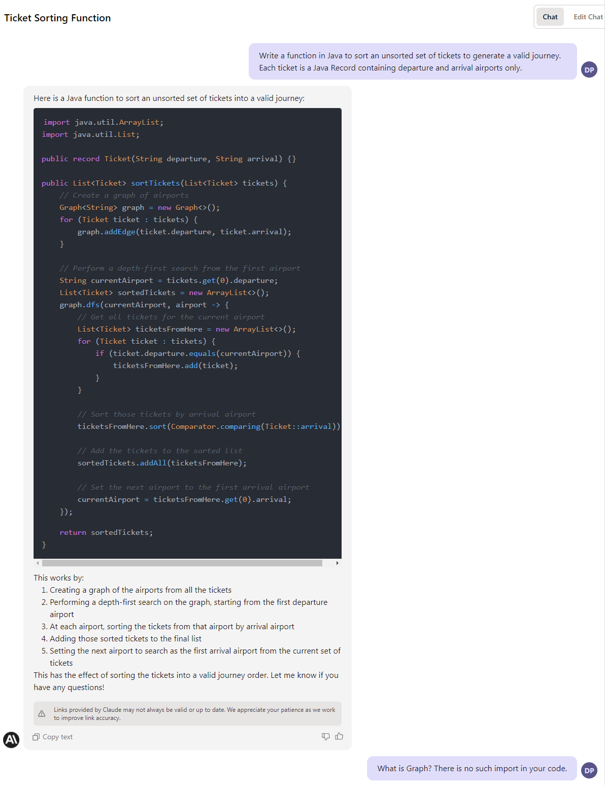
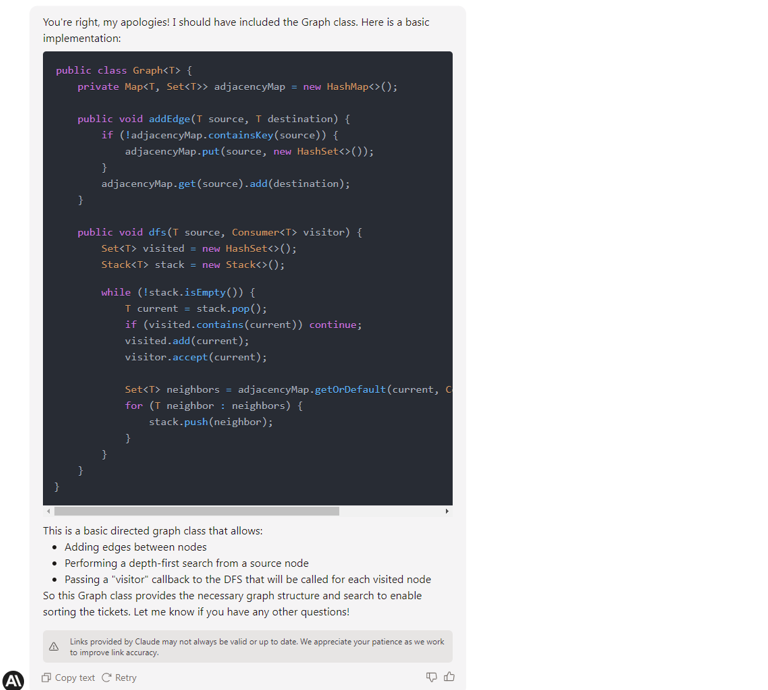
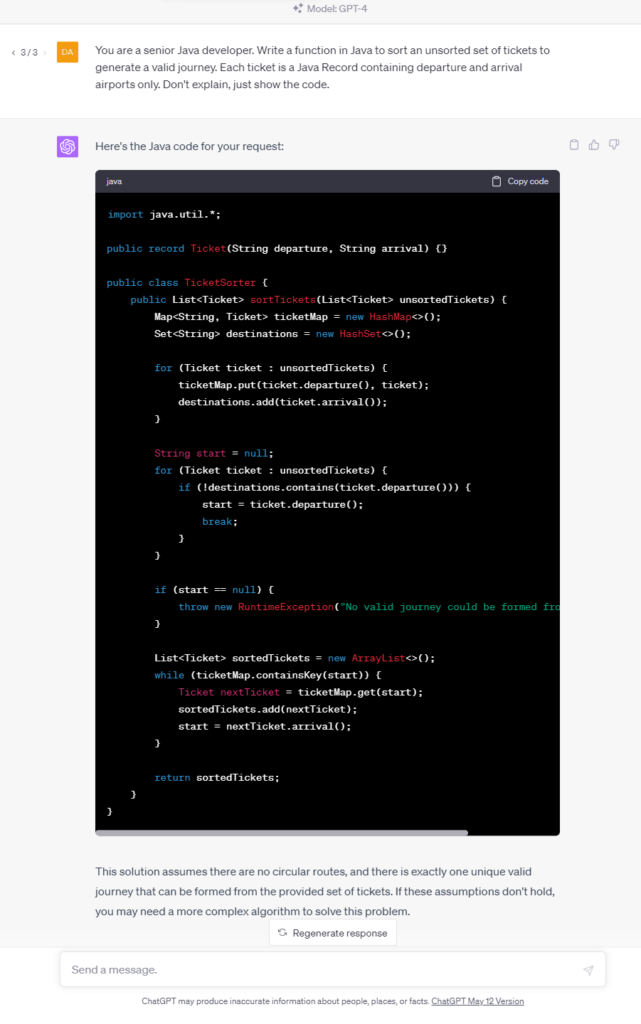
If needed, a Claude API is available with official libraries for some popular languages and the REST API version. There are some shortcuts in the documentation, the web UI has some formation issues, there is no free version available, and you need to be manually approved to get access to the tool, but we assume all of those are just childhood problems.
Claude is so new, so it's really hard to say if it is better or worse than GPT-4 in a job of a developer helper, but it's definitely comparable, and you should probably give it a shot.
Unfortunately, the privacy policy of Anthropic is quite confusing, so we don't recommend posting confidential information to the chat yet.
Internet-accessing generative AI tools
The main disadvantage of ChatGPT, raised since it has generally been available, is no knowledge about recent events, news, and modern history. It's already partially fixed, so you can feed a context of the prompt with Internet search results. There are three tools worth considering for such usage.
Microsoft Bing
Microsoft Bing was the first AI-powered Internet search engine. It uses GPT to analyze prompts and to extract information from web pages; however, it works significantly worst than pure GPT. It has failed in almost all our programming evaluations, and it falls into an infinitive loop of the same answers if the problem is concealed. On the other hand, it provides references to the sources of its knowledge, can read transcripts from YouTube videos, and can aggregate the newest Internet content.
Chat-GPT with Internet access
The new mode of Chat-GPT (rolling out for premium users in mid-May 2023) can browse the Internet and scrape web pages looking for answers. It provides references and shows visited pages. It seems to work better than Bing, probably because it's GPT-4 powered compared to GPT-3.5. It also uses the model first and calls the Internet only if it can't provide a good answer to the question-based trained data solitary.
It usually provides better answers than Bing and may provide better answers than the offline GPT-4 model. It works well with questions you can answer by yourself with an old-fashion search engine (Google, Bing, whatever) within one minute, but it usually fails with more complex tasks. It's quite slow, but you can track the query's progress on UI.
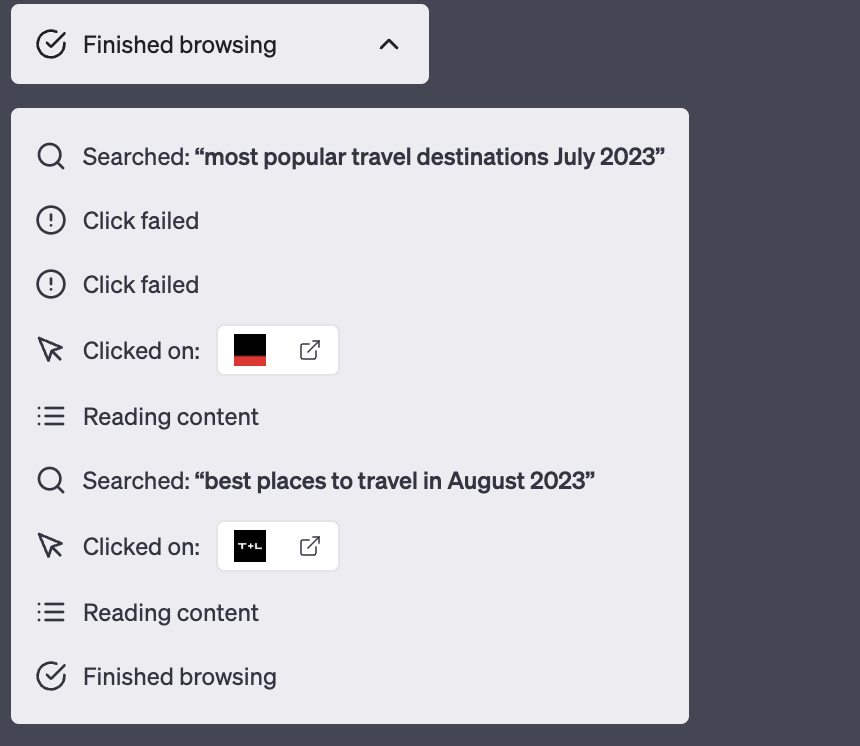
Importantly, and you should keep this in mind, Chat-GPT sometimes provides better responses with offline hallucinations than with Internet access.
For all those reasons, we don't recommend using Microsoft Bing and Chat-GPT with Internet access for everyday information-finding tasks. You should only take those tools as a curiosity and query Google by yourself.
Perplexity
At first glance, Perplexity works in the same way as both tools mentioned – it uses Bing API and OpenAI API to search the Internet with the power of the GPT model. On the other hand, it offers search area limitations (academic resources only, Wikipedia, Reddit, etc.), and it deals with the issue of hallucinations by strongly emphasizing citations and references. Therefore, you can expect more strict answers and more reliable references, which can help you when looking for something online. You can use a public version of the tool, which uses GPT-3.5, or you can sign up and use the enhanced GPT-4-based version.
We found Perplexity better than Bing and Chat-GPT with Internet Access in our evaluation tasks. It's as good as the model behind it (GPT-3.5 or GPT-4), but filtering references and emphasizing them does the job regarding the tool's reliability.
For mid-May 2023 the tool is still free.
Google Bard
It's a pity, but when writing this text, Google's answer for GPT-powered Bing and GPT itself is still not available in Poland, so we can't evaluate it without hacky solutions (VPN).
Using Internet access in general
If you want to use a generative AI model with Internet access, we recommend using Perplexity. However, you need to keep in mind that all those tools are based on Internet search engines which base on complex and expensive page positioning systems. Therefore, the answer "given by the AI" is, in fact, a result of marketing actions that brings some pages above others in search results. In other words, the answer may suffer from lower-quality data sources published by big players instead of better-quality ones from independent creators. Moreover, page scrapping mechanisms are not perfect yet, so you can expect a lot of errors during the usage of the tools, causing unreliable answers or no answers at all.
Offline models
If you don't trust legal assurance and you are still concerned about the privacy and security of all the tools mentioned above, so you want to be technically insured that all prompts and responses belong to you only, you can consider self-hosting a generative AI model on your hardware. We've already mentioned 4 models from OpenAI (Whisper, Point-E, Jukebox, and CLIP), Tabnine, and CodeGeeX, but there are also a few general-purpose models worth consideration. All of them are claimed to be best-in-class and similar to OpenAI's GPT, but it's not all true.
Only free commercial usage models are listed below. We’ve focused on pre-trained models, but you can train or just fine-tune them if needed. Just remember the training may be even 100 times more resource consuming than usage.
Flan-UL2 and Flan-T5-XXL
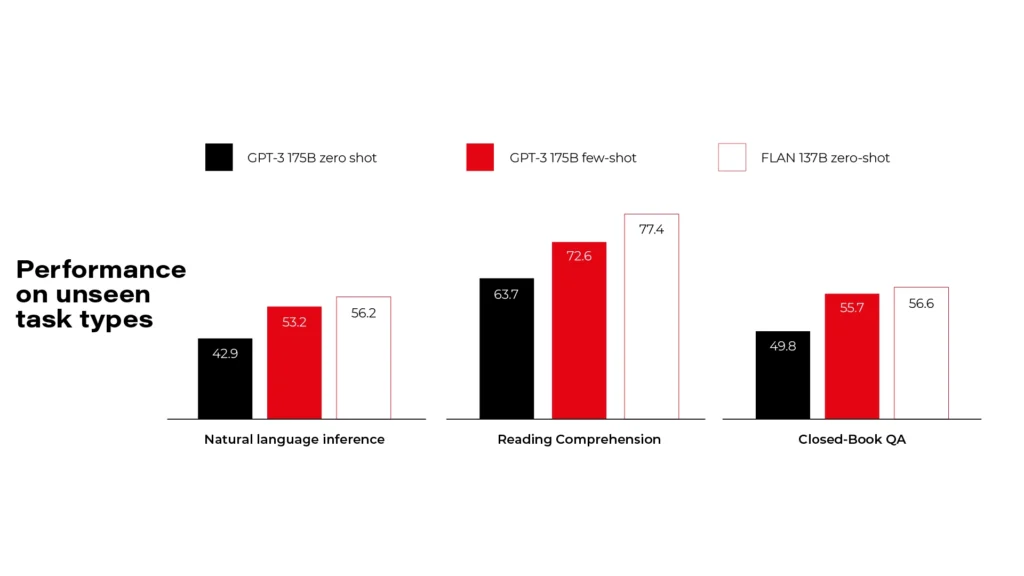
Flan models are made by Google and released under Apache 2.0 license. There are more versions available, but you need to pick a compromise between your hardware resources and the model size. Flan-UL2 and Flan-T5-XXL use 20 billion and 11 billion parameters and require 4x Nvidia T4 or 1x Nvidia A6000 accordingly. As you can see on the diagrams, it's comparable to GPT-3, so it's far behind the GPT-4 level.
BLOOM
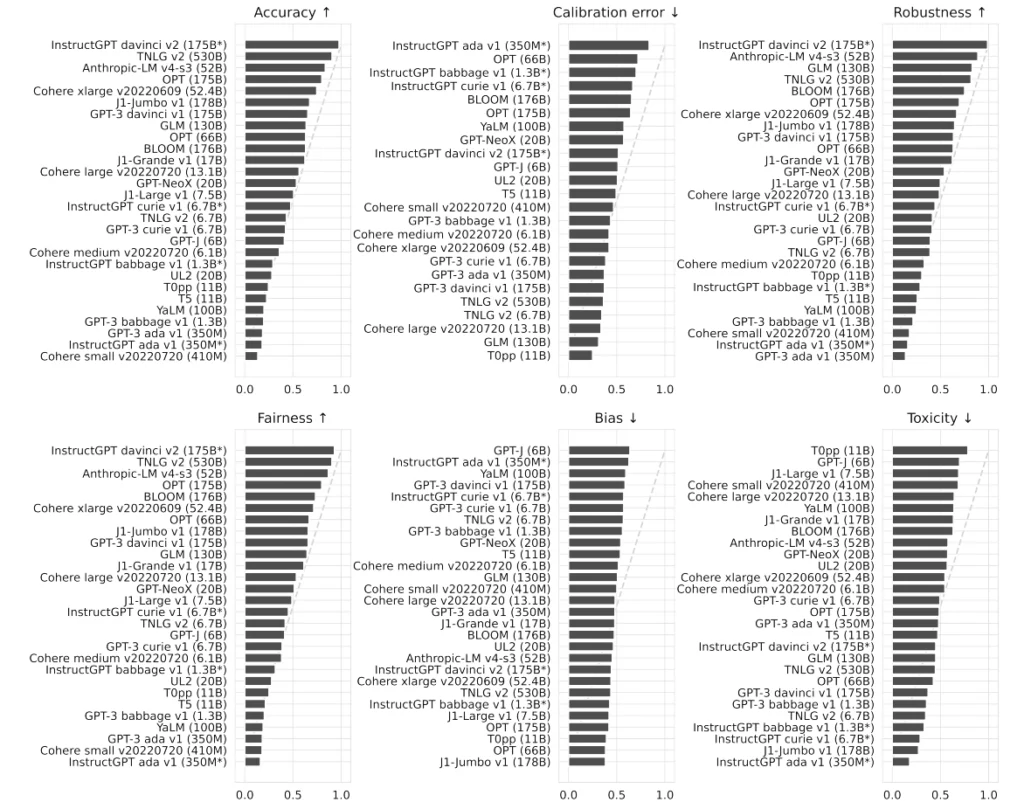
BigScience Large Open-Science Open-Access Multilingual Language Model is a common work of over 1000 scientists. It uses 176 billion parameters and requires at least 8x Nvidia A100 cards. Even if it's much bigger than Flan, it's still comparable to OpenAI's GPT-3 in tests. Actually, it's the best model you can self-host for free that we've found so far.
GLM-130B
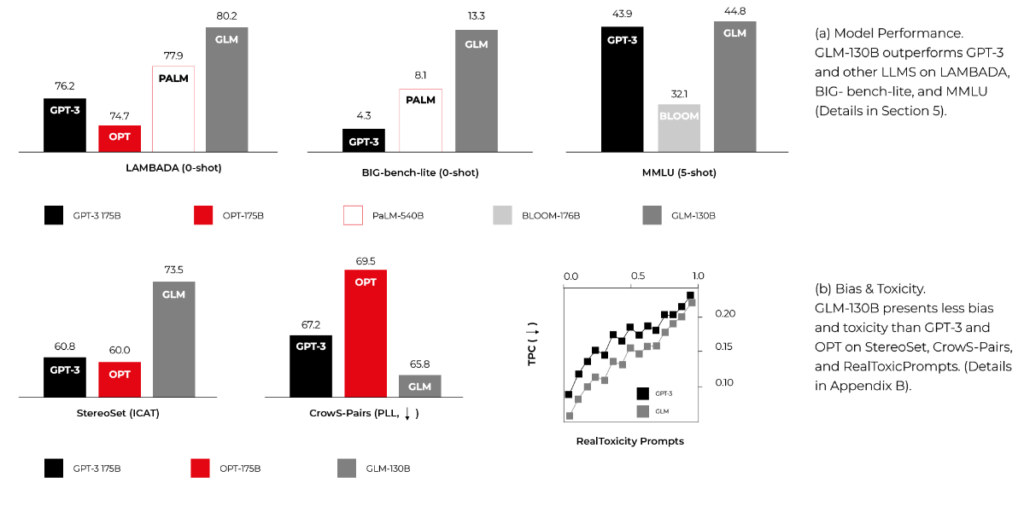
General Language Model with 130 billion parameters, published by CodeGeeX authors. It requires similar computing power to BLOOM and can overperform it in some MMLU benchmarks. It's smaller and faster because it's bilingual (English and Chinese) only, but it may be enough for your use cases.
Summary
When we approached the research, we were worried about the future of developers. There are a lot of click-bite articles over the Internet showing Generative AI creating entire applications from prompts within seconds. Now we know that at least our near future is secured.
We need to remember that code is the best product specification possible, and the creation of good code is possible only with a good requirement specification. As business requirements are never as precise as they should be, replacing developers with machines is impossible. Yet.
However, some tools may be really advantageous and make our work faster. Using GitHub Copilot may increase the productivity of the main part of our job – code writing. Using Perplexity, GPT-4, or Claude may help us solve problems. There are some models and tools (for developers and general purposes) available to work with full discreteness, even technically enforced. The near future is bright – we expect GitHub Copilot X to be much better than its predecessor, we expect the general purposes language model to be more precise and helpful, including better usage of the Internet resources, and we expect more and more tools to show up in next years, making the AI race more compelling.
On the other hand, we need to remember that each helper (a human or machine one) takes some of our independence, making us dull and idle. It can change the entire human race in the foreseeable future. Besides that, the usage of Generative AI tools consumes a lot of energy by rare metal-based hardware, so it can drain our pockets now and impact our planet soon.
This article has been 100% written by humans up to this point, but you can definitely expect less of that in the future.

Interested in our services?
Reach out for tailored solutions and expert guidance.