
Model Context Protocol for Manufacturing: A Spring Boot Guide

Manufacturing and automotive companies sit on rich operational data. Equipment telemetry, maintenance logs, parts catalogs, production metrics, quality reports - it is all there, locked behind custom APIs, ERP systems, and internal databases. The data exists. The challenge is making it reachable by an AI application.
Today, connecting a large language model to your internal systems means writing custom glue code for every data source. You build a REST endpoint, parse the response, format it into a prompt, handle errors, and hope the model calls it correctly. Multiply that by dozens of internal services and the integration tax adds up fast.
Model Context Protocol (MCP) standardizes this. This guide shows how to expose manufacturing operations data to AI using MCP on Spring Boot 4 and Spring AI 2.0 - and, more importantly, how to do it without handing an autonomous model the keys to systems your plant actually runs on.
Key takeaways
- MCP is to AI integration what REST was to service communication: one contract, so any AI client can reach any data source without bespoke glue code per system.
- Your existing Spring Boot services become AI-accessible by adding annotations to methods that already exist. No rewrite, no stack change, no separate Python platform.
- The valuable questions in operations live in the join between systems - the ones no dashboard was designed to answer.
- The server authorizes callers; the client authorizes people. Filter the tool set by role rather than redacting data fields - a capability the model does not have cannot be prompted into existence.
- Every state-changing action needs a structural approval gate, not a polite instruction in a system prompt.
Front note: this article reflects Spring AI 2.0, MCPJava SDK 2.0 and MCP protocol revision 2025-11-25.The MCP maintainers published 2026-07-28 as final onschedule, introducing a stateless protocol core, an extensions framework andhardened authorization. It replaces 2025-11-25as the current specification, but publication does not switch anything off:deprecated features carry a minimum twelve-month window, and SDKs adopt attheir own pace. Everything in this article holds as written; if you aredesigning a deployment now, read the newer revision before you commit tosession-dependent infrastructure.
What is Model Context Protocol (MCP)?
Model Context Protocol (MCP) is an open protocol that standardizes how AI applications connect to external data sources and tools. An MCP server exposes your business data and operations as tools, resources, and prompts. An MCP client - the AI application - discovers them automatically at runtime and lets the model invoke them on its own. Instead of writing custom integration code for each system and each AI application, you implement the protocol once on each side.
Anthropic released MCP in November 2024. It has since become the default integration layer for agentic systems, with SDKs in TypeScript, Python, Java, and other languages.
Why Java and Spring Boot teams should care now
Spring AI 2.0 reached general availability on June 12, 2026, built on Spring Boot 4 and Spring Framework 7, with MCP support folded into the framework itself - the MCP annotations that used to live in a community library are now part of Spring AI core. The MCP Java SDK was built by the Spring team and contributed to Anthropic, so Java and Spring Boot - the backbone of enterprise manufacturing software - are first-class MCP citizens.
You do not need to switch stacks. Your existing Spring Boot expertise applies directly.
Where this pattern applies in manufacturing
Before the code, the business scan. The architecture in this article fits any place where operational data sits behind an internal API and people ask ad-hoc questions the reporting layer never anticipated. Four common shapes:
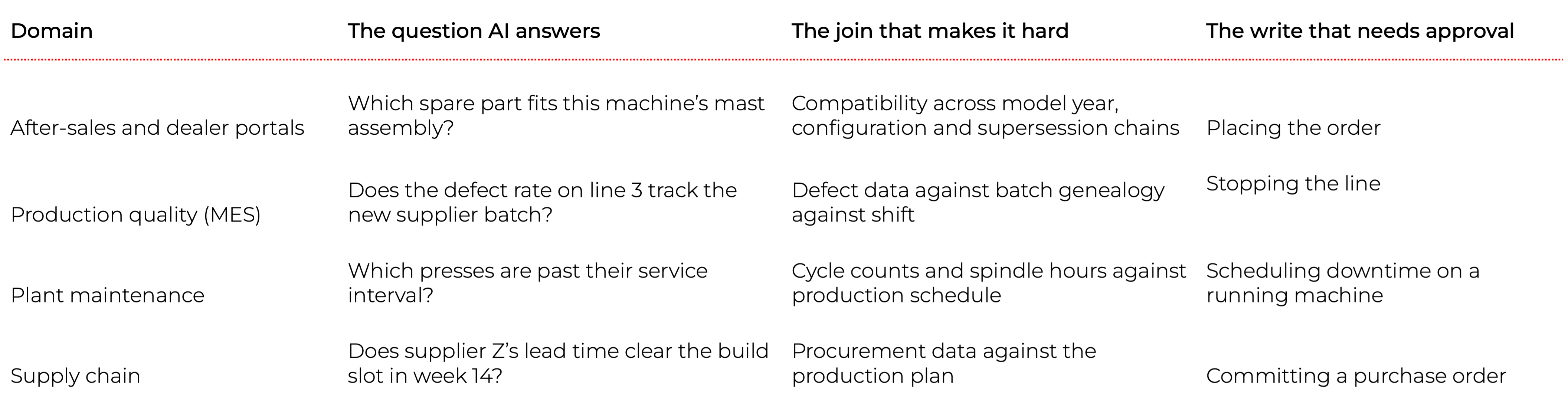
Every row has the same two properties: the answer requires joining systems that do not know about each other, and the corresponding action is one a human should sign off on. That is the shape this article solves.
We will build it on one concrete case - an assistant for an intralogistics fleet, the lift trucks, operators and shifts that move goods inside a warehouse. Forty-two lift trucks, 60 operators, three shifts, two halls. A supervisor asks “do I have enough working trucks for the night shift?” and gets a real answer computed from live data.
The forklifts are an example, not the point. Pick whichever domain you actually own; the architecture does not change.
What this article covers
- An MCP server in Spring Boot exposingnine tools, two resources and two prompts over Streamable HTTP
- An MCP client that filters the tool setby the caller’s role, and parks state-changing calls behind a human approvalgate
- A chat UI with streamed responses, a rolepicker and approval cards
- Three ideas worth stealing: expose the data,not the answers; let the server describe and the client decide; structurebeats instruction
Built on: Java 21, Spring Boot 4.1, Spring AI 2.0,MCP Java SDK 2.0.
The gap: a question no dashboard can answer
Fleet management systems come with dashboards. There is a truck availability screen, a maintenance backlog screen, a shift roster. Each one is well designed. None of them answers the supervisor’s actual question, because the answer lives in the intersection:
- how many trucks are physically available,
- minus those carrying an open high-priority fault,
- minus those past their service interval,
- compared against what the shift plan actually calls for - per truck type
A dashboard answers the questions its designer anticipated. The supervisor’s questions are ad-hoc, and they cut across four systems at once. That is the gap MCP fills: you expose the underlying data as tools and let the model do the joining, instead of building a fifth screen for every new question.
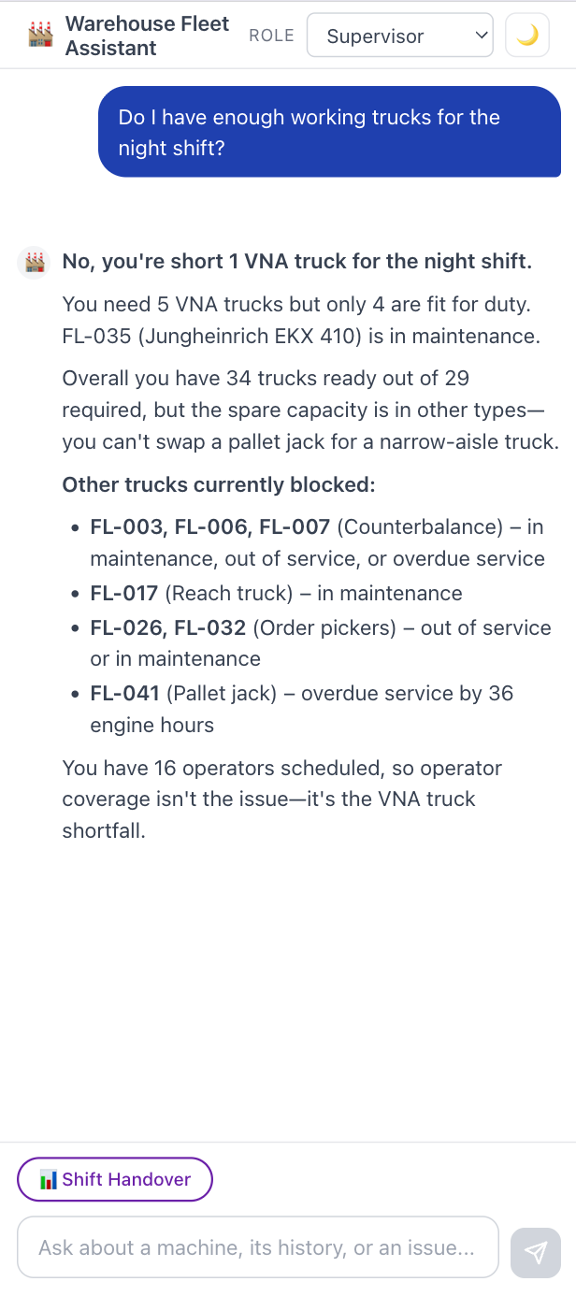
Here is what our finished assistant says:
34 trucks are fit for duty against 29 required - comfortable overall. But the night shift is one narrow-aisle truck short: the plan needs 5, only 4 are fit, because FL-035 is in maintenance. A spare pallet jack does not cover that.
Note what makes that answer useful. The headline number looks fine. The problem is a type mismatch buried two joins deep - exactly the kind of thing a human notices at 21:55 and not before.
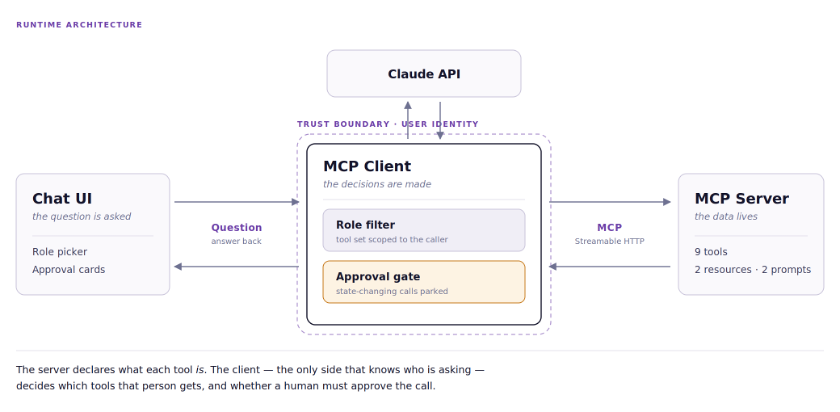
How MCP works: host, client and server
MCP follows a host → client → server architecture:
- Host - the application the user interacts with (our chat UI)
- Client - maintains a 1:1 connection with an MCP server and handles protocol negotiation
- Server - exposes your domain data and operations to AI
Tools vs resources vs prompts: how to choose
Each MCP server can expose three kinds of primitive. The distinction is who initiates the call.

For transport, MCP supports STDIO (for local and CLI tools launched as a subprocess) and Streamable HTTP (for deployed services). We use Streamable HTTP, since our server runs as a standalone Spring Boot application.
If you have built REST APIs, MCP will feel familiar - with one key difference: the LLM discovers and invokes your endpoints autonomously, based on their descriptions. You do not wire up explicit API calls. You describe what a tool does, and the model decides when to use it.
There is a second difference that matters more than it first appears, and we will return to it: a tool can describe not just what it does, but what kind of thing it is - whether it only reads, or whether it changes something. That declaration is what lets a client put a human in the loop.
If Spring AI itself is new to you, our introduction to Spring AI for Java developers covers the framework fundamentals this article builds on.
What the stack requires
Spring AI 2.0 requires Spring Boot 4 - it will not load in a 3.x context, so this is one upgrade decision rather than two. Spring Boot 4.1 requires Java 17 or later and supports up to Java 26. We are on Java 21.
One timing note for teams still on Boot 3.x: Spring Boot 3.5 and Spring Framework 6.2 reached end of life on June 30, 2026. If you were waiting for Spring AI 2.0 before planning that migration, the wait is over and the runway is not generous.
Dependencies are unremarkable. The MCP server needs exactly one starter, spring-ai-starter-mcp-server-webmvc. The client needs three: the MCP client starter, the model integration, and web support. That last one deserves a word, because it looks like cargo cult: the client pulls in both web and webflux. The application is a servlet-stack MVC app; WebFlux is there for Flux, which is how Spring AI’s streaming API returns tokens and how we emit them as Server-Sent Events. We are not running a reactive application - we are using the reactive types on an MVC stack.
The use case: warehouse fleet operations
Our scenario: a distribution center runs 42 lift trucks - counterbalance trucks, reach trucks, order pickers, very-narrow-aisle (VNA) trucks and powered pallet jacks - across two halls, worked by 60 operators on three shifts.
The people asking questions are not analysts. They are a shift supervisor, a health-and-safety officer, a fleet manager and a maintenance technician. Each has a job to finish and no interest in the data model.
We implement six things they actually do, plus three lookup tools that the others lean on:
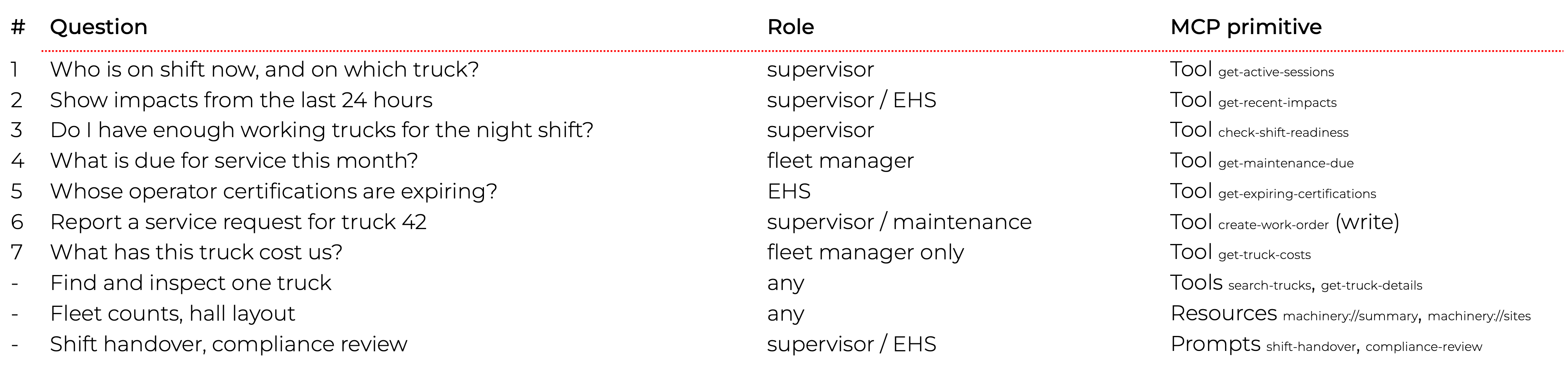
Nine tools in total. Row 7 looks like a detail and turns out to carry the whole authorization argument later on - cost visibility is granted by handing out a tool, not by hiding a field.
The data model is deliberately wider than these questions - trucks, operators, sessions, impacts, inspections, work orders, maintenance schedules, certifications, zones, shifts and cost entries. Only some of it is reachable through tools. That is the point: adding the next question is a dozen lines of Java, not a new screen.
MCP server: exposing operations as tools
The domain model earns its keep
Two modeling decisions do most of the work, and neither is about AI.
Service intervals are counted in engine hours, not calendar days. A truck running three shifts reaches its interval far sooner than one that sits idle. Model it as a next-service date and you get a maintenance queue that is quietly wrong - plausible, sorted, and misleading. So the truck record carries engineHours, and the schedule computes against it:
public record MaintenanceSchedule(
        String truckId,
        int intervalHours,
        int hoursAtLastService,
        LocalDate lastServiceDate,
        String serviceType
) {
    public int hoursUntilDue(int currentEngineHours) {
        return intervalHours - (currentEngineHours - hoursAtLastService);
    }

    public boolean isOverdue(int currentEngineHours) {
        return hoursUntilDue(currentEngineHours) <= 0;
    }
}
This is where domain modeling meets the AI application. When a user asks “what is due this month?”, they are asking a calendar question about an hours-based process. Somebody has to bridge that, and the honest place to do it is the tool description - more on that shortly.
The staffing plan is per truck type, not a single headcount. A shift carries a Map<TruckType, Integer> of what it requires, not one number. That single choice is what turns question 3 from arithmetic into something worth asking a computer, because it is what surfaces “plenty of trucks, wrong kind.”
In a real system this layer would be JPA repositories or calls to your fleet management API. The MCP annotations do not care where the data comes from.
Tools: how to write descriptions the model can act on
Tools are the primitive the LLM actually calls. Stat with the simplest useful one:
@McpTool(name = "get-active-sessions",
        description = "Show who is currently logged onto which truck, and where. "
                + "Use for questions like 'who is on shift right now and on what truck', "
                + "'who is driving FL-017', or 'how many operators are working in Hall B'.",
        annotations = @McpAnnotations(readOnlyHint = true, destructiveHint = false))
public OnShiftNow getActiveSessions() {
    // resolve the current shift, map active sessions to a typed record
}
Four things to notice.
1. Tool descriptions are critical. The LLM reads these to decide when to call each tool. Include natural-language examples of the queries that should trigger it. Write them as if explaining to a new colleague when to use this function.
2. Return records, not maps. Spring AI derives the tool’s output schema from the return type. A record gives the model a named, typed shape; Map<String, Object> gives it a guess.
3. Describe the parameters too. A tool description tells the model when to call; @McpToolParam tells it what to put in. This is where you spend your accuracy budget, because a well-chosen tool called with a nonsense argument still gives a wrong answer:
@McpToolParam(description = "Include trucks with at most this many engine hours left "
        + "before service. Defaults to 150 (roughly one month).", required = false)
Integer withinEngineHours
Mark optional parameters required = false and state the default in prose. A model that knows a parameter is optional will leave it out; a model that does not will invent a value.
4. annotations = @McpAnnotations(readOnlyHint = true, ...). This tool only reads. That declaration travels to the client over the protocol, and we are going to build on it.
The interesting tool is question 3, because it exists purely to do a join no dashboard does:
@McpTool(name = "check-shift-readiness",
        description = "Assess whether enough trucks are fit for duty for a given shift, broken "
                + "down by truck type. Combines four separate things no single dashboard holds "
                + "together: truck status, open high-priority work orders, engine-hour "
                + "maintenance overruns, and the shift staffing plan. A shift can have plenty "
                + "of trucks overall and still be short of a specific type - a spare pallet "
                + "jack does not cover a missing narrow-aisle truck. Use for 'do I have enough "
                + "working trucks for the night shift', 'are we ready for tomorrow morning', "
                + "or 'what is blocking the fleet'.",
        annotations = @McpAnnotations(readOnlyHint = true, destructiveHint = false))
public ShiftReadiness checkShiftReadiness(
        @McpToolParam(description = "Shift name or id - 'Night', 'Morning', 'Afternoon', "
                + "or SHIFT-1/2/3. Defaults to the shift after the current one.", required = false)
        String shift
) { /* ... */ }
Two details in that signature do real work. The default is the next shift, not the current one - at 21:55 a supervisor asking about readiness means the shift that is about to start. And the parameter accepts both the human name and the internal id, because the model will produce whichever the user said.
The logic that makes the tool worth calling is one small method - the definition of “fit for duty” that no single system owns:
sealed interface Blocker {
    record Status(Truck.TruckStatus status) implements Blocker {}
    record HighPriorityFault(String workOrderId) implements Blocker {}
    // negative, like MaintenanceSchedule.hoursUntilDue — one sign convention everywhere
    record PastService(int hoursUntilDue) implements Blocker {}
}

// ordersForTruck and schedule are resolved by the caller, once per fleet scan
private Optional<Blocker> blockingReason(Truck truck,
                                         List<WorkOrder> ordersForTruck,
                                         MaintenanceSchedule schedule) {
    if (truck.status() != Truck.TruckStatus.OPERATIONAL) {
        return Optional.of(new Blocker.Status(truck.status()));
    }
    // deliberate precedence: status, then faults, then service overruns.
    // A supervisor gets the hardest blocker, not a list of all of them.
    Optional<WorkOrder> fault = ordersForTruck.stream()
            .filter(order -> order.priority() == WorkOrder.Priority.HIGH)
            .findFirst();
    if (fault.isPresent()) {
        return Optional.of(new Blocker.HighPriorityFault(fault.get().id()));
    }
    if (schedule != null && schedule.isOverdue(truck.engineHours())) {
        return Optional.of(new Blocker.PastService(schedule.hoursUntilDue(truck.engineHours())));
    }
    return Optional.empty();
}
A truck can be OPERATIONAL and still be unfit - carrying a high-priority fault, or past its service interval. That distinction is business logic, it lives on your side, and it is precisely the sort of thing you were never going to get from a generic “query my database” integration. It is also the single most testable method in the codebase: pure inputs, one string out, no protocol involved.
And question 4 shows how to answer a calendar question honestly when the underlying process is not calendar-based:
@McpTool(name = "get-maintenance-due",
        description = "Maintenance queue ordered by engine hours remaining, not by calendar date - "
                + "a truck running three shifts reaches its interval far sooner than an idle one. "
                + "Overdue trucks come back with a negative value. About 150 engine hours is a "
                + "month of two-shift use, so use ~150 for 'what is due this month'.",
        annotations = @McpAnnotations(readOnlyHint = true, destructiveHint = false))
public MaintenanceQueue getMaintenanceDue(Integer withinEngineHours) { /* ... */ }
The conversion factor lives in the description. The model reads it and translates “this month” into the parameter the domain actually supports - and, in practice, explains the translation back to the user. You are teaching the model your domain in the place where it will actually read.
Read-only and mutating tools are different animals
Eight of our tools read. One writes. That difference deserves to be visible in the code, so the write tool lives alone in its own class:
@McpTool(name = "create-work-order",
        description = "Raise a service request against a truck. Creates a work order that "
                + "maintenance will pick up, so it changes fleet state. Use when the user asks "
                + "to report a fault or request service, e.g. 'report a hydraulic leak on truck 42' "
                + "or 'raise a work order for FL-017'.",
        annotations = @McpAnnotations(readOnlyHint = false, destructiveHint = true))
public WorkOrderCreated createWorkOrder(
        @McpToolParam(description = "Truck id or number, e.g. FL-042, 'truck 42' or just '42'.",
                required = true) String truckReference,
        @McpToolParam(description = "What is wrong with the truck, in the operator's own words.",
                required = true) String description,
        @McpToolParam(description = "Priority: LOW, MEDIUM or HIGH. Defaults to MEDIUM.",
                required = false) String priority,
        @McpToolParam(description = "Who is reporting it - operator id or name. Optional.",
                required = false) String reportedBy
) { /* ... */ }
destructiveHint = true is the whole point of this section. The server is stating what the tool is. It is not deciding what to do about it - the server has no idea who is asking or what your approval policy is. That decision belongs to the client, and we will get there.
Two smaller things worth copying. The tool returns a record describing what it created, not a status string: the model needs the new work order id to tell the user what happened. And truck lookup accepts "FL-042", "truck 42" or just "42", because users say “truck 42” - making the tool tolerant of that is cheaper than hoping the model always normalizes.
Resources and prompts
Resources provide read-only data that the application - not the model - pulls. Ours aggregates fleet-wide counts by type and status, engine-hour statistics, maintenance overruns and open work order totals, and returns it as JSON under machinery://summary.
When to use a resource instead of a tool: use a resource when the data is a snapshot the application wants to display or inject into context. Use a tool when the LLM needs to query with parameters. Resources are pulled by the application; tools are called by the model.
Prompts are user-driven: someone picks one deliberately. Ours belong to roles - a supervisor hands over a shift, an EHS officer reviews compliance:
@McpPrompt(name = "shift-handover",
        description = "Shift handover briefing for a supervisor: what is running, what broke, "
                + "and what the incoming shift needs to know")
public GetPromptResult shiftHandover(
        @McpArg(name = "shift", description = "Shift being handed over - 'Morning', "
                + "'Afternoon', 'Night'. Defaults to the current shift.", required = false)
        String shift
) {
    Shift current = resolveShift(shift);
    var readiness = fleetQueryTools.checkShiftReadiness(current.name());
    // ... assemble the data block, then wrap it in a user-role message
}
That second line is a lesson learned the hard way. The first version of this prompt handed the model raw counts - trucks by status, the staffing plan, a list of blockers - and asked it to judge readiness. It confidently subtracted operators from trucks and reported the fleet as 13 trucks short. Prompts are pre-loaded with data, so give the model the conclusion your code already computed, not the ingredients. Reusing the same method that backs check-shift-readiness also means there is exactly one definition of “ready” in the system.
Server configuration
Minimal - Spring AI auto-discovers annotated components:
spring:
  ai:
    mcp:
      server:
        name: warehouse-fleet-server
        type: SYNC
        protocol: STREAMABLE
        capabilities:
          tool: true
          resource: true
          prompt: true
Start it and you have an MCP server exposing nine tools, two resources and two prompts over Streamable HTTP at /mcp. The startup log confirms the counts, which is a surprisingly useful sanity check when you add a tool and nothing happens.
Building the AI application (the MCP client)
The client points at the server and picks a model:
spring:
  ai:
    mcp:
      client:
        streamable-http:
          connections:
            fleet-server:
              url: http://localhost:8081/mcp
    anthropic:
      api-key: ${ANTHROPIC_API_KEY}
      chat:
        options:
          model: claude-haiku-4-5
ToolCallbackProvider is auto-configured by Spring AI from that connection - it discovers every tool from every connected server at startup. You do not map tool calls yourself; the framework handles discovery, invocation and feeding results back into the conversation.
So the obvious thing to write is a ChatClient with the whole provider wired in as a default:
// what you would write first - and what we deliberately do not do
this.chatClient = ChatClient.builder(chatModel)
        .defaultTools(toolCallbackProvider)
        .defaultSystem(BASE_SYSTEM_PROMPT)
        .build();
Our ChatClient has no defaultsat all:
this.chatClient = ChatClient.builder(chatModel).build();Everything - system prompt and tool list - is supplied per request, and the reason is a failure mode rather than a style preference. A default tool set is the state the application falls back to when per-request scoping goes wrong: a role that resolves to nothing, a filter that matches nothing, a refactor that drops a line. If the default is “every tool from every server,” each of those bugs fails open, and the first symptom is an EHS officer filing work orders. With no defaults, the same bugs fail closed: the model gets an empty tool list and says it cannot help. That is a loud, harmless, five-minute bug.
When a supervisor asks “who is on shift right now?”:
- The message arrives as a streaming request
- Spring AI sends it to the model with the tool definitions for that request
- The model decides to call get-active-sessions
- Spring AI routes the call over MCP to our server
- The server executes and returns typed records
- The model turns them into prose
- The response streams back to the UI
All inside one chatClient.prompt(...).stream().content() call.
That is the happy path, and it is where most MCP tutorials stop. Two things are missing before you would put this in front of a warehouse.
Role-based access: who is allowed to ask?
A supervisor should not see cost data. An EHS officer should not create work orders. In our demo the role is a dropdown; in your system it comes from your identity provider. Either way, the role belongs to the client - our MCP server has no idea who is asking, and does not need to.
The important design decision is what the role filters. It is tempting to filter the data: call the tool, then strip the fields the user should not see. Do not. Filter the tool set:
public enum FleetRole {

    SUPERVISOR("Supervisor",
            Set.of("get-active-sessions", "get-recent-impacts", "check-shift-readiness",
                    "create-work-order", "search-trucks", "get-truck-details"),
            Set.of("shift-handover")),

    EHS("EHS officer",
            Set.of("get-recent-impacts", "get-expiring-certifications",
                    "search-trucks", "get-truck-details"),
            Set.of("compliance-review")),

    FLEET_MANAGER("Fleet manager",
            Set.of("get-maintenance-due", "check-shift-readiness", "get-truck-costs",
                    "search-trucks", "get-truck-details"),
            Set.of("shift-handover")),

    MAINTENANCE(/* ... */);
}
Then scope each request to the caller:
return chatClient.prompt()
        .system(BASE_SYSTEM_PROMPT + "\n\n" + role.briefing())
        .user(request.message())
        .tools(toolAccess.toolsFor(role).toArray())
        .stream()
        .content();
Each turn is scoped to whoever is asking, rather than to whatever the application booted with. The role also carries a short briefing appended to the system prompt - not as a security measure, but so the assistant’s tone matches the job. Telling the model “you are helping a supervisor on the floor” changes how it answers; it is the tool list that changes what it can answer.
Why is filtering tools better than filtering fields? Because an absent capability cannot be argued with. An EHS officer’s model has no work-order tool in its context at all - there is no prompt, however clever, that produces one. A redacted field, by contrast, is a negotiation you have invited the model into.
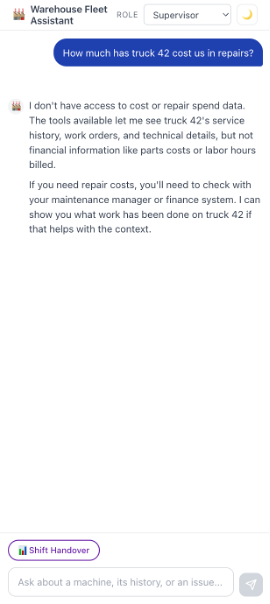
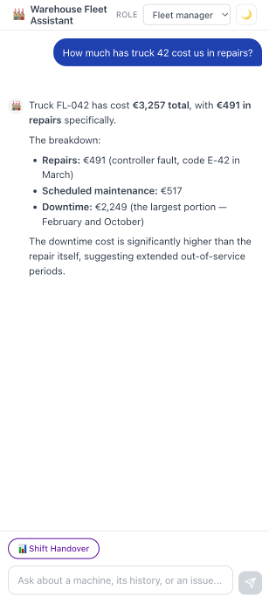
Cost visibility shows the pattern at its clearest. Rather than putting a totalCostEur field on get-truck-details and stripping it per role, costs live behind their own tool, get-truck-costs, handed only to the fleet manager. One mechanism, used for every permission. Ask the same question in two roles and the difference is visible in the transcript:
Supervisor - “How much has truck 42 cost us in repairs?” I do not have access to cost or repair budget data. What I can tell you about truck 42 is its status and maintenance history, any open work orders, service position and engine hours…
Fleet manager - same question Truck 42 (FL-042, a Still EXU 20) has cost €3,257 total: repairs €491, scheduled maintenance €517, downtime €2,249. The biggest hit is downtime - over two-thirds of the total.
The supervisor gets an honest refusal and a useful alternative, not a hallucinated number. That behavior is a consequence of the architecture, not of prompt engineering.
When the server needs to know too
Client-side filtering is the right default when the MCP server is internal and the application owns user identity - which is our case, and probably yours. It is not the whole story, and the two approaches are complementary rather than competing.
Once a server is shared across teams, exposed beyond your network, or reached by clients you do not control, it can no longer take the caller’s word for anything. Then the server has to authorize as well: verify a token at both tools/list and tools/call, so a caller cannot enumerate capabilities it may not invoke. OAuth 2.0 Token Exchange with token caching is the pattern to reach for, and passing tokens through untouched between layers is both discouraged and forbidden by the specification.
The split is worth stating plainly, because it is easy to assume one replaces the other. The server decides whether a caller is allowed in at all. The client decides which capabilities a given person gets, and whether a human must approve them. A server that authorizes callers still cannot tell a supervisor from a fleet manager inside the same trusted application - that distinction only exists where the session does. Our colleague’s write-up on MCP and A2A assistant architecture goes deeper on the server-side half, including how this works when the caller is another agent.
Human-in-the-loop: putting a person in front ofevery write
Now the harder problem. create-work-order changes state in a system maintenance actually works from. An agent that can file work orders unattended is a support ticket waiting to happen.
Remember that destructiveHint = trueon the server. The client can read it back off the wire:
private static boolean isDestructive(McpSchema.Tool tool) {
    McpSchema.ToolAnnotations annotations = tool.annotations();
    if (annotations == null) {
        return true;
    }
    if (Boolean.TRUE.equals(annotations.readOnlyHint())) {
        return false;
    }
    return !Boolean.FALSE.equals(annotations.destructiveHint());
}
Note the default. A tool that declares nothing is treated as destructive. Guessing wrong in that direction costs a click; guessing wrong the other way costs a work order.
With that, the client wraps every destructive tool in a callback that parks the call instead of running it:
class ConfirmingToolCallback implements ToolCallback {

    @Override
    public String call(String toolInput) {
        var approval = registry.register(toolName, toolInput, delegate);
        return """
                {"status":"awaiting_user_approval","approvalId":"%s",\
                "note":"This action changes fleet state and has NOT been performed. \
                An approval card is now shown to the user. Tell the user what will happen \
                once they approve, and stop - do not call this tool again."}"""
                .formatted(approval.id());
    }
}
The model sees an ordinary tool with an ordinary schema, calls it as usual, and gets back a result saying the action is waiting on a human. Nothing happened on the server. The real callback is invoked from exactly one place - the approval endpoint:
@PostMapping("/api/approvals/{id}/approve")
public ResponseEntity<Map<String, Object>> approve(@PathVariable String id) {
    var approval = registry.claim(id);
    if (approval == null) {
        return ResponseEntity.notFound().build();
    }
    String result = approval.callback().call(approval.arguments());
    return ResponseEntity.ok(Map.of("status", "approved", "result", result));
}
claim removes the entry, soan approval is single-use - a second POST gets a 404.
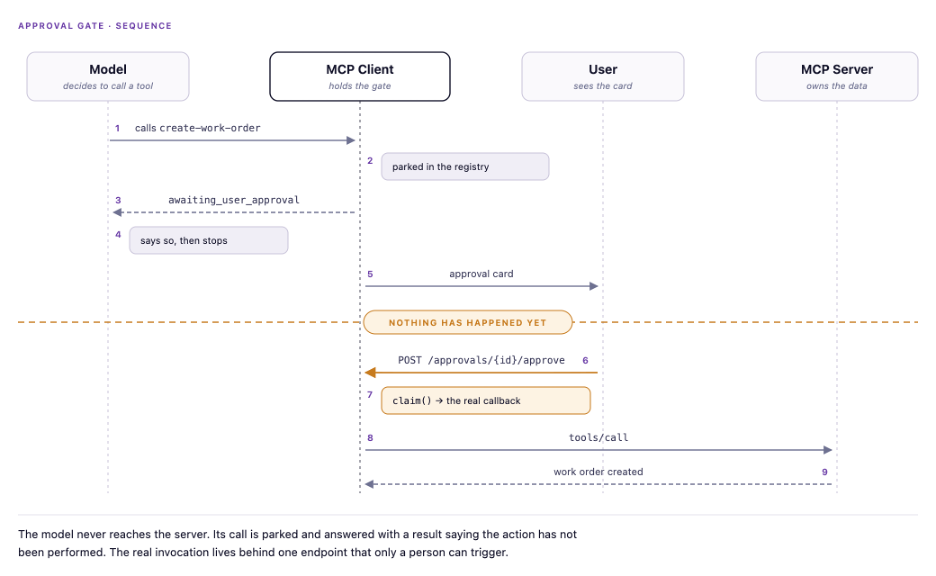
This is the part worth internalizing: the enforcement is structural, not persuasive. A common alternative is a two-step tool pair - draft-work-order then confirm-work-order - which reads nicely but guarantees nothing, because the model can call confirm immediately and no human ever saw the draft. Here the model is not asked to behave. It is not given the ability to misbehave.
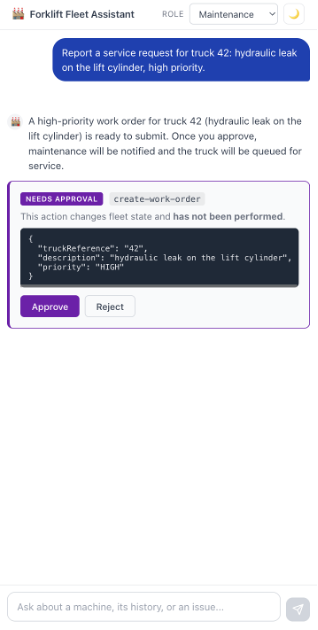
The card is polled after a turn ends rather than pushed down the response stream. Keeping approvals off the stream means the stream stays plain text and no protocol markers get embedded in prose.
What happens after Approve
There is a loose end here that most write-ups of this pattern leave dangling, so let us be explicit about it.
Our chat is stateless per turn: the controller builds a fresh prompt each request and keeps no ChatMemory, so once the model has been told “this is awaiting approval” and stopped, the conversation is over. When the user clicks Approve, the tool runs - but the model never sees the result. It does not get to say “done, that is WO-0043.”
For a demo that is a defensible trade: the write becomes visible the next time anyone asks. Approve a high-priority fault on FL-042, ask about the next shift, and FL-042 now appears among the blockers - because check-shift-readiness counts open high-priority work orders. The state is real, and the assistant reads it like any other data.
For production you have two honest options:
- Resume the tool loop. Keep the conversation and, after approval, feed the tool result back as a ToolResponseMessage so the model closes the turn itself. This is the nicer experience and the more complex plumbing - you are suspending and resuming an in-flight tool call across an HTTP round trip, which means the conversation has to be durable, not just in memory.
- Treat approval as an event. The approval endpoint runs the tool and posts a plain system message into the transcript (“WO-0043 created”). The model never resumes; the UI reports the outcome. Much less machinery, and for an operations assistant where the user is looking at the screen anyway, usually enough.
We took the second shape, minus the transcript message. Which one fits depends on whether your users approve things while watching, or hours later on a phone.
The framework-native alternative: ToolCallingAdvisor
Our gate wraps individual ToolCallback instances. Spring AI 2.0 offers a second, arguably cleaner place to put the same logic, and it landed with the release this article is built on.
In Spring AI 1.x the tool-call loop was embedded inside each ChatModel implementation. Spring AI 2.0 lifts it out into ToolCallingAdvisor, a recursive advisor in the standard ChatClient advisor chain that owns the whole iterate-call-append-resubmit cycle, regardless of model backend. It exposes four hooks - doInitializeLoop, doBeforeCall, doAfterCall and doFinalizeLoop - and the Spring AI reference documentation names an approval gate as a motivating use case for exactly these extension points.
Which should you use? The callback wrapper is simpler and travels with the tool, which suits a gate whose rule is derived from the tool’s own MCP annotation. An advisor sees the whole loop, which suits cross-cutting policy - budget caps, audit events, conditional routing between iterations, or a gate whose rule depends on conversation state rather than on the tool. If your gating logic is going to grow beyond “is this tool destructive,” start at the advisor.
The same release is worth knowing about for a reason we return to under cost: ToolSearchToolCallingAdvisor implements progressive tool disclosure, indexing the tool set once and letting the model retrieve definitions on demand instead of shipping all of them on every request.
A road not taken: MCP elicitation
MCP has a mechanism aimed at this, built into the protocol. Elicitation lets a server ask the client to collect input from the user mid-execution, and Spring AI 2.0 supports it through an @McpElicitation annotation with sync and async variants.
We did not use it, deliberately, and the reasoning is worth more than the conclusion.
With elicitation, the server initiates the question. That is a natural fit when the server needs a missing parameter. But our question is not “what value should I use?” - it is “is this person allowed to authorize this action?” That is an authorization question, and the server does not know who the user is; only the client does. Routing it through the server means the server asks a question whose answer it cannot evaluate, and the client ends up bridging elicitation to a UI anyway.
Spring AI’s own design hints at the same split: @McpElicitation is a client-side handler. The framework already assumes the client is where the user lives. Keeping the gate in the client puts the decision next to the identity it depends on. Elicitation remains the right tool for a different job - a server that genuinely needs to prompt for a value it cannot infer.
Production: what to fix before you ship
Secure the server, but know what that does not cover. Our MCP server is open. In production, secure /mcp with OAuth 2.0 - the MCP specification supports standard HTTP authentication and Spring Security protects it like any REST API. Note the division of labor this article has been building toward: the server authenticates callers, while role-based capability and human approval belong to the client, where user identity lives.
The gate is only as strong as the endpoint in front of it. This is the most important thing to fix before anyone ships this pattern. In the demo, the approve endpoint has no authentication, and approval ids are sequential (APR-1, APR-2), so guessing one is trivial. A gate that any unauthenticated caller can open is theater. Three changes make it real:
- Authorize the approve endpoint against the same role model that handed out the tool in the first place - a role that may not call create-work-order must not be able to approve one.
- Use opaque ids.
- Give parked approvals a TTL, so a card nobody clicked does not sit in memory until someone finds it.
A lenient parse must fall back to the least privileged role. Our role resolver accepts an unknown or missing role rather than failing the request, which keeps the demo forgiving - but it falls back to SUPERVISOR, and supervisor holds create-work-order. In a real deployment that fallback belongs on the most restricted role you have, or on rejecting the request outright. The general rule: lenient parsing and privileged defaults do not belong in the same method.
Do not trust tool names to survive the trip. Spring AI qualifies MCP tool names with the connection name and normalizes separators, so get-active-sessions arrives client-side as something like fleet_server_get_active_sessions. An allowlist written against the server’s names silently matches nothing. Resolve the names you get back from listTools() rather than parsing them by hand. We got lucky: the mismatch failed closed, and every role ended up with zero tools - loud and obvious. It could as easily have failed open.
Tool input validation is on by default in MCP SDK 2.0. Tool inputs are validated against the declared JSON schema, and a failure comes back as a tool result with isError=true rather than an exception. You can opt out, but the default is the one you want.
Watch the quiet half of the Jackson 3 upgrade. Spring Boot 4 moves Jackson to the tools.jackson.* package, which fails at compile time - you fix it and move on. What does not announce itself is that Jackson 3 also changed date serialization and property ordering defaults, so your JSON can change shape silently. Diff your serialized output before and after.
Model choice is a design parameter, not a config value. We developed against claude-haiku-4-5 - fast and cheap, and every tool call routed correctly. What it did not do reliably was the last mile: reading a signed engine-hour value the right way round, keeping truck ids straight across a nine-truck list, holding a numeric breakdown together in prose. The screenshots in this article were captured on Sonnet.
Two lessons. First, “the model calls the right tool” and “the model reports the result correctly” are separate problems with separate fixes - the first is tool descriptions, the second is model capability. Second, budget for it: nine tool definitions ship in every request, so the tool schemas are a fixed input cost on every turn, and trimming the tool set per role is a cost optimization as well as a security one. At larger tool counts this stops being a rounding error - the Spring team cites 10–21K tokens per request for big MCP setups, which is what progressive tool disclosure exists to address.
Watch your units in prose. Our first version reported service overruns in mth - standard shorthand for motohours in the industry. The model read it as “months” and told a supervisor a truck was 25 months overdue. Abbreviations that are unambiguous in your domain are not unambiguous to a model writing English.
Testing. The demo ships without tests, which we would not repeat. Two layers are worth having, and neither needs an LLM in the loop:
- Domain logic first. blockingReason and hoursUntilDue are pure functions and carry the business rules that matter - test them like any other code.
- Then the protocol surface. Point an McpSyncClient at the running server, assert that listTools() advertises what you expect and that readOnlyHint / destructiveHint are set correctly on every tool. That second test is what stops a new tool from silently arriving without annotations - or worse, arriving with a wrong annotation and skipping the gate.
For the broader picture of taking an assistant like this from prototype to something on-call, see our write-up on building a production-ready AI assistant.
Beyond forklifts: what this pattern unlocks
The warehouse fleet is a template. We opened with a table of four domains; here is what each looks like in practice - and in every case the interesting question has the same shape as the supervisor’s: it needs a join, and a human is accountable for the write.
After-sales and dealer portals. “Which spare part fits this truck’s mast assembly?” Wrap the parts catalog as MCP tools and dealers get an assistant instead of a folder of PDFs. The join here is compatibility across model year, configuration and supersession chains - precisely what a search box cannot do. The write to gate is placing the order.
Production quality. “Show the defect rate for assembly line 3 this week, and whether it tracks the new supplier batch.” MES data as tools, the recurring quality report as a prompt. The join is defect data against batch genealogy against shift. The write to gate is stopping the line.
Plant maintenance. The engine-hours pattern transfers directly to presses, conveyors and CNC machines: cycle counts and spindle hours instead of motohours, the same lesson that a calendar-based service queue is quietly wrong. The write to gate is scheduling downtime on a machine somebody else is running.
Supply chain. “What is the lead time for component Y from supplier Z, and does it clear the build slot in week 14?” Tools over procurement, joined against the production plan. The write to gate is committing a purchase order.
Your existing Spring Boot services become AI-accessible without a rewrite: you add annotations to methods that already exist. And one MCP server can serve several clients - a chat UI, a mobile app, a monitoring agent - each applying its own role filter and its own approval policy, because those live on the client side.
It is also the path to agentic workflows. Once tools are exposed over MCP, an agent can chain them: check the maintenance queue → find overdue trucks → raise work orders → notify maintenance. Note that the third step is exactly the one our approval gate guards, and that the gate keeps working when the caller is an agent rather than a person. Capability boundaries you build now are the ones that hold when the loop closes. Our piece on going from chatbot to AI assistant with MCP and A2A picks up where this one stops, at agent-to-agent coordination.
Conclusion: AI-enabled operations in 2026
We built an AI assistant for a warehouse fleet on Spring Boot 4, Spring AI 2.0 and Model Context Protocol:
- An MCP server exposing nine tools, two resources and two prompts over Streamable HTTP, with read-only and destructive tools declared as such
- An MCP client that filters tools by role and parks destructive calls behind a human approval gate
- A chat UI with streamed responses, a role picker and approval cards.
Three ideas are worth taking away, and only the first is about MCP:
- Expose the data, not the answers. The supervisor’s most valuable question - do I have enough trucks? - was never on anyone’s dashboard, because it lives in the join between four systems. You cannot anticipate those questions. You can make the pieces reachable.
- Let the server describe, and the client decide. The server says a tool is destructive. The client, which knows who is asking, decides whether a human must approve it. Neither needs the other’s context.
- Structure beats instruction. A capability the model does not have cannot be prompted into existence. That is a stronger guarantee than any system prompt, and it costs less to maintain.
FAQ
What is Model Context Protocol (MCP)?
MCP is an open protocol that standardizes how AI applications connect to external data sources and tools. An MCP server exposes data and operations as tools, resources and prompts; an MCP client discovers them at runtime and lets a language model invoke them. It replaces per-system integration glue with one shared contract - roughly what REST did for service communication.
How do I connect an LLM to my manufacturing or ERP data without rewriting my systems?
Expose the services you already have as MCP tools. In Spring Boot that means annotating existing methods with @McpTool and describing what they do in plain language; the underlying implementation can stay whatever it is - JPA repositories, REST calls to your MES, a fleet management API. The model discovers the tools and calls them. No data migration and no new platform.
Do I need Spring Boot 4 to use Spring AI 2.0?
Yes. Spring AI 2.0 has a Spring Boot 4 / Spring Framework 7 baseline and will not load in a 3.x context. It is one upgrade decision rather than two, which in practice makes it easier to justify. Spring Boot 4.1 needs Java 17 or later and supports up to Java 26. Note that Spring Boot 3.5 and Spring Framework 6.2 reached end of life on June 30, 2026.
Tools, resources or prompts - how do I choose?
By who initiates. A tool is called by the model, autonomously, usually with parameters - use it when the answer depends on what the user asked. A resource is pulled by the application as a snapshot to display or inject into context. A prompt is chosen deliberately by a user, as a template for a recurring workflow such as a shift handover or a compliance review. If you are unsure, ask who decides that it runs.
How do I stop an AI agent from executing a destructive action without a human?
Do not ask it to wait - remove its ability to proceed. Have the server declare the tool with destructiveHint = true, and have the client wrap such tools in a callback that registers the call and returns “awaiting approval” instead of executing. The real invocation then happens in one place, behind an authorized endpoint. A two-step draft/confirm tool pair looks similar and guarantees nothing, because the model can call confirm itself.
How do I scope MCP tools per user role in Spring AI?
Filter the tool set per request, not the data fields. Resolve the caller’s role from your identity provider, map it to a set of permitted tool names, and pass only those tools into the request. A capability that is absent from the model’s context cannot be argued into existence; a redacted field is a negotiation you have invited the model into. Note that Spring AI qualifies MCP tool names with the connection name, so resolve names from listTools() rather than hardcoding the server’s spelling.
STDIO or Streamable HTTP?
STDIO for local and CLI tools that the host launches as a subprocess. Streamable HTTP for anything deployed as a service, which is the usual enterprise case - it is a normal HTTP endpoint you can secure, load-balance and monitor like any other.
Is MCP ready for enterprise use?
The protocol and the Java SDK are stable enough to build on, and the transport is ordinary HTTP that your existing security stack already understands. The 2026-07-28 revision pushed further in that direction with a stateless core and hardened OAuth alignment. What needs deliberate design is the split this article argues for: the server authenticates callers, while the client owns user identity, capability filtering and approval. Get that boundary wrong and no amount of protocol maturity helps.
Can one MCP server serve more than one AI application?
Yes, and it is one of the main reasons to build one. The server exposes capabilities and declares what each one is; each client applies its own role filter and approval policy. A chat UI, a mobile app and an autonomous agent can share a server while granting very different things.
What does an MCP integration cost to run?
The dominant recurring cost is tokens, and tool definitions are a fixed input cost on every turn - nine tools in this demo, but large MCP setups can spend 10–21K tokens per request on schemas alone. Trimming the tool set per role reduces that as a side effect of the security model. Spring AI 2.0’s progressive tool disclosure addresses the same problem directly through progressive tool disclosure. Model choice matters too: a cheaper model may route tool calls correctly and still garble the numbers in its prose.

Grape Up guides enterprises on their data-driven transformation journey
Ready to ship? Let's talk.
Check related articles
Read our blog and stay informed about the industry's latest trends and solutions.
Interested in our services?
Reach out for tailored solutions and expert guidance.