
Kubernetes supports Windows workloads - the time to get rid of skeletons in your closet has come

Enterprises know that the future of their software is in the cloud. Despite keeping that in mind, many tech leaders delay the process of transforming their core legacy systems. How will the situation change with Kubernetes supporting Windows workloads? Can we assume that companies will leverage the Kubernetes upgrade to accelerate their journey towards the cloud?
How can this article help you?
- You can see what Kubernetes supporting Windows workloads provides for enterprises.
- We remind you why going to the cloud is crucial for your business excellence.
- You can get to know the main reason stopping enterprises from transforming their legacy systems.
- We describe the main risks that come with delaying the transition towards the cloud.
- You learn how to leverage Kubernetes supporting Windows workloads.
Technical debt is an unpleasant legacy you often come into money while taking charges of critical systems or enterprise software older than you. Laying under the cache layer and various interfaces, legacy systems encourage you to forget them. And you are good with it - you have enough tasks to perform and things to manage on a daily basis. Sprint after sprint, your team deals with developing applications and particular features to meet increasing customer demand and sophisticated needs. Initiating a tremendous venture, which may transform into opening Pandora's box, it's not exactly what you want to add to your checklist.
The bad news is that if you're willing to be successful at your job, the clock is ticking. The problem with legacy systems is that you don't know when they break down, causing disaster. You will justify yourself, but the impact on your work will be nightmarish. What you know for sure, legacy systems under applications built by your talented teams hinder further development and make your job harder than it already is.
Whatever you are going to go for it all or don't want to throw yourself in at the deep end - Kubernetes supporting Windows workloads is the news you needed. See how it can accelerate your transition towards the cloud.
What's the deal with Kubernetes supporting Windows workloads
Kubernetes was designed to run Linux containers. Such an approach complicated the transition towards the cloud for enterprises with Windows Server legacy systems. And while over 70% of the global server market is Windows-based (according to Statista), we can see why so many legacy apps are in the closets. If you work at a large enterprise, the chances that you have a few of them hidden carefully are very high.
How supporting Windows workloads by Kubernetes is changing the game? In the - not so much - olden days, Windows-based applications were immovable - they needed to be run on Windows, required Windows server, and access to numerous related databases and libraries. Such a demanding environment encouraged enterprises to wait for better days. And now they have come. Kubernetes, with production support for scheduling Windows containers on Windows nodes in the platform cluster, allows for running these Windows applications, enabling enterprises to modernize and move their apps to the cloud.
It’s believed that with this release, Kubernetes provides enterprises with the opportunity to accelerate their DevOps and cloud transformation . In case you missed 1 mln publications about cloud advantages, we will write up the main points.
Why do enterprises move their legacy applications to the cloud
As promised above, let’s keep it short:
- Scalability - the cloud allows you to easily manage your IT resources, data storage capacity, computing power, and networking (in both ways) without downtimes or other disruptions. Such flexibility supports business growth, product/service development, and better cost management.
- Security - the right set of strategies and policies allow enterprises to build and manage secure cloud environments. Decentralization and support for your cloud stack provide solutions to common challenges in maintaining on-premise infrastructure.
- Maintenance - using cloud services delivered by trusted providers, you don't have to maintain many things on your own, just leveraging available services.
- Accessibility - the pandemic showed us how crucial is remote access to our IT resources, and the cloud provides your remote or distributed teams with easy access regardless of your team members' localization - that is priceless.
- Reliability - cloud providers ensure easier and cheaper data backups, disaster recovery, and business continuity as they use the economy at scale.
- Performance - as the cloud service market is blooming and service providers are competing about increasing revenues, the quality and performance of cloud infrastructure are top-notch.
- Cost-effectiveness - with cloud computing, your enterprise can cut off numerous spendings from your books - including infrastructure, electricity, and IT experts responsible for managing resources.
- Agility - forget about capacity planning while your computing provisioning can be done within a few clicks leveraging self-service.
Sounds convincing? If everything is obvious, why are there still so many legacy apps?
Why do enterprises delay with moving apps to the cloud
Legacy systems are long-time friends with procrastination. If you are long enough in this business, you have definitely heard a few of these excuses:
- We cannot do it now. We have too many things on the list. A better day will come.
- It’s risky. It’s critically risky. Why do you even ask? Do you want to see the world burning?
- Ok, let’s do it! But wait….who knows how to do it?
- We can cover it with our UI or cache layer, and nobody will ever notice.
- It’s our core system. You touch it, everything will go bad.
- Why change it if it works well?
- It’s a too huge project for me to decide and take responsibility for the never-ending process.
These are some examples from the top of the iceberg. Diving into the process of moving legacy apps to the cloud , you can stumble upon numerous points convincing you to stay out of them. But can it last forever? What if the “zero hour” strikes?
Playing a risky game: what can happen if you don’t migrate to the cloud
Many of our business challenges wouldn’t have existed if we, at some point, tackled the underestimated issues. The excuses highlighted above can convince you to leave things as they are. But what if your real problems are just ahead of you? Let’s name some threats that may occur at enterprises that delay transition towards the cloud.
- Maintaining legacy systems becomes more expensive with time as your company has to pay for computing power supporting these solutions.
- Your enterprise may face a huge challenge to find experts understanding your legacy systems. The longer you postpone the process, the harder it will be to look for people working with frameworks and tools that are outdated.
- By allowing for increasing your technical debt, your enterprise acts against your willingness for innovation. Your legacy systems suppress the development of new products and services, undermining your competitive advantage.
- You can face a challenge to provide services to your customers because of downtimes and distractions caused by inefficient systems.
- Technology develops fast. Legacy systems stop you from participating in the movement and may generate new issues in the future, especially in the time you will need to be flexible.
- Most established enterprises work on highly regulated markets and have to meet challenging conditions. One of our business partners had to rebuild one of its core systems because of new regulations regarding data management. Such a situation can lead to enormous costs.
- There appears a serious security threat as legacy systems are prone to attacks, and without upgrades, your system may become insecure.
The list above can be expanded to many additional issues. But instead of describing challenges, let’s discuss how they can be addressed using Kubernetes .
How to leverage Kubernetes supporting Windows workloads
There is a ton of code written on Windows. With the Kubernetes update, you don’t have to think about rebuilding your applications from scratch, so myriads of working hours spent by your team are secured. Most of the code can be moved to the Kubernetes container and there developed. It’s safer and cheaper.
Kubernetes supporting Windows workloads gives you time to navigate your journey to the cloud properly. First of all, it ends the discussion for all those excuses mentioned above. The moment is now. Secondly, you can now utilize an evolutionary approach by developing and upgrading your systems instead of building them from ground zero. Furthermore, with your key legacy systems moved to the cloud, you can accelerate the overall transformation at your enterprise towards an agile, DevOps-oriented organization open to innovation and developing highly competitive software.
What should be your next move?
By supporting Windows workloads, Kubernetes makes the life of many tech teams easier. But it would be too easy if everything worked by itself. Configuration of the Kubernetes cluster to utilize Windows workloads is demanding and time-consuming. Instead of doing it on your own, you can leverage the ready-to-use solution provided by Grape Up. Cloudboostr , our Kubernetes stack, enables you to move your Windows-based apps to the cloud. Consult our expert on how to do it properly!

Grape Up guides enterprises on their data-driven transformation journey
Ready to ship? Let's talk.
Check related articles
Read our blog and stay informed about the industry's latest trends and solutions.
Common Kubernetes failures at scale
Currently, Vanilla Kubernetes supports 5000 nodes in a single cluster. It does not mean that we can just deploy 5000 workers without consequences - some problems and edge scenarios happen only in the larger clusters. In this article, we analyze the common Kubernetes failures at scale, the issues we can encounter if we reach a certain cluster size or high load - network or compute.
Incorrect size
When the compute power requirements grow, the cluster grows in size to house the new containers. Of course, as experienced cluster operators , while adding new workers, we also increase master nodes count. Everything works well until the Kubernetes cluster size expanded slightly over 1000-1500 nodes - and now everything fails. Kubectl does not work anymore, we can’t make any new changes - what has happened?
Let’s start with what is a change for Kubernetes and what actually happens when an event occurs. Kubectl contacts the kube-apiserver through API port and requests a change. Then the change is saved in a database and used by other APIs like kube-controller-manager or kube-scheduler. This gives us two quick leads - either there is a communication problem or the database does not work.
Let’s quickly check the connection to the API with curl ( curl https://[KUBERNETES_MASTE_HOST]/api/ ) - it works. Well, that was too easy.
Now, let’s check the apiserver logs if there is something strange or alarming. And there is! We have an interesting error message in logs:
etcdserver: mvcc: database space exceeded
Let’s connect to ETCD and see what is the database size now:
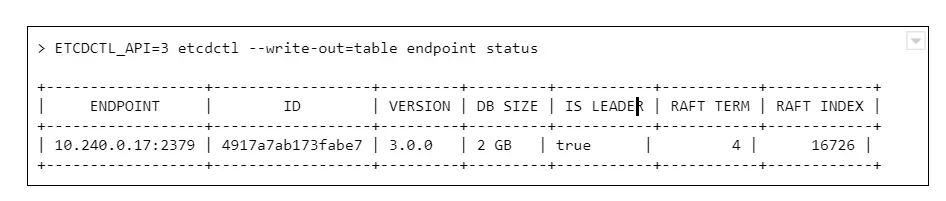
And we see a round number 2GB or 4GB of database size. Why is that a problem? The disks on masters have plenty of free space.
The thing is, it is not caused by resources starvation. The maximum DB size is just a configuration value, namely quota-backend-bytes . The configuration for this was added in 1.12, but it is possible (and for large clusters highly advised) to just use separate etcd cluster to avoid slowdowns. It can be configured by environment variable:
ETCD_QUOTA_BACKEND_BYTES
Etcd itself is a very fragile solution if you think of it for the production environment. Upgrades, rollback procedure, restoring backups - those are things to be carefully considered and verified because not so many people think about it. Also, it requires A LOT of IOPS bandwidth, so optimally, it should be run on fast SSDs.
What are ndots?
Here occurs one of the most common issues which comes to mind when we think about the Kubernetes cluster failing at scale. This is the first issue faced by our team while starting with managing Kubernetes clusters, and it seems to occur after all those years to the new clusters.
Let’s start with defining ndots . And this is not something specific to Kubernetes this time. In fact, it is just a rarely used /etc/resolv.conf configuration parameter, which by default is set to 1 .
Let’s start with the structure of this file, there are only a few options available there:
- nameserver - list of addresses of the DNS server used to resolve the addresses (in the order listed in a file). One address per keyword.
- domain - local domain name.
- sortlist - sort order of addresses returned by gethostbyname() .
- options:
- ndots - maximum number of dots which must appear in hostname given for resolution before initial absolute query should happen. Ndots = 1 means if there is any dot in the name the first try will be absolute name try.
- debug , timeout , attempts … - let’s leave other ones for now
- search - list of domains used for the resolution if the query has less than configure in ndots dots.
So the ndots is a name of configuration parameter which, if set to value bigger than 1 , generates more requests using the list specified in the search parameter. This is still quite cryptic, so let’s look at the example `/etc/resolve.conf` in Kubernetes pod:
nameserver 10.11.12.13
search kube-system.svc.cluster.local svc.cluster.local cluster.local
options ndots:5
With this configuration in place, if we try to resolve address test-app with this configuration, it generates 4 requests:
- test-app.kube-system.svc.cluster.local
- test-app.svc.cluster.local
- test-app.cluster.local
- test-app
If the test-app exists in the namespace, the first one will be successful. If it does not exist at all, it 4th will get out to real DNS.
How can Kubernetes, or actually CoreDNS, know if www.google.com is not inside the cluster and should not go this path?
It does not. It has 2 dots, the ndots = 5, so it will generate:
- www.google.com.kube-system.svc.cluster.local
- www.google.com.svc.cluster.local
- www.google.com.cluster.local
- www.google.com
If we look again in the docs there is a warning next to “search” option, which is easy to miss at first:
Note that this process may be slow and will generate a lot of network traffic if the servers for the listed domains are not local and that queries will time out if no server is available for one of the domains.
Not a big deal then? Not if the cluster is small, but imagine each DNS resolves request between apps in the cluster being sent 4 times for thousands of apps, running simultaneously, and one or two CoreDNS instances.
Two things can go wrong there - either the DNS can saturate the bandwidth and greatly reduce apps accessibility, or the number of requests sent to the resolver can just kill it - the key factor here will be CPU or memory.
What can be done to prevent that?
There are multiple solutions:
1. Use only fully qualified domain names (FQDN). The domain name ending with a dot is called fully qualified and is not affected by search and ndots settings. This might not be easy to change and requires well-built applications, so changing the address does not require a rebuild.
2. Change ndots in the dnsConfig parameter of the pod manifest:
dnsConfig:
options:
- name: ndots
value: "1"
This means the short domain names for pods do not work anymore, but we reduce the traffic. Also can be done for deployments which reach a lot of internet addresses, but not require local connections.
3. Limit the impact. If we deploy kube-dns (CordeDNS) on all nodes as DaemonSet with a fairly big resources pool there will be no outside traffic. This helps a lot with the bandwidth problem but still might need a deeper look into the deployed network overlay to make sure it is enough to solve all problems.
ARP cache
This is one of the nastiest failures, which can result in the full cluster outage when we scale up - even if the cluster is scaled up automatically. It is ARP cache exhaustion and (again) this is something that can be configured in underlying linux.
There are 3 config parameters associated with the number of entries in the ARP table:
- gc_thresh1 - minimal number of entries kept in ARP cache.
- gc_thresh2 - soft max number of entries in ARP cache (default 512).
- gc_thresh3 - hard max number of entries in ARP cache (default 1024).
If the gc_thresh3 limit is exceeded, the next requests result with a neighbor table overflow error in syslog.
This one is easy to fix, just increase the limits until the error goes away, for example in /etc/sysctl.conf file (check the manual for you OS version to make sure what is the exact name of the option):
net.ipv4.neigh.default.gc_thresh1 = 256
net.ipv4.neigh.default.gc_thresh2 = 1024
net.ipv4.neigh.default.gc_thresh3 = 2048
So it’s fixed , by why did it happen in the first place? Each pod in Kubernetes has it’s own IP address (which is at least one ARP entry). Each node takes at least two entries. This means it is really easy for a bigger cluster to exhaust the default limit.
Pulling everything at once
When the operator decides to use a smaller amount of very big workers, for example, to speed up the communication between containers, there is a certain risk involved. There is always a point of time when we have to restart a node - either it is an upgrade or maintenance. Or we don’t restart it, but add a new one with a long queue of containers to be deployed.
In certain cases, especially when there are a lot of containers or just a few very big ones, we might have to download a few dozens of gigabytes, for example, 100GB. There are a lot of moving pieces that affect this scenario - container registry location, size of containers, or several containers which results in a lot of data to be transmitted - but one result: the image pull fails. And the reason is, again, the configuration.
There are two configuration parameters that lead to Kubernetes cluster failures at scale:
- serialize-image-pulls - download the images one by one, without parallelization.
- image-pull-progress-deadline - if images cannot be pulled before the deadline triggers it is canceled.
It might be also required to verify docker configuration on nodes if there is no limit set for parallel pulls. This should fix the issue.
Kubernetes failures at scale - sum up
This is by no means a list of all possible issues which can happen. From our experience, those are the common ones, but as the Kubernetes and software evolve, this can change very quickly. It is highly recommended to learn about Kubernetes cluster failures that happened to others, like Kubernetes failures stories and lessons learned to avoid repeating mistakes that had happened before. And remember to backup your cluster, or even better make sure you have the immutable infrastructure for everything that runs in the cluster and the cluster itself, so only data requires a backup.
Deliver your apps to Kubernetes faster
Kubernetes is currently the most popular container orchestration platform used by enterprises, organizations and individuals to run their workloads . Kubernetes provides software developers with great flexibility in how they can design and architect systems and applications.
Unfortunately, its powerful capabilities come at a price of the platform’s complexity, especially from the developer’s perspective. Kubernetes forces developers to learn and understand its internals fluently in order to deploy workloads, secure them and integrate with other systems.
Why is it so complex?
Kubernetes uses the concept of Objects, which are abstractions representing the state of the cluster. When one wants to perform some operation on the cluster e.g., deploy an application, they basically need to make the cluster create several various Kubernetes Objects with an appropriate configuration. Typically, when you would like to deploy a web application, in the simplest case scenario, you would need to:
- Create a deployment.
- Expose the deployment as a service.
- Configure ingress for the service.
However, before you can create a deployment (i.e. command Kubernetes to run a specific number of containers with your application), you need to start with building a container image that includes all the necessary software components to run your app and of course the app itself. “Well, that’s easy” – you say – “I just need to write a Dockerfile and then build the image using docker build ”. That is all correct, but we are not there yet. Once you have built the image, you need to store it in a container image registry where Kubernetes can pull it from.
You could ask - why is it so complex? As a developer, I just want to write my application code and run it, rather than additionally struggle with Docker images, registries, deployments, services, ingresses, etc., etc. But that is the price for Kubernetes’ flexibility. And that is also what makes Kubernetes so powerful.
Making deployments to Kubernetes easy
What if all the above steps were automated and combined into a single command allowing developers to deploy their app quickly to the cluster? With Cloudboostr’s latest release, that is possible!
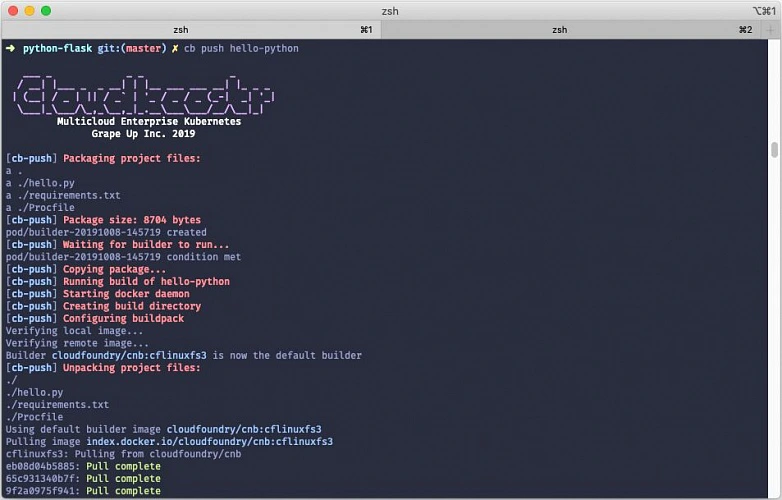
What’s new? The Cloudboostr CLI - a new command line tool designed to simplify developer experience when using Kubernetes. To deploy an application to the cluster, you simply execute a single command:
cb push APP_NAME
The concept of “pushing” an application to the cluster has been borrowed from the Cloud Foundry community and its famous cf push command described by cf push haiku:
Here is my source code
Run it on the cloud for me
I do not care how.
When it comes to Cloudboostr , the “push” command automates the app deployment process by:
- Building the container image from application sources.
- Pushing the image to the container registry.
- Deploying the image to Kubernetes cluster.
- Configuring service and ingress for the app.
Looking under the hood
Cloudboostr CLI uses the Cloud Native Buildpacks project to automatically detect the application type and build an OCI-compatible container image with an appropriate embedded application runtime. Cloud Native Buildpacks can autodetect the most popular application languages and frameworks such as Java, .NET, Python, Golang or NodeJS.
Once the image is ready, it is automatically pushed to the Harbor container registry built into Cloudboostr. By default, Harbor is accessible and serves as a default registry for all Kubernetes clusters deployed within a given Cloudboostr installation. The image stored in the registry is then used to create a deployment in Kubernetes. In the current release only standard Deployment objects are supported, but adding support for StatefulSets is in the roadmap. As the last step, a service object for the application is created and a corresponding ingress object configured with Cloudboostr’s built-in Traefik proxy.
The whole process described above is executed in the cluster. Cloudboostr CLI triggers the creation of a temporary builder container that is responsible for pulling the appropriate buildpack, building the container image and communicating with the registry. The builder container is deleted from the cluster after the build process finishes. Building the image in the cluster eliminates the need to have Docker and pack (Cloud Native Buildpacks command line tool) installed on the local machine.
Cloudboostr CLI uses configuration defined in kubeconfig to access Kubernetes clusters. By default, images are pushed to the Harbor registry in Cloudboostr, but the CLI can also be configured to push images to an external container registry.
Why bother a.k.a. the benefits
While understanding Kubernetes internals is extremely useful, especially for troubleshooting and debugging, it should not be required when you just want to run an app. Many development teams that start working with Kubernetes find it difficult as they would prefer to operate on the application level rather than interact with containers, pods, ingresses, etc. The “cb push” command aims to help those teams and give them a tool to deliver fast and deploy to Kubernetes efficiently.
Cloudboostr was designed to tackle common challenges that software development teams face using Kubernetes. It became clear that we could improve the entire developer experience by providing those teams with a convenient yet effective tool to migrate from Cloud Foundry to Kubernetes. A significant part of that transition came to offer a feature that makes deploying apps to Kubernetes as user-friendly as Cloud Foundry does. That allows developers to work intuitively and with ease.
Cloudboostr CLI significantly simplifies the process of deploying applications to a Kubernetes cluster and takes the burden of handling containers and all Kubernetes-native concepts off of developers’ backs. It boosts the overall software delivery performance and helps teams to release their products to the market faster.
Interested in our services?
Reach out for tailored solutions and expert guidance.