
About us
Our services

Capabilities

Legacy Modernization
Data Platforms
AI & Advanced Analytics

Industries

Automotive
Finance
Manufacturing

Solutions

Databoostr

Data Sharing & Monetization Platform

Cloudboostr

Multicloud Enterprise Kubernetes

Looking for something else?

Contact us for tailored solutions and expert guidance.

Contact
Case studies
Resources

Resources

Blog

Read our blog and stay informed about the industry’s latest trends and technology.

Ready to find your breaking point?

Stay updated with our newsletter.

Subscribe

Insights

Ebooks

Explore our resources and learn about building modern software solutions from experts and practitioners.

Read more
Careers
Contact
Blog
Automotive

Big picture of Spring Cloud Gateway

Łukasz Chronowski
Senior Software Engineer
October 27, 2025
•
5 min read

Table of contents

Heading 2
Heading 3
Heading 4
Heading 5
Heading 6

Schedule a consultation with software experts

Contact us

In my life, I had an opportunity to work in a team that maintains the Api Gateway System. The creation of this system began more than 15 years ago, so it is quite a long time ago considering the rate of technology changing. The system was updated to Java 8, developed on a light-way server which is Tomcat Apache, and contained various tests: integration, performance, end-to-end, and unit test. Although the gateway was maintained with diligence, it is obvious that its core contains a lot of requests processing implementation like routing, modifying headers, converting request payload, which nowadays can be delivered by a framework like Spring Cloud Gateway. In this article, I am going to show the benefits of the above-mentioned framework.

The major benefits, which are delivered by Spring Cloud Gateway:

  • support to reactive programming model: reactive http endpoint, reactive web socket
  • configuring request processing (routes, filters, predicates) by java code or yet another markup language (YAML)
  • dynamic reloading of configuration without restarting the server (integration with Spring Cloud Config Server)
  • support for SSL
  • actuator Api
  • integration gateway to Service Discovery mechanism
  • load-balancing mechanisms
  • rate-limiting (throttling) mechanisms
  • circuit breakers mechanism
  • integration with Oauth2 due to providing security features

Those above-mentioned features have an enormous impact on the speed and easiness of creating an Api gateway system. In this article, I am going to describe a couple of those features.

Due to the software, the world is the world of practice and systems cannot work only in theory, I decided to create a lab environment to prove the practical value of the Cloud Spring Gateway Ecosystem. Below I put an architecture of the lab environment:
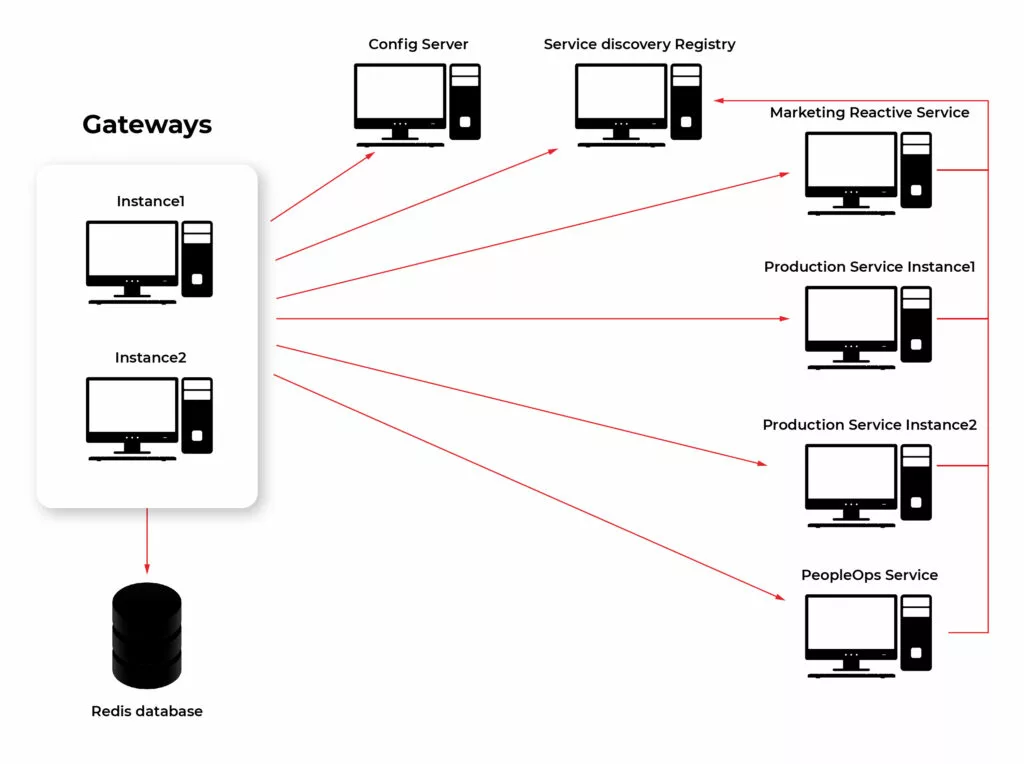
Building elements of Spring Cloud Gateway

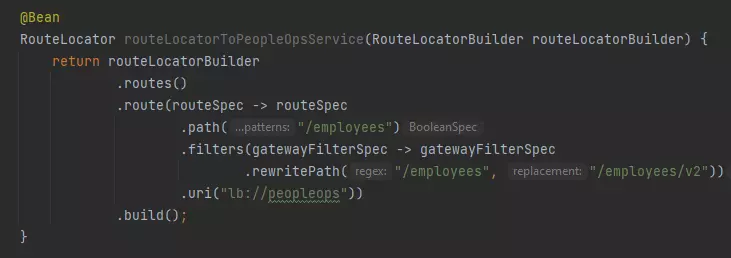
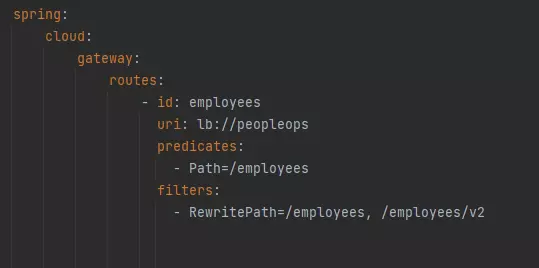
The first feature of Spring Cloud Gateway I am going to describe is a configuration of request processing. It can be considered the heart of the gateway. It is one of the major parts and responsibilities. As I mentioned earlier this logic can be created by java code or by YAML files. Below I add an example configuration in YAML and Java code way. Basic building blocks used to create processing logic are:

  • Predicates – match requests based on their feature (path, hostname, headers, cookies, query)
  • Filters – process and modify requests in a variety of ways. Can be divided depending on their purpose:
  • gateway filter - modify the incoming http request or outgoing http response
  • global filter - special filters applying to all routes so long as some conditions are fulfilled

Details about different implementations of getaway building components can be found in docs: https://cloud.spring.io/spring-cloud-gateway/reference/html/ .

Example of configuring route in Java DSL:
Configuration same route with YAML:
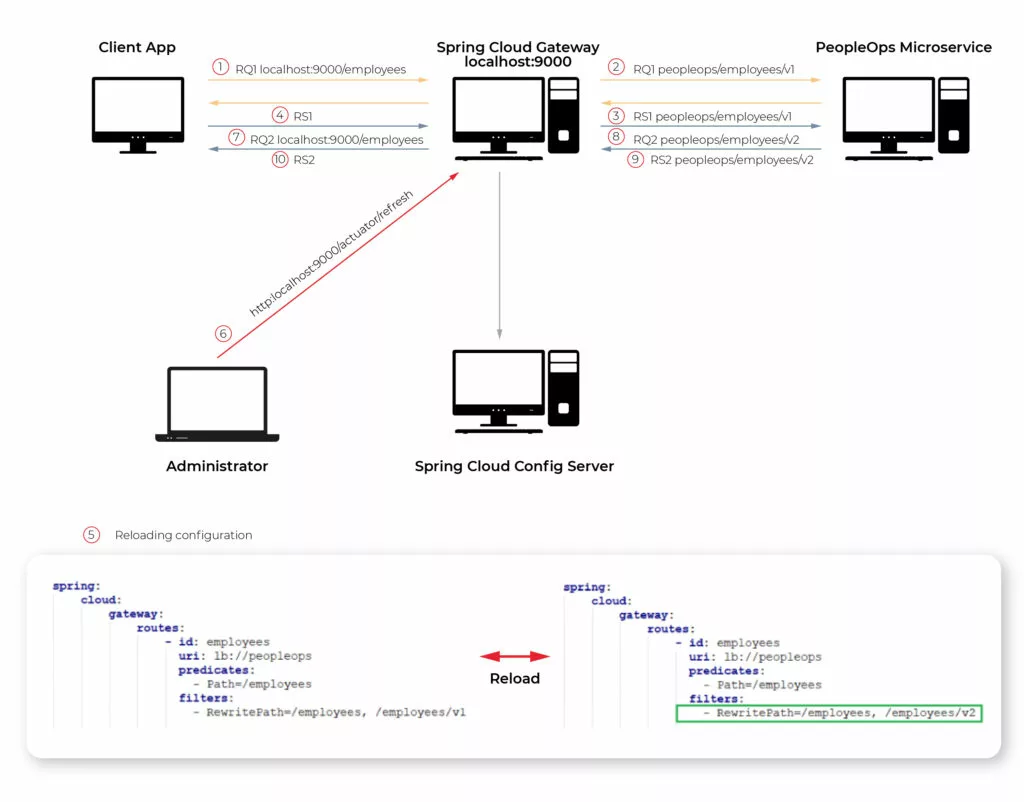
Spring Cloud Config Server integrated with Gateway

Someone might not be a huge fan of YAML language but using it here may have a big advantage in this case. It is possible to store configuration files in Spring Cloud Config Server and once configuration changes it can be reloaded dynamically. To do this process we need to use the Actuator Api endpoint.
Dynamic reloading of gateway configuration shows the picture below. The first four steps show request processing consistent with the current configuration. The gateway passes requests from the client to the “employees/v1” endpoint of the PeopleOps microservice (step 2). Then gateway passes the response back from the PeopleOps microservice to the client app (step 4). The next step is updating the configuration. Once Config Server uses git repository to store configuration, updating means committing recent changes made in the application.yaml file (step 5 in the picture). After pushing new commits to the repo is necessary to send a GET request on the proper actuator endpoint (step 6). These two steps are enough so that client requests are passed to a new endpoint in PeopleOps Microservice (steps 7,8,9,10).
Reactive web flow in Api Gateway

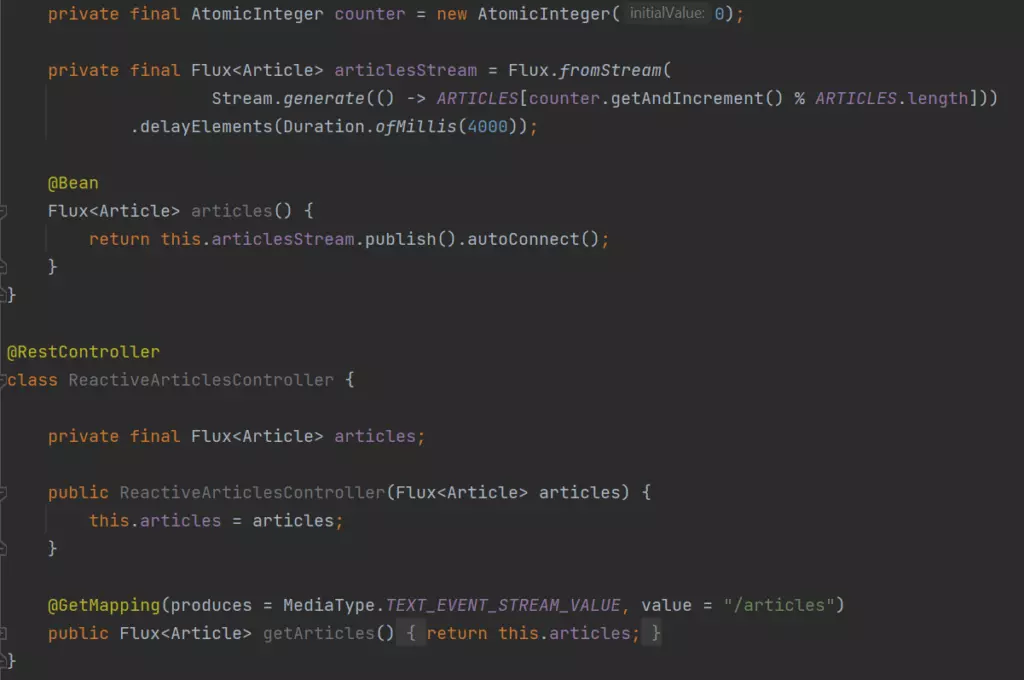
As the documentation said Spring Cloud Gateway is built on top of Spring Web Flux. Reactive programming gains popularity among Java developers so Spring Gateway offers to create fully reactive applications. In my lab, I created Controller in a Marketing microservice which generates article data repetitively every 4 seconds. The browser observes this stream of requests. The picture below shows that 6 chunks of data were received in 24 seconds.
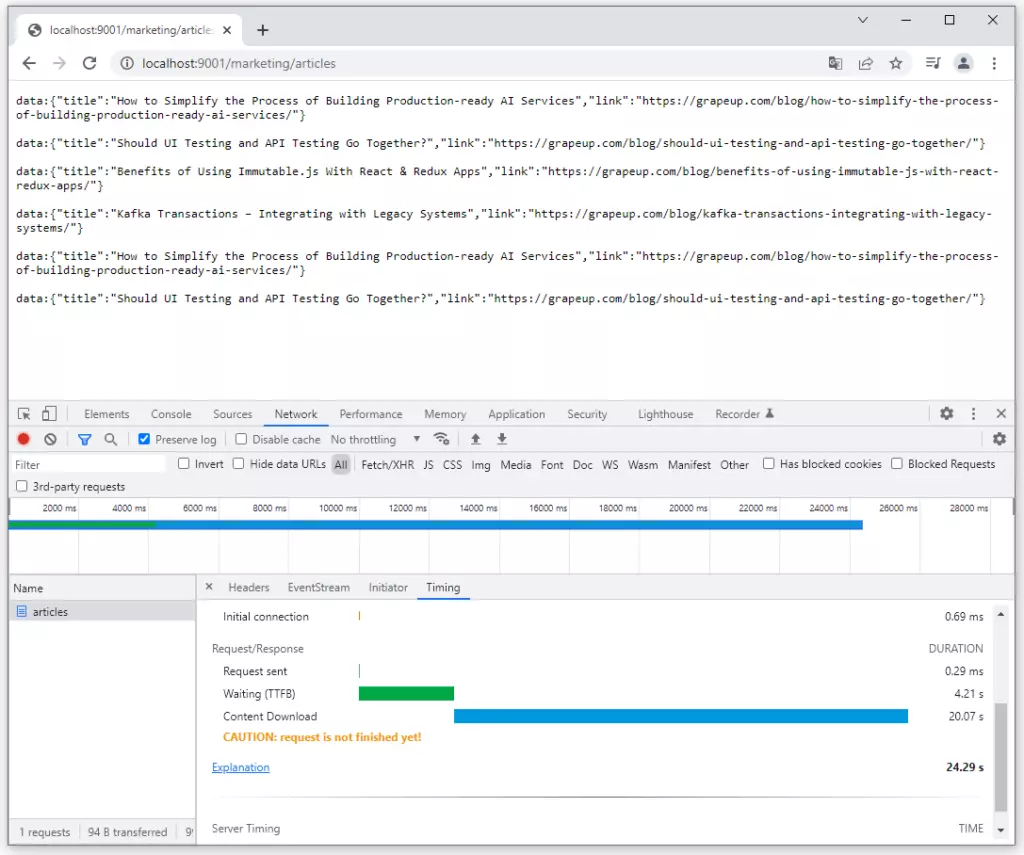
I do not dive into reactive programming style deeply, there are a lot of articles about the benefits and differences between reactive and other programming styles. I just put the implementation of a simple reactive endpoint in the Marketing microservice below. It is accessible on GitHub too: https://github.com/chrrono/Spring-Cloud-Gateway-lab/blob/master/Marketing/src/main/java/com/grapeup/reactive/marketing/MarketingApplication.java
Rate limiting possibilities of Gateway

The next feature of Spring Cloud Gateway is the implementation of rate-limiting (throttling) mechanisms. This mechanism was designed to protect gateways from harmful traffic. One of the examples might be distributed denial-of-service (DDoS) attack. It consists of creating an enormous number of requests per second which the system cannot handle.
The filtering of requests may be based on the user principles, special fields in headers, or other rules. In production environments, mostly several gateways instance up and running but for Spring Cloud Gateway framework is not an obstacle, because it uses Redis to store information about the number of requests per key. All instances are connected to one Redis instance so throttling can work correctly in a multi-instances environment.
Due to prove the advantages of this functionality I configured rate-limiting in Gateway in the lab environment and created an end-to-end test, which can be described in the picture below.
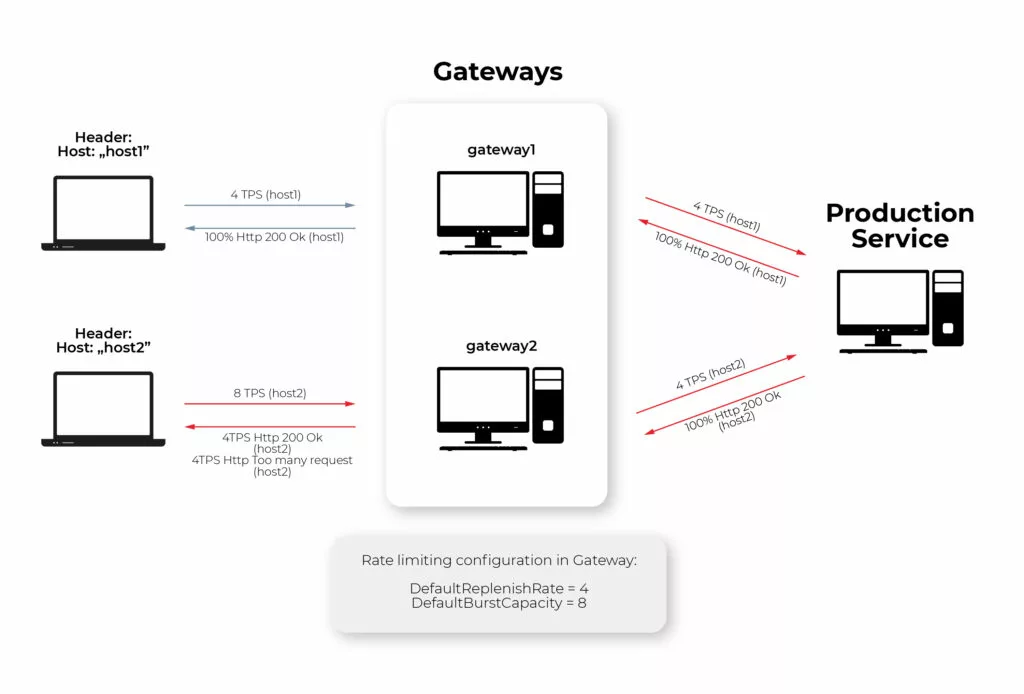
The parameters configured for throttling are as follows: DefaultReplenishRate = 4, DefaultBurstCapacity = 8. It means getaways allow 4 Transactions (Request) per second (TPS) for the concrete key. The key in my example is the header value of “Host” field, which means that the first and second clients have a limit of 4TPS separately. If the limit is exceeded, the gateway replies by http response with 429 http code. Because of that, all requests from the first client are passed to the production service, but for the second client only half of the requests are passed to the production service by the gateway, and another half are replied to the client immediately with 429 Http Code.

If someone is interested in how I test it using Rest Assured, JUnit, and Executor Service in Java test is accessible here: https://github.com/chrrono/Spring-Cloud-Gateway-lab/blob/master/Gateway/src/test/java/com/grapeup/gateway/demo/GatewayApplicationTests.java

Service Discovery

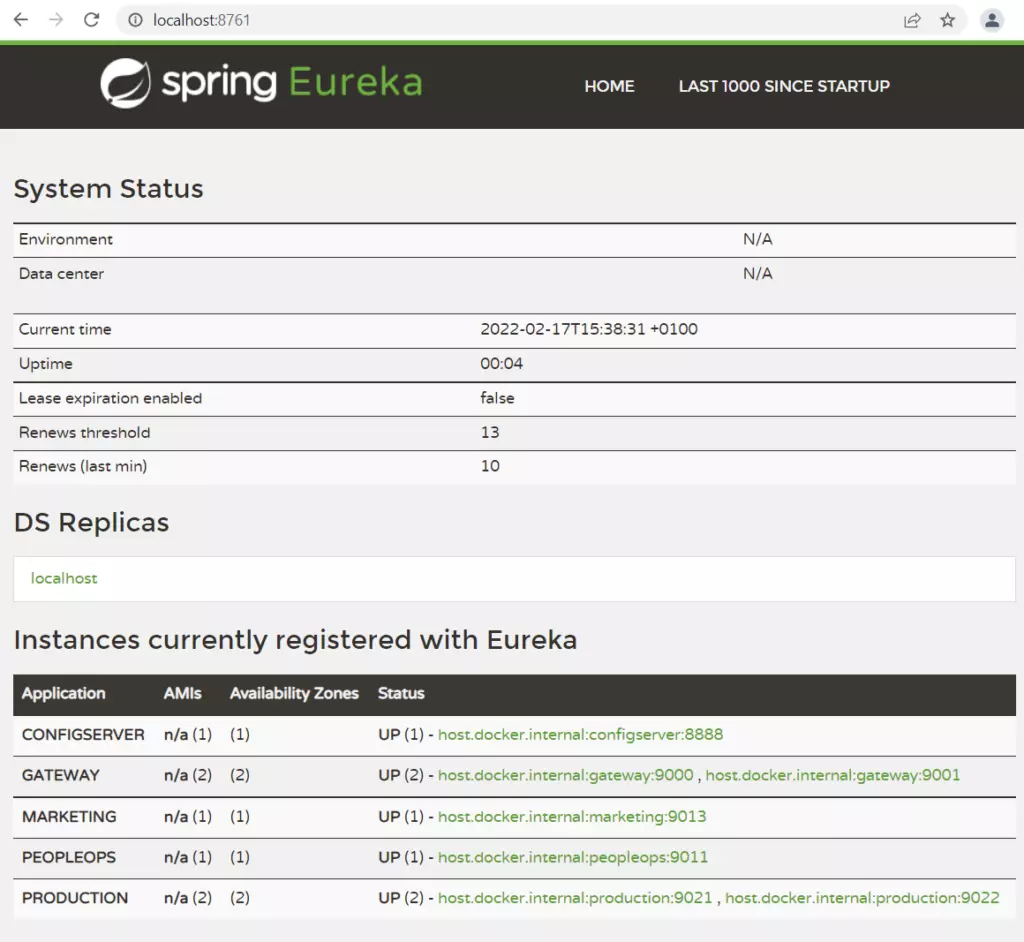
The next integration subject concerns the service discovery mechanism. Service discovery is a service registry. Microservice starting registers itself to Service Discovery and other applications may use its entry to find and communicate with this microservice. Integration Spring Cloud Gateway with Eureka service discovery is simple. Without the creation of any configuration regarding request processing, requests can be passed from the gateway to a specific microservice and its concrete endpoint.

The below Picture shows all registering applications from my lab architecture created due to a practical test of Spring Cloud Gateway. “Production” microservice has one entry for two instances. It is a special configuration, which enables load balancing by a gateway.
Circuit Breaker mention

The circuit breaker is a pattern that is used in case of failure connected to a specific microservice. All we need is to define Spring Gateway fallback procedures. Once the connection breaks down, the request will be forwarded to a new route. The circuit breaker offers more possibilities, for example, special action in case of network delays and it can be configured in the gateway.

Experiment on your own

I encourage you to conduct your own tests or develop a system that I build, in your own direction. Below, there are two links to GitHub repositories:

  1. https://github.com/chrrono/config-for-Config-server (Repo for keep configuration for Spring Cloud Config Server)
  2. https://github.com/chrrono/Spring-Cloud-Gateway-lab (All microservices code and docker-compose configuration)

To establish a local environment in a straightforward way, I created a docker-compose configuration. This is a link for the docker-compose.yml file: https://github.com/chrrono/Spring-Cloud-Gateway-lab/blob/master/docker-compose.yml

All you need to do is install a docker on your machine. I used Docker Desktop on my Windows machine. After executing the “docker-compose up” command in the proper location you should see all servers up and running:
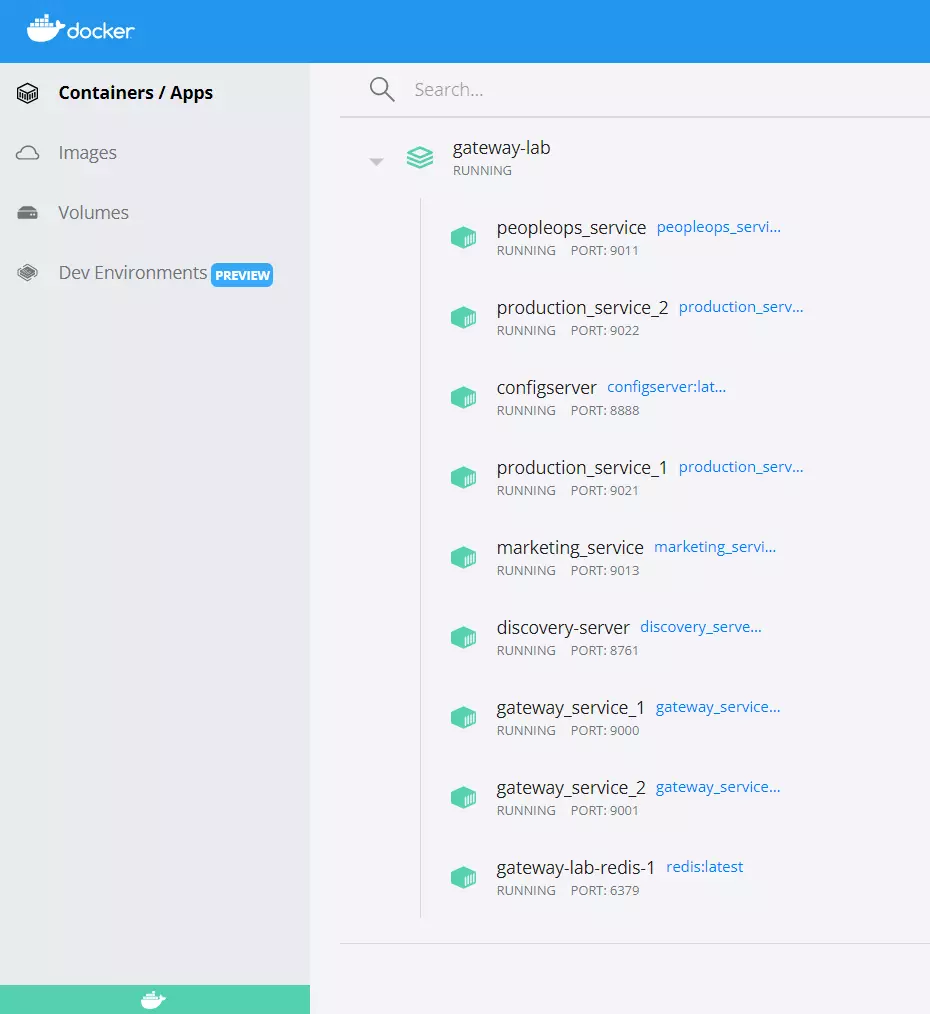
To conduct some tests I use the Postman application, Google Chrome, and my end-to-end tests (Rest Assured, JUnit, and Executor Service in Java). Do with this code all you want and allow yourself to have only one limitation: your imagination 😊

Summary

Spring Cloud Gateway is a huge topic, undoubtedly. In this article, I focused on showing some basic building components and the overall intention of gateway and interaction with others spring cloud services. I hope readers appreciate the possibilities and care by describing the framework. If someone has an interest in exploring Spring Cloud Gateway on your own, I added links to a repo, which can be used as a template project for your explorations.

Grape Up guides enterprises on their data-driven transformation journey

Ready to ship? Let's talk.

Check our offer
Blog

Check related articles

Read our blog and stay informed about the industry's latest trends and solutions.

Software development

How to build hypermedia API with Spring HATEOAS

Have you ever considered the quality of your REST API? Do you know that there are several levels of REST API? Have you ever heard the term HATEOAS? Or maybe you wonder how to implement it in Java? In this article, we answer these questions with the main emphasis on the HATEOAS concept and the implementation of that concept with the Spring HATEOAS project.

Learn more about services provided by Grape Up

You are at Grape Up blog, where our experts share their expertise gathered in projects delivered for top enterprises. See how we work.

Enabling the automotive industry to build software-defined vehicles
Empowering insurers to create
insurance telematics platforms
Providing
AI & advanced analytics consulting

What is HATEOAS?

H ypermedia A s T he E ngine O f A pplication S tate - is one of the constraints of the REST architecture. Neither REST nor HATEOAS is any requirement or specification. How you implement it depends only on you. At this point, you may ask yourself - how RESTful your API is without using HATEOAS? This question is answered by the REST maturity model presented by Leonard Richardson. This model consists of four levels, as set out below:

  • Level 0
    The API implementation uses the HTTP protocol but does not utilize its full capabilities. Additionally, unique addresses for resources are not provided.
  • Level 1
    We have a unique identifier for the resource, but each action on the resource has its own URL.
  • Level 2
    We use HTTP methods instead of verbs describing actions, e.g., DELETE method instead of URL ... /delete .
  • Level 3
    The term HATEOAS has been introduced. Simply speaking, it introduces hypermedia to resources. That allows you to place links in the response informing about possible actions, thereby adding the possibility to navigate through API.
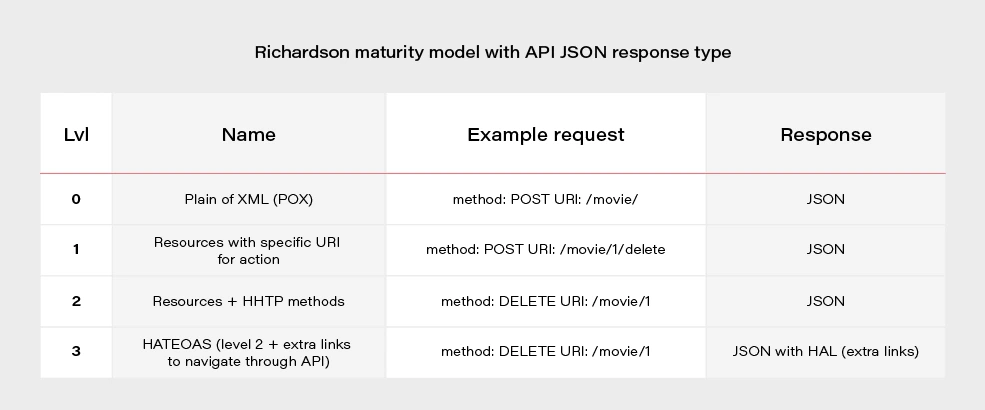
Most projects these days are written using level 2. If we would like to go for the perfect RESTful API, we should consider HATEOAS.
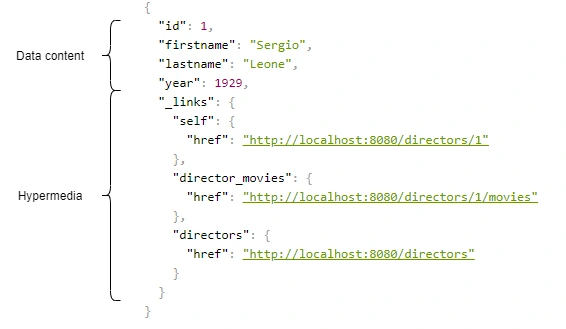
Above, we have an example of a response from the server in the form of JSON+HAL. Such a resource consists of two parts: our data and links to actions that are possible to be performed on a given resource.

Spring HATEOAS 1.x.x

You may be asking yourself how to implement HATEOAS in Java? You can write your solution, but why reinvent the wheel? The right tool for this seems to be the Spring Hateoas project. It is a long-standing solution on the market because its origins date back to 2012, but in 2019 we had a version 1.0 release. Of course, this version introduced a few changes compared to 0.x. They will be discussed at the end of the article after presenting some examples of using this library so that you better understand what the differences between the two versions are. Let’s discuss the possibilities of the library based on a simple API that returns us a list of movies and related directors. Our domain looks like this:

@Entity

public class Movie {

@Id

@GeneratedValue

private Long id;

private String title;

private int year;

private Rating rating;

@ManyToOne

private Director director;

}


@Entity

public class Director {

@Id

@GeneratedValue

@Getter

private Long id;

@Getter

private String firstname;

@Getter

private String lastname;

@Getter

private int year;

@OneToMany(mappedBy = "director")

private Set<Movie> movies;

}

We can approach the implementation of HATEOAS in several ways. Three methods represented here are ranked from least to most recommended.

But first, we need to add some dependencies to our Spring Boot project:

<dependency>

<groupId>org.springframework.boot</groupId>

<artifactId>spring-boot-starter-hateoas</artifactId>

</dependency>

Ok, now we can consider implementation options.

Entity extends RepresentationModel with links directly in Controller class

Firstly, extend our entity models with RepresentationModel.

public class Movie extends RepresentationModel<Movie>

public class Director extends RepresentationModel<Director>

Then, add links to RepresentationModel within each controller. The example below returns all directors from the system. By adding two links to each director - to himself and to the entire collection. A link is also added to the collection. The key elements of this code are two methods with static imports:

  • linkTo() - responsible for creating the link
  • methodOn() - enables to dynamically generate the path to a given resource. We don’t need to hardcode the path, but we can refer to the method in the controller.

@GetMapping("/directors")

public ResponseEntity<CollectionModel<Director>> getAllDirectors() {

List<Director> directors = directorService.getAllDirectors();

directors.forEach(director -> {

director.add(linkTo(methodOn(DirectorController.class).getDirectorById(director.getId())).withSelfRel());

director.add(linkTo(methodOn(DirectorController.class).getDirectorMovies(director.getId())).withRel("directorMovies"));

});

Link allDirectorsLink = linkTo(methodOn(DirectorController.class).getAllDirectors()).withSelfRel());

return ResponseEntity.ok(CollectionModel.of(directors, allDirectorsLink));

}

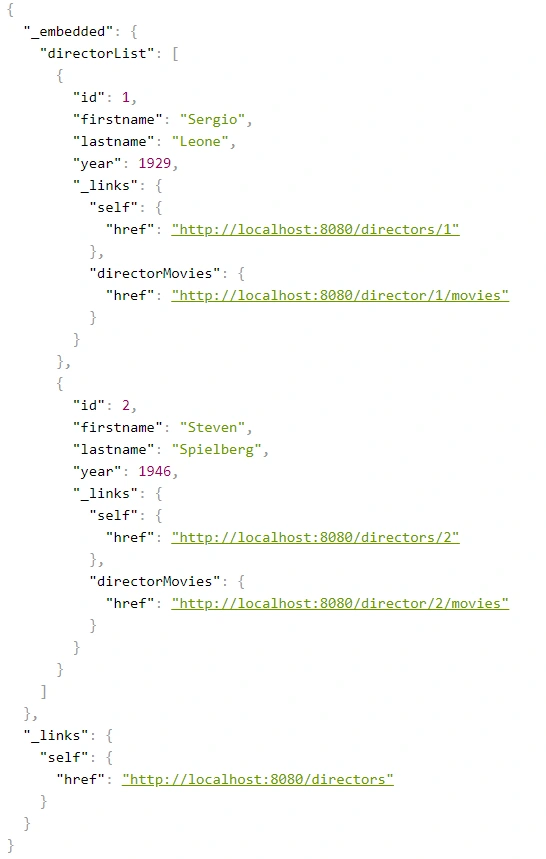
This is the response we get after invoking such controller:
We can get a similar result when requesting a specific resource.

@GetMapping("/directors/{id}")

public ResponseEntity<Director> getDirector(@PathVariable("id") Long id) {

return directorService.getDirectorById(id)

.map(director -> {

director.add(linkTo(methodOn(DirectorController.class).getDirectorById(id)).withSelfRel());

director.add(linkTo(methodOn(DirectorController.class).getDirectorMovies(id)).withRel("directorMovies"));

director.add(linkTo(methodOn((DirectorController.class)).getAllDirectors()).withRel("directors"));

return ResponseEntity.ok(director);

})

.orElse(ResponseEntity.notFound().build());

}
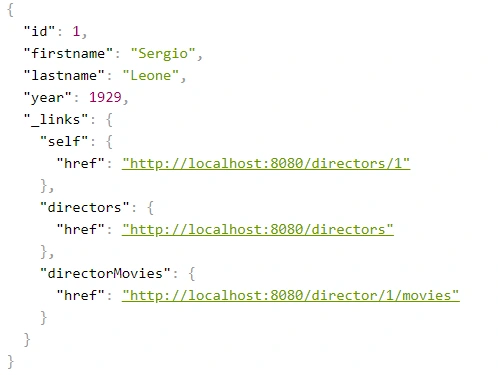
The main advantage of this implementation is simplicity. But making our entity dependent on an external library is not a very good idea. Plus, the code repetition for adding links for a specific resource is immediately noticeable. You can, of course, bring it to some private method, but there is a better way.

Use Assemblers - SimpleRepresentationModelAssembler

And it’s not about assembly language, but about a special kind of class that converts our resource to RepresentationModel.

One of such assemblers is SimpleRepresentationModelAssembler. Its implementation goes as follows:

@Component

public class DirectorAssembler implements SimpleRepresentationModelAssembler<Director> {


@Override

public void addLinks(EntityModel<Director> resource) {

Long directorId = resource.getContent().getId();

resource.add(linkTo(methodOn(DirectorController.class).getDirectorById(directorId)).withSelfRel());

resource.add(linkTo(methodOn(DirectorController.class).getDirectorMovies(directorId)).withRel("directorMovies"));

}


@Override

public void addLinks(CollectionModel<EntityModel<Director>> resources) {

resources.add(linkTo(methodOn(DirectorController.class).getAllDirectors()).withSelfRel());


}

}

In this case, our entity will be wrapped in an EnityModel (this class extends RepresentationModel ) to which the links specified by us in the addLinks() will be added. Here we overwrite two addLinks() methods - one for entire data collections and the other for single resources. Then, as part of the controller, it is enough to call the toModel() or toCollectionModel() method ( addLinks() are template methods here), depending on whether we return a collection or a single representation.

@GetMapping

public ResponseEntity<CollectionModel<EntityModel<Director>>> getAllDirectors() {

return ResponseEntity.ok(directorAssembler.toCollectionModel(directorService.getAllDirectors()));

}


@GetMapping(value = "directors/{id}")

public ResponseEntity<EntityModel<Director>> getDirectorById(@PathVariable("id") Long id) {

return directorService.getDirectorById(id)

.map(director -> {

EntityModel<Director> directorRepresentation = directorAssembler.toModel(director)

.add(linkTo(methodOn(DirectorController.class).getAllDirectors()).withRel("directors"));


return ResponseEntity.ok(directorRepresentation);

})

.orElse(ResponseEntity.notFound().build());

}

The main benefit of using the SimpleRepresentationModelAssembler is the separation of our entity from the RepresentationModel , as well as the separation of the adding link logic from the controller.

The problem arises when we want to add hypermedia to the nested elements of an object. Obtaining the effect, as in the example below, is impossible in a current way.

{

"id": "M0002",

"title": "Once Upon a Time in America",

"year": 1984,

"rating": "R",

"directors": [

{

"id": "D0001",

"firstname": "Sergio",

"lastname": "Leone",

"year": 1929,

"_links": {

"self": {

"href": "http://localhost:8080/directors/D0001"

}

}

}

],

"_links": {

"self": {

"href": "http://localhost:8080/movies/M0002"

}

}

}

Create DTO class with RepresentationModelAssembler

The solution to this problem is to combine the two previous methods, modifying them slightly. In our opinion, RepresentationModelAssembler offers the most possibilities. It removes the restrictions that arose in the case of nested elements for SimpleRepresentationModelAssembler . But it also requires more code from us because we need to prepare DTOs, which are often done anyway. This is the implementation based on RepresentationModelAssembler :

@Component

public class DirectorRepresentationAssembler implements RepresentationModelAssembler<Director, DirectorRepresentation> {

@Override

public DirectorRepresentation toModel(Director entity) {

DirectorRepresentation directorRepresentation = DirectorRepresentation.builder()

.id(entity.getId())

.firstname(entity.getFirstname())

.lastname(entity.getLastname())

.year(entity.getYear())

.build();


directorRepresentation.add(linkTo(methodOn(DirectorController.class).getDirectorById(directorRepresentation.getId())).withSelfRel());

directorRepresentation.add(linkTo(methodOn(DirectorController.class).getDirectorMovies(directorRepresentation.getId())).withRel("directorMovies"));


return directorRepresentation;

}


@Override

public CollectionModel<DirectorRepresentation> toCollectionModel(Iterable<? extends Director> entities) {

CollectionModel<DirectorRepresentation> directorRepresentations = RepresentationModelAssembler.super.toCollectionModel(entities);


directorRepresentations.add(linkTo(methodOn(DirectorController.class).getAllDirectors()).withSelfRel());


return directorRepresentations;

}

}

When it comes to controller methods, they look the same as for SimpleRepresentationModelAssembler , the only difference is that in the ResponseEntity the return type is DTO - DirectorRepresentation .

@GetMapping

public ResponseEntity<CollectionModel<DirectorRepresentation>> getAllDirectors() {

return ResponseEntity.ok(directorRepresentationAssembler.toCollectionModel(directorService.getAllDirectors()));

}


@GetMapping(value = "/{id}")

public ResponseEntity<DirectorRepresentation> getDirectorById(@PathVariable("id") String id) {

return directorService.getDirectorById(id)

.map(director -> {

DirectorRepresentation directorRepresentation = directorRepresentationAssembler.toModel(director)

.add(linkTo(methodOn(DirectorController.class).getAllDirectors()).withRel("directors"));


return ResponseEntity.ok(directorRepresentation);

})

.orElse(ResponseEntity.notFound().build());

}

Here is our DTO model:

@Builder

@Getter

@EqualsAndHashCode(callSuper = false)

@Relation(itemRelation = "director", collectionRelation = "directors")

public class DirectorRepresentation extends RepresentationModel<DirectorRepresentation> {

private final String id;

private final String firstname;

private final String lastname;

private final int year;

}

The @Relation annotation allows you to configure the relationship names to be used in the HAL representation. Without it, the relationship names match the class name and a suffix List for the collection.

By default, JSON+HAL looks like this:

{

"_embedded": {

"directorRepresentationList": [

…

]

},

"_links": {

…

}

}

However, annotation @Relation can change the name of directors :

{

"_embedded": {

"directors": [

…

]

},

"_links": {

…

}

}

Summarizing the HATEOAS concept, it consists of a few pros and cons.

Pros:

  • If the client uses it, we can change the API address for our resources without breaking the client.
  • Creates good self-documentation, and table of contents of API to the person who has the first contact with our API.
  • Can simplify building some conditions on the frontend, e.g., whether the button should be disabled / enabled based on whether the link to corresponding the action exists.
  • Less coupling between frontend and backend.
  • Just like writing tests imposes on us to stick to the SRP principle in class construction, HATEOAS can keep us in check when designing API.

Cons:

  • Additional work needed on implementing non-business functionality.
  • Additional network overhead. The size of the transferred data is larger.
  • Adding links to some resources can be sometimes complicated and can introduce mess in controllers.

Changes in Spring HATEOAS 1.0

Spring HATEOAS has been available since 2012, but the first release of version 1.0 was in 2019.

The main changes concerned the changes to the package paths and names of some classes, e.g.

Old New ResourceSupport RepresentationModel Resource EntityModel Resources CollectionModel PagedResources PagedModel ResourceAssembler RepresentationModelAssembler

It is worth paying attention to a certain naming convention - the replacement of the word Resource in class names with the word Representation . It occurred because these types do not represent resources but representations, which can be enriched with hypermedia. It is also more in the spirit of REST. We are returning the resource representations, not the resources themselves. In the new version, there is a tendency to move away from constructors in favor of static construction methods - .of() .

It is also worth mentioning that the old version has no equivalent for SimpleRepresentationModelAssembler . On the other hand, the ResourceAssembler interface has only the toResource() method (equivalent - toModel() ) and no equivalent for toCollectionModel() . Such a method is found in RepresentationModelAssembler and is the toModelCollection() method.

The creators of the library have also included a script that migrates old package paths and old class names to the new version. You can check it here .

Read more
AI
Software development

Spring AI framework overview – introduction to AI world for Java developers

In this article, we explain the fundamentals of integrating various AI models and employing different AI-related techniques within the Spring framework. We provide an overview of the capabilities of Spring AI and discuss how to utilize the various supported AI models and tools effectively.

Understanding Spring AI - Basic concepts

Traditionally, libraries for AI integration have primarily been written in Python, making knowledge of this language essential for their use. Additionally, their integration in applications written in other languages implies the writing of a boilerplate code to communicate with the libraries. Today, Spring AI makes it easier for Java developers to enable AI in Java-based applications.

Spring AI aims to provide a unified abstraction layer for integrating various AI LLM types and techniques (e.g., ETL, embeddings, vector databases) into Spring applications. It supports multiple AI model providers, such as OpenAI, Google Vertex AI, and Azure Vector Store, through standardized interfaces that simplify their integration by abstracting away low-level details. This is achieved by offering concrete implementations tailored to each specific AI provider.

Generating data: Integration with AI models

Spring AI API supports all main types of AI models, such as chat, image, audio, and embeddings. The API for the model is consistent across all model types. It consists of the following main components:

1) Model interfaces that provide similar methods for all AI model providers. Each model type has its own specific interface, such as ChatModel for chat AI models and ImageModel for image AI models. Spring AI provides its own implementation of each interface for every supported AI model provider.

2) Input prompt/request class that is used by the AI model (via model interface) providing user input (usually text) instructions, along with options for tuning the model’s behavior.

3) Response for output data produced by the model. Depending on the model type, it contains generated text, image, or audio (for Chat Image and Audio models correspondingly) or more specific data like floating-point arrays in the case of Embedding models.

All AI model interfaces are standard Spring beans that can be injected using auto-configuration or defined in Spring Boot configuration classes.

Chat models

The chat LLMs gnerate text in response to the user’s prompts. Spring AI has the following main API for interaction with this type of model.

  • The ChatModel interface allows sending a String prompt to a specific chat AI model service. For each supported AI chat model provider in Spring AI, there is a dedicated implementation of this interface.
  • The prompt class contains a list of text messages (queries, typically a user input) and a ChatOptions object. The ChatOptions interface is common for all the supported AI models. Additionally, every model implementation has its own specific options for class implementation.
  • The ChatResponse class encapsulates the output of the AI chat model, including a list of generated data and relevant metadata.
  • Furthermore, the chat model API has a ChatClient class , which is responsible for the entire interaction with the AI model. It encapsulates the ChatModel, enabling users to build and send prompts to the model and retrieve responses from it. ChatClient has multiple options for transforming the output of the AI model, which includes converting raw text response into a custom Java object or fetching it as a Flux-based stream.

Putting all these components together, let’s give an example code of Spring service class interacting with OpenAI chat API:

// OpenAI model implementation is available via auto configuration
// when ‘org.springframework.ai:spring-ai-openai-spring-boot-starter'
// is added as a dependency

@Configuration
public class ChatConfig {
// Defining chat client bean with OpenAI model
@Bean
ChatClient chatClient(ChatModel chatModel) {
return ChatClient.builder(chatModel)
.defaultSystem("Default system text")
.defaultOptions(
OpenAiChatOptions.builder()
.withMaxTokens(123)
.withModel("gpt-4-o")
.build()
).build();
}
}@Service
public class ChatService {
private final ChatClient chatClient;
...
public List<String> getResponses(String userInput) {
var prompt = new Prompt(
userInput,
// Specifying options of concrete AI model options
OpenAiChatOptions.builder()
.withTemperature(0.4)
.build()
);

var results = chatClient.prompt(prompt)
.call()
.chatResponse()
.getResults();

return results.stream()
.map(chatResult -> chatResult.getOutput().getContent())
.toList();
}
}

Image and Audio models

Image and Audio AI model APIs are similar to the chat model API; however, the framework does not provide a ChatClient equivalent for them.

For image models the main classes are represented by:

  • ImagePrompt that contains text query and ImageOptions
  • ImageModel for abstraction of the concrete AI model
  • ImageResponse containing a list of the ImageGeneration objects as a result of ImageModel invocation.

Below is the example Spring service class for generating images:

@Service
public class ImageGenerationService {
// OpenAI model implementation is used for ImageModel via autoconfiguration
// when ‘org.springframework.ai:spring-ai-openai-spring-boot-starter’ is
// added as a dependency

private final ImageModel imageModel;
...
public List<Image> generateImages(String request) {
var imagePrompt = new ImagePrompt(
// Image description and prompt weight
new ImageMessage(request, 0.8f),
// Specifying options of a concrete AI model
OpenAiImageOptions.builder()
.withQuality("hd")
.withStyle("natural")
.withHeight(2048)
.withWidth(2048)
.withN(4)
.build()
);

var results = imageModel
.call(imagePrompt)
.getResults();

return results.stream()
.map(ImageGeneration::getOutput)
.toList();
}
}

When it comes to audio models there are two types of them supported by Spring AI: Transcription and Text-to-Speech.

The text-to-speech model is represented by the SpeechModel interface. It uses text query input to generate audio byte data with attached metadata.

In transcription models , there isn't a specific general abstract interface. Instead, each model is represented by a set of concrete implementations (as per different AI model providers). This set of implementations adheres to a generic "Model" interface, which serves as the root interface for all types of AI models.

Embedding models

1. The concept of embeddings

Let’s outline the theoretical concept of embeddings for a better understanding of how the embeddings API in Spring AI functions and what its purpose is.

Embeddings are numeric vectors created through deep learning by AI models. Each component of the vector corresponds to a certain property or feature of the data. This allows to define the similarities between data (like text, image or video) using mathematical operations on those vectors.

Just like 2D or 3D vectors represent a point on a plane or in a 3D space, the embedding vector represents a point in an N-dimensional space. The closer points (vectors) are to each other or, in other words, the shorter the distance between them is, the more similar the data they represent is. Mathematically the distance between vectors v1 and v2 may be defined as: sqrt(abs(v1 - v2)).

Consider the following simple example with living beings (e.g., their text description) as data and their features:

Is Animal (boolean) Size (range of 0…1) Is Domestic (boolean) Cat 1 0,1 1 Horse 1 0,7 1 Tree 0 1,0 0

In terms of the features above, the objects might be represented as the following vectors: “cat” -> [1, 0.1, 1] , “horse” -> [1, 0.7, 1] , “tree” -> [0, 1.0, 0]

For the most similar animals from our example, e.g. cat and horse, the distance between the corresponding vectors is sqrt(abs([1, 0.1, 1] - [1, 0.7, 1])) = 0,6 While comparing the most distinct objects, that is cat and tree gives us: sqrt(abs([1, 0.1, 1] - [0, 1.0, 0])) = 1,68

2. Embedding model API

The Embeddings API is similar to the previously described AI models such as ChatModel or ImageModel.

  • The Document class is used for input data. The class represents an abstraction that contains document identifier, content (e.g., image, sound, text, etc), metadata, and the embedding vector associated with the content.
  • The EmbeddingModel interface is used for communication with the AI model to generate embeddings. For each AI embedding model provider, there is a concrete implementation of that interface. This ensures smooth switching between various models or embedding techniques.
  • The EmbeddingResponse class contains a list of generated embedding vectors.

Storing data: Vector databases

Vector databases are specifically designed to efficiently handle data in vector format. Vectors are commonly used for AI processing. Examples include vector representations of words or text segments used in chat models, as well as image pixel information or embeddings.

Spring AI has a set of interfaces and classes that allow it to interact with vector databases of various database vendors. The primary interface of this API is the VectorStore , which is designed to search for similar documents using a specific similarity query known as SearchRequest.

It also has methods for adding and removing the Document objects. When adding to the VectorStore, the embeddings for documents are typically created by the VectorStore implementation using an EmbeddingMode l. The resulting embedding vector is assigned to the documents before they are stored in the underlying vector database.

Below is an example of how we can retrieve and store the embeddings using the input documents using the Azure AI Vector Store.

@Configuration
public class VectorStoreConfig {
...
@Bean
public VectorStore vectorStore(EmbeddingModel embeddingModel) {
var searchIndexClient = ... //get azure search index client
return new AzureVectorStore(
searchIndexClient,
embeddingModel,
true,
// Metadata fields to be used for the similarity search
// Considering documents that are going to be stored in vector store
// represent books/book descriptions

List.of(MetadataField.date("yearPublished"),
MetadataField.text("genre"),
MetadataField.text("author"),
MetadataField.int32("readerRating"),
MetadataField.int32("numberOfMainCharacters")));
}
}
@Service
public class EmbeddingService {
private final VectorStore vectorStore;
...
public void save(List<Document> documents) {
// The implementation of VectorStore uses EmbeddingModel to get embedding vector
// for each document, sets it to the document object and then stores it

vectorStore.add(documents);
}

public List<Document> findSimilar(String query,
double similarityLimit,
Filter.Expression filter) {
return vectorStore.similaritySearch(
SearchRequest.query(query)
// used for embedding similarity search
// only having equal or higher similarity
.withSimilarityThreshold(similarityLimit)
// search only documents matching filter criteria
.withFilterExpression(filter)
.withTopK(10)
// max number of results
);
}

public List<Document> findSimilarGoodFantasyBook(String query) {
var goodFantasyFilterBuilder = new FilterExpressionBuilder();
var goodFantasyCriteria = goodFantasyFilterBuilder.and(
goodFantasyFilterBuilder.eq("genre", "fantasy"),
goodFantasyFilterBuilder.gte("readerRating", 9)
).build();

return findSimilar(query, 0.9, goodFantasyCriteria);
}
}

Preparing data: ETL pipelines

The ETL, which stands for “Extract, Transform, Load” is a process of transforming raw input data (or documents) to make it applicable or more efficient for the further processing by AI models. As the name suggests, the ETL consists of three main stages: extracting the raw data from various data sources, transforming data into a structured format, and storing the structured data in the database.

In Spring AI the data used for ETL in every stage is represented by the Document class mentioned earlier. Here are the Spring AI components representing each stage in ETL pipeline:

  • DocumentReader – used for data extraction, implements Supplier<List<Document>>
  • DocumentTransformer – used for transformation, implements Function<List<Document>, List<Document>>
  • DocumentWriter – used for data storage, implements Consumer<List<Document>>

The DocumentReader interface has a separate implementation for each particular document type, e.g., JsonReader, TextReader, PagePdfDocumentReader, etc. Readers are temporary objects and are usually created in a place where we need to retrieve the input data, just like, e.g., InputStream objects. It is also worth mentioning that all the classes are designed to get their input data as a Resource object in their constructor parameter. And, while Resource is abstract and flexible enough to support various data sources, such an approach limits the reader class capabilities as it implies conversion of any other data sources like Stream to the Resource object.

The DocumentTransformer has the following implementations:

  • TokenTextSplitter – splits document into chunks using CL100K_BASE encoding, used for preparing input context data of AI model to fit the text into the model’s context window.
  • KeywordMetadataEnricher – uses a generative AI model for getting the keywords from the document and embeds them into the document’s metadata.
  • SummaryMetadataEnricher – enriches the Document object with its summary generated by a generative AI model.
  • ContentFormatTransformer – applies a specified ContentFormatter to each document to unify the format of the documents.

These transformers cover some of the most popular use cases of data transformation. However, if some specific behavior is required, we’ll have to provide a custom DocumentTransformer.

When it comes to the DocumentWriter , there are two main implementations: VectorStore, mentioned earlier, and FileDocumentWriter, which writes the documents into a single file. For real-world development scenarios the VectorStore seems the most suitable option. FileDocumentWriter is more suitable for simple or demo software where we don't want or need a vector database.

With all the information provided above, here is a clear example of what a simple ETL pipeline looks like when written using Spring AI:

public void saveTransformedData() {
// Get resource e.g. using InputStreamResource
Resource textFileResource = ...
TextReader textReader = new TextReader(textFileResource);

// Assume tokenTextSplitter instance in created as bean in configuration
// Note that the read() and split() methods return List<Document> objects

vectorStore.write(tokenTextSplitter.split(textReader.read()));
}

It is worth mentioning that the ETL API uses List<Document> only to transfer data between readers, transformers, and writers. This may limit their usage when the input document set is large, as it requires the loading of all the documents in memory at once.

Converting data: Structured output

While the output of AI models is usually raw data like text, image, or sound, in some cases, we may benefit from structuring that data. Particularly when the response includes a description of an object with features or properties that suggest an implicit structure within the output.

Spring AI offers a Structured Output API designed for chat models to transform raw text output into structured objects or collections. This API operates in two main steps: first, it provides the AI model with formatting instructions for the input data, and second, it converts the model's output (which is already formatted according to these instructions) into a specific object type. Both the formatting instructions and the output conversion are handled by implementations of the StructuredOutputConverter interface.

There are three converters available in Spring AI:

  • BeanOutputConverter<T> – instructs AI model to produce JSON output using JSON Schema of a specified class and converts it to the instances of the that class as an output.
  • MapOutputConverter – instructs AI model to produce JSON output and parses it into a Map<String, Object> object
  • ListOutputConverter – retrieves comma separated items form AI model creating a List<String> output

Below is an example code for generating a book info object using BeanOutputConverter:

public record BookInfo (String title,
String author,
int yearWritten,
int readersRating) { }

@Service
public class BookService {
private final ChatClient chatClient;
// Created in configuration of BeanOutputConverter<BookInfo> type
private final StructuredOutputConverter<BookInfo> bookInfoConverter;
...
public final BookInfo findBook() {
return chatClient.prompt()
.user(promptSpec ->
promptSpec
.text("Generate description of the best " +
"fantasy book written by {author}.")
.param("author", "John R. R. Tolkien"))
.call()
.entity(bookInfoConverter);
}
}

Production Readiness

To evaluate the production readiness of the Spring AI framework, let’s focus on the aspects that have an impact on its stability and maintainability.

Spring AI is a new framework. The project was started back in 2023. The first publicly available version, the 0.8.0 one, was released in February 2024. There were 6 versions released in total (including pre-release ones) during this period of time.

It’s an official framework of Spring Projects, so the community developing it should be comparable to other frameworks, like Spring JPA. If the framework development continues, it’s expected that the community will provide support on the same level as for other Spring-related frameworks.

The latest version, 1.0.0-M4, published in November, is still a release candidate/milestone. The development velocity, however, is quite good. Framework is being actively developed: according to the GitHub statistics, the commit rate is 5.2 commits per day, and the PR rate is 3.5 PRs per day. We may see it by comparing it to some older, well-developed frameworks, such as Spring Data JPA, which has 1 commit per day and 0.3 PR per day accordingly.

When it comes to bug fixing, there are about 80 bugs in total, with 85% of them closed on their official GitHub page. Since the project is quite new, these numbers may not be as representable as in other older Spring projects. For example, Spring Data JPA has almost 800 bugs with about 90% fixed.

Conclusion

Overall, the Spring AI framework looks very promising. It might become a game changer for AI-powered Java applications because of its integration with Spring Boot framework and the fact that it covers the vast majority of modern AI model providers and AI-related tools, wrapping them into abstract, generic, easy-to-use interfaces.

Read more
Software development

Quarkus framework overview and comparison with Spring Boot

In this article, we’ll give an overview of the Quarkus framework and compare it with Spring Boot -  the most popular Java backend framework.

Quarkus is an open-source Java framework for developing web applications. It is designed to build apps in a modern approach with microservices and cloud-native applications. Quarkus has built-in support for the two most popular package managers: Gradle and Maven. By default, a new starter project created using the official Quarkus CLI uses Maven, although it may be easily switched to generate a grade-based project instead.

Features comparison to Spring Boot framework

Let’s make an overview of the main features available in Quarkus and compare them to the equivalent ones from Spring Framework.

Application configuration

Quarkus uses an open-source SmallRye Config library for configuring applications. By default, it uses  application.properties files for this purpose. However, there is an option to also use the yaml file. In order to enable yaml configuration, we need to add a  quarkus-config-yaml dependency. Quarkus may also additionally read configuration using environment variables specified in the  .env file. This is particularly useful for local development.

You may store some local settings in the  .env file e.g., to enable retrieval of credentials from external sources for local builds and not commit the file, keeping it for local usage only. Spring does not support reading environment variables from an  .env file, so developers have to either inject them by IDE or configure them directly using the application configuration file.

Similarly to Spring, Quarkus supports different profiles depending on the target environment. This may be achieved by adding a profile name to the  application.properties file name, e.g.:


 application.properties – base configuration
 application-dev.properties – extended configuration for the dev environment. When the dev profile is active, it will add (or override) the configuration to the base profile.

There is also an ability to build a configuration hierarchy with an additional configuration layer to mention base and profile-specific configuration. We may specify the name of the parent profile using  quarkus.config.profile.parent in  application-<profile>.properties file. E.g., by specifying  quarkus.config.profile.parent=common in the  application-dev.properties file, we’ll get a three-level hierarchy:

 application.properties – base configuration  application-common.properties – overrides/extends base configuration
 application-dev.properties – overrides/extends  common profile configuration

Spring has similar setting called  spring.config.import which allows to import properties from a specified file rather than creating a hierarchy.

Dependency injection

Quarkus uses Jakarta EE Contexts and Dependency Injection engine. Similarly to Spring, Quarkus uses the concept of a bean. A bean is an object managed by an application environment (container) which creation and behavior can be controlled by the developer in a declarative style using annotations. For injecting beans, same as in the Spring Boot, we may use field, setter, and constructor injections.

Beans can be created by annotating the bean class with a scoped annotation:

@ApplicationScopedpublic class DataService {
   
public void writeData() {
       //...
   }
}

Compare with similar bean in Spring Boot:

@Servicepublic class DataService {
 
public void writeData() {
       //...
   }
}

Another way to define beans is to use producer methods or fields. This is similar to  @Configuration classes in Spring Boot.

Quarkus:

// Define beans
@ApplicationScopedpublic class SettingsProducer {

   
@Produces
   String appToken = "123abc";

 
@Produces
   Map<String, String> settings() {
       return Map.of(
           "setting 1", "value1",
           "setting 2", "value2"
       );
   }

 
@Produces
   MyBean myBean() {
       return new MyBean(); // custom class
   }

}

// Inject beans:
@ApplicationScopedpublic class DataService {
  @Inject
   
private String appToken;

   
@Inject
 
private Map<String, String> settings;

   
@Inject
   
private MyBean myBean;


   //…
}

Equivalent Spring Boot code:


// Configuration:
@Configuration
public class SettingsProducer {
 
 @Bean
   String appToken() {
       return "123abc";
   }

 
@Bean
   Map<String, String> settings() {
       return Map.of(
           "setting 1", "value1",
           "setting 2", "value2"
       );
   }

 
@Bean
   MyBean myBean() {
       return new MyBean();
   }
}

// Injecting beans:
@Beanpublic class DataService {
 
@Autowired
   private String appToken;

   
@Autowired
   
@Qualifier("settings") // needed to explicitly tell spring that Map itself is a bean
   private Map<String, String> settings;

 
@Autowired
   private MyBean myBean;

   //…
}

Quarkus also provides built-in mechanisms for interceptors, decorator, and event handling using Jakarta EE framework annotations and classes.

RESTful API

Building RESTful services with Quarkus is enabled by RESTEasy Reactive framework, which is an implementation of Jakarta REST specification. The example class to handle endpoint requests:

@Path("/api")
public class DataResource {
   
@GET
   @Path("resource")

   public String getData() {
       return "My resource";
   }

   
@POST
   @Path("add/{data}")

   public String addData(String data,
@RestQuery String type) {
       return "Adding data: " + data + " of type: " + type;
   }

}

Class annotation  @Path defines the root path of the URL. Each method contains HTTP method annotation (  @GET, @POST ) and  @Path annotation that becomes a subpath of the root part. That is, in the example above,  getData() is called for  GET /api/resource request. Method  addData() is called for  POST /api/add/some_text?type=text request. Path component  some_text will be specified as a data parameter to the  addData() method. Query parameter  text will be passed as a type parameter.

In Spring Boot, the above endpoint implementation using Spring Web is very similar:

@RestController
@RequestMapping("/api")

public class TestController {
   
@GetMapping("resource")
   public String hello() {
       return "My resource";
   }

   
@PostMapping("add/{data}")
   public String addData(
@PathVariable String data, @RequestParam String type) {
       return "Adding data: " + data + " of type: " + type;
   }
}

Security

Quarkus has its own Security framework, similarly to Spring Boot. Quarkus Security has built-in authentication mechanisms (like Basic, Form-based etc) and provides an ability to use well-known external mechanisms, such as OpenID Connect or WebAuth. It also contains security annotations for role-based access control. On the other hand, Spring Security has more abilities and is more flexible than Quarkus Security. E.g.,  @Secured and  @PreAuthorize Spring annotations are not provided natively by Quarkus. However,  Quarkus can be integrated with Spring Security to use the functionality that is provided by Spring Security only.

Cloud integration

Quarkus supports building container images when creating an application. The following container technologies are supported:

  •     Docker.    To generate a Dockerfile that allows the building of a docker image, the     quarkus-container-image-docker    extension is used.
  •     Jib.    The Jib container images can be built by using the     quarkus-container-image-jib    extension. For Jib containerization, Quarkus provides caching of the app dependencies stored in a layer different from the application. This allows to rebuild the application fast. It also makes the application build smaller when pushing the container. Moreover, it gives the ability to build apps and containers without the need to have any client-side docker-related tool in case only push to the docker registry is needed.
  •     OpenShift.    To build an OpenShift container, the     quarkus-container-image-openshift    is needed. The container is built by only uploading an artifact and its dependencies to the cluster, where they are merged into the container. Building OpenShift builds requires the creation of BuildConfig and two ImageStream resources. One resource is required for the builder image and one for the output image. The objects are created by the Quarkus Kubernetes extension.
  •     Buildpack.    Quarkus extension     quarkus-container-image-buildpack    uses build packs to create container images. Internally, the Docker service is used.

Quarkus is positioned as a Kubernetes native. It provides a Quarkus Kubernetes extension that allows the deployment of apps to Kubernetes. This simplifies workflow and, in simple applications, allows one to deploy to Kubernetes in one step without deep knowledge of Kubernetes API itself. Using quarkus-kubernetes dependency provides auto-generated Kubernetes manifest in the target directory. The manifest is ready to be applied to the cluster using the following example command:

kubectl apply -f target/kubernetes/kubernetes.json

Quarkus also creates a dockerfile for the docker image for deployment. Application properties of the Quarkus app allow the configuration of container images to set their names, groups, etc. Kubernetes-related application properties allow the setup of a generated resource. E.g,  quarkus.kubernetes.deployment-kind sets the resource kind to, e.g., Deployment, StatefulSet, or Job.

When it comes to Spring Boot it also has support of containerization and Kubernetes. However, such support is not out-of-the-box. The setup and deployment require much more configuration and technology-specific knowledge comparing to how it’s implemented in Quarkus. Quarkus reduces boilerplate code and setup since it has a native configuration for Kubernetes and containerization.

Production readiness and technical support

Quarkus is a relatively new framework comparing to Spring/Spring Boot. The initial Quarkus release took place on May 20, 2019. The first production Spring Framework release was on March 24, 2004, and Spring Boot was first released on April 1, 2014. Quarkus releases new versions a bit more frequently than Spring Boot, although the frequency is very good for both frameworks. There are 3-4 Quarkus releases per month and 5-6 releases of Spring Boot.

When it comes to bugs, there are 8289 total issues marked as bugs on github for Quarkus, and only 881 of them are in opened state. For Spring Boot, there are 3473 total issues that are marked as bugs, and only 66 of them are opened. The bugs are fixed faster for Spring Boot. The reason may be because it has a larger supporting community as Spring is much older.

Spring Boot has long-term support (LTS) versions that are maintained (updates/bug fixes) for a longer period of time without introducing major changes. Such an approach gives more stability and allows the use of the older version of your application that is getting all the critical fixes (e.g., fixes of known vulnerabilities). At the same time, you may work on the newer releases of your product to integrate and test the latest version of the framework. Spring Boot offers one year of regular support for each LTS edition and more than two years of commercial support.

Quarkus recently introduced LTS versions supported for one year. They plan to release a new LTS version every six months. Currently, Quarkus does not have commercial support for LTS versions.

Summary

In this article, we described key features of the Quarkus framework and compared them with the equivalent features in Spring Boot. Let’s summarize the main pros and cons of both frameworks in every area addressed.

  •     Application Configuration  

Both Spring Boot and Quarkus have well-developed systems of configuration management. Even though Quarkus has the ability to build a simple three-level hierarchy of profiles, both frameworks can handle app configuration at a good level to satisfy app development needs.

  •     Dependency Injection  

Both frameworks use a similar approach with beans injected at run time and use annotations to define bean types, assign bean information, and specify injection points.

  •     RESTful API  

Spring Boot and Quarkus have very similar approach to writing RESTful API, with no major differences.

  •     Security  

Quarkus provides the same authorization methods as Spring and has built-in integration with well-known authentication mechanisms. Spring Security offers more security-related annotations, although some of them can be used in Quarkus as it has the ability to integrate with the Spring Security framework.

  •     Cloud integration  

Quarkus has native support for containerization and Kubernetes. It provides more abilities and is easier to use in cloud-native environments and tools compared to Spring Boot. This may be a key factor in choosing between Spring Boot and Quarkus for a development of a new app designed for a cloud-native environment.

  •     Production Readiness and Technical Support  

Spring Boot is a much older framework. It has a larger support community and more users. It provides more robust LTS versions with the ability to extend tech support even more with LTS commercial support. Quarkus, on the other hand, has just recently introduced LTS versions with a shorter support period and doesn’t have commercial options. However, both frameworks are stable, bugs are continuously fixed, and new versions are released frequently.

For the most of its features, Quarkus implements Jakarta EE specifications, while Spring Boot includes its own solutions. Implementing the specification offers the advantage of creating a more consistent and robust API, as opposed to using non-standard methods. On the other hand, Spring Boot  is quite an old and well-known framework and its features have proven to be stable and robust over time.

Read more
View all
Connect

Interested in our services?

Reach out for tailored solutions and expert guidance.

Stay updated with our newsletter

Subscribe for fresh insights and industry analysis.

About UsCase studiesContactCareers
Capabilities:
Legacy ModernizationData PlatformsArtificial Intelligence
Industries:
AutomotiveFinanceManufacturing
Solutions:
DataboostrCloudboostr
Resources
BlogInsights
© Grape Up 2025
Cookies PolicyPrivacy PolicyTerms of use
Grape Up uses cookies

This website uses cookies to improve its user experience and provide personalized content for you. We use cookies for web analytics and advertising. You can accept these cookies by clicking "OK" or go to Details in order to manage your cookies preferences more precisely. To learn more, check out our Privacy and Cookies Policy

Accept allDetails
Grape Up uses cookies

Essential website cookies are necessary to provide you with services available through the website, autosave your settings and preferences, and to enhance the performance and security of the website - you have the right not to accept them through your web browser's settings, but your access to some functionality and areas of our website may be restricted.

Analytics cookies: (our own and third-party : Google, HotJar) – you can accept these cookies below:

Marketing cookies (third-party cookies: Hubspot, Facebook, LinkedIn) – you can accept these cookies below:

Ok