
How to get effective computing services: AWS Lambda

In the modern world, we are constantly faced with the need not only to develop applications but also to provide and maintain an environment for them. Writing scalable, fault-tolerant, and responsive programs is hard, and on top of that, you’re expected to know exactly how many servers, CPUs, and how much memory your code will need to run – especially when running in the Cloud. Also, developing cloud native applications and microservice architectures make our infrastructure more and more complicated every time.
So, how not worry about underlying infrastructure while deploying applications? How do get easy-to-use and manage computing services? The answer is in serverless applications and AWS Lambda in particular.
What you will find in this article:
- What is Serverless and what we can use that for?
- Introduction to AWS Lambda
- Role of AWS Lambda in Serverless applications
- Coding and managing AWS Lambda function
- Some tips about working with AWS Lambda function
What is serverless?
Serverless computing is a cloud computing execution model in which the cloud provider allocates machine resources on-demand, taking care of the servers on behalf of their customers. Despite the name, it does not involve running code without servers, because code has to be executed somewhere eventually. The name “serverless computing” is used because the business or person that owns the system does not have to purchase, rent, or provision servers or virtual machines for the back-end code to run on. But with provided infrastructure and management you can focus on only writing code that serves your customers.
Software Engineers will not have to take care of operating system (OS) access control, OS patching, provisioning, right-sizing, scaling, and availability. By building your application on a serverless platform, the platform manages these responsibilities for you.
The main advantages of AWS Serverless tools are :
- No server management – You don’t have to provision or maintain any servers. There is no software or runtime to install or maintain.
- Flexible scaling – You can scale your application automatically.
- High availability – Serverless applications have built-in availability and fault tolerance.
- No idle capacity – You don't have to pay for idle capacity.
- Major languages are supported out of the box - AWS Serverless tools can be used to run Java, Node.js, Python, C#, Go, and even PowerShell.
- Out of the box security support
- Easy orchestration - applications can be built and updated quickly.
- Easy monitoring - you can write logs in your application and then import them to Log Management Tool.
Of course, using Serverless may also bring some drawbacks:
- Vendor lock-in - Your application is completely dependent on a third-party provider. You do not have full control of your application. Most likely, you cannot change your platform or provider without making significant changes to your application.
- Serverless (and microservice) architectures introduce additional overhead for function/microservice calls - There are no “local” operations; you cannot assume that two communicating functions are located on the same server.
- Debugging is more difficult - Debugging serverless functions is possible, but it's not a simple task, and it can eat up lots of time and resources.
Despite all the shortcomings, the serverless approach is constantly growing and becoming capable of more and more tasks. AWS takes care of more and more development and distribution of serverless services and applications. For example, AWS now provides not only Lambda functions(computing service), but also API Gateway(Proxy), SNS(messaging service), SQS(queue service), EventBridge(event bus service), and DynamoDB(NoSql database).
Moreover, AWS provides Serverless Framework which makes it easy to build computing applications using AWS Lambda. It scaffolds the project structure and takes care of deploying functions, so you can get started with your Lambda extremely quickly.
Also, AWS provides the specific framework to build complex serverless applications - Serverless Application Model (SAM). It is an abstraction to support and combine different types of AWS tools - Lambda, DynamoDB API Gateway, etc.
The biggest difference is that Serverless is written to deploy AWS Lambda functions to different providers. SAM on the other hand is an abstraction layer specifically for AWS using not only Lambda but also DynamoDB for storage and API Gateway for creating a serverless HTTP endpoint. Another difference is that SAM Local allows you to run some services, including Lambda functions, locally.
AWS Lambda concept
AWS Lambda is a Function-as-a-Service(FaaS) service from Amazon Web Services. It runs your code on a high-availability compute infrastructure and performs all of the administration of the compute resources, including server and operating system maintenance, capacity provisioning and automatic scaling, code monitoring, and logging.
AWS Lambda has the following conceptual elements:
- Function - A function is a resource that you can invoke to run your code in Lambda. A function has code to process the events that you pass into the function or that other AWS services send to the function. Also, you can add a qualifier to the function to specify a version or alias.
- Execution Environment - Lambda invokes your function in an execution environment, which provides a secure and isolated runtime environment. The execution environment manages the resources required to run your function. The execution environment also provides lifecycle support for the function's runtime. At a high level, each execution environment contains a dedicated copy of function code, Lambda layers selected for your function, the function runtime, and minimal Linux userland based on Amazon Linux.
- Deployment Package - You deploy your Lambda function code using a deployment package. AWS Lambda currently supports either a zip archive as a deployment package or a container image that is compatible with the Open Container Initiative (OCI) specification.
- Layer - A Lambda layer is a .zip file archive that contains libraries, a custom runtime, or other dependencies. You can use a layer to distribute a dependency to multiple functions. With Lambda Layers, you can configure your Lambda function to import additional code without including it in your deployment package. It is especially useful if you have several AWS Lambda functions that use the same set of functions or libraries. For example, in a layer, you can put some common code about logging, exception handling, and security check. A Lambda function that needs the code in there, should be configured to use the layer. When a Lambda function runs, the contents of the layer are extracted into the /opt folder in the Lambda runtime environment. The layer need not be restricted to the language of the Lambda function. Layers also have some limitations: each Lambda function may have only up to 5 layers configured and layer size is not allowed to be bigger than 250MB.
- Runtime - The runtime provides a language-specific environment that runs in an execution environment. The runtime relays invocation events, context information, and responses between Lambda and the function. AWS offers an increasing number of Lambda runtimes, which allow you to write your code in different versions of several programming languages. At the moment of this writing, AWS Lambda natively supports Java, Go, PowerShell, Node.js, C#, Python, and Ruby. You can use runtimes that Lambda provides, or build your own.
- Extension - Lambda extensions enable you to augment your functions. For example, you can use extensions to integrate your functions with your preferred monitoring, observability, security, and governance tools.
- Event - An event is a JSON-formatted document that contains data for a Lambda function to process. The runtime converts the event to an object and passes it to your function code.
- Trigger - A trigger is a resource or configuration that invokes a Lambda function. This includes AWS services that you can configure to invoke a function, applications that you develop, or some event source.
So, what exactly is behind AWS Lambda?
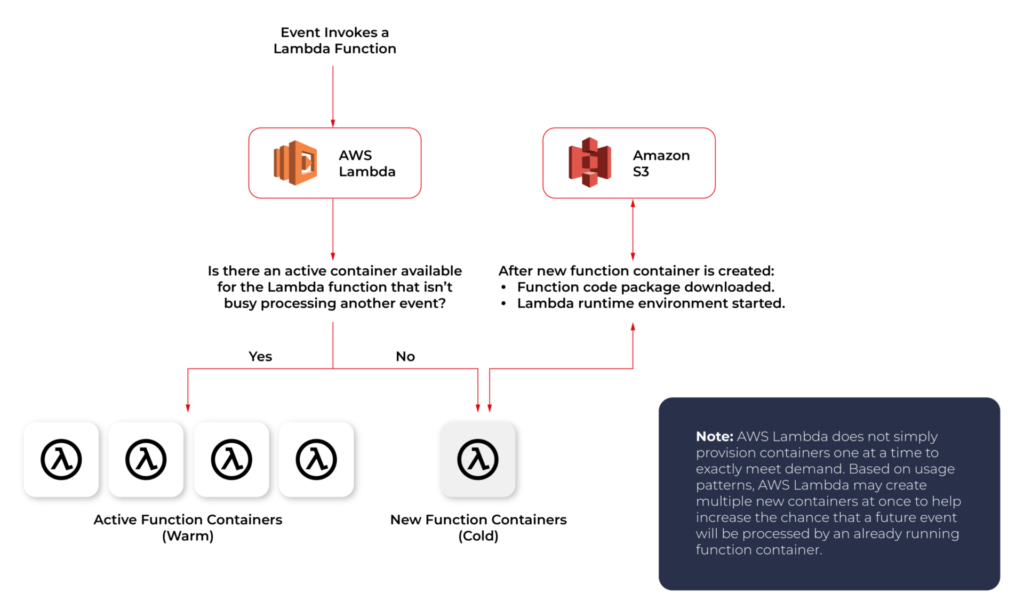
From an infrastructure standpoint, every AWS Lambda is part of a container running Amazon Linux (referenced as Function Container). The code files and assets you create for your AWS Lambda are called Function Code Package and are stored on an S3 bucket managed by AWS. Whenever a Lambda function is triggered, the Function Code Package is downloaded from the S3 bucket to the Function container and installed on its Lambda runtime environment. This process can be easily scaled, and multiple calls for a specific Lambda function can be performed without any trouble by the AWS infrastructure.
The Lambda service is divided into two control planes. The control plane is a master component responsible for making global decisions about provisioning, maintaining, and distributing a workload. A second plane is a data plane that controls the Invoke API that runs Lambda functions. When a Lambda function is invoked, the data plane allocates an execution environment to that function, chooses an existing execution environment that has already been set up for that function, then runs the function code in that environment.
Each function runs in one or more dedicated execution environments that are used for the lifetime of the function and then destroyed. Each execution environment hosts one concurrent invocation but is reused in place across multiple serial invocations of the same function. Execution environments run on hardware virtualized virtual machines (microVMs). A micro VM is dedicated to an AWS account but can be reused by execution environments across functions within an account. MicroVMs are packed onto an AWS-owned and managed hardware platform (Lambda Workers). Execution environments are never shared across functions and microVMs are never shared across AWS accounts.
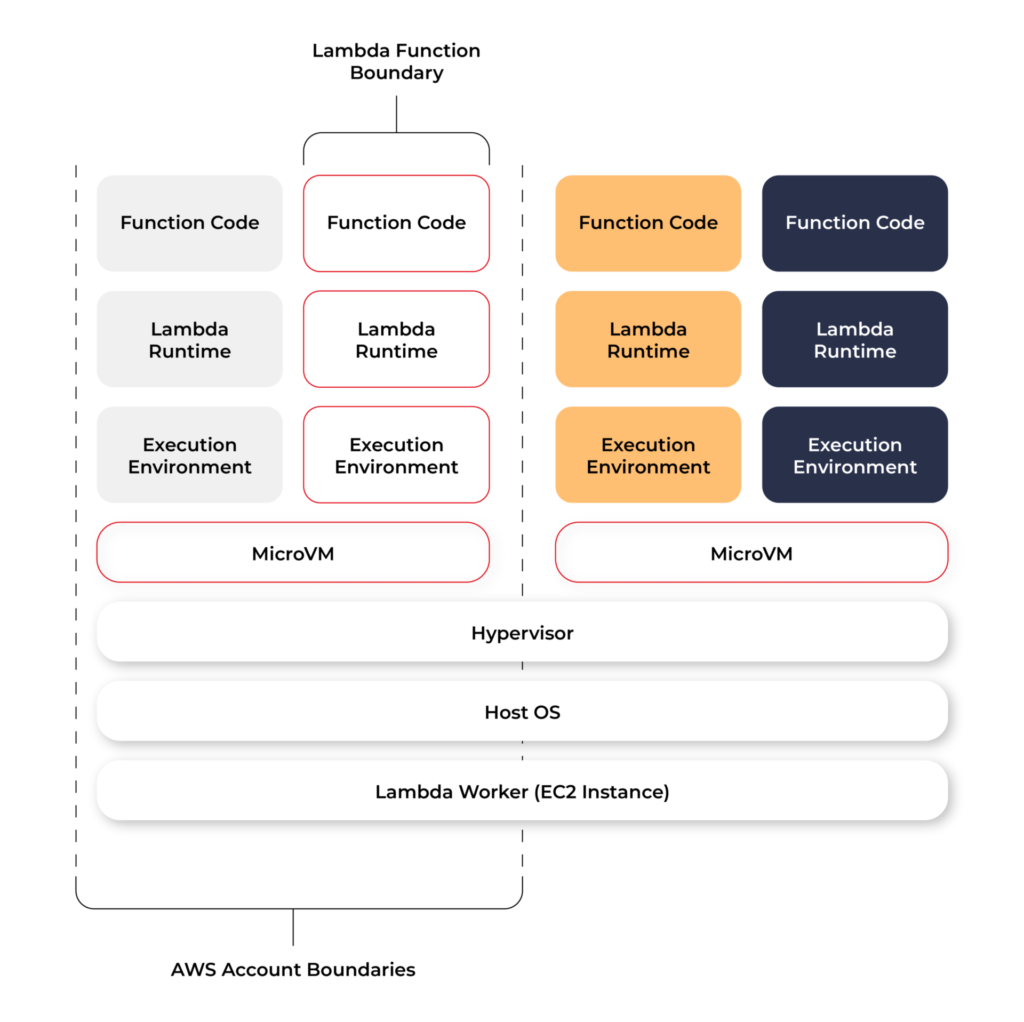
Even though Lambda execution environments are never reused across functions, a single execution environment can be reused for invoking the same function, potentially existing for hours before it is destroyed.
Each Lambda execution environment also includes a writeable file system, available at /tmp . This storage is not accessible to other execution environments. As with the process state, files are written to /tmp remain for the lifetime of the execution environment.
Cold start VS Warm start
When you call a Lambda Function, it follows the steps described above and executes the code. After finishing the execution, the Lambda Container stays available for a few minutes, before being terminated. This is called a Cold Start.
If you call the same function and the Lambda Container is still available (haven’t been terminated yet), AWS uses this container to execute your new call. This process of using active function containers is called Warm Container and it increases the response speed of your Lambda.
Role of AWS Lambda in serverless applications
There are a lot of use cases you can use AWS Lambda for, but there are killer cases for which Lambda is best suited:
- Operating serverless back-end
The web frontend can send requests to Lambda functions via API Gateway HTTPS endpoints. Lambda can handle the application logic and persist data to a fully-managed database service (RDS for relational, or DynamoDB for a non-relational database).
- Working with external services
If your application needs to request services from an external provider, there's generally no reason why the code for the site or the main application needs to handle the details of the request and the response. In fact, waiting for a response from an external source is one of the main causes of slowdowns in web-based services. If you hand requests for such things as credit authorization or inventory checks to an application running on AWS Lambda, your main program can continue with other elements of the transaction while it waits for a response from the Lambda function. This means that in many cases, a slow response from the provider will be hidden from your customers, since they will see the transaction proceeding, with the required data arriving and being processed before it closes.
- Near-realtime notifications
Any type of notifications, but particularly real-time, will find a use case with serverless Lambda. Once you create an SNS, you can set triggers that fire under certain policies. You can easily build a Lambda function to check log files from Cloudtrail or Cloudwatch. Lambda can search in the logs looking for specific events or log entries as they occur and send out notifications via SNS. You can also easily implement custom notification hooks to Slack or another system by calling its API endpoint within Lambda.
- Scheduled tasks and automated backups
Scheduled Lambda events are great for housekeeping within AWS accounts. Creating backups, checking for idle resources, generating reports, and other tasks which frequently occur can be implemented using AWS Lambda.
- Bulk real-time data processing
There are some cases when your application may need to handle large volumes of streaming input data, and moving that data to temporary storage for later processing may not be an adequate solution.If you send the data stream to an AWS Lambda application designed to quickly pull and process the required information, you can handle the necessary real-time tasks.
- Processing uploaded S3 objects
By using S3 object event notifications, you can immediately start processing your files by Lambda, once they land in S3 buckets. Image thumbnail generation with AWS Lambda is a great example for this use case, the solution will be cost-effective and you don’t need to worry about scaling up - Lambda will handle any load.
AWS Lambda limitations
AWS Lambda is not a silver bullet for every use case. For example, it should not be used for anything that you need to control or manage at the infrastructure level, nor should it be used for a large monolithic application or suite of applications.
Lambda comes with a number of “limitations”, which is good to keep in mind when architecting a solution.
There are some “hard limitations” for the runtime environment: the disk space is limited to 500MB, memory can vary from 128MB to 3GB and the execution timeout for a function is 15 minutes. Package constraints like the size of the deployment package (250MB) and the number of file descriptors (1024) are also defined as hard limits.
Similarly, there are “limitations” for the requests served by Lambda: request and response body synchronous event payload can be a maximum of 6 MB while an asynchronous invocation payload can be up to 256KB. At the moment, the only soft “limitation”, which you can request to be increased, is the number of concurrent executions, which is a safety feature to prevent any accidental recursive or infinite loops from going wild in the code. This would throttle the number of parallel executions.
All these limitations come from defined architectural principles for the Lambda service:
- If your Lambda function is running for hours, it should be moved to EC2 rather than Lambda.
- If the deployment package jar is greater than 50 MB in size, it should be broken down into multiple packages and functions.
- If the request payloads exceed the limits, you should break them up into multiple request endpoints.
It all comes down to preventing deploying monolithic applications as Lambda functions and designing stateless microservices as a collection of functions instead. Having this mindset, the “limitations” make complete sense.
AWS Lambda examples
Let’s now take a look at some AWS Lambda examples. We will start with a dummy Java application and how to create, deploy and trigger AWS Lambda. We will use AWS Command Line Interface(AWS CLI) to manage functions and other AWS Lambda resources.
Basic application
Let’s get started by creating the Lambda function and needed roles for Lambda execution.

This trust policy allows Lambda to use the role's permissions by giving the service principal lambda.amazonaws.com permission to call the AWS Security Token Service AssumeRole action. The content of trust-policy.json is the following:

Then let’s attach some permissions to the created role. To add permissions to the role, use the attach-policy-to-role command. Start by adding the AWSLambdaBasicExecutionRole managed policy.

Function code
As an example, we will create Java 11 application using Maven.
For Java AWS Lambda provides the following libraries:
- com.amazonaws:aws-lambda-java-core – Defines handler method interfaces and the context object that the runtime passes to the handler. This is a required library.
- com.amazonaws:aws-lambda-java-events – Different input types for events from services that invoke Lambda functions.
- com.amazonaws:aws-lambda-java-log4j2 – An appender library for Apache Log4j 2 that you can use to add the request ID for the current invocation to your function logs.
Let’s add Java core library to Maven application:

Then we need to add a Handler class which will be an entry point for our function. For Java function this Handler class should implement com.amazonaws.services.lambda.runtime.RequestHandler interface. It’s also possible to set generic input and output types.
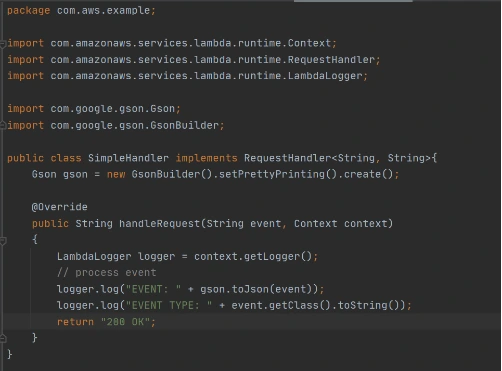
Now let’s create a deployment package from the source code. For Lambda deployment package should be either .zip or .jar. To build a jar file with all dependencies let’s use maven-shade-plugin .
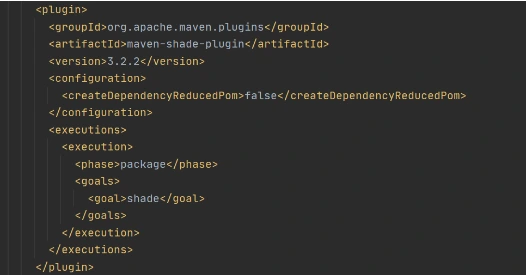
After running mvn package command, the resulting jar will be placed into target folder. You can take this jar file and zip it.
Now let’s create Lambda function from the generated deployment package.

Once Lambda function is deployed we can test it. For that let’s use invoke-command.

out.json means the filename where the content will be saved. After invoking Lambda you should be able to see a similar result in your out.json :
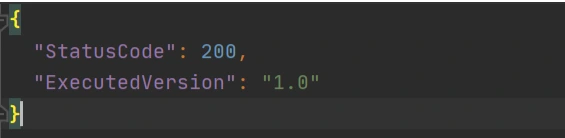
More complicated example
Now let’s take a look at a more complicated application that will show the integration between several AWS services. Also, we will show how Lambda Layers can be used in function code. Let’s create an application with API Gateway as a proxy, two Lambda functions as some back-end logic, and DynamoDB as data storage. One Lambda will be intended to save a new record into the database. The second Lambda will be used to retrieve an object from the database by its identifier.
Let’s start by creating a table in DynamoDB. For simplicity, we’ll add just a couple of fields to that table.

Now let’s create a Java module where some logic with database operations will be put. Dependencies to AWS DynamoDB SDK should be added to the module.
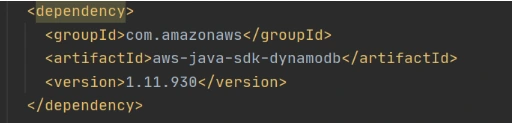
Now let’s add common classes and models to work with the database. This code will be reused in both lambdas.
Model entity object:
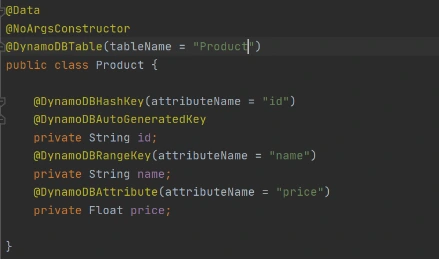
Adapter class to DynamoDB client.
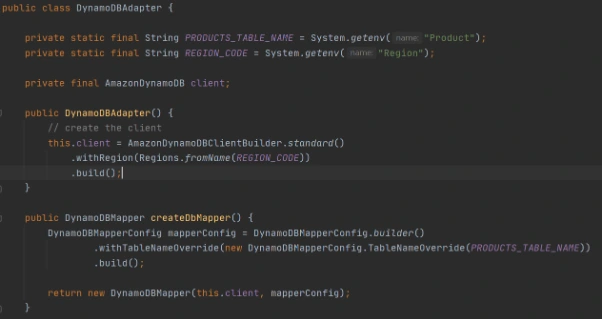
Implementation of DAO interface to provide needed persistent operations.
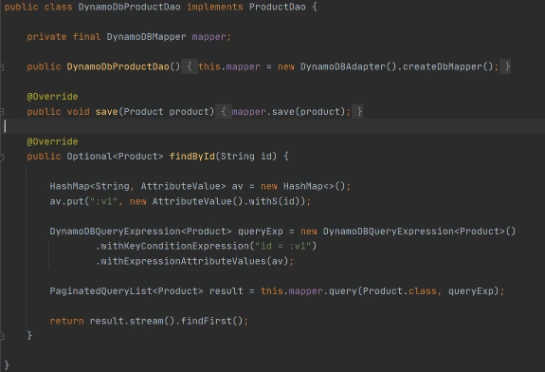
Now let’s build this module and package it into a jar with dependencies. From that jar, a reusable Lambda Layer will be created. Compress fat jar file as a zip archive and publish it to S3. After doing that we will be able to create a Lambda Layer.

Layer usage permissions are managed on the resource. To configure a Lambda function with a layer, you need permission to call GetLayerVersion on the layer version. For functions in your account, you can get this permission from your user policy or from the function's resource-based policy. To use a layer in another account, you need permission on your user policy, and the owner of the other account must grant your account permission with a resource-based policy.
Function code
Now let’s add this shared dependency to both Lambda functions. To do that we need to define a provided dependency in pom.xml.
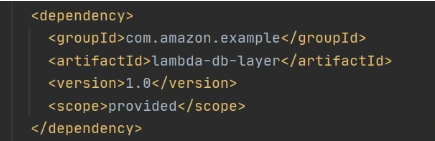
After that, we can write Lambda handlers. The first one will be used to persist new objects into the database:
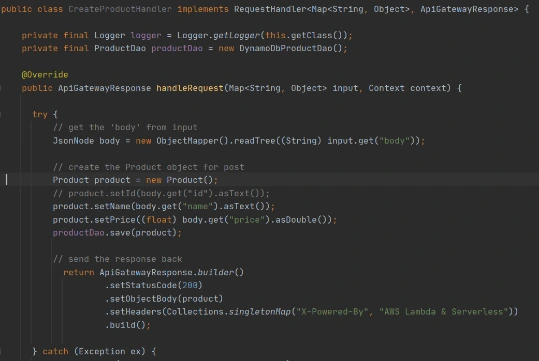
NOTE : in case of subsequent calls AWS may reuse the old Lambda instance instead of creating a new one. This offers some performance advantages to both parties: Lambda gets to skip the container and language initialization, and you get to skip initialization in your code. That’s why it’s recommended not to put the creation and initialization of potentially reusable objects into the handler body, but to move it to some code blocks which will be executed once - on the initialization step only.
In the second Lambda function we will extract object identifiers from request parameters and fetch records from the database by id:
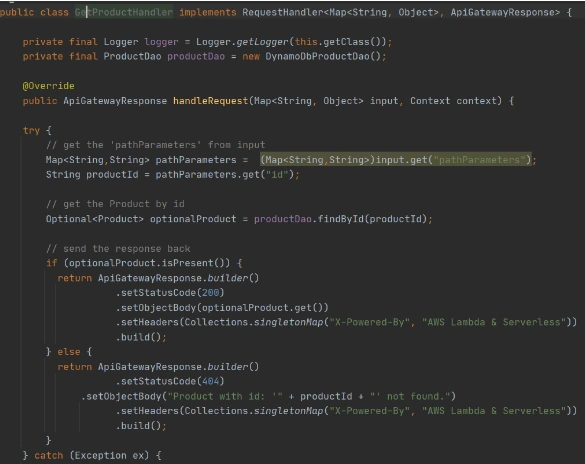
Now create Lambda functions as it was shown in the previous example. Then we need to configure layer usage for functions. To add layers to your function, use the update-function-configuration command.

You must specify the version of each layer to use by providing the full Amazon Resource Name (ARN) of the layer version. While your function is running, it can access the content of the layer in the /opt directory. Layers are applied in the order that's specified, merging any folders with the same name. If the same file appears in multiple layers, the version in the last applied layer is used.
After attaching the layer to Lambda we can deploy and run it.
Now let’s create and configure API Gateway as a proxy to Lambda functions.

This operation will return json with the identifier of created API. Save the API ID for use in further commands. You also need the ID of the API root resource. To get the ID, run the get-resources command.

Now we need to create a resource that will be associated with Lambda to provide integration with functions.


Parameter --integration-http-method is the method that API Gateway uses to communicate with AWS Lambda. Parameter --uri is a unique identifier for the endpoint to which Amazon API Gateway can send requests.
Now let’s make similar operations for the second lambda( get-by-id-function ) and deploy an API.

Note. Before testing API Gateway, you need to add permissions so that Amazon API Gateway can invoke your Lambda function when you send HTTP requests.

Now let’s test our API. First of all, we’ll try to add a new product record:

The result of this call will be like this:

Now we can retrieve created object by its identifier:

And you will get a similar result as after POST request. The same object will be returned in this example.
AWS Lambda tips
Debugging Lambda locally
You can use AWS SAM console with a number of AWS toolkits to test and debug your serverless applications locally. For example, you can perform step-through debugging of your Lambda functions. The commands sam local invoke and sam local start-api both support local step-through debugging of your Lambda functions. To run AWS SAM locally with step-through debugging support enabled, specify --debug-port or -d on the command line. For example:

Also for debugging purposes, you can use AWS toolkits which are plugins that provide you with the ability to perform many common debugging tasks, like setting breakpoints, executing code line by line, and inspecting the values of variables. Toolkits make it easier for you to develop, debug, and deploy serverless applications that are built using AWS.
Configure CloudWatch monitoring and alerts
Lambda automatically monitors Lambda functions on your behalf and reports metrics through Amazon CloudWatch. To help you monitor your code when it runs, Lambda automatically tracks the number of requests, the invocation duration per request, and the number of requests that result in an error. Lambda also publishes the associated CloudWatch metrics. You can leverage these metrics to set CloudWatch custom alarms. The Lambda console provides a built-in monitoring dashboard for each of your functions and applications. Each time your function is invoked, Lambda records metrics for the request, the function's response, and the overall state of the function. You can use metrics to set alarms that are triggered when function performance degrades, or when you are close to hitting concurrency limits in the current AWS Region.
Beware of concurrency limits
For those functions whose usage scales along with your application traffic, it’s important to note that AWS Lambda functions are subject to concurrency limits. When functions reach 1,000 concurrent executions, they are subject to AWS throttling rules. Future calls will be delayed until your concurrent execution averages are back below the threshold. This means that as your applications scale, your high-traffic functions are likely to see drastic reductions in throughput during the time you need them most. To work around this limit, simply request that AWS raise your concurrency limits for the functions that you expect to scale.
Also, there are some widespread issues you may face working with Lambda:
Limitations while working with database
If you have a lot of reading/writing operations during one Lambda execution, you may probably face some failures due to Lambda limitations. Often the case is a timeout on Lambda execution. To investigate the problem you can temporarily increase the timeout limit on the function, but a common and highly recommended solution is to use batch operations while working with the database.
Timeout issues on external calls
This case may occur if you call a remote API from Lambda that takes too long to respond or that is unreachable. Network issues can also cause retries and duplicated API requests. To prepare for these occurrences, your Lambda function must always be idempotent. If you make an API call using an AWS SDK and the call fails, the SDK automatically retries the call. How long and how many times the SDK retries is determined by settings that vary among each SDK. To fix the retry and timeout issues, review the logs of the API call to find the problem. Then, change the retry count and timeout settings of the SDK as needed for each use case. To allow enough time for a response to the API call, you can even add time to the Lambda function timeout setting.
VPC connection issues
Lambda functions always operate from an AWS-owned VPC. By default, your function has full ability to make network requests to any public internet address — this includes access to any of the public AWS APIs. You should configure your functions for VPC access when you need to interact with a private resource located in a private subnet. When you connect a function to a VPC, all outbound requests go through your VPC. To connect to the internet, configure your VPC to send outbound traffic from the function's subnet to a NAT gateway in a public subnet.

Grape Up guides enterprises on their data-driven transformation journey
Ready to ship? Let's talk.
Check related articles
Read our blog and stay informed about the industry's latest trends and solutions.
How to run Selenium BDD tests in parallel with AWS Lambda
Have you ever felt annoyed because of the long waiting time for receiving test results? Maybe after a few hours, you’ve figured out that there had been a network connection issue in the middle of testing, and half of the results can go to the trash? That may happen when your tests are dependent on each other or when you have plenty of them and execution lasts forever. It's quite a common issue. But there’s actually a solution that can not only save your time but also your money - parallelization in the Cloud.
How it started
Developing UI tests for a few months, starting from scratch, and maintaining existing tests, I found out that it has become something huge that will be difficult to take care of very soon. An increasing number of test scenarios made every day led to bottlenecks. One day when I got to the office, it turned out that the nightly tests were not over yet. Since then, I have tried to find a way to avoid such situations.
A breakthrough was the presentation of Tomasz Konieczny during the Testwarez conference in 2019. He proved that it’s possible to run Selenium tests in parallel using AWS Lambda. There’s actually one blog that helped me with basic Selenium and Headless Chrome configuration on AWS. The Headless Chrome is a light-weighted browser that has no user interface. I went a step forward and created a solution that allows designing tests in the Behavior-Driven Development process and using the Page Object Model pattern approach, run them in parallel, and finally - build a summary report.
Setting up the project
The first thing we need to do is signing up for Amazon Web Services. Once we have an account and set proper values in credentials and config files (.aws directory), we can create a new project in PyCharm, Visual Studio Code, or in any other IDE supporting Python. We’ll need at least four directories here. We called them ‘lambda’, ‘selenium_layer’, ‘test_list’, ‘tests’ and there’s also one additional - ‘driver’, where we keep a chromedriver file, which is used when running tests locally in a sequential way.
In the beginning, we’re going to install the required libraries. Those versions work fine on AWS, but you can check newer if you want.
requirements.txt
allure_behave==2.8.6
behave==1.2.6
boto3==1.10.23
botocore==1.13.23
selenium==2.37.0
What’s important, we should install them in the proper directory - ‘site-packages’.
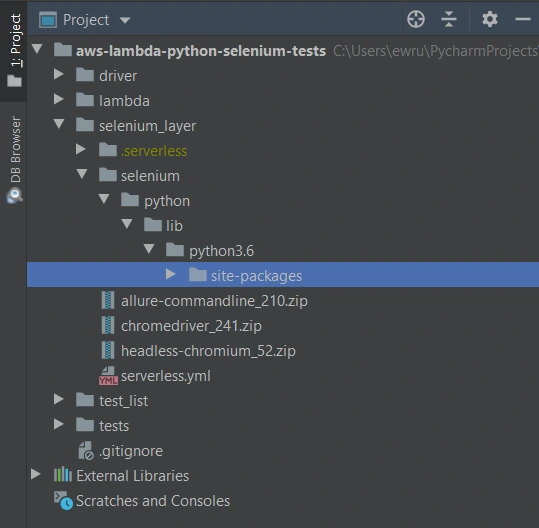
We’ll need also some additional packages:
Allure Commandline ( download )
Chromedriver ( download )
Headless Chromium ( download )
All those things will be deployed to AWS using Serverless Framework, which you need to install following the docs . The Serverless Framework was designed to provision the AWS Lambda Functions, Events, and infrastructure Resources safely and quickly. It translates all syntax in serverless.yml to a single AWS CloudFormation template which is used for deployments.
Architecture - Lambda Layers
Now we can create a serverless.yml file in the ‘selenium-layer’ directory and define Lambda Layers we want to create. Make sure that your .zip files have the same names as in this file. Here we can also set the AWS region in which we want to create our Lambda functions and layers.
serverless.yml
service: lambda-selenium-layer
provider:
name: aws
runtime: python3.6
region: eu-central-1
timeout: 30
layers:
selenium:
path: selenium
CompatibleRuntimes: [
"python3.6"
]
chromedriver:
package:
artifact: chromedriver_241.zip
chrome:
package:
artifact: headless-chromium_52.zip
allure:
package:
artifact: allure-commandline_210.zip
resources:
Outputs:
SeleniumLayerExport:
Value:
Ref: SeleniumLambdaLayer
Export:
Name: SeleniumLambdaLayer
ChromedriverLayerExport:
Value:
Ref: ChromedriverLambdaLayer
Export:
Name: ChromedriverLambdaLayer
ChromeLayerExport:
Value:
Ref: ChromeLambdaLayer
Export:
Name: ChromeLambdaLayer
AllureLayerExport:
Value:
Ref: AllureLambdaLayer
Export:
Name: AllureLambdaLayer
Within this file, we’re going to deploy a service consisting of four layers. Each of them plays an important role in the whole testing process.
Creating test set
What would the tests be without the scenarios? Our main assumption is to create test files running independently. This means we can run any test without others and it works. If you're following clean code, you'll probably like using the Gherkin syntax and the POM approach. Behave Framework supports both.
What gives us Gherkin? For sure, better readability and understanding. Even if you haven't had the opportunity to write tests before, you will understand the purpose of this scenario.
01.OpenLoginPage.feature
@smoke
@login
Feature: Login to service
Scenario: Login
Given Home page is opened
And User opens Login page
When User enters credentials
And User clicks Login button
Then User account page is opened
Scenario: Logout
When User clicks Logout button
Then Home page is opened
And User is not authenticated
In the beginning, we have two tags. We add them in order to run only chosen tests in different situations. For example, you can name a tag @smoke and run it as a smoke test, so that you can test very fundamental app functions. You may want to test only a part of the system like end-to-end order placing in the online store - just add the same tag for several tests.
Then we have the feature name and two scenarios. Those are quite obvious, but sometimes it’s good to name them with more details. Following steps starting with Given, When, Then and And can be reused many times. That’s the Behavior-Driven Development in practice. We’ll come back to this topic later.
Meantime, let’s check the proper configuration of the Behave project.
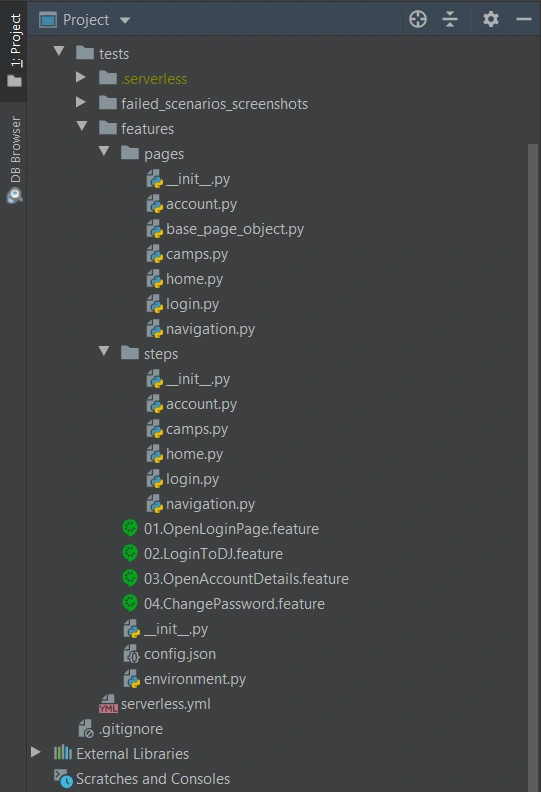
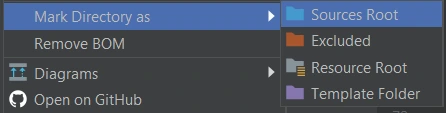
We definitely need a ‘feature’ directory with ‘pages’ and ‘steps’. Make the ‘feature’ folder as Sources Root. Just right-click on it and select the proper option. This is the place for our test scenario files with .feature extension.
It’s good to have some constant values in a separate file so that it will change only here when needed. Let’s call it config.json and put the URL of the tested web application.
config.json
{
"url": "http://drabinajakuba.atthost24.pl/"
}
One more thing we need is a file where we set webdriver options.
Those are required imports and some global values like, e.g. a name of AWS S3 bucket in which we want to have screenshots or local directory to store them in. As far as we know, bucket names should be unique in whole AWS S3, so you should probably change them but keep the meaning.
environment.py
import os
import platform
from datetime import date, datetime
import json
import boto3
from selenium import webdriver
from selenium.webdriver.chrome.options import Options
REPORTS_BUCKET = 'aws-selenium-test-reports'
SCREENSHOTS_FOLDER = 'failed_scenarios_screenshots/'
CURRENT_DATE = str(date.today())
DATETIME_FORMAT = '%H_%M_%S'
Then we have a function for getting given value from our config.json file. The path of this file depends on the system platform - Windows or Darwin (Mac) would be local, Linux in this case is in AWS. If you need to run these tests locally on Linux, you should probably add some environment variables and check them here.
def get_from_config(what):
if 'Linux' in platform.system():
with open('/opt/config.json') as json_file:
data = json.load(json_file)
return data[what]
elif 'Darwin' in platform.system():
with open(os.getcwd() + '/features/config.json') as json_file:
data = json.load(json_file)
return data[what]
else:
with open(os.getcwd() + '\\features\\config.json') as json_file:
data = json.load(json_file)
return data[what]
Now we can finally specify paths to chromedriver and set browser options which also depend on the system platform. There’re a few more options required on AWS.
def set_linux_driver(context):
"""
Run on AWS
"""
print("Running on AWS (Linux)")
options = Options()
options.binary_location = '/opt/headless-chromium'
options.add_argument('--allow-running-insecure-content')
options.add_argument('--ignore-certificate-errors')
options.add_argument('--disable-gpu')
options.add_argument('--headless')
options.add_argument('--window-size=1280,1000')
options.add_argument('--single-process')
options.add_argument('--no-sandbox')
options.add_argument('--disable-dev-shm-usage')
capabilities = webdriver.DesiredCapabilities().CHROME
capabilities['acceptSslCerts'] = True
capabilities['acceptInsecureCerts'] = True
context.browser = webdriver.Chrome(
'/opt/chromedriver', chrome_options=options, desired_capabilities=capabilities
)
def set_windows_driver(context):
"""
Run locally on Windows
"""
print('Running on Windows')
options = Options()
options.add_argument('--no-sandbox')
options.add_argument('--window-size=1280,1000')
options.add_argument('--headless')
context.browser = webdriver.Chrome(
os.path.dirname(os.getcwd()) + '\\driver\\chromedriver.exe', chrome_options=options
)
def set_mac_driver(context):
"""
Run locally on Mac
"""
print("Running on Mac")
options = Options()
options.add_argument('--no-sandbox')
options.add_argument('--window-size=1280,1000')
options.add_argument('--headless')
context.browser = webdriver.Chrome(
os.path.dirname(os.getcwd()) + '/driver/chromedriver', chrome_options=options
)
def set_driver(context):
if 'Linux' in platform.system():
set_linux_driver(context)
elif 'Darwin' in platform.system():
set_mac_driver(context)
else:
set_windows_driver(context)
Webdriver needs to be set before all tests, and in the end, our browser should be closed.
def before_all(context):
set_driver(context)
def after_all(context):
context.browser.quit()
Last but not least, taking screenshots of test failure. Local storage differs from the AWS bucket, so this needs to be set correctly.
def after_scenario(context, scenario):
if scenario.status == 'failed':
print('Scenario failed!')
current_time = datetime.now().strftime(DATETIME_FORMAT)
file_name = f'{scenario.name.replace(" ", "_")}-{current_time}.png'
if 'Linux' in platform.system():
context.browser.save_screenshot(f'/tmp/{file_name}')
boto3.resource('s3').Bucket(REPORTS_BUCKET).upload_file(
f'/tmp/{file_name}', f'{SCREENSHOTS_FOLDER}{CURRENT_DATE}/{file_name}'
)
else:
if not os.path.exists(SCREENSHOTS_FOLDER):
os.makedirs(SCREENSHOTS_FOLDER)
context.browser.save_screenshot(f'{SCREENSHOTS_FOLDER}/{file_name}')
Once we have almost everything set, let’s dive into single test creation. Page Object Model pattern is about what exactly hides behind Gherkin’s steps. In this approach, we treat each application view as a separate page and define its elements we want to test. First, we need a base page implementation. Those methods will be inherited by all specific pages. You should put this file in the ‘pages’ directory.
base_page_object.py
from selenium.webdriver.common.action_chains import ActionChains
from selenium.webdriver.support.ui import WebDriverWait
from selenium.webdriver.support import expected_conditions as EC
from selenium.common.exceptions import *
import traceback
import time
from environment import get_from_config
class BasePage(object):
def __init__(self, browser, base_url=get_from_config('url')):
self.base_url = base_url
self.browser = browser
self.timeout = 10
def find_element(self, *loc):
try:
WebDriverWait(self.browser, self.timeout).until(EC.presence_of_element_located(loc))
except Exception as e:
print("Element not found", e)
return self.browser.find_element(*loc)
def find_elements(self, *loc):
try:
WebDriverWait(self.browser, self.timeout).until(EC.presence_of_element_located(loc))
except Exception as e:
print("Element not found", e)
return self.browser.find_elements(*loc)
def visit(self, url):
self.browser.get(url)
def hover(self, element):
ActionChains(self.browser).move_to_element(element).perform()
time.sleep(5)
def __getattr__(self, what):
try:
if what in self.locator_dictionary.keys():
try:
WebDriverWait(self.browser, self.timeout).until(
EC.presence_of_element_located(self.locator_dictionary[what])
)
except(TimeoutException, StaleElementReferenceException):
traceback.print_exc()
return self.find_element(*self.locator_dictionary[what])
except AttributeError:
super(BasePage, self).__getattribute__("method_missing")(what)
def method_missing(self, what):
print("No %s here!", what)
That’s a simple login page class. There’re some web elements defined in locator_dictionary and methods using those elements to e.g., enter text in the input, click a button, or read current values. Put this file in the ‘pages’ directory.
login.py
from selenium.webdriver.common.by import By
from .base_page_object import *
class LoginPage(BasePage):
def __init__(self, context):
BasePage.__init__(
self,
context.browser,
base_url=get_from_config('url'))
locator_dictionary = {
'username_input': (By.XPATH, '//input[@name="username"]'),
'password_input': (By.XPATH, '//input[@name="password"]'),
'login_button': (By.ID, 'login_btn'),
}
def enter_username(self, username):
self.username_input.send_keys(username)
def enter_password(self, password):
self.password_input.send_keys(password)
def click_login_button(self):
self.login_button.click()
What we need now is a glue that will connect page methods with Gherkin steps. In each step, we use a particular page that handles the functionality we want to simulate. Put this file in the ‘steps’ directory.
login.py
from behave import step
from environment import get_from_config
from pages import LoginPage, HomePage, NavigationPage
@step('User enters credentials')
def step_impl(context):
page = LoginPage(context)
page.enter_username('test_user')
page.enter_password('test_password')
@step('User clicks Login button')
def step_impl(context):
page = LoginPage(context)
page.click_login_button()
It seems that we have all we need to run tests locally. Of course, not every step implementation was shown above, but it should be easy to add missing ones.
If you want to read more about BDD and POM, take a look at Adrian’s article
All files in the ‘features’ directory will also be on a separate Lambda Layer. You can create a serverless.yml file with the content presented below.
serverless.yml
service: lambda-tests-layer
provider:
name: aws
runtime: python3.6
region: eu-central-1
timeout: 30
layers:
features:
path: features
CompatibleRuntimes: [
"python3.6"
]
resources:
Outputs:
FeaturesLayerExport:
Value:
Ref: FeaturesLambdaLayer
Export:
Name: FeaturesLambdaLayer
This is the first part of the series covering running Parallel Selenium tests on AWS Lambda. More here !
How to run Selenium BDD tests in parallel with AWS Lambda - Lambda handlers
In our first article about Selenium BDD Tests in Parallel with AWS Lambda, we introduce parallelization in the Cloud and give you some insights into automating testing to accelerate your software development process. By getting familiar with the basics of Lambda Layers architecture and designing test sets, you are now ready to learn more about the Lambda handlers.
Lambda handlers
Now’s the time to run our tests on AWS. We need to create two Lambda handlers. The first one will find all scenarios from the test layer and run the second lambda in parallel for each scenario. In the end, it will generate one test report and upload it to the AWS S3 bucket.
Let’s start with the middle part. In order to connect to AWS, we need to use the boto3 library - AWS SDK for Python. It enables us to create, configure, and manage AWS services. We also import here behave __main__ function , which will be called to run behave tests from the code, not from the command line.
lambda/handler.py
import json
import logging
import os
from datetime import datetime
from subprocess import call
import boto3
from behave.__main__ import main as behave_main
REPORTS_BUCKET = 'aws-selenium-test-reports'
DATETIME_FORMAT = '%H:%M:%S'
logger = logging.getLogger()
logger.setLevel(logging.INFO)
def get_run_args(event, results_location):
test_location = f'/opt/{event["tc_name"]}'
run_args = [test_location]
if 'tags' in event.keys():
tags = event['tags'].split(' ')
for tag in tags:
run_args.append(f'-t {tag}')
run_args.append('-k')
run_args.append('-f allure_behave.formatter:AllureFormatter')
run_args.append('-o')
run_args.append(results_location)
run_args.append('-v')
run_args.append('--no-capture')
run_args.append('--logging-level')
run_args.append('DEBUG')
return run_args
What we also have above is setting arguments for our tests e.g., tags or feature file locations. But let's get to the point. Here is our Lambda handler code:
lambda/handler.py
def lambda_runner(event, context):
suffix = datetime.now().strftime(DATETIME_FORMAT)
results_location = f'/tmp/result_{suffix}'
run_args = get_run_args(event, results_location)
print(f'Running with args: {run_args}')
# behave -t @smoke -t ~@login -k -f allure_behave.formatter:AllureFormatter -o output --no-capture
try:
return_code = behave_main(run_args)
test_result = False if return_code == 1 else True
except Exception as e:
print(e)
test_result = False
response = {'test_result': test_result}
s3 = boto3.resource('s3')
for file in os.listdir(results_location):
if file.endswith('.json'):
s3.Bucket(REPORTS_BUCKET).upload_file(f'{results_location}/{file}', f'tmp_reports/{file}')
call(f'rm -rf {results_location}', shell=True)
return {
'statusCode': 200,
'body': json.dumps(response)
}
The lambda_runner method is executed with tags that are passed in the event. It will handle a feature file having a name from the event and at least one of those tags. At the end of a single test, we need to upload our results to the S3 bucket. The last thing is to return a Lambda result with a status code and a response from tests.
There’s a serverless file with a definition of max memory size, lambda timeout, used layers, and also some policies that allow us to upload the files into S3 or save the logs in CloudWatch.
lambda/serverless.yml
service: lambda-test-runner
app: lambda-test-runner
provider:
name: aws
runtime: python3.6
region: eu-central-1
memorySize: 512
timeout: 900
iamManagedPolicies:
- "arn:aws:iam::aws:policy/CloudWatchLogsFullAccess"
- "arn:aws:iam::aws:policy/AmazonS3FullAccess"
functions:
lambda_runner:
handler: handler.lambda_runner
events:
- http:
path: lambda_runner
method: get
layers:
- ${cf:lambda-selenium-layer-dev.SeleniumLayerExport}
- ${cf:lambda-selenium-layer-dev.ChromedriverLayerExport}
- ${cf:lambda-selenium-layer-dev.ChromeLayerExport}
- ${cf:lambda-tests-layer-dev.FeaturesLayerExport}
Now let’s go back to the first lambda function. There will be a little more here, so we'll go through it in batches. Firstly, imports and global variables. REPORTS_BUCKET should have the same value as it’s in the environment.py file (tests layer).
test_list/handler.py
import json
import logging
import os
import shutil
import subprocess
from concurrent.futures import ThreadPoolExecutor as PoolExecutor
from datetime import date, datetime
import boto3
from botocore.client import ClientError, Config
REPORTS_BUCKET = 'aws-selenium-test-reports'
SCREENSHOTS_FOLDER = 'failed_scenarios_screenshots/'
CURRENT_DATE = str(date.today())
REPORTS_FOLDER = 'tmp_reports/'
HISTORY_FOLDER = 'history/'
TMP_REPORTS_FOLDER = f'/tmp/{REPORTS_FOLDER}'
TMP_REPORTS_ALLURE_FOLDER = f'{TMP_REPORTS_FOLDER}Allure/'
TMP_REPORTS_ALLURE_HISTORY_FOLDER = f'{TMP_REPORTS_ALLURE_FOLDER}{HISTORY_FOLDER}'
REGION = 'eu-central-1'
logger = logging.getLogger()
logger.setLevel(logging.INFO)
There are some useful functions to avoid duplication and make the code more readable. The first one will find and return all .feature files which exist on the tests layer. Then we have a few functions that let us create a new AWS bucket or folder, remove it, upload reports, or download some files.
test_list/handler.py
def get_test_cases_list() -> list:
return [file for file in os.listdir('/opt') if file.endswith('.feature')]
def get_s3_resource():
return boto3.resource('s3')
def get_s3_client():
return boto3.client('s3', config=Config(read_timeout=900, connect_timeout=900, max_pool_connections=500))
def remove_s3_folder(folder_name: str):
s3 = get_s3_resource()
bucket = s3.Bucket(REPORTS_BUCKET)
bucket.objects.filter(Prefix=folder_name).delete()
def create_bucket(bucket_name: str):
client = get_s3_client()
try:
client.head_bucket(Bucket=bucket_name)
except ClientError:
location = {'LocationConstraint': REGION}
client.create_bucket(Bucket=bucket_name, CreateBucketConfiguration=location)
def create_folder(bucket_name: str, folder_name: str):
client = get_s3_client()
client.put_object(
Bucket=bucket_name,
Body='',
Key=folder_name
)
def create_sub_folder(bucket_name: str, folder_name: str, sub_folder_name: str):
client = get_s3_client()
client.put_object(
Bucket=bucket_name,
Body='',
Key=f'{folder_name}{sub_folder_name}'
)
def upload_html_report_to_s3(report_path: str):
s3 = get_s3_resource()
current_path = os.getcwd()
os.chdir('/tmp')
shutil.make_archive('report', 'zip', report_path)
s3.Bucket(REPORTS_BUCKET).upload_file('report.zip', f'report_{str(datetime.now())}.zip')
os.chdir(current_path)
def upload_report_history_to_s3():
s3 = get_s3_resource()
current_path = os.getcwd()
os.chdir(TMP_REPORTS_ALLURE_HISTORY_FOLDER)
for file in os.listdir(TMP_REPORTS_ALLURE_HISTORY_FOLDER):
if file.endswith('.json'):
s3.Bucket(REPORTS_BUCKET).upload_file(file, f'{HISTORY_FOLDER}{file}')
os.chdir(current_path)
def download_folder_from_bucket(bucket, dist, local='/tmp'):
s3 = get_s3_resource()
paginator = s3.meta.client.get_paginator('list_objects')
for result in paginator.paginate(Bucket=bucket, Delimiter='/', Prefix=dist):
if result.get('CommonPrefixes') is not None:
for subdir in result.get('CommonPrefixes'):
download_folder_from_bucket(subdir.get('Prefix'), bucket, local)
for file in result.get('Contents', []):
destination_pathname = os.path.join(local, file.get('Key'))
if not os.path.exists(os.path.dirname(destination_pathname)):
os.makedirs(os.path.dirname(destination_pathname))
if not file.get('Key').endswith('/'):
s3.meta.client.download_file(bucket, file.get('Key'), destination_pathname)
For that handler, we also need a serverless file. There’s one additional policy AWSLambdaExecute and some actions that are required to invoke another lambda.
test_list/serverless.yml
service: lambda-test-list
app: lambda-test-list
provider:
name: aws
runtime: python3.6
region: eu-central-1
memorySize: 512
timeout: 900
iamManagedPolicies:
- "arn:aws:iam::aws:policy/CloudWatchLogsFullAccess"
- "arn:aws:iam::aws:policy/AmazonS3FullAccess"
- "arn:aws:iam::aws:policy/AWSLambdaExecute"
iamRoleStatements:
- Effect: Allow
Action:
- lambda:InvokeAsync
- lambda:InvokeFunction
Resource:
- arn:aws:lambda:eu-central-1:*:*
functions:
lambda_test_list:
handler: handler.lambda_test_list
events:
- http:
path: lambda_test_list
method: get
layers:
- ${cf:lambda-tests-layer-dev.FeaturesLayerExport}
- ${cf:lambda-selenium-layer-dev.AllureLayerExport}
And the last part of this lambda - the handler. In the beginning, we need to get a list of all test cases. Then if the action is run_tests , we get the tags from the event. In order to save reports or screenshots, we must have a bucket and folders created. The invoke_test function will be executed concurrently by the PoolExecutor. This function invokes a lambda, which runs a test with a given feature name. Then it checks the result and adds it to the statistics so that we know how many tests failed and which ones.
In the end, we want to generate one Allure report. In order to do that, we need to download all .json reports, which were uploaded to the S3 bucket after each test. If we care about trends, we can also download data from the history folder. With the allure generate command and proper parameters, we are able to create a really good looking HTML report. But we can’t see it at this point. We’ll upload that report into the S3 bucket with a newly created history folder so that in the next test execution, we can compare the results. If there are no errors, our lambda will return some statistics and links after the process will end.
test_list/handler.py
def lambda_test_list(event, context):
test_cases = get_test_cases_list()
if event['action'] == 'run_tests':
tags = event['tags']
create_bucket(bucket_name=REPORTS_BUCKET)
create_folder(bucket_name=REPORTS_BUCKET, folder_name=SCREENSHOTS_FOLDER)
create_sub_folder(
bucket_name=REPORTS_BUCKET, folder_name=SCREENSHOTS_FOLDER, sub_folder_name=f'{CURRENT_DATE}/'
)
remove_s3_folder(folder_name=REPORTS_FOLDER)
create_folder(bucket_name=REPORTS_BUCKET, folder_name=REPORTS_FOLDER)
client = boto3.client(
'lambda',
region_name=REGION,
config=Config(read_timeout=900, connect_timeout=900, max_pool_connections=500)
)
stats = {'passed': 0, 'failed': 0, 'passed_tc': [], 'failed_tc': []}
def invoke_test(tc_name):
response = client.invoke(
FunctionName='lambda-test-runner-dev-lambda_runner',
InvocationType='RequestResponse',
LogType='Tail',
Payload=f'{{"tc_name": "{tc_name}", "tags": "{tags}"}}'
)
result_payload = json.loads(response['Payload'].read())
result_body = json.loads(result_payload['body'])
test_passed = bool(result_body['test_result'])
if test_passed:
stats['passed'] += 1
stats['passed_tc'].append(tc_name)
else:
stats['failed'] += 1
stats['failed_tc'].append(tc_name)
with PoolExecutor(max_workers=500) as executor:
for _ in executor.map(invoke_test, test_cases):
pass
try:
download_folder_from_bucket(bucket=REPORTS_BUCKET, dist=REPORTS_FOLDER)
download_folder_from_bucket(bucket=REPORTS_BUCKET, dist=HISTORY_FOLDER, local=TMP_REPORTS_FOLDER)
command_generate_allure_report = [
f'/opt/allure-2.10.0/bin/allure generate --clean {TMP_REPORTS_FOLDER} -o {TMP_REPORTS_ALLURE_FOLDER}'
]
subprocess.call(command_generate_allure_report, shell=True)
upload_html_report_to_s3(report_path=TMP_REPORTS_ALLURE_FOLDER)
upload_report_history_to_s3()
remove_s3_folder(REPORTS_FOLDER)
subprocess.call('rm -rf /tmp/*', shell=True)
except Exception as e:
print(f'Error when generating report: {e}')
return {
'Passed': stats['passed'],
'Failed': stats['failed'],
'Passed TC': stats['passed_tc'],
'Failed TC': stats['failed_tc'],
'Screenshots': f'https://s3.console.aws.amazon.com/s3/buckets/{REPORTS_BUCKET}/'
f'{SCREENSHOTS_FOLDER}{CURRENT_DATE}/',
'Reports': f'https://s3.console.aws.amazon.com/s3/buckets/{REPORTS_BUCKET}/'
}
else:
return test_cases
Once we have it all set, we need to deploy our code. This shouldn’t be difficult. Let’s open a command prompt in the selenium_layer directory and execute the serverless deploy command. When it’s finished, do the same thing in the ‘tests’ directory, lambda directory, and finally in the test_list directory. The order of deployment is important because they are dependent on each other.
When everything is set, let’s navigate to our test-list-lambda in the AWS console.
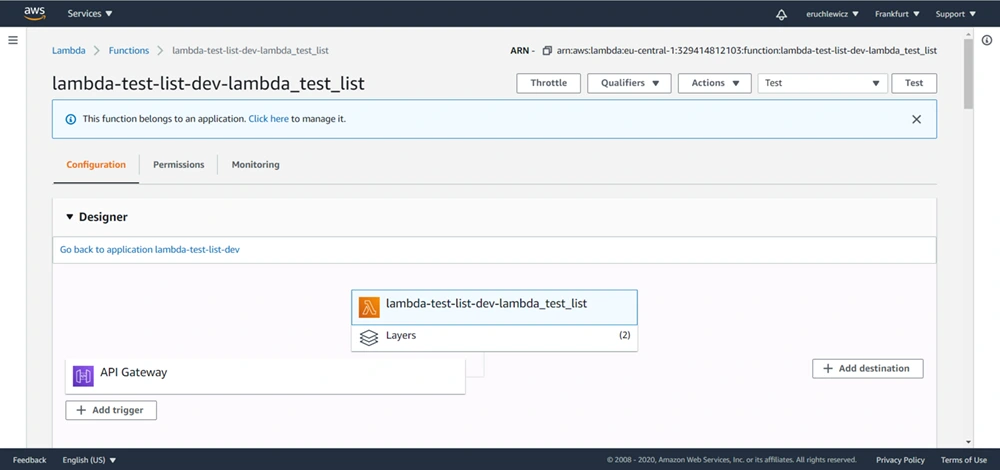
We need to create a new event. I already have three, the Test one is what we’re looking for. Click on the Configure test events option.
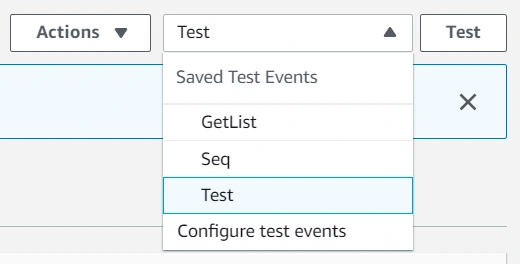
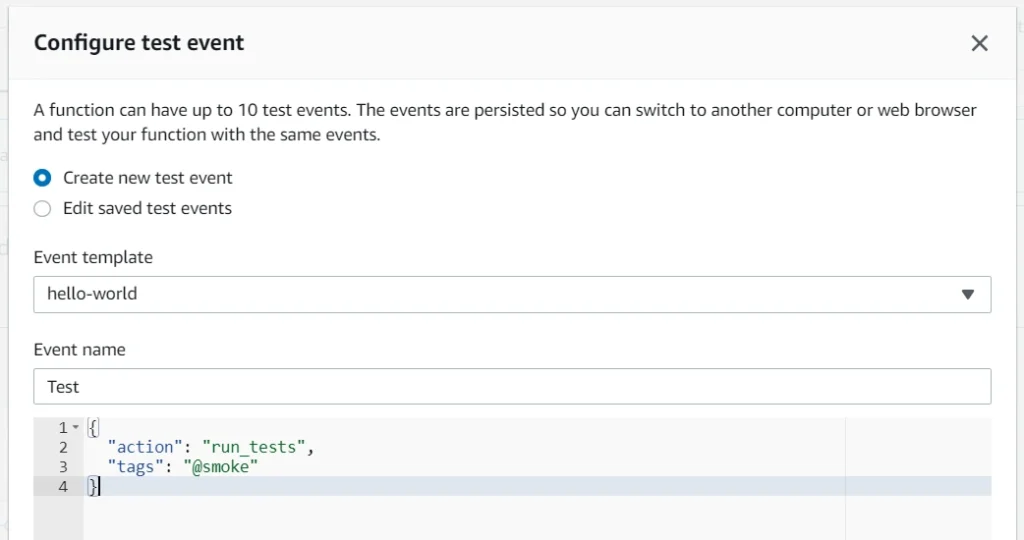
Then select an event template, an event name, and fill JSON. In the future, you can add more tags separated with a single space. Click Create to save that event.
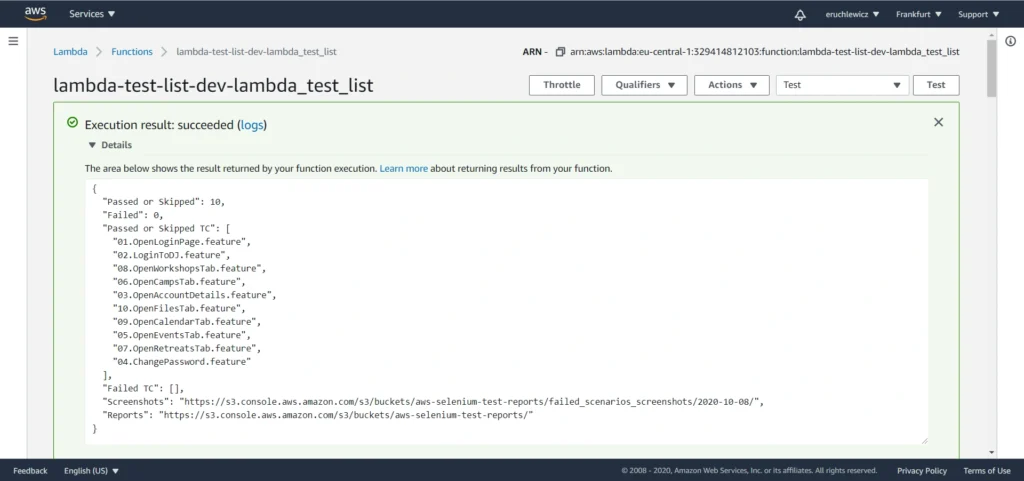
The last step is to click the Test button and wait for the results. In our case, it took almost one minute. The longest part of our solution is generating the Allure report when all tests are finished.
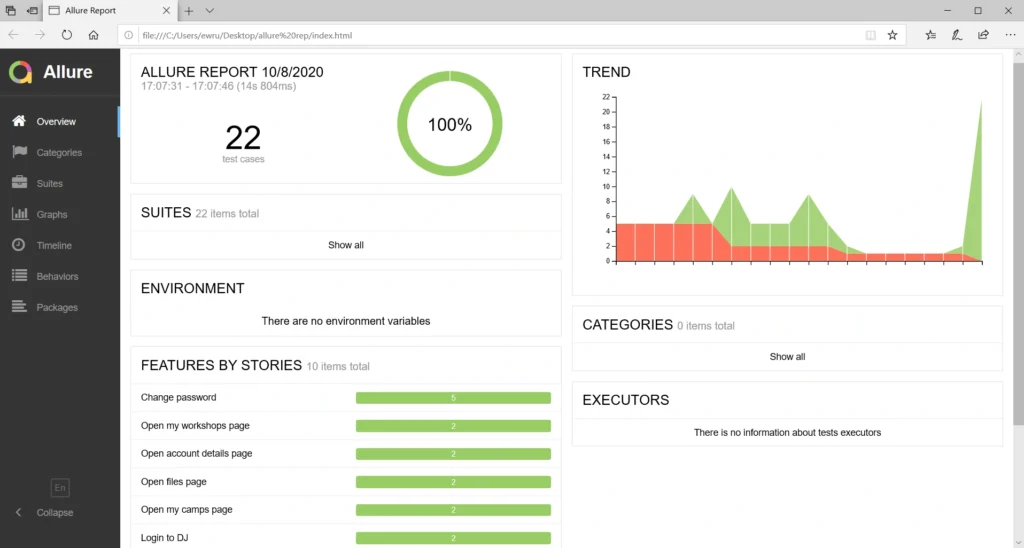
When you navigate to the reports bucket and download the latest one, you need to unpack the .zip file locally and open the index.html file in the browser. Unfortunately, most of the browsers won’t handle it that easily. If you have Allure installed, you can use the allure serve <path> command. It creates a local Jetty server instance, serves the generated report, and opens it in the default browser. But there’s also a workaround - Microsoft Edge. Just right-click on the index.html file and open it with that browser. It works!
Statistics
Everybody knows that time is money. Let’s check how much we can save. Here we have a division into the duration of the tests themselves and the entire process.
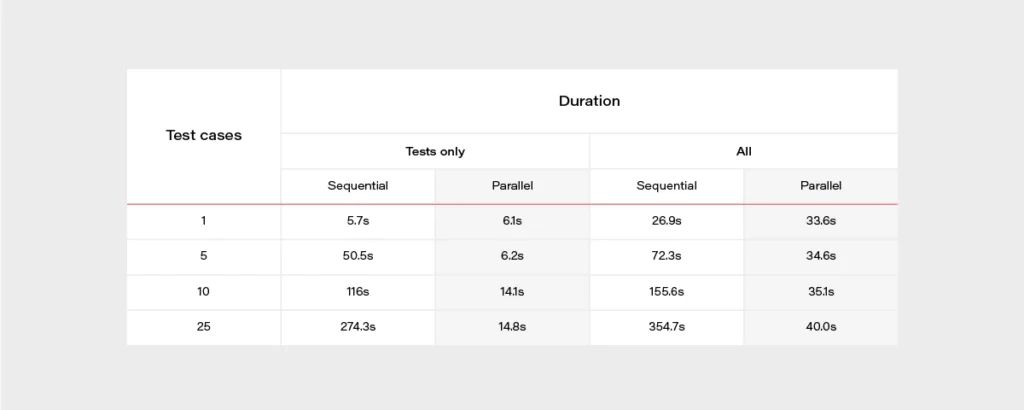
It’s really easy to find out that parallel tests are much faster. When having a set of 500 test cases, the difference is huge. It can take about 2 hours when running in a sequential approach or 2 minutes in parallel. The chart below may give a better overview.
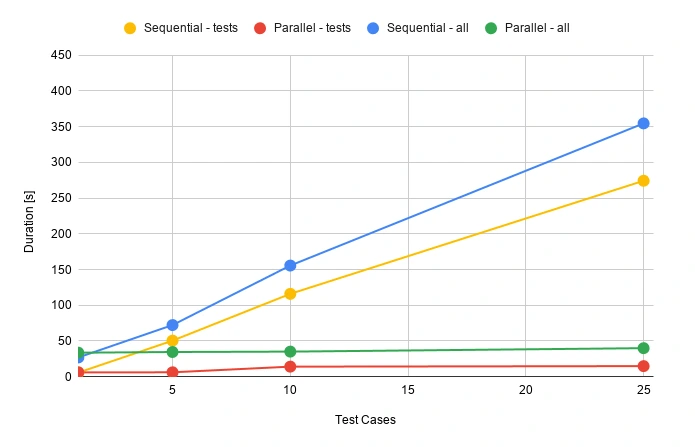
During the release, there’s usually not that much time for doing regression tests. Same with running tests that take several hours to complete. Parallel testing may speed up the whole release process.
Well, but what is the price for that convenience? Actually not that high.

Let’s assume that we have 100 feature files, and it takes 30 seconds for each one to execute. We can set a 512MB memory size for our lambda function. Tests will be executed daily in the development environment and occasionally before releases. We can assume 50 executions of each test monthly.
Total compute (seconds) = 100 * 50 * (30s) = 150,000 seconds
Total compute (GB-s) = 150,000 * 512MB/1024 = 75,000 GB-s
Monthly compute charges = 75,000 * $0.00001667 = $1.25
Monthly request charges = 100 * 50 * $0.2/M = $0.01
Total = $1.26
It looks very promising. If you have more tests or they last longer, you can double this price. It’s still extremely low!
AWS Lambda handlers - summary
We went through quite an extended Selenium test configuration with Behave and Allure and made it work in the parallel process using AWS Lambda to achieve the shortest time waiting for results. Everything is ready to be used with your own app, just add some tests! Of course, there is still room for improvement - reports are now available in the AWS S3 bucket but could be attached to emails or served so that anybody can display them in a browser with a URL. You can also think of CI/CD practices. It's good to have continuous testing in the continuous integration process, e.g., when pushing some new changes to the main or release branch in your GIT repository in order to find all bugs as soon as possible. Hopefully, this article will help you with creating your custom testing process and speed up your work.
Sources
Serverless architecture with AWS Cloud Development Kit (CDK)
The IT world revolves around servers - we set up, manage, and scale them, we communicate with them, deploy software onto them, and restrict access to them. In the end, it is difficult to imagine our lives without them. However, in this “serverfull” world, an idea of serverless architecture arose. A relatively new approach to building applications without direct access to the servers required to run them. Does it mean that the servers are obsolete, and that we no longer should use them? In this article, we will explore what it means to build a serverless application, how it compares to the well-known microservice design, what are the pros and cons of this new method and how to use the AWS Cloud Development Kit framework to achieve that.
Background
There was a time when the world was inhabited by creatures known as “monolith applications”. Those beings were enormous, tightly coupled, difficult to manage, and highly resource-consuming, which made the life of tech people a nightmare.
Out of that nightmare, a microservice architecture era arose, which was like a new day for software development. Microservices are small independent processes communicating with each other through their APIs. Each microservice can be developed in a different programming language, best suited for its job, providing a great deal of flexibility for developers. Although the distributed nature of microservices increased the overall architectural complexity of the systems, it also provided the biggest benefit of the new approach, namely scalability, coming from the possibility to scale each microservice individually based on its resource demands.
The microservice era was a life changer for the IT industry. Developers could focus on the design and development of small modular components instead of struggling with enormous black box monoliths. Managers enjoyed improvements in efficiency. However, microservice architecture still posed a huge challenge in the areas of deployment and infrastructure management for distributed systems. What is more, there were scenarios when it was not as cost-effective as it could be. That is how the software architecture underwent another major shift. This time towards the serverless architecture epoch.
What is serverless architecture?
Serverless, a bit paradoxically, does not mean that there are no servers. Both server hardware and server processes are present, exactly as in any other software architecture. The difference is that the organization running a serverless application is not owning and managing those servers. Instead, they make use of third-party Backend as a Service (BaaS) and/or Function as a Service platform.
- Backend as a Service (BaaS) is a cloud service model where the delivery of services responsible for server-side logic is delegated to cloud providers. This often includes services such as: database management, cloud storage, user authentication, push notifications, hosting, etc. In this approach, client applications, instead of talking to their dedicated servers, directly operate on those cloud services.

- Function as a Service (FaaS) is a way of executing our code in stateless, ephemeral computing environments fully managed by third-party providers without thinking about the underlying servers. We simply upload our code, and the FaaS platform is responsible for running it. Our functions can then be triggered by events such as HTTP(S) requests, schedulers, or calls from other cloud services. One of the most popular implementations of FaaS is the AWS Lambda service, but each cloud provider has its corresponding options.

In this article, we will explore the combination of both BaaS and FaaS approaches as most enterprise-level solutions combine both of them into a fully functioning system.
Note: This article is often referencing services provided by AWS . However, it is important to note that the serverless architecture approach is not cloud-provider-specific and most of the services mentioned as part of the AWS platform have their equivalents in other cloud platforms.
Serverless architecture design
We know a bit of theory, so let us look now at a practical example. The figure 1 presents an architecture diagram of a user management system created with the serverless approach.

The system utilizes Amazon Cognito for user authentication and authorization, ensuring that only authorized parties access our API. Then we have the API Gateway, which deals with all the routing, requests throttling, DDOS protection etc. API Gateway also allows us to implement custom authorizers if we can’t or don’t want to use Amazon Cognito. The business logic layer consists of Lambda Functions. If you are used to the microservice approach, you can think of each lambda as a separate set of a controller endpoint and service method, handling a specific type of request. Lambdas further communicate with other services such as databases, caches, config servers, queues, notification services, or whatever else our application may require.
The presented diagram demonstrates a relatively simple API design. However, it is good to bear in mind that the serverless approach is not limited to APIs. It is also perfect for more complex solutions such as data processing, batch processing, event ingestion systems, etc.
Serverless vs Microservices
Microservice-oriented architecture broke down the long-lasting realm of monolith systems through the division of applications into small, loosely coupled services that could be developed, deployed, and maintained independently. Those services had distinct responsibilities and could communicate with each other through APIs, constituting together a much larger and complex system. Up till this point, serverless does not differ much from the microservice approach. It also divides a system into smaller, independent components, but instead of services, we usually talk about functions.
So, what’s the difference? The microservices are standalone applications, usually packaged as lightweight containers and run on physical servers (commonly in the cloud), which you can access, manage and scale if needed. Those containers need to be supervised (orchestrated) with the use of tools such as Kubernetes . So speaking simply, you divide your application into smaller independent parts, package them as containers, deploy on servers, and orchestrate their lifecycle.
In comparison, when it comes to serverless functions, you only write your function code, upload it to the FaaS provider platform, and the cloud provider handles its packaging, deployment, execution, and scaling without showing you (or giving you access to) physical resources required to run it. What is more, when you deploy microservices, they are always active, even when they do not perform any processing, on the servers provisioned to them. Therefore, you need to pay for required host servers on a daily or monthly basis, in contrast to the serverless functions, which are only brought to life for their time of execution, so if there are no requests they do not use any resources.

Pros & cons of serverless computing
Pros:
- Pricing - Serverless works in a pay-as-you-go manner, which means that you only pay for those resources which you actually use, with no payment for idle time of the servers and no in-front dedication. This is especially beneficial for applications with infrequent traffic or startup organizations.
- Operational costs and complexity - The management of your infrastructure is delegated almost entirely to the cloud provider. This frees up your team allocation, decreases the probability of error on your side, and automates downtime handling leading to the overall increase in the availability of your system and the decrease in operational costs.
- Scalability by design - Serverless applications are scalable by nature. The cloud provider handles scaling up and down of resources automatically based on the traffic.
Cons:
- It is a much less mature approach than microservices which means a lot of unknowns and spaces for bad design decisions exist.
- Architectural complexity - Serverless functions are much more granular than microservices, and that can lead to higher architectural complexity, where instead of managing a dozen of microservices, you need to handle hundreds of lambda functions.
- Cloud provider specific solutions - With microservices packaged as containers, it didn’t matter which cloud provider you used. That is not the case for serverless applications which are tightly bound to the services provided by the cloud platform.
- Services limitations - some Faas and BaaS services have limitations such as a maximum number of concurrent requests, memory, timeouts, etc. which are often customizable but only to a certain point (e.g., default AWS Lambda execution quota equals 1000).
- Cold starts - Serverless applications can introduce response delays when a new instance handles its first request because it needs to boot up, copy application code, etc. before it can run the logic.
How much does it really cost?
One of the main advantages of the serverless design is its pay-as-you-go model, which can greatly decrease the overall costs of your system. However, does it always lead to lesser expenses? For this consideration, let us look at the pricing of some of the most common AWS services.
Service Price API Gateway 3.50$ per 1M requests (REST Api) Lambda 0.20$ per 1M request SQS First 1M free, then 0.40& per 1M requests
Those prices seem low, and in many cases, they will lead to very cheap operational costs of running serverless applications. Having that said, there are some scenarios where serverless can get much more expensive than other architectures. Let us consider a system that handles 5 mln requests per hour. Having it designed as a serverless architecture will lead to the cost of API Gateway only equal to:
$3.50 * 5 * 24 * 30 = $12,600/month
In this scenario, it could be more efficient to have an hourly rate-priced load balancer and a couple of virtual machines running. Then again, we would have to take into consideration the operational cost of setting up and managing the load balancer and VMs. As you can see, it all depends on the specific use case and your organization. You can read more about this scenario in this article .
AWS Cloud Development Kit
At this point, we know quite a lot about serverless computing, so now, let’s take a look at how we can create our serverless applications. First of all, we can always do it manually through the cloud provider’s console or CLI. It may be a valuable educational experience, but we wouldn’t recommend it for real-life systems. Another well-known solution is using Infrastructure as a Code (IaaS), such as AWS Cloud Formation service . However, in 2019 AWS introduced another possibility which is AWS Cloud Development Kit (CDK).
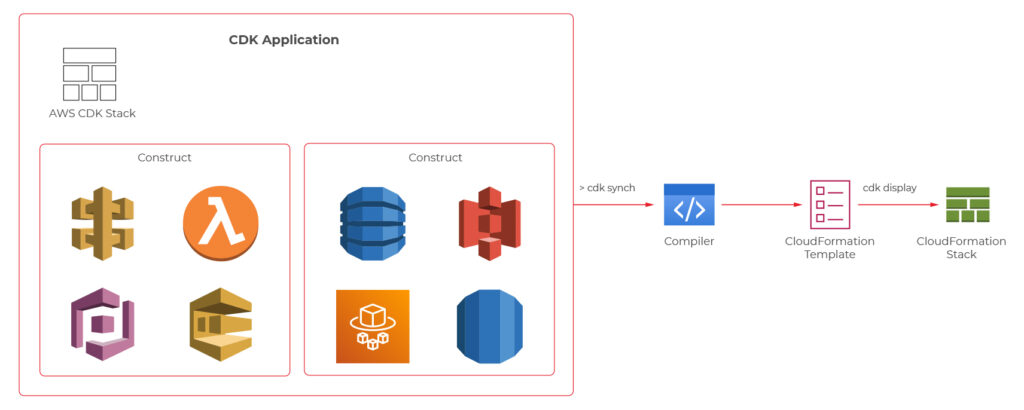
AWS CDK is an open-source software development framework which lets you define your architectures using traditional programming languages such as Java, Python, Javascript, Typescript, and C#. It provides you with high-level pre-configured components called constructs which you can use and further extend in order to build your infrastructures faster than ever. AWS CDK utilizes Cloud Formation behind the scenes to provision your resources in a safe and repeatable manner.
We will now take a look at the CDK definitions of a couple of components from the user management system, which the architecture diagram was presented before.
Main stack definition
export class UserManagerServerlessStack extends cdk.Stack {
private static readonly API_ID = 'UserManagerApi';
constructor(scope: cdk.Construct, id: string, props?: cdk.StackProps) {
super(scope, id, props);
const cognitoConstruct = new CognitoConstruct(this)
const usersDynamoDbTable = new UsersDynamoDbTable(this);
const lambdaConstruct = new LambdaConstruct(this, usersDynamoDbTable);
new ApiGatewayConstruct(this, cognitoConstruct.userPoolArn, lambdaConstruct);
}
}
API gateway
export class ApiGatewayConstruct extends Construct {
public static readonly ID = 'UserManagerApiGateway';
constructor(scope: Construct, cognitoUserPoolArn: string, lambdas: LambdaConstruct) {
super(scope, ApiGatewayConstruct.ID);
const api = new RestApi(this, ApiGatewayConstruct.ID, {
restApiName: 'User Manager API'
})
const authorizer = new CfnAuthorizer(this, 'cfnAuth', {
restApiId: api.restApiId,
name: 'UserManagerApiAuthorizer',
type: 'COGNITO_USER_POOLS',
identitySource: 'method.request.header.Authorization',
providerArns: [cognitoUserPoolArn],
})
const authorizationParams = {
authorizationType: AuthorizationType.COGNITO,
authorizer: {
authorizerId: authorizer.ref
},
authorizationScopes: [`${CognitoConstruct.USER_POOL_RESOURCE_SERVER_ID}/user-manager-client`]
};
const usersResource = api.root.addResource('users');
usersResource.addMethod('POST', new LambdaIntegration(lambdas.createUserLambda), authorizationParams);
usersResource.addMethod('GET', new LambdaIntegration(lambdas.getUsersLambda), authorizationParams);
const userResource = usersResource.addResource('{userId}');
userResource.addMethod('GET', new LambdaIntegration(lambdas.getUserByIdLambda), authorizationParams);
userResource.addMethod('POST', new LambdaIntegration(lambdas.updateUserLambda), authorizationParams);
userResource.addMethod('DELETE', new LambdaIntegration(lambdas.deleteUserLambda), authorizationParams);
}
}
CreateUser Lambda
export class CreateUserLambda extends Function {
public static readonly ID = 'CreateUserLambda';
constructor(scope: Construct, usersTableName: string, layer: LayerVersion) {
super(scope, CreateUserLambda.ID, {
...defaultFunctionProps,
code: Code.fromAsset(resolve(__dirname, `../../lambdas`)),
handler: 'handlers/CreateUserHandler.handler',
layers: [layer],
role: new Role(scope, `${CreateUserLambda.ID}_role`, {
assumedBy: new ServicePrincipal('lambda.amazonaws.com'),
managedPolicies: [
ManagedPolicy.fromAwsManagedPolicyName('service-role/AWSLambdaBasicExecutionRole'),
]
}),
environment: {
USERS_TABLE: usersTableName
}
});
}
}
User DynamoDB table
export class UsersDynamoDbTable extends Table {
public static readonly TABLE_ID = 'Users';
public static readonly PARTITION_KEY = 'id';
constructor(scope: Construct) {
super(scope, UsersDynamoDbTable.TABLE_ID, {
tableName: `${Aws.STACK_NAME}-Users`,
partitionKey: {
name: UsersDynamoDbTable.PARTITION_KEY,
type: AttributeType.STRING
} as Attribute,
removalPolicy: RemovalPolicy.DESTROY,
});
}
}
The code with a complete serverless application can be found on github: https://github.com/mkapiczy/user-manager-serverless
All in all, serverless architecture is becoming an increasingly attractive solution when it comes to the design of IT systems. Knowing what it is all about, how it works, and what are its benefits and drawbacks will help you make good decisions on when to stick to the beloved microservices and when to go serverless in order to help your organization grow .
Interested in our services?
Reach out for tailored solutions and expert guidance.