

Bartek is a Full-Stack Software Engineer specializing in Java, frontend, and mobile technologies. When he’s not coding or working in the cloud, you can find him at a concert - either playing or listening. He also enjoys exploring new technologies, a passion that aligns with his work at Grape Up, where he applies his technical skills to drive innovation.
Read articles
Native app vs. hybrid app: How to choose a solution that meets your business needs
Every time we start a new project, we organize brainstorming sessions about architecture and how to manage the project. Regarding mobile apps, we have one additional question – should we choose a hybrid or native app?
Let's start from the absolute beginning. What is a native app?
A native app is a software or program developed to carry out a specific task within a platform or environment. Native apps are built using software development tools (SDK) for particular software frameworks, hardware platforms, or operating systems. Native apps are built for use on a particular device, such as Apple iPhone or Google Android. To create an iOS application, we use Swift, which replaced Objective-C a few years ago. If we want our app to be available on Android phones, we can choose Kotlin (more popular) or Java (replaced by Kotlin a few years ago, however, we can still use it). Let's start by discussing the pros and cons of native apps.
PROS
First – native apps are stable and reliable. That's especially worthwhile cause if you work on large projects, you want to focus on implementing new features, not fight with platform limitations. While working on a native app, you can be sure you will find well-prepared documentation for each part of the SDK – it does not matter if it's a camera, Bluetooth, or design principles.
If you want to use a specific part of SDK or hardware that is specific to a platform, such as Bluetooth, a camera native app also would be a better choice. Even if you decide to go hybrid, these components need to be handled by native code, so you would need a library or plugins. It doesn't make sense to use native frameworks in hybrid apps.
If we are planning a big battery driller app with a beautiful, complicated, animated UI, we should choose a native app. Performance and responsiveness are much better than hybrid can offer. Same thing if we're talking about UX; better UX equals digital customer engagement.
All these points are essential, but what matters the most is security. You should know that native apps are much safer, more stable, and less vulnerable to security risks.
CONS
Of course, native apps are not perfect, and we can easily find examples of ideas when a hybrid app would be a better choice.
Native apps, of course, have a separate codebase for Android and iOS. This means we have (at least) two teams to manage one project. This also reflects bug fixing – it's much easier and takes less time to find and fix bugs if we have one code base.
You should also consider the time you have to create an app. Developing on multiple platforms means a more extended development schedule and, as a result, higher development costs. Therefore, native app development quickly eats up resources.
Go hybrid?
You always have a choice 😊 Native app is a clever idea, but is it always the best one, and what is it - a hybrid app? A (hybrid app) is a software application that combines elements of both native apps and web applications. Simply – it is the technology where we share the codebase between platforms – Android and iOS. The most popular frameworks are:
- React Native
- Flutter
- Xamarin
- KMM (soon 😉)
Let's discuss the pros and cons of hybrid apps.
PROS
Of course, the most significant advantage of hybrid apps is that they can be used across platforms and devices – they share one code base. Cool, isn't it? This means more accessible updates, bug fixes, and maintenance. Also, Development is much simpler and quicker by not having to build from the ground up for each platform.
A crucial thing is the deployment process. Hybrid apps can be deployed much faster than native apps, which can be extremely helpful, especially in big, complicated projects.
Regarding performance, reduced time frames equate to reduced resource drain. We should keep that in mind.
Finally - Hybrid apps can take advantage of dynamic web content. If you plan to create a big social platform – mobile app, web page, and so on – you should consider a hybrid app.
CONS
Looks interesting, right? Well, it is not an ideal solution. Like everything else – it has some limitations.
As we mentioned, there are components that 100% rely on device-specific components or hardware – like cameras, Bluetooth, etc. To use that feature in hybrid applications, we need to implement plugins or parts – or create them ourselves. That can be time assuming but also can present security risks.
The second important thing is user experience - it can suffer as hybrid apps cannot take advantage of the platform's UI.
The last thing - being unable to take full advantage of the hardware sometimes impacts the performance of our applications by making them poor and insecure.
There is one proposition that eliminates most of our cons – KMM, Kotlin Multiplatform Mobile. Its significant advantage is that we share the whole business logic between platforms – Android and iOS using Kotlin language. We create separate native layouts and UI layers for each platform. But of course – there is a problem 😊 KMM is still in the alpha phase, and, in my opinion, it is not production ready yet. But we should keep an eye on that as it might be a revolution.
Summary
It is not an easy task to choose the best technology. We should consider many varied factors that can impact our app. Here are key takeaways for both solutions – native and hybrid.
Native apps: Key takeaways
Native apps provide the best stability and security. They will tend to perform faster and be able to handle the most demanding tasks. This kind of application is best placed to use specific devices' hardware functionality. The user experience is smooth and featureful.
Hybrid apps: Key takeaways
Hybrid apps are easy to get onto iOS and Android. By utilizing a single codebase, you can reduce budget and time costs.
How to migrate on-premise databases to AWS RDS with AWS DMS: Our guide
Migrating an on-premise MS SQL Server database to AWS RDS, especially for high-stakes applications handling sensitive information, can be challenging yet rewarding. This guide walks through the rationale for moving to the cloud, the key steps, the challenges you may face, and the potential benefits and risks.
Why Cloud?
When undertaking such a significant project, you might wonder why we would change something that was working well. Why shift from a proven on-premise setup to the cloud? It's a valid question. The rise in the popularity of cloud technology is no coincidence, and AWS offers several advantages that make the move worthwhile for us.
First, AWS's global reach and availability play a crucial role in choosing it. AWS operates in multiple regions and availability zones worldwide, allowing applications to deploy closer to users, reducing latency, and ensuring higher availability. In case of any issues at one data center, AWS's ability to automatically switch to another ensures minimal downtime - a critical factor, especially for our production environment.
Another significant reason for choosing AWS is the fully managed nature of AWS RDS . In an on-premise setup, you are often responsible for everything from provisioning to scaling, patching, and backing up the database. With AWS, these responsibilities are lifted. AWS takes care of backups, software patching, and even scaling based on demand, allowing the team to focus more on application development and less on infrastructure management.
Cost is another compelling factor. AWS's pay-as-you-go model eliminates the need to over-provision hardware, as is often done on-premise to handle peak loads. By paying only for resources used, particularly in development and testing environments, expenses are significantly reduced. Resources can be scaled up or down as needed, especially beneficial during periods of lower activity.
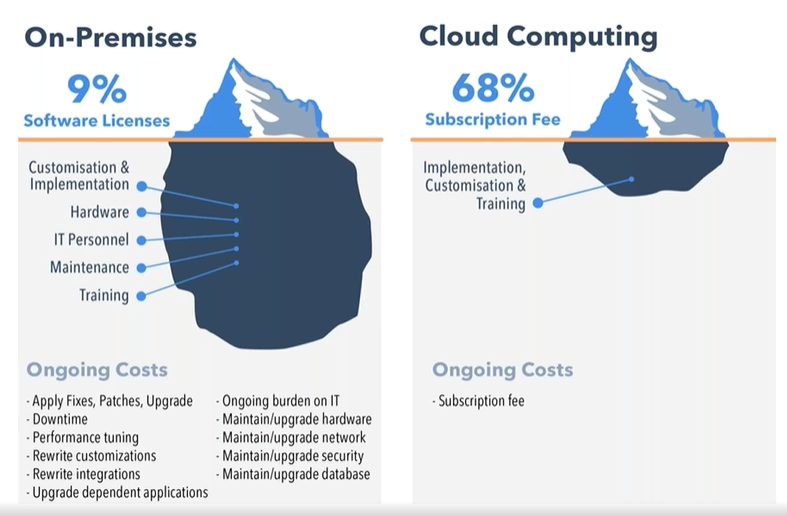
Source: https://www.peoplehr.com/blog/2015/06/12/saas-vs-on-premise-hr-systems-pros-cons-hidden-costs/
The challenges and potential difficulties
Migrating a database from on-premise to AWS RDS isn’t a simple task, especially when dealing with multiple environments like dev, UAT, staging, preprod, and production. Here are some of the possible issues that could arise during the process:
- Complexity of the migration process : Migrating on-premise databases to AWS RDS involves several moving parts, from initial planning to execution. The challenge is not just about moving the data but ensuring that all dependencies, configurations, and connections between the database and applications remain intact. This requires a deep understanding of our infrastructure and careful planning to avoid disrupting production systems.
The complexity could increase with the need to replicate different environments - each with its unique configurations - without introducing inconsistencies. For example, the development environment might allow more flexibility, but production requires tight controls for security and reliability.
- Data consistency and minimal downtime : Ensuring data consistency while minimizing downtime for a production environment might be one of the toughest aspects. For a business that operates continuously, even a few minutes of downtime could affect customers and operations. Although AWS DMS (Database Migration Service) supports live data replication to help mitigate downtime, careful timing of the migration might be necessary to avoid conflicts or data loss. Inconsistent data, even for a brief period, could lead to application failures or incorrect reports.
Additionally, setting up the initial full load of data followed by ongoing change data capture (CDC) could present a challenge. Close migration monitoring might be essential to ensure no changes are missed while data is being transferred.
- Handling legacy systems : Some existing systems might not be fully compatible with cloud-native features, requiring certain services to be rewritten to work in synchronous or asynchronous manners to avoid potential timeout issues within an organization’s applications.
- Security and compliance considerations : Security is a major concern throughout the migration process, especially when moving sensitive business data to the cloud. AWS offers robust security tools, but it’s necessary to ensure that everything is correctly configured to avoid potential vulnerabilities. This included setting up IAM roles, policies, and firewalls and managing infrastructure with relevant tools. Additionally, a secure connection between on-premise and cloud databases would likely be crucial to safeguard data migration using AWS DMS.
- Managing the learning curve : For a team relatively new to AWS, the learning curve can be steep. AWS offers a vast array of services and features, each with its own set of best practices, pricing models, and configuration options. Learning to use services like RDS, DMS, IAM, and CloudWatch effectively could require time and experimentation with various configurations to optimize performance.
- Coordination across teams : Migrating such a critical part of the infrastructure requires coordination across multiple teams - development, operations, security, and management. Each team has its priorities and concerns, making smooth communication and alignment of goals a potential challenge to ensure a unified approach.
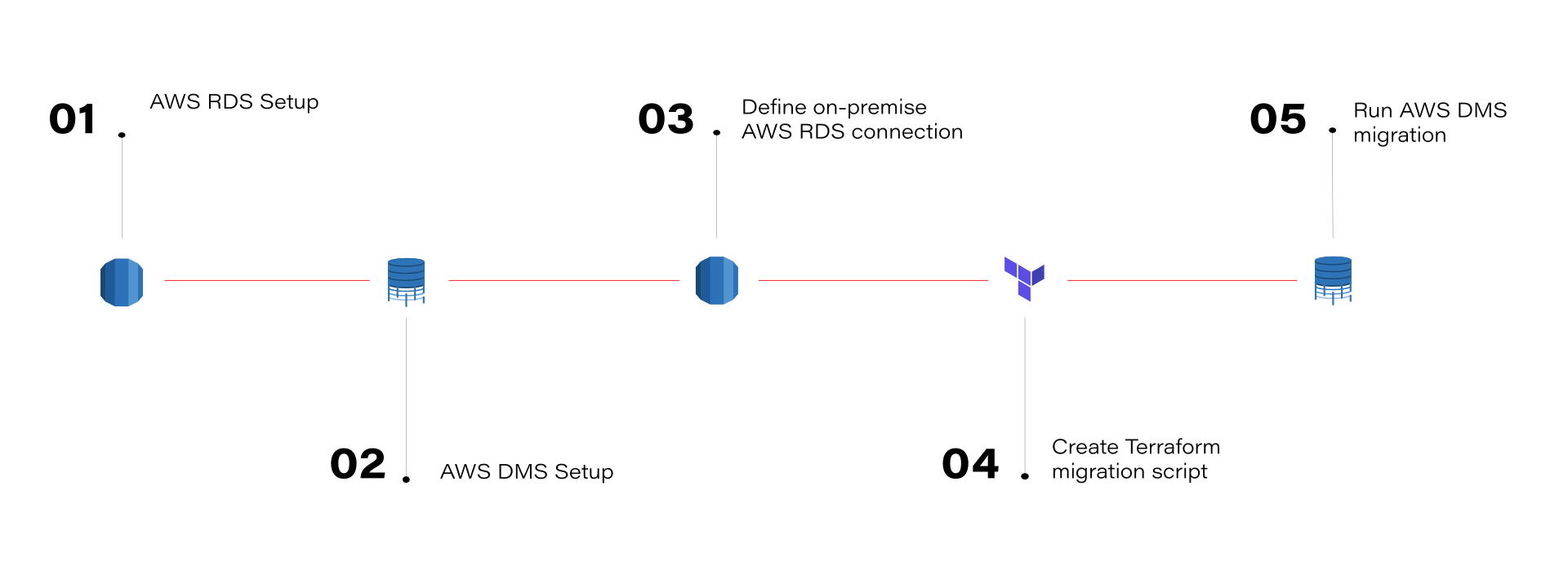
What can be gained by migrating on-premise databases to AWS RDS
This journey isn’t fast or easy. So, is it worth it? Absolutely! The migration to AWS RDS provides significant benefits for database management. With the ability to scale databases up or down based on demand, performance is optimized, and over-provisioning resources is avoided. AWS RDS automates manual backups and database maintenance, allowing teams to focus on more strategic tasks. Additionally, the pay-as-you-go model helps manage and optimize costs more efficiently.
Risks and concerns
AWS is helpful and can make your work easier. However, it's important to be aware of the potential risks:
- Vendor lock-in : Once you’re deep into AWS services, moving away can be difficult due to the reliance on AWS-specific technologies and configurations.
- Security misconfigurations : While AWS provides strong security tools, a misconfiguration can expose sensitive data. It’s crucial to ensure access controls, encryption, and monitoring are set up correctly.
- Unexpected costs : While AWS’s pricing can be cost-effective, it’s easy to incur unexpected costs, especially if you don’t properly monitor your resource usage or optimize your infrastructure.
Conclusion
Migrating on-premise databases to AWS RDS using AWS DMS is a learning experience. The cloud offers incredible opportunities for scalability, flexibility, and innovation, but it also requires a solid understanding of best practices to fully benefit from it. For organizations considering a similar migration, the key is to approach it with careful planning, particularly around data consistency, downtime minimization, and security.
For those just starting with AWS, don't be intimidated - AWS provides extensive documentation, and the community is always there to help. By embracing the cloud, we open the door to a more agile, scalable, and resilient future.