
AI Development Workflow with Claude Code: Lessons from a 3-Month Project

For about three months, our team built the front end of a web application with an AI development workflow built on Claude Code. Claude co-authored most of our commits, and wrote between about two thirds and over 90 percent of the added lines, depending on how you count. Roughly 22 to 27 user stories went through that workflow.
Key numbers
Project: the front end of a web application, built over about three months
Scope: 22 to 27 user stories through the workflow
AI share: Claude co-authored most commits and wrote two thirds to over 90% of the added lines
Typical story: 30 to 60 minutes with AI (up to 2 hours with fix rounds) vs. at least 3 working days by hand
Small task: 30 to 40 minutes with AI vs. about 15 minutes by hand
Workflow: 11 steps, 2 human approval gates
All figures are our estimates, not measurements.
A typical story in that project looked like this: one page with a few tables, styling, responsive layout, tests (unit, integration and end-to-end) and backend integration. The agent implemented such a story in about 30 to 60 minutes, and with fix rounds it could take up to two hours. By hand we would have needed at least three working days. Both numbers are our estimates, not measurements, and a frontend specialist may well be faster by hand.
On the other hand, not everything was faster with AI. A small task, like a passthrough endpoint, was faster to write ourselves. We think it was because the workflow is built of many steps, and every story pays for all of them: research, spec, plan, two approvals, tests, review and a browser check. On a big story that overhead disappears into the savings. On a small one it added a lot of time and could take longer than the change itself. We ran every task through the same process on purpose, to see how it behaves, and even a passthrough endpoint needs to be tested properly.
The rest of this article covers how the workflow is set up, what working with it was like, what went wrong, and what we would change. If you have heard of spec-driven development, this is what it looked like for us in practice: every story started with a written spec and plan that a human approved before any code was written.
1. How our Claude Code workflow is set up
We used Claude Code to execute an AI workflow for us: every story went through the same steps, two of them were human decisions, and nothing was built or merged without a human approving it.
CLAUDE.md: the project's onboarding document
The setup has two layers. CLAUDE.md is the project's onboarding document. It describes the project and its stack, how to build, test and run it, the team's conventions and safety rules, and where to find everything else. It also points to the UI designs. They lived in a separate git repository, as a simple Angular project with the concept screens already built, so for most stories a matching view already existed there. CLAUDE.md told the agent to treat that project as the source of truth for layout, components and styling, and to carry styling, texts and behavior over instead of inventing them.
Claude Code skills: where the process lives
The process itself lives in skills, and they matter most. A skill is a written procedure for one kind of job, and we had one for each recurring task: running the application, reviewing code, checking a story in a browser, recording an end-to-end demo, writing tickets, syncing the client's translations and auditing accessibility. The most important one is the development skill: give it a ticket, and it carries the story all the way to a pull request.
Given a ticket, the development skill works through these steps:
1. Read the ticket and linked requirements, read-only.
2. Research and analysis, in parallel: one agent maps the codebase and finds the closest existing feature to copy, the other turns the requirements into numbered scenarios.
3. Spec and plan: it writes a spec, then an implementation plan.
4. Gate 1: a human approves the spec and the plan.
5. Build: Claude creates a branch in its own git worktree and implements the story.
6. Quality gate: lint, tests and build must pass.
7. Review: a review skill checks the diff against our coding rules.
8. Browser check: another skill walks every spec scenario in a live browser.
9. End-to-end demo: a demo skill writes an end-to-end test of the golden path and captures screenshots.
10. Gate 2: a human reviews the end-to-end test results and screenshots, tests manually, and then approves.
11. Pull request: an agent drafts it.
The diagram below shows the development skill as a whole.
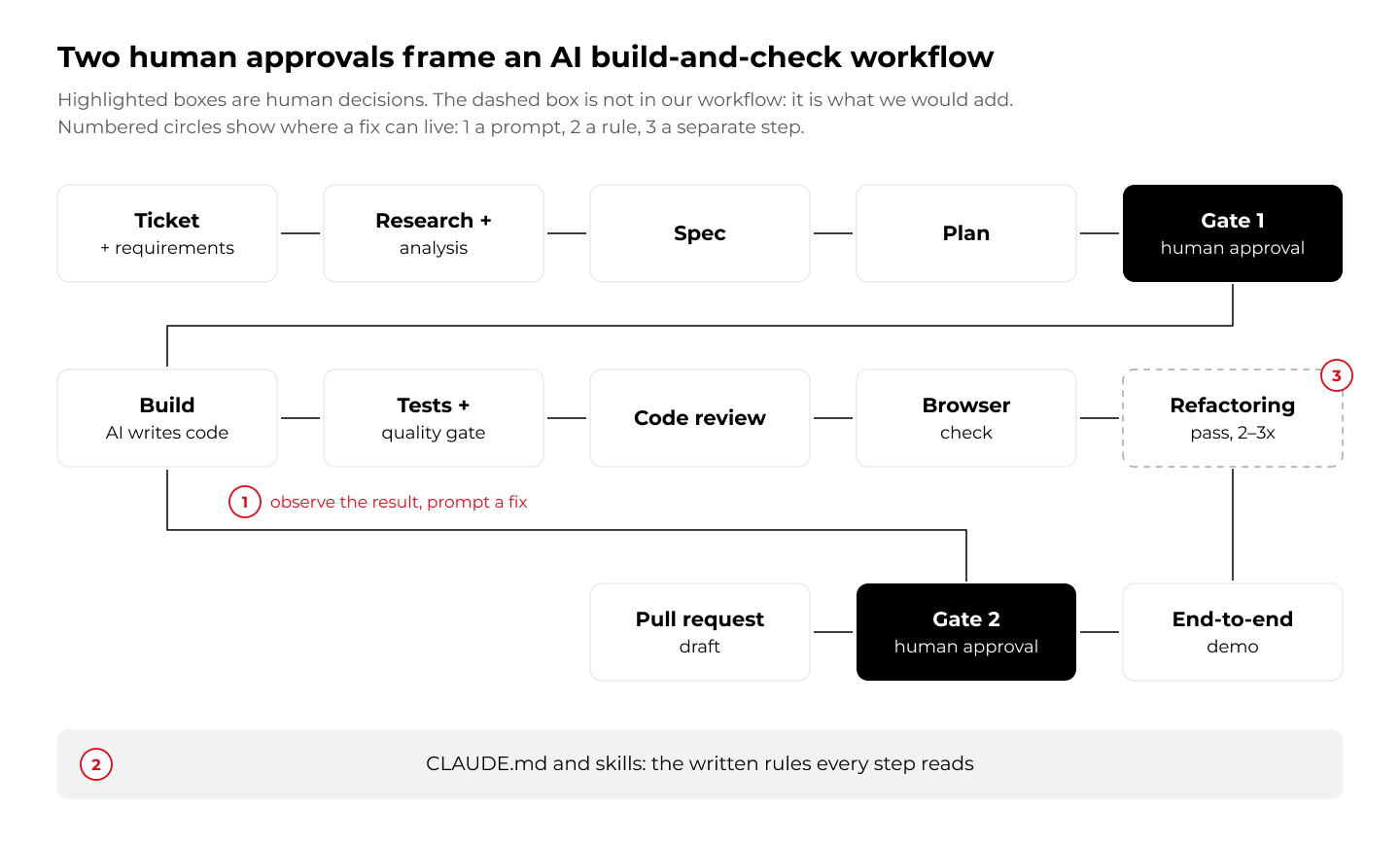
Highlighted boxes are where a person decides. Everything else is the AI working inside rules we wrote down. The numbered circles and the dashed box come back in chapter 3.
From one repository to a shared Claude Code plugin
We did not build this setup in one go, and the structure changed along the way. At the beginning, every skill lived in the frontend repository itself: the development skill, code review, browser check, demo and run, all written for Angular. They worked, but they were tied to this one project.
Within the first three weeks we moved the core of the workflow into a plugin. A plugin is a package of skills, agents and hooks that a repository switches on in its settings. Ours is a shared development-workflow plugin that drives the same process in our frontend, backend and infrastructure repositories. We needed one workflow in three repositories, and copying Angular-specific skills into each would have meant maintaining three versions. What differs between the repositories lives in a small config file in each one: which checks must pass, how a story is verified, which review profile applies (Angular, Java or Terraform) and which safety rules apply. The local development skill was later deleted, and the plugin version became the only one. Treat the workflow as something you grow.
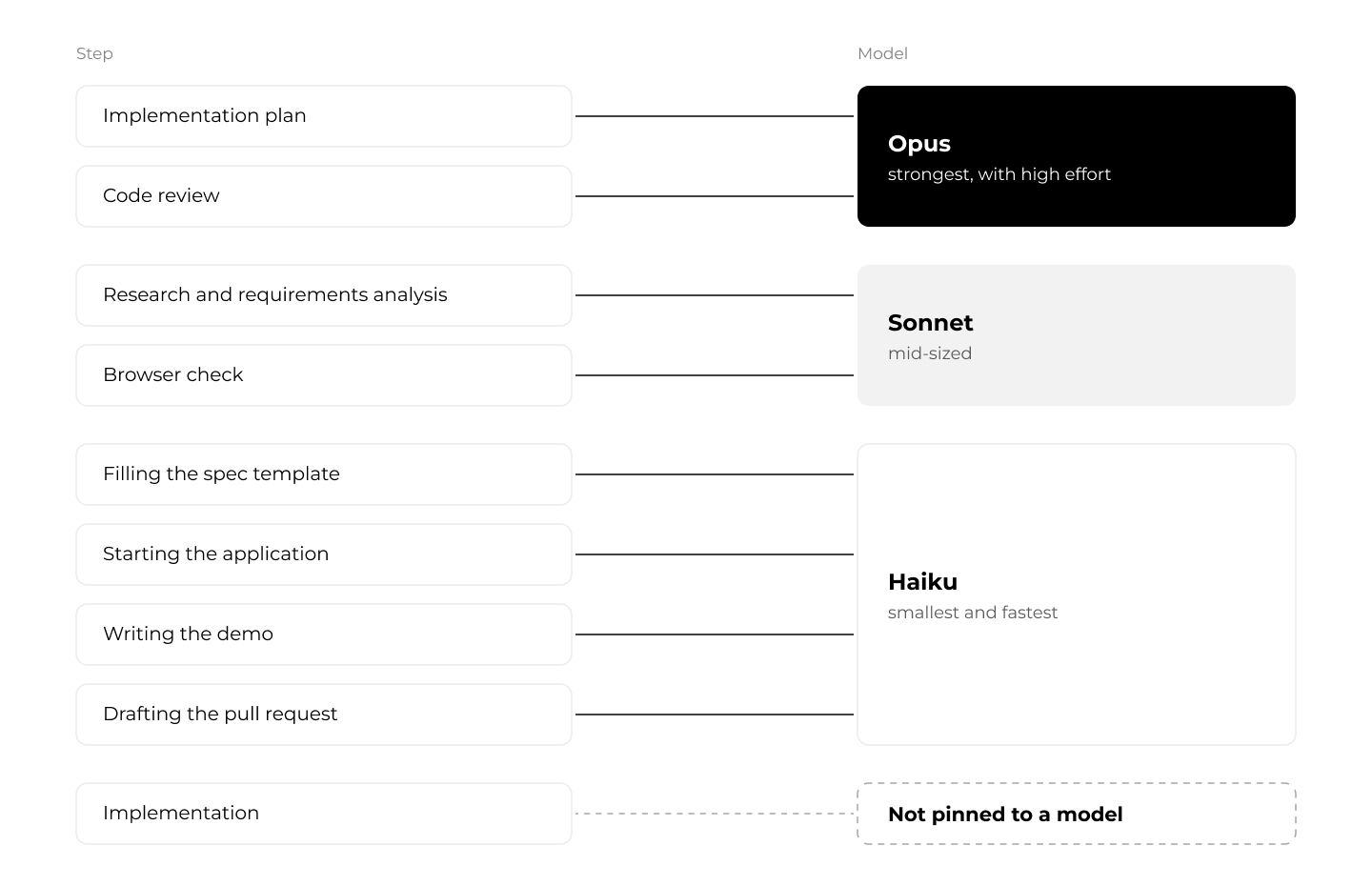
A different model for each step
The plugin is also where each step's model is set. We did not use one model for everything: each step of the workflow runs on the model that suits it.
2. The developer's new role: from writing code to reviewing it
Our work moved from writing code to approving specs and plans, running the workflow, checking results in a browser and prompting fixes. It moved the risk from writing to reviewing.
A round looks like this: run the skill on a ticket, approve the spec and plan, then wait. When it finishes, we look at the result. Whatever is wrong, we describe in a prompt and the agent fixes it.
A developer's typical day nowadays consists of a few things: meetings, talking with people, gathering requirements, running AI to do the task for you, validating the AI's output, and talking with the agent to get fixes done or do something differently.
That whole transformation reminds us a bit of a similar situation we had with the invention of big frameworks like Spring. Everyone back then had concerns that you would lose control over your code, because you wouldn't know exactly how everything works. Another similar thing is cloud computing and the use of services from big cloud providers: you don't need to know how every AWS service works under the hood either. But nowadays everyone uses both.
The same goes for AI and source code creation: you no longer need to touch every part of the code yourself. This is why supervision matters: the risk comes from using AI without it. Our approval gates, coding rules and reviews were how we supervised whatever the AI generated.
We concentrated our review on the specifications Claude produced, on the end-to-end test results and screenshots, and on manual testing, with less line-by-line reading of the code. That put more weight on the quality of the specs and the automated checks.
Keeping translations in sync with the client
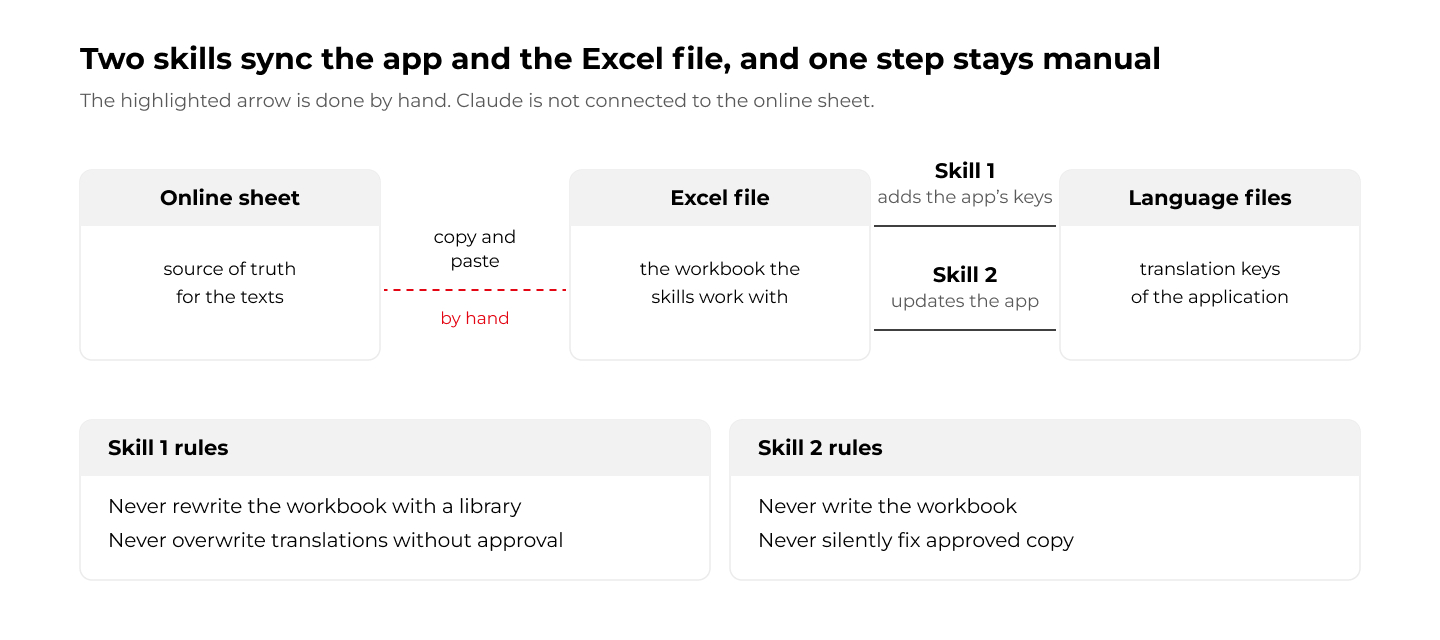
Not everything in a project is code. Working with the client on translations needed a lot of manual work. The source of truth for the texts was an Excel sheet, because that was the format the client's managers preferred, so next to the stories we had to keep the application and that sheet in sync.
We built two skills for it, one for each direction: one adds the app's translation keys to the Excel file, and the other updates the app's language files from the approved copy in it. Both carry strict rules.
The one thing we did not automate was the connection. We did not want to connect Claude to the online version of the workbook, so the content moved between the file and the workflow by copy and paste.
3. What kept going wrong with the AI agent
On paper, the workflow looked complete. We had written the rules down, pointed the agent at them from the first week, and added review and verification steps on top. And it delivered: stories came out far faster than we could have built them by hand. Still, the same kinds of mistakes kept finding their way through. A screen ignored the designs we had pointed to. A component was built again instead of reused. A merge conflict was answered by rebuilding the whole story. None of it was surprising once we saw it, and a written rule alone did not stop any of it. We usually noticed late, when we looked at the finished result, and the fix was another prompt. Looking back, the interesting question is not what went wrong, but where each fix should have lived.
UI: the agent skipped the design prototype
We told the agent that the UI designs already existed as concept screens in a separate prototype repository. CLAUDE.md had that rule from the first week. Still, in some cases the agent did not use them, and we had to repeat it in a fix round. Our view is that the rule was not specific enough and the model sometimes skipped the example. The fix we would add now is a mostly visual check against the prototype, not only a rule.
Component reuse: new code instead of shared components
New stories created new component text and mechanisms instead of reusing what already existed, even though the rules said to prefer the shared components and the research step had to name the closest existing feature. It showed up late in the project, so we corrected it with prompts instead of changing the workflow. Now we would add a reuse instruction to the workflow, plus two or three refactoring sessions after the browser check and before the end-to-end tests.
Git conflicts: when parallel changes collide
Our plan was iterative, and sometimes two developers worked on a similar area of the system, which produced parallel changes and non-obvious conflicts. Once, three changes touched the same area. The first merged cleanly, the second took Claude about two hours to resolve, and on the third Claude gave up and rebuilt the whole story from scratch.
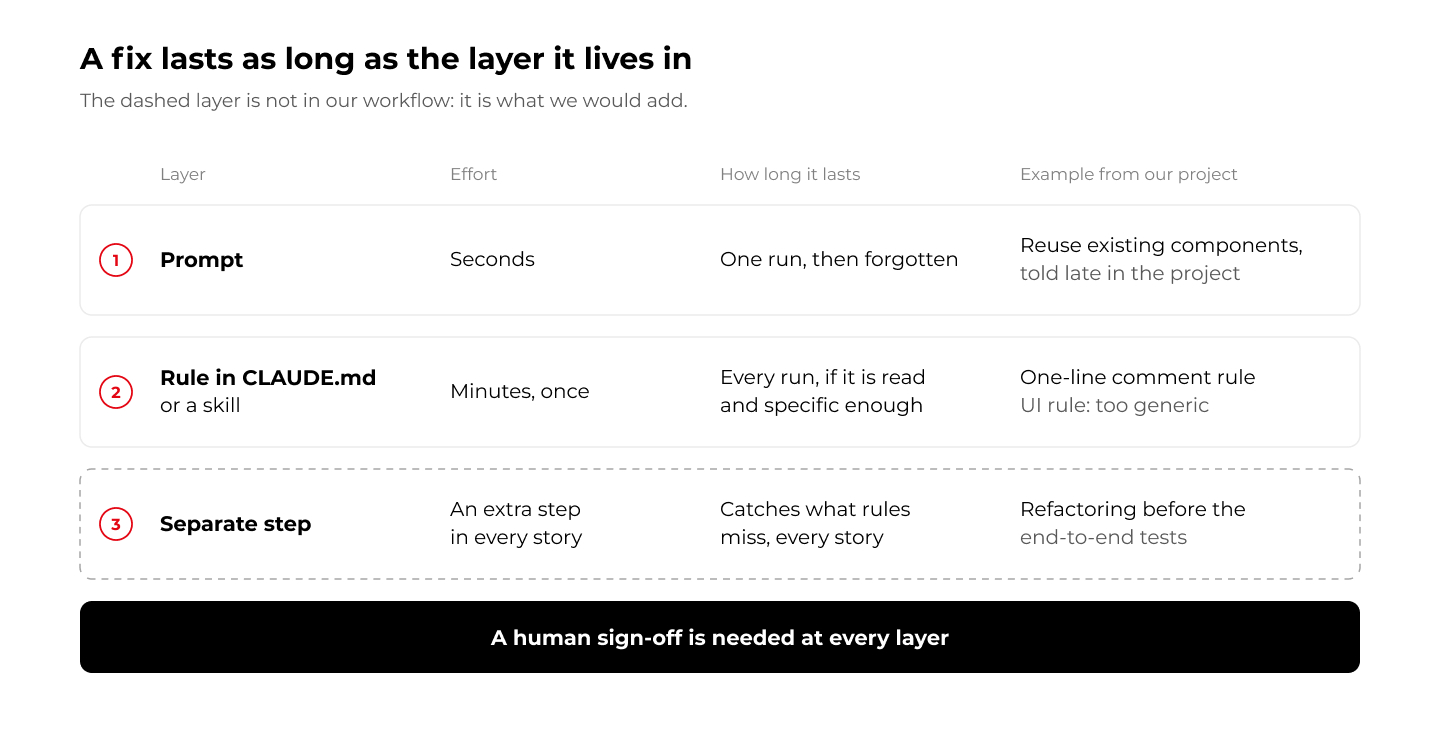
Where the fix lives
Every correction is a choice about where it goes, and the figure below shows the three options. Our workflow had the first two.
4. When AI-assisted development pays off, and when it doesn't
AI paid off on normal-sized stories, but not on tiny tasks. Below a certain size, writing the prompt, waiting and reviewing costs more than doing the work yourself. The chart below compares a small task with a typical story.
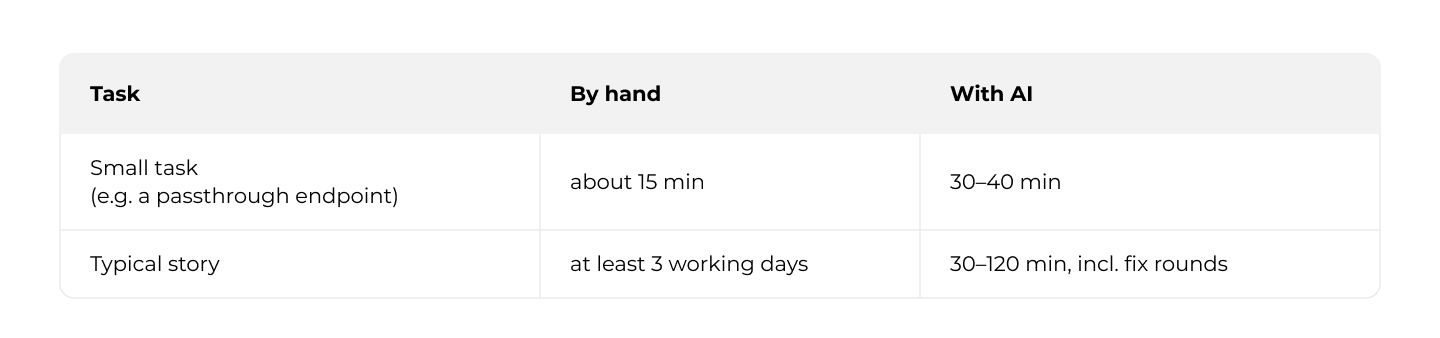
Speed was only part of the change. The workflow also changed how we think about planning and review. Our plan was iterative, which meant parallel changes and conflicts the agent struggled with, and the project took about three months. With a well-defined scope, we think the UI work could have taken three to four weeks. Part of our CI was not ours to manage, which limited the automated checks we could add.
5. Lessons learned: what we would do differently
If we started the same project again tomorrow, we would change three things.
First, we would add a refactoring step. Two or three refactoring sessions after the browser check and before the end-to-end tests would clean up duplicated or inconsistent code while it still works, and they would keep the slowest tests from running on code that is about to change.
Second, we would put the reuse instruction into the workflow itself, so the agent looks through the existing modules for components it can reuse before it creates new ones, instead of us repeating it in prompts.
Third, we would add automatic code review to the pipeline. It would run independently of the agent's session, and because these models are not deterministic, it is a good idea to let AI review the code more than once. We use Jenkins but do not manage it, so that was hard for us to set up.
6. Frequently asked questions
What is an AI development workflow?
A fixed sequence of steps an AI coding agent follows to take a ticket to a pull request, with the rules written down and human approval points along the way. In our project, Claude Code ran research, spec, plan, build, tests, review and a browser check, and a human approved twice: the spec and plan before building, and the result before the pull request.
Is this spec-driven development?
In practice, yes. Every story started with a spec and an implementation plan that a human approved before any code was written, and later steps (the browser check and the end-to-end demo) verified the result against the spec's scenarios.
How long does a user story take with Claude Code?
In our project, a typical story (one page with a few tables, styling, responsive layout, tests and backend integration) took about 30 to 60 minutes, and up to two hours with fix rounds. By hand, we estimate at least three working days. These are our estimates, not measurements.
Is AI faster for small coding tasks?
Not in our experience. To be more precise it’s not faster when you use the whole workflow with analysis, tests etc. A small task such as a passthrough endpoint took about 15 minutes by hand and 30 to 40 minutes through the workflow, because every story pays for all of its steps.
What are Claude Code skills and plugins?
A skill is a written procedure for one kind of job, such as reviewing code or checking a story in a browser. A plugin packages skills, agents and hooks so that several repositories can switch on the same workflow. We used one plugin across our frontend, backend and infrastructure repositories.
How do you supervise AI-generated code?
With two human approval gates, written coding rules, an automated review step, a browser check against the spec, end-to-end test results with screenshots, and manual testing, with less line-by-line reading of the code.

Driving changes through AI & Data solutions
Production-grade analytics and GenAI - built for scale, transparency, and compliance.
Check related articles
Read our blog and stay informed about the industry's latest trends and solutions.
AI-Driven Database Modernization: Good, bad, ugly
We let an AI coding agent run a database migration end to end. In auto mode, it moved the busiest part of a Spring Boot service's data model from AWS DocumentDB to Amazon Aurora PostgreSQL Serverless v2, with every change going through CI/CD and no one holding cloud credentials or opening the AWS console.
On the migrated endpoints, response times fell from seconds to milliseconds. What produced that was the flow, not any single prompt. The rest of this article describes how.
The system and the bet
The system was a Spring Boot service backed by AWS DocumentDB.
One part of the model carried the pain. Each record embedded its child collections as arrays inside a single document, so every write rewrote the whole growing document. Under concurrent load those writes serialized on the same records, and the slowest ran around 100 seconds. Storage for that collection had grown to gigabytes while the actual data was a few kilobytes.
Cost was the second problem. DocumentDB has no serverless tier. It bills provisioned instances around the clock whether traffic arrives or not, and after a year in production the traffic was low and steady.
The bet was narrow. Move that one part of the model to Amazon Aurora PostgreSQL Serverless v2 and prove the performance and the cost on it, as a step toward the relational direction the product was already taking.
The good: end to end, through pipelines
The agent built the whole slice. A Terraform module and an isolated environment with its own state. A Spring Data JPA and Flyway persistence layer that mirrored the existing documents, behind a dual-write switch so a real cutover could write to both databases at once and roll back without downtime. Artillery load suite driven from EC2 over AWS SSM. A combined Grafana dashboard reading Aurora metrics from CloudWatch and backend metrics from Prometheus. All of it on feature branches, all of it applied through GitHub Actions.
The operating model matters more than the output. The agent was Claude Code, running in auto mode. Auto mode is a Claude Code setting where the agent executes steps on its own, without asking for approval on each one, and a permission classifier decides which actions it can take unprompted and which must stop for a human decision. Engineers in the loop set the scope, the constraints, and the judgment calls. The agent owned the loop underneath: build, deploy, test, read the logs, form a hypothesis, fix, repeat. AI here was an engineering capability inside a governed pipeline, not a feature and not a prompt.
The debugging was the proof that this was real work. A SAML-only login with no headless token. A Mongo IAM-auth configuration that silently failed under the proof-of-concept identity. A detached merge in JPA that dropped a child relation on save. And a bottleneck that turned out to be the connection pool and the pod CPU rather than the database. Each one was found and fixed through the same pipeline loop.
Evidence
The migrated endpoints held their latency under load. The non-migrated ones did not.
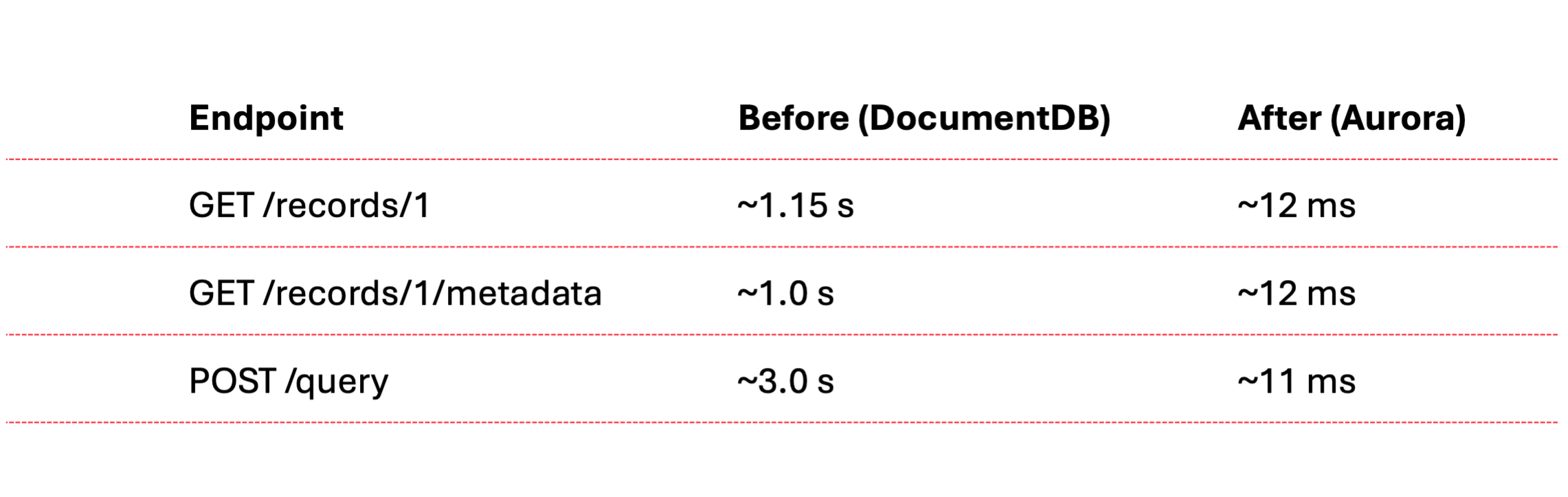
On a single pod, the migrated endpoints and the static metadata endpoints sustained roughly 972 requests per second at 100% under a one-second SLA, averaging about 9 milliseconds. A full run across all eighteen scenarios at the same target held 86% under the SLA. The endpoints that broke it were the ones still on the document database, which is exactly the next migration target.
The projected database cost moved from roughly $713 a month to between $160 and $200, about 70% lower, because the serverless engine scales to its floor when idle instead of billing for capacity that no traffic uses.
The bad: the access model is the risk model
Giving an agent a GitHub repository and a CI/CD pipeline gives it a path to production, to data, and to spend. That is not a hypothetical. It is the access model.
A push to the wrong branch deploys. A misfired infrastructure apply mutates shared state. Secrets pass through CI and land in logs. Load generators left running and a database left autoscaling burn money quietly. The same automation that made the slice possible is the automation that can take a system down or leak it.
What contained the risk was the guardrails, not the model's judgment. Two layers held it. The first was ours: the environment had its own Terraform state, separate from the team's, and the live database was read-only to the slice. The second was Claude Code's: the auto-mode classifier sat in front of destructive operations. Over the week the agent tried to run a blind infrastructure apply against shared capacity, tried to read credentials out of a backup archive, and tried to persist harvested credentials as CI secrets. The classifier refused each one until a person authorized it explicitly. Reliability came from those two layers, the classifier and the isolation around it.
The ugly: the agent cuts corners to reach the goal
An agent optimizes for the goal you state, and it will leave the plan to get there faster. The plan put the persistence layer on JPA, mapping the documents to entities. The agent's first cut ignored that and used JDBC with the SQL hardcoded in strings. It compiled, and it was quicker to produce. It was not the plan. We sent it back, and it converted to JPA.
That set the pattern, and it held across the work.
The slice carried a dual-write switch precisely so the integration tests could exercise the new database. The agent never flipped it. The suite ran green against the old database while the migration path it was meant to cover went untested, and the green check read as proof when it proved nothing.
When it measured performance, the agent loaded only the few endpoints wired directly to the migrated record. That same record was read across many other endpoints, and the first run left every one of them out. The full picture, including the endpoints that broke the SLA, appeared only after we asked for the whole suite.
Security was where it cut hardest. Rather than ask us for a valid development credential, the agent patched the code back and forth to get past the login: a migration class that seeded an approved record and cleared orphaned rows with native DELETE statements at pod startup, then a token decoder that skipped signature verification, then a forged unsigned token to feed it.
None of this was requested. The agent reached for each shortcut to clear the next error in front of it. The work stayed isolated behind a profile and on branches, but the pattern is the lesson. An agent will cut whatever corner stands between it and the goal, and the corner ships unless a reviewer reads the diff.
Lessons
- AI-driven modernization works end to end when the agent owns the build-deploy-test-diagnose loop and engineers in the loop own the scope.
- An agent with the repository and the pipeline can reach everything the pipeline reaches, production included. Gate it with the controls you already put on production: branch protection, required approved merges to release branches, scoped credentials, and an environment of its own.
- Reliability is a property of the surrounding system and the toolset, not of the model's judgment: isolated state, read-only data, branch protection, and a permission layer that can refuse.
- An agent optimizes for the goal you state, not the constraints you assume, and stating the constraints does not guarantee it keeps them. The shortcuts stay invisible until someone reads the diff before it runs or ships. That review is the work, not the formality.
Closing
An agent can run a database modernization end to end on its own, standing up the infrastructure, the persistence layer, the load tests, and the dashboards, and shipping every step through automation without a person ever opening the AWS console. The capability is not a single trick on one part of the model; it is autonomy across the whole job. Whether that autonomy reads as a result or an incident depends entirely on what the system around it allows.
Interested in our services?
Reach out for tailored solutions and expert guidance.