
Serverless - why, when and how?

This is the first article of the mini-series that will get you started with a Serverless architecture and the Function-as-a-Service execution model - whose popularity is constantly growing. In this part, you will get answers to some of the most popular questions regarding Serverless, including: what is it, why it’s worth your attention, how does it work under the hood and which cloud provider meets your needs.
No servers at all?
Not really, your code has to be executed somewhere. Okay, so what is it all about then?
Serverless is a cloud computing execution model in which computer resources are dynamically allocated and managed by a cloud provider of your choice. Among serverless databases, storages, analytic tools, and many others, there is also Function-as-a-Service that we will focus on in this article.
FaaS is a serverless backend service that lets you execute and manage your code without bothering about the infrastructure that used to run your apps on it. In simple terms, you can order a function call without caring about how and where it is performed.
Why?
For money, as Serverless is extremely cost-effective in cases described in the next paragraph. In the serverless cloud execution model, you pay only for used resources, you don’t pay a penny when your code is not being executed!
Moreover, neither actual hardware nor public cloud infrastructure costs a company as much as software engineers’ time. Employees are the most cost-consuming resources. Serverless lets developers focus on functionalities instead of server provisioning, hardening and maintaining infrastructure.
Serverless services scale automatically when needed. You can control their performance by toggling memory and throughput. Furthermore, you don’t have to worry about thunderstorms or any other issues! Serverless services come with built-in high availability and fault tolerance features, meaning your function will be executed even if the primary server has blown up.
When to consider serverless?
Whenever you are preparing a proof of concept or prototyping application… Serverless functions do not generate costs at low workloads and are always ready to deal with the situations they increase. Combining this feature with no server management, it significantly accelerates the delivery of MVP.
When it comes to production, a Serverless architecture fits stateless applications like REST / GraphQL APIs very well. It is much easier, faster and cheaper to get such applications up and running. Services with unpredictable load pikes and inactivity periods, as well as cron jobs (running periodically) are also a great use case examples of FaaS.
Imagine the management of an application for ordering lunch. It has very high load peaks around noon, and it is unused for the rest of the day. Why pay for servers hosting such an application 24 hours a day, instead of paying just for the time when it is really used?
A Serverless architecture is often used for data processing, video streaming and handling IoT events. It is also very handy when it comes to integrating multiple SaaS services. Implementing a facade on top of a running application, for the purpose of migrating it or optimization can also be done much easier using this approach. FaaS is like cable ties and insulating tape in a DIY toolbox.
Where’s the catch?
It would be too good if there weren’t any catches. Technically, you could get a facebook-like application up and running using Serverless services, but it would cost a fortune! It turns out that such a solution would cost thousands of times more than hosting it on regular virtual machines or your own infrastructure. Serverless is also a bad choice for applications using sockets to establish a persistent connection with a server described in Rafal’s article about RSocket . Such a connection would need to be reestablished periodically as Lambda stays warmed-up for about 10 minutes after the last call. In this approach, you would be billed for the time of established connection.
Moreover, your whole solution becomes vendor bound. There are situations when a vendor raises prices, or another cloud provider offers new cool features. It is harder to switch between them, once you have your application up and running. The process takes time, money and the other vendor may not offer all the services that you need.
Furthermore, It is harder to troubleshoot your function, and almost every vendor enforces you to use some additional services to monitor logs from the execution - that generate extra costs. There is also a bit less comfortable FaaS feature that we have to take into account - “Cold start”. From time to time, it makes your function work much longer than usual. Depending on the vendor, there are different constraints on function execution time, which might be exceeded because of it. The following paragraph will explain this FaaS behavior in detail.
How does it work?
It is a kind of a mystery what can we find under the hood of FaaS. There are many services and workers that are responsible for orchestrating function invocations, concurrency management, tracking containers busy and idle states, scheduling incoming invocations appropriately, etc. The technology stack differs between vendors, but the general scheme is the same and you can find it below.
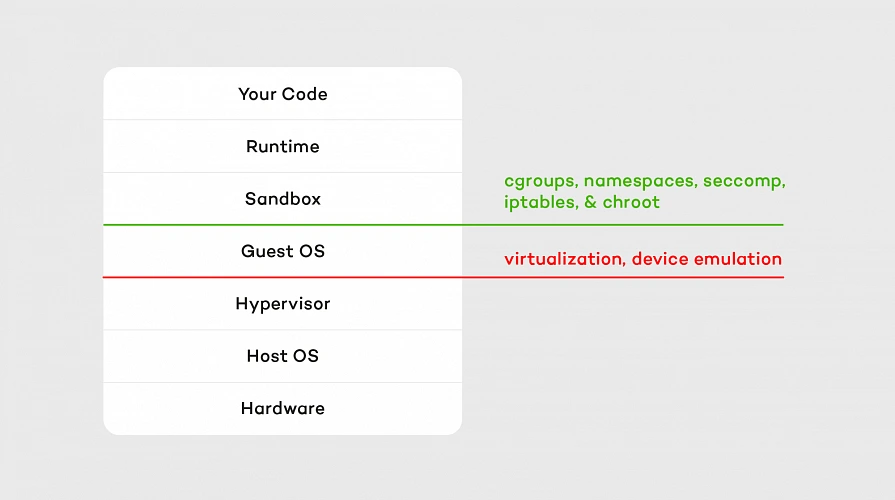
Hypervisor which emulates real devices is the first layer of isolation. The second one consists of containers and OS separation that comes with it. Our code is executed on a sandbox container with an appropriate runtime installed on it. A sandbox is being set up (so-called “Cold start” mentioned above) whenever a function is called for the first time after making changes or hasn’t been invoked for 5 - 15 minutes (depending on the vendor). It means that containers persist between calls, which accelerates execution but is also a bit tricky sometimes. For example, if we choose one of the interpreted languages as a runtime, all invocations are being performed on the same interpreter instance as long as the container lives. That means global variables and context are cached in memory between function executions, so keeping there sensitive data like tokens or passwords is a bad idea.
Containers’ load is balanced similarly to CPU resource allocation, which means they are not loaded equally. The workload is concentrated as much as possible, so runtime consumes the maximum capacity of a container. Thanks to that, other containers in the pool are unused and ready to run another function in the meantime.
Which vendor to pick?
Serverless services are offered by many cloud providers like AWS, GCP, Microsoft Azure, and IBM among others. It’s hard to say which one to choose, as it depends on your needs. The main differences between them are: pricing, maximum execution time, supported runtimes and concurrency. Let’s take a brief look at the comparison below.
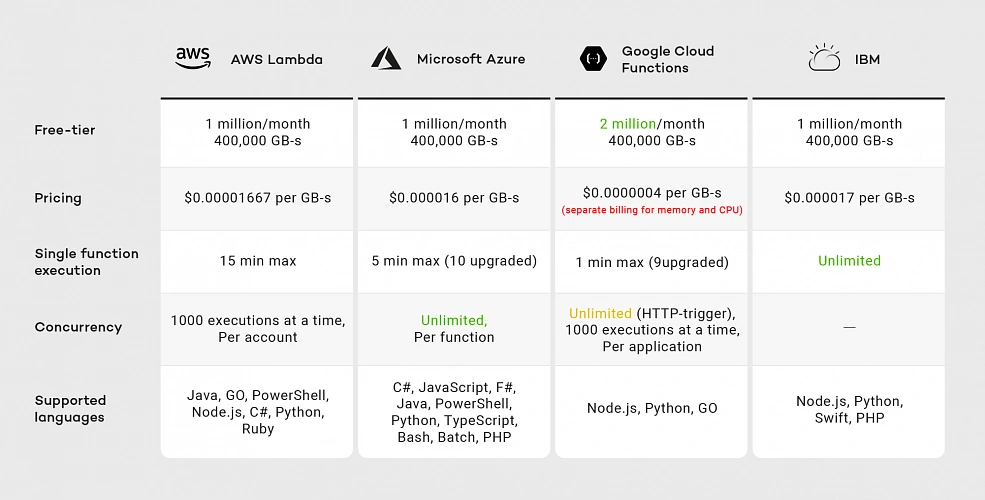
As of the second half of 2019, you can see that all vendors provide similar pricing except Google. Although Google’s free-tier offer seems promising because of the doubled number of free requests, when we exceed this limit, we have two separate billings for memory and CPU, meaning Google’s pricing model is the most expensive.
Considering execution time IBM and AWS Lambda are the best choices. Although IBM has no time limit for single-function execution, it’s concurrency rate remains unclear. IBM documentation does not guarantee that functions will run concurrently. Google provides 1000 executions at a time per project, while AWS provides the same limit per account. That means you can run multiple Google Cloud Functions with the same concurrency, while on AWS you have to divide this limitation between all your functions.
If you look for a wide variety of supported runtimes, AWS and Azure are the best choices. While AWS supported languages list has not changed much since 2014, Google was providing only JavaScript runtime until June 2019. That means AWS runtimes may be more reliable than Google’s.
In the next article in the series, I will focus on AWS, which has a wide range of services that can be integrated with AWS Lambda for the purpose of building more complete applications. Moreover, AWS has a large community around it, which helps when a problem arises.
Summary
In this article, I tried to address the most common questions regarding Serverless architecture and the Function-as-a-Service execution model. I suggested when to use it, and when not to. We took a brief tour of what lays under the hood of FaaS and compared its vendors.
In the next articles, we will explore AWS. I will guide you through Amazon serverless services and help you create your first serverless application using them.

Grape Up guides enterprises on their data-driven transformation journey
Ready to ship? Let's talk.
Check related articles
Read our blog and stay informed about the industry's latest trends and solutions.
Serverless architecture with AWS Cloud Development Kit (CDK)
The IT world revolves around servers - we set up, manage, and scale them, we communicate with them, deploy software onto them, and restrict access to them. In the end, it is difficult to imagine our lives without them. However, in this “serverfull” world, an idea of serverless architecture arose. A relatively new approach to building applications without direct access to the servers required to run them. Does it mean that the servers are obsolete, and that we no longer should use them? In this article, we will explore what it means to build a serverless application, how it compares to the well-known microservice design, what are the pros and cons of this new method and how to use the AWS Cloud Development Kit framework to achieve that.
Background
There was a time when the world was inhabited by creatures known as “monolith applications”. Those beings were enormous, tightly coupled, difficult to manage, and highly resource-consuming, which made the life of tech people a nightmare.
Out of that nightmare, a microservice architecture era arose, which was like a new day for software development. Microservices are small independent processes communicating with each other through their APIs. Each microservice can be developed in a different programming language, best suited for its job, providing a great deal of flexibility for developers. Although the distributed nature of microservices increased the overall architectural complexity of the systems, it also provided the biggest benefit of the new approach, namely scalability, coming from the possibility to scale each microservice individually based on its resource demands.
The microservice era was a life changer for the IT industry. Developers could focus on the design and development of small modular components instead of struggling with enormous black box monoliths. Managers enjoyed improvements in efficiency. However, microservice architecture still posed a huge challenge in the areas of deployment and infrastructure management for distributed systems. What is more, there were scenarios when it was not as cost-effective as it could be. That is how the software architecture underwent another major shift. This time towards the serverless architecture epoch.
What is serverless architecture?
Serverless, a bit paradoxically, does not mean that there are no servers. Both server hardware and server processes are present, exactly as in any other software architecture. The difference is that the organization running a serverless application is not owning and managing those servers. Instead, they make use of third-party Backend as a Service (BaaS) and/or Function as a Service platform.
- Backend as a Service (BaaS) is a cloud service model where the delivery of services responsible for server-side logic is delegated to cloud providers. This often includes services such as: database management, cloud storage, user authentication, push notifications, hosting, etc. In this approach, client applications, instead of talking to their dedicated servers, directly operate on those cloud services.

- Function as a Service (FaaS) is a way of executing our code in stateless, ephemeral computing environments fully managed by third-party providers without thinking about the underlying servers. We simply upload our code, and the FaaS platform is responsible for running it. Our functions can then be triggered by events such as HTTP(S) requests, schedulers, or calls from other cloud services. One of the most popular implementations of FaaS is the AWS Lambda service, but each cloud provider has its corresponding options.

In this article, we will explore the combination of both BaaS and FaaS approaches as most enterprise-level solutions combine both of them into a fully functioning system.
Note: This article is often referencing services provided by AWS . However, it is important to note that the serverless architecture approach is not cloud-provider-specific and most of the services mentioned as part of the AWS platform have their equivalents in other cloud platforms.
Serverless architecture design
We know a bit of theory, so let us look now at a practical example. The figure 1 presents an architecture diagram of a user management system created with the serverless approach.

The system utilizes Amazon Cognito for user authentication and authorization, ensuring that only authorized parties access our API. Then we have the API Gateway, which deals with all the routing, requests throttling, DDOS protection etc. API Gateway also allows us to implement custom authorizers if we can’t or don’t want to use Amazon Cognito. The business logic layer consists of Lambda Functions. If you are used to the microservice approach, you can think of each lambda as a separate set of a controller endpoint and service method, handling a specific type of request. Lambdas further communicate with other services such as databases, caches, config servers, queues, notification services, or whatever else our application may require.
The presented diagram demonstrates a relatively simple API design. However, it is good to bear in mind that the serverless approach is not limited to APIs. It is also perfect for more complex solutions such as data processing, batch processing, event ingestion systems, etc.
Serverless vs Microservices
Microservice-oriented architecture broke down the long-lasting realm of monolith systems through the division of applications into small, loosely coupled services that could be developed, deployed, and maintained independently. Those services had distinct responsibilities and could communicate with each other through APIs, constituting together a much larger and complex system. Up till this point, serverless does not differ much from the microservice approach. It also divides a system into smaller, independent components, but instead of services, we usually talk about functions.
So, what’s the difference? The microservices are standalone applications, usually packaged as lightweight containers and run on physical servers (commonly in the cloud), which you can access, manage and scale if needed. Those containers need to be supervised (orchestrated) with the use of tools such as Kubernetes . So speaking simply, you divide your application into smaller independent parts, package them as containers, deploy on servers, and orchestrate their lifecycle.
In comparison, when it comes to serverless functions, you only write your function code, upload it to the FaaS provider platform, and the cloud provider handles its packaging, deployment, execution, and scaling without showing you (or giving you access to) physical resources required to run it. What is more, when you deploy microservices, they are always active, even when they do not perform any processing, on the servers provisioned to them. Therefore, you need to pay for required host servers on a daily or monthly basis, in contrast to the serverless functions, which are only brought to life for their time of execution, so if there are no requests they do not use any resources.

Pros & cons of serverless computing
Pros:
- Pricing - Serverless works in a pay-as-you-go manner, which means that you only pay for those resources which you actually use, with no payment for idle time of the servers and no in-front dedication. This is especially beneficial for applications with infrequent traffic or startup organizations.
- Operational costs and complexity - The management of your infrastructure is delegated almost entirely to the cloud provider. This frees up your team allocation, decreases the probability of error on your side, and automates downtime handling leading to the overall increase in the availability of your system and the decrease in operational costs.
- Scalability by design - Serverless applications are scalable by nature. The cloud provider handles scaling up and down of resources automatically based on the traffic.
Cons:
- It is a much less mature approach than microservices which means a lot of unknowns and spaces for bad design decisions exist.
- Architectural complexity - Serverless functions are much more granular than microservices, and that can lead to higher architectural complexity, where instead of managing a dozen of microservices, you need to handle hundreds of lambda functions.
- Cloud provider specific solutions - With microservices packaged as containers, it didn’t matter which cloud provider you used. That is not the case for serverless applications which are tightly bound to the services provided by the cloud platform.
- Services limitations - some Faas and BaaS services have limitations such as a maximum number of concurrent requests, memory, timeouts, etc. which are often customizable but only to a certain point (e.g., default AWS Lambda execution quota equals 1000).
- Cold starts - Serverless applications can introduce response delays when a new instance handles its first request because it needs to boot up, copy application code, etc. before it can run the logic.
How much does it really cost?
One of the main advantages of the serverless design is its pay-as-you-go model, which can greatly decrease the overall costs of your system. However, does it always lead to lesser expenses? For this consideration, let us look at the pricing of some of the most common AWS services.
Service Price API Gateway 3.50$ per 1M requests (REST Api) Lambda 0.20$ per 1M request SQS First 1M free, then 0.40& per 1M requests
Those prices seem low, and in many cases, they will lead to very cheap operational costs of running serverless applications. Having that said, there are some scenarios where serverless can get much more expensive than other architectures. Let us consider a system that handles 5 mln requests per hour. Having it designed as a serverless architecture will lead to the cost of API Gateway only equal to:
$3.50 * 5 * 24 * 30 = $12,600/month
In this scenario, it could be more efficient to have an hourly rate-priced load balancer and a couple of virtual machines running. Then again, we would have to take into consideration the operational cost of setting up and managing the load balancer and VMs. As you can see, it all depends on the specific use case and your organization. You can read more about this scenario in this article .
AWS Cloud Development Kit
At this point, we know quite a lot about serverless computing, so now, let’s take a look at how we can create our serverless applications. First of all, we can always do it manually through the cloud provider’s console or CLI. It may be a valuable educational experience, but we wouldn’t recommend it for real-life systems. Another well-known solution is using Infrastructure as a Code (IaaS), such as AWS Cloud Formation service . However, in 2019 AWS introduced another possibility which is AWS Cloud Development Kit (CDK).
AWS CDK is an open-source software development framework which lets you define your architectures using traditional programming languages such as Java, Python, Javascript, Typescript, and C#. It provides you with high-level pre-configured components called constructs which you can use and further extend in order to build your infrastructures faster than ever. AWS CDK utilizes Cloud Formation behind the scenes to provision your resources in a safe and repeatable manner.
We will now take a look at the CDK definitions of a couple of components from the user management system, which the architecture diagram was presented before.
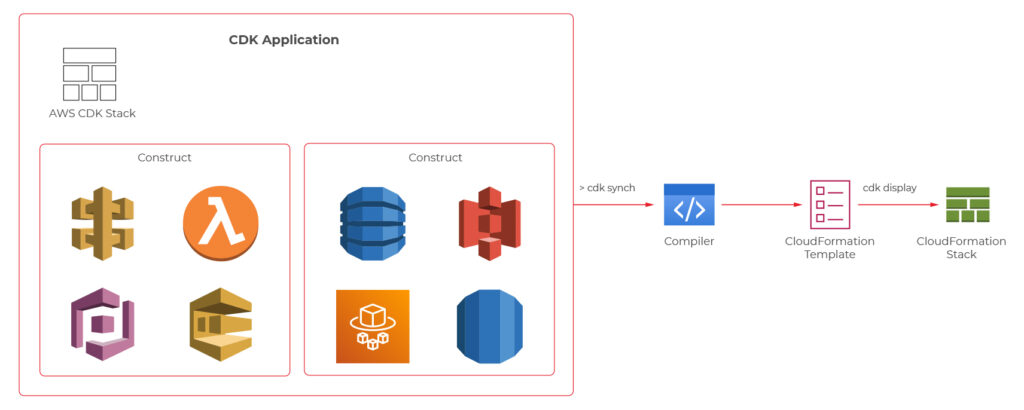
Main stack definition
export class UserManagerServerlessStack extends cdk.Stack {
private static readonly API_ID = 'UserManagerApi';
constructor(scope: cdk.Construct, id: string, props?: cdk.StackProps) {
super(scope, id, props);
const cognitoConstruct = new CognitoConstruct(this)
const usersDynamoDbTable = new UsersDynamoDbTable(this);
const lambdaConstruct = new LambdaConstruct(this, usersDynamoDbTable);
new ApiGatewayConstruct(this, cognitoConstruct.userPoolArn, lambdaConstruct);
}
}
API gateway
export class ApiGatewayConstruct extends Construct {
public static readonly ID = 'UserManagerApiGateway';
constructor(scope: Construct, cognitoUserPoolArn: string, lambdas: LambdaConstruct) {
super(scope, ApiGatewayConstruct.ID);
const api = new RestApi(this, ApiGatewayConstruct.ID, {
restApiName: 'User Manager API'
})
const authorizer = new CfnAuthorizer(this, 'cfnAuth', {
restApiId: api.restApiId,
name: 'UserManagerApiAuthorizer',
type: 'COGNITO_USER_POOLS',
identitySource: 'method.request.header.Authorization',
providerArns: [cognitoUserPoolArn],
})
const authorizationParams = {
authorizationType: AuthorizationType.COGNITO,
authorizer: {
authorizerId: authorizer.ref
},
authorizationScopes: [`${CognitoConstruct.USER_POOL_RESOURCE_SERVER_ID}/user-manager-client`]
};
const usersResource = api.root.addResource('users');
usersResource.addMethod('POST', new LambdaIntegration(lambdas.createUserLambda), authorizationParams);
usersResource.addMethod('GET', new LambdaIntegration(lambdas.getUsersLambda), authorizationParams);
const userResource = usersResource.addResource('{userId}');
userResource.addMethod('GET', new LambdaIntegration(lambdas.getUserByIdLambda), authorizationParams);
userResource.addMethod('POST', new LambdaIntegration(lambdas.updateUserLambda), authorizationParams);
userResource.addMethod('DELETE', new LambdaIntegration(lambdas.deleteUserLambda), authorizationParams);
}
}
CreateUser Lambda
export class CreateUserLambda extends Function {
public static readonly ID = 'CreateUserLambda';
constructor(scope: Construct, usersTableName: string, layer: LayerVersion) {
super(scope, CreateUserLambda.ID, {
...defaultFunctionProps,
code: Code.fromAsset(resolve(__dirname, `../../lambdas`)),
handler: 'handlers/CreateUserHandler.handler',
layers: [layer],
role: new Role(scope, `${CreateUserLambda.ID}_role`, {
assumedBy: new ServicePrincipal('lambda.amazonaws.com'),
managedPolicies: [
ManagedPolicy.fromAwsManagedPolicyName('service-role/AWSLambdaBasicExecutionRole'),
]
}),
environment: {
USERS_TABLE: usersTableName
}
});
}
}
User DynamoDB table
export class UsersDynamoDbTable extends Table {
public static readonly TABLE_ID = 'Users';
public static readonly PARTITION_KEY = 'id';
constructor(scope: Construct) {
super(scope, UsersDynamoDbTable.TABLE_ID, {
tableName: `${Aws.STACK_NAME}-Users`,
partitionKey: {
name: UsersDynamoDbTable.PARTITION_KEY,
type: AttributeType.STRING
} as Attribute,
removalPolicy: RemovalPolicy.DESTROY,
});
}
}
The code with a complete serverless application can be found on github: https://github.com/mkapiczy/user-manager-serverless
All in all, serverless architecture is becoming an increasingly attractive solution when it comes to the design of IT systems. Knowing what it is all about, how it works, and what are its benefits and drawbacks will help you make good decisions on when to stick to the beloved microservices and when to go serverless in order to help your organization grow .
How to migrate on-premise databases to AWS RDS with AWS DMS: Our guide
Migrating an on-premise MS SQL Server database to AWS RDS, especially for high-stakes applications handling sensitive information, can be challenging yet rewarding. This guide walks through the rationale for moving to the cloud, the key steps, the challenges you may face, and the potential benefits and risks.
Why Cloud?
When undertaking such a significant project, you might wonder why we would change something that was working well. Why shift from a proven on-premise setup to the cloud? It's a valid question. The rise in the popularity of cloud technology is no coincidence, and AWS offers several advantages that make the move worthwhile for us.
First, AWS's global reach and availability play a crucial role in choosing it. AWS operates in multiple regions and availability zones worldwide, allowing applications to deploy closer to users, reducing latency, and ensuring higher availability. In case of any issues at one data center, AWS's ability to automatically switch to another ensures minimal downtime - a critical factor, especially for our production environment.
Another significant reason for choosing AWS is the fully managed nature of AWS RDS . In an on-premise setup, you are often responsible for everything from provisioning to scaling, patching, and backing up the database. With AWS, these responsibilities are lifted. AWS takes care of backups, software patching, and even scaling based on demand, allowing the team to focus more on application development and less on infrastructure management.
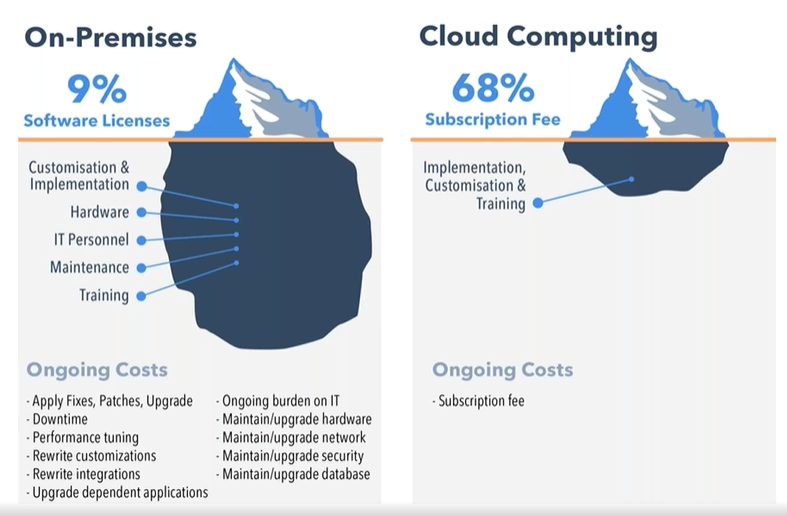
Cost is another compelling factor. AWS's pay-as-you-go model eliminates the need to over-provision hardware, as is often done on-premise to handle peak loads. By paying only for resources used, particularly in development and testing environments, expenses are significantly reduced. Resources can be scaled up or down as needed, especially beneficial during periods of lower activity.
Source: https://www.peoplehr.com/blog/2015/06/12/saas-vs-on-premise-hr-systems-pros-cons-hidden-costs/
The challenges and potential difficulties
Migrating a database from on-premise to AWS RDS isn’t a simple task, especially when dealing with multiple environments like dev, UAT, staging, preprod, and production. Here are some of the possible issues that could arise during the process:
- Complexity of the migration process : Migrating on-premise databases to AWS RDS involves several moving parts, from initial planning to execution. The challenge is not just about moving the data but ensuring that all dependencies, configurations, and connections between the database and applications remain intact. This requires a deep understanding of our infrastructure and careful planning to avoid disrupting production systems.
The complexity could increase with the need to replicate different environments - each with its unique configurations - without introducing inconsistencies. For example, the development environment might allow more flexibility, but production requires tight controls for security and reliability.
- Data consistency and minimal downtime : Ensuring data consistency while minimizing downtime for a production environment might be one of the toughest aspects. For a business that operates continuously, even a few minutes of downtime could affect customers and operations. Although AWS DMS (Database Migration Service) supports live data replication to help mitigate downtime, careful timing of the migration might be necessary to avoid conflicts or data loss. Inconsistent data, even for a brief period, could lead to application failures or incorrect reports.
Additionally, setting up the initial full load of data followed by ongoing change data capture (CDC) could present a challenge. Close migration monitoring might be essential to ensure no changes are missed while data is being transferred.
- Handling legacy systems : Some existing systems might not be fully compatible with cloud-native features, requiring certain services to be rewritten to work in synchronous or asynchronous manners to avoid potential timeout issues within an organization’s applications.
- Security and compliance considerations : Security is a major concern throughout the migration process, especially when moving sensitive business data to the cloud. AWS offers robust security tools, but it’s necessary to ensure that everything is correctly configured to avoid potential vulnerabilities. This included setting up IAM roles, policies, and firewalls and managing infrastructure with relevant tools. Additionally, a secure connection between on-premise and cloud databases would likely be crucial to safeguard data migration using AWS DMS.
- Managing the learning curve : For a team relatively new to AWS, the learning curve can be steep. AWS offers a vast array of services and features, each with its own set of best practices, pricing models, and configuration options. Learning to use services like RDS, DMS, IAM, and CloudWatch effectively could require time and experimentation with various configurations to optimize performance.
- Coordination across teams : Migrating such a critical part of the infrastructure requires coordination across multiple teams - development, operations, security, and management. Each team has its priorities and concerns, making smooth communication and alignment of goals a potential challenge to ensure a unified approach.
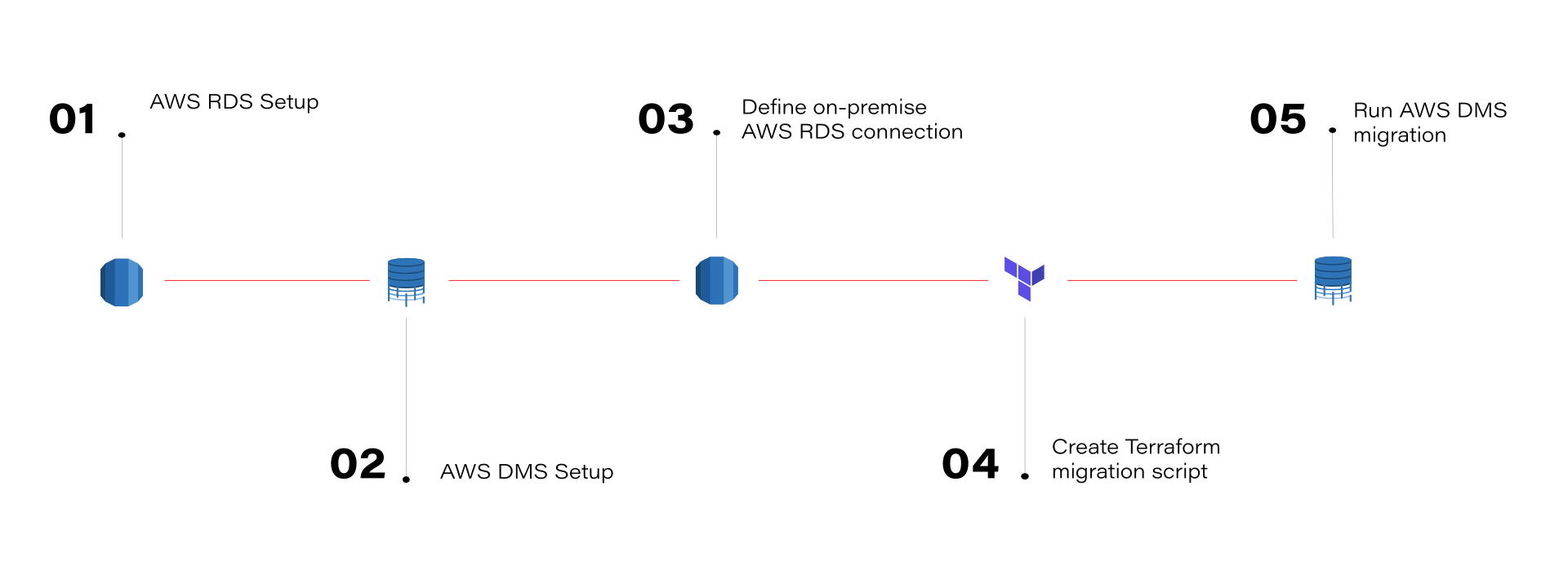
What can be gained by migrating on-premise databases to AWS RDS
This journey isn’t fast or easy. So, is it worth it? Absolutely! The migration to AWS RDS provides significant benefits for database management. With the ability to scale databases up or down based on demand, performance is optimized, and over-provisioning resources is avoided. AWS RDS automates manual backups and database maintenance, allowing teams to focus on more strategic tasks. Additionally, the pay-as-you-go model helps manage and optimize costs more efficiently.
Risks and concerns
AWS is helpful and can make your work easier. However, it's important to be aware of the potential risks:
- Vendor lock-in : Once you’re deep into AWS services, moving away can be difficult due to the reliance on AWS-specific technologies and configurations.
- Security misconfigurations : While AWS provides strong security tools, a misconfiguration can expose sensitive data. It’s crucial to ensure access controls, encryption, and monitoring are set up correctly.
- Unexpected costs : While AWS’s pricing can be cost-effective, it’s easy to incur unexpected costs, especially if you don’t properly monitor your resource usage or optimize your infrastructure.
Conclusion
Migrating on-premise databases to AWS RDS using AWS DMS is a learning experience. The cloud offers incredible opportunities for scalability, flexibility, and innovation, but it also requires a solid understanding of best practices to fully benefit from it. For organizations considering a similar migration, the key is to approach it with careful planning, particularly around data consistency, downtime minimization, and security.
For those just starting with AWS, don't be intimidated - AWS provides extensive documentation, and the community is always there to help. By embracing the cloud, we open the door to a more agile, scalable, and resilient future.
Interested in our services?
Reach out for tailored solutions and expert guidance.