
Running Langfuse v3 on ECS Fargate: architecture, hardening and operations

Introduction
Langfuse is an open-source LLM observability platform: traces, prompts, evaluations, datasets. Traces hold prompts, completions and often personal data, so many teams self-host it.
Langfuse v2 was one container and a Postgres database. v3 adds a worker, ClickHouse, Redis and S3 (architecture comparison), and v4 keeps the same components. This guide shows how to run all of it on AWS with ECS Fargate and managed services, without Kubernetes. The setup meets strict requirements:
• no public endpoints apart from a CDN,
• read-only root filesystems,
• customer-managed KMS keys,
• images only from the account's own registry, behind a scan gate.
The guide describes a single environment; code is Terraform plus some shell, shortened to what matters.
Everything here reflects Langfuse 3.224.2 and ClickHouse 26.5.7, as of October 2026. Langfuse v4 changes the ClickHouse data model and will get a separate article.
1. Architecture
1.1 Components
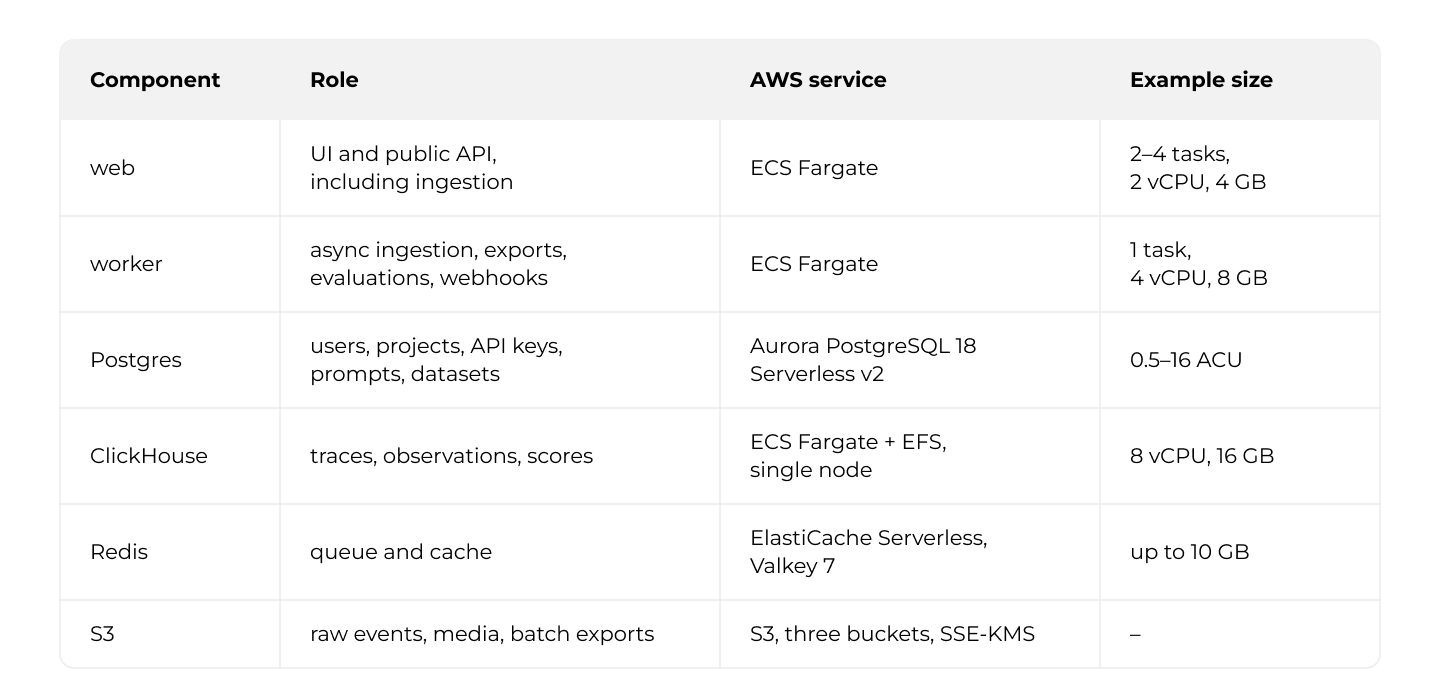
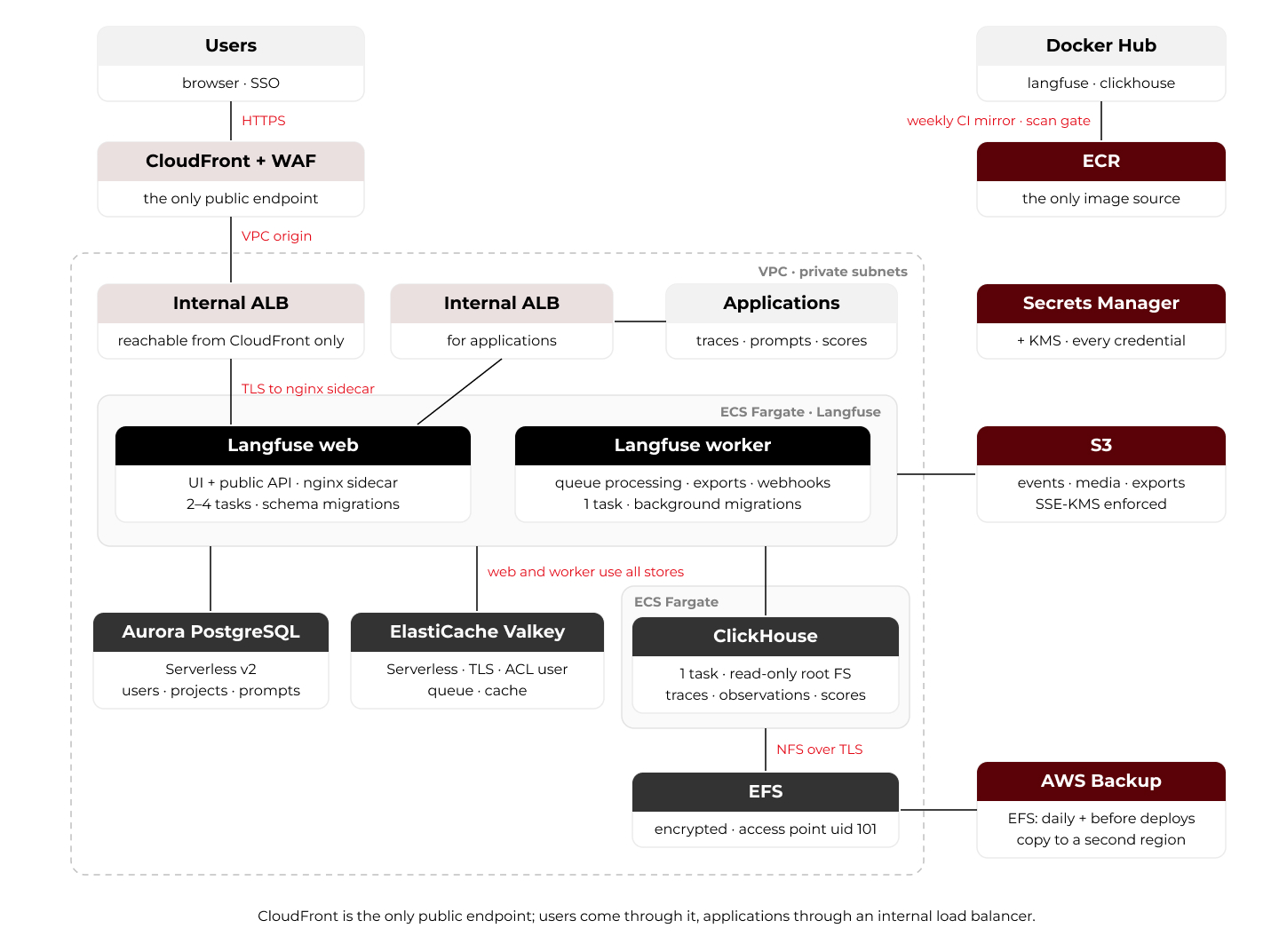
1.2 How data flows
Ingestion. An application posts a batch to /api/public/ingestion. Web writes it to the S3 events bucket and queues only a reference in Redis; the worker reads the events from S3 and writes them to ClickHouse. A load spike fills a queue instead of hitting ClickHouse.
Reading. The UI and read APIs query ClickHouse for traces, observations and scores, and Postgres for the rest.
1.3 Network and access
Everything runs in private subnets. Outbound traffic leaves through a NAT gateway and AWS Network Firewall with a domain allow-list; Langfuse needs it for LLM APIs, the identity provider if you use SSO, and AWS APIs without a VPC endpoint.
CloudFront is the only public endpoint. Both load balancers behind it are internal, which gives two ways in:
• users through CloudFront with AWS WAF, connected to an internal ALB by a VPC origin,
• applications in the VPC through a second internal ALB.
Web and worker reach ClickHouse through a private Cloud Map DNS name.
2. Setting up the components
2.1 Shared secrets
Web and worker must share ENCRYPTION_KEY (encrypts secrets stored in Postgres, such as LLM connection keys; 256 bits as 64 hex characters), SALT (salts hashed API keys) and NEXTAUTH_SECRET (signs sessions).
Generate them once (ENCRYPTION_KEY with random_id of 32 bytes, rendered as .hex) and store all three in one Secrets Manager secret. Both task definitions read from it:
secrets = [
  { name = "ENCRYPTION_KEY",  valueFrom = "${var.langfuse_app_secret_arn}:encryption_key::" },
  { name = "SALT",            valueFrom = "${var.langfuse_app_secret_arn}:salt::" },
  { name = "NEXTAUTH_SECRET", valueFrom = "${var.langfuse_app_secret_arn}:nextauth_secret::" },
]
:key:: selects one field of a JSON secret. Unlike environment, secrets keeps values out of the task definition, which anyone with ecs:DescribeTaskDefinition can read.
2.2 Postgres
Langfuse gets its own database and user in an Aurora cluster that is reachable only from the VPC's private subnets, so Terraform cannot connect to it directly. A one-off Lambda inside the VPC, invoked by Terraform through aws_lambda_invocation, runs as the master user:
CREATE USER langfuse WITH ENCRYPTED PASSWORD '...';
GRANT langfuse TO root;
CREATE DATABASE langfuse WITH ENCODING='UTF8' OWNER=langfuse;
Do not pass a DATABASE_URL. The Langfuse images build it from four variables, so the password stays in Secrets Manager:
environment = [
  { name = "DATABASE_HOST", value = var.aurora_endpoint },
  { name = "DATABASE_NAME", value = "langfuse" },
]
secrets = [
  { name = "DATABASE_USERNAME", valueFrom = "${var.db_secret_arn}:username::" },
  { name = "DATABASE_PASSWORD", valueFrom = "${var.db_secret_arn}:password::" },
]
A scheduled Lambda rotates the password, then redeploys web and worker, because ECS resolves secrets only at task start.
2.3 Redis (Valkey)
Langfuse needs Redis 7+ or Valkey. We use ElastiCache Serverless (Valkey 7) with a usage limit and a password-authenticated ACL user. Serverless caches always run in cluster mode with TLS, so:
environment = [
  { name = "REDIS_CLUSTER_ENABLED", value = "true" },
  { name = "REDIS_CLUSTER_NODES",   value = "${aws_elasticache_serverless_cache.langfuse.endpoint[0].address}:6379" },
  { name = "REDIS_TLS_ENABLED",     value = "true" },
  { name = "REDIS_USERNAME",        value = "langfuse-user" },
]
secrets = [
  { name = "REDIS_AUTH", valueFrom = "${var.redis_secret_arn}:password::" },
]
This is a deliberate deviation. The Langfuse documentation requires maxmemory-policy=noeviction; on ElastiCache Serverless it is fixed at volatile-lru. Once nothing evictable (keys with a TTL) is left at the usage limit, writes fail and Langfuse cannot enqueue ingestion jobs. An alarm on BytesUsedForCache well below the limit buys time but is not the same guarantee. If you need it, use a node-based cluster with a parameter group that sets noeviction.
2.4 ClickHouse
ClickHouse runs as a single Fargate task with its data on an encrypted EFS file system (throughput_mode = "elastic"). A replicated setup is possible but needs more components, such as ClickHouse Keeper and storage per replica; section 3.6 outlines it.
Storage
Mount the file system through an access point that presents every file as the clickhouse user (uid/gid 101) of the official image:
resource "aws_efs_access_point" "clickhouse" {
  file_system_id = aws_efs_file_system.clickhouse.id

  root_directory {
    path = "/clickhouse"
    creation_info {
      owner_uid   = 101
      owner_gid   = 101
      permissions = "0755"
    }
  }

  posix_user {
    uid = 101
    gid = 101
  }
}
A file system policy allows mounting only by the ClickHouse task role, through this access point, over TLS; NFS (2049) is open only to the ClickHouse task.
Image
Build a thin image on top of the official one. Section 3.3 shows how the pipeline resolves BASE_REF.
# clickhouse/clickhouse-server@sha256:...
ARG BASE_REF
FROM ${BASE_REF}

# patch OS packages, keep the pinned ClickHouse version
USER root
RUN set -eux; \
    apt-get update; \
    apt-mark hold clickhouse-server clickhouse-client clickhouse-common-static || true; \
    apt-get upgrade -y; \
    rm -rf /var/lib/apt/lists/*

COPY config.d/paths.xml /etc/clickhouse-server/config.d/paths.xml
# the access point already presents files as uid 101
ENV CLICKHOUSE_DO_NOT_CHOWN=1
COPY docker-entrypoint.sh /docker-entrypoint.sh
ENTRYPOINT ["/docker-entrypoint.sh"]
config.d/paths.xml sets the data, temp, PID and log paths below and enables console logging, so the logs reach CloudWatch. With a read-only root filesystem, each of these paths is a volume:

Because users.d is a volume, files copied into it at build time are hidden at runtime. User-profile settings therefore have to be written at startup, by a wrapper around the official entrypoint. ClickHouse 26.5.x with Langfuse 3.224.2 needs one such setting. Without it, the lazy-materialization optimizer fails on Langfuse's scores query with Code: 10 NOT_FOUND_COLUMN_IN_BLOCK:
#!/usr/bin/env bash
set -euo pipefail

mkdir -p /var/tmp/clickhouse /var/run/clickhouse
chown 101:101 /var/tmp/clickhouse /var/run/clickhouse

mkdir -p /etc/clickhouse-server/users.d
cat > /etc/clickhouse-server/users.d/zzz-langfuse.xml <<'EOF'
<clickhouse>
    <profiles>
        <default>
            <query_plan_optimize_lazy_materialization>0</query_plan_optimize_lazy_materialization>
        </default>
    </profiles>
</clickhouse>
EOF

exec /entrypoint.sh
Task and service
volume {
  name = "clickhouse-data"
  efs_volume_configuration {
    file_system_id     = aws_efs_file_system.clickhouse.id
    transit_encryption = "ENABLED"
    authorization_config {
      access_point_id = aws_efs_access_point.clickhouse.id
      iam             = "ENABLED"
    }
  }
}

container_definitions = jsonencode([{
  name                   = "clickhouse"
  image                  = "${aws_ecr_repository.clickhouse.repository_url}:latest"
  readonlyRootFilesystem = true
  portMappings = [
    { containerPort = 8123 },   # HTTP: Langfuse
    { containerPort = 9000 },   # native protocol: migrations
  ]
  # mountPoints: the volumes from the table above
  ulimits = [{ name = "nofile", softLimit = 262144, hardLimit = 262144 }]   # container-level field, not part of linuxParameters
  healthCheck = { command = ["CMD-SHELL", "wget -qO- 127.0.0.1:8123/ping || exit 1"] }
}])
The service must never run two tasks against the same data:
resource "aws_ecs_service" "clickhouse" {
  desired_count                      = 1
  deployment_minimum_healthy_percent = 0     # stop the old task first
  deployment_maximum_percent         = 100
  availability_zone_rebalancing      = "DISABLED"
  # + Cloud Map registration: clickhouse-internal.<private zone>
}
Every ClickHouse deploy therefore has a shortdowntime. On the Langfuse side, set CLICKHOUSE_CLUSTER_ENABLED=false, because a single node cannot run ON CLUSTER statements:
environment = [
  { name = "CLICKHOUSE_URL",             value = "http://clickhouse-internal.${var.private_zone}:8123" },
  { name = "CLICKHOUSE_MIGRATION_URL",   value = "clickhouse://clickhouse-internal.${var.private_zone}:9000" },
  { name = "CLICKHOUSE_CLUSTER_ENABLED", value = "false" },
]
# + CLICKHOUSE_USER, CLICKHOUSE_PASSWORD, CLICKHOUSE_DB from Secrets Manager
2.5 S3
Langfuse uses three buckets: events (every ingested batch lands here first), media and batch exports. Each has versioning, blocked public access and SSE-KMS with a customer-managed key. The bucket policy denies non-TLS requests and any PutObject that does not ask for SSE-KMS with our key:
statement {
  sid       = "DenyPutWithWrongKmsKey"
  effect    = "Deny"
  actions   = ["s3:PutObject"]
  resources = ["${each.value.arn}/*"]
  principals {
    type        = "AWS"
    identifiers = ["*"]
  }
  condition {
    test     = "StringNotEquals"
    variable = "s3:x-amz-server-side-encryption-aws-kms-key-id"
    values   = [aws_kms_key.langfuse_s3.arn]
  }
}
With this policy in place, Langfuse has to send the encryption headers, or every upload is denied. Set the following on both containers:
{ name = "LANGFUSE_S3_EVENT_UPLOAD_BUCKET",         value = local.buckets.events },
{ name = "LANGFUSE_S3_EVENT_UPLOAD_REGION",         value = var.aws_region },
{ name = "LANGFUSE_S3_EVENT_UPLOAD_SSE",            value = "aws:kms" },
{ name = "LANGFUSE_S3_EVENT_UPLOAD_SSE_KMS_KEY_ID", value = aws_kms_key.langfuse_s3.arn },
# the same four for LANGFUSE_S3_MEDIA_UPLOAD_* and LANGFUSE_S3_BATCH_EXPORT_*,
# plus LANGFUSE_S3_BATCH_EXPORT_ENABLED=true
No access keys are needed; the task role needs s3:GetObject, s3:PutObject and s3:ListBucket on the buckets, and kms:GenerateDataKey and kms:Decrypt on the key.
2.6 Web and worker on ECS Fargate
Web
The web task has an init container, Langfuse on port 3000 and an nginx sidecar for TLS on port 8453. With a read-only root filesystem, the Next.js cache (/app/web/.next/cache) needs a volume. Fargate creates that volume owned by root, while Langfuse runs as nextjs, so an init container fixes the ownership first:
{
  name                   = "fix-next-cache-perms"
  image                  = local.langfuse_web_image   # same image, so nextjs:nodejs exist
  essential              = false
  user                   = "0"
  readonlyRootFilesystem = true
  entryPoint             = ["/bin/sh", "-c"]          # skip the Langfuse entrypoint
  command                = ["chown nextjs:nodejs /app/web/.next/cache"]
  mountPoints            = [{ sourceVolume = "next-cache", containerPath = "/app/web/.next/cache" }]
},
{
  name                   = "langfuse-web"
  image                  = local.langfuse_web_image
  readonlyRootFilesystem = true
  dependsOn              = [{ containerName = "fix-next-cache-perms", condition = "SUCCESS" }]
  mountPoints            = [{ sourceVolume = "next-cache", containerPath = "/app/web/.next/cache" }]
  environment = [
    { name = "HOSTNAME",     value = "0.0.0.0" },
    { name = "NEXTAUTH_URL", value = "https://${var.langfuse_domain}" },
  ]
  healthCheck = {
    command = ["CMD-SHELL", "wget -q -O /dev/null localhost:3000/api/public/health || exit 1"]
  }
}
The entryPoint override is required: the image's entrypoint exits without database variables, and otherwise runs migrations first.
Langfuse serves plain HTTP and does not terminate TLS itself, so an nginx sidecar does. It generates a self-signed certificate at startup, listens on 8453 with TLS and proxies to http://127.0.0.1:3000 with proxy_read_timeout 25m. An ALB does not validate target certificates, so traffic stays encrypted into the task without any certificate management. The service attaches the nginx container to two target groups (section 2.7) and uses the deployment circuit breaker with rollback. Target tracking scales it between 2 and 4 tasks at 50% average CPU, Langfuse's saturation point (section 3.6).
Worker
The worker is one container with the same store settings as web, plus LANGFUSE_ENABLE_BACKGROUND_MIGRATIONS=true and a health check on http://localhost:3030/api/health. It needs no load balancer or inbound rules.
2.7 Access
Users
CloudFront reaches the internal ALB through an aws_cloudfront_vpc_origin (origin_protocol_policy = "https-only", TLS 1.2), referenced from the distribution's vpc_origin_config. The distribution uses the managed policies Managed-CachingDisabled and Managed-AllViewerExceptHostHeader and an ACM certificate from us-east-1. The ALB is internal = true, and its security group accepts port 443 only from CloudFront:
data "aws_ec2_managed_prefix_list" "cloudfront_origin_facing" {
  name = "com.amazonaws.global.cloudfront.origin-facing"
}

resource "aws_security_group_rule" "alb_from_cloudfront" {
  security_group_id = aws_security_group.alb_external.id
  type              = "ingress"
  protocol          = "tcp"
  from_port         = 443
  to_port           = 443
  prefix_list_ids   = [data.aws_ec2_managed_prefix_list.cloudfront_origin_facing.id]
}
The WAF web ACL (scope CLOUDFRONT) has a per-IP rate limit and the AWS managed rule groups. The OAuth callback carries a long query string and base64 payloads, which some size-restriction and cross-site-scripting rules of the common rule set flag. Switch only those rules to count with rule_action_override, and keep them effective elsewhere: add a rule that blocks on their labels for every path except /api/auth/callback/*.
SSO is optional: Langfuse also supports email and password, and OAuth/OIDC providers such as Google, GitHub, Okta or Microsoft Entra ID. This setup disables passwords and uses SSO, here with Entra ID (redirect URI https://<langfuse domain>/api/auth/callback/azure-ad):
environment = [
  { name = "NEXTAUTH_URL",                   value = "https://${var.langfuse_domain}" },
  { name = "AUTH_DISABLE_USERNAME_PASSWORD", value = "true" },
]
# + AUTH_AZURE_AD_CLIENT_ID, AUTH_AZURE_AD_CLIENT_SECRET, AUTH_AZURE_AD_TENANT_ID from Secrets Manager
Applications
Applications that send traces or fetch prompts use a second internal ALB with an ACM certificate for a name in the private zone. Its security group accepts port 443 only from the application subnets. Machine traffic stays inside the VPC and bypasses WAF rules tuned for browsers, which would otherwise block large ingestion batches.
Webhooks
As SSRF protection, Langfuse refuses private webhook targets unless allow-listed. List only the receiving service's subnets:
{ name = "LANGFUSE_WEBHOOK_WHITELISTED_IP_SEGMENTS", value = join(",", var.webhook_target_subnet_cidrs) }Give the target a certificate the worker trusts, such as an internal ALB with ACM. Do not set NODE_TLS_REJECT_UNAUTHORIZED=0: it disables certificate checks for every TLS connection of the worker.
3. Operating it
3.1 Images: mirror, scan, deploy
ECS pulls only from ECR in its own account, with IMMUTABLE tags and scan on push. A weekly CI pipeline authenticates with its OIDC token via sts:AssumeRoleWithWebIdentity, for a role that trusts only the pipeline project's main branch.
It separates publishing from approval: scheduled jobs push langfuse/langfuse:3 and langfuse/langfuse-worker:3 under a timestamp and their exact version and gate them on the scan; the manual deploy job (section 3.2) moves latest and updates the service:
# --- scheduled jobs ---
DATE="$(date "+%Y%m%d%H%M%S")"
VERSION="$(docker image inspect langfuse/langfuse:3 \
  --format '{{index .Config.Labels "org.opencontainers.image.version"}}')"   # e.g. 3.224.2
docker tag langfuse/langfuse:3 "$REPOSITORY:$DATE"    && docker push "$REPOSITORY:$DATE"
docker tag langfuse/langfuse:3 "$REPOSITORY:$VERSION" && docker push "$REPOSITORY:$VERSION"

aws ecr wait image-scan-complete --repository-name "$NAME" --image-id imageTag="$DATE"
CRITICAL=$(aws ecr describe-image-scan-findings --repository-name "$NAME" --image-id imageTag="$DATE" \
  --query "imageScanFindings.findingSeverityCounts.CRITICAL" --output text | head -n 1)
if [ -n "$CRITICAL" ] && [ "$CRITICAL" -gt 0 ]; then echo "CRITICAL: $CRITICAL"; exit 1; fi

# --- manual deploy job ---
# immutable tags: delete latest, then push it again
aws ecr batch-delete-image --repository-name "$NAME" --image-ids imageTag=latest || true
docker tag langfuse/langfuse:3 "$REPOSITORY:latest" && docker push "$REPOSITORY:latest"
# REVISION: describe-task-definition -> jq (image = $REPOSITORY:$DATE) -> register-task-definition
aws ecs update-service --cluster "$CLUSTER" --service "$NAME" --task-definition "$NAME:$REVISION"
aws ecs wait services-stable --cluster "$CLUSTER" --services "$NAME"
With enhanced scanning, the CI role also needs inspector2:ListFindings and inspector2:ListCoverage. Terraform owns the same task definition and references :latest. Since latest moves only in the manual job, a later terraform apply cannot roll out an unapproved image or its migrations.
With continuous scanning, Inspector re-evaluates deployed images and sends two EventBridge event types (source aws.inspector2):
• Inspector2 Scan, sent once after the initial scan,
• Inspector2 Finding, sent whenever a finding is created, updated or closed, including new CVEs in running images. Match this one:
event_pattern = jsonencode({
  source        = ["aws.inspector2"],
  "detail-type" = ["Inspector2 Finding"],
  detail = {
    severity  = ["CRITICAL"],
    status    = ["ACTIVE"],
    resources = { type = ["AWS_ECR_CONTAINER_IMAGE"] }
  }
})
If you automate deleting images instead, note that ECS cannot start new tasks from a deleted image.
3.2 Upgrading Langfuse
A release can change the Postgres schema, the ClickHouse schema, or both. In 3.224.2:
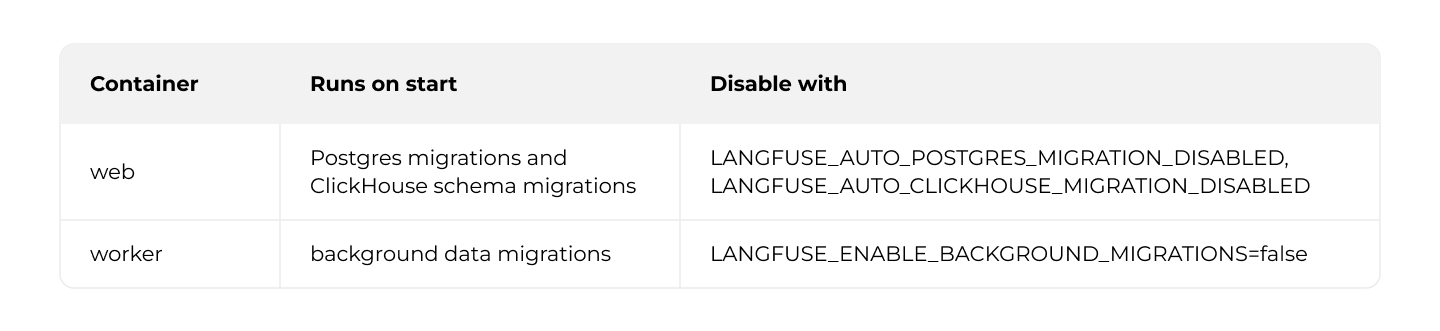
Deploying an older image does not revert a migration, so the deploy job is when: manual while the scheduled jobs only publish and scan.
Right before it, take an on-demand recovery point of the ClickHouse file system. AWS Backup copies EFS file by file without freezing it, and AWS recommends pausing writers for a consistent copy, so stop ClickHouse meanwhile. Web keeps accepting ingestion into S3 and the queue; check that the queue drains afterwards.
aws ecs update-service --cluster "$CLUSTER" --service clickhouse --desired-count 0
aws ecs wait services-stable --cluster "$CLUSTER" --services clickhouse

JOB=$(aws backup start-backup-job \
  --backup-vault-name "$BACKUP_VAULT" \
  --resource-arn "arn:aws:elasticfilesystem:${AWS_REGION}:${ACCT}:file-system/${FS_ID}" \
  --iam-role-arn "$BACKUP_ROLE_ARN" \
  --query BackupJobId --output text)

DEADLINE=$(( $(date +%s) + 3600 ))
while true; do
  STATE=$(aws backup describe-backup-job --backup-job-id "$JOB" --query State --output text)
  case "$STATE" in
    COMPLETED)              break ;;
    FAILED|ABORTED|EXPIRED) echo "backup $JOB ended in $STATE"; exit 1 ;;
  esac
  [ "$(date +%s)" -lt "$DEADLINE" ] || { echo "backup $JOB timed out in $STATE"; exit 1; }
  sleep 30
done

aws ecs update-service --cluster "$CLUSTER" --service clickhouse --desired-count 1
aws ecs wait services-stable --cluster "$CLUSTER" --services clickhouse
Then deploy web, which runs the migrations; Aurora point-in-time recovery covers Postgres.
To roll back, scale web and worker to zero, restore ClickHouse (section 3.4) and Aurora to the same moment, since they reference each other by ID, and deploy the previous image. Rehearse this before you need it.
3.3 Upgrading ClickHouse
ClickHouse has its own weekly pipeline that follows a release line (CLICKHOUSE_RELEASE_LINE: "26.5"): it finds the highest stable patch, builds the image from section 2.4 on its digest, pushes it as <version>-<timestamp> through the same scan gate, and deploys it in a manual job after the snapshot from section 3.2.
TAGS="$(curl -fsS "https://hub.docker.com/v2/repositories/clickhouse/clickhouse-server/tags?page_size=100&name=${CLICKHOUSE_RELEASE_LINE}.")"
CLICKHOUSE_VERSION="$(echo "$TAGS" | jq -r --arg line "$CLICKHOUSE_RELEASE_LINE" '
  [ .results[].name | select(test("^[0-9]+\\.[0-9]+\\.[0-9]+$")) | select(startswith($line + "."))
    | {name: ., parts: (split(".") | map(tonumber))} ] | sort_by(.parts) | last.name // empty')"

docker pull "clickhouse/clickhouse-server:${CLICKHOUSE_VERSION}"
BASE_REF="$(docker inspect --format='{{index .RepoDigests 0}}' "clickhouse/clickhouse-server:${CLICKHOUSE_VERSION}")"
docker build --build-arg BASE_REF="$BASE_REF" -t "$REPOSITORY:${CLICKHOUSE_VERSION}-${DATE}" .
A newer release line only triggers a notification, and changing the line is a manual decision, because the dependency works both ways: a Langfuse release can require a newer ClickHouse (v4 needs at least 25.12, with 26.4 recommended), and a newer ClickHouse can break a Langfuse query, as the users.d override in section 2.4 shows.
3.4 Backups
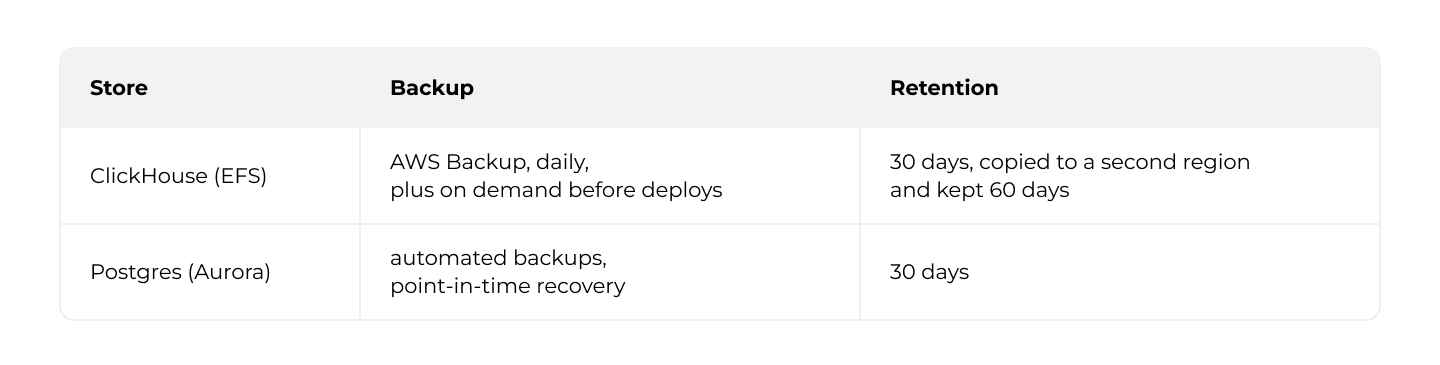
The backup plan has a copy_action to a vault in the second region; both vaults use customer-managed KMS keys.
The daily backup runs while ClickHouse writes, so it may be inconsistent; the pre-deploy backup is the reliable restore point, or use ClickHouse's own BACKUP ... TO S3(...).
To restore ClickHouse:
1. Restore the recovery point to a new file system. AWS Backup never restores in place: the data lands in /aws-backup-restore_<datetime>/clickhouse.
2. Either move that directory back to /clickhouse with a one-off task, or create an access point whose root_directory.path points at it.
3. Point the task definition's EFS volume at the new file system and access point, add mount targets and the file system policy, and redeploy.
3.5 Monitoring
3.6 Scaling
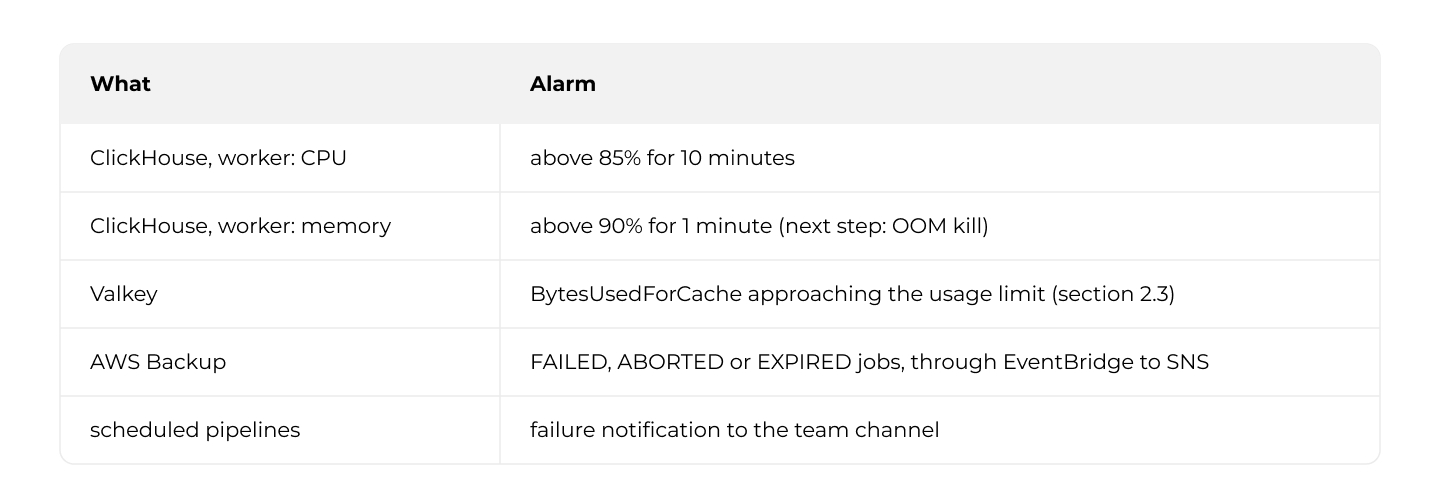
Where this setup stands. It handles a modest load: around 200 traces a day with about 40 observations each, LLM-as-a-judge evaluations on top, and about 80 sessions. Web stays below 10% CPU and the worker below 10% of its memory, so the worker could start at Langfuse's minimum of 2 CPU and 4 GiB. ClickHouse sits at a few percent, apart from short daily peaks of up to about 90% CPU and 80% memory during large data transfers. Size ClickHouse for those peaks, not for the average, and keep the memory alarm (section 3.5) above them.
When load grows, the Langfuse scaling guide recommends:
Worker: scale out on queue depth, not CPU. With ENABLE_AWS_CLOUDWATCH_METRIC_PUBLISHING=true (task role: cloudwatch:PutMetricData), Langfuse publishes langfuse.queue.ingestion.depth.type_waiting to CloudWatch; put a scaling policy on it. Each task runs up to LANGFUSE_INGESTION_QUEUE_PROCESSING_CONCURRENCY (default 20) and LANGFUSE_TRACE_UPSERT_WORKER_CONCURRENCY (default 25) jobs, adding load on ClickHouse and Redis.
Web: scale out, then split. The documented minimum is 2 CPU and 4 GiB per container, saturated above 50% CPU. Under heavy ingestion, a second web service for /api/public/ingestion*, /api/public/media* and /api/public/otel* keeps the UI responsive; here, a path-pattern listener rule on the internal ALB.
Redis: shard the queues. Above 90% Redis CPU, set LANGFUSE_INGESTION_QUEUE_SHARD_COUNT and LANGFUSE_TRACE_UPSERT_QUEUE_SHARD_COUNT to two to three times the Redis shard count and lower the per-worker concurrency in proportion. Never reduce them later. ElastiCache Serverless shows one virtual node, so watch ECPU instead.
ClickHouse: vertical first (at least 16 GiB for larger deployments; Fargate allows 16 vCPU and 120 GB per task). Beyond that:
• Replicas add availability, not write capacity. Langfuse supports only a single shard and recommends at least 3 replicas with 3 ClickHouse Keeper nodes. Moving there means CLICKHOUSE_CLUSTER_ENABLED=true, storage per replica and tables recreated with replicated engines: a data migration, not a configuration change.
• For larger deployments, Langfuse recommends ClickHouse Cloud or BYOC, which separate compute from storage; CLICKHOUSE_READ_ONLY_URL can route reads to separate compute.
4. Summary
4.1 What we built
Langfuse v3 runs on AWS without Kubernetes, behind one public endpoint, with customer-managed encryption, read-only containers and approved, scanned images. Most of the work is in details the documentation covers briefly:
• secrets that web and worker must share,
• Valkey in cluster mode with TLS,
• ClickHouse with a read-only root filesystem and a users.d setting for 26.5.x,
• S3 encryption that Langfuse has to request explicitly,
• an init container for the Next.js cache.
4.2 What you take on
Self-hosting means owning weekly image updates, irreversible migrations behind a manual gate and a fresh snapshot, ClickHouse upgrades, backups of two stores restored together, and scaling.
4.3 Alternatives
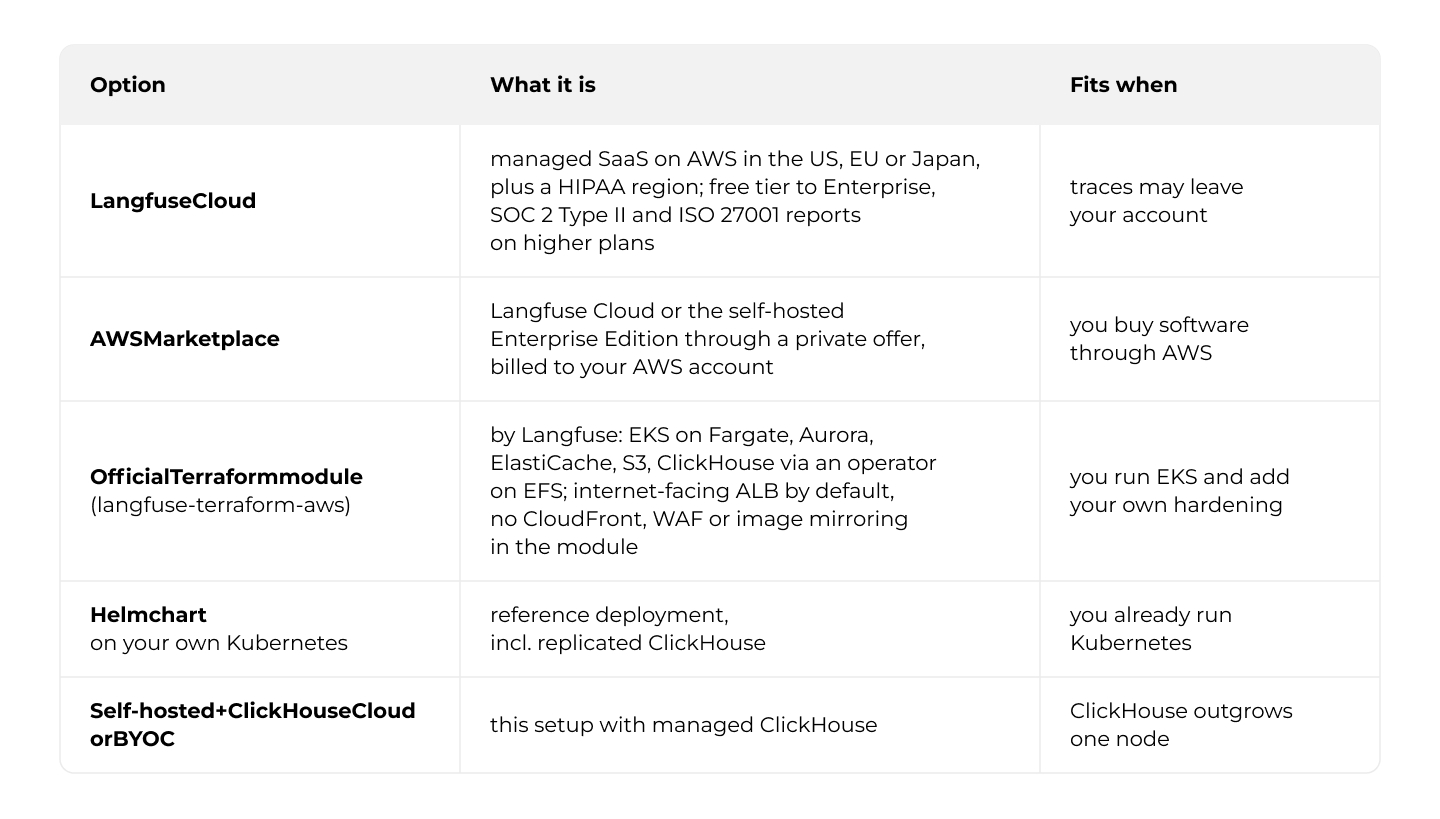
Each self-hosted variant can add the commercial Enterprise license, which brings SSO enforcement, project-level RBAC, audit logs and support.
This guide fits teams already on ECS who do not want Kubernetes for one tool.
A follow-up article will cover connecting applications to Langfuse and managing its data over time, as well as the move to Langfuse v4.
Thank you for taking the time to read.

Grape Up guides enterprises on their data-driven transformation journey
Ready to ship? Let's talk.
Check related articles
Read our blog and stay informed about the industry's latest trends and solutions.
Interested in our services?
Reach out for tailored solutions and expert guidance.