
In-app purchases in iOS apps – a tester’s perspective

Year after year, Apple’s new releases of mobile devices gain a decent amount of traction in tech media coverage and keep attracting customers to obtain their quite pricey products. Promises of superior quality, straightforwardness of the integrated ecosystem, and inclusion of new, cutting edge technologies urge the company’s longtime fans and new customers alike to upgrade their devices to Californian designed phones, tablets and computers.
Resurgence
Focusing on the mobile market alone, it is impossible to neglect the significant raise in Apple’s iOS market share of mobile operating systems. Its major competitor, Google’s Android has noted 70.68% of mobile market share in April 2020 – which is around 6 percentage points less than in October 2019. On the other hand, iOS, which noted 22.09% of the market share around the same time, recently has risen to 28.79%. This trend surely pleases Apple’s board, along with anyone who strives to monetize their app ideas in App store.
Gaining revenue through in-app purchases sounds like a brilliant idea, but it requires plenty of planning, calculating risks, and evaluating funds for the project. Before publishing the software product, an idea has to be conceived, marketed, developed, and tested. Each step of this process of making an app aimed at providing paid content differs from the process of creating a custom-ordered software. And that also includes testing.
At what cost?
But wait! Testing usually includes lots of repetition. So that would mean testers have to go through many transactions. Doesn’t that entail spending lots of money? Well, not exactly. Apple provides development teams with their own in-app purchase testing tool, Sandbox. But using it doesn’t make testing all fun and games.
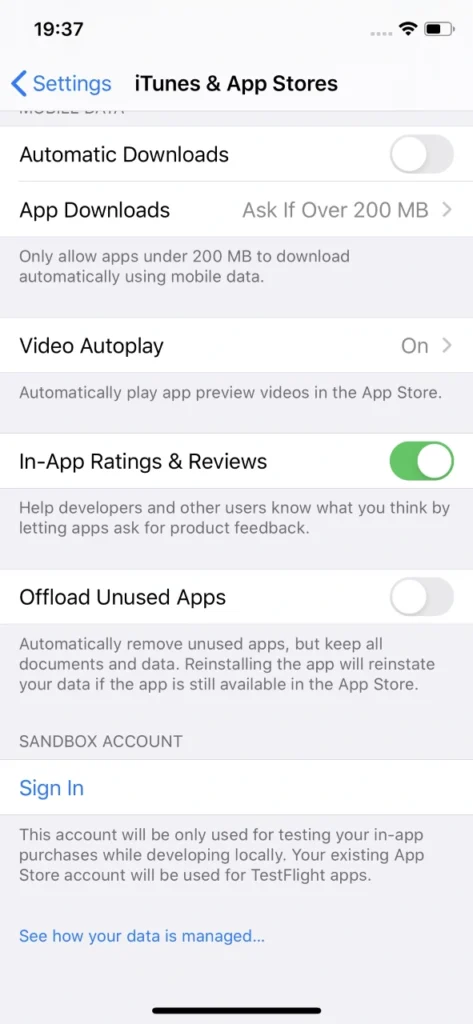
Sandbox allows for local development of in-app purchases without spending a dime on them. That happens by supplementing the ‘real’ Appstore account with the Sandbox one. Sounds fantastic, doesn’t it? But unfortunately, there are some inconveniences behind that.
If it ain’t broke...
First of all, Sandbox accounts have to be created manually via iTunes Connect, which leaves much to be desired in terms of performance. These accounts require an email in a valid format. Testers will need plenty of Sandbox accounts because it is actually quite easy to ‘use them up’, especially when tested software has its own sign-in system (not related to Apple ID). If by design said app account is also associated with In-app purchase, each app account will require a new Sandbox account.

Unfortunately, Apple’s Sandbox accounts can get really tricky to log into. When you’re trying to sign in to another Sandbox account, which was probably named similarly as all previous one for convenience, you’d think your muscle memory will allow you to type in the password without looking at the screen. Nothing more wrong. Sometimes, when you type in the credentials which consist of an email and a password, check twice and hit Sign In button in Sandbox login popover, nothing happens.
User is not logged in, not even a sign in error is displayed. And you try again. Every character is exactly the same as before. And eventually, you manage to log in. It’s not really a big of a deal unless you lose your temper easily testing manually, but a simple message informing why Sandbox login failed would be much more user-friendly. In automated tests you could just write the code to try to log in until the email address used as login is displayed in the Sandbox account section in iOS settings, which means that the login was successful. It’s not something testers can’t live with, but addressing the issue by Apple would greatly improve the experience of working in iOS development.
Cryptic writings
Problems arise when notifications informing that a particular Sandbox user is subscribed to an auto-renewable subscription are not delivered by Apple. Therefore, many subscription purchase attempts have to be made to actually make sure whether the development of the app went the correct way and it’s just Apple’s own system’s error, not a bug inside the app.
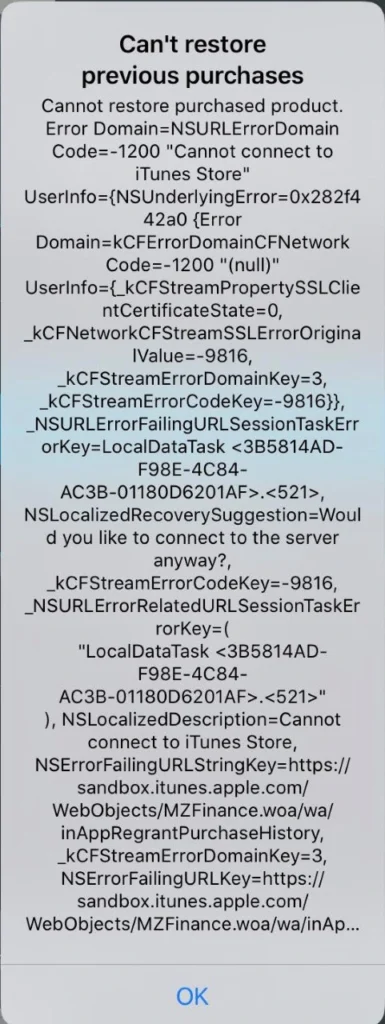
Speaking of errors – during testing of in-app purchase features, it can become really difficult to point out to developers what went wrong to help them debug the problem. Errors displayed are very cryptic and long; therefore, investigating the root cause of the problem can consume a substantial amount of time. There are two main reasons for that: there’s no error documentation created by Apple for those long error messages or the message displayed is very generic.
Combining this with problems which include performance drops in ‘prime time’, problems with receiving server notifications, e.g. for Autorenewing Subscriptions or simply inability to connect to iTunes store and a simple task of testing monthly subscription can turn into a major regression testing suite.
Hey, Siri...
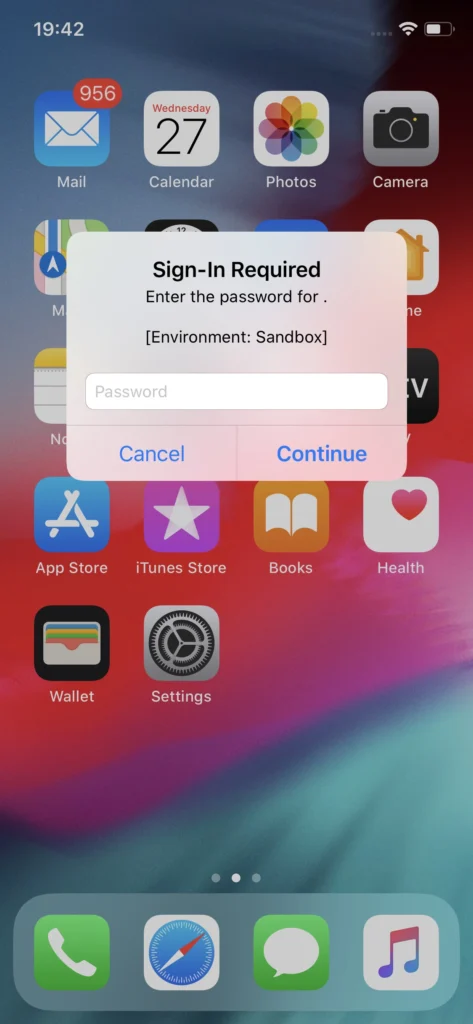
Another issue with Sandbox testing that is not so convenient to work with and not so obvious to workaround are the irritating Sandbox login prompts. These occur randomly for the eternity of your app’s development cycle if the In-app purchases feature in the app under test includes auto-renewable subscriptions. What is problematic is that these login prompts pop-up at any given time, not just when the app is used or dropped to the background. Well, if you’re patient you can learn to live with it and dismiss it when it shows up. But problems may occur when the device used for testing said app is also utilized as a real device in automated tests, e.g. in conjunction with Appium.
This can be addressed by setting up Appium properties in testing framework to automatically dismiss system popups. That could prove somewhat helpful if the test suite doesn’t include any other interactions with system popups. Deleting the application which includes auto-renewable subscriptions from the device gets rid of the random Sandbox login prompts on the device, but that’s not how testing works. Another workaround might be building the app with subscription part removed, which requires additional work on developers’ side. These login prompts are surely a major problem which Apple should address.
Send reinforcements
Despite all that, developers and testers alike can and eventually will get through the tedious process of developing and ensuring the quality of in-app purchases in Apple’s ecosystem . A good tactic for this in manual testing is to work out a solid testing routine, which will allow for quicker troubleshooting. Being cautious about each step in the testing scenario and monitoring the environment differences such as being logged in with proper Sandbox account instead of regular Apple ID, an appropriate combination of app account and the Sandbox account or the state of the app in relation to purchases made (whether an In-app purchase has been made within a particular installation or not) is key to understanding whether the application does what is expected and transactions are successful.
While Silicon Valley’s giant rises in the mobile market again, more and more ideas will be monetized in Appstore, making profits not only for the developers but also directly for Apple, which collects a hefty portion of the money spent on apps and paid extras. Let’s hope that sooner than later Apple will address the issues that have been annoying development teams for years now and make their jobs a bit easier.
Sources:

Grape Up guides enterprises on their data-driven transformation journey
Ready to ship? Let's talk.
Check related articles
Read our blog and stay informed about the industry's latest trends and solutions.
Testing iOS applications using Appium, Cucumber, and Serenity - a recipe for quality
iOS devices still claim a significant part of the mobile market, taking up to 22 percent of the sales globally. As many devoted clients come back for new Apple products, there is also a great demand for iOS applications. In this article, we are going to look at ensuring the quality of iOS apps striving for the usage of best practices using Appium, Cucumber and Serenity tools.
Structure
The Page Object Model is one of the best approaches to testing that QA engineers can apply to a test automation project. It is such a way of structuring the code in an automation project that improves code quality and readability, test maintenance and on top of that, it is a great way of avoiding chaos. The basic idea behind it comes to keeping all references to mobile elements and methods performing operations on them in one class file for each page or screen of the app (or web page for non-native web applications).
What are the benefits of this approach, you may ask? Firstly, it makes automation really straightforward. Basically, it means finding elements in our iOS app via inspector and then performing operations on them. Another main advantage is the coherent structure of the project that allows anyone to navigate through it quickly.
Let's take an example of an app that contains recipes. It shows the default cookbook with basic recipes on startup, which will be our first page. From there, a user can navigate to any available recipe, thus marking a second page. On top of that, the app also allows to browse other cookbooks or purchase premium ones, making it the third page and consequently - a page object file.
Similarly, we should create corresponding step definition files. This is not an obligatory practice, but keeping all step definitions in one place causes unnecessary chaos.
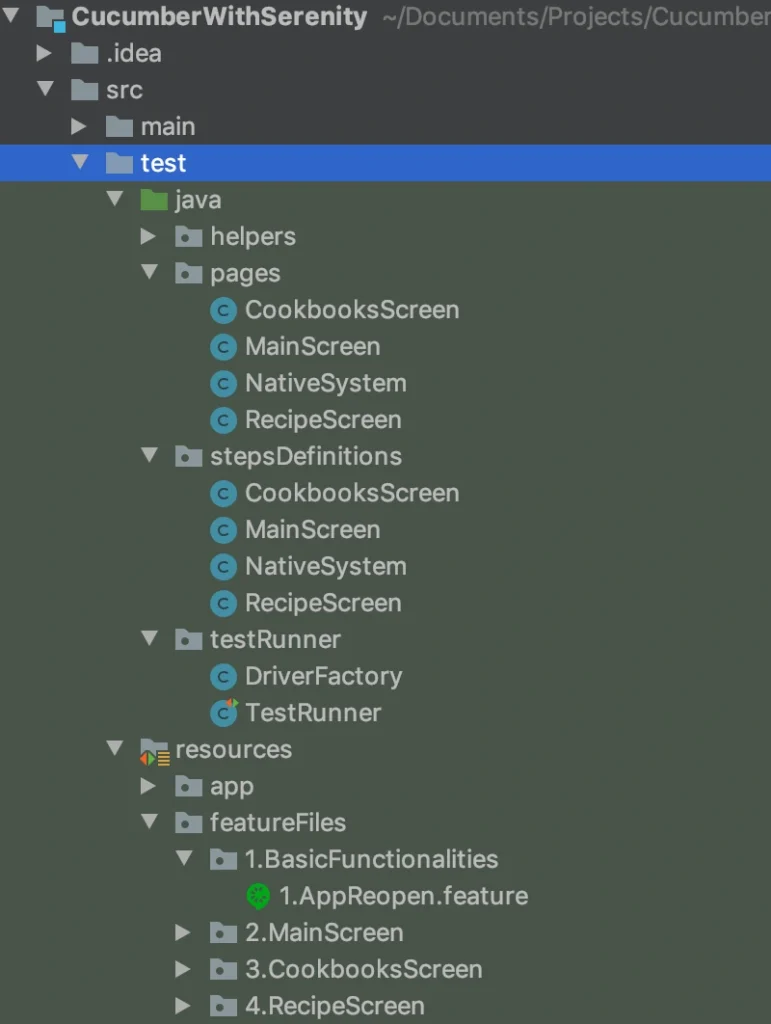
While creating your pages and step definition class files it is advised to choose names that are related to the page (app screen) which contents you are going to work on. Naming these files after a feature or scenario can seem right at first glance, but as the project expands, you will notice more and more clutter in its structure. Adopting the page naming convention ensures that anyone involved in the project can get familiar with it straight away and start collaboration on it in no time. Such practice also contributes to reusability of code - either step definitions or methods/functions.
Contrary to the mentioned step and step definition files, the Cucumber feature files should be named after a feature they verify. Clever, isn’t it? And again, structuring them into directories named in relation to a particular field of the application under test will make the structure more meaningful.
Serenity’s basic concept is to be a 'living documentation'. Therefore, giving test scenarios and feature files appropriate names helps the team and stakeholders understand reports and the entire project better.
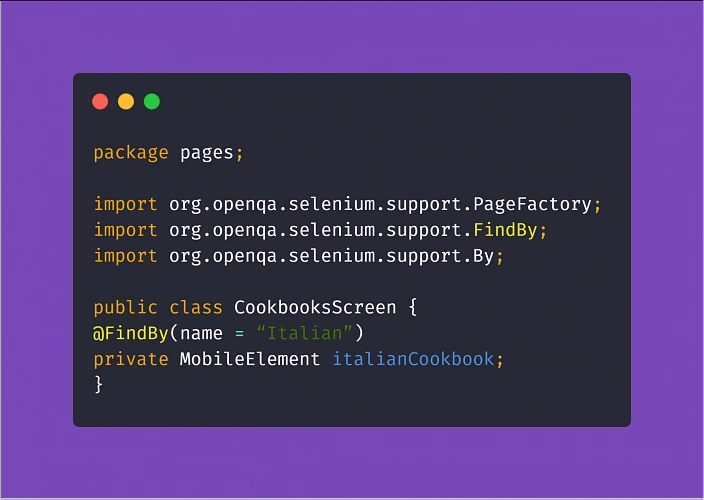
Another ingredient expanding the benefits of the Page Object Model in the test automation project is PageFactory. It is a tool that helps you reduce the coding work and easily put MobileElements locators in code, using @FindBy notation. From there, finding elements for Appium to interact with them in tests is much simpler.
Assertion
Running tests via Appium can be very resource-consuming. To make things easier for your MacOS machine running tests on your iOS device, make sure you are not constantly asserting the visibility of all objects on a page. This practice significantly increases the test execution time, which usually is not the most desirable thing.
What is more, when you do have to check if an element is visible, enabled, clickable, or anything in between - try to avoid locating mobile elements using Xpath. The Appium inspector tip has a valid point! You should do what you can to convince the development team to make an extra effort and assign unique IDs and names to the elements in the app. This will not only make automation testing easier and quicker, consequently making your work as a tester more effective, ultimately resulting in increasing the overall quality of the product. And that is why we are here. Not to mention that the maintenance of the tests (e.g. switching to different locators when necessary) will become much more enjoyable.
Understanding the steps
Another aspect of setting up this kind of project comes down to taking advantage of Cucumber and using Gherkin language.
Gherkin implements a straightforward approach with Given, When, Then notation with the help of the additional And and But which seems fairly easy to use. You could write pretty much anything you want in the test steps of your feature files. Ultimately, the called methods are going to perform actions.
But the reason for using the Behavior Driven Development approach and Cucumber itself is enabling the non-tech people involved in the project to understand what is going on in the tests field. Not only that, writing test scenarios in Given/When/Then manner can also act in your advantage. Such high-level test descriptions delivered by the client or business analyst will get you coding in no time, provided that they are written properly. Here are some helpful tips:
Test scenarios written in Gherkin should focus on the behavior of the app (hence Behavior Driven Development).
Here's an example of how NOT to write test scenarios in Gherkin, further exploring the theme of cookbook application:
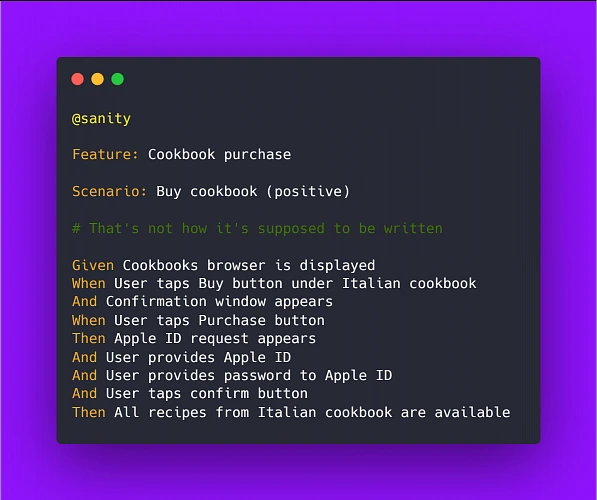
Above example illustrates two bad practices we should avoid: It focuses on the implementation instead of behavior and it uses hard-coded values rather than writing test steps in such a way to enable reusability by changing values within a step.
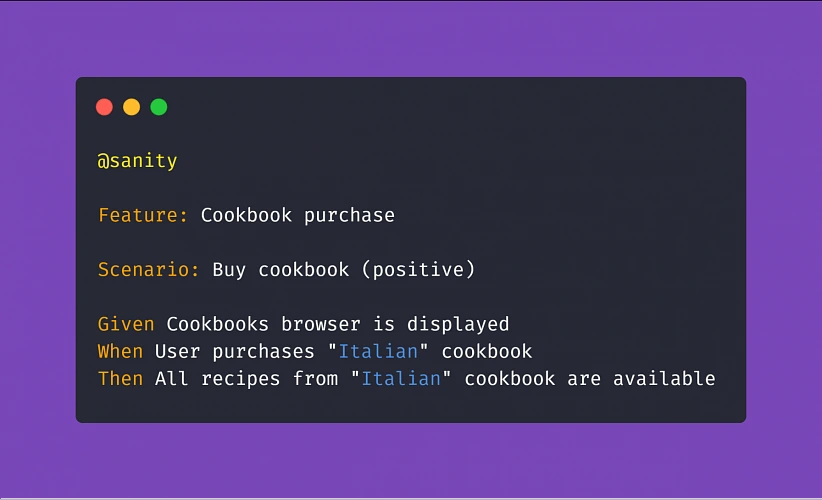
Therefore, a proper scenario concerning purchasing a cookbook in our example app should look like:
Another example:
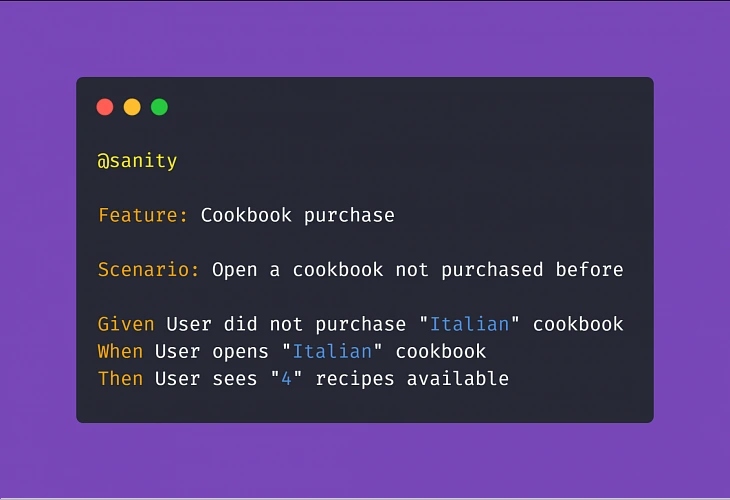
Adopting this approach means less work creating and coding the test steps whenever the implementation of a particular feature changes.
Apart from the main notation of Given/When/Then , Cucumber supports usage of conjunction steps. Using And and But step notations will make the test steps more general and reusable, which results in writing less code and maintaining order within the project. Here is a basic example:
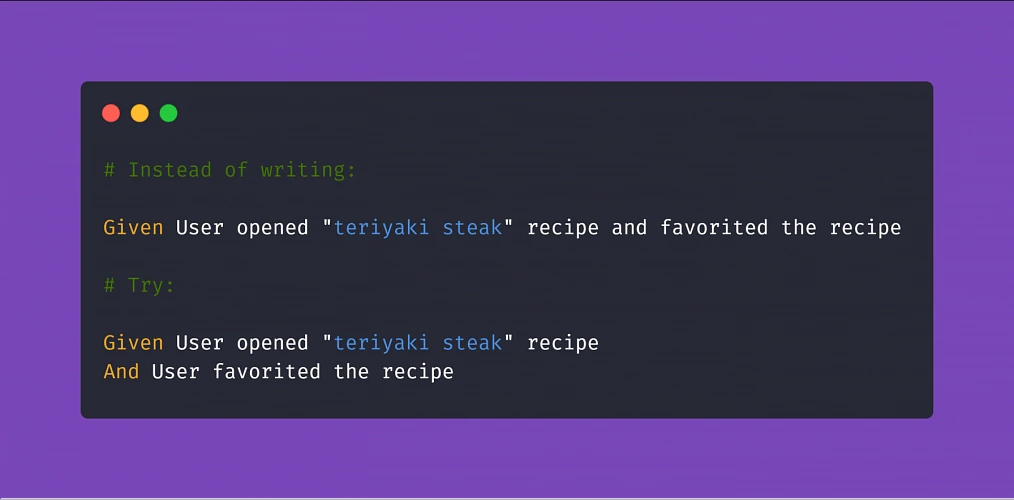
Doing so, if you code the above 'Given' step to locate our recipe element by searching its name, you can reuse it many times just changing the string value in the step (provided that you code the step definition properly later on). On top of that, The 'And' step can be a part of any test scenario that involves such action.
Putting it all together
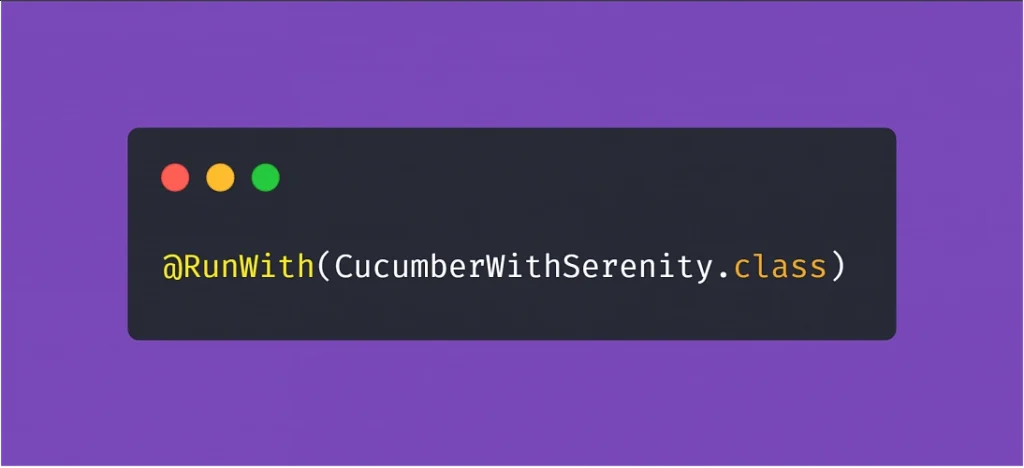
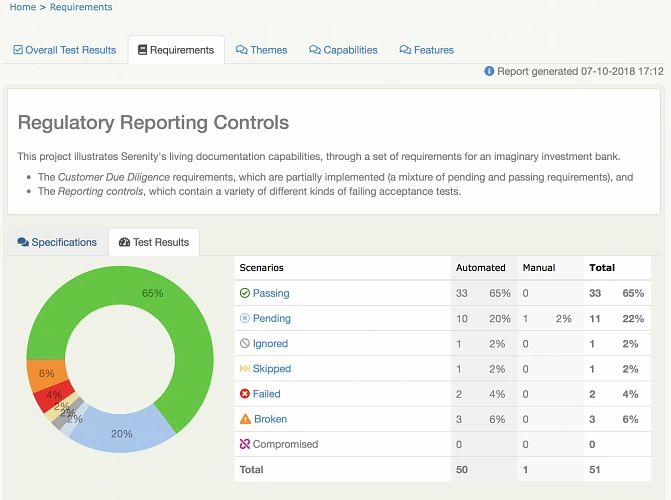
After setting up a project utilizing the practices described above, the most visible parts of using Serenity are the generated test reports. After adopting the @RunWith(CucumberWithSerenity.class) tag in your TestRunner class file, running the test suite will result in Serenity generating an aggregated test results report, which can be useful in evaluating the quality of the app under test and presenting the status of the product to the stakeholders or the development team.
Appium, Cucumber, Serenity - summary
As you can see, the concept of best practices in automation testing can be summarized in three words: reusability, readability, and performance. Reusability means fewer coding, consequently diminishing the time needed to finish the job. Readability improves understanding, which is crucial to ensure that the product does what it needs to do. Finally, performance saves execution time and improves stability. All three contributing not only to the quality of the test automation project but have a significant role in enhancing the overall quality of the delivered app.
Sources:
5 concourse CI tips: How to speed up your builds and pipeline development
With ever-growing IT projects, automation is nowadays a must-have. From building source code and testing to versioning and deploying, CI/CD tools were always the anonymous team member, who did the job no developer was eager to do. Today, we will take a look at some tips regarding one of the newest tools - Concourse CI. First, we will speed up our Concourse jobs, then we’ll ease the development of the new pipelines for our projects.
Aggregate your steps
By default, Concourse tasks in a job are executed separately. This is perfectly fine for small Concourse jobs that last a minute or two. It also works well at the beginning of the project, as we just want to get the process running. But at some point, it would be nice to optimize our builds.
The simplest way to save time is to start using the aggregate keyword. It runs all the steps declared inside of it in parallel. This leads to time-savings in both - script logic execution and in the overhead that occurs when starting the next task.
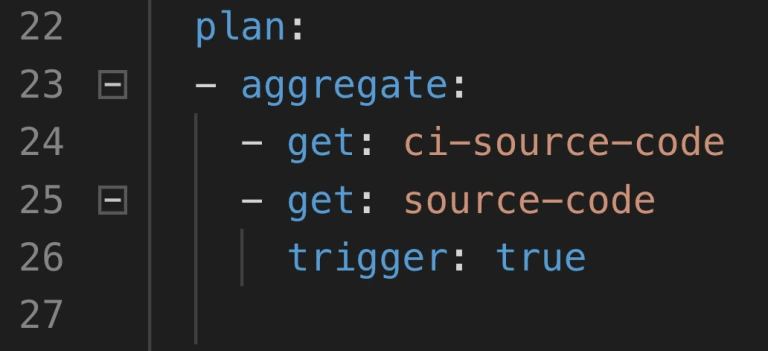
Neat, so where can we use it? There are 2 main parts of a job where the aggregation is useful:
1. Resource download and upload.
2. Tests execution.
Get and put statements are ideal targets because download and upload of resources are usually completely independent. Integration tests, contract tests, dependency vulnerabilities tests, and alike are also likely candidates if they don’t interfere with one another. Project build tasks? Probably not, because those are usually sequential and we require their output to proceed.
How much time can aggregating save? Of course, it depends. Assuming we can’t aggregate steps that build and test our code, we do get the advantage of simultaneous upload and download of our resources as well as we get less visible step-to-step overhead. We usually save up to two, maybe even three minutes. The largest saving we got was from over half an hour to below ten minutes. Most of the saved time came from running test-related tasks in parallel.
Use docker images with built-in tools
This improvement is trickier to implement but yields a noticeable build time gains. Each task runs in a container, and the image for that container has a certain set of tools available. At some point in the project comes a time where no available image has the tool required. First thing developers do is they download that tool manually or install it using a package manager as a part of the task execution. This means that the tool is fetched every time the task runs. On top of that, the console output is flooded with tool installation logs.
The solution is to prepare a custom container image that already has everything needed for a task to complete. This requires some knowledge not directly related to Concourse, but for example to Docker. With a short dockerfile and a couple of terminal commands, we get an image with the tools we need.
1. Create dockerfile.
2. Inside of the file, install or copy your tools using RUN or COPY commands.
3. Build the image using docker build.
4. Tag and push the image to the registry.
5. Change image_resource part in your Concourse task to use the new image.
That’s it, no more waiting for tools to install each time! We could even create a pipeline to build and push the image for us.
Create pipelines from a template
Moving from time-saving measures to developer convenience tips, here’s one for bigger projects. Those usually have a certain set of similar build pipelines with the only differences being credentials, service names, etc. - parameters that are not hardcoded in the pipeline script and are injected at execution time from a source like CredHub. This is typical for Cloud Foundry and Kubernetes web projects with microservices. With a little bit of creativity, we could get a bash or python script to generate those pipelines from a single template file.
First, we need to have a template file. Take one of your existing pipeline specifications and substitute parameter names with their pipeline agnostic version. Our script needs to loop over a pipeline names list, substitute generic parameter names with proper pipeline related ones that are available in Credhub and then set the pipeline in Concourse with the fly CLI.
The second part of the equation here is a Concourse job that watches for changes in the template file in a Git repository and starts the pipeline generation script. With this solution, we have to change only one file to get all pipelines updated, and on top of that, a commit to pipeline repository is sufficient to trigger the update.
Log into a task container to debug issues
When debugging Concourse task failures, the main source of information on failure is the console. A quick glance at the output is enough to solve most of the problems. Other issues may require a quick peek into the environment of an unsuccessful task. We can do that with fly intercept command.
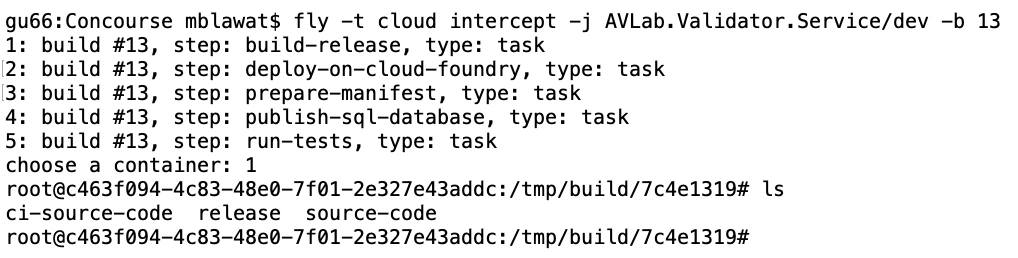
Fly intercept allows us to log into a container that executed a specific task in a specific job run. Inside we can see the state of the container when task finished and can try to find the root of failure. There may be an empty environment variable - we forgot to set the proper param in a yml file. The resource has a different structure inside of it - we need to change the task script or the resource structure. When the work is done, don’t forget to log out of the container. Oh, and don’t wait too long! Those containers can be disposed of by Concourse at any time.
Use Visual Studio Code Concourse add-on
The last thing I want to talk about is the Concourse CI Pipeline Editor for Visual Studio Code. It’s a plugin that offers suggestions, documentation popups, and error checking for Concourse yml files. If you use the pipeline template and generation task from the previous tip, then any syntax error in your template will be discovered as late as the update task updating the pipelines from the template. That’s because you won’t run fly set-pipeline yourself. Fixing such issue requires a new commit in the pipeline repository.
With the plugin, any unused resource or a typo in property name will be detected immediately. Add-on will also help you write new pieces of automation code by suggesting keywords and showing available values for Concourse commands. The only action required is to update the files.associations section in the settings. We use separate directories for pipelines and tasks, so we have set it up as follows:

Conclusion
And that’s it! We hope you have found at least one tip useful and will use it in your project. Aggregate is an easy one to implement, and it’s good to have a habit of aggregating steps from the start. Custom images and pipeline templates are beneficial in bigger projects where they help keep CI less clunky. Finally, fly intercept and the VSC add-on are just extra tools to save time during the pipeline development.
Why nearshoring may be the best choice for your software development
Adapting the latest technologies obligates executives to decide if they should build an in-house team or outsource demanding processes and hire an external team. And while outsourced projects become more sophisticated, leaders responsible for making decisions are taking into account more factors than just cost savings. Here comes nearshoring.
Disruptive economy, the fast-changing landscape of cutting-edge technologies, and extremely demanding customers – regardless of the established position on the market, today’s most powerful enterprises need help to retain once gained a competitive advantage . Most of the world’s largest companies are undergoing radical changes that focus on adapting the latest technology and game-changing approaches to company culture.
To embrace digital transformation and get the most out of it, leaders in their fields – automotive, telco, insurance, banking, etc. – utilize knowledge and experience of external teams. As this collaboration is getting more recognition it also takes more sophisticated forms. For decades, the biggest enterprises have been opening their branches in different countries or delegating parts of their processes to specialized teams outside the organization – this is the way outsourcing and offshoring were born.
And while it works perfectly for many business fields, companies that implement the most comprehensive technologies, rebuilding their core businesses, and trying to adopt promising approaches to software delivery, need a solution that is more sophisticated.
What is nearshoring?
Delegating tasks to external teams is full of benefits, but also has some real treats – like cultural differences in communication between teams, challenges to manage processes remotely, disruption in transforming knowledge, and many more. After years of testing good and bad experiences, some enterprises have mastered the most effective way to delegate job – nearshoring.
Nearshoring is often described as the outsourcing of services, especially regarding the newest technologies, to companies in nearby countries. In practice, it means that an enterprise from Germany hires a company from Poland to develop a particular project like building an app or implementing software. Nearshoring is often used by brands expanding their services to the new yet advanced business fields, where building and an in-house team responsible for a given area would be too expensive and challenging.
Why do enterprises prefer nearshoring over offshoring?
While using nearshoring and offshoring comes to some common profits – cost savings, tax benefits, finding skilled professionals in given niches, the first one supposed to be an answer to the challenges addressed in a previous part. Companies that complain about their experiences with offshoring too often make the same mistakes. They decide on moving their processes to the far-distant countries regardless of cultural differences and working style. They focus on thing easier to measure, like financial results and don’t take into consideration less obvious factors.
Backed with that experiences, enterprises from various industries have started to collaborate with teams of professionals that have more in common with their employees; geographically, by living in the same part of the world, often sharing a border, and culturally – by belonging to similar cultural circle, sharing common working culture, and being at a comparable level of language used in project (English, first!).
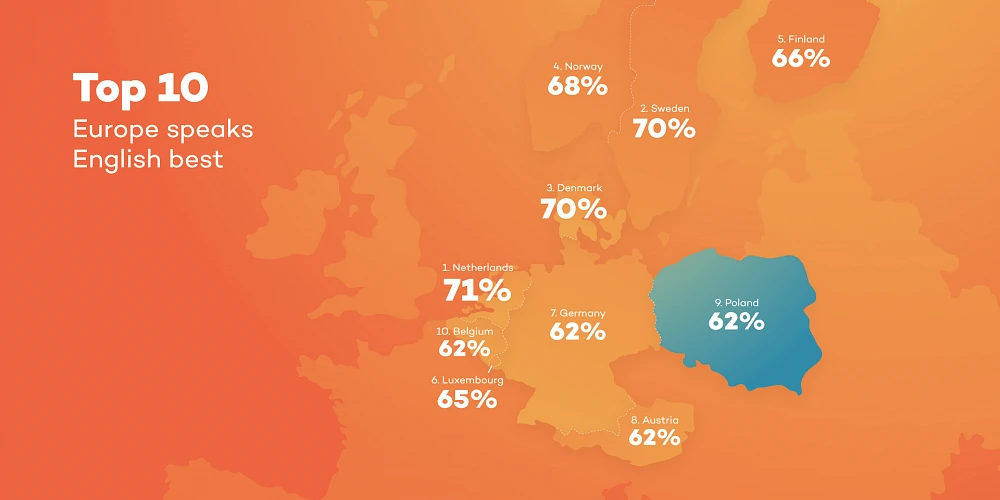
According to many leaders responsible for workforce management, when deciding on hiring a company that have to help you with improving your business, especially if you're trying to implement complex technology, you should pay at least as much attention to the communication and soft skills as to the know-how and experiences in working on similar projects.

Where do enterprises from Western and Northern Europe look for partners?
Agile teams from Central Europe that consist of experts in transforming businesses, implementing DevOps culture, and enabling cloud-native technologies are getting a strong recognition among established companies from Germany, France, UK. Norway and Italy. Professionals in Poland, Czechia or Hungary are known for their skills, language proficiency, and working culture. And it has never been more difficult to find some real differences in the ways people from these parts of Europe live.
All these things make collaboration more fluent and easier to manage. Partnering with companies from the same time zones can also save the cost of communication and transport, and makes them available during similar working hours.
Taking into account flexibility, language skills, technical knowledge, experience in various international projects, lower operational costs and cultural similarities to the leading European countries, companies from countries like Poland have become natural nearshoring hubs.
Collaboration with top enterprises from a nearshoring partner’s perspective
For the last couple of years, Grape Up has been working as a nearshoring partner with the most recognized brands in various industries like leading automakers from Germany and large telcos from Italy and Switzerland. These experiences have helped our team develop soft skills needed to get the most out of the cooperation, both for hiring enterprises and our employees who can now master their expertise working on demanding projects for the most competitive businesses.
We have to admit that our competitive advantage may seem unfair. We’ve gathered a huge team of experienced engineers familiar with the latest cloud-native technologies, Open Source tools, DevOps and Agile approaches. They feel well in the international environment, speak fluent English, and are good in adapting to a new working style. We have two R&D centers in Poland and a few offices in Europe. We use experience amassed through the years of working with companies that are willing to be early adopters of cutting-edge technologies and innovative methodologies. We’re active contributors to cloud-native and open source communities, we attend top conferences and industry events – that give us direct access to knowledge and innovative ideas. Being ahead of the competitive crowd allows us to focus on the most promising projects.
If your enterprise is working on digital transformation, trying to implement DevOps or adapt cloud-native technologies and you need some support or consultancy reach us without a doubt . We are responsible for numerous successful migration to the cloud, enabling cloud platforms, transforming legacy software into cutting-edge applications, and tackling business challenges that at first sight might seem unsolvable.
Interested in our services?
Reach out for tailored solutions and expert guidance.