
How to automate operationalization of Machine Learning apps - running first project using Metaflow

In the second article of the series, we guide you on how to run a simple project in an AWS environment using Metaflow. So, let’s get started.
Need an introduction to Metaflow? Here is our article covering basic facts and features .
Prerequisites
- Python 3
- Miniconda
- Active AWS subscription
Installation
To install Metaflow, just run in the terminal:
conda config --add channels conda-forge conda install -c conda-forge metaflow
and that's basically it. Alternatively, if you want to only use Python without conda type:
pip install metaflow
Set the following environmental variables related to your AWS account:
- AWS_ACCESS_KEY_ID
- AWS_SECRET_ACCESS_KEY
- AWS_DEFAULT_REGION
AWS Server-Side configuration
The separate documentation called “ Administrator's Guide to Metaflow “ explains in detail how to configure all the AWS resources needed to enable cloud scaling in Metaflow. The easier way is to use the CloudFormation template that deploys all the necessary infrastructure. The template can be found here . If for some reason, you can’t or don’t want to use the CloudFormation template, the documentation also provides detailed instructions on how to deploy necessary resources manually. It can be a difficult task for anyone who’s not familiar with AWS services so ask your administrator for help if you can. If not, then using the CloudFormation template is a much better option and in practice is not so scary.
AWS Client-Side configuration
The framework needs to be informed about the surrounding AWS services. Doing it is quite simple just run:
metaflow configure aws
in terminal. You will be prompted for various resource parameters like S3, Batch Job Queue, etc. This command explains in short what’s going on, which is really nice. All parameters will be stored under the ~/.metaflowconfig directory as a json file so you can modify it manually also. If you don’t know what should be the correct input for prompted variables, in the AWS console, go to CloudFormation -> Stacks -> YourStackName -> Output and check all required values there. The output of the stack formation will be available after the creation of your stack from the template as explained above. After that, we are ready to use Metaflow in the cloud!
Hello Metaflow
Let's write very simple Python code to see what boilerplate we need to create a minimal working example.
hello_metaflow.py
from metaflow import FlowSpec, step
class SimpleFlow(FlowSpec):
@step
def start(self):
print('Lets start the flow!')
self.message = 'start message'
print(self.message)
self.next(self.modify_message)
@step
def modify_message(self):
self.message = 'modified message'
print(self.message)
self.next(self.end)
@step
def end(self):
print('The class members are shared between all steps.')
print(self.message)
if __name__ == '__main__':
SimpleFlow()
The designers of Metaflow decided to apply an object-oriented approach. To create a flow, we must create a custom class that inherits from FlowSpec class. Each step in our pipeline is marked by @step decorator and basically is represented by a member function. Use self.next member function to specify the flow direction in the graph. As we mentioned before, this is a directed acyclic graph – no cycles are allowed, and the flow must go in one way, with no backward movement. Steps named start and end are required to define the endpoints of the graph. This code results in a graph with three nodes and two-edged.

It’s worth to note that when you assign anything to self in your flow, the object gets automatically persisted in S3 as a Metaflow artifact.
To run our hello world example, just type in the terminal:
python3 hello_metaflow.py run
Execution of the command above results in the following output:
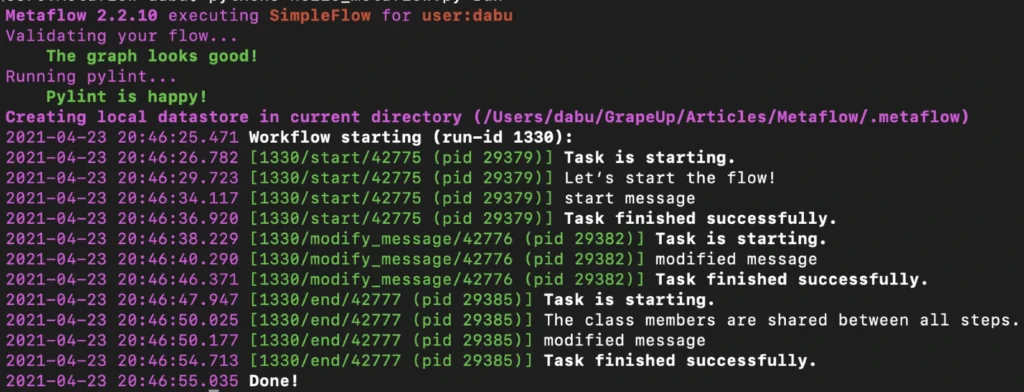
By default, Metaflow uses local mode . You may notice that in this mode, each step spawns a separate process with its own PID. Without much effort, we have obtained code that can be very easily paralleled on your personal computer.
To print the graph in the terminal, type the command below.
python3 hello_metaflow.py show
Let’s modify hello_metaflow.py script so that it imitates the training of the model.
hello_metaflow.py
from metaflow import FlowSpec, step, batch, catch, timeout, retry, namespace
from random import random
class SimpleFlow(FlowSpec):
@step
def start(self):
print('Let’s start the parallel training!')
self.parameters = [
'first set of parameters',
'second set of parameters',
'third set of parameters'
]
self.next(self.train, foreach='parameters')
@catch(var = 'error')
@timeout(seconds = 120)
@batch(cpu = 3, memory = 500)
@retry(times = 1)
@step
def train(self):
print(f'trained with {self.input}')
self.accuracy = random()
self.set_name = self.input
self.next(self.join)
@step
def join(self, inputs):
top_accuracy = 0
for input in inputs:
print(f'{input.set_name} accuracy: {input.accuracy}')
if input.accuracy > top_accuracy:
top_accuracy = input.accuracy
self.winner = input.set_name
self.winner_accuracy = input.accuracy
self.next(self.end)
@step
def end(self):
print(f'The winner is: {self.winner}, acc: {self.winner_accuracy}')
if __name__ == '__main__':
namespace('grapeup')
SimpleFlow()
The start step prepares three sets of parameters for our dummy training. The optional argument for each passed to the next function call splits our graph into three parallel nodes. Foreach executes parallel copies of the train step.
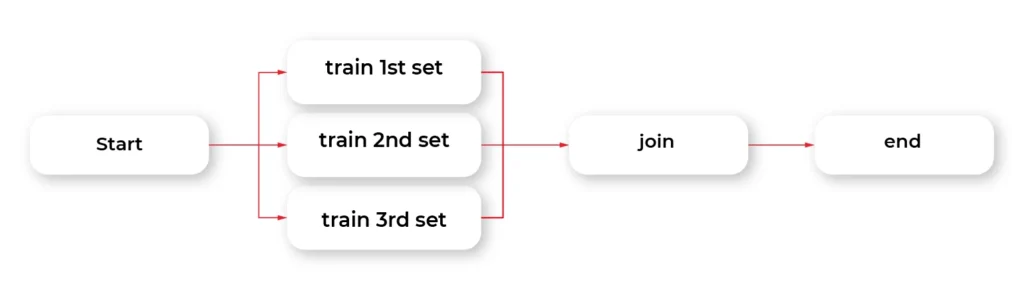
The train step is the essential part of this example. The @batch decorator sends out parallel computations to the AWS nodes in the cloud using the AWS Batch service. We can specify how many virtual CPU cores we need, or the amount of RAM required. This one line of Python code allows us to run heavy computations in parallel nodes in the cloud at a very large scale without much effort. Simple, isn't it?
The @catch decorator catches the exception and stores it in an error variable, and lets the execution continue. Errors can be handled in the next step. You can also enable retries for a step simply by adding @retry decorator. By default, there is no timeout for steps, so it potentially can cause an infinite loop. Metaflow provides a @timeout decorator to break computations if the time limit is exceeded.
When all parallel pieces of training in the cloud are complete, we merge the results in the join function. The best solution is selected and printed as the winner in the last step.
Namespaces is a really useful feature that helps keeping isolated different runs environments, for instance, production and development environments.
Below is the simplified output of our hybrid training.
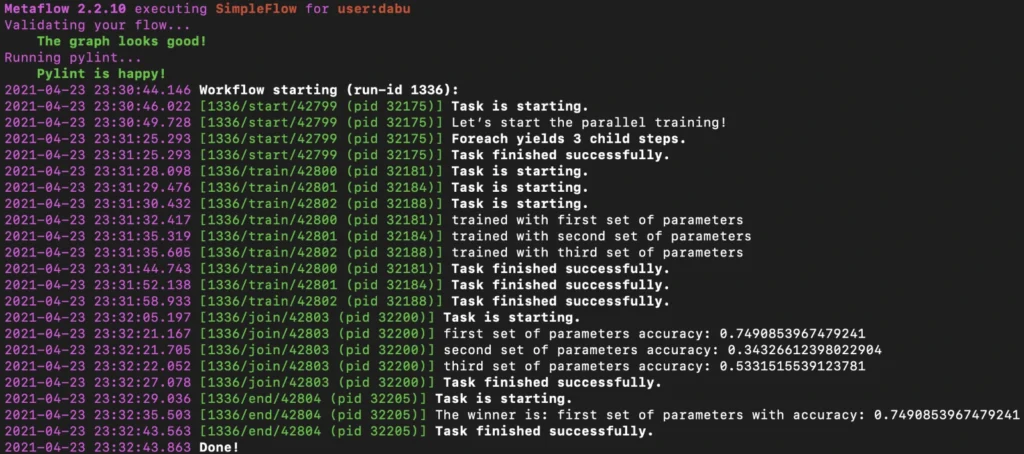
Obviously, there is an associated cost of sending computations to the cloud, but usually, it is not significant, and the benefits of such a solution are unquestionable.
Metaflow - Conclusions
In the second part of the article about Metaflow, we presented only a small part of the library's capabilities. We encourage you to read the documentation and other studies. We will only mention here some interesting and useful functionalities like passing parameters, conda virtual environments for a given step, client API, S3 data management, inspecting flow results with client API, debugging, workers and runs management, scheduling, notebooks, and many more. We hope this article has sparked your interest in Metaflow and will encourage you to explore this area further.

Grape Up guides enterprises on their data-driven transformation journey
Ready to ship? Let's talk.
Check related articles
Read our blog and stay informed about the industry's latest trends and solutions.
How to automate operationalization of Machine Learning apps - an introduction to Metaflow
In this article, we briefly highlight the features of Metaflow, a tool designed to help data scientists operationalize machine learning applications.
Introduction to machine learning operationalization
Data-driven projects become the main area of focus for a fast-growing number of companies. The magic has started to happen a couple of years ago thanks to sophisticated machine learning algorithms, especially those based on deep learning. Nowadays, most companies want to use that magic to create software with a breeze of intelligence. In short, there are two kinds of skills required to become a data wizard:
Research skills - understood as the ability to find typical and non-obvious solutions for data-related tasks, specifically extraction of knowledge from data in the context of a business domain. This job is typically done by data scientists but is strongly related to machine learning, data mining, and big data.
Software engineering skills - because the matter in which these wonderful things can exist is software. No matter what we do, there are some rules of the modern software development process that help a lot to be successful in business. By analogy with intelligent mind and body, software also requires hardware infrastructure to function.
People tend to specialize, so over time, a natural division has emerged between those responsible for data analysis and those responsible for transforming prototypes into functional and scalable products. That shouldn't be surprising, as creating rules for a set of machines in the cloud is a far different job from the work of a data detective.
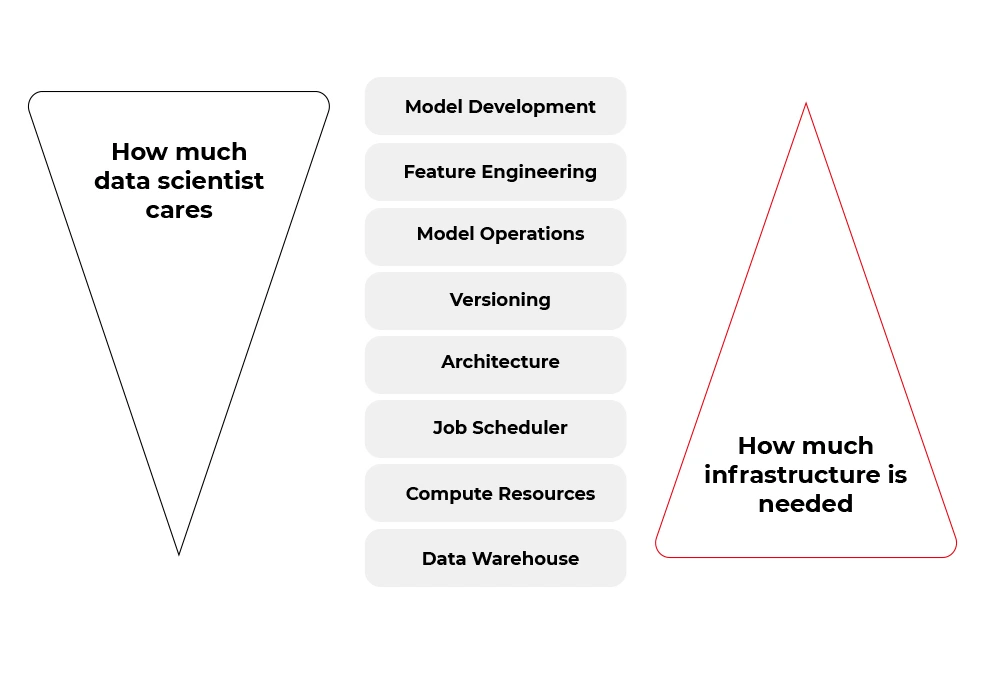
Fortunately, many of the tasks from the second bucket (infrastructure and software) can be automated. Some tools aim to boost the productivity of data scientists by allowing them to focus on the work of a data detective rather than on the productionization of solutions. And one of these tools is called Metaflow.
If you want to focus more on data science , less on engineering, but be able to scale every aspect of your work with no pain, you should take a look at how is Metaflow designed.
A Review of Metaflow
Metaflow is a framework for building and managing data science projects developed by Netflix. Before it was released as an open-source project in December 2019, they used it to boost the productivity of their data science teams working on a wide variety of projects from classical statistics to state-of-the-art deep learning.
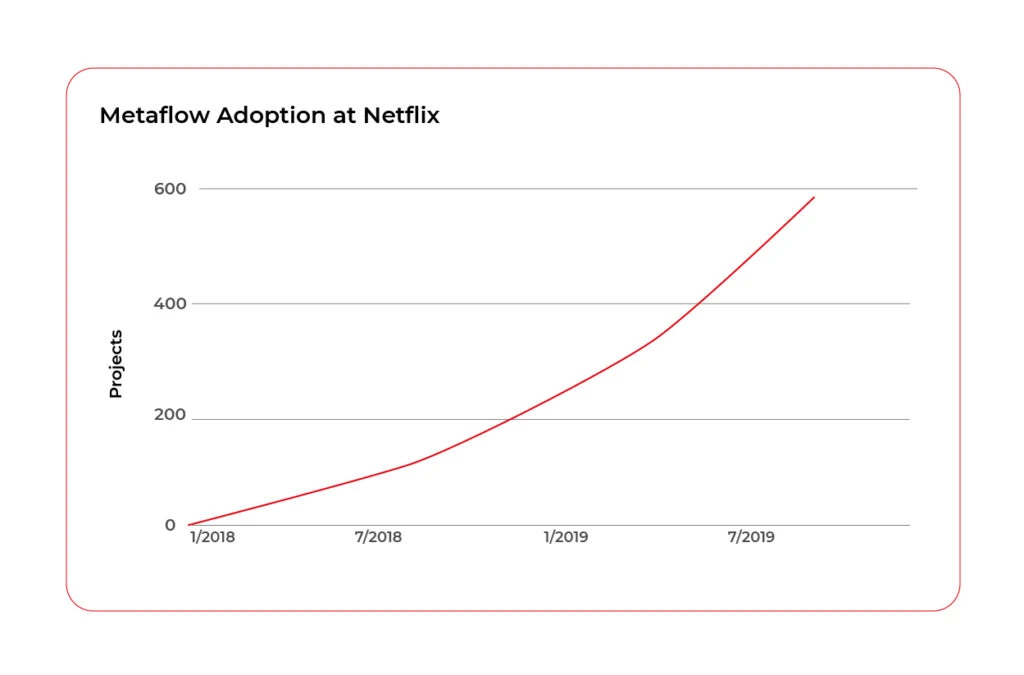
The Metaflow library has Python and R API, however, almost 85% of the source code from the official repository (https://github.com/Netflix/metaflow) is written in Python. Also, separate documentation for R and Python is available.
At the time this article is written (July 2021), the official repository of the Metaflow has 4,5 k stars, above 380 forks, and 36 contributors, so it can be assumed as a mature framework.
“Metaflow is built for data scientists, not just for machines”
That sentence got attention when you visit the official website of the project ( https://metaflow.org/ ). Indeed, these are not empty words. Metaflow takes care of versioning, dependency management, computing resources, hyperparameters, parallelization, communication with AWS stack, and much more. You can truly focus on the core part of your data-related work and let Metaflow do all these things using just very expressive decorators.
Metaflow - core features
The list below explains the key features that make Metaflow such a wonderful tool for data scientists, especially for those who wish to remain ignorant in other areas.
- Abstraction over infrastructure. Metaflow provides a layer of abstraction over the hardware infrastructure available, cloud stack in particular. That’s why this tool is sometimes called a unified API to the infrastructure stack.
- Data pipeline organization. The framework represents the data flow as a directed acyclic graph. Each node in the graph, also called step, contains some code to run wrapped in a function with @step decorator.
@step
def get_lat_long_features(self):
self.features = coord_features(self.data, self.features)
self.next(self.add_categorical_features)
The nodes on each level of the graph can be computed in parallel, but the state of the graph between levels must be synchronized and stored somewhere (cached) – so we have very good asynchronous data pipeline architecture.

This approach facilitates debugging, enhances the performance of the pipeline, and allows us completely separate the steps so that we can run one step locally and the next one in the cloud if, for instance, the step requires solving large matrices. The disadvantage of that approach is that salient failures may happen without proper programming discipline.
- Versioning. Tracking versions of our machine learning models can be a challenging task. Metaflow can help here. The execution of each step of the graph (data, code, and parameters) is hashed and stored, and you can access logged data later, using client API.
- Containerization. Each step is run in a separate environment. We can specify conda libraries in each container using
@condadecorator as shown below. It can be a very useful feature under some circumstances.
@conda(libraries={"scikit-learn": "0.19.2"})
@step
def fit(self):
...
- Scalability. With the help of
@batchand@resourcesdecorators, we can simply command AWS Batch to spawn a container on ECS for the selected Metaflow step. If individual steps take long enough, the overhead of spawning the containers should become irrelevant.
@batch(cpu=1, memory=500)
@step
def hello(self):
...
- Hybrid runs. We can run one step locally and another compute-intensive step on the cloud and swap between these two modes very easily.
- Error handling. Metaflow’s
@retrydecorator can be used to set the number of retries if the step fails. Any error raised during execution can be handled by@catchdecorator. The@timeoutdecorator can be used to limit long-running jobs especially in expensive environments (for example with GPGPUs).
@catch(var="compute_failed")
@retry
@step
def statistics(self):
...
- Namespaces. An isolated production namespace helps to keep production results separate from experimental runs of the same project running concurrently. This feature is very useful in bigger projects where more people is involved in development and deployment processes.
from metaflow import Flow, namespace
namespace("user:will")
run = Flow("PredictionFlow").latest_run
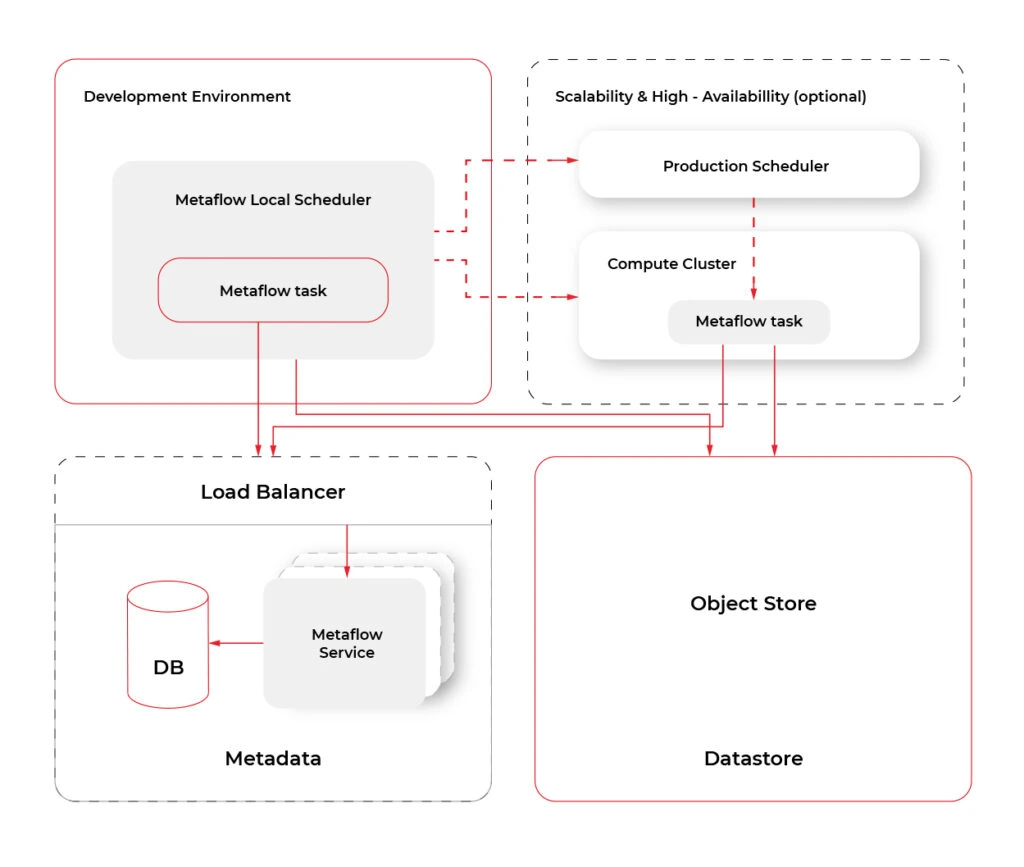
- Cloud Computing . Metaflow, by default, works in the local mode . However, the shared mode releases the true power of Metaflow. At the moment of writing, Metaflow is tightly and well coupled to AWS services like CloudFormation, EC2, S3, Batch, DynamoDB, Sagemaker, VPC Networking, Lamba, CloudWatch, Step Functions and more. There are plans to add more cloud providers in the future. The diagram below shows an overview of services used by Metaflow.
Metaflow - missing features
Metaflow does not solve all problems of data science projects. It’s a pity that there is only one cloud provider available, but maybe it will change in the future. Model serving in production could be also a really useful feature. Competitive tools like MLFlow or Apache AirFlow are more popular and better documented. Metaflow lacks a UI that would make metadata, logging, and tracking more accessible to developers. All this does not change the fact that Metaflow offers a unique and right approach, so just cannot be overlooked.
Conclusions
If you think Metaflow is just another tool for MLOps , you may be surprised. Metaflow offers data scientists a very comfortable workflow abstracting them from all low levels of that stuff. However, don't expect the current version of Metaflow to be perfect because Metaflow is young and still actively developed. However, the foundations are solid, and it has proven to be very successful at Netflix and outside of it many times.
Interested in our services?
Reach out for tailored solutions and expert guidance.