

About us
Our services

Capabilities

Legacy Modernization
Data Platforms
AI & Advanced Analytics

Industries

Automotive
Finance
Manufacturing

Solutions

Databoostr

Data Sharing & Monetization Platform

Cloudboostr

Multicloud Enterprise Kubernetes

Looking for something else?

Contact us for tailored solutions and expert guidance.

Contact
Case studies
Resources

Resources

Blog

Read our blog and stay informed about the industry’s latest trends and technology.

Ready to find your breaking point?

Stay updated with our newsletter.

Subscribe

Insights

Ebooks

Explore our resources and learn about building modern software solutions from experts and practitioners.

Read more
Contact
Blog
Software development

gRPC streaming

Daniel Bryła
Technical Leader | Expert Software Engineer
October 21, 2025
•
5 min read

Table of contents

Heading 2
Heading 3
Heading 4
Heading 5
Heading 6

Schedule a consultation with software experts

Contact us

Previous articles presented what Protobuf is and how it can be combined with gRPC to implement simple synchronous API. However, it didn’t present the true power of gRPC, which is streaming, fully utilizing the capabilities of HTTP/2.0.

Contract definition

We must define the method with input and output parameters like the previous service. To follow the separation of concerns, let’s create a dedicated service for GPS tracking purposes. Our existing proto should be extended with the following snippet.

message SubscribeRequest {

string vin = 1;

}


service GpsTracker {

rpc Subscribe(SubscribeRequest) returns (stream Geolocation);

}

The most crucial part here of enabling streaming is specifying it in input or output type. To do that, a keyword stream is used. It indicates that the server will keep the connection open, and we can expect Geolocation messages to be sent by it.

Implementation

@Override

public void subscribe(SubscribeRequest request, StreamObserver<Geolocation> responseObserver) {

responseObserver.onNext(

Geolocation.newBuilder()

.setVin(request.getVin())

.setOccurredOn(TimestampMapper.convertInstantToTimestamp(Instant.now()))

.setCoordinates(LatLng.newBuilder()

.setLatitude(78.2303792628867)

.setLongitude(15.479358124673292)

.build())

.build());

}

The simple implementation of the method doesn’t differ from the implementation of a unary call. The only difference is in how onNext the method behaves; in regular synchronous implementation, the method can’t be invoked more than once. However, for method operating on stream, onNext may be invoked as many times as you want.
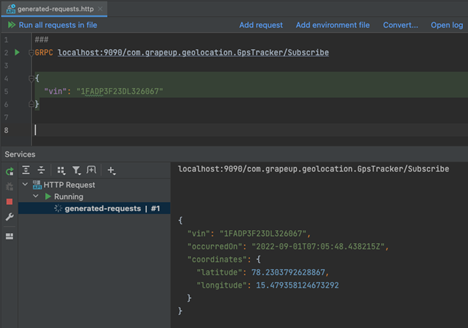
As you may notice on the attached screenshot, the geolocation position was returned but the connection is still established and the client awaits more data to be sent in the stream. If the server wants to inform the client that there is no more data, it should invoke: the onCompleted method; however, sending single messages is not why we want to use stream.

Use cases for streaming capabilities are mainly transferring significant responses as streams of data chunks or real-time events. I’ll try to demonstrate the second use case with this service. Implementation will be based on the reactor ( https://projectreactor.io / ) as it works well for the presented use case.

Let’s prepare a simple implementation of the service. To make it work, web flux dependency will be required.

implementation 'org.springframework.boot:spring-boot-starter-webflux'

We must prepare a service for publishing geolocation events for a specific vehicle.

InMemoryGeolocationService.java

import com.grapeup.grpc.example.model.GeolocationEvent;

import org.springframework.stereotype.Service;

import reactor.core.publisher.Flux;

import reactor.core.publisher.Sinks;


@Service

public class InMemoryGeolocationService implements GeolocationService {


private final Sinks.Many<GeolocationEvent> sink = Sinks.many().multicast().directAllOrNothing();


@Override

public void publish(GeolocationEvent event) {

sink.tryEmitNext(event);

}


@Override

public Flux<GeolocationEvent> getRealTimeEvents(String vin) {

return sink.asFlux().filter(event -> event.vin().equals(vin));

}


}

Let’s modify the GRPC service prepared in the previous article to insert the method and use our new service to publish events.

@Override

public void insert(Geolocation request, StreamObserver<Empty> responseObserver) {

GeolocationEvent geolocationEvent = convertToGeolocationEvent(request);

geolocationRepository.save(geolocationEvent);

geolocationService.publish(geolocationEvent);


responseObserver.onNext(Empty.newBuilder().build());

responseObserver.onCompleted();

}

Finally, let’s move to our GPS tracker implementation; we can replace the previous dummy implementation with the following one:

@Override

public void subscribe(SubscribeRequest request, StreamObserver<Geolocation> responseObserver) {

geolocationService.getRealTimeEvents(request.getVin())

.subscribe(event -> responseObserver.onNext(toProto(event)),

responseObserver::onError,

responseObserver::onCompleted);

}

Here we take advantage of using Reactor, as we not only can subscribe for incoming events but also handle errors and completion of stream in the same way.

To map our internal model to response, the following helper method is used:

private static Geolocation toProto(GeolocationEvent event) {

return Geolocation.newBuilder()

.setVin(event.vin())

.setOccurredOn(TimestampMapper.convertInstantToTimestamp(event.occurredOn()))

.setSpeed(Int32Value.of(event.speed()))

.setCoordinates(LatLng.newBuilder()

.setLatitude(event.coordinates().latitude())

.setLongitude(event.coordinates().longitude())

.build())

.build();

}

Action!
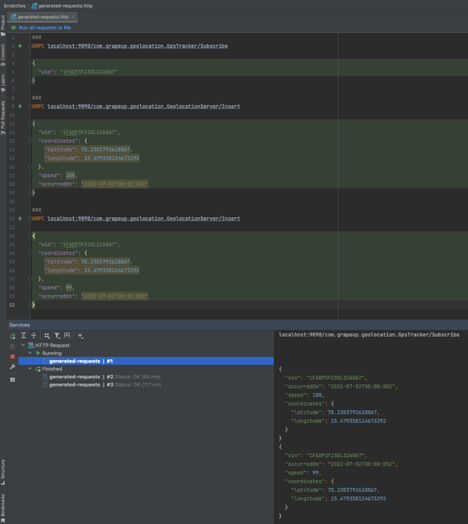
As you may be noticed, we sent the following requests with GPS position and received them in real-time from our open stream connection. Streaming data using gRPC or another tool like Kafka is widely used in many IoT systems, including Automotive .

Bidirectional stream

What if our client would like to receive data for multiple vehicles but without initial knowledge about all vehicles they are interested in? Creating new connections for each vehicle isn’t the best approach. But worry no more! While using gRPC, the client may reuse the same connection as it supports bidirectional streaming, which means that both client and server may send messages using open channels.

rpc SubscribeMany(stream SubscribeRequest) returns (stream Geolocation);

Unfortunately, IntelliJ doesn’t allow us to test this functionality with their built-in client, so we have to develop one ourselves.

localhost:9090/com. grapeup.geolocation.GpsTracker/SubscribeMany

com.intellij.grpc.requests.RejectedRPCException: Unsupported method is called

Our dummy client could look something like that, based on generated classes from the protobuf contract:

var channel = ManagedChannelBuilder.forTarget("localhost:9090")

.usePlaintext()

.build();

var observer = GpsTrackerGrpc.newStub(channel)

.subscribeMany(new StreamObserver<>() {

@Override

public void onNext(Geolocation value) {

System.out.println(value);

}


@Override

public void onError(Throwable t) {

System.err.println("Error " + t.getMessage());

}


@Override

public void onCompleted() {

System.out.println("Completed.");

}

});

observer.onNext(SubscribeRequest.newBuilder().setVin("JF2SJAAC1EH511148").build());

observer.onNext(SubscribeRequest.newBuilder().setVin("1YVGF22C3Y5152251").build());

while (true) {} // to keep client subscribing for demo purposes :)

If you send the updates for the following random VINs: JF2SJAAC1EH511148 , 1YVGF22C3Y5152251 , you should be able to see the output in the console. Check it out!

Tip of the iceberg

Presented examples are just gRPC basics; there is much more to it, like disconnecting from the channel from both ends and reconnecting to the server in case of network failure. The following articles were intended to share with YOU that gRPC architecture has so much to offer, and there are plenty of possibilities for how it can be used in systems. Especially in systems requiring low latency or the ability to provide client code with strict contract validation.

Grape Up guides enterprises on their data-driven transformation journey

Ready to ship? Let's talk.

Check our offer
Blog

Check related articles

Read our blog and stay informed about the industry's latest trends and solutions.

Software development

gRPC Remote Procedure Call (with Protobuf)

One of the most crucial technical decisions during designing API is to choose the proper protocol for interchanging data. It is not an easy task. You have to answer at least a few important questions - which will integrate with API, if you have any network limitations, what is the amount and frequency of calls, and will the level of your organization's technological maturity allow you to maintain this in the future?

When you gather all the information, you can compare different technologies to choose one that fits you best. You can pick and choose between well-known SOAP, REST, or GraphQL. But in this article, we would like to introduce quite a new player in the microservices world - gRPC Remote Procedure Call.

What is gRPC (Remote Procedure Call)?

gRPC is a cross-platform open-source Remote Procedure Call (RPC) framework initially created by Google. The platform uses Protocol Buffers as a data serialization protocol, as the binary format requires fewer resources and messages are smaller. Also, a contract between the client and server is defined in proto format, so code can be automatically generated. The framework relies on HTTP/2 (supports TLS) and beyond performance, interoperability, and code generation offers streaming features and channels.

Declaring methods in contract

Have you read our article about serializing data with Protocol Buffers ? We are going to add some more definitions there:

message SearchRequest {

string vin = 1;

google.protobuf.Timestamp from = 2;

google.protobuf.Timestamp to = 3;

}


message SearchResponse {

repeated Geolocation geolocations = 1;

}


service GeolocationServer {

rpc Insert(Geolocation) returns (google.protobuf.Empty);

rpc Search(SearchRequest) returns (SearchResponse);

}

The structure of the file is pretty straightforward - but there are a few things worth noticing:

  • service GeolocationServer - service is declared by keyword with that name
  • rpc Insert(Geolocation) - methods are defined by rpc keyword, its name, and request parameter type
  • returns (google.protobuf.Empty) - and at the end finally a return type. As you can see you have to always return any value, in this case, is a wrapper for an empty structure
  • message SearchResponse {repeated Geolocation geolocations = 1}; - if you want to return a list of objects, you have to mark them as repeated and provide a name for the field

Build configuration

We can combine features of Spring Boot and simplify the setup of gRPC server by using the dedicated library GitHub - yidongnan/grpc-spring-boot-starter: Spring Boot starter module for gRPC framework. (follow the installation guide there) .

It let us use all the goodness of the Spring framework (such as Dependency Injection or Annotations).

Now you are ready to generate Java code! ./gradlew generateProto

Server implementation

To implement the server for our methods definition, first of all, we have to extend the proper abstract class, which had been generated in the previous step:

public class GeolocationServer extends GeolocationServerGrpc.GeolocationServerImplBase

As the next step add the @GrpcService annotation at the class level to register gRPC server and override server methods:

@Override

public void insert(Geolocation request, StreamObserver<Empty> responseObserver) {

GeolocationEvent geolocationEvent = convertToGeolocationEvent(request);

geolocationRepository.save(geolocationEvent);


responseObserver.onNext(Empty.newBuilder().build());

responseObserver.onCompleted();

}


@Override

public void search(SearchRequest request, StreamObserver<SearchResponse> responseObserver) {

List<GeolocationEvent> geolocationEvents = geolocationRepository.searchByVinAndOccurredOnFromTo(

request.getVin(),

convertTimestampToInstant(request.getFrom()),

convertTimestampToInstant(request.getTo())

);


List<Geolocation> geolocations = geolocationEvents.stream().map(this::convertToGeolocation).toList();


responseObserver.onNext(SearchResponse.newBuilder()

.addAllGeolocations(geolocations)

.build()

);

responseObserver.onCompleted();

}

  • StreamObserver<> responseObserver - stream of messages to send
  • responseObserver.onNext() - writes responses to the client. Unary calls must invoke onNext at most once
  • responseObserver.onCompleted() - receives a notification of successful stream completion

We have to convert internal gRPC objects to our domain entities:

private GeolocationEvent convertToGeolocationEvent(Geolocation request) {

Instant occurredOn = convertTimestampToInstant(request.getOccurredOn());

return new GeolocationEvent(

request.getVin(),

occurredOn,

request.getSpeed().getValue(),

new Coordinates(request.getCoordinates().getLatitude(), request.getCoordinates().getLongitude())

);

}


private Instant convertTimestampToInstant(Timestamp timestamp) {

return Instant.ofEpochSecond(timestamp.getSeconds(), timestamp.getNanos());

}

Error handling

Neither client always sends us a valid message nor our system is resilient enough to handle all errors, so we have to provide ways to handle exceptions.

If an error occurs, gRPC returns one of its error status codes instead, with an optional description.

We can handle it with ease in a Spring’s way, using annotations already available in the library:

@GrpcAdvice

public class GrpcExceptionAdvice {


@GrpcExceptionHandler

public Status handleInvalidArgument(IllegalArgumentException e) {

return Status.INVALID_ARGUMENT.withDescription(e.getMessage()).withCause(e);

}

}

  • @GrpcAdvice - marks the class as a container for specific exception handlers
  • @GrpcExceptionHandler - method to be invoked when an exception specified as an argument is thrown

Now we ensured that our error messages are clear and meaningful for clients.

gRPC - is that the right option for you?

As demonstrated in this article, gRPC integrates well with Spring Boot, so if you’re familiar with it, the learning curve is smooth.

gRPC is a worthy option to consider when you’re working with low latency, highly scalable, distributed systems. It provides an accurate, efficient, and language-independent protocol.

Check out the official documentation for more knowledge! gRPC

Read more
Software development

Protobuf: How to serialize data effectively with protocol buffers

In a world of microservices, we often have to pass information between applications. We serialize data into a format that can be retrieved by both sides. One of the serialization solutions is Protocol Buffers (Protobuf) - Google's language-neutral mechanism. Messages can be interpreted by a receiver using the same or different language than a producer. Many languages are supported, such as Java, Go, Python, and C++.

A data structure is defined using neutral language through  .proto files. The file is then compiled into code to be used in applications. It is designed for performance. Protocol Buffers encode data into binary format, which reduces message size and improves transmission speed.

Defining message format

This  .proto the file represents geolocation information for a given vehicle.

1 syntax = "proto3";

2

3 package com.grapeup.geolocation;

4

5 import "google/type/latlng.proto";

6 import "google/protobuf/timestamp.proto";

7

8 message Geolocation {

9  string vin = 1;

10  google.protobuf.Timestamp occurredOn = 2;

11  int32 speed = 3;

12  google.type.LatLng coordinates = 4;

13}

1 syntax = "proto3";

Syntax refers to Protobuf version, it can be  proto2 or  proto3 .

1package com.grapeup.geolocation;

Package declaration prevents naming conflicts between different projects.

1 message Geolocation {

2  string vin = 1;

3  google.protobuf.Timestamp occurredOn = 2;

4  int32 speed = 3;

5  google.type.LatLng coordinates = 4;

6}

Message definition contains a name and a set of typed fields. Simple data types are available, such as bool, int32, double, string, etc. You can also define your own types or import them.

1google.protobuf.Timestamp occurredOn = 2;

The  = 1 ,  = 2 markers identify the unique tag. Tags are a numeric representation for the field and are used to identify the field in the message binary format. They have to be unique in a message and should not be changed once the message is in use. If a field is removed from a definition that is already used, it must be  reserved .

Field types

Aside from scalar types, there are many other type options when defining messages. Here are few, but you can find all of them in the Language Guide  Language Guide (proto3)  |  Protocol Buffers  |  Google Developers .

 Well Known Types

1 import "google/type/latlng.proto";

2 import "google/protobuf/timestamp.proto";

3

4 google.protobuf.Timestamp occurredOn = 2;

5 google.type.LatLng coordinates = 4;

There are predefined types available to use  Overview  |  Protocol Buffers  |  Google Developers . They are known as Well Know Types and have to be imported into  .proto .

 LatLng represents a latitude and longitude pair.

 Timestamp is a specific point in time with nanosecond precision.

 Custom types

1 message SingularSearchResponse {

2  Geolocation geolocation = 1;

3}

You can use your custom-defined type as a field in another message definition.

 Lists

1 message SearchResponse {

2  repeated Geolocation geolocations = 1;

3}

You can define lists by using repeated keyword.

    OneOf  

It can happen that in a message there will always be only one field set. In this case,  TelemetryUpdate will contain either geolocation, mileage, or fuel level information.

This can be achieved by using  oneof . Setting value to one of the fields will clear all other fields defined in     oneof    .

1 message TelemetryUpdate {

2  string vin = 1;

3  oneof update {

4    Geolocation geolocation = 2;

5    Mileage mileage =3;

6    FuelLevel fuelLevel = 4;

7  }

8}

9

10 message Geolocation {

11  ...

12}

13

14 message Mileage {

15  ...

16}

17

18 message FuelLevel {

19  ...

20}

Keep in mind backward-compatibility when removing fields. If you receive a message with     oneof   that has been removed from  .proto definition, it will not set any of the values. This behavior is the same as not setting any value in the first place.

You can perform different actions based on which value is set using the     getUpdateCase()   method.

1 public Optional<Object> getTelemetry(TelemetryUpdate telemetryUpdate) {

2        Optional<Object> telemetry = Optional.empty();

3        switch (telemetryUpdate.getUpdateCase()) {

4            case MILEAGE -> telemetry = Optional.of(telemetryUpdate.getMileage());

5            case FUELLEVEL -> telemetry = Optional.of(telemetryUpdate.getFuelLevel());

6            case GEOLOCATION -> telemetry = Optional.of(telemetryUpdate.getGeolocation());

7            case UPDATE_NOT_SET -> telemetry = Optional.empty();

8        }

9        return telemetry;

10    }

Default values

In  proto3 format fields will always have a value. Thanks to this  proto3 can have a smaller size because fields with default values are omitted from payload. However this causes one issue - for scalar message fields, there is no way of telling if a field was explicitly set to the default value or not set at all.

In our example, speed is an optional field -  some modules in a car might send speed data , and some might not. If we do not set speed, then the geolocation object will have speed with the default value set to 0. This is not the same as not having speed set on messages.

In order to deal with default values you can use official wrapper types  protobuf/wrappers.proto at main · protocolbuffers/protobuf . They allow distinguishing between absence and default. Instead of having a simple type, we use Int32Value, which is a wrapper for the int32 scalar type.

1 import "google/protobuf/wrappers.proto";

2

3 message Geolocation {

4  google.protobuf.Int32Value speed = 3;

5}

If we do not provide speed, it will be set to  nil .

Configure with Gradle

Once you’ve defined your messages, you can use  protoc , a protocol buffer compiler, to generate classes in a chosen language. The generated class can then be used to build and retrieve messages.

In order to compile into Java code, we need to add dependency and plugin in  build.gradle

1 plugins {

2    id 'com.google.protobuf' version '0.8.18'

3}

4

5 dependencies {

6    implementation 'com.google.protobuf:protobuf-java-util:3.17.2'

7}

and setup the compiler. For Mac users an osx specific version has to be used.

1 protobuf {

2    protoc {

3        if (osdetector.os == "osx") {

4            artifact = "com.google.protobuf:protoc:${protobuf_version}:osx-x86_64"

5        } else {

6            artifact = "com.google.protobuf:protoc:${protobuf_version}"

7        }

8    }

9}

Code will be generated using  generateProto task.

The code will be located in  build/generated/source/proto/main/java in a package as specified in  .proto file.

We also need to tell gradle where the generated code is located

1 sourceSets {

2    main {

3        java {

4            srcDirs 'build/generated/source/proto/main/grpc'

5            srcDirs 'build/generated/source/proto/main/java'

6        }

7    }

8}

The generated class contains all the necessary methods for building the message as well as retrieving field values.

1 Geolocation geolocation = Geolocation.newBuilder()

2            .setCoordinates(LatLng.newBuilder().setLatitude(1.2).setLongitude(1.2).build())

3            .setVin("1G2NF12FX2C129610")

4            .setOccurredOn(Timestamp.newBuilder().setSeconds(12349023).build())

5            .build();

6

7 LatLng coordinates = geolocation.getCoordinates();

8 String vin = geolocation.getVin();

Protocol Buffers - summary

As shown protocol buffers are easily configured. The mechanism is language agnostic, and it’s easy to share the same  .proto definition across different microservices.

Protobuf is easily paired with gRPC, where methods can be defined in  .proto files and generated with gradle.

There is official documentation available  Protocol Buffers  |  Google Developers and guides  Language Guide (proto3)  |  Protocol Buffers  |  Google Developers .

Read more
View all
Connect

Interested in our services?

Reach out for tailored solutions and expert guidance.

Stay updated with our newsletter

Subscribe for fresh insights and industry analysis.

About UsCase studiesContactCareers
Capabilities:
Legacy ModernizationData PlatformsArtificial Intelligence
Industries:
AutomotiveFinanceManufacturing
Solutions:
DataboostrCloudboostr
Resources
BlogInsights
© Grape Up 2025
Cookies PolicyPrivacy PolicyTerms of use