
Running LLMs on-device with Qualcomm Snapdragon 8 Elite

Why on-device LLM inference is changing automotive AI?
Large Language Models have traditionally lived in the cloud - massive GPU clusters serving billions of requests through APIs. But for industries like automotive, cloud dependency is not always acceptable. Connectivity fails in tunnels, rural areas, and underground parking structures. Latency spikes are unacceptable for safety-critical driver interactions. And sending private conversation data to external servers raises serious compliance and data sovereignty concerns. This is precisely where on-device LLM inference and edge AI become not just attractive, but essential.
What if the LLM could run directly on a chip inside the vehicle?
We set out to prove this is not only possible, but production-ready. Using Qualcomm’s Snapdragon 8 Elite platform with its dual Hexagon NPU cores, we deployed multiple on-device LLM variants on an Android device and built a fully functional edge AI inference server requiring zero cloud connectivity.
Platform and software stack for on-device AI inference
Our setup relies on the following components:
- Chipset: Qualcomm Snapdragon 8 Elite with dual Hexagon NPU cores
- Operating system: Android
- Inference runtime: Qualcomm Genie - a lightweight on-device engine optimized for autoregressive LLM inference on Hexagon NPU
- Model compilation: Qualcomm AI Hub - a cloud service that compiles and optimizes models for specific Snapdragon chipsets
- Application: Custom-built Android service based on Qualcomm's AI Hub Apps reference architecture, extended with an HTTP server interface
The Genie runtime is the critical piece. It takes QNN context binaries - precompiled, quantized model graphs - and executes them on the NPU with minimalCPU overhead. The model never touches a GPU. All heavy computation runs on dedicated AI silicon.
Llama models for edge AI: 3B vs. 8B on-device parameter comparison
We worked with two models from Meta's Llama family, chosen to represent different points on the size-versus-quality spectrum:
Llama 3.2 3B Instruct -a compact 3-billion parameter model. Quantized to W4A16 precision (4-bit weights, 16-bit activations), it fits comfortably in device memory and delivers fast, responsive inference. Ideal for quick interactions - voice command interpretation, short summaries, simple question answering.
Llama 3.1 8B Instruct -a larger 8-billion parameter model with a 2048-token context window. Also quantized to W4A16, it produces noticeably higher quality responses with better reasoning, longer coherent outputs, and more nuanced instruction following.This model represents a sweet spot between capability and on-device feasibility.
Both models were exported through Qualcomm AI Hub as QNN context binaries, each split across five parts for efficient loading and memory management.
Compiling LLMs for Snapdragon 8 Elite with Qualcomm AI Hub
The path from open-source model weights to on-device NPU execution is streamlined through Qualcomm's toolchain. The qai_hub_models Python package provides export scripts for supported models. A single command handles quantization, optimization, and compilation:
python -m
qai_hub_models.models.llama_v3_1_8b_instruct.export--
chipsetqualcomm-snapdragon-8-elite --skip-profiling --
output-dirgenie_bundle
The entire export process - from Hugging Face model to device-readybinaries - takes minutes, not days. This dramatically lowers the barrier to experimenting with different models on-device.
Building a self-contained on-device LLM inference server
Rather than building a traditional Android chat application, we took a more versatile approach. We transformed the device into a network-accessible LLM inference server.

The device runs a lightweight HTTP server as an Android foreground service. It can be reached over USB or Ethernet - any machine on the local network can send prompts and receive streaming responses. In an automotive context, this means the LLM service can be accessed by the vehicle's head unit, a diagnostic tool, or any connected system - without requiring a custom client application.
The server exposes a simple REST API:
- GET/health - service health check
- GET /models - list available models on device
- POST /models/load - load a model into NPU memory
- POST /models/unload - unload a model and freeNPU memory
- POST /generate - send a prompt, receive streaming SSE response
The /generate endpoint uses Server-Sent Events for real-time tokenstreaming. Each token is pushed to the client the moment it is generated,creating a responsive, conversational experience.
The server also hosts a self-contained web interface at the root path.Opening the device's IP address in any browser presents a chat interface where users can select a model, type a prompt, and watch the response appear token by token. No app installation required on the client side. Just a browser and a network connection.


On-device LLM performance: Tokens per second on Snapdragon 8 Elite
The results demonstrate that on-device LLM inference on Snapdragon 8Elite is not just a tech demo - it delivers genuinely usable performance.
Llama 3.2 3B Instruct runs at approximately 10 tokens per second. At this speed, responses feel fluid and interactive. A typical short answer (50–80tokens) appears in under 8 seconds. For voice assistant scenarios - where the user asks a question and expects a spoken answer - this is more than sufficient. The response begins streaming before the user even finishes processing the question mentally.
Llama 3.1 8B Instruct runs at approximately 5 tokens per second. While slower, this is still fast enough for many practical applications. A 100-token response completes in about 20 seconds. More importantly, the quality improvement over the 3B model is substantial - longer coherent reasoning chains, better instruction adherence, and more nuanced responses. For tasks like summarizing a vehicle manual section, explaining a dashboard warning, or having a multi-turn conversation about navigation options, the 8B model's quality advantage justifies the speed tradeoff.
To put these numbers in perspective: 5 tokens per second from an8-billion parameter model running entirely on a mobile chipset, with zero cloud dependency, zero network latency, and complete data privacy. Two years ago, this would have required a server rack.
Optimizing on-device AI: Genie runtime configuration explained
Genie's behavior is tuned through two configuration files that ship alongside each model.
The Genie config (genie_config.json) controls core runtime parameters:context length in tokens, CPU thread count, CPU core affinity via bit mask, and memory mapping settings.
The HTP (Hexagon Tensor Processor - NPU) backend config(htp_backend_ext_config.json) controls NPU-specific settings: which Hexagon NPU core to use (Snapdragon 8 Elite has two), and the performance profile -"burst" for maximum throughput or"sustained_high_performance" for thermal stability during extended sessions.
These configurations provide fine-grained control over the performance-power-thermal tradeoff - essential in automotive environments where sustained operation and thermal management are critical constraints.
Automotive AI use cases enabled by on-device LLM inference
Running an LLM directly in the vehicle opens up application scenarios that are impossible or impractical with cloud-based AI:
Offline voice assistant - a natural language interface that works in tunnels, parking garages, rural areas, and anywhere without cellular coverage.The driver asks a question; the answer comes from the device, not the cloud.
On-board vehicle manual - instead of flipping through a 500-page PDF, the driver or passenger asks "What does the yellow triangle warning light mean?" and gets an immediate, contextual answer.
Predictive maintenance dialogue - the vehicle detects an anomaly and theLLM explains it in natural language: "Your tire pressure is 15% below recommended. This is likely due to the temperature drop overnight. I recommend checking the pressure at your next stop."
Multi-language support - a single quantized multilingual model can serve drivers in any language without requiring separate language packs or cloud translation services.
Privacy-first personal assistant - calendar, contacts, and preferences stay on-device. No conversation transcripts leave the vehicle. Full GDPR compliance by design.
Diagnostic and service support - technicians can query the vehicle's state in natural language during service appointments, without needing specialized diagnostic software.
Key lessons from deploying LLMs on edge hardware
The export toolchain is mature enough for production exploration.Qualcomm AI Hub abstracts away enormous complexity - quantization, graph optimization, NPU code generation - behind a single export command. Going from a Hugging Face model to running inference on a phone takes less than an hour.
Configuration matters. CPU core affinity, thread count, NPU core assignment, memory mapping, and performance profiles all affect throughput, latency, and thermal behavior. There is no universal "best"configuration - it depends on the model, the workload pattern, and the thermal constraints of the deployment environment.
The hardware is ready. Snapdragon 8 Elite's dual Hexagon NPU cores deliver real, practical LLM inference performance. An 8-billion parameter model generating coherent, high-quality text at 5 tokens per second on a mobile chipset - with headroom for optimization - is a remarkable engineering achievement.
The form factor is transformative. An Android device the size of a credit card, drawing a few watts, running a full LLM inference stack accessible over HTTP. For automotive, industrial IoT, and edge computing, this changes what is possible without cloud infrastructure.
Conclusion: On-device LLM inference is ready for production
We set out to answer a simple question: can you run a real, useful LLMon a Snapdragon 8 Elite, entirely on-device, and make it accessible as a service?
The answer is yes.
With Qualcomm's Genie runtime and AI Hub toolchain, we deployed both a3-billion and an 8-billion parameter Llama model on an Android device. We built an HTTP server interface that turns the device into a self-contained LLM appliance - accessible from any browser, any connected system, with zero cloud dependency.
The 3B model at 10 tokens per second is fast enough for real-time voice assistant interactions. The 8B model at 5 tokens per second delivers meaningfully better response quality while remaining practical for conversational use. Both run entirely on the NPU, leaving the CPU and GPU free for other tasks.
For the automotive industry - where privacy, reliability, and offline capability are non-negotiable - on-device LLM inference is no longer a future promise. It is a present reality. The hardware exists. The toolchain exists.The performance is there.
The question is no longer "Can we run an LLM in the car?" It is "What will we build with it?"
FAQ: On-device LLM inference
What is on-device LLM inference?
On-device LLM inference means running a large language model directly on local hardware - such as a mobilechipset or embedded processor - without sending data to cloud servers. This approach delivers lower latency, complete offline capability, and full dataprivacy, since no prompts or responses ever leave the device.
Why is Qualcomm Snapdragon 8 Elite suited for LLM inference?
The Snapdragon 8 Elite features dual Hexagon NPU (Neural Processing Unit) cores specifically designed for AIworkloads. These dedicated cores execute quantized model graphs with minimalCPU and GPU overhead, enabling models with billions of parameters to run at practical speeds entirely on a mobile chipset.
What is the Qualcomm Genie runtime?
Qualcomm Genie is a light weight on-device inference engine optimized for auto regressive LLM inference on Hexagon NPU hardware. It takes precompiled, quantized QNN context binaries and executes them efficiently on the NPU, keeping the CPU and GPU free for other vehicle system tasks.
How fast do LLMs run on Snapdragon 8 Elite?
In our testing, Llama 3.2 3B Instruct achieved approximately 10 tokens per second, and the larger Llama 3.18B Instruct model ran at approximately 5 tokens per second. Both deliver practical, interactive performance suitable for real-world applications such as voice assistants and on-board advisory systems.
What is W4A16 quantization and why does it matter for on-device AI?
W4A16 quantization uses 4-bit precision for model weights and 16-bit precision for activations. This significantly reduces the memory footprint of large language models without a major loss in output quality - making multi-billion parameter models feasible for deployment on mobile hardware and automotive-grade chips.
Can LLMs run in a vehicle without internet connectivity?
Yes. On-device LLM inference runs entirely on the vehicle's local chipset, requiring no network connection. This is critical for automotive applications where connectivity is intermittent -such as tunnels, rural roads, or underground parking - and where real-time,reliable response is non-negotiable.
What is Qualcomm AI Hub?
Qualcomm AI Hub is a cloud-based compilation service that converts open-source model weights into optimized QNN context binaries targeting specific Snapdragon chipsets. It handles quantization, graph optimization, and NPU code generation automatically, reducing the path from a Hugging Face model checkpoint to device-ready binaries to under one hour.
Is on-device AI inference GDPR compliant?
On-device AI inference processes all data locally, meaning no conversation transcripts, voice recordings, or personal data are transmitted to external servers. This architecture supports GDPR compliance by design and is especially relevant for in-vehicle personal assistants, predictive maintenance systems, and any application involving sensitive user data.

Driving changes through AI & Data solutions
Production-grade analytics and GenAI - built for scale, transparency, and compliance.
Check related articles
Read our blog and stay informed about the industry's latest trends and solutions.
How to design the LLM Hub Platform for enterprises
In today's fast-paced digital landscape, businesses constantly seek ways to boost efficiency and cut costs. With the rising demand for seamless customer interactions and smoother internal processes, large corporations are turning to innovative solutions like chatbots. These AI-driven tools hold the potential to revolutionize operations, but their implementation isn't always straightforward.
The rapid advancements in AI technology make it challenging to predict future developments. For example, consider the differences in image generation technology that occurred over just two years:

Source: https://medium.com/@junehao/comparing-ai-generated-images-two-years-apart-2022-vs-2024-6c3c4670b905
Find more examples in this blog post .
This text explores the requirements for an LLM Hub platform, highlighting how it can address implementation challenges, including the rapid development of AI solutions, and unlock new opportunities for innovation and efficiency. Understanding the importance of a well-designed LLM Hub platform empowers businesses to make informed decisions about their chatbot initiatives and embark on a confident path toward digital transformation.
Key benefits of implementing chatbots
Several factors fuel the desire for easy and affordable chatbot solutions.
- Firstly, businesses recognize the potential of chatbots to improve customer service by providing 24/7 support, handling routine inquiries, and reducing wait times.
- Secondly, chatbots can automate repetitive tasks , freeing up human employees for more complex and creative work.
- Finally, chatbots can boost operational efficiency by streamlining processes across various departments, from customer service to HR.
However, deploying and managing chatbots across diverse departments and functions can be complex and challenging. Integrating chatbots with existing systems, ensuring they understand and respond accurately to a wide range of inquiries, and maintaining them with regular updates requires significant technical expertise and resources.
This is where LLM Hubs come into play.
What is an LLM Hub?
An LLM Hub is a centralized platform designed to simplify the deployment and management of multiple chatbots within an organization. It provides a single interface to oversee various AI-driven tools, ensuring they work seamlessly together. By centralizing these functions, an LLM Hub makes implementing updates, maintaining security standards, and managing data sources easier.
This centralization allows for consistent and efficient management, reducing the complexity and cost associated with deploying and maintaining chatbot solutions across different departments and functions.
Why does your organization need an LLM Hub?
The need for such solutions is clear. Without the adoption of AI tools, businesses risk falling behind quickly. Furthermore, if companies neglect to manage AI usage, employees might use AI tools independently, leading to potential data leaks. One example of this risk is described in an article detailing leaked conversations using ChatGPT, where sensitive information, including system login credentials, was exposed during a system troubleshooting session at a pharmacy drug portal.
Cost is another critical factor. The affordability of deploying chatbots at scale depends on licensing fees, infrastructure costs, and maintenance expenses. A comprehensive LLM Hub platform that is both cost-effective and scalable allows businesses to adopt chatbot technology with minimal financial risk.
Considerations for the LLM Hub implementation
However, achieving this requires careful planning. Let’s consider, for example, data security . To provide answers tailored to employees and potential customers, we need to integrate the models with extensive data sources. These data sources can be vast, and there is a significant risk of inadvertently revealing more information than intended. The weakest link in any company's security chain is often human error, and the same applies to chatbots. They can make mistakes, and end users may exploit these vulnerabilities through clever manipulation techniques.
We can implement robust tools to monitor and control the information being sent to users. This capability can be applied to every chatbot assistant within our ecosystem, ensuring that sensitive data is protected. The security tools we use - including encryption, authentication mechanisms, and role-based access control - can be easily implemented and tailored for each assistant in our LLM Hub or configured centrally for the entire Hub, depending on the specific needs and policies of the organization.
As mentioned, deploying, and managing chatbots across diverse departments and functions can also be complex and challenging. Efficient development is crucial for organizations seeking to stay compliant with regulatory requirements and internal policies while maximizing operational effectiveness. This requires utilizing standardized templates or blueprints within an LLM Hub, which not only accelerates development but also ensures consistency and compliance across all chatbots.
Additionally, LLM Hubs offer robust tools for compliance management and control, enabling organizations to monitor and enforce regulatory standards, access controls, and data protection measures seamlessly. These features play a pivotal role in reducing the complexity and cost associated with deploying and maintaining chatbot solutions while simultaneously safeguarding sensitive data and mitigating compliance risks.
In the following chapter, we will delve into the specific technical requirements necessary for the successful implementation of an LLM Hub platform, addressing the challenges and opportunities it presents.
LLM Hub - technical requirements
Several key technical requirements must be met to ensure that LLM Hub functions effectively within the organization's AI ecosystem. These requirements focus on data integration, adaptability, integration methods, and security measures . For this use case, 4 major requirements were set based on the business problem we want to solve.
- Independent Integration of Internal Data Sources: The LLM Hub should seamlessly integrate with the organization's existing data sources. This ensures that data from different departments or sources within the organization can be seamlessly incorporated into the LLM Hub. It enables the creation of chatbots that leverage valuable internal data, regardless of the specific chatbot's function. Data owners can deliver data sources, which promotes flexibility and scalability for diverse use cases.
- Easy Onboarding of New Use Cases: The LLM Hub should streamline the process of adding new chatbots and functionalities. Ideally, the system should allow the creation of reusable solutions and data tools. This means the ability to quickly create a chatbot and plug in data tools, such as internal data sources or web search functionalities into it. This reusability minimizes development time and resources required for each new chatbot, accelerating AI deployment.
- Security Verification Layer for the Entire Platform: Security is paramount in LLM-Hub development when dealing with sensitive data and infinite user interactions. The LLM Hub must be equipped with robust security measures to protect user privacy and prevent unauthorized access or malicious activities. Additionally, a question-answer verification layer must be implemented to ensure the accuracy and reliability of the information provided by the chatbots.
- Possibility of Various Integrations with the Assistant Itself: The LLM Hub should offer diverse integration options for AI assistants. Interaction between users and chatbots within the Hub should be available regardless of the communication platform. Whether users prefer to engage via an API, a messaging platform like Microsoft Teams, or a web-based interface, the LLM Hub should accommodate diverse integration options to meet user preferences and operational needs.
High-level design of the LLM Hub
A well-designed LLM Hub platform is key to unlocking the true potential of chatbots within an organization. However, building such a platform requires careful consideration of various technical requirements. In the previous section, we outlined four key requirements. Now, we will take an iterative approach to unveil the LLM Hub architecture.
Data sources integration
Figure 1
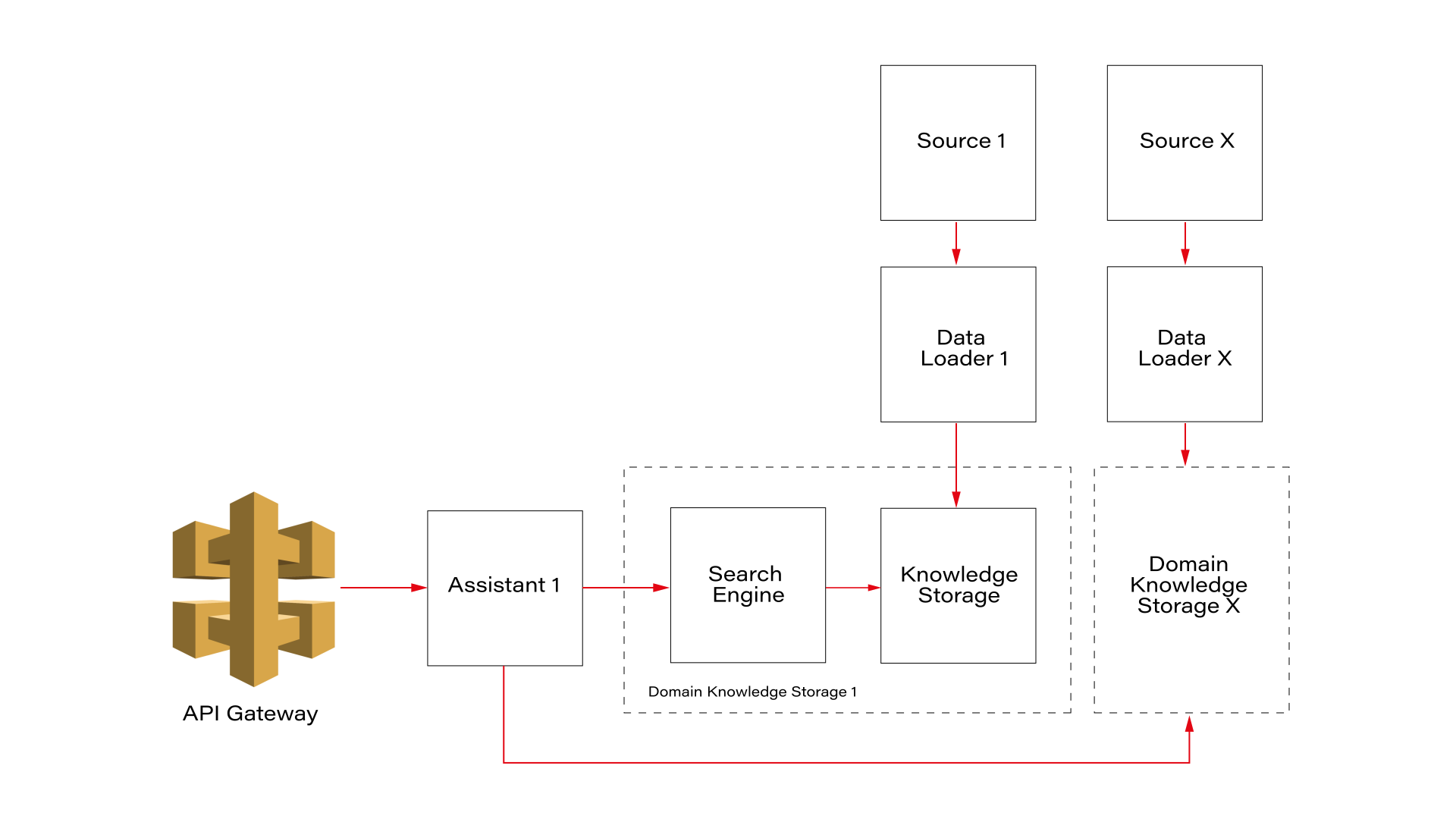
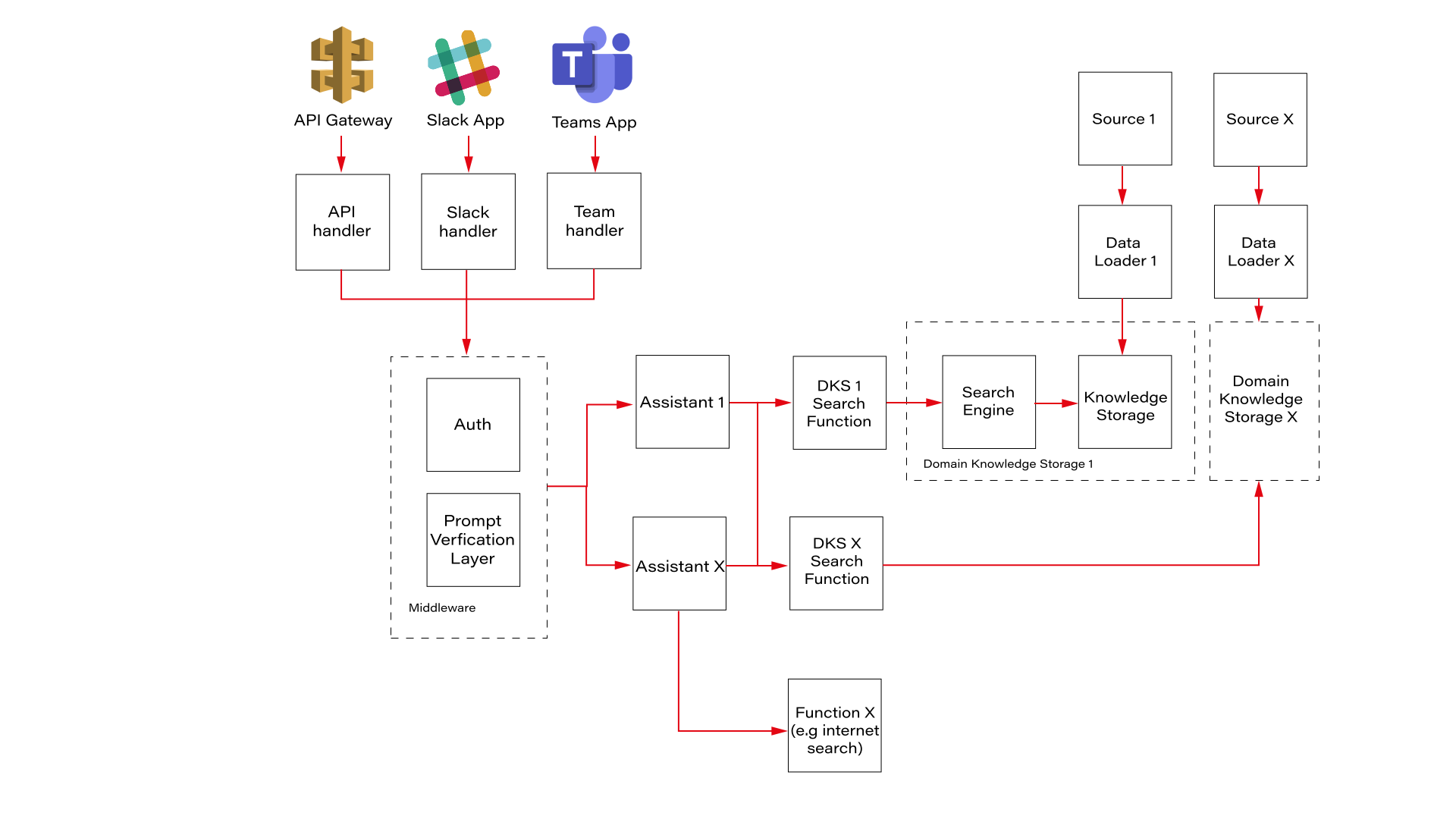
The architectural diagram in Figure 1 displays a design that prioritizes independent integration of internal data sources. Let us break down the key components and how they contribute to achieving the goal:
- Domain Knowledge Storage (DKS) – knowledge storage acts as a central repository for all the data extracted from the internal source. Here, the data is organized using a standardized schema for all domain knowledge storages. This schema defines the structure and meaning of the data (metadata), making it easier for chatbots to understand and query the information they need regardless of the original source.
- Data Loaders – data loaders act as bridges between the LLM Hub and specific data sources within the organization. Each loader can be configured and created independently using its native protocols (APIs, events, etc.), resulting in structured knowledge in DKS. This ensures that LLM Hub can integrate with a wide variety of data sources without requiring significant modifications in the assistant. Data Loaders, along with DKS, can be provided by data owners who are experts in the given domain.
- Assistant – represents a chatbot that can be built using the LLM Hub platform. It uses the RAG approach, getting knowledge from different DKSs to understand the topic and answer user questions. It is the only piece of architecture where use case owners can make some changes like prompt engineering, caching, etc.
Functions
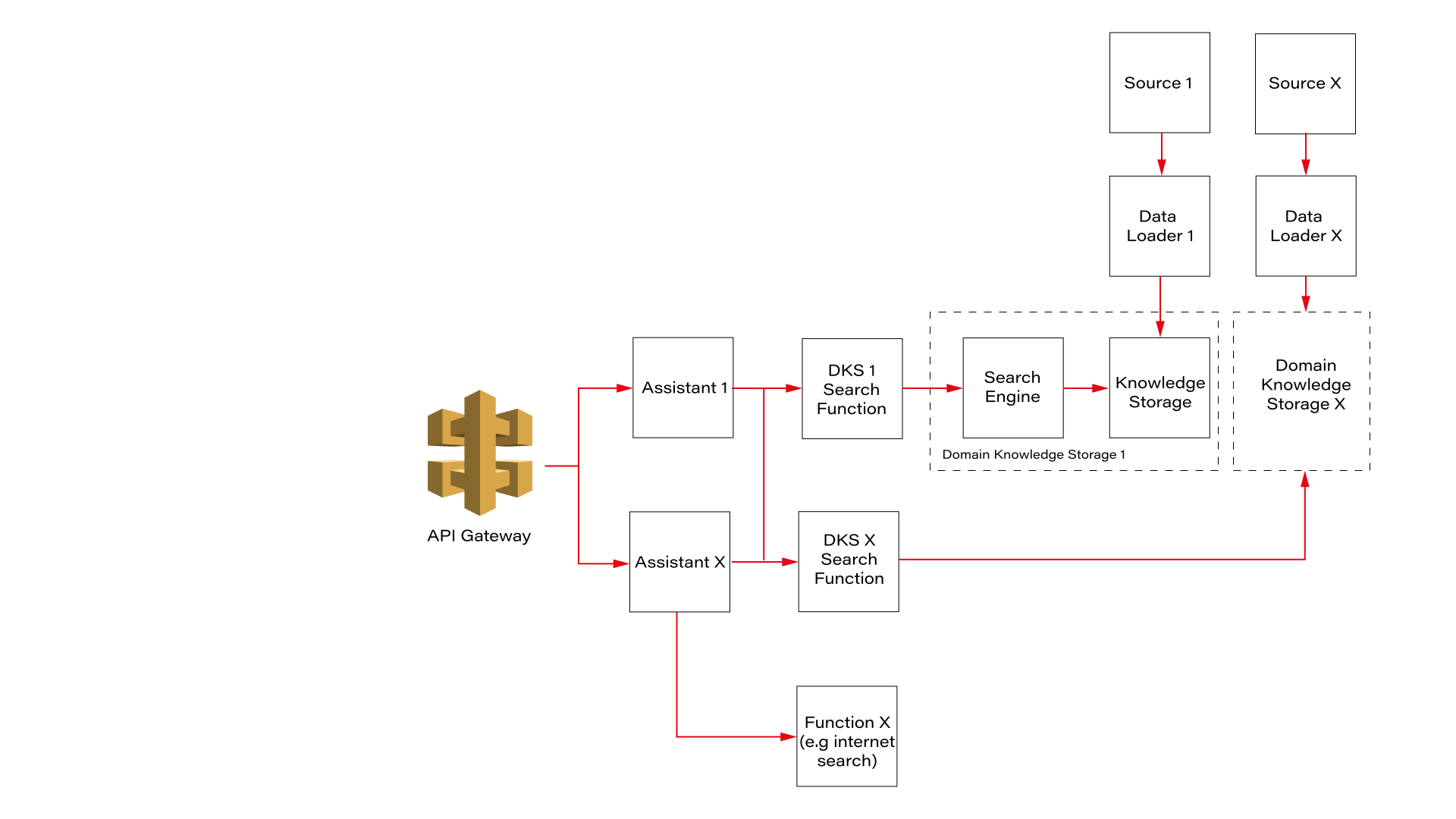
Figure 2 introduces pre-built functions that can be used for any assistant. It enables easier onboarding for new use cases . Functions can be treated as reusable building blocks for chatbot development . Assistants can easily enable and disable specific functions using configuration.
They can also facilitate knowledge sharing and collaboration within an organization. Users can share functions they have created, allowing others to leverage them and accelerate chatbot development efforts.
Using pre-built functions, developers can focus on each chatbot's unique logic and user interface rather than re-inventing the wheel for common functionalities like internet search. Also, using function calling, LLM can decide whether specific data knowledge storage should be called or not, optimizing the RAG process, reducing costs, and minimizing unnecessary calls to external resources.
Figure 2
Middleware
With the next diagram (Figure 3), we introduce an additional layer of middleware, a crucial enhancement that fortifies our software by incorporating a unified authentication process and a prompt validation layer. This middleware acts as a gatekeeper , ensuring that all requests meet our security and compliance standards before proceeding further into the system.
When a user sends a request, the middleware's authentication module verifies the user's credentials to ensure they have the necessary permissions to access the requested resources. This step is vital in maintaining the integrity and security of our system, protecting sensitive data, and preventing unauthorized access. By implementing a robust authentication mechanism, we safeguard our infrastructure from potential breaches and ensure that only legitimate users interact with our assistants.
Next, the prompt validation layer comes into play. This component is designed to scrutinize each incoming request to ensure it complies with company policies and guidelines. Given the sophisticated nature of modern AI models, there are numerous ways to craft queries that could potentially extract sensitive or unauthorized information. For instance, as highlighted in a recent study , there are methods to extract training data through well-constructed queries. By validating prompts before they reach the AI model, we mitigate these risks, ensuring that the data processed is both safe and appropriate.
Figure 3
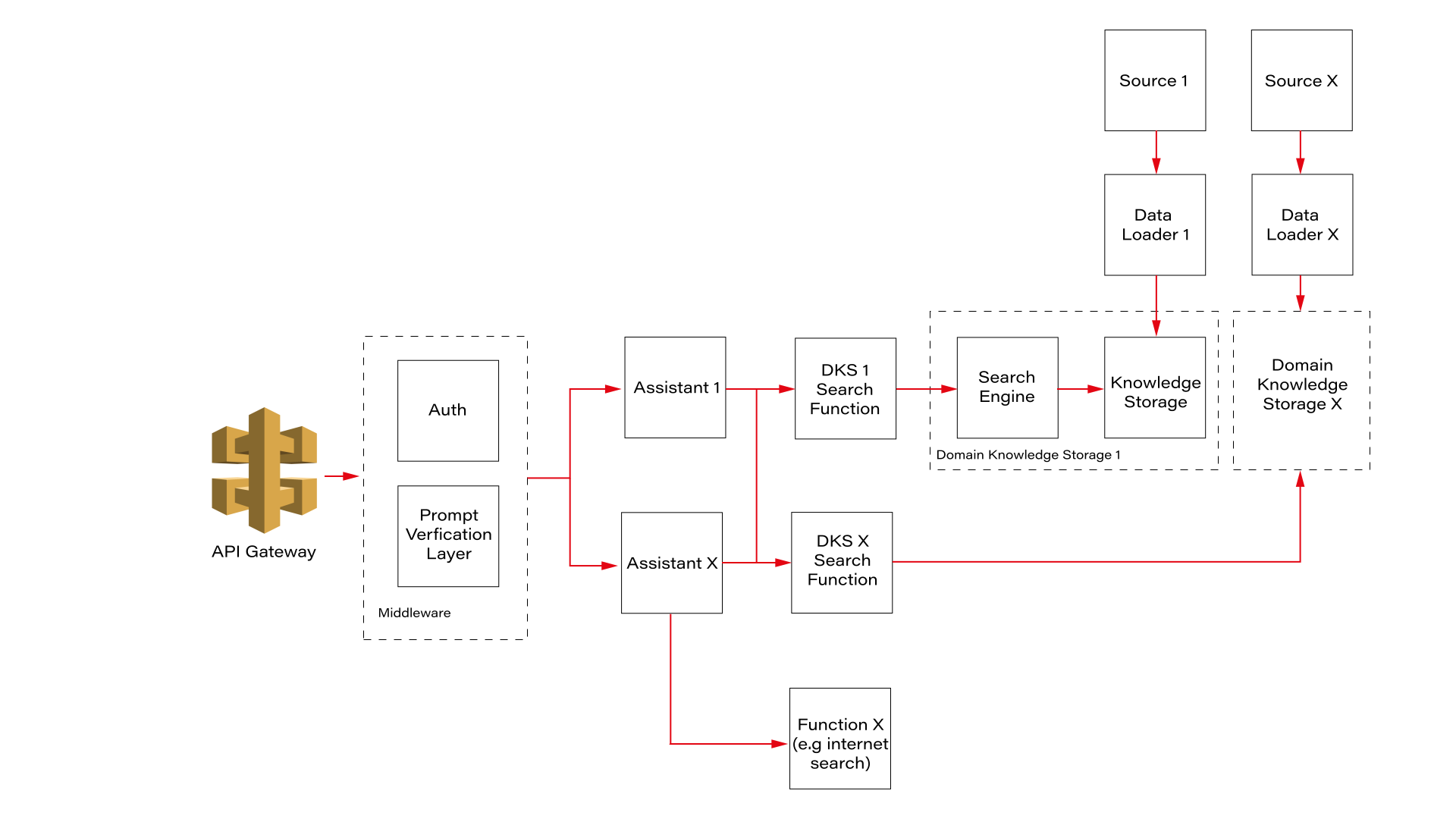
The middleware, comprising the authentication (Auth) and Prompt Verification Layer, acts as a gatekeeper to ensure secure and valid interactions. The authentication module verifies user credentials, while the Prompt Verification Layer ensures that incoming requests are appropriate and within the scope of the AI model's capabilities. This dual-layer security approach not only safeguards the system but also ensures that users receive relevant and accurate responses.
Adaptability is the key here. It is designed to be a common component for all our assistants, providing a standardized approach to security and compliance. This uniformity simplifies maintenance, as updates to the authentication or validation processes can be implemented across the board without needing to modify each assistant individually. Furthermore, this modular design allows for easy expansion and customization, enabling us to tailor the solution to meet the specific needs of different customers.
This means a more reliable and secure system that can adapt to their unique requirements. Whether you need to integrate new authentication protocols, enforce stricter compliance rules, or scale the system to accommodate more users, our middleware framework is flexible enough to handle these changes seamlessly.
Handlers
We are coming to the very beginning of our process: the handlers. Figure 4 highlights the crucial role of these components in managing requests from various sources . Users can interact through different communication platforms, including popular ones in office environments such as Teams and Slack. These platforms are familiar to employees, as they use them daily for communication with colleagues.
Handling prompts from multiple sources can be complex due to the variations in how each platform structures requests. This is where our handlers play a critical role.
They are designed to parse incoming requests and convert them into a standardized format , ensuring consistency in responses regardless of the communication platform used. By developing robust handlers, we ensure that the AI model provides uniform answers across all communicators, thereby enhancing reliability and user experience.
Moreover, these handlers streamline the integration process, allowing for easy scalability as new communication platforms are adopted. This flexibility is essential for adapting to the evolving technological landscape and maintaining a cohesive user experience across various channels.
The API handler facilitates the creation of custom, tailored front-end interfaces . This capability allows the company to deliver unique and personalized chat experiences that are adaptable to various scenarios.
For example, front-end developers can leverage the API handler to implement a mobile version of the chatbot or enable interactions with the AI model within a car. With comprehensive documentation, the API handler provides an effective solution for developing and integrating these features seamlessly.
In summary, the handlers are a foundational element of our AI infrastructure, ensuring seamless communication, robust security, and scalability. By standardizing requests and enabling versatile front-end integrations, they provide a consistent and high-quality user experience across various communication platforms.
Figure 4
Conclusions
The development of the LLM Hub platform is a significant step forward in adopting AI technology within large organizations. It effectively addresses the complexities and challenges of implementing chatbots in an easy, fast, and cost-effective way. But to maximize the potential of LLM Hub, architecture is not enough, and several key factors must be considered:
- Continuous Collaboration: Collaboration between data owners, use case owners, and the platform team is essential for the platform to stay at the forefront of AI innovation.
- Compliance and Control: In the corporate world, robust compliance measures must be implemented to ensure the chatbots adhere to industry and organizational standards. LLM Hub can be a perfect place for it. It can implement granular access controls, audit trails, logging, or policy enforcements.
- Templates for Efficiency: LLM Hub should provide customizable templates for all chatbot components that can be used in a new use case. Facilitating templates will help teams accelerate the creation and deployment of new assistants, improving efficiency and reducing time to market.
By adhering to these rules, organizations can unlock new ways for growth, efficiency, and innovation in the era of artificial intelligence. Investing in a well-designed LLM Hub platform equips corporations with the chatbot tools to:
- Simplify Compliance: LLM Hub ensures that chatbots created in the platform adhere to industry regulations and standards, safeguarding your company from legal implications and maintaining a positive brand name.
- Enhance Security : Security measures built into the platform foster trust among all customers and partners, safeguarding sensitive data and the organization's intellectual property.
- Accelerate chatbot development : Templates and tools provided by LLM Hub, or other use case owners enhance quickly development and launch of sophisticated chatbots.
- Asynchronous Collaboration and Work Reduction: An LLM Hub enables teams to work asynchronously on chatbot development, eliminating the need to duplicate efforts, e.g., to create a connection to the same data source or make the same action.
As AI technology continues to evolve, the potential applications of LLM Hubs will expand, opening new opportunities for innovation. Organizations can leverage this technology to not only enhance customer interactions but also to streamline internal processes, improve decision-making, and foster a culture of continuous improvement. By integrating advanced analytics and machine learning capabilities, the LLM Hub can provide deeper insights and predictive capabilities, driving proactive business strategies.
Furthermore, the modularity and scalability of the LLM Hub platform means that it can grow alongside the organization, adapting to changing needs without requiring extensive overhauls. Specifically, this growth potential translates to the ability to seamlessly integrate new tools and functionalities into the entire LLM Hub ecosystem. Additionally, new chatbots can be simply added to the platform and use already implemented tools as the organization expands. This future-proof design ensures that investments made today will continue to yield benefits in the long run.
The successful implementation of an LLM Hub can transform the organizational landscape, making AI an integral part of the business ecosystem. This transformation enhances operational efficiency and positions the organization as a leader in technological innovation, ready to meet future challenges and opportunities.
GrapeChat – the LLM RAG for enterprise
LLM is an extremely hot topic nowadays. In our company, we drive several projects for our customers using this technology. There are more and more tools, researches, and resources, including no-code, all-in-one solutions.
The topic for today is RAG – Retrieval Augmented Generation. The aim of RAG is to retrieve necessary knowledge and generate answers to the users’ questions based on this knowledge. Simply speaking, we need to search the company knowledge base for relevant documents, add those documents to the conversation context, and instruct an LLM to answer questions using the knowledge. But in detail, it’s nothing simple, especially when it comes to permissions.
Before you start
There are two technologies that take the current software development sector by storm, taking advantage of the LLM revolution : Microsoft Azure cloud platform, along with other Microsoft services, and Python programming language.
If your company uses Microsoft services, and SharePoint and Azure are within your reach, you can create a simple RAG application fast. Microsoft offers a no-code solution and application templates with source code in various languages (including easy-to-learn Python) if you require minor customizations.
Of course, there are some limitations, mainly in the permission management area, but you should also consider how much you want your company to rely on Microsoft services.
If you want to start from scratch, you should start by defining your requirements (as usual). Do you want to split your users into access groups, or do you want to assign access to resources for individuals? How do you want to store and classify your files? How deeply do you want to analyze your data (what about dependencies)? Is Python a good choice, after all? What about the costs? How to update permissions? There are a lot of questions to answer before you start. In Grape Up, we went through this process and implemented GrapeChat, our internal RAG-based chatbot using our Enterprise data.
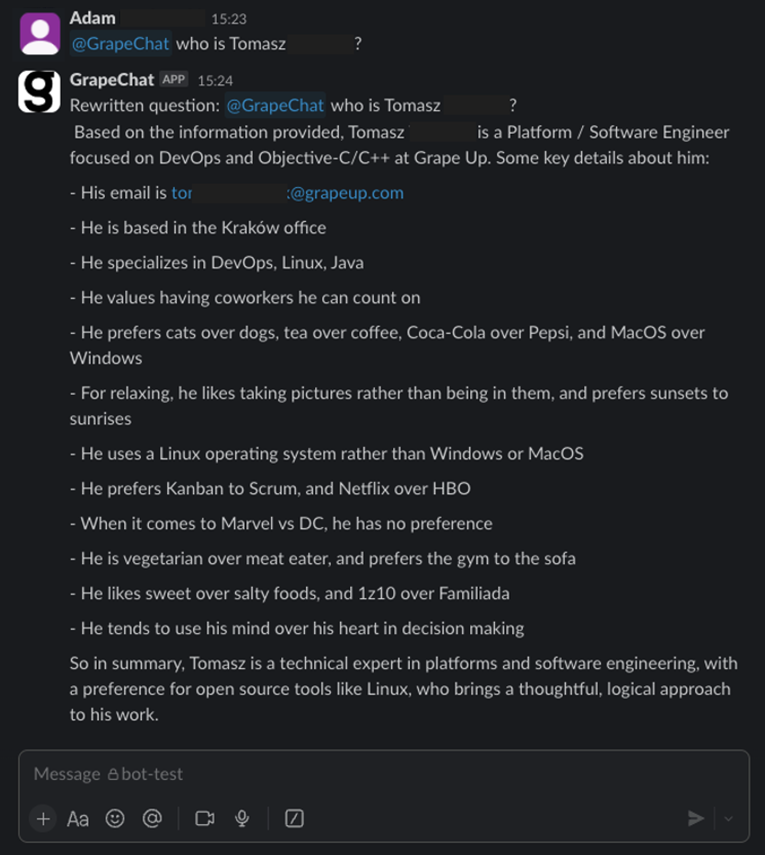
Now, I invite you to learn more from our journey.
The easy way

Source: https://learn.microsoft.com/en-us/azure/ai-services/openai/how-to/use-your-data-securely
The most time-efficient way to create a chatbot using RAG is to use the official manual from Microsoft . It covers everything – from pushing data up to the front-end application. However, it’s not very cost-efficient. To make it work with your data, you need to create an AI Search resource, and the simplest one costs 234€ per month (you will pay for the LLM usage, too). Moreover, SharePoint integration is not in the final stage yet , which forces you to manually upload data. You can lower the entry threshold by uploading your data to Blob storage instead of using SharePoint directly, and then you can use Power Automate to do it automatically for new files, but it requires more and more hard to troubleshoot UI-created components, with more and more permission management by your Microsoft-care team (probably your IT team) and a deeper integration between Microsoft and your company.
And then there is the permission issue.
When using Microsoft services, you can limit access to the documents being processed during RAG by using Azure AI Search security filters . This method requires you to assign a permission group when adding each document to the system (to be more specific, during indexing), and then you can add a permission group as a parameter to the search request. Of course, there is much more offered by Microsoft in terms of security of the entire application (web app access control, network filtering, etc.).
To use those techniques, you must have your own implementation (say bye-bye to no-code). If you like starting a project from a blueprint, go here . Under the link, you’ll find a ready-to-use Azure application, including the back-end, front-end, and all necessary resources, along with scripts to set it up. There are also variants linked in the README file, written in other languages (Java, .Net, JavaScript).
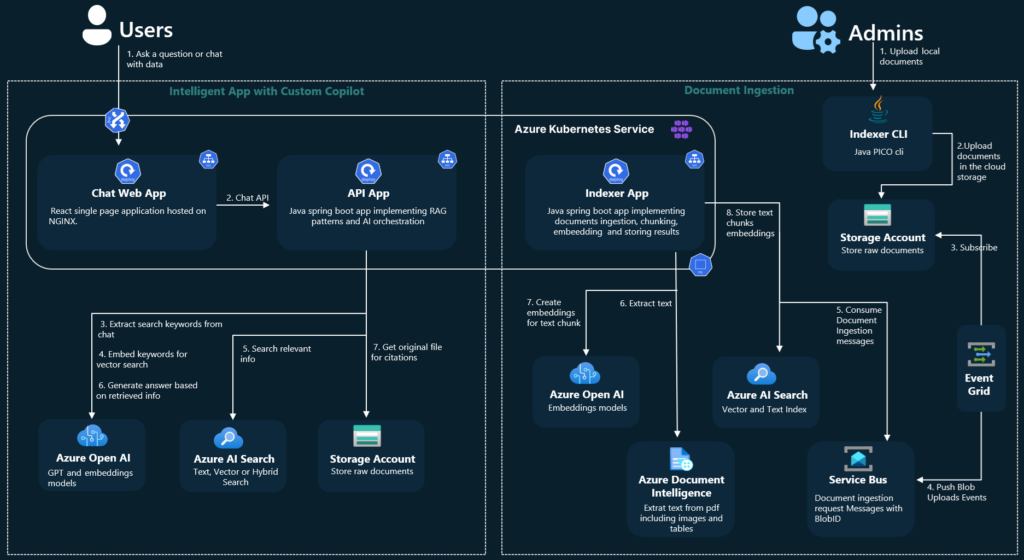
Source: https://github.com/Azure-Samples/azure-search-openai-demo-java/blob/main/docs/aks/aks-hla.png
However, there are still at least three topics to consider.
1) You start a new project, but with some code already written. Maybe the quality of the code provided by Microsoft is enough for you. Maybe not. Maybe you like the code structure. Maybe not. From my experience, learning the application to adjust it may take more time than starting from scratch. Please note that this application is not a simple CRUD, but something much more complex, making profits from a sophisticated toolbox.
2) Permission management is very limited. “Permission” is a keyword that distinguishes RAG and Enterprise-RAG. Let’s imagine that you have a document (for example, the confluence page) available to a limited number of users (for example, your company’s board). One day, the board member decides to grant access to this very page to one of the non-board managers. The manager is not part of the “board” group, the document is already indexed, and Confluence uses a dual-level permission system (space and document), which is not aligned with external SSO providers (Microsoft’s Entra ID).
Managing permissions in this system is a very complex task. Even if you manage to do it, there are two levels of protection – the Entra ID that secures your endpoint and the filter parameter in the REST request to restrict documents being searched during RAG. Therefore, the potential attack vector is very wide – if somebody has access to the Entra ID (for example, a developer working on the system), she/he can overuse the filtering API to get any documents, including the ones for the board members’ eyes only.
3) You are limited to Azure AI Search. Using Azure OpenAI is one thing (you can use OpenAI API without Azure, you can go with Claude, Gemini, or another LLM), but using Azure AI Search increases cost and limits your possibilities. For example, there is no way to utilize connections between documents in the system, when one document (e.g. an email with a question) should be linked to another one (e.g. a response email with the answer).
All in all, you couple your company with Microsoft very strict – using Entra ID permission management, Azure resources, Microsoft Storage (Azure Blob or SharePoint), etc. I’m not against Microsoft, but I’m against a single point of failure and addiction to a single service provider.
The hard way
I would say a “better way”, but it’s always a matter of your requirements and possibilities.
The hard way is to start the project with a blank page. You need to design the user’s touch point, the backend architecture, and the permission management.
In our company, we use SSO – the same identity for all resources: data storage, communicators, and emails. Therefore, the main idea is to propagate the user’s identity to authorize the user to obtain data.
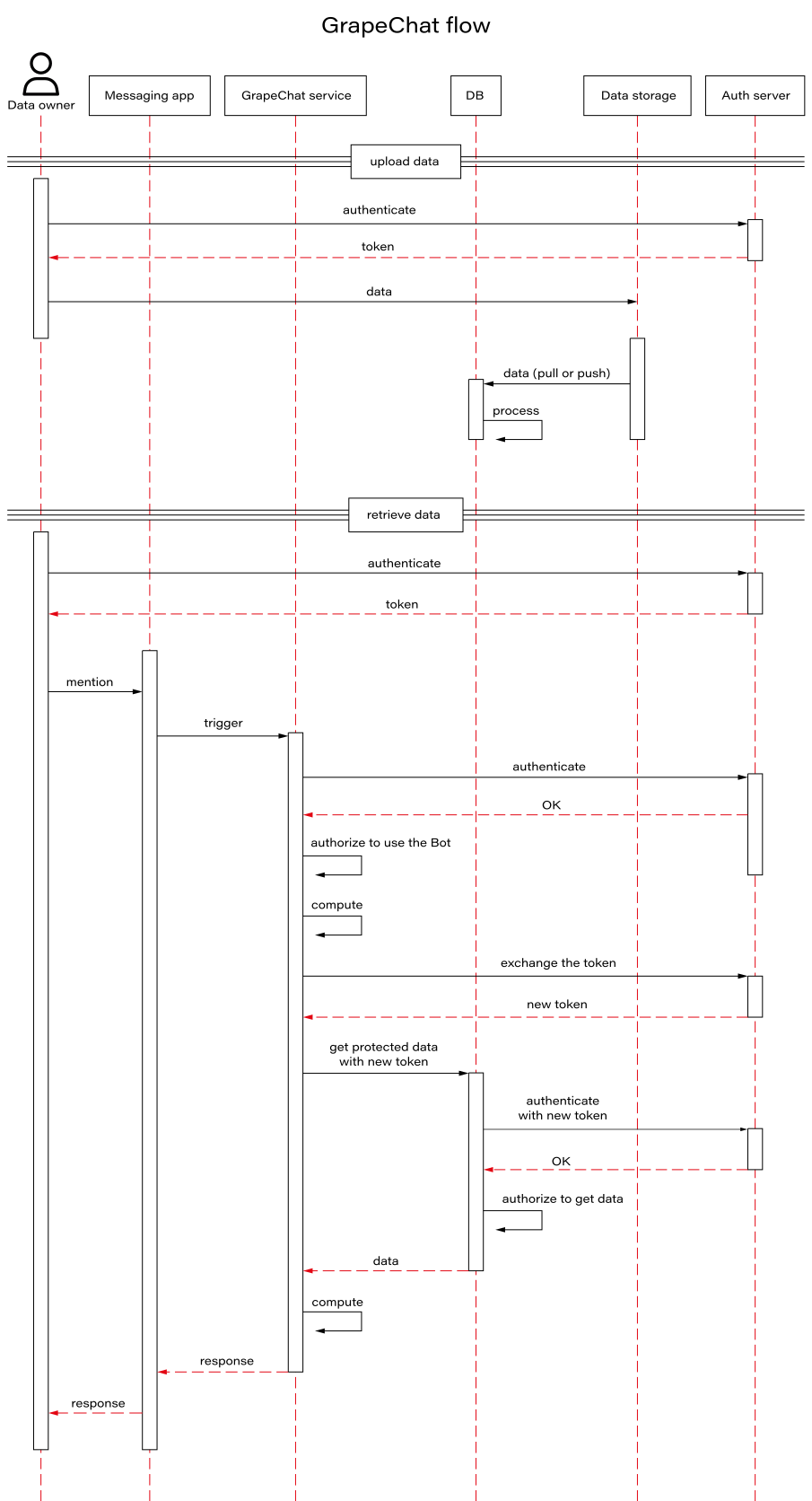
Let’s discuss the data retrieval part first. The user logs into the messaging app (Slack, Teams, etc.) with their own credentials. The application uses their token to call the GrapeChat service. Therefore, the user’s identity is ensured. The bot decides (using LLM) to obtain some data. The service exchanges the user’s token for a new user’s token, allowed to call the database. This process is allowed only for the service with the user logged in. It's impossible to access the database without both the GrapeChat service and the user's token. The database verifies credentials and filters data. Let me underline this part – the database is in charge of data security. It’s like a typical database, e.g. PostgreSQL or MySQL – the user uses their own credentials to access the data, and nobody challenges its permission system, even if it stores data of multiple users.
Wait a minute! What about shared credentials, when a user stores data that should be available for other users, too?
It brings us to the data uploading process and the database itself.
The user logs into some data storage. In our case, it may be a messaging app (conversations are a great source of knowledge), email client, Confluence, SharePoint, shared SMB resource, or a cloud storage service (e.g. Dropbox). However, the user’s token is not used to copy the data from the original storage to our database.
There are three possible solutions.
- The first one is to actively push data from its original storage to the database. It’s possible in just a few systems, e.g. as automatic forwarding for all emails configured on the email server.
- The second one is to trigger the database to download new data, e.g. with a webhook. It’s also possible in some systems, e.g. Contentful to send notifications about changes this way.
- The last one is to periodically call data storages and compare stored data with the origin. This is the worst idea (because of the possible delay and comparing process) but, unfortunately, the most common one. In this approach, the database actively downloads data based on a schedule.
Using those solutions requires separate implementations for each data origin.
In all those cases, we need a non-user’s account to process user’s data. The solution we picked is to create a “superuser” account and restrict it to non-human access. Only the database can use this account and only in an isolated virtual network.
Going back to the group permission and keeping in mind that data is acquired with “superuser” access, the database encrypts each document (a single piece of data) using the public keys of all users that should have access to it. Public keys are stored with the Identity (in our case, this is a custom field in Active Directory), and let me underline it again – the database is the only entity that process unencrypted data and the only one that uses “superuser” access. Then, when accessing the data, a private key (obtained from an Active Directory using the user’s SSO token) of each allowed user can be used for decryption.
Therefore, the GrapeChat service is not part of the main security processes, but on the other hand, we need a pretty complex database module.
The database and the search process
In our case, the database is a strictly secured container running 3 applications – SQL database, vector database, and a data processing service. Its role is to acquire and embed data, update permissions, and execute search. The embedding part is easy. We do it internally (in the database module) with the Instructor XL model, but you can choose a better one from the leaderboard . Allowed users’ IDs are stored within the vector database (in our case – Qdrant ) for filtering purposes, and the plain text content is encrypted with users’ public keys.
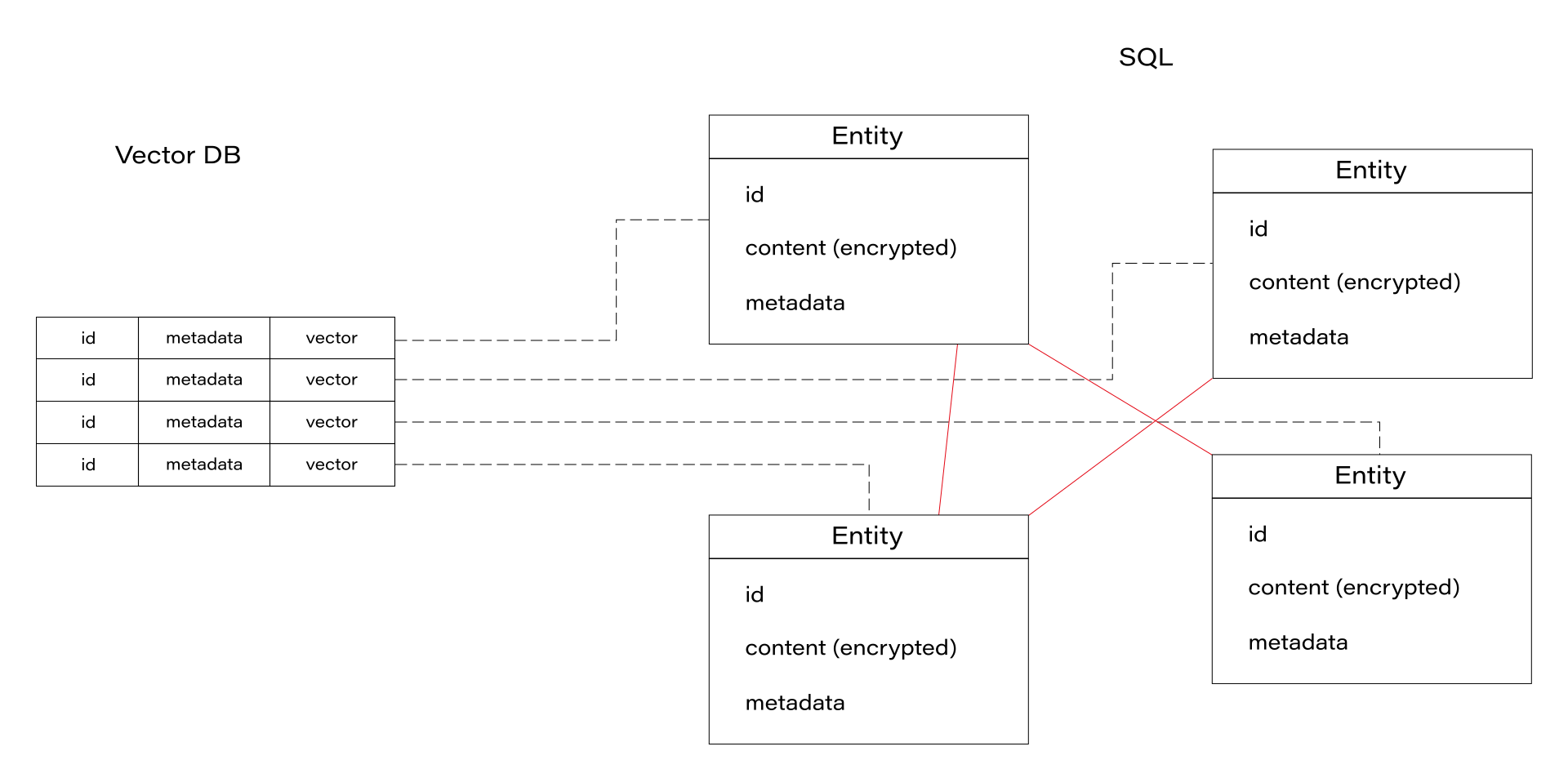
When the DB module searches for a query, it uses the vector DB first, including metadata to filter allowed users. Then, the DB service obtains associated entities from the SQL DB. In the next steps, the service downloads related entities using simple SQL relations between them. There is also a non-data graph node, “author”, to keep together documents created by the same person. We can go deeper through the graph relation-by-relation if the caller has rights to the content. The relation-search deepness is a parameter of the system.
We do use a REST field filter like the one offered by the native MS solution, too, but in our case, we do the permission-aware search first. So, if there are several people in the Slack conversation and one of them mentions GrapeChat, the bot uses his permission in the first place and then, additionally, filters results not to expose a document to other channel members if they are not allowed to see it. In other words, the calling user can restrict search results according to teammates but is not able to extend the results above her/his permissions.
What happens next?
The GrapeChat service is written in Java. This language offers a nice Slack SDK, and Spring AI, so we've seen no reason to opt for Python with the Langchain library. The much more important component is the database service, built of three elements described above. To make the DB fast and smalll, we recommend using Rust programming language, but you can also use Python, according to the knowledge of your developers.
Another important component is a document parser. The task is easy with simple, plain text messages, but your company knowledge includes tons of PDFs, Word docs, Excel spreadsheets, and even videos. In our architecture, parsers are external, replaceable modules written in various languages working with the DB in the same isolated network.
RAG for Enterprise
With all the achievements of recent technology, RAG is not rocket science anymore. However, when it comes to the Enterprise data, the task is getting more and more complex. Data security is one of the biggest concerns in the LLM era, so we recommend starting small – with a limited number of non-critical documents, with limited access, and a wisely secured system.
In general, the task is not impossible, and can be easily handled with a proper application design. Working on an internal tool is a great opportunity to gain experience and prepare better for your next business cases, especially when the IT sector is so young and immature. This way we, here at GrapeUp, use our expertise to serve our customers in a better way.
Interested in our services?
Reach out for tailored solutions and expert guidance.